[Reader Disclosure]Our content is reader-supported. This means we may earn a commission if you click on some of our links.
According to recent data, 90% of businesses have adopted AI to stay competitive, but only a fraction are seeing real results. The difference isn’t the technology. It’s how they use it.
Here’s what most businesses get wrong about AI lead generation: they treat it like a shortcut. They buy a tool, automate a few emails, and wonder why nothing changed.
The businesses actually winning with AI aren’t using more tools, they’re using smarter systems.
That’s exactly what this guide covers: how to use AI for lead generation in a way that actually works, not just adds to your tech stack.
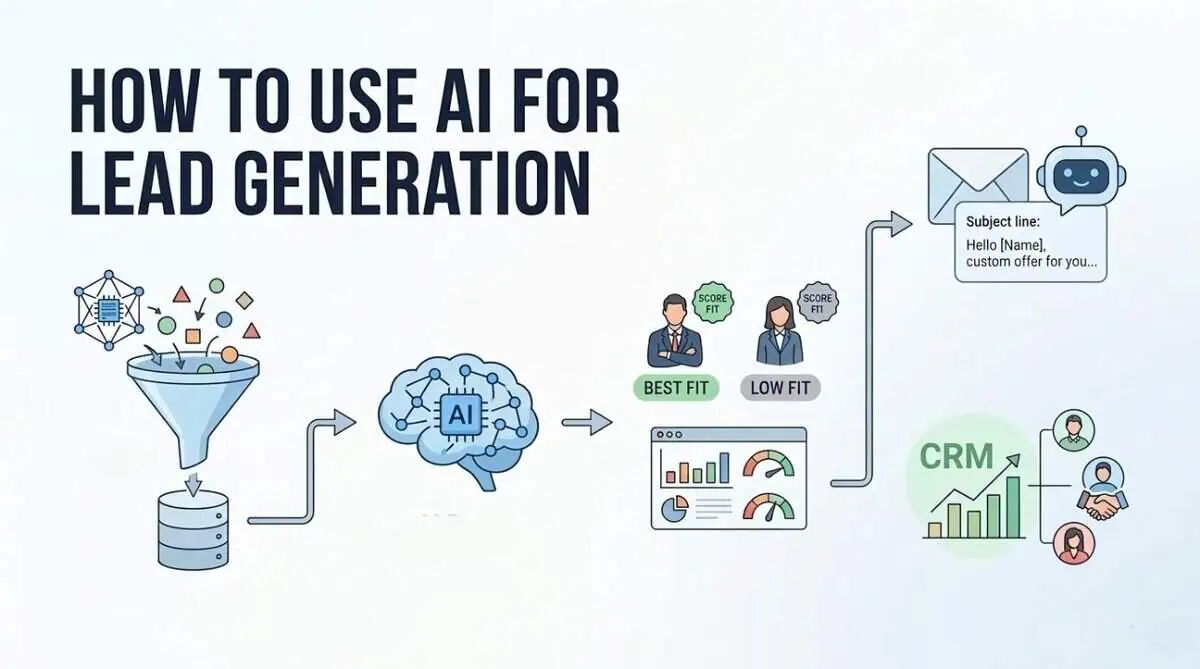
AI lead generation is using artificial intelligence to automatically find and qualify potential customers for your business.
AI tools scan data sources like LinkedIn, websites, and CRM history to spot patterns in who actually buys from you. It then finds new people who match that pattern, scores them by likelihood to convert, and can even send the first outreach automatically.
The numbers show why this matters. Companies using AI for lead generation report 75% higher conversion rates compared to traditional methods. That’s because AI doesn’t just guess which leads are hot – it learns from your past successes to spot similar patterns in new prospects.
Why Should You Use AI for Lead Generation?
Let’s talk numbers. The ROI case for AI for lead generation isn’t just theoretical – it’s backed by real data showing significant improvements across every metric that matters.
Here’s what you can expect when you implement AI properly:
Generate more leads: AI sales tools can increase your lead volume by 50%. That’s because AI works 24/7, never gets tired, and can process thousands of data points simultaneously to identify opportunities you’d miss manually.
Cut lead costs by 60%: The same research shows AI can reduce your cost per lead by up to 60%. Traditional lead generation involves paying for ads, content creation, and manual outreach. AI automates much of this work, dramatically lowering your expenses while maintaining quality.
Save 10 hours per rep each week: Sales teams using AI tools save an average of 10 hours per rep weekly. That’s time they can spend actually selling instead of researching and qualifying leads.
Improve conversion rates by 25%: Companies using AI-powered lead scoring report conversion rate improvements of up to 25%. The AI identifies which leads are most likely to buy, so your team focuses on the right prospects.
Increase lead quality significantly: Machine learning lead scoring delivers 75% higher conversion rates compared to traditional methods. The AI analyses thousands of data points to separate serious buyers from window shoppers.
Scale without hiring: AI handles the repetitive work that would normally require additional staff. You can double your lead generation efforts without doubling your team size, making growth much more cost-effective.
How to Use AI for Lead Generation
Let’s talk about how to actually use AI for lead generation.
Think of these six strategies as building blocks – each one addresses a different part of the lead generation process. When you combine them, you create a system that works consistently without constant manual effort.
We’ll start with the foundation: finding the right people to talk to.
1. AI-Powered Prospecting & Lead List Building
This is where most sales teams waste time. Manual prospecting means hours spent searching LinkedIn, company websites, and databases trying to find potential customers. AI lead generation changes this completely.
How to implement it:
First, define your ideal customer profile. What industries, company sizes, and job titles match your best customers? Feed this information into an AI prospecting tool.
Then let the AI scan databases and public sources. It looks for companies and people who match your criteria, then verifies contact information automatically.
Third, prioritise the list. The AI scores leads based on how closely they match your ideal profile and their likelihood to respond.
Tools to use:
Tools like Cognism and Apollo.io use AI to build targeted lead lists. They analyse millions of data points to find companies that fit your criteria, then provide verified contact information.
Metric to track:
Watch your “research time per lead.” This should drop significantly as the AI handles the heavy lifting. Also track the quality of leads generated – are they better matches for your ideal customer profile?
The key here is letting AI do the searching while your team focuses on connecting. You get more targeted leads in less time, which means more conversations and more opportunities.
2. Personalised Outreach Automation
You probably delete generic emails without reading them. But when someone mentions your company, your role, or a specific challenge you’re facing, you pay attention. That’s what personalised outreach automation does at scale.
Spam is sending the same message to everyone. Personalised outreach is sending the right message to the right person at the right time.
The numbers show why this matters. Personalised emails improve open rates by 20-40% compared to generic campaigns. Plus, 82% of email marketers say personalisation boosts their open rates.
Here’s what to do:
First, segment your leads based on data from your CRM. Group them by industry, job title, company size, or engagement level.
Second, create templates with personalisation fields. Use placeholders for names, companies, and specific pain points that the AI can fill in automatically.
Third, set up triggers based on lead behaviour. When someone downloads a whitepaper or visits your pricing page, the AI sends a relevant follow-up email within minutes. You can also pair this with a landing page creator to build targeted pages that match the exact message in the email, so when a lead clicks through, the experience feels conversion-ready.
Fourth, test and optimise. The AI should analyse which subject lines, messaging, and timing work best for different segments, then adjust automatically.
Tools to use:
Tools like Outreach.io and Salesloft use AI to personalise outreach sequences. These AI tools for lead generation analyse which messages get responses and optimise your campaigns over time.
Metric to track:
Watch your “personalised email open rate” compared to generic campaigns. Also track reply rates – personalised outreach should generate more conversations, not just opens.
3. Predictive Lead Scoring
Traditional lead scoring is like guessing which apples will be ripe based on their colour. Predictive lead scoring is like having a fruit expert who’s tasted thousands of apples and knows exactly which ones will be sweet based on dozens of factors you can’t see.
The AI analyses your past successful deals – who bought, what they looked at, how they interacted with you – then finds similar patterns in new leads.
How to implement it:
First, feed your CRM data into the system. The AI needs to see your historical wins and losses to learn what success looks like.
Second, let it analyse current leads. It looks at website visits, email opens, content downloads, and dozens of other signals you’d never track manually.
Third, prioritise based on scores. The AI gives each lead a score from 1-100 showing how likely they are to buy. Your team focuses on the highest scores first.
Tools to use:
Tools like HubSpot’s predictive lead scoring and Salesforce Einstein analyse your data automatically. They work with your existing CRM to add intelligence without changing your workflow.
Metric to track:
Watch your “conversion rate by lead score.” You should see significantly higher conversion rates from leads with high scores versus low scores. This tells you the AI is learning correctly.
4. AI Chatbots for Lead Capture
Here’s a problem you’ve probably faced: someone visits your website, looks around, then leaves without telling you who they are. Traditional contact forms have terrible conversion rates – most people just won’t fill them out.
AI chatbots change this completely. They start conversations with visitors, answer questions, and collect contact information naturally. Business leaders report a 67% increase in sales through chatbot assistance.
The thing is, modern chatbots don’t feel robotic. They understand context, remember what you’ve discussed, and can qualify leads while having natural conversations.
How to implement it:
First, set up your chatbot to greet visitors. Program it with common questions about your products or services.
Second, train it to qualify leads. Ask simple questions like “What problem are you trying to solve?” or “When do you need a solution?”
Third, connect it to your CRM. When someone provides contact information, the chatbot should create a lead record automatically with all the conversation history.
Tools to use:
Tools like Intercom and Drift offer AI chatbots that integrate with your website. They learn from conversations and get better at qualifying leads over time.
Metric to track:
Track “chatbot conversion rate” – what percentage of chatbot conversations turn into qualified leads? Compare this to your traditional form conversion rates. You’ll likely see a significant improvement.
5. AI-Driven Data Enrichment
Here’s a problem you might not see until it’s too late: your lead data is decaying faster than you think. People change jobs, companies rebrand, and contact information becomes outdated.
Data enrichment is like having a research assistant who constantly updates your CRM. It adds missing information, corrects errors, and keeps your database current.
First, connect your CRM to a data enrichment tool. The AI scans your existing contacts and identifies missing or outdated information.
Second, set up automatic updates. The tool should refresh contact details, job titles, company information, and social profiles regularly.
Third, verify email addresses before outreach. The AI checks if emails are valid and active, preventing bounces before they happen.
Fourth, enrich new leads automatically. When someone fills out a form or your chatbot captures a lead, the AI immediately adds company size, funding information, and other relevant details.
Tools to use:
Tools like Clearbit and ZoomInfo use AI to enrich lead data. They connect to multiple data sources and keep your CRM accurate without manual work.
Metric to track:
Track your “data decay rate” – how many contacts become outdated each month. Also watch email bounce rates and engagement metrics. When your data is accurate, your outreach performs better.
6. Intent Data & Trigger-Based Outreach
Trigger-based outreach means reaching out at exactly the right moment. When someone shows intent signals, you contact them while they’re actively looking for solutions. According to Mixology Digital’s research, 70% of B2B teams now use intent data for digital marketing. Plus, companies using intent data effectively see 2-4x improvement in pipeline conversion.
How to implement it:
First, set up intent data monitoring. Connect a tool that tracks when companies search for keywords related to your industry. Look for patterns like multiple people from the same company researching similar topics.
Second, create trigger rules. Define what actions should trigger outreach. This could be when a target account visits your pricing page, downloads a competitor comparison, or searches for specific solution keywords.
Third, automate your response. When a trigger fires, send personalised outreach within hours – not days. The message should reference what they were researching and offer relevant help.
Fourth, track engagement. Monitor which triggers lead to conversations and adjust your rules based on what works.
Tools to use:
Tools like 6Sense and ZoomInfo offer intent data capabilities. They monitor web activity and alert you when target accounts show buying signals.
Metric to track:
Watch your “trigger-based response rate.” Compare how leads from intent signals respond versus cold outreach. You should see significantly higher engagement from people who were already researching.
Best AI Lead Generation Tools
Now that you understand the strategies, you need the right tools to implement them. The AI lead generation space has matured significantly, with different tools specialising in specific parts of the process.
Here’s a comparison of the top options for:
Tool Name
Primary Function
Key Features
Pricing Tier
Apollo.io
All-in-one prospecting & engagement
Contact database, email automation, CRM integration, intent data
Starts at $99/month
ZoomInfo
Enterprise data & intelligence
Company data, contact verification, buying signals, mobile app
Verified emails/phones, data enrichment, team collaboration
Credit-based plans
Cognism
B2B data compliance
GDPR-compliant data, intent signals, mobile numbers
Custom enterprise
Each tool has its strengths. Apollo.io works well if you want everything in one place without enterprise costs. ZoomInfo dominates for large companies needing comprehensive data. LeadIQ excels if your team lives on LinkedIn. Lusha focuses on verified contact accuracy.
Your choice depends on your team size, budget, and which part of the lead generation process needs the most help. Start with one tool that solves your biggest pain point, then expand as you see results.
Common Mistakes to Avoid
Here’s what you need to watch out for when implementing AI lead generation. These mistakes can derail your efforts before you see any real results.
Buying tools before cleaning data: AI works with the data you feed it. If your CRM has outdated contacts or duplicate records, the AI will make bad decisions. Clean your data first, then implement tools.
No clear ideal customer profile: Without defining exactly who you’re targeting, AI can’t prioritise effectively. You’ll waste time and money on leads that will never convert.
Expecting instant results: AI needs time to learn your patterns and optimise. Most teams see meaningful improvements within 30-60 days, not overnight.
Over-automating outreach: Too much automation feels robotic and spammy. Balance automated sequences with personalised human touchpoints.
Ignoring compliance: GDPR and CAN-SPAM regulations apply to AI outreach too. Make sure your tools and processes respect privacy laws and consent requirements.
No feedback loop for scoring model: If you don’t tell the AI which leads converted and which didn’t, it can’t improve. Regularly update your scoring model with real outcomes.
Tool sprawl without integration: Using five different tools that don’t talk to each other creates more work, not less. Choose tools that integrate with your existing systems.
The biggest mistake you can make is treating AI as a magic solution. It’s a tool that amplifies your existing strategy. If your strategy is flawed, AI will just execute flawed strategy faster.
Start small, measure everything, and avoid these common pitfalls. That’s how you build sustainable AI-powered lead generation that actually grows your business.
Measuring Success: KPIs to Track
Here’s the thing about AI lead generation: if you’re not tracking the right numbers, you won’t know what’s working. That’s why you need a 30/60/90-day review cycle.
Check your metrics monthly, make adjustments quarterly, and do a full strategy review every 90 days.
Focus on these five key metrics to measure your AI lead generation success:
Lead Volume (Baseline vs Target): Track how many leads you’re generating compared to your baseline. Successful AI implementations typically see 50-100% increases in lead volume within the first 90 days. Set specific weekly and monthly targets based on your growth goals.
Lead Quality Score (Average Score Target): This is where AI really shines. Your lead scoring system should give each lead a quality score from 1-100. Aim for an average score of 65+ for qualified leads. Companies using AI-powered scoring report 75% higher conversion rates compared to traditional methods.
Cost Per Lead (Industry Average vs AI Target): The average cost per qualified lead in 2026 is $198. B2B industries typically see $150-$450 per lead. With AI, aim to reduce this by 40-60% through automation and better targeting.
Lead-to-Opportunity Conversion Rate (Benchmark): This measures how many leads turn into real sales opportunities. B2B companies average 3-5% conversion rates. AI should help you reach the upper end of this range or better.
Time Saved per Rep (Hours Reduction): Track how much time your sales team saves on manual tasks. The benchmark is 10+ hours per rep each week. This time should be redirected toward actual selling activities, which directly impacts revenue.
A startup consultant, digital marketer, traveller, and philomath. Aashish has worked with over 20 startups and successfully helped them ideate, raise money, and succeed. When not working, he can be found hiking, camping, and stargazing.
Each week I share research backed AI oriented content in my newsletter.
There are AI ideas, AI trends, tutorials, and guides.
24k entrepreneurs read it. I'd love you to join.