You ask your AI assistant a question about your company’s latest product specs. It responds confidently with information from three months ago. The specs changed last week. Now you’re making decisions based on outdated data, and you don’t even know it.
This is the hallucination problem. AI models are trained on fixed datasets, so they can’t access information beyond their training cutoff. They make things up when they don’t know the answer. They sound certain even when they’re completely wrong.
RAG changes that. Instead of forcing AI to rely purely on memory, it lets the model search through your actual documents, databases, and knowledge bases before generating a response. Think of it as the difference between taking a test from memory versus taking an open-book exam.
What Is RAG?
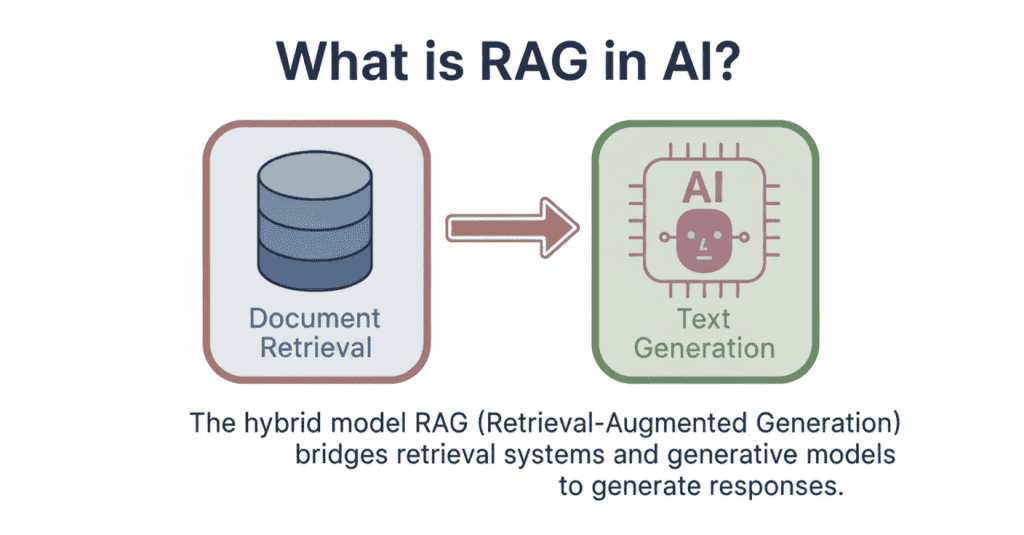
RAG stands for Retrieval-Augmented Generation. It’s a technique that combines two steps: first, the system searches for relevant information from external sources. Then, it uses that retrieved context to generate accurate, grounded responses.
When you ask a question, the RAG system doesn’t immediately start generating an answer. It first retrieves the most relevant documents or data chunks from your knowledge base. Only after gathering this context does the AI model create its response, using the retrieved information as a reference.
This approach solves the knowledge gap problem. The AI isn’t limited to what it learned during training. It can access up-to-date information, company-specific data, or specialised knowledge that wasn’t in its original training set.
That’s exactly why 30-60% of enterprise AI use cases now rely on RAG. Companies need AI that works with their proprietary information, not just generic knowledge. RAG makes that possible without retraining expensive models from scratch.
Why RAG Was Developed
You can’t just throw more data at an LLM and expect it to stay current. The architecture itself has limitations that make traditional approaches impractical.
The Knowledge Cutoff Problem
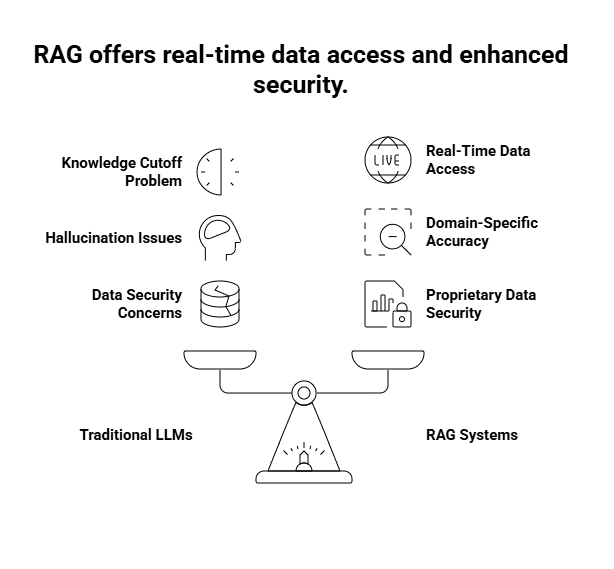
When GPT-4 was trained, its knowledge stopped at April 2023. GPT-3.5? January 2022. That’s not a minor quirk. It means these models can’t tell you about yesterday’s product launch, last month’s regulatory change, or this year’s research findings.
Retraining a model every time something new happens isn’t realistic. We’re talking millions in compute costs and weeks of processing time. You’d be outdated again before training even finished.
Hallucination Issues in LLMs
Here’s what makes hallucinations tricky. LLMs don’t actually “know” things. They predict what word should come next based on probability. So when you ask a question, the model generates an answer that sounds plausible, even if it’s completely wrong.
Think of it like this: if you asked someone who never studied medicine to explain a surgical procedure, they might string together medical terms in ways that sound convincing. That’s essentially what an LLM does when it hallucinates.
For enterprises, this is a dealbreaker. A customer service bot that makes up return policies or a legal assistant that invents case law creates liability, not value.
The Need for Domain-Specific Accuracy
Your company has internal documentation, proprietary research, customer data, and specialised processes that don’t exist in any public dataset. You can’t feed all that into a public LLM’s training data without serious privacy and security concerns.
Even if you trained a private model on your data, you’d face the same retraining nightmare every time someone updates a policy document or adds new product specs. According to enterprise adoption research, companies need systems that can work with constantly evolving internal knowledge bases without exposing sensitive information.
That’s where RAG changes the game. It lets models access your specific documents in real-time without baking that data into the model itself. Your proprietary information stays behind your firewall, but the AI can still use it to generate accurate responses.
How RAG Works
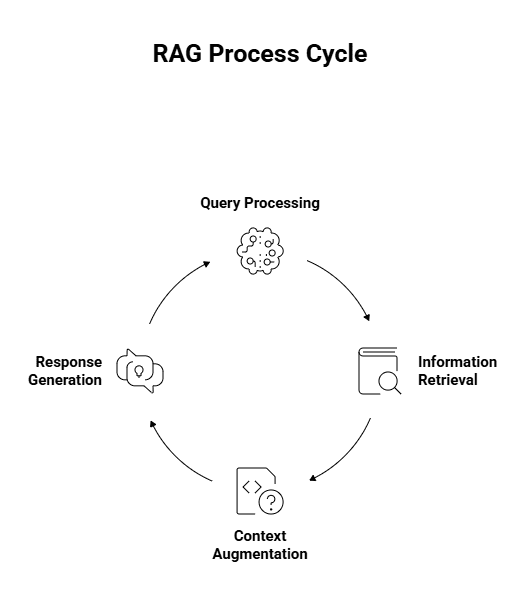
When you send a query to a RAG system, four distinct steps happen in a matter of seconds. Here’s how the process unfolds.
Step 1: Query Processing
You type in your question, let’s say, “What’s the warranty coverage for water damage?” The system doesn’t immediately search for those exact words. Instead, it converts your query into a mathematical representation called an embedding.
Think of it like translating your question into coordinates on a map. This lets the system understand the meaning behind your words, not just the words themselves. A question about “coverage for liquid spills” would land near your water damage query, even though the phrasing differs completely.
Step 2: Information Retrieval
With your question now in searchable format, the system scans through its knowledge base, usually stored in what’s called a vector database. It’s hunting for documents that match the intent of your query. If you ask about “refund policy,” it might pull up sections labelled “return procedures” or “money-back guarantee” because they’re semantically similar.
This beats old-school keyword matching, which would miss relevant documents just because they used different terminology. The system typically retrieves the top 3-5 most relevant chunks of information.
Step 3: Context Augmentation
Here’s where things get interesting. The system takes those retrieved documents and packages them alongside your original question.
This creates what developers call an “enriched prompt.” It’s like handing someone a textbook opened to the right page before asking them to answer your question.
The LLM now has specific reference material to work with instead of relying solely on patterns it learned during training.
Step 4: Response Generation
The LLM reads both your question and the retrieved context, then generates its answer. But unlike a standard chatbot making predictions based on training data, it’s synthesising information from the documents you just provided.
It can quote specific policy sections, reference exact dates, or cite particular guidelines.
The model isn’t guessing what your warranty might cover it’s reading the actual policy and explaining it to you.
RAG vs Traditional Memory Systems
AI memory isn’t one-size-fits-all. You’ve got models with massive context windows that can hold entire conversations in active memory. Then you’ve got RAG systems that pull information on demand. Both let AI work with information beyond its training data, but they do it in completely different ways.
The approach you pick changes how your AI performs, how much it costs to run, and what kinds of tasks it can actually handle. A long context window works like keeping every page of a book open on your desk. RAG works like having a filing cabinet where you grab exactly what you need.
Here’s where each one makes sense.
What Is a Context Window?
A context window is the amount of text an LLM can process at once. Think of it as the model’s working memory. When you’re having a conversation with ChatGPT, it remembers what you said three messages ago because those messages are still inside its context window.
Early models had tiny windows. GPT-3 could only handle about 4,000 tokens, roughly 3,000 words. That’s barely enough for a short article. You’d hit the limit mid-conversation, and the model would forget what you talked about at the start.
Now we’re seeing models with context windows in the millions of tokens. Claude can process 200,000 tokens. Gemini 1.5 Pro pushes that to 1 million. You could feed it an entire novel, and it would remember every plot point while answering your questions.
But here’s the catch. Bigger context windows mean exponentially higher costs. Processing millions of tokens for every query burns through compute resources fast. Plus, there’s a performance issue called “lost in the middle”, models sometimes miss relevant information buried deep in a massive context.
Key Differences Between RAG and Context Windows
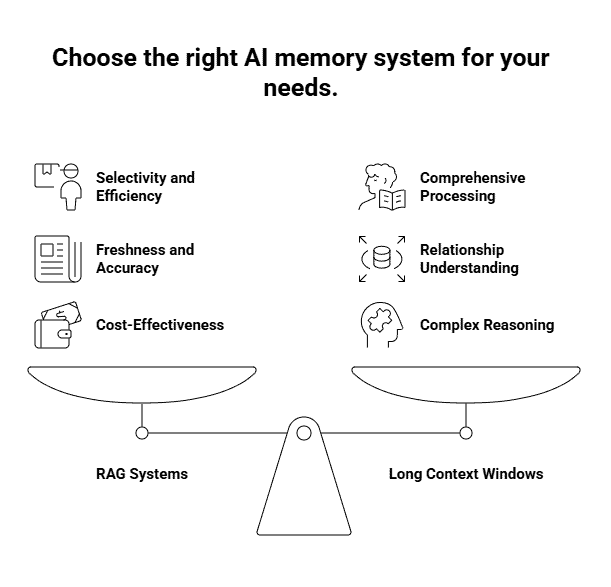
The biggest difference is selectivity. A context window processes everything you feed it. If you dump 50 documents into the prompt, the model has to work through all of it, relevant or not. RAG searches first, then only processes what matters.
Say you need information about a specific clause in a 500-page contract. With a long context window, you’d load all 500 pages and ask your question. The model reads everything, finds your clause, and generates an answer. You just paid to process 499 pages of irrelevant content.
RAG flips that script. It searches the contract, identifies the three paragraphs that mention your clause, and only sends those to the model. You get the same answer for a fraction of the cost.
Then there’s the freshness factor. Context windows work with whatever you manually include in each query. If your company policy changed yesterday, you need to remember to include the updated version in your prompt. RAG automatically pulls from your knowledge base, so it always fetches the current version without you thinking about it.
Accuracy differs too. Models can still hallucinate with long context windows, especially when information is scattered across hundreds of pages. RAG systems ground responses in specific retrieved passages, making it easier to trace where information came from and catch potential errors.
When to Use RAG vs Long Context Windows
Choosing between RAG and long context windows depends on what the model needs to do and how much information it needs at once.
- Use long context windows when understanding the whole document matters.
They work best when the model needs to see relationships across an entire text. For example, analysing how characters evolve from Act 1 to Act 3 in a screenplay, or understanding arguments that build gradually across a document. - Use long context windows for complex, cross-referenced reasoning.
Tasks like legal contract analysis benefit when all sections are loaded together. Clauses in one part often depend on definitions or conditions elsewhere, and having everything in memory helps the model reason accurately. - Use RAG for large-scale question answering. Customer support bots or internal knowledge systems don’t need every document at once. They just need the few most relevant ones. RAG retrieves those and ignores the rest.
- Use RAG when cost and scale matter. Processing massive context windows for thousands of daily queries gets expensive fast. RAG keeps costs down by retrieving only what’s needed per query.
- Use a hybrid approach when you need both efficiency and depth.
Many systems retrieve relevant chunks using RAG, then pass them into a longer context window for deeper reasoning. This combines cost efficiency with better analysis. - For most enterprise use cases, RAG is the practical default.
It scales better, stays up to date easily, and makes answers auditable. Long context windows are powerful, but unless full-document reasoning is essential, RAG usually delivers better value.
Real-World Applications of RAG
RAG shows up in places you probably interact with daily. Customer support chatbots use it to pull answers from company knowledge bases, referencing specific policies or product documentation instead of guessing. That’s why some support bots can cite exact help articles while others just make things up.
Enterprise search tools lean on RAG to help employees find information scattered across internal documents. Instead of reading through hundreds of PDFs, a worker asks a question and gets an answer pulled from the relevant files.
Healthcare systems use RAG to help doctors reference medical literature during patient consultations, pulling from thousands of research papers without memorising them. Financial analysts use it to query reports and regulatory documents, getting specific data points without manual searches.
According to recent analysis, RAG is becoming the baseline for enterprise AI in 2025. Ship an AI system without retrieval, and you’re betting on hallucinations.
Benefits of Using RAG
RAG’s value isn’t theoretical; it directly improves reliability and control.
- Higher accuracy: Answers are grounded in real documents, which significantly reduces hallucinations.
- Lower costs and faster responses: Only relevant chunks are processed instead of entire knowledge bases.
- No retraining required for updates: Add or update documents and the system can reference them immediately.
- Better privacy control: Proprietary data stays in your database, not embedded in model weights.
- Improved transparency and auditability: You can trace answers back to source documents, which is critical for accountability.
- Reduced misinformation in high-stakes decisions: Research shows advanced RAG systems, especially those using knowledge graphs, significantly lower misinformation risk in areas like finance and legal discovery.

A startup consultant, digital marketer, traveller, and philomath. Aashish has worked with over 20 startups and successfully helped them ideate, raise money, and succeed. When not working, he can be found hiking, camping, and stargazing.