
You type a question into ChatGPT, hit enter, and get an answer. No tutorial needed. No examples provided. Just a direct ask and a direct response. That’s zero-shot prompting at work, and you’ve probably been using it without knowing it had a name.
Here’s the thing. While most people start zero-shot prompting naturally, understanding how it actually works can make you way more effective at getting AI to do what you need.
This guide breaks down the mechanics, shows you when it shines, and helps you spot when you need a different approach. Whether you’re building AI tools or just trying to get better outputs from ChatGPT, knowing this foundational technique matters.
What Is Zero-Shot Prompting?
Zero-shot prompting is the simplest way to interact with AI models. You give the model a direct instruction or question without showing it any examples first. That’s it.
ScienceDirect research defines zero-shot prompting as direct prompting where you describe what you want without providing training data or demonstrations. The model taps into what it already learned during its massive pre-training phase to figure out your request.
Think of it like this. You ask someone who speaks multiple languages, “Translate ‘hello’ to Spanish.” You don’t show them ten other translation examples first. They just know it’s “hola” because they already learned Spanish. The AI works the same way. It uses patterns and knowledge baked into it from training on billions of text examples.
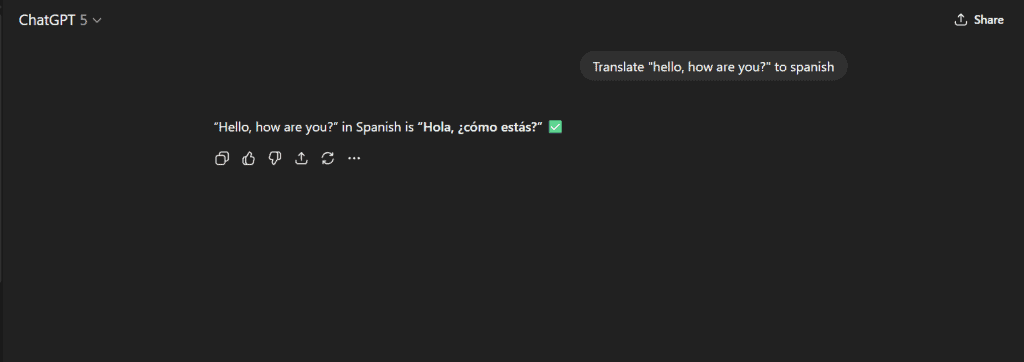
What makes this different from other prompting methods is the absence of examples. You’re not showing the model how to format an answer or giving it a sample output. You’re counting entirely on its pre-existing knowledge to understand and complete your task.
This approach works because modern language models have seen so much text during training that they’ve internalised countless patterns. When you ask them to summarise text, classify sentiment, or answer questions, they recognise these as tasks they’ve encountered variations of before. They don’t need you to spell it out with examples because they’ve already learned the general concept.
How Does Zero-Shot Prompting Work?
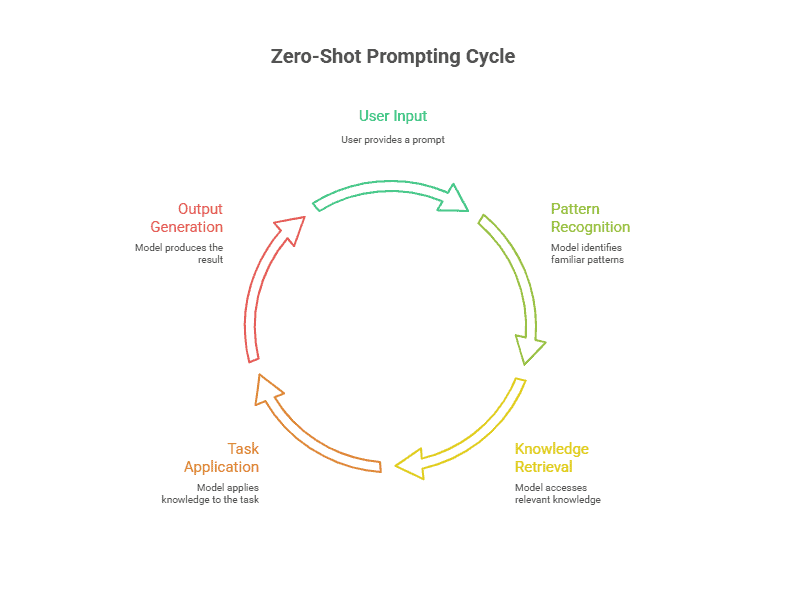
Here’s what happens behind the scenes. You type an instruction like “Is this review positive or negative: ‘I loved this product!’” The model reads it and recognises the pattern. It’s seen sentiment analysis tasks in countless forms during training. Not this exact review, but similar requests across millions of text examples.
The model then pulls from its pre-trained knowledge. It knows “loved” connects with positive emotions. It understands review structures. It’s learned what positive versus negative language looks like. All without you providing any examples of correct answers.
What makes this possible? Research shows that zero-shot prompting works because models are exposed to diverse task descriptions during training. They’ve processed everything from news articles to scientific papers to social media posts. This massive exposure teaches them to recognise what you’re asking for, even when phrased in completely new ways.
Your instruction activates the relevant knowledge. The model doesn’t need task-specific training because it’s already seen similar patterns. It just applies what it learned broadly to your specific request. The catch? How well it performs depends on whether your task resembles something from its training data.
Zero-Shot Prompting vs Few-Shot Prompting
Here’s where things get interesting. Zero-shot prompting has a close cousin called few-shot prompting. The difference? Few-shot includes examples right in your prompt to show the AI what you want.
Let’s see this in action. A zero-shot prompt looks like: “Classify this email as spam or not spam: Check out this exclusive offer!” You’re giving direct instructions and expecting the model to figure it out.
A few-shot version adds examples first: “Classify emails as spam or not spam. Example 1: ‘Claim your prize now!’ = spam. Example 2: ‘Your package will arrive Tuesday’ = not spam. Now classify: Check out this exclusive offer!” You’re showing the pattern before asking.
Research indicates that choosing the right prompting technique can improve performance by 8-47% over basic approaches. That’s a huge difference.
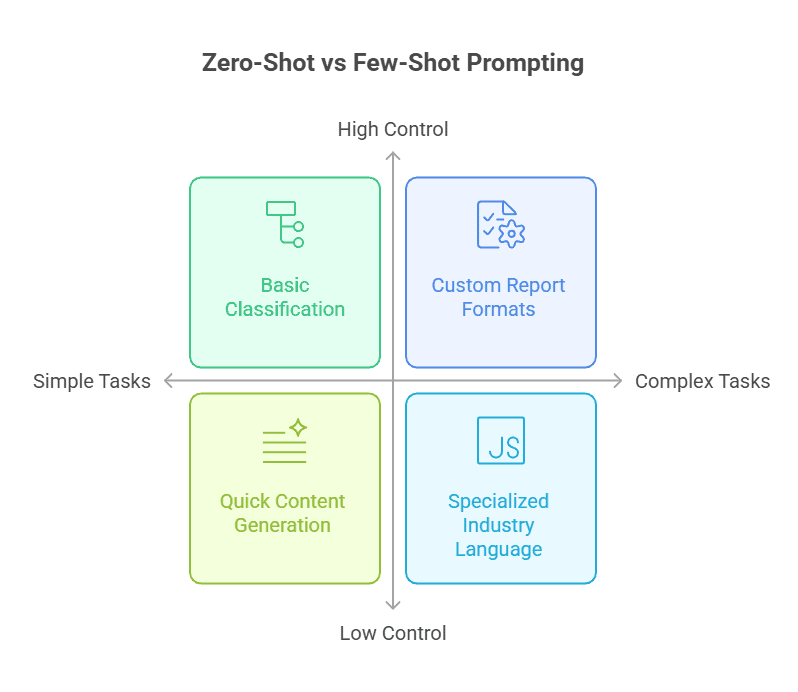
So when should you use each? Zero-shot works great for straightforward tasks like basic classification, simple questions, or quick content generation. It’s faster because you skip creating examples. Plus, you save on token usage.
Few-shot shines when you need specific formatting, handle nuanced requirements, or work with complex classification systems. Think custom report formats or specialised industry language. The tradeoff? You’ll spend time crafting good examples and use more tokens per request.
The task complexity drives the decision. Simple and clear? Go zero-shot. Intricate or format-specific? Few-shot gives you that extra control.
When To Use Zero-Shot Prompting
So when does zero-shot prompting actually make sense? It works best for straightforward tasks where the model already knows what to do. According to Lakera AI research, zero-shot prompts work best for well-known, straightforward tasks like writing summaries and answering FAQs.
Think about asking an AI to “translate this sentence to Spanish” or “classify this customer review as positive or negative.” These are tasks the model has seen thousands of times during training.
You’ll also want zero-shot when you’re pressed for time. Creating examples takes effort, and sometimes you just need an answer now. This makes it perfect for prototyping new ideas or testing whether an AI can handle your use case before you invest in more complex approaches.
Plus, there’s the token efficiency angle. Every example you add increases your token count, which means higher costs and slower responses. If your task is simple enough that the model gets it without hand-holding, why spend the extra tokens? It’s like giving someone directions to a place they already know how to find.
Benefits Of Zero-Shot Prompting
There are significant benefits to using zero-shot prompting. Here are some of them:
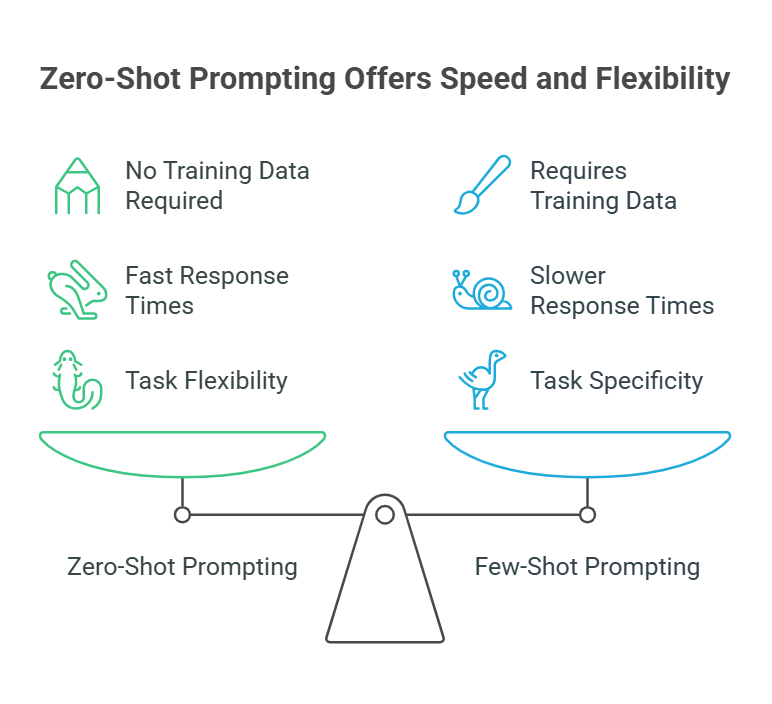
No Training Data Required
Here’s the thing that makes zero-shot so accessible: you don’t need to collect or create any examples. No hunting through old conversations to find the perfect demonstration. No formatting sample inputs and outputs. You just write your instruction and go.
This saves you hours of prep work. While someone using few-shot might spend their afternoon curating examples, you’re already getting results. It’s especially helpful if you’re not technical. You don’t need to understand how to structure training data or worry about whether your examples are representative enough. The model handles everything with what it already knows.
Fast Response Times
Fewer tokens mean the model has less to process. That’s basic math, but it matters more than you might think. When you’re not feeding the model several examples before your actual request, responses come back faster.
This speed advantage really shows up in real-time applications. Chat interfaces, live customer support, instant content generation—these all benefit from shaving off those extra milliseconds. And there’s a practical bonus: fewer tokens per request means lower costs when you’re paying per API call. If you’re running thousands of requests daily, those savings add up quickly.
Flexibility Across Tasks
What you learn with zero-shot transfers immediately to new situations. The same approach that worked for summarising articles also works for translating text, answering questions, or generating email responses. You’re not locked into one task type.
Need to switch from sentiment analysis to keyword extraction? Just change your instruction. No need to maintain separate libraries of examples for each task or retrain anything. The model adapts instantly to whatever you’re asking. This flexibility makes zero-shot ideal when you’re working on varied projects or need to handle unpredictable request types throughout your day.
Limitations Of Zero-Shot Prompting
That said, zero-shot prompting isn’t perfect for every situation. While it’s fast and flexible, there are real scenarios where it falls short. Knowing these limitations helps you decide when to switch to few-shot prompting or fine-tuning instead.
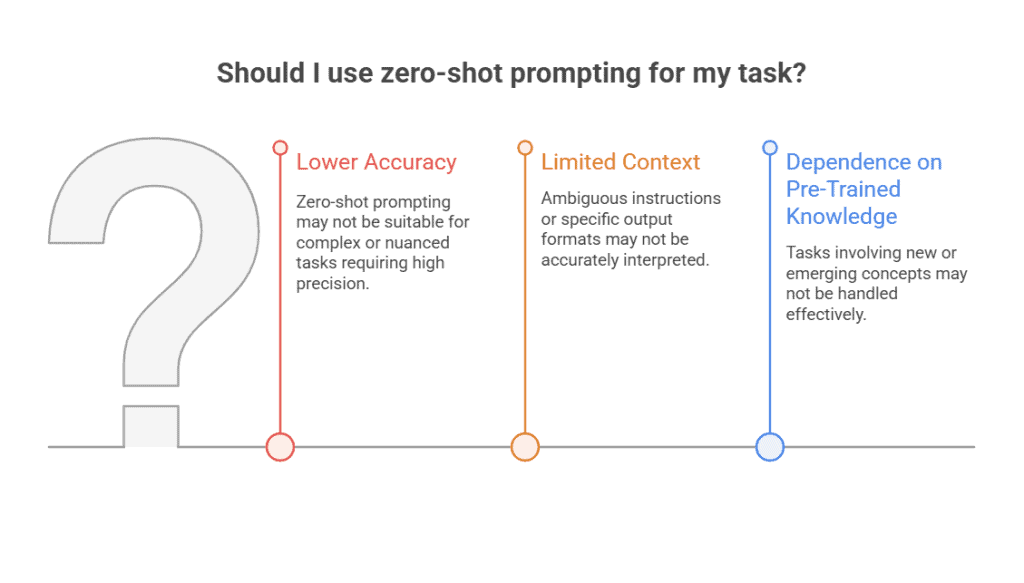
Lower Accuracy For Complex Tasks
Zero-shot prompting struggles when tasks get nuanced or highly specialised. The model might miss subtle requirements or fail to grasp domain-specific terminology it hasn’t seen much during training.
Say you ask it to analyse a legal contract for compliance issues. Without examples showing what “compliance” means in your specific context, the AI might flag generic concerns but miss industry-specific violations. Same goes for medical diagnosis or technical code reviews, where precision matters.
When you need precision and can’t afford mistakes, zero-shot becomes risky. The model is working from general patterns rather than specific guidance tailored to your exact needs.
Limited Context Understanding
Without examples, the model is essentially guessing what you want. This creates problems when your instructions are ambiguous or when you need a specific output format.
Let’s say you want a JSON structure with particular field names and nested objects. A zero-shot prompt might give you JSON, but the structure could be completely different from what you need. Or if you’re asking for “a professional email,” your idea of “professional” and the model’s interpretation might not align.
You end up compensating with extremely detailed instructions. But even then, the model might misinterpret your intent because it has no reference point. That’s exactly why few-shot prompting exists, those examples clarify what “good” looks like.
Dependence On Model’s Pre-Trained Knowledge
Zero-shot only works well when your task resembles something in the model’s training data. If you’re asking about events after the training cutoff date or emerging concepts, the model simply won’t know.
Ask about a software framework released last month, and you’ll get outdated or made-up information. Request analysis of a brand-new regulation, and the model can’t help because it’s never encountered that material.
Plus, performance varies wildly based on model quality. A smaller or older model might struggle with tasks that a newer, larger model handles easily in zero-shot mode. You’re limited by what the AI has “seen” during pre-training, which means truly novel tasks fall outside its comfort zone.
How To Write Effective Zero-Shot Prompts
Knowing the limitations is one thing. Actually writing prompts that work is another. The good news? You don’t need to be a prompt engineer to get solid results. You just need to follow a few practical guidelines that eliminate guesswork and help the model understand exactly what you’re asking for.
Be Clear and Specific
Vague prompts get vague results. Instead of “Tell me about this article,” try “Summarise this article in 3 bullet points.” See the difference? The second one uses a precise verb (summarise) and states exactly what you want (3 bullet points).
Clear, specific instructions broken into simple steps significantly improve AI output quality. The model isn’t trying to guess whether you want a summary, an analysis, or a full rewrite. You’ve already told it. This saves time and cuts down on back-and-forth revisions.
Define The Task Explicitly
State the task type right at the start. Don’t make the model figure out whether you’re asking for classification, translation, or something else entirely. Remove all guesswork about what you’re requesting. If you want sentiment analysis, say “Classify the following customer review as positive, negative, or neutral:” before pasting the review. The action (classify) and the subject (customer review) are both crystal clear. That’s how you get consistent results without needing to provide examples.
Provide Context When Needed
Some tasks need background info to make sense. If you’re asking the model to draft an email response, it helps to know whether you’re a customer service manager, a sales rep, or a tech support agent. Try “As a customer service manager, draft a response to this complaint:” instead of just “Respond to this.”
But here’s the thing: don’t overload your prompt with unnecessary details. Add context only when it actually changes how the task should be approached. Think domain, industry, or role information that shifts the tone or focus.
Specify The Output Format
Tell the model how to structure its response. Want bullet points? Say so. Need a numbered list? Request it. Looking for a specific word count? Set the limit upfront. Specifying output structure dramatically improves response consistency.
Try “Answer in exactly 50 words” or “Provide your answer as a numbered list with no more than 5 items.” This simple step gives you control over the format without needing to rewrite your entire prompt or ask for revisions.
Zero-Shot Prompting Examples
Let’s look at some real-world examples you can start using today. These show how different tasks benefit from clear, direct prompts.
Text Classification Example
Say you’re sorting through articles or support tickets. Here’s what works:
“Classify this customer support ticket into one of these categories: Technical Issue, Billing Question, Feature Request, or Account Access. Ticket: My password reset link isn’t working, and I’ve tried three times already.”
This works because you’re giving the model a closed set of options and a clear task. The model doesn’t need training data, it understands what “Technical Issue” means and can match the context. Models perform well when categories are explicitly stated upfront.
Sentiment Analysis Example
When you’re analysing customer feedback or social media mentions, structure matters:
“Analyse the sentiment of this product review as Positive, Negative, or Neutral: The delivery was fast but the product quality didn’t match the photos. Disappointed overall.”
What makes this effective? You’ve defined exactly three outcomes and provided the text to analyse. The model won’t wander into irrelevant territory or give you a rambling explanation when you just need a quick sentiment label. Plus, limiting options to three clear categories makes the output immediately actionable.
Content Generation Example
“Write a professional email to a client explaining a project delay. Include an apology, brief reason for the delay, new timeline, and next steps. Keep it under 100 words and maintain a reassuring tone.”
This prompt works because it specifies format, length, tone, and required elements. You’re not leaving the model guessing about what “professional” means in your context. The constraints, word count, specific components, tone guide the output without needing example emails. That’s the thing about good zero-shot prompts: they replace examples with precise instructions.
Question Answering Example
“Answer this question in 2-3 sentences using language a 10th grader would understand: How does blockchain technology ensure security?”
The constraints here do the heavy lifting. By specifying sentence count and reading level, you’re preventing both oversimplification and technical jargon overload. The model knows to explain the concept without diving into cryptographic hash functions or distributed ledger minutiae. You get a focused answer that’s actually useful, not a textbook chapter.
Common Use Cases For Zero-Shot Prompting
Zero-shot prompting shows up in more places than you might think. Once you start noticing it, you’ll see it everywhere.
- Customer support teams use it to automatically route tickets to the right departments without building custom classifiers. It can scan incoming requests and decide whether something belongs in billing, technical support, or account management. Same goes for generating FAQ responses; you don’t need to anticipate every possible question.
- Content creators lean on it for quick social media posts, first-draft emails, or blog outlines when they’re staring at a blank screen. MIT research demonstrates zero-shot prompting’s effectiveness for content generation tasks, especially when you don’t have training examples to work from.
- Data processing workflows use it for text classification, pulling specific entities from documents, or labelling datasets without manual annotation. You can point it at customer feedback and ask it to extract product names or feature requests.
- Translation and localisation work surprisingly well, especially for languages where you don’t have parallel corpora sitting around. Marketing teams use it for sentiment monitoring across social platforms, tracking how people feel about their brand without setting up complex systems.
- Developers use it for quick prototyping, testing whether AI can handle a task before committing resources. And educators are finding it useful for generating explanations, simplifying complex topics, or creating tutoring responses tailored to different learning levels.
The beauty is you can start using these applications immediately. No dataset collection. No model training. Just clear instructions.
Start With What You Already Know
Zero-shot prompting is your starting point with any AI model. It won’t solve every problem; you’ve seen its limitations, but it handles way more than most people expect.
The examples we walked through aren’t theoretical. Try them. Adjust the wording. See what breaks and what surprises you. You’ll develop an instinct for when zero-shot is enough and when you need to level up to few-shot or fine-tuning.
Most tasks don’t need fancy techniques. They need clear communication. That’s what you’re learning here: how to talk to these models in a way they understand. The more you practice, the better your results get.
So pick a task you’ve been curious about. Write a straightforward prompt. Hit enter. You might be surprised by what happens.