
You type a few words into ChatGPT, and seconds later, it writes an entire email for you. Or you ask it to explain quantum physics like you’re five, and it actually makes sense. What’s happening in that split second between hitting “enter” and getting a response?
That’s the power of a prompt. It’s not magic, it’s structure. And once you understand how to control it, you’ll get better results from any AI tool you use.
What Is an AI Prompt?
An AI prompt is a structured text instruction that guides artificial intelligence models to generate specific responses or outputs. These aren’t just casual questions you throw at a chatbot. They’re carefully constructed inputs that tell the AI exactly what you want it to do.
Here’s the thing: a prompt can be as simple as “Write a poem about rain” or as complex as “Act as a senior marketing analyst and create a 90-day content strategy for a B2B SaaS startup targeting CFOs in the healthcare industry.” Both are prompts, but one gives the AI far more direction.
Think of it this way. If someone asked you “food?”, you’d be confused. But if they said “Can you recommend a good Italian restaurant near downtown that’s open past 9 PM?”, now you know exactly what they need. That’s the difference between a vague input and a structured prompt.
How AI Prompts Work
When you type a prompt, you’re not actually talking to a thinking being. You’re feeding instructions into a pattern-recognition system that’s been trained on massive amounts of text data.
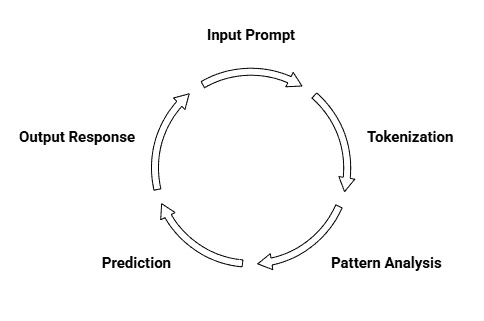
The AI breaks your words into smaller pieces called tokens. It then analyses those tokens based on billions of patterns it learned during training. What comes next isn’t the AI “understanding” your request in the human sense, it’s predicting the most likely sequence of words that should follow, based on what it’s seen before.
Let’s say you prompt: “Explain photosynthesis to a 10-year-old.” The AI recognises “explain,” knows it needs simplified language because of “10-year-old,” and identifies “photosynthesis” as a scientific concept that needs breaking down. It then generates a response by predicting which words typically appear in beginner-friendly science explanations.
That’s why specificity matters. The more context you give, tone, audience, format, constraints, the better the AI can predict what you actually want. You’re essentially programming it with natural language instead of code.
AI Prompt vs Simple Instructions
Think of the difference like asking someone to cook dinner. You could just say “make food,” but what would you get? A sandwich? A five-course meal? Something burnt?
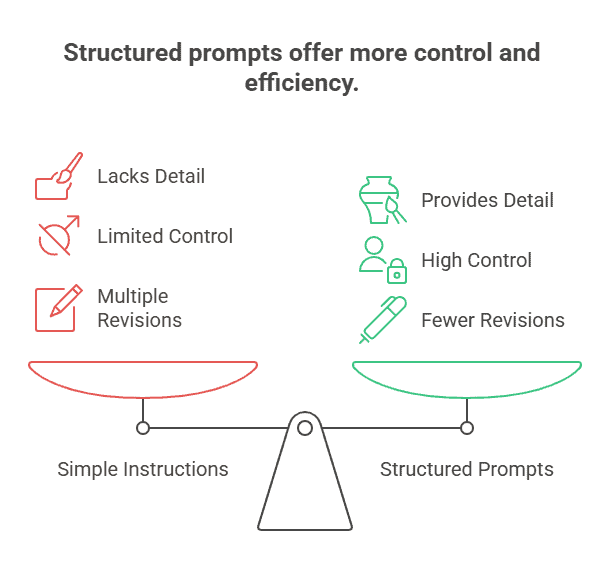
That’s what happens with simple instructions to AI. When you type “write an email,” the AI has to guess everything. It doesn’t know if you’re emailing your boss or your friend. It can’t tell if you need something formal or casual. So it picks something generic that probably won’t fit what you actually need.
Here’s what a simple instruction looks like:
Simple: “Write an email about the meeting.”
Now compare that to a structured prompt:
Structured: “You’re a project manager writing to your team. We need to reschedule next Tuesday’s budget review meeting because the finance director is travelling. Write a brief, friendly email suggesting two alternative dates and asking for their availability.”
See the difference? The structured version tells the AI who you are, what situation you’re in, who you’re talking to, and what tone to use. You’re not leaving anything to chance.
This is why structure matters. More details mean more control. You’re guiding the AI toward exactly what you need instead of hoping it guesses right. And the best part? Once you know how to structure prompts, it takes maybe 30 seconds longer to write, but saves you from multiple revisions.
Key Components of an AI Prompt
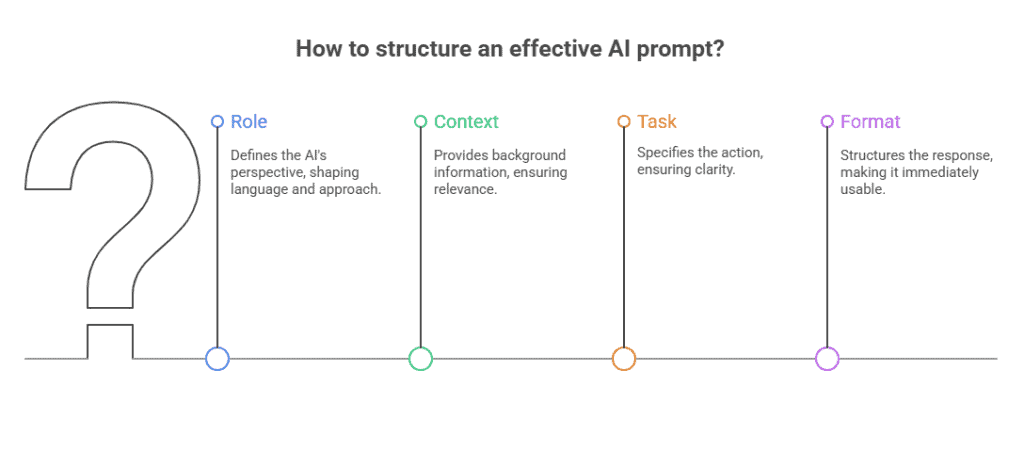
The University System of Georgia’s AI Literacy Guide breaks down effective prompts into four elements: Role, Context, Task, and Format. Think of these as the building blocks that transform vague requests into specific instructions.
Let’s break down each one.
1. Role
Role tells the AI what perspective to take. Are you asking it to be a teacher, a marketer, a friend, or a technical expert? This shapes the language it uses and how it approaches your request.
Example: “You’re a fitness coach working with beginners” makes the AI use encouraging, simple language. “You’re a sports scientist” would give you technical, research-focused answers instead.
The role sets the personality and expertise level. When you’re clear about this, you avoid getting responses that feel off-target.
2. Context
Context is the background information the AI needs to understand your situation. What problem are you solving? Who’s involved? What constraints do you have?
Example: Instead of “suggest a gift,” try “My sister just graduated med school and loves hiking. Budget is $50.” Now the AI knows who the gift is for, what they like, and what you can spend.
Without context, AI makes assumptions. With it, you get relevant suggestions that actually match your situation.
3. Task
Task is the clearest part. What do you want the AI to do? Write something? Analyse data? Generate ideas? Be specific about the action.
Example: “List five podcast topics” is better than “help with my podcast.” “Rewrite this paragraph to be more conversational” beats “improve this.”
Use action verbs. Create, analyse, summarise, rewrite, generate, explain. The more precise your verb, the better your output.
4. Format
Format tells the AI how to structure its response. Do you need bullet points? A paragraph? A table? A step-by-step list?
Example: “Give me three meal ideas in a numbered list with prep time for each” creates something you can actually use. Compare that to just “suggest meals” which might give you a rambling paragraph.
Format makes the output immediately usable. You’re not wasting time reformatting what the AI gives you.
Types of AI Prompts
Not all prompts work the same way. Think of them like different tools in a toolbox—each one solves problems differently.
Here are the three main types you’ll use most often.
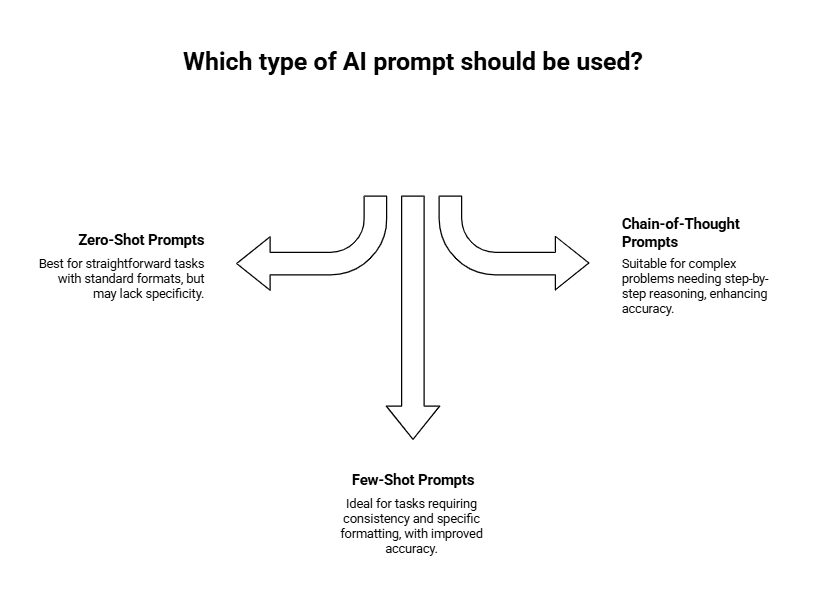
1. Zero-Shot Prompts
This is the simplest approach. You give the AI a task without any examples.
Just tell it what you want, and it figures out the rest based on its training.
Example: “Write a professional email declining a meeting request.”
The AI has never seen your specific situation before, but it understands what a professional decline email looks like. Zero-shot works great for straightforward tasks where the format is standard—emails, summaries, basic explanations.
But here’s the thing. When you need something more specific or formatted in a particular way, zero-shot can miss the mark.
2. Few-Shot Prompts
This is where you show the AI what you want by including examples.
According to Vendasta’s 2025 prompting guide, few-shot prompting significantly improves accuracy because the AI learns your exact style and format from the examples you provide.
Example:
“Convert these product names to SKU codes. Here are two examples:
Blue Cotton T-Shirt → BLU-COT-TSH
Red Leather Jacket → RED-LEA-JAC
Now convert: Green Wool Sweater”
The AI sees the pattern—first three letters of each word, separated by hyphens. It’ll respond with “GRE-WOO-SWE.”
Few-shot prompts work best when you need consistency across multiple outputs or when the task has a specific format that’s unique to your needs.
3. Chain-of-Thought Prompts
Sometimes you need the AI to think through a problem step-by-step instead of jumping to an answer.
That’s what chain-of-thought prompting does. You ask the AI to show its reasoning process.
Example:
“A store offers 20% off all items, then an additional 10% off at checkout. If a jacket costs $100, how much will I pay? Show your work step-by-step.”
The AI will break it down:
1. First discount: $100 – 20% = $80
2. Second discount: $80 – 10% = $72
3. Final price: $72
This approach shines when you’re dealing with complex problems, math, logic puzzles, or decisions that need careful reasoning. It also helps you spot if the AI made a mistake somewhere in its thinking.
What’s interesting here is that chain-of-thought prompts often get better results than direct questions because they force the AI to work through the problem methodically instead of guessing.
How To Write an Effective AI Prompt
Knowing prompt types is one thing. Writing prompts that actually work is another.
Here’s how to craft prompts that get you the results you need.
Be Clear and Specific
Vague prompts get vague results.
Instead of “Write about marketing,” try “Write a 200-word explanation of email marketing for small business owners who’ve never used it before.”
See the difference? The second version tells the AI exactly what to write, how long it should be, and who it’s for.
Specificity eliminates guesswork. When you’re precise about what you want, the AI doesn’t have to fill in the blanks with assumptions that might not match your needs.
Provide Sufficient Context
The AI doesn’t know your situation unless you tell it.
Let’s say you want help with a customer complaint. A weak prompt: “How should I respond to this complaint?”
A strong prompt: “I run a small bakery. A customer complained that their birthday cake arrived two hours late. We offered a refund, but they’re still upset and posted a negative review. How should I respond publicly to their review?”
That context, your business type, what happened, what you’ve already done, and where they complained, gives the AI everything it needs to craft a relevant response.
Think of it like briefing a coworker. You wouldn’t just say “help me with this” without explaining the situation.
Specify the Output Format
Tell the AI exactly how to structure its response.
Want a bullet list? Say so. Need a table? Request it. Looking for a specific structure? Describe it.
Example: “List five benefits of remote work. Format as a numbered list with each benefit followed by a one-sentence explanation.”
Without format instructions, the AI might give you paragraphs when you needed a quick list, or a simple list when you needed detailed explanations.
This is especially helpful when you’re copying the output into another tool or document. Getting the right format the first time saves you from reformatting later.
Include Examples When Needed
Remember few-shot prompts? This is where they come in handy.
When you need the AI to match a specific style, tone, or format, show it what you want.
Example:
“Write product descriptions in this style:
Product: Wireless Mouse
Description: Click, scroll, conquer. This mouse cuts the cord without cutting performance.
Now write one for: Noise-Cancelling Headphones”
The AI picks up on the punchy, benefit-focused style and mirrors it.
You don’t need examples for every prompt, just when you’re after something specific that’s hard to describe with words alone.
What Is an Image Prompt?
Image prompts are text descriptions you give to AI image generators like DALL-E, Midjourney, or Stable Diffusion. Instead of generating words, these prompts create visual content.
Here’s the thing: you’re essentially painting with words. The more visual details you include, the better control you have over what the AI creates. Think of it as giving directions to an artist who can’t see what’s in your head.
Say you type “dog.” You’ll get a dog, sure. But what kind? What’s it doing? Where is it? Now try “golden retriever puppy playing in autumn leaves, soft afternoon sunlight.” See the difference? That’s the power of descriptive prompting.
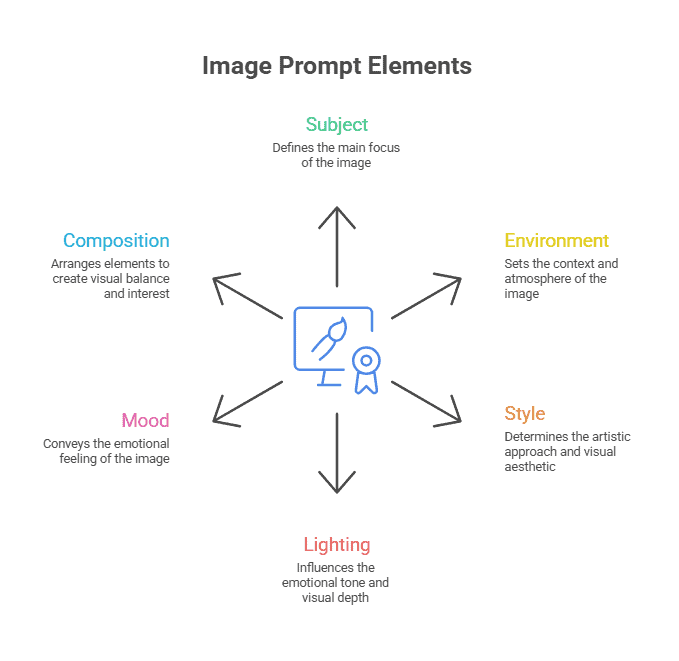
Unlike text prompts that focus on tasks and instructions, image prompts need to be intensely visual. You’re not asking the AI to do something; you’re describing what you want to see. Effective image prompts typically include six core elements: subject, environment, lighting, composition, style, and mood. Master these, and you’ll generate images that actually match your vision.
Structure of an Image Prompt
Let’s break down what makes an image prompt work. Each element adds another layer of control over your final image. A clear format for image prompts is:
[Subject], [Environment], [Lighting], [Composition], [Style], [Mood]
Subject
This is what’s actually in your image. A person? An object? A landscape? Get specific here.
Compare these two prompts:
“A woman” vs. “A woman in her 30s with curly red hair wearing a leather jacket”
The second one gives the AI much more to work with. Include details about age, appearance, clothing, poses, or actions. If it’s an object, describe its material, condition, and size. For scenes, mention what elements are present and how they relate to each other.
Environment
Environment describes the setting or location where your subject exists. It brings context and story to your image, influencing not just what you see but how you feel about it. Specificity helps the AI build a world around your subject and ensures the result matches your vision.
Compare these two uses:
“A woman in a city” vs. “A woman in her 30s with curly red hair wearing a leather jacket, on a rain-soaked neon-lit street in Tokyo at midnight”
The second prompt uses the environment. It tells the AI not just the location, but the ambience, urban details, and even hints at the story (midnight, neon, rain).
Style and Artistic Direction
This tells the AI what artistic approach to take. Do you want something photorealistic? A watercolour painting? Digital art? Anime style?
You can reference specific artists or art movements. “In the style of Van Gogh” creates something very different from “photorealistic studio photography” or “minimalist line drawing.”
The style you choose completely transforms the output. A prompt for “a castle” becomes wildly different when you add “fantasy concept art” versus “architectural blueprint” versus “impressionist painting.”
Lighting and Mood
Lighting sets the emotional tone of your image. It’s what makes a photo feel warm and inviting or cold and dramatic.
Try specifying things like “golden hour sunlight,” “harsh fluorescent lighting,” “soft diffused light,” or “dramatic shadows.” Each creates a totally different atmosphere.
You can also add mood descriptors: “melancholic,” “energetic,” “peaceful,” “tense.” These guide the AI toward the feeling you want to convey. A forest scene with “eerie morning mist” hits differently than the same forest with “bright cheerful sunlight.”
Composition and Camera Angle
Think like a photographer here. Where’s the camera positioned? How close are we to the subject?
Specify angles like “bird’s eye view,” “worm’s eye view,” “close-up portrait,” or “wide landscape shot.” You can also mention depth of field, “shallow depth of field with blurred background” creates that professional photography look.
Adding composition details like “rule of thirds,” “centred composition,” or “subject in foreground with mountains in background” gives you precise control over how elements are arranged in your image.
Types of Image Prompts
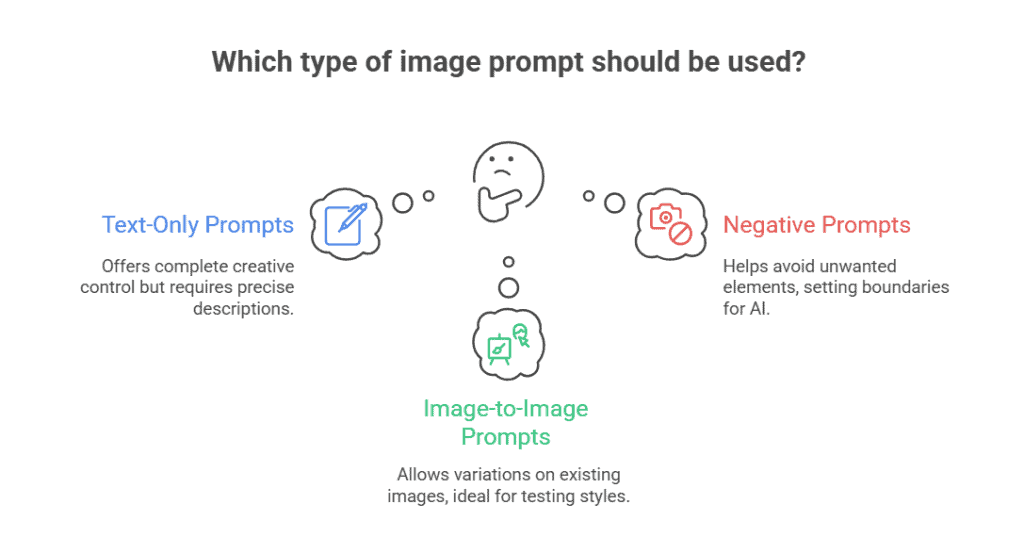
Not all image prompts work the same way. Depending on what you’re trying to create, you’ll pick different approaches. Here are the three main types you’ll run into.
Text-Only Prompts
This is where most people start. You write out what you want, and the AI generates it from scratch.
Think of it like ordering food without showing a picture. You describe exactly what you want: “A steaming bowl of ramen with soft-boiled eggs, green onions, and thin slices of pork in a ceramic bowl.” The more specific you get, the closer the result matches your vision.
Text-only prompts give you complete creative control. You’re not limited by existing images. But they also require more precision in your descriptions.
Image-to-Image Prompts
Here’s where things get interesting. You upload a reference image, then add text instructions to modify it.
Say you have a photo of your living room. You can upload it and prompt: “Same room but with Victorian furniture and warm sunset lighting through the windows.” The AI keeps the room’s layout but transforms the style.
This works great when you want variations on something that already exists. Product designers use this to test colour schemes. Architects use it to show clients different finishing options for the same space.
Negative Prompts
Sometimes it’s easier to say what you don’t want than to describe everything you do want.
Negative prompts tell the AI what to avoid. If you’re generating a portrait and keep getting results with extra fingers or blurry backgrounds, you’d add: “blurry, distorted hands, out of focus, low quality.”
The thing is, AI tools sometimes add common elements you didn’t ask for. Negative prompts help you steer away from those default patterns. You’re setting boundaries instead of just giving directions.
Image Prompt Examples
Let’s look at how different platforms handle the same concept. According to Vertu’s platform comparison, each AI generator responds better to specific prompt structures.
Midjourney Example
Midjourney loves artistic references and style keywords. It excels when you mention art movements or specific artists.
Prompt: “A cosy coffee shop interior, warm Edison bulb lighting, exposed brick walls, customers reading books, shot on film, cinematic composition, in the style of Wes Anderson –ar 16:9 –v 7”
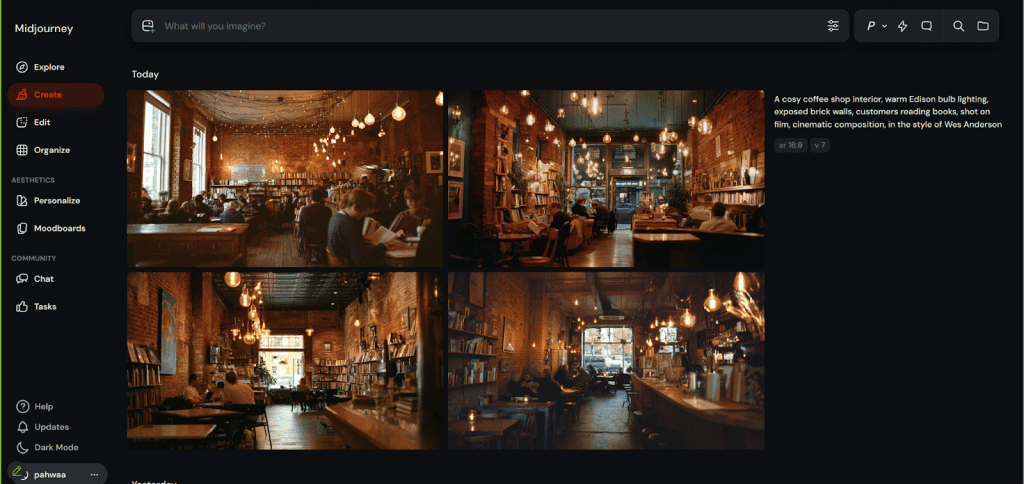
Notice the style reference at the end? That’s what makes Midjourney shine. The “–ar 16:9” sets the aspect ratio, and “–v 7” specifies the model version. These technical tags help refine the output.
ChatGPT Example
ChatGPT handles natural, conversational language better than others. You can write prompts like you’re talking to a friend.
Prompt: “Create an image of a golden retriever wearing sunglasses, sitting at a beach cafe table with a tropical drink, ocean view in the background, sunny day, photorealistic style”
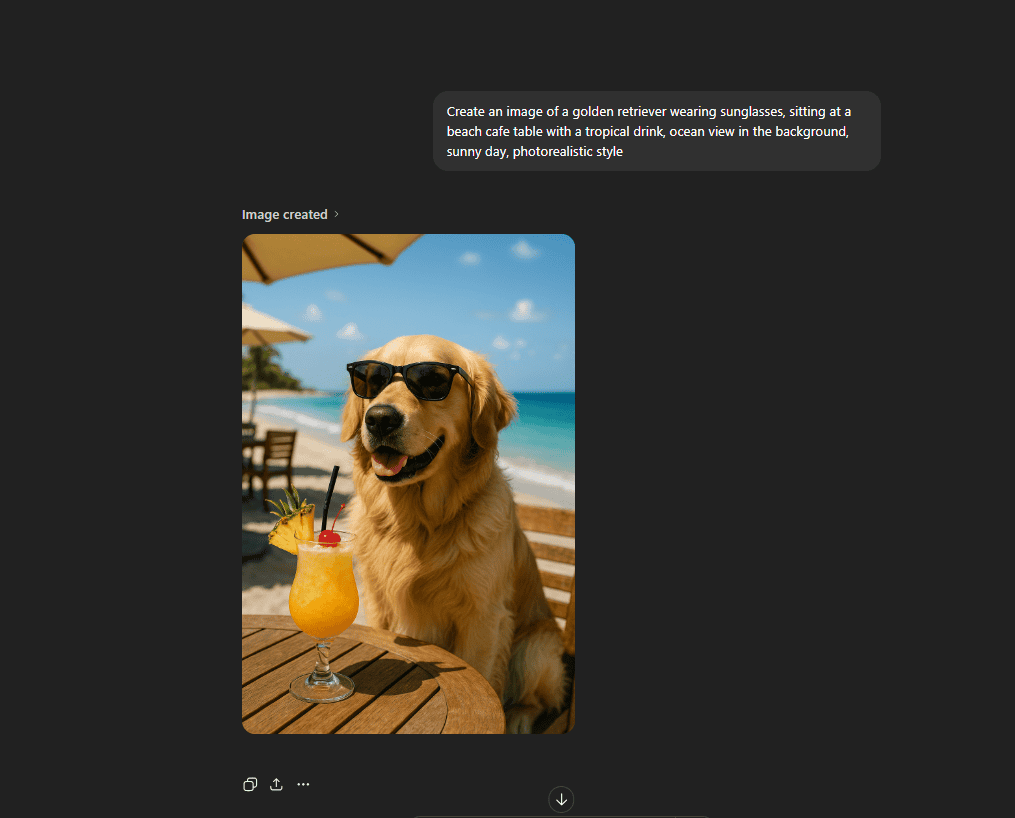
See how it reads almost like a sentence? ChatGPT interprets context well. You don’t need special syntax or technical modifiers. Just describe what you see in your head.
Stable Diffusion Example
Stable Diffusion responds best to detailed, technical prompts with specific modifiers and quality tags.
Prompt: “Portrait of a woman with red hair, green eyes, freckles, natural lighting, 85mm lens, shallow depth of field, (highly detailed:1.3), (photorealistic:1.2), professional photography, 8k uhd, sharp focus”
Negative prompt: “blurry, cartoon, illustration, low quality, distorted features, oversaturated”
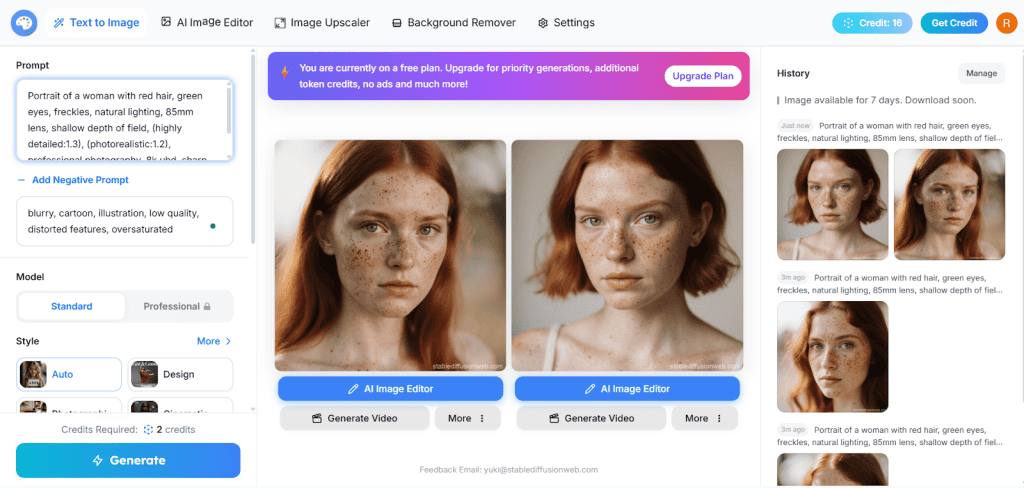
The numbers in parentheses like “(highly detailed:1.3)” are weight modifiers. They tell the AI to emphasise those qualities more. Stable Diffusion lets you fine-tune each element’s importance, which is why technical users love it.
What Is a Video Prompt?
Video prompts create moving images. That’s the simple part. The tricky bit? You’re not just describing what something looks like anymore, you’re directing what happens over time.
Think about it. With an image prompt, you capture one frozen moment. With video, you’re telling a story that unfolds across seconds. The camera needs to know where to move. Objects need to know how to behave. Actions need to flow in a sequence that makes sense.
This makes video prompts more complex than their image cousins. You’re essentially a director now, not just a photographer. You need to think about continuity, how one frame connects to the next. You need to consider pacing, does the action happen fast or slow?
Tools like Sora, Runway, and Pika turn your text into short clips. But they need more guidance than image generators. You’re not just saying “what”, you’re explaining “how” and “when.”
Structure of a Video Prompt
Breaking down video prompts into four core elements helps you think like a director. Each piece controls a different aspect of your scene.
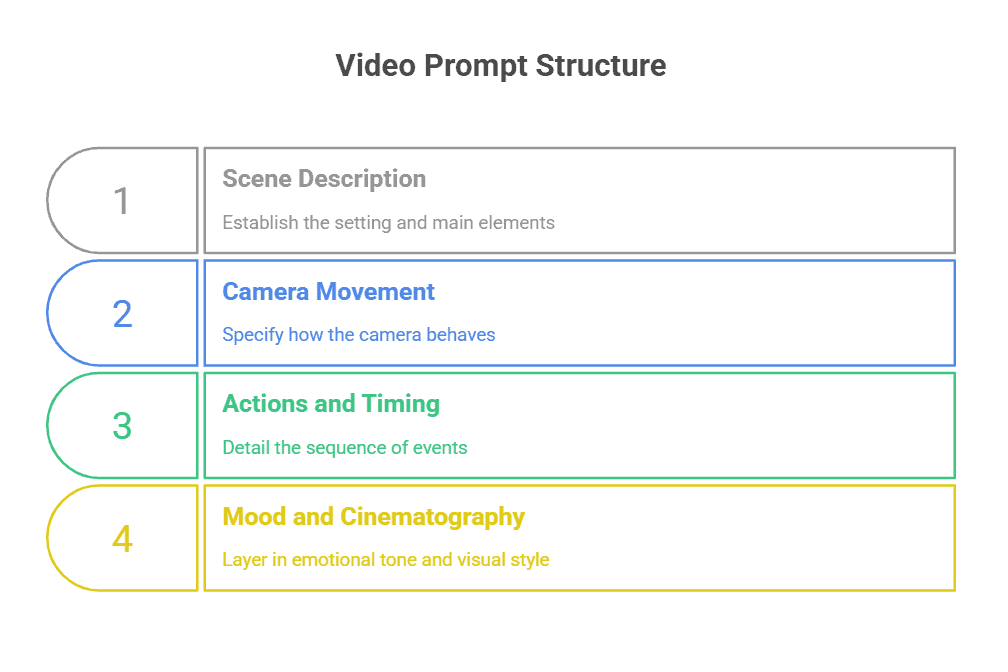
Scene Description
Start with the setting and main elements. What’s happening in your video? This is your foundation, the stage where everything unfolds.
Instead of just “a woman in a park,” you’d write “a woman jogs through a foggy park at dawn, passing empty benches and lamp posts.” You’re establishing the world before adding motion to it.
Keep this concrete. The AI needs to know what exists in the scene before it can animate it.
Camera Movement
Here’s where you add drama. How does the camera behave? Does it stay locked in place? Follow your subject? Drift slowly across the scene?
Camera movement shapes how viewers experience your video. A slow pan creates calm. A quick zoom builds tension. A tracking shot following someone walking pulls viewers into the journey.
Common movements to specify: static shot, pan left/right, zoom in/out, dolly forward/back, tracking shot, handheld shake, aerial view descending. Each creates a different feel.
Actions and Timing
What changes during your clip? This is your sequence of events. Does someone turn around? Does a leaf fall? Does light shift across a wall?
Be specific about what moves and when. “The cat stretches, then jumps onto the windowsill” gives clear direction. “A cat moves” leaves too much to chance.
Think in beats. What happens first? What happens next? Video AI needs this roadmap to create smooth transitions between actions.
Mood and Cinematography
Now layer in the emotional tone and visual style. Are you shooting a dreamy indie film? A crisp documentary? A moody thriller?
Terms like “cinematic depth of field,” “golden hour lighting,” “handheld documentary style,” or “slow-motion capture” tell the AI what kind of film language to use. This affects everything from colour grading to how motion blurs.
The mood ties your technical elements together into something that feels intentional, not random.
Video Prompt Examples
Seeing structure in action helps. Let’s look at how two major platforms handle prompts differently.
Sora Example
Sora excels at narrative, cinematic sequences. Recent examples show it handles complex scenes with natural motion and realistic physics.
Here’s a full Sora-style prompt:
“Several giant wooly mammoths approach, treading through a snowy meadow. Their long wooly fur lightly blows in the wind as they walk. Snow-covered trees and dramatic snow-capped mountains fill the distance. Mid-afternoon light with wispy clouds and a sun high in the distance creates a warm glow. The low camera view captures the large furry mammals with beautiful photography, depth of field.”
Notice how it weaves scene description (mammoths in snowy meadow), action (walking, fur blowing), camera position (low view), and cinematography (warm glow, depth of field) into one flowing description. Sora responds well to this storytelling approach.
Runway Example
Runway tends toward more technical, effects-focused prompts. It’s particularly strong when you’re working from an existing image or need precise motion control.
A Runway-style prompt might look like:
“The camera dollies forward slowly through the abandoned warehouse. Dust particles float through beams of light from broken windows. The subject turns their head gradually to look behind them. Handheld camera with slight natural shake. Industrial atmosphere with high contrast lighting.”
This breaks down camera motion (dolly forward), environmental action (floating dust), subject movement (turning head), shooting style (handheld), and mood (industrial, high contrast) into clear, separate instructions. Runway’s engine uses these discrete elements to build the scene methodically.
What Is an Audio Prompt?
Audio prompts tell AI tools what sounds to create. Think music tracks, voiceovers, or sound effects.
Tools like ElevenLabs, Suno, and Udio turn your text descriptions into actual audio. You describe the mood, instruments, or voice characteristics you want, and the AI generates it.
According to Grand View Research, the AI voice generator market is projected to grow from $3.5 billion in 2023 to $21.7 billion by 2030. That’s because creators need custom audio fast, without hiring musicians or voice actors.
Audio prompts work differently from text or image prompts. You’re describing what something should sound like, not what it should look like. Your prompt needs to capture tempo, tone, instruments, emotional quality, and duration.
Structure of an Audio Prompt
Audio prompts have three core elements. Miss one, and you’ll get generic results that don’t match what you’re hearing in your head.
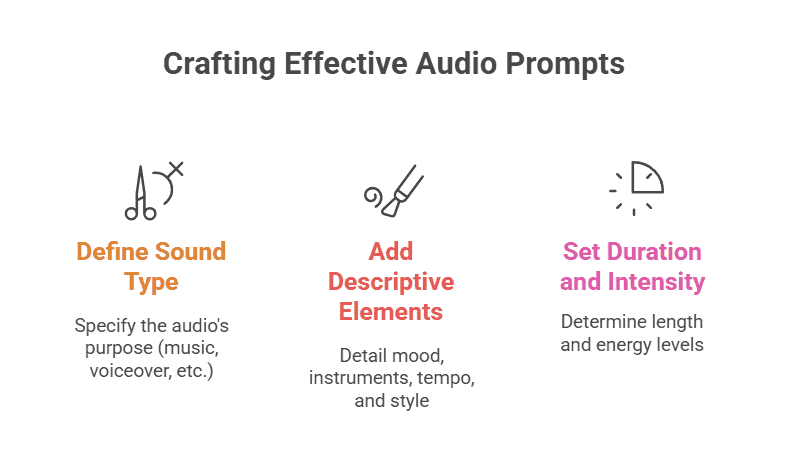
Sound Type and Purpose
Start by telling the AI what you’re making. Music? Voiceover? Sound effect?
This sets the foundation. If you want background music for a meditation app, say “calm ambient music for meditation.” If you need a podcast intro, specify “energetic voiceover for podcast introduction.”
The tool needs to know if it’s generating a 30-second jingle or a 3-minute track. Purpose shapes everything that follows.
Descriptive Elements
This is where you paint with words. Describe mood, instruments, tempo, and style.
For music, mention genre, instruments, and feeling. “Upbeat acoustic guitar with light percussion, folk style, optimistic mood.”
For voices, specify gender, age, accent, and emotion. “Middle-aged male voice, British accent, warm and trustworthy tone.”
For sound effects, describe the source and context. “Heavy wooden door creaking open slowly in an empty hallway.”
The more sensory detail you include, the closer the output matches your vision.
Duration and Intensity
Tell the AI how long and how intense the audio should be.
Duration matters for pacing. A 15-second music snippet needs different structure than a 2-minute track. Most tools let you specify length directly.
Intensity describes volume dynamics and energy level. “Gradually building from soft to powerful” creates a different feel than “consistent medium volume throughout.”
For voices, intensity affects delivery speed and emphasis. “Slow, deliberate speech with pauses for emphasis” sounds completely different from “quick, energetic delivery.”
Audio Prompt Examples
Let’s look at how these structures work in practice across different audio types.
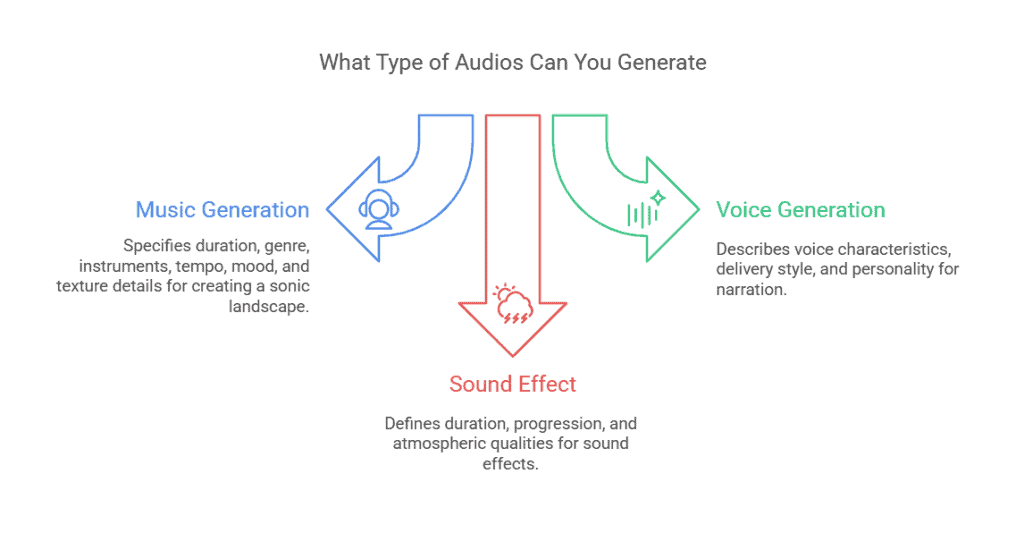
Music Generation
“Create a 90-second lo-fi hip hop track with mellow piano melody, soft vinyl crackle, and steady drum beat at 70 BPM. Relaxed, nostalgic mood perfect for studying. Include subtle bass line and occasional hi-hat flourishes.”
This prompt specifies duration, genre, specific instruments, tempo, mood, and texture details. The AI knows exactly what sonic landscape to build.
Voice Generation
“Generate a 45-second narration in a young female voice, American accent, enthusiastic and friendly tone. Clear pronunciation with slight upward inflection at end of sentences, as if explaining something exciting to a friend. Medium pace with natural pauses.”
Here you’re describing not just the voice itself but how it should deliver the content. Personality comes through in those details.
Sound Effect
“Create a 3-second sound effect of thunder rumbling in the distance, starting quiet and building to a low, powerful crescendo before fading out. Deep bass frequencies with atmospheric quality, suitable for a storm scene.”
Sound effects need precise duration and clear progression. You’re describing what happens over time, not just what it sounds like at one moment.
Common Mistakes To Avoid When Writing Prompts
You’ve learned the frameworks. Now let’s talk about what trips people up.
- Being too vague. “Make me a nice image” tells the AI nothing. What subject? What style? What colours? The AI will guess, and you probably won’t like the guess. Add specifics.
- Overcomplicating everything. Cramming 15 different ideas into one prompt creates chaos. The AI tries to include everything and produces a messy result. Pick one clear direction per prompt.
- Not iterating. Your first prompt rarely nails it. You need to generate, review, adjust, and try again. Treat prompting like a conversation, not a one-shot command.
- Ignoring platform differences. Each AI tool has strengths and limitations. A prompt that works great in Midjourney might fail in DALL-E. Read the documentation. Learn what your specific tool does best.
- Forgetting context. If you’re generating content for social media, specify aspect ratio. If it’s for kids, mention an age-appropriate tone. Context shapes everything.
Tips For Improving Your Prompts
Here’s how to get better results consistently.
- Start simple, then refine. Begin with a basic prompt. See what the AI produces. Then add details to steer it closer to your vision. This beats trying to write the perfect prompt on attempt one.
- Study examples. Look at prompt libraries and communities. See what works for others. Notice patterns in successful prompts, specific word choices, structure, detail level.
- Use the RCTF framework. For any prompt type, think Role, Context, Task, Format. This structure keeps you organised and ensures you include essential elements.
- Iterate based on results. If the output is close but not quite right, don’t start over. Adjust your prompt based on what you see. Too cartoony? Add “photorealistic.” Too serious? Add “playful tone.”
- Save what works. When you nail a prompt, save it. Build a personal library of effective prompts you can adapt later. You’re not starting from scratch every time.
Prompting is a skill. You get better with practice. The more you write prompts, the faster you’ll know what works and what doesn’t. Start experimenting today.