[Reader Disclosure]Our content is reader-supported. This means we may earn a commission if you click on some of our links.
Not too long ago, accounting meant drowning in spreadsheets, manually entering data for hours, and hoping you don’t miss a decimal point somewhere. It was slow, repetitive, and honestly, quite exhausting. But things have changed fast.
AI has quietly made its way into accounting, and it’s doing a lot more than people think. From sorting through invoices to catching errors, AI is taking over the grunt work so accountants can focus on the stuff that actually requires brainpower.
And the best part? You don’t need to be a tech wizard to start using it.
In this article, we’ll walk you through everything you need to know about using AI for accounting: what it is, how it helps, the tools you can use, and what to watch out for along the way.
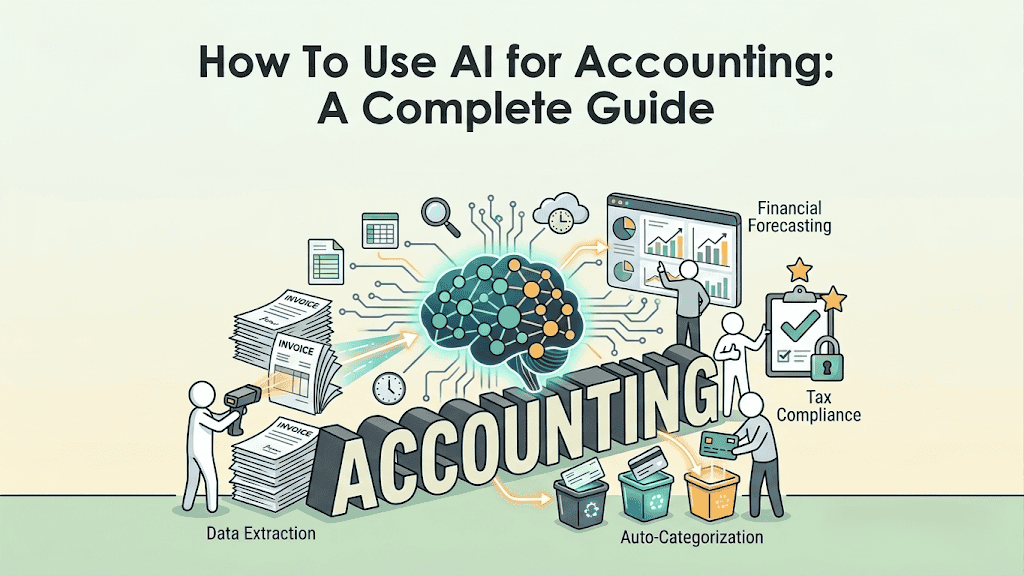
AI in accounting simply means using artificial intelligence to handle financial tasks that were traditionally done by hand. AI can now handle accounting tasks like data entry, transaction categorisation, invoice processing, reconciliation, and even fraud detection.
Here’s a simple example. Let’s say your business receives hundreds of invoices every month. Instead of someone manually reading each invoice, entering the details into a system, and matching it to a purchase order, an AI-powered tool can do all of that in seconds.
It reads the invoice, extracts the relevant data, matches it to the right order, and flags anything that looks off.
It’s not about replacing accountants. It’s about freeing them up to do higher-value work like advising clients, planning finances, and making strategic decisions. The number-crunching? AI handles that now.
Key Benefits of Using AI for Accounting
AI isn’t just a flashy upgrade. It solves real problems that accounting teams deal with every day. Here’s what you stand to gain:
You save a ton of time: Tasks like data entry, reconciliation, and invoice processing that used to take hours can now be done in minutes. According to industry reports, AI can handle 30% to 46% of manual tasks performed by accounting professionals.
You reduce human errors: Manual data entry typically has error rates of 1–4%. AI-powered tools can push accuracy rates above 95%, which means fewer mistakes and fewer headaches down the line.
You get real-time financial insights: Instead of waiting until month-end to know where your business stands, AI tools give you up-to-date dashboards and reports so you can make decisions on the fly.
You can scale without hiring a massive team: AI lets smaller teams handle larger workloads. This is especially helpful for growing businesses or firms that experience seasonal spikes in demand.
You catch fraud early: AI can scan thousands of transactions and spot unusual patterns that a human might easily miss. This makes fraud detection faster and more reliable.
You stay compliant more easily: AI tools can keep up with changing tax laws and regulations, automatically flagging issues and helping you stay on the right side of the law.
Common Use Cases of AI in Accounting
AI isn’t just useful in one area of accounting. It’s showing up across the board. Here are the most common ways businesses are putting it to work.
Accounts Payable and Receivable
This is one of the biggest areas where AI is making an impact. AI-powered tools can automatically process invoices, verify vendor details, route invoices through the correct approval paths, and schedule payments, all without manual intervention. On the receivable side, AI can track outstanding payments, send automated reminders, and even predict which clients are likely to pay late.
Financial Reporting and Analysis
AI can pull data from multiple sources, generate financial reports, and even provide written commentary on the numbers. For example, some tools can explain why revenue dipped in a particular quarter or highlight cost-saving opportunities.
If you’re evaluating a potential investment, you can pair these insights with tools like an internal rate of return calculator to quickly assess whether a project is worth pursuing.
Bookkeeping and Data Entry
If there’s one thing accountants are happy to hand off to AI, it’s data entry. AI tools can read receipts, bank statements, and invoices, then automatically extract and categorise the information into the correct accounts. Some platforms claim to reduce manual data entry by up to 90%.
Bank Reconciliation
Matching transactions across bank statements and accounting records used to be one of the most tedious parts of accounting. AI now automates this process by identifying matches, flagging discrepancies, and learning from corrections over time.
Tax Preparation and Compliance
AI is getting surprisingly good at tax prep. For simpler cases like individual tax returns, AI can handle much of the preparation work, including gathering documents, running calculations, and identifying deductions. For more complex filings, it serves as a first pass that human accountants can review and refine.
Fraud Detection and Risk Assessment
AI’s ability to analyse massive datasets makes it ideal for spotting anomalies. Whether it’s an unusual transaction pattern, a duplicate payment, or an expense that doesn’t match company policy, AI flags it in real time. This is a game-changer for both internal audits and external compliance.
Expense Management
Tracking, categorising, and approving expenses is another area where AI shines. Employees can simply upload a receipt, and the AI will categorise it, check it against company policies, and flag anything that doesn’t add up. No more chasing people down for missing receipts.
How to Use AI for Accounting
Getting started with AI in accounting doesn’t have to be overwhelming. Here’s a step-by-step approach to help you ease into it.
Step 1: Identify your pain points. Start by looking at where your team spends the most time on repetitive, manual work. Is it invoice processing? Data entry? Month-end close? Pick the area that’s eating up the most hours.
Step 2: Audit your existing tools. You might already have AI capabilities built into the software you’re using. Platforms like QuickBooks, Xero, and Zoho Books have been adding AI features steadily. Check what’s available before you go shopping for new tools.
Step 3: Start with a small pilot. Don’t try to overhaul everything at once. Pick one high-friction workflow, like accounts payable or monthly reporting, and run a 30-to-60 day pilot. Measure the time savings, error reduction, and team feedback.
Step 4: Choose the right AI tool. Based on your pilot results, evaluate tools that fit your needs and budget. Look for features like integration with your existing systems, data security, audit trails, and the ability to scale as your business grows.
Step 5: Train your team. AI tools are only as good as the people using them. Make sure your team understands how the tool works, what it can and can’t do, and how to review AI-generated outputs. The goal is supervision, not blind trust.
Step 6: Monitor and optimise. Once you’ve rolled out your AI tool, keep an eye on performance. Track metrics like processing time, accuracy rates, and cost savings. Use these insights to fine-tune your workflows and expand AI adoption to other areas.
Step 7: Keep humans in the loop. AI should assist, not replace, professional judgment. Always have review checkpoints in place, especially for client-facing work, tax filings, and financial reporting.
Best AI Tools for Accounting
Here’s a quick look at some of the top AI accounting tools available right now:
Tool
Best For
Pricing
QuickBooks Online
Small to mid-sized businesses, bookkeeping, invoicing
AI is powerful, but it’s not perfect. Here are some challenges you should be aware of:
Data security and privacy risks. AI tools process sensitive financial data, which makes them a potential target for breaches. You need to make sure any tool you use has strong encryption, access controls, and compliance with data protection regulations.
The “black box” problem. Some AI models are hard to interpret. In accounting, where transparency is critical, not being able to explain how the AI arrived at a particular conclusion can be a real issue, especially during audits.
Integration headaches. Getting AI tools to work smoothly with your existing accounting software, ERP systems, and workflows can be tricky. Disconnected systems create more work, not less.
Over-reliance on AI. If your team starts trusting AI outputs without reviewing them, mistakes can slip through. AI can hallucinate, misinterpret data, or apply rules incorrectly, and in accounting, even a small error can have big consequences.
Cost and ROI concerns. While many tools offer affordable plans, enterprise-level AI solutions can be expensive. If results aren’t immediate, it can be hard to justify the investment, especially for smaller firms.
Skills gap. AI is changing what accountants need to know. Entry-level tasks that used to help junior accountants build foundational skills are now being automated, which creates a training gap that firms need to address.
Regulatory uncertainty. AI regulations are still evolving. What’s compliant today might not be tomorrow, so you need to stay on top of changing rules around AI usage in financial contexts.
Best Practices for Using AI in Accounting
To make the most out of AI without running into trouble, keep these best practices in mind:
Start small and scale gradually: Don’t automate everything at once. Begin with one or two processes, prove the value, then expand. Quick wins build internal buy-in.
Always review AI outputs: Treat AI results as a starting point, not the final answer. Have a qualified accountant review any AI-generated reports, filings, or classifications before they go out.
Invest in training: Make sure your team understands the tools they’re using. This includes not just how to operate them, but also how to critically evaluate what the AI produces.
Create a clear AI usage policy: Define what AI tools are approved, how they should be used, and what data can be fed into them. This helps prevent shadow AI, which is staff using unapproved tools that may compromise data security.
Prioritise data security: Choose tools with strong encryption, SOC 2 compliance, and clear data handling policies. Never send sensitive client data through tools that don’t meet your security standards.
Keep audit trails: Make sure your AI tools document every automated action. This is essential for compliance, internal audits, and building trust with clients.
A startup consultant, digital marketer, traveller, and philomath. Aashish has worked with over 20 startups and successfully helped them ideate, raise money, and succeed. When not working, he can be found hiking, camping, and stargazing.
Each week I share research backed AI oriented content in my newsletter.
There are AI ideas, AI trends, tutorials, and guides.
24k entrepreneurs read it. I'd love you to join.