Now, businesses store everything digitally, but that brings its own problems. Files scattered across email, shared drives, and individual computers. Finding what you need takes too long, and keeping track of different versions is difficult.
That’s where document management systems come in. A DMS gives you one place to store, find, and manage all your documents. It’s not just digital storage, it’s a system that organises files, tracks changes, and lets your team collaborate without the usual chaos.
In this guide, we’ll walk you through what a DMS actually does, how it works, and how to pick the right one for your needs.
What Is a Document Management System?
A document management system is software that stores, organises, and tracks your digital files in one place.
Instead of going through folders on your computer or shared drives, a DMS lets you find any document in seconds. It works with all file types, PDFs, Word docs, images, and even spreadsheets.
Here’s what it actually does: It captures documents from different sources, tags them with searchable information, and stores them securely. When you need something, you type in a keyword and it appears.
How Document Management Systems Work
A DMS follows a simple path: capture, store, organise, and retrieve. You bring documents into the system, it sorts them intelligently, and you pull them up when needed.
Let’s break down what happens at each stage.
Document Capture and Import
This is how files enter the system. You can scan paper documents, upload digital files, or even drag emails straight into the DMS. Some systems connect to other tools like accounting software, so invoices flow in automatically. The system converts everything into a digital format it can read and organise.
Storage and Organisation
Once captured, documents live in a centralised database. The system creates a logical structure, like departments, projects, or document types. But unlike traditional folders, you’re not locked into one location. A contract can appear under “Legal” and “Client Name” at the same time without making copies.
Indexing and Metadata
The DMS then tags each document with metadata, details like author, date created, document type, and keywords. Some systems read the content and auto-tag based on what they find.
You can add custom tags too. This creates multiple ways to find the same document later.
Retrieval and Search
When you need a document, you search by any tag or keyword. The system scans metadata and even text inside documents. Type “Q4 budget presentation” and it surfaces everything related, even if the file is named “final_v3_UPDATED.pptx.” You can filter by date, author, or document type to narrow results.
Many new systems also let you preview files directly in your browser. You can embed Excel workbooks online for viewing and even basic editing without downloading anything, which speeds up collaboration when teams need to reference data quickly.
Version Control and Tracking
The system tracks every change made to a document. When someone edits a file, it saves the new version but keeps the old ones. You can see who made changes and when. If someone messes up, you roll back to a previous version.
Key Features of a DMS
Not all document management systems are built the same. The right combination of features can make the difference between a system that saves time and one that creates bottlenecks.
Here’s what you should look for:
- Version Control: Tracks every change made to a document and lets you restore previous versions if needed.
- Access Permissions: Controls who can view, edit, or delete specific documents based on their role. It’s like giving different people different keys to different rooms.
- Workflow Automation: Routes documents through approval processes automatically, like sending invoices to the right manager without manual forwarding.
- Collaboration Tools: Lets multiple people work on the same document simultaneously with real-time updates and commenting features.
- Compliance Tracking: Monitors document retention schedules and creates audit trails showing who accessed what and when. Essential for industries with strict regulations.
- Integration Capabilities: Connects with your existing tools like email, CRM, or accounting software so documents flow between systems seamlessly.
- Advanced Search: Finds documents instantly using keywords, dates, or content within files. It’s like having Google for your company’s files.
- Mobile Access: Lets you view and approve documents from your phone or tablet when you’re away from your desk.
Types of Document Management Systems
Document management systems aren’t one-size-fits-all. They come in different forms based on how they’re deployed, what they do, and who uses them. Understanding these types helps you figure out which setup matches your actual needs rather than settling for something that’s either overkill or underwhelming.
By Deployment Model
Where your DMS lives matters. Some systems run entirely online, others sit on your own servers, and some split the difference. Here’s how each approach works:
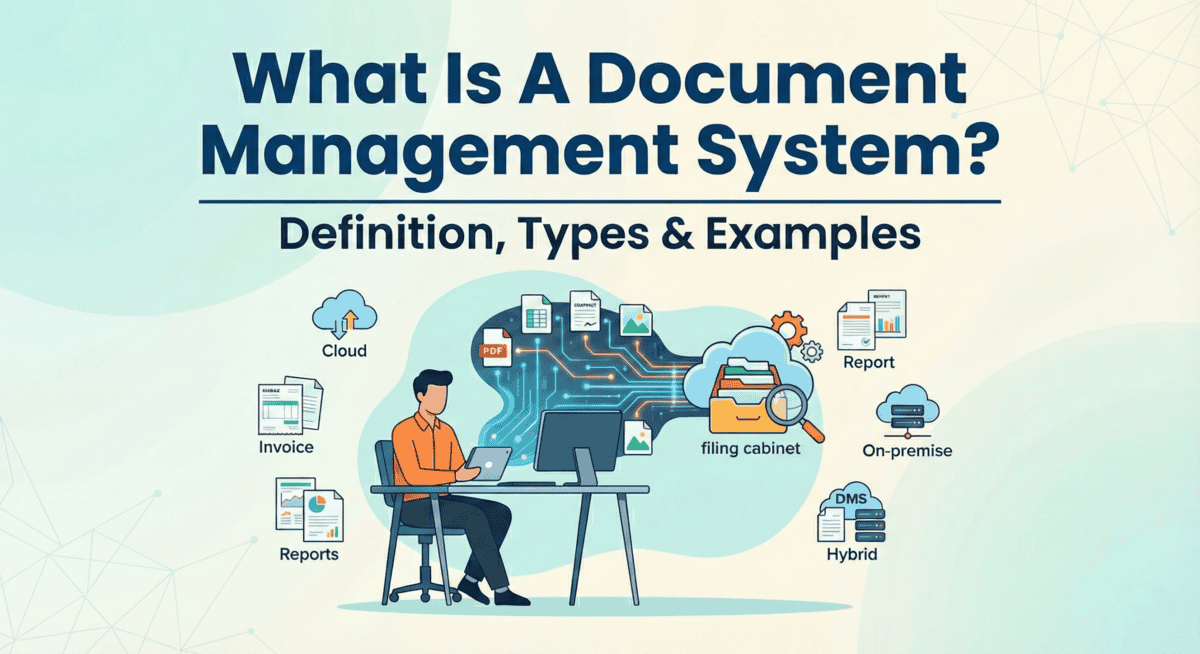
- Cloud-Based DMS: Lives entirely online and accessed through your browser. The vendor handles updates, backups, and server maintenance. Popular with remote teams since everyone can access files from anywhere with internet.
- On-Premise DMS: Software and documents sit on servers you own and control. Your IT team manages everything from installation to security patches. Companies in heavily regulated industries like healthcare or finance prefer this because it keeps sensitive data within their walls.
- Hybrid DMS: Combines both approaches. You might store active documents on local servers while archiving older files in the cloud, or use on-premise for sensitive data and cloud for collaboration. Flexible but requires managing two systems at once.
By Functionality
Different systems focus on different tasks. Some just digitise paper, while others automate entire workflows. Here’s what each type specialises in:
- Document Imaging Systems: Specialise in converting paper into digital files. Focus on capture and retrieval without much else. Good for offices drowning in physical paperwork who need a straightforward digitisation solution.
- Enterprise Content Management (ECM): The heavyweight option that handles way more than just documents, emails, images, videos, records, everything. Includes retention rules, automated workflows, and connects with other business systems.
- Records Management Systems: Focus specifically on handling records according to legal and regulatory requirements. Track retention schedules, trigger automatic deletions when allowed, and maintain audit trails. Government agencies and legal departments rely on these to stay compliant without manually tracking every document’s lifecycle.
- Workflow Management Systems: Route documents through approval processes automatically. A purchase order goes from requester to manager to finance to vendor without anyone manually forwarding it.
By Scale
The size of your organisation determines what system makes sense. Small teams need different features than multinational companies. Here’s how systems scale:
- Departmental DMS: Designed for single teams like HR or legal. Solves one department’s specific document challenges without trying to serve the entire company. Limited user count with focused features.
- Small Business DMS: Streamlined systems with essential features and pricing that doesn’t require enterprise budgets. Sacrifice some advanced capabilities for simplicity and affordability. Perfect when you need better than filing cabinets but don’t require complex integrations.
- Enterprise DMS: Built for thousands of users across multiple locations and departments. According to market research, the US document management system market hit $2.17 billion in 2025 and is expected to reach $7.25 billion by 2033, growth driven largely by enterprise adoption. These systems offer extensive customisation, integration with existing software ecosystems, and the infrastructure to handle massive document volumes.
Examples of Popular Document Management Systems
The DMS market offers plenty of options, from enterprise-level platforms to nimble cloud solutions. Here’s what you’ll find if you start shopping around for a system.
This is a hybrid platform that large organisations rely on. SharePoint works as both a DMS and collaboration hub, which means teams can manage documents while chatting, sharing calendars, and running project workflows in one place.
Enterprises like it because it integrates with the Microsoft ecosystem they’re probably already using. The learning curve can be steep, but for companies deep into Office 365, it makes sense.
2. DocuWare
DocuWare is cloud-based and appeals to mid-sized businesses that want quick digitisation without heavy IT involvement. It’s modular, so you can pick the features you actually need instead of paying for everything up front.
Companies in manufacturing and accounting use it a lot because it handles invoices, purchase orders, and compliance paperwork pretty smoothly. The interface is straightforward enough that employees don’t need days of training.
3. M-Files
M-Files takes a different approach by organising documents based on what they are, not where they’re stored. Instead of digging through folder hierarchies, you search by metadata like client name or project type. Professional services firms and legal teams find this useful because they deal with complex document relationships. It’s flexible enough to connect with existing systems without forcing you to migrate everything at once.
4. Box
Box is fully cloud-based and targets businesses that prioritise remote collaboration. It’s simpler than enterprise systems like SharePoint but more robust than basic file storage. Tech companies and creative agencies use it because sharing files externally is painless.
The security features meet compliance requirements without getting complicated. It plays nice with third-party apps, which matters if your team uses a mix of tools.
5. Laserfiche
Laserfiche focuses on workflow automation alongside document storage. Government agencies and healthcare organisations pick it because it handles records retention and regulatory compliance well.
It can process high volumes of paperwork, think permits, patient records, or legal filings, and route them automatically based on rules you set up. The system works on-premise or in the cloud, depending on your data policies.
How to Choose the Right DMS?
Picking a document management system isn’t like choosing office supplies. Get it wrong, and you’re stuck with clunky software nobody wants to use. Get it right, and your team works faster with less frustration.
Assess Your Business Needs
Start by asking yourself what’s actually broken. Are you losing files? Spending hours searching for documents? Struggling with version control?
Think about scale too. A five-person team needs something different than a company with 500 employees. If you’re planning to grow, you’ll want a system that grows with you. According to Grand View Research, the US document management market is expanding at 14.9% annually, driven largely by security and compliance demands.
Write down your top three problems. That’s your starting point.
Evaluate Key Selection Criteria
Once you know what you need, here’s what to look for:
- Ease of use: If your team can’t figure it out in 10 minutes, they won’t use it
- Scalability: Can it handle 10x your current document volume without choking?
- Security features: Look for encryption, access controls, and audit trails
- Pricing model: Monthly per user? One-time fee? Storage limits? Read the fine print
- Customer support: When things break at 4 PM on Friday, can you reach someone?
Test the system yourself before buying. Most vendors offer free trials. Click around. Upload files. See if it feels intuitive or frustrating.
Consider Integration Requirements
Your DMS needs to play nice with the tools you already use. Email, CRM, accounting software, project management apps. If it sits in isolation, you’re creating more work, not less.
Ask yourself: What systems do we use daily? Does this DMS connect to them? Some platforms offer hundreds of integrations. Others are more limited.
Check if the vendor provides APIs for custom connections. You might need them later.
Review Vendor Support and Training
Even the best system is useless if nobody knows how to use it. Look for vendors who offer onboarding help, training materials, and ongoing support.
What does their implementation process look like? Do they assign a dedicated person to help you migrate? Are there video tutorials, documentation, or live training sessions?
Read reviews about their support team. Response time matters when you’re stuck.
Benefits of Using a DMS
You’ve got the features. You’ve compared the types. Now here’s what actually changes when you implement a DMS, the real-world outcomes that affect your bottom line and day-to-day operations.
- Reclaim Hours Lost to Document Hunting: A DMS puts everything in one searchable place, so finding a document takes seconds instead of derailing someone’s entire morning.
- Slash Physical Storage Costs: No more renting storage units or dedicating entire rooms to paper archives. One company storing 2 million documents annually can save thousands just by going paperless.
- Lock Down Security and Compliance: A DMS gives you permission controls, audit trails, and encryption. You know who accessed what and when. For industries with strict regulations, that’s not just convenient, it’s required.
- Enable Real Collaboration: Teams can work on the same document simultaneously. Marketing reviews the contract while legal adds notes. No email chains. No “final_final_v3” filenames.
- Protect Against Disasters: If your office goes down, your files don’t. You’re back in business faster because nothing’s actually lost.
- Speed Up Decision-Making: When executives need last quarter’s report, they get it instantly. No waiting for someone to find it. No delays because Karen’s on vacation and she’s the only one who knows where it’s filed. Faster access means faster decisions.
Challenges and How to Address Them
Getting a DMS up and running isn’t always smooth sailing. You’ll likely hit a few bumps along the way, and that’s completely normal. What matters is knowing what to expect and having a plan to work through it.
Here’s what trips up most organisations:
- Employee pushback: People get comfortable with their current workflow. Switching to a new system feels like extra work, even when it’ll save time later.
- Migration headaches: Moving years of documents from filing cabinets or old servers into a DMS takes time. You’re not just uploading files; you need to organise them properly.
- Budget concerns: The upfront cost can be intimidating, especially when you factor in training and potential IT support.
- Training gaps: A powerful system means nothing if your team doesn’t know how to use it. Half-trained employees will either avoid the system or use it incorrectly.
Start small. Pick one department or document type to migrate first.
For employee resistance, involve people early. Ask what frustrates them about current document handling. When they see the DMS solving their actual problems, they’ll get on board.
Spread out costs by choosing a cloud-based DMS with monthly payments instead of a massive upfront investment. You can also phase the rollout, basic features first, advanced tools later.
Make training ongoing, not a one-time event. Short video tutorials work better than lengthy manuals. Assign a go-to person in each department who can answer quick questions without waiting for IT.