
Home / AI tools / AI watermark detector
AI watermark detector.
Check photos, videos and text for AI watermarks from ChatGPT, Gemini, Sora and more. This free AI watermark checker needs no login, and your files stay on your device.
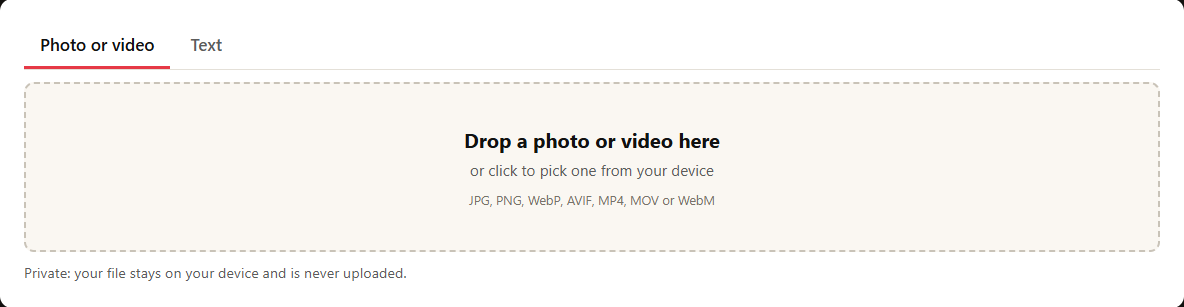
Drop an image or video into the AI watermark detector above, or paste in some text and hit check. That is the whole setup.
What comes back is more than one percentage. You get a plain answer, an AI score out of 100, which AI likely made it when the tool can tell, and the reasons behind that call. The evidence can be three very different things: a signed record sitting inside the file (the kind of Content Credentials backed by the C2PA standard), a label inside the file or an invisible watermark, or a statistical estimate based on how the writing reads.
It also tells you what it could not check. That last part matters more than most people expect, because a clean result is not proof of anything on its own.
Images and video are checked right here and never leave your device.
AI Watermark Checker for Every Major Model
Each generator leaves a different trace. Here is the exact step for each one, and what the tool gives you back.
ChatGPT Watermark Detector
Drop a ChatGPT image into the tool. It verifies the signed stamp sitting in the file, and names OpenAI when that stamp is intact. Paste ChatGPT text instead and it looks for leftovers such as utm_source=chatgpt.com and citation code, then adds a writing-style score. It cannot read OpenAI’s textGrain mark.
Claude Watermark Detector
Paste Claude text. You get a writing-style score plus a scan for leftovers. The tool cannot read Claude’s hidden mark, and neither can any other public one, because Anthropic holds the key and keeps detection in private preview. In our small test the score was 60 or more on 4 of 6 Claude passages, and it never named Claude. So treat any seller of a public Claude watermark detector with doubt.
Gemini Watermark Detector
Drop a Gemini, Imagen or Nano Banana image. The tool verifies Google’s signed stamp and reads the Made with Google AI label when the file carries one. You do not need the visible sparkle in the corner. It cannot read SynthID.
SynthID Detector and Checker
This tool cannot read SynthID. The result screen links to Google’s free SynthID Detector. It covers images, video and audio from Google, OpenAI, NVIDIA and Kakao. It needs a sign-in, and it does not check text.
Sora and Veo Video Detector
Drop an original clip. The tool verifies its signed stamp. With no stamp, it scores frames pulled from the video. Veo clips are signed by Google, and original Sora clips by OpenAI. A clip saved out of a social app has usually lost its stamp by then.
C2PA and Content Credentials Checker
Drop any JPG, PNG, WebP or MP4 that carries Content Credentials. The tool checks it against the C2PA trust list right on your device, then tells you who signed the file and whether it changed after signing.
Invisible Character Detector
Paste text. The tool flags hidden characters such as zero-width spaces, narrow no-break spaces and the private-use characters ChatGPT wraps around citations. It also says which ones are normal.
What This AI Watermark Detector Checks
This AI watermark checker looks for different things depending on what you give it. Here is the full checklist, format by format.
AI Image Detector and Checker
Every image goes through five passes. It checks for C2PA signatures, plain metadata labels, and the generation settings that tools like Stable Diffusion and ComfyUI write into PNG files. Those settings name the model and the prompt, which is often enough to identify the maker. It also looks for China’s AIGC label, a mark that AI services based there are required to add.
Then it scans the pixels for the invisible marks used by public Stable Diffusion and Flux models. Last, it runs an on-device check on how the image looks, since some AI pictures carry no marks at all.
AI Video Detector and Checker
Video gets the same treatment, minus the PNG settings. The tool reads C2PA signatures and the AIGC label, then looks for stream markers left by generators such as Kling. On top of that, it pulls frames from the clip and scores them with the same on-device check it uses for images.
AI Text Detector
Text starts with leftovers. Chatbots sometimes leave citation fragments or hidden characters behind, and those are easy to spot. Then, if you pasted at least 50 words, the tool adds a GPT-5.5 estimate of how the writing is put together. That is a statistical guess about word choice and sentence rhythm, not a mark sitting in the file.
What It Cannot Read
Some marks stay out of reach. SynthID, Claude’s word-choice pattern and OpenAI’s textGrain all need a key their makers hold, so this AI watermark detector cannot read them. For SynthID, Google’s and OpenAI’s own checkers are the only option.
How to Read Your Result
The result screen leads with one plain line, then shows the evidence under it. Read it top to bottom.
The Answer at the Top
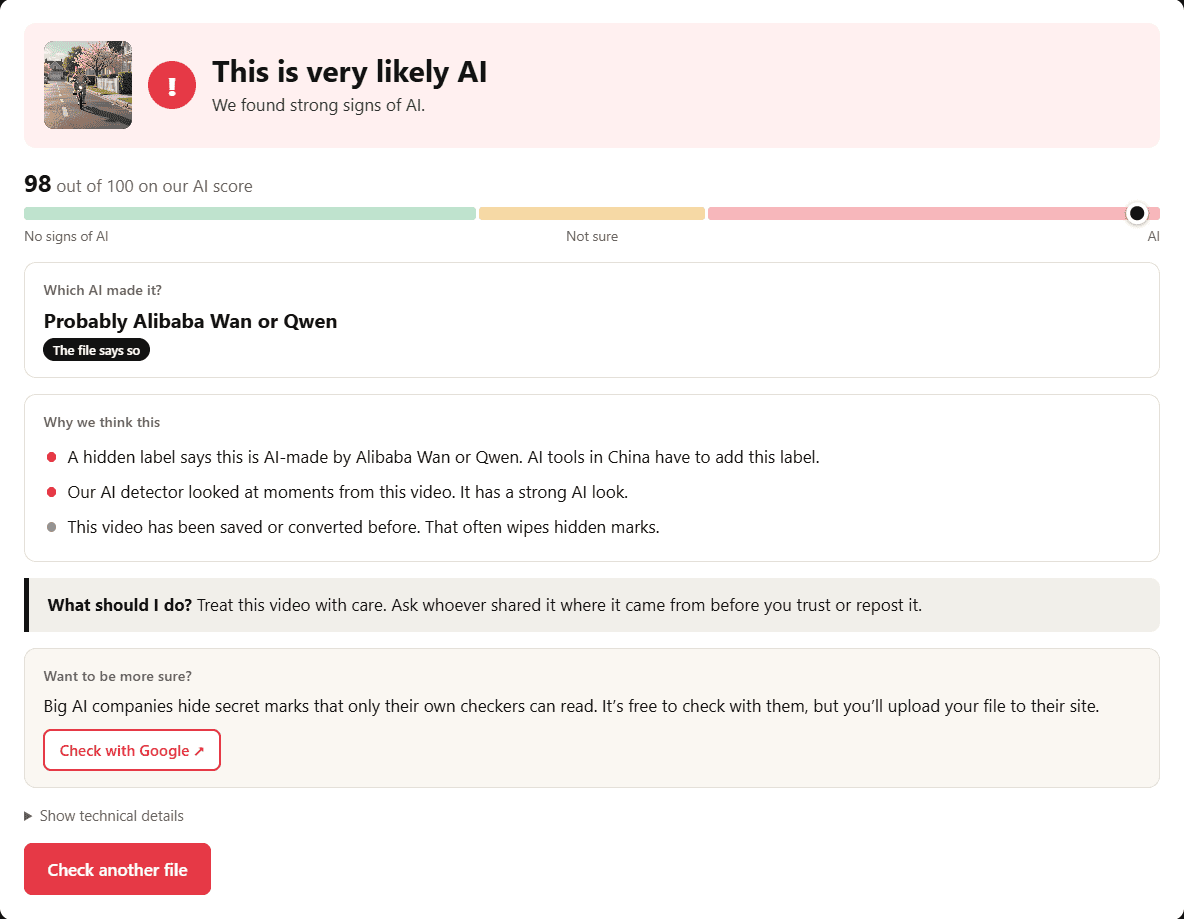
The top line gives the verdict in one of five phrases: Yes, this was made with AI, This is very likely AI, This is probably AI, We can’t tell, or We found no signs of AI.
Only the first one is proof. It appears when the file carries a signed digital stamp that chains to the C2PA trust list. Everything below it is a matter of degree.
The AI Score
Under the verdict sits a score from 0 to 100, on a three-part bar labelled No signs of AI, Not sure and AI. Think of it as an estimate that pulls all the evidence into one number, not as a measurement.
Text scores need the most care. In one study of 15 language models judging AI text, across 233,428 judgements, the tests used unedited samples. Real writing is often cut and rewritten, and that can pull a score in either direction.
Which AI Made It?
When the tool can name a maker, it names one, with a small tag beside it. Confirmed by the stamp is the solid one. The file says so means the file claims a maker in its own metadata, and anyone can edit that with free software. Best guess is just that. If nothing names a tool, the result says so rather than inventing one.
Why We Think This
This lists the reasons in plain words: what turned up in the file and what the estimate leaned on. What should I do? sits right under it and gives you one next step. Anyone who wants the raw evidence can open Show technical details.
When We Find Nothing
We found no signs of AI does not mean a person made the file. The detector misses about 3 in 10 AI images. Saving and sharing also wipes marks. Take a screenshot of a signed image and its signature is gone, though nothing in the picture looks different. A clean result is a gap in the evidence, not proof of anything.
How This AI Watermark Detector Works
Checks run in order of strength. The strongest evidence is read first, the weakest last. Images and video are checked right here in your browser. Only the writing-style check for text uses a server.
What We Check
Each check looks for one kind of trace, from a signed record down to a plain guess based on how the writing reads.
Check | What we read | How we verify it | Evidence level |
|---|---|---|---|
Signed Content Credentials | The C2PA record in JPG, PNG, WebP and MP4 files | Validated with the official c2pa-web library against the C2PA trust list and the Content Credentials list | Proof, if the signature is trusted and states AI |
Expired or unknown signatures | The same record, when the signer isn’t trusted or the certificate has lapsed | Reported with the signer’s name, never as proof | Label in file |
Metadata labels | IPTC digital source type, EXIF and XMP fields such as Software, Make and Credit | Matched against known AI tool names and IPTC values | Label in file |
China AI label | The AIGC field required by GB 45438, in image and video metadata | Producer codes matched to the company behind them | Label in file |
Generator settings | Stable Diffusion and ComfyUI settings stored in PNG text fields | Parsed for the sampler settings and model name | Label in file |
Video stream markers | Text tags in the first 2 MB of video data, such as kling-ai | Exact string match | Label in file or hint |
Public invisible watermarks | The fixed Stable Diffusion 1.x, SDXL and Flux patterns | Decoded from the pixels. A match needs 86% to 92% of bits | Strong when found. A miss means nothing |
AI look check | The picture, or 6 frames from a video | Detectra v1 detector, run in your browser. Video uses the middle score | Estimate |
Text leftovers | Citation code, link tags and private-use characters from chatbots | Pattern match on the pasted text | Label in text |
Hidden characters | Zero-width spaces, narrow spaces and Unicode tag characters | Character scan, with allowances for French and other normal use | Hint or note |
Writing style | Pasted text of 50 words or more | Read by GPT-5.5. Only its numbers reach the result, so text can’t talk its way past the check | Estimate |
How the AI Score Works
The score starts at even odds. Each piece of evidence multiplies those odds by the amount in the table. The result is capped between 3 and 98, unless a trusted signature proves the file was made with AI.
The weights for the AI look check and the writing-style check come from our own test results, rounded down to stay cautious. The weights for labels and leftover hints are our own judgement, not measured values.
Evidence | Effect on the odds of AI |
|---|---|
Trusted signature stating AI | Treated as proof. The score shows 99 |
Public invisible watermark decoded | 200 times more likely |
Label in the file or text | 12 to 80 times more likely, depending on the label |
Hints | 1.6 to 10 times more likely |
AI look score of 88 or more | 25 times more likely |
AI look score of 65 to 87 | 5 times more likely |
AI look score of 35 to 64 | 1.3 times more likely |
AI look score under 35 | About 5 times less likely |
Writing-style score of 85 or more | 15 times more likely |
Writing-style score of 60 to 84 | 3 times more likely |
Writing-style score of 35 to 59 | About 3 times less likely |
Writing-style score under 35 | 5 times less likely |
Test Results
The tests ran on 30 October 2026, and the sets were small. Every AI file was an original, straight from the generator. A file that has been saved and shared will usually score lower.
Test | What we used | Result |
|---|---|---|
AI images, full tool | 41 original files from OpenAI, Google, Black Forest Labs, Ideogram, ByteDance, Baidu and Adobe | 38 flagged, 21 with signed proof, 3 missed |
AI video, full tool | 31 original files from Sora, Veo, Kling, Wan, Vidu, Seedance, Jimeng and LTX | 26 flagged, 5 with signed proof, 1 can’t tell, 4 missed |
AI look check alone | The same 41 AI images | 30 caught (73%) |
Real images | 129 images uploaded to Feedough from 2015 to 2018, scored on a desktop copy of the model | 4 flagged (3%), all designed ads or posters |
Real video | 4 phone clips and 5 short social clips not labelled as AI | None flagged, 1 phone clip came back as can’t tell |
Naming the maker | The 72 AI files above | A maker named on 56 |
AI text | 46 passages from gpt-4o-mini (25), MiMo v2.6 (15) and Claude Opus 5.5 (6) | 43 scored 60 or more (93%), 20 scored 85 or more |
Human text | 45 passages from Feedough articles published before 2020 | 4 scored 60 or more (9%), none scored 85 or more |
Naming the writer | 25 GPT passages and 6 Claude passages | OpenAI named on 25 of 25, Claude on 0 of 6 |
Invisible marks | 18 lossless test images and 40 real images | Read 8 of 18, none after a JPG save or a half-size resize, 0 false hits |
Hostile files | 6,008 corrupted and hand-crafted files | No crashes, slowest read 11 ms |
What We Haven’t Tested
Some things are still unproven. Files saved out of WhatsApp, Instagram or TikTok have not been tested yet, so the effect of those apps is unknown. Browser checks used Edge and phone emulation, not Safari, Firefox or real handsets. Text that a person has edited by hand has not been tested either. The 5 short social clips were never verified as real clips. And a model can only be tested on whatever existed on the test date, so newer outputs are outside these numbers.
Sources and Versions
This is tool version 1.1.2, last tested 30 October 2026, running on ONNX Runtime Web 1.31.1. These numbers apply to that version, and we update them when we re-test.
- C2PA technical specification
- c2pa-web library, version 0.15.5, from the Content Authenticity Initiative
- IPTC digital source type list
- Detectra v1 model card, built on Community Forensics (CVPR 2025)
- invisible-watermark, the open-source library behind the public patterns
- Wikipedia’s list of chatbot markup, the base for our text patterns
- aicheck test files, the source of our AI sample files
Is It Safe to Check a File Here?
Here is what happens to what you check.
Images and videos are read inside your browser. The checks run in a locked frame with no network access, so the file never reaches Feedough’s servers. Nothing is uploaded, and nothing is kept.
Pasted text is the one exception. The writing-style estimate sends that text to OpenAI through Feedough to score it. Feedough does not store it. Still, if the passage is sensitive, that trade is worth knowing before you paste it in.
Final Thoughts
Treat the result as one piece of evidence, not a verdict. A trusted signature settles it. Everything else is a nudge.
Whatever the number says, do not use it alone against a student or a writer. Marks die when files are saved and shared, and the text estimate is only a guess at word choice. Ask how the file was made first, and use our guide to detecting AI-generated content for other checks. If you want a second opinion, our lists of the best AI detectors and best free AI detectors are good places to start.
For marks this tool cannot read, there is only one route: Google’s SynthID Detector and OpenAI’s verification tool, since those marks need their owners’ keys. For everything else, the score is a starting point for a conversation, not the end of one.
More free tools
- Image to Prompt GeneratorTurn any image into a prompt you can reuse.
- Image Description GeneratorDescribe an image in clear words.
- Final Frame ExtractorPull the last frame out of a video.
- AI Prompt GeneratorWrite a better prompt for any model.
