
Query Fan-out generator
Type a question and press Generate to see the 10 searches each platform is most likely to run, ranked. Every platform runs at once, so switching tabs is instant.
- best running shoes for flat feet 2026
- stability running shoes for overpronation
- Brooks Adrenaline vs ASICS Kayano
Your website ranks on page one for a certain thing. But then you ask ChatGPT the same question, and it cites three other sites (not including yours).
Annoying? Yes. Random? No.
AI assistants don’t answer from a single search. They split your question into several smaller ones, read what comes back, and quote whichever pages answer those best. But you never get to see those searches.
That’s why Feedough’s query fan-out generator is here so you can see what AI searches for when you ask it a question. It predicts those fan-out queries for you, across five AI platforms, so you can write for what the AI is actually looking up.
What Is Query Fan-Out?
Query fan-out is how AI search engines break down a question into several subqueries, search them at the same time, and combine the results into one answer with citations.
For example, if you ask Google AI Mode for the “best laptop for video editing under $2,000. It doesn’t search that exact phrase and stop. It might also look up “GPU requirements”, “Premiere Pro specs”, “MacBook vs Windows comparisons and current prices”. Then it pulls the most useful passages from each search and writes one answer.
Google gave the technique its name when it launched AI Mode in 2025. The idea itself is older. What’s new is how much it now decides who gets cited.
Note: Not every question needs fan out. A simple fact like the capital of Spain barely needs one search. Comparisons, plans and buying decisions are where it goes wide.
Which AI search engines use query fan-out?
All major AI platforms use query fan-out technique in some form. Only Google has officially named it, so for the others, what you see below is observed behaviour:
AI search engine | Uses fan-out? | What we know |
|---|---|---|
Google AI Mode | Yes, confirmed by Google | Fans out the most on complex questions. Google upgraded the process alongside Gemini 3 in November 2025. |
Google AI Overviews | Yes, confirmed by Google | Listed next to AI Mode in Google’s documentation on AI features, with lighter fan-out for quicker answers. |
ChatGPT Search | Yes, when it browses | Searched the web on about 31% of prompts in one study, with around 2 sub-queries each time. Often adds “best”, “reviews” or the current year. |
Perplexity | Yes | The most open about it. Shows its sources and cites them inline. |
Gemini | Yes | Runs web searches when a question needs current information. |
Claude | Yes, when web search is on | Runs several searches for questions that need fresh information, then cites what it used. |
What Is a Query Fan-Out Generator?
A query fan-out generator is a tool that predicts the searches an AI engine will run for a given prompt. You give it a question. It gives you the sub-queries.
Why predict instead of just showing them? Because nobody outside these companies can see the real ones. Google doesn’t list fan-out queries in Search Console, Analytics or any paid product, and no AI company publishes them.
That also makes it a handy AI search query generator: put in any topic and you see the questions AI engines are likely to chase.
Here’s what you get from Feedough’s query fan-out tool:
- 10 predicted searches per platform, ranked from most to least likely
- Five platforms side by side: ChatGPT, Google AI Mode, Perplexity, Claude and Gemini
- Country targeting, so results fit the market you care about
- A branching map that shows exactly how one prompt splits apart
- One-click copy for a single search, one platform or all five
How to Use Feedough’s Query Fan-Out Generator
It takes under a minute. Here’s how to use it:
Step 1: Type your prompt the way a real person would
Write it like you’d type it into ChatGPT. Full sentences beat keywords every time. GEO” gives the tool almost nothing to work with, while “i want to know how GEO works” tells it what the person wants and how they talk. AI assistants are built for longer, more complex questions, so don’t hold back. You have up to 500 characters.
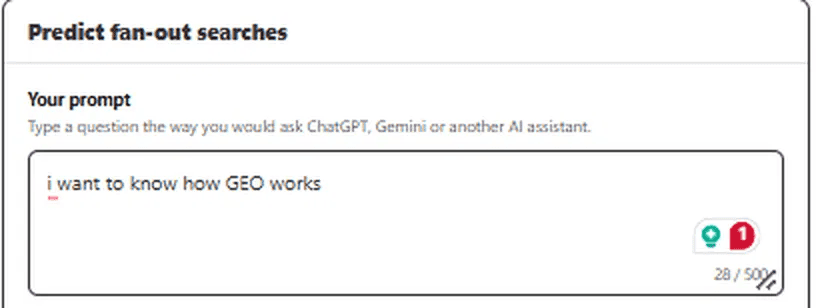
Step 2: Enter a location and click Generate
Skip the location for a broad view. Selling in one market? Enter a city or country, since AI engines can run different searches depending on location. Then hit Generate.

Step 3: Read the fan-out map
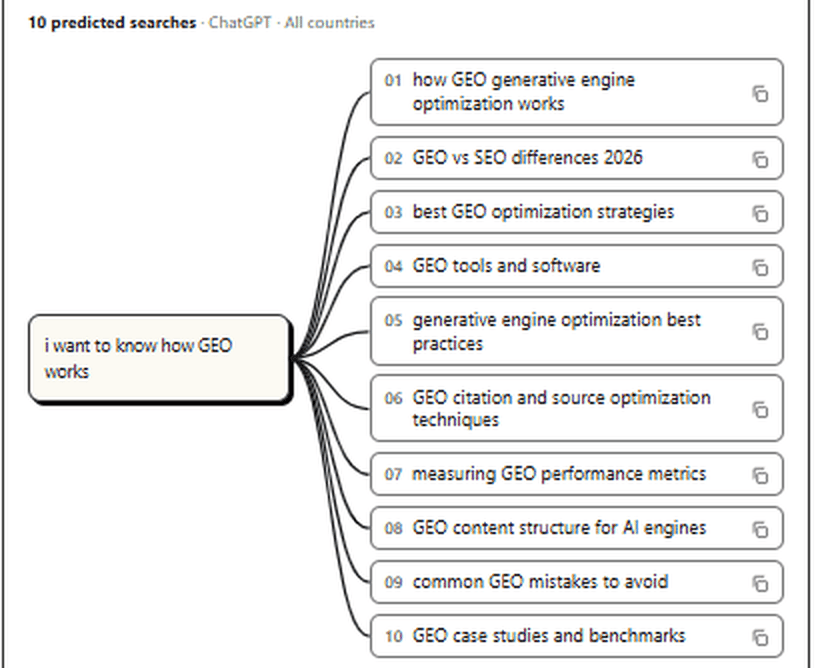
Your prompt sits on the left. Ten predicted searches branch out to the right, numbered in order.
For the GEO example, ChatGPT’s list includes “GEO vs SEO differences 2026”, “measuring GEO performance metrics” and “common GEO mistakes to avoid”. Notice the year? ChatGPT adds the current year to its searches a lot. Small details like that tell you how to phrase your headings.
Step 4: Switch between platforms
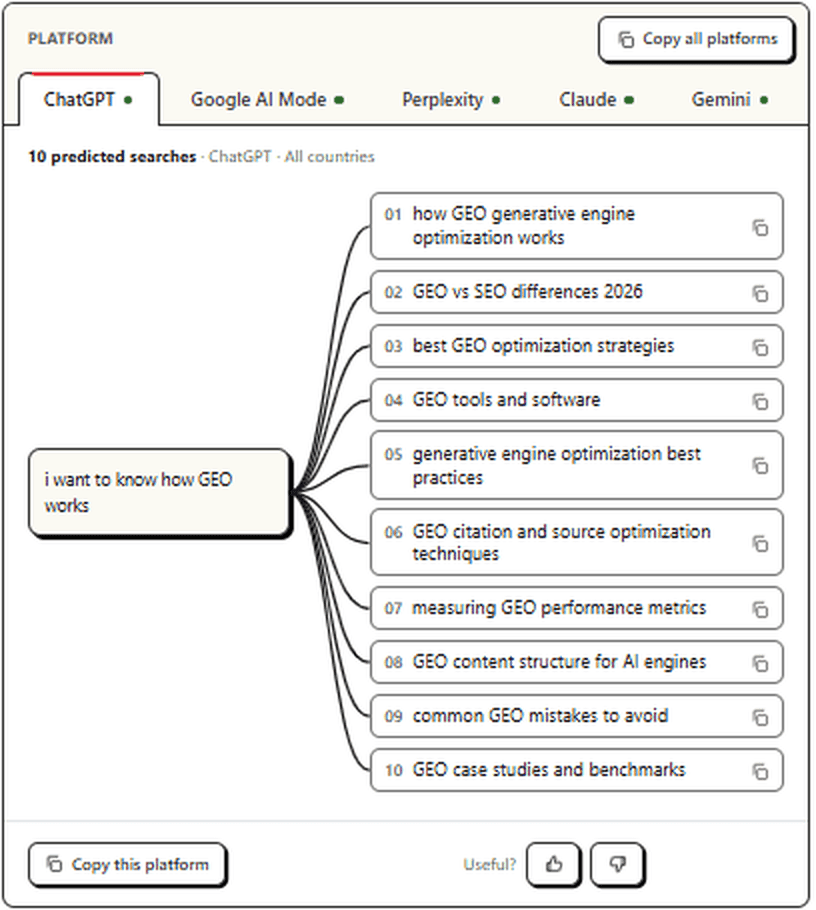
Click through the tabs. The lists won’t match. Each engine searches in its own way, and seeing them side by side shows you what all of them care about and what only one does.

Step 5: Copy what you need
Each search has its own copy icon. Want the whole list? Use Copy this platform. Want everything? Copy all platforms grabs all 50 searches at once. Paste them into your content brief, a spreadsheet or straight into your draft.
Why Use a Query Fan-Out Tool?
Because ranking and getting cited are no longer the same thing. The query fan out generator is needed for:
- GEO / AI visibility: find the sub-topics a page must cover to get cited in AI answers
- Content planning: turn one keyword into a full cluster of sections or articles
- Gap analysis: check which fan-out queries your existing content already answers and which it misses
Then there’s the platform gap. A study of 1.15 million questions found 79.6% of cited sources appeared on just one of five major AI engines. Write only for ChatGPT and you’re leaving Perplexity, Gemini and Claude to someone else.
How To Use The Fan-Out Queries
A list of searches is only useful if it changes what you publish. Match what you find to what you do next:
What you find | What to do |
A search your page already answers | Keep it. Make sure the answer sits in the first line or two under a clear heading, so the AI can lift it. |
A search your page doesn’t cover | Add a section. Use the search phrasing, or something close, as the heading. |
A search big enough for its own page | Write a supporting page and link it from your main one. That’s how topic clusters get built. |
The same search on three or more platforms | Cover this first. It’s your safest bet. |
A search only one platform runs | Cover it if your audience relies on that platform. |
A search phrased as a question | Turn it into an FAQ. |
Best Query Fan-Out Generators
Several free tools do this now. They work quite differently, and those differences decide which one fits your job.
1. Feedough Query Fan-Out Generator
Feedough’s query fan-out generator is the only tool on this list that starts from a full prompt and shows predicted searches for five AI platforms side by side. You get 10 ranked searches each for ChatGPT, Google AI Mode, Perplexity, Claude and Gemini, plus country targeting, a visual map and copy buttons for everything. Free to use. If you want to know how different AI engines will treat the same question, start here.
2. LLMrefs
LLMrefs also works from a full prompt, but you pick one AI model at a time. Its handy extra: every result has Google and Bing buttons, so you can check who already ranks for it. Good for digging deep into a single platform.
3. Wellows
Wellows starts from a seed keyword, not a prompt. It returns 40+ variants across eight types, such as follow-up, generalization and specification, sorted into priority tiers. The form asks for your domain and email. CSV export is included, which makes it useful for keyword-style research at volume.
4. SEO Review Tools
Type a keyword or topic into SEO Review Tools and you get related queries labelled by intent: informational, navigational, commercial or transactional. Export to CSV. Simple and quick.
5. Rankability
Rankability groups its results into reformulations, related questions, comparisons and adjacent topics. You can flip between a list and a tree view, or export the whole thing as a PNG. It’s the most visual of the keyword-based options, so it suits topic planning sessions.
Writing for one keyword? Any of the keyword tools will do. Writing to get cited by ChatGPT, Gemini and Perplexity at once? You need results split by platform, and that’s what Feedough’s tool is built for.
