Feedough Logo

Blog

  • How To Create A Video Ad Using AI (Step-by-Step)

    How To Create A Video Ad Using AI (Step-by-Step)

    AI isn’t just taking over coding, content writing or customer service.

    There is now constant innovation happening in video creation as well.

    For example, Google’s VEO 3 can now even create videos with audio and sound effects. Kling can now generate lifelike product demonstrations with zero filming required.

    There are even several open-source AI video generators, such as Wan and Genmo, that are changing how creators create videos without big budgets.

    But here’s the catch – most AI tools still struggle with longer formats (most are stuck at the 8-to-15-second mark), which works for social snippets but falls short for full ads. Moreover, there is no one-size-fits-all solution yet to create a video ad using AI.

    So, you’d need to do a lot of mix and match to create a polished 30-second spot.

    It’ll include using several AI tools to –

    • Write the script,
    • Create a storyboard
    • Convert that storyboard into stills
    • Create consistent characters
    • Convert stills to videos
    • Add voiceover and BGM

    And then manually edit (or use AI) to piece it all together smoothly.

    I know it sounds complicated, but the process is actually quite straightforward once you break it down.

    Before I move into steps, here’s the tool stack we’ll be using –

    1. Scripts – ChatGPT with search
    2. Storyboard – Boords
    3. Image generation – Midjourney, Reve, ChatGPT, Gemini, and Dreamina
    4. Image to video – Sora
    5. Video generation (with audio) – VEO 3 by Google
    6. VO Generation (text to speech) – Eleven Labs

    While there are several other AI generators that can handle these steps, I’ve found this combination works best. It makes it easier to create a video ad using AI that looks both professional and compelling

    Here’s how it all comes together:

    Step 1: Come Up With A Video Ad Script

    An idea doesn’t automatically lead to the final script. You need structure.

    Start simple. Just answer three questions:

    1. Who is this ad for?
    2. What problem does it solve for them?
    3. Why should they care?

    Keep it tight. No fluff.

    For example, if you’re selling a productivity app, your answers might look like this:

    • Who? Busy professionals drowning in tasks
    • What? Saves 2 hours daily by automating repetitive work
    • Why? More free time means less stress and better work-life balance

    Type these answers into ChatGPT with a clear prompt:

    You are a skilled copywriter with a knack for crafting engaging video ad scripts that resonate with your target audience. Your expertise lies in crafting concise narratives that not only capture attention but also drive action.
    
    Your task is to write a 30-second video ad script for a product. Here are the details you need to incorporate:
    
    - Product: __________
    
    - Target Audience: __________
    
    - Problem Being Solved: __________
    
    - Key Benefit: __________
    
    ---
    
    The script should be conversational in tone, engaging the audience as if having a friendly chat. Keep it under 200 words while ensuring the core message is clear and compelling.
    
    ---
    
    Make sure to emphasise how the product uniquely addresses the problem and highlight the key benefit that makes it stand out from competitors. 
    
    ---
    
    Avoid jargon and keep the language simple and relatable, appealing to the emotions and needs of the target audience.
    

    The AI will spit out multiple versions. Pick the strongest one.

    Now tweak it and read it aloud. Don’t think that anything that reads correctly in your ‘mind’will sound natural when spoken. It’s a totally different story.

    Does it sound natural?

    If not, cut any jargon or create a prompt to simplify it further.

    Here’s a trick: Record yourself reading the script. Listen back. Does it flow? Does it sound like something you’d actually say in a real conversation?

    If not, keep refining.

    Once it passes the “human test,” move to step 1.5.

    Step 1.5 involves converting your normal script to a two-column format or a dual-column video script format. Now, this is different from a standard script.

    The left column lists the visuals—what the audience sees. The right column has the audio—what they hear.

    Since it’s an AI ad, you’ll want to know what visuals you need to prepare while adding your voice script to Eleven Labs. Plus, once done, you’d need to create prompts for frames you’d want in MidJourney or another AI image generator.

    Here are two ChatGPT prompt continuations of the above that will convert your normal script into a dual-column format and then into prompts for the same. Just copy, paste, and tweak as needed.

    Prompt 1:

    "Transform this script into a video storyboard. First column should describe each scene—actions, text overlays, close-ups. Second column has the exact spoken words."  

    Transform this script into a video storyboard

    Prompt 2:

    "Generate MidJourney or similar image prompts for each scene in this storyboard. Include style references, lighting, and composition details to match the tone of my script. Here's how an image prompt looks like - [subject]in a [setting], [action], [mood], [lighting], [style reference] – keep it elaborative but specific." 
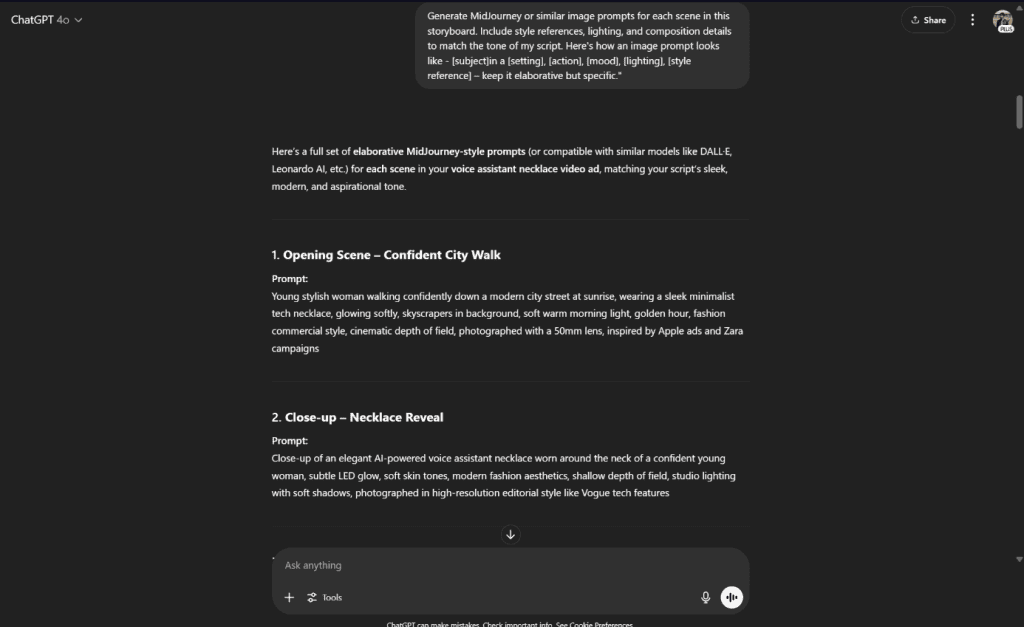
    Generate image prompts for each scene

    Now, let’s break this down.

    First, take your refined script and run it through Prompt 1. This gives you a clear visual roadmap, no guesswork. You’ll see exactly what needs to happen on screen while your voiceover plays.

    Next, use Prompt 2 to generate AI-friendly image descriptions. The more precise you are, the better the results. Instead of “a happy customer,” try “a woman in her 30s smiling at her laptop in a cosy home office, warm lighting, realistic style.”

    Also, ensure that AI provides you with the prompt for the character and the product (if it’s not a real product).

    By setting this foundation, you make it much easier to create a video ad using AI that feels polished, professional, and emotionally engaging.

    Step 2: Create A Storyboard

    While there are several ways to do this, the simplest is to use an AI storyboard generator. Tools like StoryboardThat, Boords or even specialised tools like LTX Studio can help you create a rough sketch of your scenes.

    Some might even ignore this step entirely. Big mistake. A storyboard isn’t just pretty pictures. It’s your roadmap for pacing, transitions, and consistency. Skipping it means risking disjointed visuals that confuse viewers.

    Here’s how to make it painless:

    1. Use AI tools to draft first. Upload your dual-column script prompts to tools like Booords. It’ll auto-generate scene layouts. Tweak as needed, swap angles, and adjust timing.
    2. Keep it rough. Don’t obsess over polish. Stick figures or rough sketches are sufficient if they effectively convey the idea. The goal is clarity, not art.
    3. Note key moments. Highlight scenes where visuals must sync with audio (product demos, emotional beats, or data reveals). These require precise timing.
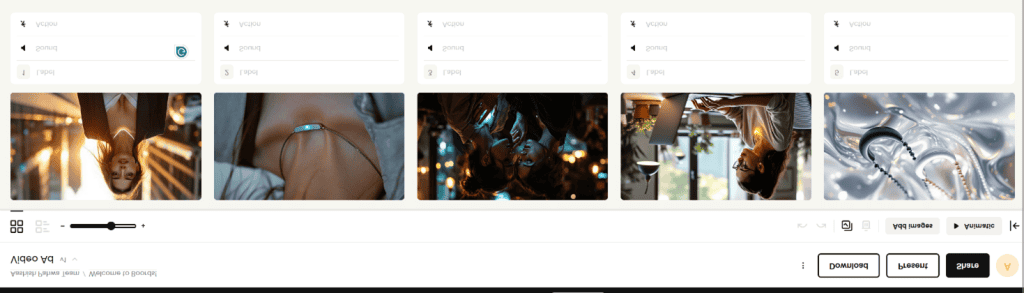
    Create A Storyboard

    Know that this step doesn’t require you to have the best AI images. It’s just that you should know what your scenes will look like before moving forward. Think of it like sketching a blueprint before building a house. You wouldn’t start hammering nails without knowing where the walls go.

    Step 3: Creating Visual Assets with AI

    When we refer to visual assets, we typically mean images (with consistent characters) and videos that we create using those images. A few tools currently dominate this space. MidJourney, Seedream, and Flux handle images well with consistent characters. Runway, Veo 3, Kling, Sora, and Pika Labs tackle video.

    But here’s the catch: you don’t need all of them. Plus they cost a lot.

    For our reference, we’ll use Sora as it comes free with ChatGPT and does a decent job of generating basic visuals. For some visuals where we require the character to speak, we can either use VEO 3 or Hedra.

    Step 3.1 – Creating visuals using Midjourney

    One of the great new features of Midjourney is the Omi-Reference feature, which allows you to maintain character consistency across multiple images. Just upload a reference photo, and the AI will mimic the style, colours, and features. This is huge for storytelling, where you need the same character in different scenes, especially for explainer videos or tutorials.

    Here’s how you can make it work.

    First take the character prompt generated using ChatGPT to generate the character of your video ad. Here’s what we got –

    using ChatGPT to generate the character of your video ad.

    Now, drag the character on the top prompt field under the omni reference option in Midjourney. Select the consistency level you want. Higher settings keep details strict, while lower ones allow more creative variation.

    using ChatGPT to generate the character of your video ad.

    And then start creating the scenes you sketched earlier.

    Midjourney will generate variations of your character in different poses, settings, or actions. Pick the ones that match your storyboard. If something’s off—like the wrong expression or background, just tweak the prompt slightly and regenerate.

    For example, if your character needs to look surprised in one scene, use the prompt “wide-eyed, mouth slightly open” to describe their expression. Need them holding a product?Just add “gripping [product name] with both hands” to the description. The AI picks up on these small details surprisingly well.

    Now here’s a pro tip. Save every version Midjourney creates, even the rejects. Why? Because sometimes a “failed” image has the perfect facial expression or background for another scene. It’s like having a digital scrapbook of options. You can use that expression as a style guide for another image.

    When you’ve all your images, organise them in folders that match your storyboard scenes. Label them clearly—Scene1_Character, Scene1_Background etc. This keeps everything tidy when you move to the next step.

    Step 3.2 – Converting Your Images to Videos

    Now this is a fun step.

    Head over to Sora (or RunwayML or Kling) and upload your Midjourney images, along with similar yet video-oriented prompts. You can use an AI video prompt generator for it.

    Now you have two options: either to use Sora’s storyboard or just an image-to-video generator. Play with both and see where it takes you.

    Here’s how I proceeded for the video generation using Sora –
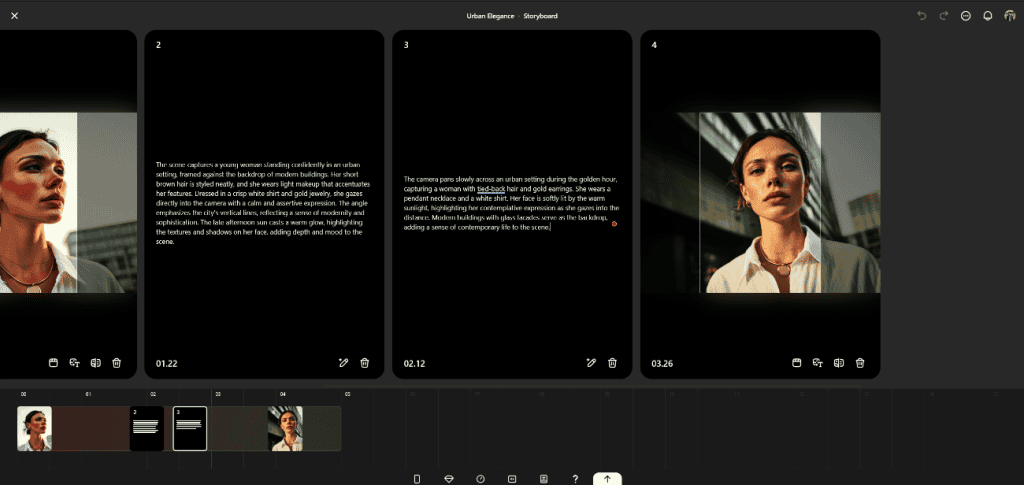
    Converting Your Images to Videos

    Step 4: AI-Assisted VO Generation

    A good voiceover (a non robotic one) can change the entire game and can fix the small gitches your video has. So don’t skip this part.

    First, choose your voice type. Do you want a friendly tone, or something more authoritative? Male or female? Young or mature?

    Once this is sorted, take the audio/VO Column of your script to Elevenlabs (or Dia, SpeechGen etc.). Paste in your lines and pick a voice that fits your brand.

    But before you hit generate, here are some tips to getting a more natural sound from a text to speech tool –

    first, make slight tweaks to your script’s punctuation. A short pause here, an emphasised word there can be added well using punctuations. Here’ an example of how I adjusted a script to sound more natural:
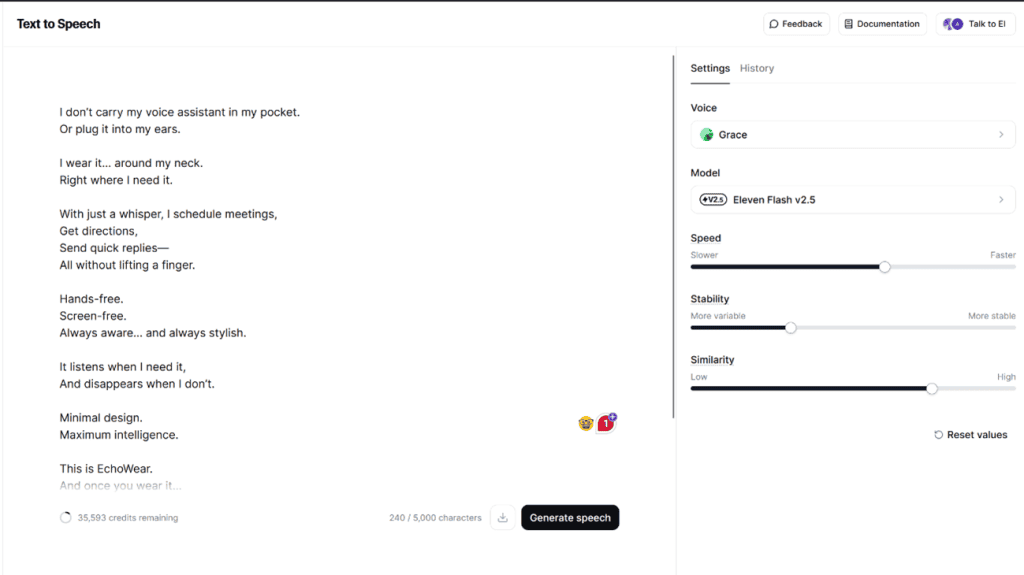
    AI-Assisted VO Generation

    A simple ellipses can create a natural pause. Or a well-placed comma can make the voice sound more human.

    Try saying it out loud yourself. Notice where you naturally pause or stress certain words. Then add those small details to your text.

    Second, adjust the speed. Eleven labs has a slider to control the speed of the voice. A slightly slower pace can make the narration sound more natural, while a faster one works for energetic content.

    Once done, add sound effects or background music (BGM), both of which you can generate using Eleven Labs or Google’s MusicFX.

    Step 6: Getting It All Together

    Now that you have all the pieces in place – video snippets, voiceover, and background music (BGM)- it’s time to assemble them into a cohesive final product. This is where basic editing comes in.

    For beginners, CapCut or Canva’s video editor is a great option. They’re simple, intuitive, and don’t require any technical expertise. Simply drag and drop your clips, sync them with the voiceover, and adjust the timing as needed.

    For advanced users, you can opt for Adobe Premiere Pro and Adobe After Effects to add those professional polish touches.

    Here’s a quick tip: the key to smooth editing is proper sequencing. Start by laying down your voiceover first, then match the visuals to it. Keep transitions simple. No need for flashy effects. A clean cut often works better than a distracting transition.

    Don’t forget to fine-tune the audio levels. The background music should never overpower the narration. A good rule of thumb is to lower the background music (BGM) by about 6 dB when the voiceover is active.

    And that’s it – you’ve managed to create a video ad using AI from start to finish.
  • Will Smartglasses Replace Smartphones?

    Will Smartglasses Replace Smartphones?

    People believed that when Mark Zuckerberg said that smart glasses would definitely replace smartphones.

    But can a hands-free, voice-activated, smart glass replace something as ubiquitous as smartphones? Don’t you think replacing a device that more than half of the world’s population is currently using would be impossible? Or can smart glasses really revolutionise the way we interact with technology?

    Here’s a deeper look into the potential impact of smart glasses on our daily lives and how they could potentially replace smartphones.

    The Difference In Utility Of Smartphones and Smartglasses

    Before we even start talking about replacing smartphones, we need to understand the difference in utility and what each device brings to the table today (and probably tomorrow).

    Smartphones – Utility for Today and Tomorrow

    Smartphones form the backbone of our digital lives.

    They not only serve as an essential communication tool, but also as a mini-computer that allows us to access the internet, use various apps and complete tasks on the go.

    They are the doorway to a present digital ecosystem where the participants –

    • Connect: We can connect with friends, family and colleagues through messaging, social media and video calls.
    • Entertain: The app ecosystem in smartphones offers a wide range of entertainment options, from streaming movies and music to playing games.
    • Organise: With calendar apps, note-taking apps and other productivity tools, smartphones help us stay organised and on top of our tasks.
    • Learn: Smartphones also serve as a learning tool with access to educational resources, online courses and informative articles.
    • Shop: Almost the entire economy has become mobile-friendly, allowing users to shop for goods and services with the convenience of their smartphones.
    • Navigate: With GPS capabilities, getting directions and finding the best routes is easier than ever before.
    • Capture: Most smartphones come equipped with high-quality cameras that allow us to capture memories through photos and videos.
    • Earn: Since its an ecosystem – where users meet creators (developers, content creators, etc.) – people are making a career using just smartphones.

    If we look at it from a broader perspective, smartphones are no longer just any accessory. in fact, according to statistics, smartphones have transitioned into essential tools in our everyday routines. According to the Pew Research Center, 91% of Americans own a smartphone. This shift highlights their integral role in modern life.

    Now, let’s look at smart glasses. What can they do? How do they compare to smartphones?

    Smart Glasses – Utility for Today and Tomorrow

    Smart glasses are marketed as the next upgrade to smartphones. They are simple glasses but equipped with features like display screens (transparent within glasses) and built-in sensors that allow them to interact with the world around you. As a user today, you can utilise these smart glasses to interact with virtual assistants like Gemini or ChatGPT, or check your notifications without lifting a finger. You can also explore augmented reality experiences. For example, you might see directions overlaid on the street in front of you, or information about a building pop up as you look at it.

    As per statistics, the smart glasses market is projected to grow significantly, with estimates ranging from reaching over $10 billion by 2031 to over $15 billion by 2032. This growth suggests increasing interest and development in this technology.

    But how does this compare to what a smartphone does? Let’s revisit the key functions we discussed earlier and examine how smart glasses fit in.

    Here’s the breakdown:

    • Communicate: Smart glasses can connect to the internet, allowing you to send messages and make calls. You can even use voice commands to interact with your contacts. It’s just like having a tiny phone display right in front of your eyes.
    • Interact: With built-in cameras and sensors, smart glasses can understand your surroundings. This opens the door to augmented reality. You now see helpful information layered onto the real world, not on a small mobile screen. Like identifying plants in your garden or getting a real-time translation of a foreign sign. Some even let you control things with subtle hand gestures.
    • Experience: Smart glasses can display information and media directly in your field of vision. You can watch videos, view photos, or follow navigation without needing to pull out your phone. It’s a hands-free way to consume digital content while still being present in the physical world.
    • Capture: Like smartphones, many smart glasses feature cameras. You can snap pictures or record videos of what you see, hands-free. This is great for capturing moments without having to fumble for your phone. It’s like having a personal videographer right in your glasses.

    Now, why does this comparison matter? Because it helps us understand where smart glasses fit into our tech lives. They aren’t necessarily here to replace your smartphone entirely. At least not yet. Instead, they offer a different way to interact with technology. They are more integrated with your physical world. More subtle. Less disruptive.

    Think about it. When you get a notification on your phone, you stop what you’re doing. You pull it out. You look down. With smart glasses, that same notification can appear as a quick, unobtrusive glance in your peripheral vision. You see it. You process it without breaking your stride. It’s about accessing information and interacting with the digital world in a more fluid and less attention-grabbing way.

    Hands-on vs Handsfree Tech

    Apple, Google, Meta, Snap, and almost all the big tech companies have already planned or are in the process of planning their move in the smart glasses industry as it could be the next major platform after phones, offering a more natural and social computing vibe.

    But why? Ultimately, it comes down to how we utilise them.

    Your phone is a “hands-on” device. You hold it. You tap the screen. You physically interact with it to accomplish tasks. Smart glasses, on the other hand, are designed to be “hands-free.” They are designed to be worn, delivering information and allowing interaction without requiring you to use your hands.

    But with the advent of AI, this distinction gets interesting.

    AI is changing the game. It’s making smart glasses smarter, more capable. AI can power those identification features we talked about – recognising faces, objects, or even emotions. It can improve the accuracy of translation, making communication across languages smoother. AI can also help filter the information you receive, showing you only what’s most relevant at any given moment. This makes the “hands-free” experience even more seamless and useful.

    Since AI is making even our phones hands-free to a great extent with voice commands and better predictive capabilities, the lines are blurring. It’s not just about whether you’re holding a device or wearing one. It’s about how you interact with it.

    And this makes us reach this question –

    The Advantage Of Smartglasses Over Smartphones

    As the world predicts a future where AI powers most of our interactions, why would smart glasses replace phones? What makes them better equipped for this future? It comes down to how they fit into our lives.

    Hands-free

    The biggest advantage of smartglasses over smartphones is the simple fact that you don’t need to hold them physically.

    Think about driving. You can’t safely use your phone. However, with smart glasses, navigation cues or important alerts can appear in your vision without requiring you to take your hands off the wheel or your eyes off the road for long.

    The information is just there, when and where you need it.

    And it isn’t just driving. Let’s say you’re in the middle of cooking. Your hands are messy, covered in flour or sauce. You need to check a recipe. With a phone, you’d have to wash your hands, unlock the phone, and find the recipe app. With smart glasses, you could simply ask for the recipe, and it could appear, step-by-step, right in front of you, all while your hands stay exactly where they are.

    And it’s not just hands-free, some of us wear glasses for most of our lives. It’s like just adding a smart aspect to them. Just get a pair of best prescription smart glasses and you’ll have a superpower in your eyes. Isn’t it?

    Augmented Reality

    Another big win for smart glasses is something called Augmented Reality, or AR.

    AR isn’t just about showing you information. It’s about layering digital information onto the real world you see around you.

    In simplest terms, AR in smart glasses takes what you see and adds computer-generated stuff to it. Think of it like those filters you see on social media, but instead of just changing your face, it can add things to your surroundings, and that too in real-time in your actual vision not on a screen. This is a pretty big deal.

    Say you’re trying to assemble a piece of furniture. The instructions are usually flat diagrams that can be tricky to follow. With smart glasses, the instructions could appear as an overlay on the actual furniture pieces, showing you exactly where each part goes and how it connects.

    Or maybe you’re exploring a new city. Instead of constantly looking at a map on your phone, AR in smart glasses could highlight points of interest as you walk by, giving you historical facts or restaurant reviews without you even needing to stop or pull out a device. It’s like having a personal tour guide in your line of sight.

    Contextual Awareness

    Smart glasses understand where you are and what you’re doing. This is “contextual awareness.” They use sensors and data to figure out the situation.

    They can tell if you’re driving, walking, or sitting at a desk. This understanding lets them show you information that’s relevant to that moment.

    For example, if you’re at a train station, smart glasses might automatically display the departure board information. No need to pull out your phone and open an app. If you’re in a store, they might recognise the product you’re looking at and show you reviews or price comparisons. They tailor the information to your immediate surroundings and actions.

    And it’s hypothetical scenarios. For example, Google’s new glasses project, Android XR glasses, showed how smart glasses could translate conversations in real-time, displaying the translated text in your line of sight as someone speaks a different language.

    That’s contextual awareness on the go that smartphones can’t beat.

    AI Integration

    One of the reasons smart glasses (like Google Glass) failed previously was the lack of a strong use case. It was just glasses with not-so-interactive features.

    But AI changes this. Today’s smart glasses, like Meta Ray-Ban smart glasses, Google’s Android XR, and Snap’s Spectacles, use AI to make them much more helpful.

    For example, Google’s new glasses can now connect to the internet and utilise AI for real-time information retrieval. Imagine wearing glasses that can not only capture images but also recognise landmarks. As you look at a famous building, the glasses could give you a brief history or even suggest nearby attractions. This feature makes them far more engaging.

    In fact, according to Sergey Brin (Google’s cofounder), smart glasses could be the next major platform after phones, as they are the “perfect” hardware for AI.

    Now, take a look at the competition. Meta’s Ray-Ban smart glasses and Snap’s Spectacles are also upping their game. They integrate social media, enabling users to effortlessly capture and share moments. With just a tap, you can send your latest adventure to friends. This blend of AI, AR and social sharing creates an interactive experience that resonates with today’s tech-savvy users.

    And since AI now understands voice inputs (unlike the robotic responses of the past), it’s predicted that it’ll become more handy than smartphones when it comes to tasks that need verbal directions.

    The Advantage Of Smartphones Over Glasses

    While smart glasses hold a bright future, smartphones still possess some key advantages today that may be difficult to overcome, even by the best smart glasses. Here are a few examples –

    Battery life

    With current battery technology, smart glasses simply cannot compete with the long battery life of smartphones. Running all those AI features, displays, and sensors takes a lot of power. This means frequent charging, which can be a hassle.

    Smartphones, on the other hand, are bigger, have larger batteries, and often last all day on a single charge. This makes them more practical for daily use.

    For a fact, the average battery life of smart glasses is 3-4 hours with moderate use, while that of a smartphone can easily last a full day.

    Input Methods and User Interface (UI/UX)

    Smartphones capitalise on what’s known as “micro-moments.” These are those brief instances when you instinctively reach for your phone for quick answers or to complete a simple task. Think of checking the weather or finding a nearby coffee shop. Smartphones excel in these moments because they offer seamless user interfaces and fast responses.

    For example, if you want to check your email, you can do it in just a few taps. The touchscreen interface is intuitive and universally understood. Everyone from your tech-savvy niece to your tech-averse grandma can navigate it with ease.

    Plus, there’s an app for each such micro-moment and a keyboard that doesn’t mess up. Typing on a smartphone is second nature for most people. Whether you’re texting a friend or writing a to-do list, the on-screen keyboard is familiar and efficient.

    Smart glasses, on the other hand, struggle to provide the same level of intuitive interaction. Although voice commands and gestures are innovative, they’re not always reliable.

    Imagine trying to send a text using voice commands in a noisy environment.

    Not exactly convenient, right? And gestures can sometimes misinterpret your intentions, leading to frustrating user experiences.

    App Ecosystem 

    One factor that could hinder smart glasses from completely replacing smartphones is the network effect created by the vast app ecosystem.

    This ecosystem comprises millions of participants, including users, developers, marketers, and even regulators. It’s a bustling digital marketplace where almost every need has an app.

    Smartphones are the central hub for this ecosystem. They’re like the Swiss army knife of technology, packed with tools and features for almost any scenario.

    This vast collection of apps enables smartphones to adapt and offer a wide range of functionalities, from gaming and navigation to fitness tracking and online shopping.

    Smart glasses, however, are still in the early stages. Their app ecosystem is small, with limited offerings.

    Developing applications for smart glasses presents unique challenges.

    For instance, the user interface needs to be reimagined to accommodate small displays and alternative input methods, such as voice or gestures.

    Moreover, it’s not as beneficial to develop an app for a platform with a smaller user base. This chicken-and-egg problem makes it hard for smart glasses to catch up. Why? Because developers go where the users are, and users go where the apps are. It’s a tough cycle to break.

    Privacy and Security

    The biggest problem with smart glasses is that they see and listen to everything you do. This constant surveillance raises serious privacy and security concerns.

    Say you’re at a café. Your glasses could unintentionally capture sensitive conversations or private moments. It’s like having a camera on your face. Not everyone will be comfortable with that.

    There was already an uproar about privacy with voice assistants like Alexa, where a CNET survey indicated that over 70% of users have privacy concerns with devices like Amazon Echo. This discomfort stems from the fear of being constantly monitored. Now, imagine that unease magnified with smart glasses, which could potentially capture both audio and visual data.

    And then there’s a fear of getting hacked. That’s worse.

    What if someone gains unauthorised access to your smart glasses? They could see everything you see. It’s like giving a stranger a front-row seat to your life. Not a comforting thought.

    Smartphones, even though not entirely immune, offer more established security protocols. App developers and manufacturers have spent years refining their security measures. Consider fingerprint sensors, facial recognition, and two-factor authentication. These tools act as barriers against unwanted access. Smart glasses have yet to catch up.

    The Final Verdict – Will Smart Glasses Replace Smartphones?

    While smart glasses may seem like a futuristic gadget at present, there is potential for their future growth. Yet, replacing smartphones is a big ask.

    Because it’s not just about replacing a device. We are talking about replacing an entire ecosystem. It’s not just about ditching a device. It’s about leaving an entire ecosystem behind. Say you’re part of Apple’s ecosystem. Switching from it isn’t a walk in the park. Your iCloud, your apps, your files, everything is interconnected. It’s almost like being tangled in a web. Chris Wiegman shares a personal experience about how leaving such ecosystems is challenging yet doable with careful planning.

    So the future isn’t about replacing. It’s about coexistence.

  • Top 5 Compliance Certifications Every SaaS Startup Should Consider

    Top 5 Compliance Certifications Every SaaS Startup Should Consider

    Starting up isn’t as simple as creating and launching an idea on the internet. And when it comes to SAAS, you don’t just have to zero in on the tech stack and marketing strategy, but also the regulatory compliance aspect of your business. This is where compliance certifications come into play.

    Compliance certifications refer to a set of guidelines and regulations that businesses must adhere to to ensure user data’s security, privacy, and confidentiality. These certifications are not only important for building trust with your customers but also for staying compliant with the law.

    So, to help you navigate through the complex world of compliance certifications, here are five essential compliance certifications that you should consider for your SAAS startup:

    SOC 2 (System and Organisation Controls 2)

    SOC 2 or System and Organisation Controls 2 is a compliance certification focusing on the security, availability, processing integrity, confidentiality, and user data privacy.

    It was designed by the American Institute of Certified Public Accountants (AICPA) to ensure that businesses are following industry-standard security and privacy practices. This certification is tailored explicitly for service organisations that store or process sensitive information in the cloud.

    SOC 2 has two types of reports – Type 1 and Type 2.

    1. The Type 1 report evaluates whether your organisation’s controls are designed effectively to meet the SOC 2 criteria at a specific point in time.
    2. The Type 2 report verifies not only the design but also the effectiveness of the controls over a period of time, typically 6-12 months. This provides a more comprehensive understanding of your organisation’s security and privacy practices.

    Importance of SOC 2 (What Can Non-compliance Lead To?)

    SOC 2 compliance is crucial for SAAS organisations that handle sensitive data, such as personally identifiable information (PII), financial information, or healthcare records. Not being SOC 2 compliant can have serious consequences, like –

    • Security vulnerabilities – While not always the case, non-compliance with SOC 2 standards can indicate potential security vulnerabilities in an organisation’s systems and processes. This can leave sensitive data at risk of being compromised by hackers or malicious actors.
    • Legal consequences – In some industries, such as healthcare or finance, compliance with SOC 2 is legally required. Failure to comply can result in hefty fines or other legal consequences for the organisation.
    • Loss of trust and reputation – A major data breach due to non-compliance can lead to loss of trust from customers and damage to the organisation’s reputation. This could lead to a decrease in customer retention and new business opportunities.
    • Limited growth potential – Many enterprise customers require their SAAS providers to be SOC 2 compliant in order to do business with them. Non-compliance can limit the organisation’s potential for growth and expansion into new markets.

    ISO/IEC 27001

    ISO/IEC 27001 is a globally recognised information security management system (ISMS) standard that provides a framework for organisations, especially SAAS providers, to manage and protect sensitive information from various threats.

    Complying with this standard can help SAAS providers demonstrate their commitment to security and build trust with their customers.

    This standard focuses on the confidentiality, integrity, and availability of information within an organisation.

    It also requires organisations to conduct risk assessments and implement appropriate security controls to mitigate potential risks.

    Additionally, ISO/IEC 27001 certification can give SAAS providers a competitive advantage in the market by providing assurance to customers that their data is secure.

    Importance of ISO/IEC 27001 (What can Non-compliance lead to?)

    An ISO/IEC 27001 certification is important not only to ensure the security of customer data but also to carry several other benefits for SAAS providers. Non-compliance with this standard can have serious consequences for an organisation.

    Firstly, non-compliant organisations may face legal liabilities and financial penalties in case of a data breach or loss of sensitive information. This can damage the organisation’s reputation and trust among its customers, resulting in a potential loss of business.

    Moreover, non-compliance can disrupt services and operations, causing financial losses due to downtime and delays in production. It can also hinder the growth and expansion of the organisation, as many potential clients may require ISO/IEC 27001 certification as a prerequisite for partnership or collaboration.

    HIPAA (Health Insurance Portability and Accountability Act)

    If you’re a SAAS company operating in the healthcare industry, then HIPAA compliance is of utmost importance. This act was created to protect sensitive patient information and ensure its confidentiality, integrity, and availability.

    The penalties for non-compliance with HIPAA can be severe, ranging from fines to imprisonment. Failure to comply with HIPAA regulations can also result in reputational damage and loss of trust among patients and healthcare partners.

    Some key steps to achieving HIPAA compliance include conducting regular risk assessments, implementing physical and technical safeguards for protecting electronic protected health information (ePHI), and training employees on privacy policies and procedures.

    Importance of HIPAA (What can Non-compliance lead to?)

    Even though it may seem like a tedious compliance task, HIPAA is crucial for protecting patient data and maintaining the integrity of healthcare systems.

    Non-compliance with HIPAA regulations can have serious consequences, not healthcare organisations but even for SAAS providers that handle PHI.

    Some of the potential risks and implications of non-compliance include:

    • Legal penalties: Violations of HIPAA can result in significant fines and legal action being taken against covered entities and business associates. The financial penalties can range from $100 to $50,000 per violation, depending on the level of negligence.
    • Loss of trust: Failure to protect patient information can lead to loss of trust among patients and partners, resulting in reputational damage. This could have long-term implications for the organisation’s success and growth.
    • Civil and criminal liability: Besides financial penalties, HIPAA violations can also result in civil and criminal liability. This means that individuals involved in the violation could face charges and even imprisonment.
    • Patient safety concerns: HIPAA regulations often require strict standards for data security, which may limit access to patient information in emergency situations. This could potentially impact patient care and safety if vital information is not readily available.

    GDPR (General Data Protection Regulation)

    Introduced in 2018 by the European Union, GDPR is a comprehensive set of data protection regulations that aim to strengthen and unify European data privacy laws.

    This regulation governs how organisations, including SAAS companies, collect, process, and store EU citizens’ personal data.

    It doesn’t matter if the company is located in the EU or not, as long as they are dealing with personal data of EU citizens, they must comply with GDPR.

    The purpose of GDPR is to give individuals more control over their personal data and simplify the international business regulatory environment by unifying regulations within the EU.

    Under this regulation, individuals have the right to access, rectify, restrict or erase their personal data held by companies. They also have the right to be informed about how their data is being used and can opt out of direct marketing.

    Companies must obtain explicit consent from individuals before collecting and processing their personal data. This includes clearly stating why the data is being collected and how it will be used. In addition, companies must implement necessary security measures to protect personal data from unauthorised access or disclosure.

    Furthermore, the GDPR also requires companies to appoint a Data Protection Officer (DPO) who is responsible for ensuring compliance with the regulation. This individual must have expert knowledge of data protection laws and practices and act as a point of contact for individuals and authorities regarding all matters related to personal data processing.

    Importance of GDPR (What can Non-compliance lead to?)

    Non-compliance with the GDPR can lead to serious consequences for companies. The regulation has strict penalties for violations, including fines of up to 4% of a company’s global annual revenue or €20 million (whichever is higher).

    These fines are significantly higher than previous data protection regulations and strongly incentivise companies to comply with the GDPR. And it’s problematic for SAAS companies.

    Some examples of companies that have faced fines for non-compliance include Google ($57M), British Airways (£20M), and Marriott International (£18.4M).

    Aside from financial penalties, non-compliance can also damage a company’s reputation and erode customer trust.

    Non-compliant companies may also face legal action from individuals whose data has been mishandled. This can result in costly lawsuits and further damage to a company’s reputation.

    Furthermore, non-compliance with the GDPR can also lead to business disruptions as companies may be required to change their processes and systems to comply with the regulation. This can be time-consuming and expensive, especially for smaller businesses that may not have the resources to make these changes easily.

    PCI DSS (Payment Card Industry Data Security Standard)

    PCI DSS, or Payment Card Industry Data Security Standard, is an important regulation that aims to ensure the security of credit card transactions and protect cardholder data. It was developed by major credit card companies, including Visa, Mastercard, American Express, and Discover, to establish a set of requirements for businesses that process or store credit card information.

    If you’re a SAAS company, just adding Stripe/PayPal/etc doesn’t automatically make you PCI DSS compliant. You still need to ensure that your processes and systems meet the requirements set forth by this standard.

    This includes implementing secure network protocols, regularly testing security systems, and conducting internal audits to identify any potential vulnerabilities.

    To comply with PCI DSS, businesses must

    • Identify and categorise cardholder data flows.
    • Implement strong access control measures and maintain secure systems.
    • Regularly monitor and test networks.
    • Complete the appropriate Self-Assessment Questionnaire (SAQ) and, if required, undergo a formal assessment by a Qualified Security Assessor (QSA)

    The SAAS businesses must also regularly train their employees on security protocols and ensure that any third-party vendors they use are also following the necessary security measures.

    Additionally, businesses must have a response plan in place in case of a data breach or other security incident. This includes notifying affected parties, investigating the cause of the breach, and implementing steps to prevent future incidents.

    Importance of PCI DSS (What can Non-compliance lead to?)

    Unlike strict regulations such as HIPAA or GDPR, PCI DSS compliance is not legally mandated for all businesses. However, non-compliance can seriously affect businesses that handle payment card information.

    Firstly, businesses that are found to be non-compliant with PCI DSS may face hefty fines from the card brands and acquiring banks. These fines can range from $5,000 to $100,000 per month, and they can witness increased transaction fees and the potential loss of the ability to process credit card payments.

    In addition to financial penalties, non-compliant businesses risk damaging their reputation and losing customer trust. A data breach can result in negative publicity and a loss of customer confidence, leading to a potential loss of business.

    Furthermore, if a business experiences a data breach due to non-compliance, it may also be subject to legal action from affected customers. This can result in costly lawsuits and settlements, further impacting the business’s financial stability.

  • How to Write an Email for Job Application

    How to Write an Email for Job Application

    If I talk numbers, you compete with an average of 118 candidates for every job you apply for. This number only increases for graduate-level jobs, corporate-level jobs, and specific industries. This is why it’s important to set yourself apart from the competition.

    But how do you do that?

    One way to differentiate yourself from other job candidates is simply by making your job application email stand out. Honestly, the majority of the candidates just go to ChatGPT and ask it to “write a job application email for this job” and give it the job description.

    The result?

    Hundreds of similar robotic emails flooded to the employer’s inbox.

    So, how do you make your job application email unique and grab the attention of potential employers?

    Here’s a guide on how to write an effective job application email that will set you apart from the competition.

    But first –

    When Is It Appropriate To Send A Job Application Email?

    Not every job post that you come across requires you to find the employer’s email and send them a separate email to apply for the job. Most of the time, you will be required to fill out an online application form or send your resume and cover letter through a company’s career portal.

    However, there are certain circumstances when sending a job application email can benefit you:

    • When a direct contact is provided: Some job postings may include the direct contact information of the hiring manager or HR personnel. In this case, it is appropriate to send them a personalised job application email.
    • When following up on a previous conversation: If you have already had an informational interview or networking event with someone from the company, it is appropriate to follow up with a personalised job application email.
    • When applying for a referral-based position: If you were referred to the job by someone within the company, it is always a good idea to send a job application email mentioning your referral.
    • When there are no specific application instructions: In some cases, a job post may not include any specific instructions for applying. In this case, sending a well-written job application email can showcase your initiative and professionalism.
    • When you’re sending an application for a job that is not posted: If you are interested in working for a particular company and there are no job postings available, sending a job application email with your resume and cover letter can help create an opportunity for yourself.

    Once you understand when it is appropriate to send a job application email, now let’s take a look at how to write one.

    The Structure of a Job Application Email

    To make sure your job application email stands out, it’s important to structure it in a professional and organised manner. Here is the basic structure that you can follow:

    • Subject: It’s the one sentence preview of what your email is about. The employer sees it before they even open the email.
    • Salutation: The first line of your email where you address the person you are sending the email to. Use their name, if possible.
    • Introduction: It’s the opening paragraph of your email where you introduce yourself and mention the job you are applying for.
    • Body: This is where you can showcase your relevant skills, experiences, and qualifications that make you a suitable candidate for the job. Keep it concise and focused on what the employer is looking for.
    • Closing: This is where you thank the recipient for their time and consideration, reiterate your interest in the position, and include a call to action such as requesting an interview or meeting.
    • Signature: You end your email with a professional signature that includes your full name, contact information, and any relevant links (such as LinkedIn profile).
    • Attachments: Often, along with the email, you also need to send your resume and cover letter as attachments.

    Steps To Write Your Job Application Email

    As you would with any job application, you need to study the job posting and understand what the employer is looking for. Then do a thorough research on the company to get a better idea of their values, culture and mission. This will help you tailor your job application email accordingly.

    So, let’s dive into the steps:

    Fill Up The Reciepient

    First thing’s first, make sure you have the correct email address of the recipient. If it’s not provided in the job posting, do your research to find out who will be receiving your email.

    Also, while it’s possible to send email to multiple recipients individually using a cold emailing SAAS, I recommend focusing on one recipient at a time when it comes to job application emails.

    This way, you can personalise and tailor your email to the specific job and company, increasing your chances of standing out.

    For example, if you send the same email to multiple recipients, you might miss mentioning a specific skill or experience that is mentioned in one job posting but not in another. This could make your email seem generic and lack attention to detail.

    Also, some people make a mistake of adding different recipients in same email in “CC” or “BCC”. This is a red flag for employers as it shows a lack of discretion and professionalism.

    Start With A Strong Subject Line

    The subject line is the first thing that an employer sees when they receive your email.

    It’s the one sentence that they read before deciding whether to open your email or not.

    So, avoid using generic subjects such as “Job Application” or “Resume for [Position]”. Instead, try to incorporate something unique about yourself or the job posting in the subject line. For example, you can mention a specific skill or experience that makes you stand out from other candidates.

    Examples:

    • Experienced Digital Marketer Applying for [Position]
    • Passionate Writer with 3 Years of Experience – Interested in [Position]
    • Referral from [Name] – Application for [Position]

    Also, if possible, keep your subject lines between 6-10 words as it has a proven 21% open rate compared to 14% for those with 11-15 words.

    Begin With A Greeting

    When addressing the recipient, use their name if possible. This shows that you have taken the time to research and personalise your email.

    If you are unsure of the recipient’s gender or name, you can always use “Dear Hiring Manager” or “Dear [Company Name] Team”.

    Avoid generic greetings such as “To Whom It May Concern” or “Hello, Sir/Madam” as they lack personalisation and may come across as lazy.

    One good way of finding out the recipient’s name is by researching on LinkedIn or the company’s website. Some companies’ policies even list the email addresses of HR personnel or recruiters on their websites along with their names.

    Write A Strong Introduction

    Now, an introduction is your hook to the employer. It’s where you grab the reader’s attention and make them want to read more.

    Start off by introducing yourself and mentioning the specific job or position you are applying for. Then, mention how you came across the job posting or referral (if any).

    Keep this paragraph short and to the point. Mention your name, educational background (if relevant), and briefly highlight any experience or skills that make you a suitable candidate for the job.

    Here’s an example:

    “Hello John,

    My name is Sarah Jones, and I recently came across the job posting for a Marketing Manager at Feedough. As a marketing professional with 5 years of experience in the digital space, I was immediately drawn to this opportunity. I am passionate about creating effective campaigns and driving results for businesses, making me a perfect fit for this role.”

    Build A No Yapping Body

    The body of your job application email is where you can elaborate on your skills, experiences, and qualifications. But remember to keep it concise and focused.

    Avoid repeating information already mentioned in your resume, cover letter, or even introduction. Instead, use this space to highlight specific achievements and how they align with the company’s values or mission.

    You can also mention any relevant projects or initiatives you have worked on that showcase your capabilities for the job.

    But most importantly, make sure to tie everything back to why you are a perfect fit for the job and how you can contribute to the company’s success.

    You can even mention your research on the company and how that made you even more determined to join them. This shows your genuine interest in the company and can make a great impression.

    For example, the continuation of the above example could be:

    In my previous role at XYZ Company, I successfully led a digital marketing campaign that resulted in a 20% increase in website traffic and a 15% increase in online sales. I am confident that with my experience and skills, I can help Feedough achieve similar results and further establish itself as a leader in the industry.

    I even researched a bit about Feedough’s recent initiatives such as the “Startup Spotlight” series, and I strongly believe I can add value and contribute to the company’s mission of empowering entrepreneurs. In my last job, I spearheaded a similar initiative, which received positive feedback and helped increase brand recognition for my company.

    I am excited about the opportunity to join Feedough and be part of its dynamic team.”

    Close With A Strong Call To Action

    In your closing paragraph, express your enthusiasm for the job and thank the recipient for considering your application.

    You can also mention any attachments that you have included such as your resume, cover letter or portfolio. Remember to proofread these documents before attaching them to avoid any typos or errors.

    Finally, end with a strong call to action. This could be asking for an interview or further information on the next steps in the hiring process.

    Here’s an example:

    “Thank you for considering my application. I have attached my resume and cover letter for your review. I look forward to discussing further how my skills and experience align with Feedough’s needs. Please let me know if you require any additional information from me.

    Best regards,

    Sarah Jones”

    Never Forget Your Signature

    Your signature is like your virtual business card. It includes your name, contact information, and any relevant links, such as your LinkedIn or professional portfolio.

    Having a professional signature that is easy to read and visually appealing is important. You can use email signature templates available online or create one using HTML.

    Make sure to include:

    • Your Full Name
    • Email Address
    • Phone Number (optional)
    • Relevant Links (LinkedIn, Portfolio, etc.)

    You can even create email signature on iPhone, Outlook or Gmail to make it easier to add your signature every time you send out a job application email. There are several online free tools available for this purpose.

    Add The Attachments

    You usually attach your resume and cover letter with the job application email. However, if you have a portfolio or any other relevant documents that showcase your work, make sure to include them as well.

    Remember to mention these attachments in your email so that the recipient knows what they are opening. You can also name the files clearly so it’s easy for the recipient to identify them.

    Also, it’s important to name these attachments properly. Instead of using generic names like “Resume 4” or “Cover Letter 2”, use your full name and the job title to make it more personalised and easier to track.

    For example: SarahJones_Resume_MarketingManager_Feedough.pdf

    Keep It Professional

    Lastly, it’s important to maintain a professional tone throughout your job application email. Avoid using slang, contractions or emoticons as they can come across as unprofessional.

    Also, proofread your email for any spelling or grammatical errors before hitting send. You want to make sure you are presenting yourself in the best light possible.

    Do’s And Don’ts Of Writing A Job Application Email

    Now that we have discussed the key elements of a job application email, here are some do’s and don’ts to keep in mind while writing one:

    Do’s:

    • Personalise your email for each job application: One of the important things to remember is that each job application should be personalised and tailored to the specific job and company you are applying for. This shows your genuine interest in the role and can help you stand out from other applicants.
    • Use a professional email address: Ensure to use an email address that looks professional and not something like “[email protected]”. Your email address can create a first impression, so it’s important to keep it simple and easy to read.
    • Keep it concise: Your email should be brief, ideally no longer than a page. Recruiters receive hundreds of emails daily, so they don’t have time to read lengthy emails. Stick to the main points and avoid repeating information that is already mentioned in your resume or cover letter.
    • Use proper formatting: Use bullet points and subheadings to make your email easy to read and navigate. This will also help you highlight important information and make it stand out.
    • Follow the instructions: If the job posting has specific instructions on how to apply, make sure to follow them. This could include mentioning a specific subject line or attaching certain documents.

    Don’ts:

    • Use informal language: Avoid using slang, contractions or emoticons in your email. These can come across as unprofessional and may hurt your chances of getting called for an interview.
    • Send a generic email: While sending the same email to multiple companies may be tempting, avoid doing so. Each job application should be personalised and tailored to the specific role and company you are applying for.
    • Include irrelevant details: Stick to relevant information in your email. Your hobbies or personal interests may not necessarily be important for the job, so avoid mentioning them unless they are directly related to the role.
    • Use fancy fonts or formatting: Stick to simple, easy-to-read fonts like Arial or Times New Roman. Using fancy fonts or formatting can make your email difficult to read and may come across as unprofessional.
    • Send without proofreading: Make sure to proofread your email before sending it. Spelling or grammatical errors can make a bad impression and hurt your chances of getting called for an interview. Remember, your job application email is the first point of contact with a potential employer. Make sure to take the time to craft a professional and personalised email that showcases your skills and qualifications in the best possible way.

    Also, always follow up on your job application emails, if you don’t hear back within a week or two, send a polite follow-up email enquiring about the status of your application. Thank them again for considering you and reiterating your interest in the role.

  • This AI Startup Makes It Easy to Find Misinformation or Real Facts- Truth Quotient Startup Review

    This AI Startup Makes It Easy to Find Misinformation or Real Facts- Truth Quotient Startup Review

    If you are a fact-checker, researcher, or content creator, you know the drill. Every day is a race to separate real truth from online fiction. Right now, you’re likely buried in manual checks, cross-referencing sources for hours.

    Mistakes? They’re costly. But what if finding solid, verifiable truth became less of a grind? Truth Quotient, a new startup, thinks it should be. They’re building smart tech to make claim verification simpler and faster. Their mission? To empower you with truth, minus the endless hassle.

    We did an interview with Andrew Meiners from Truth Quotient to uncover how they’re making this happen.

    What is Truth Quotient?

    Truth Quotient is making waves in the battle against misinformation, using advanced technology to empower different sectors. At its heart, the LegitTM platform leverages AI-driven algorithms to verify claims and reveal truths efficiently. Imagine entering any assertion and watching as the system evaluates it against reliable sources. That’s the power of its Truth Meter, offering clarity in a world where truth can be elusive.

    The scope is impressive. Truth Quotient caters to fact-checkers, researchers, and content creators—anyone who cannot afford skirting around misinformation. The platform streamlines their workflow by providing rapid, reliable truth validation.

    Solving the misinformation challenge involves an intricate mix of AI and human reasoning. Manual fact-checking is slow and laborious, while inaccuracy can bring hefty costs. Truth Quotient’s solution automates this tedious process. From generating citations to refining documents, LegitTM is a trusty ally in making informed decisions.

    What elevates Truth Quotient above the fray is its dual mission: technological innovation and critical thinking. Beyond validating facts, it analyses logical structures and pinpoints vulnerabilities in arguments. A blend of credibility and efficiency, Truth Quotient stands as a reliable aid in the truth-seeking era.

    Truth Quotient Founders

    Dr. John Hnatio stands out as the central figure in the foundation of Truth Quotient. With a career rooted in systems engineering and educational leadership, he brings a wealth of expertise to the table. His journey reflects years of dedication to critical thinking and decision-making processes. Dr. Hnatio is not just a scientist; he’s a published thought leader known for developing innovative frameworks in problem analysis. These frameworks now lie at the core of Truth Quotient’s cutting-edge technology.

    Dr. John Hnatio

    The story of Truth Quotient is one of necessity and vision. In a world drowning in misinformation, Dr. Hnatio saw the urgent need for a tool that could navigate the complexities of truth verification. This insight was born from the realisation that unverified information eroded trust, impaired decisions, and divided communities. Observing these societal shifts, he recognised technology’s potential to restore clarity and confidence through verified truth.

    In the early days, the startup faced a slew of challenges. Crafting a system capable of handling the intricacies of truth validation was daunting. It required a blend of AI innovation and human cognitive insight. Dr. Hnatio gathered a diverse team of experts in artificial intelligence, systems engineering, and educational theory to ensure a robust foundation grounded in scientific integrity. The mission was straightforward yet complex: create a tool that simplifies truth while also being accessible to a broad audience.

    The innovation that led to Truth Quotient came from Dr. Hnatio’s profound understanding of educational frameworks and logical analysis. Observing the gap left by conventional fact-checking tools, he envisioned something more comprehensive. He wanted not only to validate information but to build a platform that assesses claims, analyses logical structures, and identifies fallacies. This vision gave birth to LegitTM, a platform transforming the way we engage with information, providing clarity in an often murky digital age.

    Interview with Andrew Meiners, Program Manager of Truth Quotient

    We got the chance to sit down with Andrew Meiners, Truth Quotient’s program manager, to understand more. He walked us through the nitty-gritty of their platform and his vision for tackling online misinformation. Here’s how our conversation went.

    Q: Andrew, could you tell us a bit about yourself and your role at Truth Quotient?
    A:
    Certainly. My name is Andrew Meiners, and I am the Program Manager at Truth Quotient. Essentially, I represent Truth Quotient and oversee a number of things to keep us moving forward.


    Q: In simple terms, what does Truth Quotient actually do?
    A:
    Truth Quotient empowers organisations to verify claims. We help them foster critical thinking and make informed decisions. We do this through advanced technology that seeks truth. Essentially, we provide tools to help people and companies find and use reliable information.

    Q: Who exactly is Truth Quotient trying to help? Who is your target audience?
    A:
    Our audience is quite broad. We are targeting anyone who needs to be sure about the information they are using. This includes fact-checkers, naturally, but also researchers and content creators. Business analysts who make big decisions based on data are also key for us. Educators and students, too, because learning to think critically is so important. Even technology developers who want to build truth verification into their own platforms can use our tools. Really, anyone who values facts, credibility, and wants to work efficiently in a world full of dodgy information. These are people and organisations in sectors where getting it wrong – misinformation – can cost them money, reputation, or have wider societal impacts. Journalists need to check facts fast. Academics need to validate their research. Marketers need accurate information to be credible. Businesses need solid data for strategy. Educators need to teach critical thinking using real-world examples. Developers need APIs to add truth validation to their products. They all need solutions that are easy to use, innovative, and reliable. The information landscape is complex and they need help navigating it.

    Q: What is the main problem that Truth Quotient is trying to solve?
    A:
    The core problem is misinformation. It’s everywhere, and it’s really hard for people and organisations to tell what’s true from what’s false. We are drowning in information, and not all of it is good. False information leads to bad choices. It damages trust. It has serious consequences across many areas, like journalism, education, business, you name it. Often, people just do not have the right tools to check claims properly and efficiently. Manual fact-checking takes ages, and it is easy to make mistakes. Analysing information deeply, to really understand if it is sound, requires critical thinking skills that not everyone has or has time to use effectively. Our solution gives users the tech to verify claims, look at the logic of arguments, and get clear evidence from reliable sources. We automate a lot of the boring, time-consuming stuff. This helps our users make informed decisions, be more credible, and reduce the harm caused by misinformation.

    Q: How does Truth Quotient actually solve this problem? What’s the solution?
    A:
    We solve it with our LegitTM platform. It’s built with advanced AI. This tech analyses claims and checks how valid they are. It gives you clear, evidence-based results. You put in any statement, and LegitTM compares it to credible sources. It gives you a ‘truth score’ using our Truth Meter. This helps make things clear when the truth is hard to find. It provides search results, links to sources, fact-checking sites, and context. So you get the full picture for each claim. For researchers, writers, and students, it makes things faster. It creates citations and exportable summaries. Soon, with our premium version, you will be able to upload whole documents. It will find weak claims, logical problems, and inconsistencies. It will highlight these visually, so you can quickly fix and check again. Also, our AuthentificationTM API lets developers add our truth-validation tech into other platforms. LegitTM is reliable, efficient, and scalable. It helps users fight misinformation, improve their credibility, and make decisions based on real truth.

    Q: Who are the people behind Truth Quotient? Tell us about your founding team.
    A:
    Dr. John Hnatio is the Chief Scientist at Truth Quotient. He’s really the driving force behind our mission. He wants to change how we all deal with information. His background is in systems engineering and educational leadership. He’s spent his career improving critical thinking and decision-making. He’s published a lot of work and developed new ways to analyse complex problems. These ideas are the basis of Truth Quotient’s tech. Dr. Hnatio’s vision is to help people think critically in the digital age, so they can act decisively and avoid misinformation. His leadership ensures our solutions are based on solid science, are technologically advanced, and truly help people find objective truth.

    Q: What was the inspiration for starting Truth Quotient in this industry?
    A:
    The inspiration came from seeing how bad misinformation is becoming and the damage it causes. The founders realised that the spread of false information, especially online, was destroying trust and making it harder to make good decisions. Dr. John Hnatio, in particular, has studied systems thinking and education for a long time. He saw that people lacked good tools to check claims. This made them vulnerable to bias, wrong ideas, and poor reasoning. Advances in AI and data analysis provided a chance to tackle this problem properly. The team shared a belief that technology could help. It could encourage informed discussion, improve critical thinking, and empower people to make choices based on facts. They were passionate about creating practical solutions. This led them to develop LegitTM, a platform designed to cut through the noise, analyse information thoroughly, and bring back confidence in verified truth.

    Q: What were the early days of Truth Quotient like? Any challenges you faced?
    A:
    The early days were definitely challenging. One of the main hurdles was building a system that could actually validate truth in a complex way. We quickly learned that it wasn’t just about algorithms. It was also about understanding how humans reason and analyse logically. To overcome this, we built a team with experts in AI, systems engineering, and education. This mix of skills was crucial to make sure our solution was both technically advanced and scientifically sound. Another big challenge was making the technology user-friendly. Our first prototypes were technically capable, but they weren’t easy for non-tech people to use. We went through a lot of development, beta testing, and worked closely with early users. This helped us refine the platform and make it powerful yet accessible.

    Q: How is Truth Quotient different from its competitors? What makes it stand out?
    A:
    Truth Quotient is different because of our deep commitment to both tech innovation and critical thinking. Other platforms might offer fact-checking or validation features, but we go further. We provide a comprehensive, scientifically grounded system. It does not just check if claims are accurate. It also analyses logical structures, finds fallacies, and gives users clear, actionable insights. It’s about more than just surface-level checks; it’s about truly understanding and validating information.

    Q: Has Truth Quotient received any external funding? Can you share details on funding or valuation?
    A:
    Yes, we have received external funding. However, details on our valuation and recent funding rounds are currently undisclosed.

    Q: What are Truth Quotient’s plans for the future? What’s next on the roadmap?
    A:
    We have a lot planned for the future. We are launching LegitTM Premium soon, possibly by the time this article is out. This premium version will have advanced features. It will allow users to upload and analyse entire documents. It will check for claim validity, logical fallacies, and consistency. LegitTM Premium will colour-code sentences to show validity, making it easy to spot weak points. This will be especially useful for researchers, educators, and content creators to improve the accuracy of their work.

    Users will also be able to edit documents directly in the platform and re-analyse instantly. Alongside Premium, we are also launching the AuthentificationTM API. This will let developers integrate our truth-validation tech into various platforms. Think news, social media, content creation – it could transform these industries. The API will automatically check claims, validate sources, and provide real-time fact-checking. This will help platforms be more transparent and fight misinformation.

    We are also developing a browser extension. This will let users check the overall validity of webpages, just like LegitTM Premium does for documents. It will evaluate each sentence on a webpage and highlight its validity in real-time. This will help users identify unreliable information while browsing. It will be a seamless tool for instant truth validation. We are also developing specialised software for specific markets. These tools will use the AuthentificationTM API and address the unique needs of different sectors, like media, law, research, education, and marketing.

    We are confident that LegitTM Premium, the AuthentificationTM API, and these market-specific tools will significantly expand Truth Quotient’s impact. We aim to help more professionals and industries tackle misinformation in the digital world. LegitTM Premium and the AuthentificationTM API could be live by the time this article is published, bringing these powerful tools to users and partners. We will keep evolving and improving our platform, always aiming to provide actionable, science-backed insights. We want to empower users to make informed, critical decisions based on truth.

    Q: Can you share any information about revenue or customer growth?
    A:
    Our monthly revenue is currently undisclosed. We are serving very few customers right now, and our year-on-year growth percentage is also very little at this time. We are still in the early stages of growth in terms of these metrics.

    Q: What other details about your startup journey would you like to share?
    A:
    The journey has been an exciting challenge. Every step has pushed us to refine our mission and improve our tech. From the beginning, our core goal has been to help people find truth, improve critical thinking, and fight misinformation. This goal is more important than ever. When we started thinking about AuthentificationTM and LegitTM, we knew misinformation was a huge problem everywhere. From social media to academic research. We set out to build a solution. Creating a system sophisticated enough to assess complex claims and give credible, reliable results was a major challenge. It had not been done at this scale before. Building a team who understood the importance of truth was key. Dr. John Hnatio, our Chief Scientist, has been central to this. With his background in research and expertise in logic, he has driven the development of our core tech. It’s been incredible to see our initial idea grow into a platform used by people to evaluate claims and foster evidence-based discussion. We faced challenges, especially in fine-tuning the tech to handle the complexity of language. Understanding what makes a claim valid and communicating that clearly to users was not easy. Through user testing and feedback, we found a balance between user-friendliness and technical depth. Looking ahead, we are excited about the future. LegitTM Premium, AuthentificationTM API, and the browser extension are just the start. We want to keep evolving our platform to support industries and individuals who need better tools to find truth. We are also keen to develop more specialised tools for different sectors – media, law, marketing, academia – to meet their specific needs for information accuracy. The support we have received, from early users to our talented team, has been invaluable. Every milestone confirms that our work is meaningful. We are excited to see where this journey takes us. We look forward to helping our users create a world driven by truth, reason, and informed discussion.

    Q: What advice do you have for aspiring entrepreneurs?
    A:
    Starting a business is rewarding but tough. From day one, remember that perseverance, flexibility, and adaptability are vital. The path to building something meaningful is not straight. You will face setbacks that test you. But how you handle those moments – learning, adjusting, and growing – that defines your success.

    Q: Are there any statistics related to your industry or Truth Quotient that you can share?
    A:
    Yes, one key statistic is the accuracy of LegitTM. Our system has been validated to achieve a 95%+ accuracy rate in identifying the validity of claims. This is something that really sets us apart in fact-checking and truth verification. This level of precision means users can trust LegitTM’s results. It empowers them to make informed decisions and reduces the risks of misinformation. This high accuracy is thanks to the tech behind AuthentificationTM API, which constantly improves its algorithms to deliver reliable results. As the need for trustworthy verification grows, our accuracy gives us a significant advantage in sectors like media, education, research, and more.

    Feedough’s Take on Truth Quotient

    Truth Quotient is stepping into a space that’s ripe for change. Everyone knows misinformation online is a huge headache. What they’re doing with AI to tackle this feels timely. From what I see, the LegitTM platform could genuinely speed up how people verify information. Think about journalists, researchers – anyone who spends ages checking facts. This tech has the potential to cut down that time significantly.

    For Truth Quotient, the challenge will be getting adoption. Changing habits is never easy. But if they can show businesses and individuals how much time and money LegitTM saves, they could really take off. The future looks interesting. If they keep refining their tech and focus on user needs, they’ve got a good shot at becoming a key player in the fight for online truth. Expect to see more companies needing tools like this as the online world gets even noisier.

  • Examples Of AI In Customer Service

    Examples Of AI In Customer Service

    AI has already changed the way a customer is acquired, retained, and serviced—all at once. It’s not just humans who serve customers anymore. Machines can do so with almost similar or sometimes even better results. AI is taking centre stage, and it isn’t limited to chatbots.

    Today, AI-led customer services –

    • Handle 13.8% more customer inquiries per hour
    • Led to a 35% cost reduction
    • Result in a 32% revenue increase

    And companies are using it for holistic text, voice, and even video customer support.

    Surprisingly, 15% of contact centres have already started using generative AI capabilities to accelerate customer service. And no, just having AI answering the calls doesn’t change the purpose of call center system. In fact, companies using AI report a 37% drop in first response times compared to those without automation.

    Several renowned companies like Motel Rocks, Marriott International, and Indigo have already incorporated AI in customer service in some way or another and have seen great results. Here are some examples of how you can incorporate AI in customer service as well –

    AI in Support Chatbots

    Chatbots form an integral part of the customer service of all businesses, big or small. They are the virtual assistants who interact with customers 24/7 and provide instant responses to frequently asked questions.

    Initially started off as simple rule-based chatbots (where predefined rules decide the response), chatbots now use NLP (Natural Language Processing) and ML (Machine Learning) to understand customer queries and provide relevant responses.

    For example, HomeServe USA uses an AI assistant named Charlie to handle over 11,000 calls daily, offering quick resolutions and routing complex queries to human agents.

    Similarly, Bank of America also introduced an AI-powered chatbot named Erica that checks its customers’ balance, redeems rewards, spots duplicate charges, and sends real-time notifications and personalised insights tailored to their financial goals.

    If we look at the timeline of chatbots, the technology has seen three different eras –

    1. Basic Chatbots (1966–2010s): Pioneered by ELIZA and SmarterChild, these rule-based systems matched keywords to predefined responses. Limited to FAQs, they achieved 30–40% resolution rates in controlled environments.
    2. Conversational Agents (2010s–2022): ML-powered agents like Apple’s Siri introduced contextual awareness, improving intent recognition by 58%. However, their reliance on structured datasets hindered their adaptability to novel queries.
    3. Generative AI Chatbots (2022–Present): GPT-4 and Google’s LaMDA enable open-domain dialogues, with systems like Carrefour’s Hopla generating personalised shopping advice by analysing purchase history and real-time inventory.

    Today, chatbots aren’t just AI powered conversational agents that use existing knowledge to respond, they’re functional agents that can perform tasks like scheduling appointments, ordering food, making reservations and even troubleshooting. This frees up human agents to focus on complex queries that require empathy and critical thinking.

    Predictive Analytics using AI

    AI’s role in customer service does not end at chatbots. Companies are using AI to address customer needs before they escalate into support tickets proactively. For example, Starbucks actively use predictive AI models to analyse its customers’ purchasing behaviour, including what customers buy, when, and their average spending.

    Netflix’s predictive AI analyses users’ viewing history to recommend shows and movies based on genre and preferences.

    And Amazon’s predictive analytics forecasts demand and recommends products based on past purchases, searches, or browsing behaviour.

    This not only enhances customer engagement and loyalty but also drives customer satisfaction by anticipating their needs and preferences, reducing customer complaints and support tickets.

    AI Voice Agents

    AI isn’t just limited to text-to-text conversations; it can also take the form of voice-based agents – in the most human-like manner. Startups like ElevenLabs, bland, etc., provide a holistic platform to develop voice agents that –

    • Take the personality and persona of a human
    • Speak in multiple languages (including slang)
    • Understand customer emotions
    • Can carry out transactions, call tools, perform actions, and provide support services.

    Startups like Hume and Vapi even provide AI agents that show emotions and can be trained to handle customer service like a human but without the biases or limitations of humans. This helps in creating a more relatable and empathetic experience for customers.

    It’s gotten to a level that a startup, Bland, even released a billboard advertisement to replace humans with AI voice agents.

    bland billboard ai in customer service

    A real-life example of such a voice agent replacing customer support is Bank of America’s Erica, which lets its customers get information and perform banking tasks just by talking to it.

    Personalised Recommendations

    AI not only helps in solving support tickets but also improves the overall customer experience by ensuring customers buy the product they need, hence reducing the number of returns and exchanges.

    For example, Sephora uses an AI virtual advisor that provides personalised product recommendations based on the customer’s skin type, preferences, and purchase history. It increases online sales and repeat purchases by 20% as AI helps customers find their perfect match using personalised recommendations.

    Similarly, marketplaces like Amazon also use AI algorithms to personalise product recommendations based on customers’ browsing and purchase histories. This not only drives sales but it also improves the customer experience by providing relevant and useful suggestions.

    Sentiment Analysis

    Not every form filled by the customer has the same sentiment; hence, a company must understand how a customer feels when interacting with them. AI Sentiment Analysis helps companies analyse customer reviews, feedback, and complaints to understand the overall sentiment of their customers. This can help companies identify areas of improvement as and when needed, leading to better customer satisfaction and retention.

    For example, Motel Rocks uses Zendesk’s Advanced AI to enhance its customer service operations, including prioritising distressed customers through sentiment analysis. The system assigns emoticon-based mood indicators (e.g., very negative, negative, neutral, positive, very positive) to incoming customer queries. This allows the team to identify and prioritise issues requiring immediate attention quickly. For example, if multiple tickets indicate dissatisfaction with late deliveries, the team can promptly investigate and resolve the root cause.

    This integration has led to a 9.44% increase in customer satisfaction (CSAT) and a 50% reduction in ticket volume, as many inquiries are deflected through AI-driven self-service options. The sentiment analysis also enables the team to turn negative interactions into positive outcomes, with around 70% of initially dissatisfied customers leaving positive reviews after their issues are resolved.

    Bottom-Line?

    AI is now an integral part of customer service, powering chatbots, predictive analytics, AI voice agents for a more personalized experience and sentiment analysis to understand customers’ overall satisfaction.

    The result is not just an increase in operational efficiency but also improved customer engagement, loyalty and satisfaction. As we move forward, the role of AI in customer service will only continue to grow – leading towards a future where humans and AI work together to provide superior experiences for customers. With advancements in AI technology, the possibilities are endless for providing exceptional customer support while continuously evolving to meet changing needs and demands. Companies that embrace and integrate AI into their customer service strategies will have competitive advantages over those that do not – resulting in long-term success and growth.

  • This AI Tool Makes Ads Easy for Small Businesses – Epicly AI Startup Review

    This AI Tool Makes Ads Easy for Small Businesses – Epicly AI Startup Review

    Running a small business takes all your energy. Suddenly, you’re also the marketing person. And then there are ads. Making ads feels like another job on top of everything else. It costs time and money many small businesses just don’t have.

    Right now, lots of small businesses struggle to get their message out there. They’re missing customers because ads feel too hard. What if there was another way? What if making ads was actually simple? Epicly AI believes it can be.

    They’ve created an AI tool to make ads easy, even if you’re not a tech expert. Imagine creating ads ready to go in just minutes. This platform helps with writing ad copy, creating voiceovers, and picking music – all in one place. To learn how this works, we interviewed Paul Melluzzo, the CEO of Epicly AI.

    What is Epicly AI?

    Epicly AI is a generative AI platform designed to simplify the ad creation process for small to medium-sized businesses and agencies. If you’re a business owner juggling multiple tasks, you’ll appreciate how Epicly AI streamlines the task of advertising. This platform empowers you—and others like you—who may lack technical expertise to create ready-to-use ads in just minutes.

    The primary audience includes busy founders and agency owners who need efficient solutions for marketing challenges. You might find it difficult to make time for ads, or perhaps you’ve struggled with the steep learning curve of traditional ad creation. Epicly AI was developed with these concerns in mind, providing easy-to-follow, AI-guided processes for writing ad copy, generating realistic voiceovers, and selecting suitable music.

    Imagine managing all your ad creation needs without jumping between various tools or services. Epicly AI distinctively integrates copywriting, voiceover generation, and music selection in a single application. This means less hassle and more time to focus on other crucial aspects of your business. By eliminating multiple costly subscriptions and reducing tab chaos, you find a smoother path to effective advertising.

    Epicly AI Founders

    Paul Melluzzo and Torrey Benane stand at the helm of Epicly AI. Both bring a wealth of film and video production experience to the company. While Paul takes charge of the technical aspects, crafting the software’s backbone and branding, Torrey focuses on steering business development and refining the product’s user experience. Their complementary skills form the backbone of this compelling startup.

    Epicly AI Founders

    Paul and Torrey’s journey into the world of generative AI began with a clear need they identified among their clients. Working in video production, they noticed that many small businesses were constrained not just by their budgets, but by time and expertise. The spark for Epicly AI came from a desire to solve these very issues. They aimed to simplify the ad-making process for businesses with limited resources and overstretched marketing teams. The result? A tool that demystifies ad creation without compromising on quality.

    Diving into the early days of Epicly AI, Paul and Torrey faced a daunting challenge. Reimagining the production process to minimise technical complexities was no small feat. They wanted to create a streamlined platform that was easy to use, even for those without a technical background. The solution was to integrate copywriting, voiceover technology, and music selection into a single, user-friendly application. This approach not only saved time but also eliminated the need for multiple costly subscriptions.

    The idea for Epicly AI was born out of necessity. Serving clients in the film and video industry revealed a significant gap in the advertising market. Paul and Torrey capitalised on their experience to bridge this gap. They crafted software tailored to meet the challenges faced by businesses every day. Epicly AI isn’t just another app; it’s a testament to their journey and commitment to making advertising accessible for everyone.

    Interview with Paul Melluzzo, CEO & Co-Founder of Epicly AI

    We had the chance to sit down with Paul Melluzzo, the founder of Epicly AI. He is also the CEO. We wanted to understand more about the platform and his vision. Here’s how our conversation went:

    Q: Paul, tell us a bit about yourself and Epicly AI. What is your role?
    A:
    I’m Paul Melluzzo, CEO and Co-Founder of Epicly AI. Epicly AI is a generative AI platform. It helps small and medium businesses, startups, and agencies create ads quickly. We want to make ad creation easy for everyone, no matter their tech skills.

    Q: Who is Epicly AI for? Who are you trying to help?
    A:
    We focus on busy founders and owners of small to medium businesses, startups, and agencies. Anyone who finds advertising a hassle. If you’re struggling to find time for ads or find it too technical, Epicly AI is for you.

    Q: What problem does Epicly AI solve?
    A:
    Advertising can be tough, especially for those without marketing teams. It feels complicated and time-consuming. We make it simpler. We provide an AI-guided process for copywriting, voiceovers, and music. It’s all in one place.

    Q: Can you tell us about the team behind Epicly AI?
    A:
    It’s myself and Torrey Benane. I’m the technical co-founder. I handle the coding and branding. Torrey works on business development and product UX. We both have backgrounds in film and video. This experience really shaped how we built Epicly AI.

    Q: What made you start Epicly AI?
    A:
    We saw a real need. Our clients in video production often needed ads but had small budgets. They also had stretched marketing teams. We decided to build software to help them create ads themselves, without needing a big team or budget.

    Q: What were the early days of Epicly AI like? What was a big challenge?
    A:
    The biggest hurdle was simplifying the ad creation process. Advertising can be quite technical. We had to figure out how to remove those technical parts. We wanted to make it accessible to anyone, even without ad experience.

    Q: What makes Epicly AI different from other ad creation tools?
    A:
    We put everything in one app. Copywriting, voiceover generation, and music selection are all integrated. This saves users money on multiple subscriptions. It also stops the constant switching between different tools. It’s about making the process smooth and efficient.

    Q: Has Epicly AI received any funding?
    A:
    Not yet. We are currently bootstrapped.

    Q: What are your plans for the future of Epicly AI?
    A:
    We have a lot planned. We are working on video templates for editing. We want to add support for multiple languages. An ad campaign builder is also in the works. Plus many more features.

    Q: How is Epicly AI doing in terms of revenue and customers?
    A:
    We just launched last week. We have users on our free plan. We’re pre-revenue right now. Customer numbers are still to be determined as we’re so new. But we are seeing good initial interest.

    Q: Anything else you want to share about your startup journey?
    A:
    Our combined experience in video production, over 25 years, has been crucial. It really informed how we designed the software. We understand the ad creation process deeply.

    Q: What advice do you have for people wanting to start their own business?
    A:
    Just go for it. People will always find reasons not to do something. But creating something special is incredibly rewarding. Don’t let fear hold you back.

    Q: Are there any industry statistics that are relevant to Epicly AI?
    A:
    The digital advertising market is huge. The total addressable market is $400 billion globally. Our focus market, small to medium businesses, spends around $39.3 billion annually. We are aiming for a small slice of that. Even 1% of the obtainable market would be significant. That’s about 40,000 users paying $25 per month.

    Feedough’s Take on Epicly AI

    For small businesses, time is always tight. Epicly AI steps in to cut through the usual fuss of making ads. It’s built for those who find themselves doing everything at once, marketing included. The platform’s strength lies in bringing ad creation pieces together – copy, voice, music – in one place. This is smart. Small businesses often juggle many tools. Epicly AI could be a welcome change, saving both time and subscription fees.

    Looking ahead, Epicly AI has a real chance to shake things up. The market for simple ad tools is growing. Lots of businesses need to promote themselves online but lack big budgets or ad teams. Epicly AI fits right into this gap. The challenge, as with any new platform, will be getting noticed and building trust. Being bootstrapped adds another layer of grit. Expect them to focus on user feedback and smart growth.

    The future for Epicly AI seems bright if they keep things simple and user-focused. They’re tackling a real pain point for small businesses. Keep an eye on their progress; they might just become the go-to tool for easy ads.

  • This Startup Makes AI Chat Easy – Periscope Chat Startup Review

    This Startup Makes AI Chat Easy – Periscope Chat Startup Review

    You’re likely juggling a lot – tons of customer questions flooding in, maybe from all over the globe in different languages. Right now, you might be throwing more people at the problem, or your teams are stuck doing the same things over and over. It’s like trying to put out fires everywhere, all the time.

    What if you could handle all those questions without the constant scramble? That’s where AI steps in, but often it sounds complicated, right? Periscope Chat gets it. They’re not about fancy tech for tech’s sake. Instead, they look at your biggest headaches – those communication bottlenecks – and build AI that just… works. Easy AI for chat. Sounds good?

    We sat down with Vishnu Pillai, Co-founder of Periscope Chat, to learn how they’re making AI chat simple and actually helpful for businesses like yours.

    What is Periscope Chat?

    Periscope Chat is an AI solution focused on streamlining communication for businesses. It caters primarily to Chief Operating Officers, Customer Experience Managers, and Heads of IT in medium to large enterprises across industries like manufacturing, e-commerce, and customer service. The platform helps manage high volumes of queries, offering multilingual support, which is a boon for businesses dealing with diverse audiences.

    At its core, Periscope Chat designs AI agents that handle both complex and repetitive tasks. This reduces the dependency on human agents, freeing up your workforce for more strategic tasks. You get a custom AI agent that integrates seamlessly with existing workflows – whether it’s through your web platform, ERP, or even Slack. It becomes a part of your toolset, improving response times and reducing operational costs.

    What makes Periscope Chat different is its commitment to practical problem-solving rather than dazzling with unnecessary technology. They start with understanding the problem. Sometimes, the solution might be simple, like an Excel sheet. Their honesty in providing what truly fits your needs – with proven savings in cost and time – is what sets them apart.

    Periscope Chat Founders

    Vishnu Pillai is more than just a co-founder; he’s an entrepreneur with an impressive 14-year history in advanced AI. Over the years, he’s delved deep into the world of artificial intelligence, and his experience shines through Periscope Chat’s innovative approach. Satyajeet Jadhav joins him as a co-founder. Satyajeet brings a solid background in product engineering, having honed his skills at the University of Minnesota, making them a formidable team with complementary strengths.

    The story behind Periscope Chat started more organically than planned. Initially, Vishnu and Satyajeet were interested in building technology for its own sake. But things soon changed when a few friends approached them with real-world challenges that demanded AI solutions. It turns out that these issues almost always revolve around communication gaps, causing bottlenecks in operations. Solving these problems consistently revealed even more, convincing.

    Interview with Vishnu Pillai, I am the Co-Founder of Periscope Chat

    Right, so we got the chance to chat with Vishnu Pillai, the Co-founder of Periscope Chat. We were keen to understand how they are making AI chat accessible and useful for businesses. Here’s how it went.

    Q: Vishnu, tell us a bit about Periscope Chat. What exactly does it do?
    A:
    We build AI that speaks your brand. Essentially, we create custom AI agents for businesses. These agents are designed to handle customer queries and streamline internal communications. They can integrate directly into your existing systems, whether it’s your website, ERP, Slack, or even WhatsApp. The goal is to make communication smoother and more efficient.

    Q: Who is Periscope Chat for? Who are your ideal customers?
    A:
    We focus on medium to large enterprises. Specifically, we often work with Chief Operating Officers, Customer Experience Managers, and Heads of IT. Industries we work in include manufacturing, e-commerce, travel, hospitality, real estate, HR, customer service, and BPOs. Any business dealing with high volumes of questions, multilingual support needs, and the desire to reduce reliance on human agents for repetitive tasks will find our solution helpful.

    Q: What kind of problems are you trying to solve for these businesses? What are their main pain points?
    A:
    The core problem is managing communication effectively. Think about the challenges of handling a huge number of customer or employee inquiries. Providing support in multiple languages is another big one. Many businesses are also looking to reduce their dependence on human agents for routine tasks. Improving response times without increasing costs is always a pressure. And finally, integrating new tech into their current systems without disruption is crucial. These are the areas where Periscope Chat steps in.

    Q: What inspired you to start Periscope Chat?
    A:
    It started with helping friends. We were asked by a few people we knew to help solve some of their business problems using AI. As we talked to them, we realised many of their issues were related to communication breakdowns in their processes. These gaps were causing inconsistencies. When we solved one problem, they’d tell us about more. We saw common threads and kept solving these problems, gradually building what is now Periscope Chat.

    Q: How did the early days of Periscope Chat look? Any lessons learned?
    A:
    Initially, we made a mistake. We focused on building cool tech first and then looked for problems it could solve. We built some impressive tech, but nobody wanted to buy it. The problems it solved, even though we thought they were significant, weren’t worth the investment for users. So, we flipped our approach. We stopped building tech in isolation and started focusing on industry problems first. We realised that many problems are similar across different industries and can be solved with similar tech. So, we started building tech specifically to solve those common problems. This ensured we always had a market for our solution because we were directly addressing real needs.

    Q: What makes Periscope Chat different from other AI chat solutions out there? What’s your unique approach?
    A:
    We start with the problem. Then we look at the tech. If a problem can be solved with something as simple as an Excel sheet, we’ll say so. We pride ourselves on being honest with our customers. We’ll tell them straight up if they actually need our AI or not. This problem-first approach, and our honesty, sets us apart.

    Q: Periscope Chat is self-funded, right? No external investment so far?
    A:
    That’s correct. We haven’t taken any external funding yet.

    Q: What does the future hold for Periscope Chat? What are your plans?
    A:
    We’re expanding. Soon, we’ll offer our product to developers. This will allow them to design their own AI agents and deploy them wherever they need. We’re also moving into VOIP integrations. This means voice-based service providers can integrate our solutions and offer them as part of their packages. Imagine sales teams making calls and Periscope automatically summarising the call and updating CRM details. That’s where we’re heading.

    Q: Can you give us an idea of Periscope Chat’s current traction?
    A:
    We’re still early stage. Currently, we’re making nearly $1200 per month and serving about 5 customers on average each month. It’s early days, but we’re seeing good growth. Around 100% month-on-month growth at the moment.

    Q: Any advice for people thinking of starting their own business?
    A:
    Do everything yourself. Don’t wait for help. No one is coming to save you. You are your own saviour. That’s the reality of it.

    Q: Finally, are there any industry stats or facts about conversational AI that are relevant to Periscope Chat’s work?
    A:
    Absolutely. The conversational AI market is growing rapidly. It’s projected to grow at around 26% per year between now and 2029. Some estimates say it will be a $150 billion market by 2033. In 2024, it was valued at around $13 billion, and it’s expected to reach almost $50 billion by 2030. This growth shows the increasing importance of AI in communication, which is exactly what Periscope Chat is focused on.

    Feedough’s Take on Periscope Chat

    Alright, so Periscope Chat seems to be onto something useful. They’re tackling a real pain point for businesses – the sheer volume of communication and the struggle to manage it efficiently. The way they’re going about it, focusing on problems first and tech second, that’s smart. Loads of tech startups get lost in the ‘cool tech’ trap, building solutions nobody actually needs. Periscope Chat appears to be different; they listen to what businesses are struggling with and then craft AI to fix those specific issues. That’s a much stronger approach for long-term growth.

    Looking ahead, their move to empower developers and integrate with VOIP is interesting. Opening up their platform could create a whole ecosystem around their AI agents. Voice integration? That’s where things are heading. Think about the data and insights they could unlock from voice interactions. The challenge for them, like any startup, will be scaling and staying ahead of the curve as the AI chat space heats up. But with their pragmatic approach and focus on real business problems, they’ve got a solid foundation to build on. It’s early days, but they’re definitely one to watch in this space.

  • What is a Passphrase? Examples And Security Tips

    What is a Passphrase? Examples And Security Tips

    Online identity protection has become the keystone in today’s virtualised digital environment. Might passphrases just be the best way to keep our information safe? Cyber threats are becoming more sophisticated; therefore, old-fashioned passwords are becoming too weak.  Passphrases are longer than regular passwords and easier to remember; they are also much harder to break.

    We will discuss what a passphrase is, its differences from passwords, types of passphrases, and tips on how to create a good one. We will also provide you with useful passphrase examples, so that you can see exactly just how well they work.

    What Is a Passphrase?

    A password is a long combination of words or characters used to confirm your identity. Passphrases depend on length and randomness for security, unlike traditional passwords, which are short and complex. For instance, instead of a password like “P@ssw0rd!”, a passphrase could be “Orange-Sun-Dances-Over#Sea456”.

    Passphrases are usually easier to remember because they can be made from phrases or sentences. They are also harder for hackers to break into because they are longer and more complicated.

    Passphrase vs Password: How Are They Different?

    A password is normally a short combination of letters, numbers, and symbols intended to be unique and safe, but sometimes, it may be hard to remember. A passphrase is a longer set of words or sentences that is easier for people to remember. Because it is longer and more complicated, it provides better security.

    The Key Difference

    Length and form are the sole distinctions that separate a passphrase from a password. While passwords are shorter and use random characters, passphrases depend on words or sentences. With such a configuration, they become longer and stronger.

    Detailed Comparison

    Complexity: The passwords use a combination of letters, numbers, and symbols in a brief format. For instance, “Tr!ck1982”. In a passphrase, words, phrases, or even segments become used for typing. This includes phrases like “Blue^Moon$OverMountains99. The basic construct is to make your password/passphrase almost impossible to crack by making it difficult yet easy to recall.

    Length: Passphrases are much longer, at least 16 characters in length, and hence far more resistant to brute-force attacks. The higher the entropy, the more difficult it is to crack the password. 

    Memorability and Security: A carefully chosen passphrase is easier to remember than a random password. Longer passphrases have higher entropy, which means they withstand attacks much better.

    If you’re still using outdated password-based methods, now is the time to switch to passphrases. To create one, you can use your own imagination associations that will only make sense or sound familiar to you.

    Types of Passphrases

    Not all passphrases are alike. You can select from different passphrases based on your preference and security requirements.

    Random Passphrases

    Random passphrases are composed of unrelated words, numbers, and symbols mixed to form secure and hard-to-guess strings. They are perfect for protecting private data because their randomness makes it almost impossible for another person to guess it. For example, “Star-Orange%Cloud12@” is a strong passphrase since it doesn’t make sense. 

    Forming similar sentences that are not common in our everyday lives or logic will make your passphrase stronger. They’re much more difficult for hackers to guess and are good for single-use or very sensitive accounts. 

    Main Advantages:

    They’re much more difficult for hackers to guess.

    Good for single-use or very sensitive accounts.

    Weakness: 

    Random passphrases are not easy to memorise without a particular method or software. So, tools like password managers might come in handy.

    Mnemonic Passphrases

    Mnemonic passphrases help you remember secure combinations. They use memory aids such as acronyms or simple phrases. “ILov3$ChocoL@te!” (I Love Chocolate), for instance, uses symbols, numbers, and letters for security with the phrase itself being easy to remember.

    These passphrases are ideal for personal accounts, and a breeze to use compared to completely random passphrases. Mnemonics can be vulnerable to guessing if they include commonly used phrases.

    Sentence Passphrases

    Sentence passphrases are full sentences that may contain symbols and numbers. The sentence “My$Cat%Sleeps123!” is hard to crack but easy to recall. These passphrases are highly resistant to cyberattacks because they are long and coherent. They might seem simple, but they’re not easy to guess.

    Sentence passphrases are super easy to implement and easy to recall and are good for accounts that require strong security. The problem with them is that while their passphrases are strong, they can still be vulnerable in some cases. If they follow predictable patterns or use common words, they might be easier to crack. Also, they can be difficult to manage securely across multiple accounts. 

    Algorithmic Passphrases

    Algorithmic passphrases are formed using a particular rule or procedure to ensure they are unique and random. For instance, you can mix the first letter of a favorite saying with numbers and symbols to form “TwBtS@1800!” which reads “To Be or Not to Be.”

    They are much more secure and reliable for the user and are more difficult to crack if one does not know how the system works, but they might take effort to create or remember. Make sure you’re familiar with tools like a password manager to save and protect algorithmic passphrases for hassle-free use. Selecting the right type of passphrase relies on your balance between memorability and security.

    Advantages of Using Passphrases

    Passphrases offer numerous advantages over traditional passwords:

    Improved Security

    Passphrases are more secure than ordinary passwords because they are longer and more complex. Brute-force attacks, whereby automated software tests millions of combinations of passwords each second, are the usual way cybercriminals attack. 

    It takes only a few minutes to crack a short password, whereas a well-formatted passphrase that is 16 characters or longer will take centuries to crack. The extra length, along with symbols and digits, multiplies security exponentially so that it’s virtually impossible to guess.

    Improved Memorability

    Compared to strong passwords with mixed characters, passphrases are built in a meaningful way, and so are easier to remember. For instance, a passphrase like “Blue$Sky@Morning123!” creates a picture in your mind that you are easily able to recall. However, common passwords like “Tr@ck19” have no logical relation, making them harder to remember and hackable. Using recognisable words or related meanings, passphrases reach a point between security and useability.

    Flexibility

    Passphrases may be designed to protect personal accounts, work login credentials, or encrypted data. Passphrases are customisable, and users can include personal choices, phrases, or individual patterns to ensure they are unique but easy to recall. Passphrases also find their way across different platforms, ranging from banking and email account access to secure system logins, providing a blanket security solution.

    Resistance to Dictionary Attacks

    Dictionary attacks depend on scripted programs that check usual words, phrases, or stolen passwords for access to accounts. Easy-to-use passwords such as “Football123” or “Password!” are easily exposed because they tend to show up in compromised databases. A properly constructed passphrase, however, includes random words, special symbols, and numbers in a non-patterned way—making it much less likely to be victimised by these types of attacks.

    User-Friendly Implementation

    Passphrases provide convenience and compatibility across various devices, accounts, and security systems. They can be applied in multi-factor authentication (MFA), encrypted storage, VPN login, and password management, so users can enjoy high security without the need for undue complexity. Strong passphrases are more practical and user-friendly compared to conventional passwords, which tend to require frequent changes due to security threats. Strong passphrases can last longer and remain effective, thus being a more convenient option.

    Drawbacks of Using Passphrases

    Despite the advantages of passphrases, there are some drawbacks associated with them:

    Length

    Long passphrases offer high security but may be troublesome to type, particularly on handheld devices. Typing a 20-character passphrase on a small keyboard is error-prone and frustrating. In such cases, short passwords are tempting even though they offer inferior security.

    Complexity in Generation

    Forming a passphrase that is secure yet easy to remember is not always easy. If it is too random, it’s hard to remember. If it is too plain, it’s too predictable and susceptible to attack. The right balance takes effort and thinking.

    Overconfidence

    Most users believe that any passphrases are safe. This belief might cause bad design practices, such as employing popular phrases or predictable patterns. Even a long passphrase is vulnerable to being cracked if it contains distinguishable structures or no randomness.

    Need for Storage

    Recalling numerous distinct passphrases without the aid of a password manager may be tricky. Users may end up reusing or shortening them, which compromises security. Making the most out of strong passphrases also requires a secure way to store them. 

    Tips for Creating a Secure and Strong Passphrase

    Creating a strong passphrase requires a thoughtful approach. Use random word combinations or combine unrelated words for maximum security.

    Example: “Mountain-Dog^Cloud#99” 

    Make it longer and aim for at least 16-20 characters. Also, symbols and numbers should be added to introduce complexity with special characters and digits.

    Example: “Tiger&1Ocean@45Sky”.

    Avoid predictable patterns or crackable passphrases while staying away from keyboard sequences like “12345” or common phrases. Always keep your password/passphrase unique, and never reuse the same passphrase across multiple accounts. 

    Good Passphrase Examples

    Here are examples of strong and secure passphrases:

    • “Happy^Sunset&77Rocks!”
    • “Dolphin&Wave^99Dance!”
    • “Orange^River%123Smile!”
    • “Winter^Snow$Forest123!”

    Important Tip: Always check your passphrases through an online password checker to ensure that they meet the security standards.

    A Hyper-Connected World Needs Better Security

    Cybersecurity is essential in a hyper-connected world, as it helps protect personal information and ensure privacy. Passphrases and VPNs are two essential tools in the fight against cyber threats. Here’s why they are important:

    Improving Security with Passphrases

    Passphrases constitute a major jump from the usually weak and susceptible passwords. In security, this is a compilation of odd words, symbols, and numbers combined to make them longer and harder to guess. Examples such as “Purple!Sunset@92” and “CloudyHorizon#Travel22” show how easy they may be to memorise but complicated. Effective passphrases keep accounts secured and guard invaluable information from hacks.

    How Do VPNs Keep Your Online Activity Secure?

    Besides passphrases that secure your login credentials, VPNs also provide additional security by encrypting your internet connection. A VPN encrypts your connection, protecting your data even on unsecured public Wi-Fi.

    Protecting Oneself from Changing Cyber Threats

    Cybercriminals always find new, creative ways to exploit vulnerabilities. A strong passphrase combined with a VPN protects against threats such as phishing scams, ransomware, and data theft. For instance, using a passphrase to log into your accounts while connected to a VPN keeps your information safe, even if the network is hacked.

    Helping People with Robust Strategies

    People can protect themselves from today’s cyber dangers by using passphrases and security tools like VPNs. Keep your online data safe with a well-thought-out approach to password management; for example, use NordVPN password manager or others. Investing in reliable cybersecurity tools ensures you’re taking proactive steps.

    The Conclusion

    Let’s be real—traditional passwords aren’t cutting it anymore. Cyber threats are getting more advanced, and weak passwords make it way too easy for hackers to break in. Switching to passphrases might be a move to consider. 

    Instead of struggling with random letters and numbers, you can use a string of words that make sense to you but are tough for anyone else to guess. 

    At the end of the day, online security comes down to good habits. A strong passphrase is a solid first step, but staying alert and using other protective measures will keep your information even safer. 

  • This AI Startup Automates Twitter Engagement to Find Your Fans – Replyhunt Startup Review

    This AI Startup Automates Twitter Engagement to Find Your Fans – Replyhunt Startup Review

    Okay, so Twitter’s a goldmine, right? For connecting, for finding your people. But here’s the truth: who has the time? You’re probably juggling a million things already. Endless scrolling and crafting replies? Feels like another job on top of your job.

    Right now, maybe you’re missing out on chats that could turn into big wins. What if there was a way to be present on Twitter without actually being there all day?

    That’s where AI steps in. ReplyHunt saw this Twitter time crunch as a chance to help. They built an AI that hunts for your fans and even starts conversations for you. Sounds interesting? We sat down with ReplyHunt’s maker, David Kim, to get the full story.

    What is ReplyHunt?

    ReplyHunt is a dynamic AI-powered tool offering a fresh approach to social media engagement. Designed for businesses and content creators, it tackles the daunting task of maintaining an active online presence. By automating the time-consuming process of crafting personalised replies, ReplyHunt ensures users can effectively manage their social media interactions without being glued to their screens. Imagine being able to engage with potential leads efficiently while focusing on other critical tasks.

    Time is a precious resource, especially for small teams or solo creators. ReplyHunt acknowledges this by providing 24/7 automated replies. This feature means no interaction goes unanswered, even outside of typical working hours. By scanning for specific keywords, it not only identifies but also engages with real potential leads, making missed opportunities a relic of the past. Users can easily connect with their target audience, enhancing their visibility and expanding their reach.

    What truly differentiates ReplyHunt is its ability to create authentic, personalised interactions. Unlike generic automation tools, it tailors responses to the context of each interaction. The intuitive interface further adds to its appeal, ensuring that even those without technical expertise can harness its full potential. With tools like performance analytics, users can track engagement metrics, understand their audience better, and refine their strategies.

    ReplyHunt Founders

    David Kim, the mastermind behind ReplyHunt, is not just another tech entrepreneur. He carved his path into the world of AI and social media marketing out of sheer necessity. His journey began when he discovered just how taxing it was for businesses and creators to manage their social media presence effectively. During a pivotal moment with his own small business, when another lucrative opportunity slipped away due to an overflowing workload, Kim knew there had to be a better way. That’s when he asked the critical question: What if social media engagement could be automated without losing its personal touch?

    Before ReplyHunt became a solution for countless users, it was a simple idea that David Kim developed with a clear purpose. The early days were filled with experimentation and refining the concept. Kim and his team envisioned an AI-driven tool that wasn’t just another run-of-the-mill automation service. They wanted something that felt human — an agent that could discern keywords, find leads, and engage smoothly within the social media sphere. It was about more than just replying to mentions. It was about genuine connection and turning potential interactions into business opportunities.

    The frustration, the missed leads, the brainstorming sessions — all these elements shaped the identity of ReplyHunt. It was a project born from the real struggles of balancing engagement and productivity. By acknowledging these challenges, Kim crafted ReplyHunt into an intuitive platform meant to rescue businesses and creators from the chaos of social media. This backstory not only highlights the drive behind the startup but also serves as a classic example of necessity birthing innovation. In your journey, this kind of pragmatic approach could be the spark you need to solve your own market challenges.

    Interview with David Kim, Founder of ReplyHunt

    We had the chance to sit down with David Kim, the maker behind ReplyHunt, to understand more about how this tool is changing the social media game. He walked us through the nuts and bolts of ReplyHunt and his vision for the future of social media engagement. Here’s how our chat went.

    Q: David, thanks for speaking with us. To start, could you tell us a bit about yourself and your role at ReplyHunt?
    A:
    I’m David Kim, and I’m the maker of ReplyHunt. Basically, I founded it.

    Q: For those just discovering ReplyHunt, can you explain in simple terms what it does?
    A:
    ReplyHunt is an AI agent for social media marketing. Think of it as a tool that helps you find potential customers on platforms like Twitter. It crafts replies to get conversations going and boost your engagement.

    Q: Who is ReplyHunt for, and what problem does it solve for them?
    A:
    ReplyHunt is designed for businesses and content creators. The core problem it solves is the struggle to manage social media engagement effectively. It boils down to a few key issues. First, crafting personalised replies and keeping an eye on social media for leads eats up a huge amount of time. This is especially tough for smaller teams or solo creators. Second, without good tools, businesses miss potential leads or are too slow to respond. This means lost opportunities and revenue. Third, keeping a consistent, active presence online is hard work. ReplyHunt tackles these problems with AI. It automates replies, scans for important keywords, and ensures you’re engaging 24/7. This means users save time, grab opportunities, and maintain a professional online presence without the constant grind.

    Q: How exactly does ReplyHunt solve these problems? What are its key features?
    A:
    ReplyHunt has a few features that really make a difference. The automated replies are central. They provide 24/7 interaction on Twitter, ensuring you’re always engaging promptly. The AI writes personalised responses, which dramatically increases reply rates and gets you noticed. It makes automated outreach efficient and effective. Then there’s keyword scanning. This feature lets you easily spot trending opportunities on Twitter. By tracking keywords you care about, ReplyHunt finds real sales opportunities and helps you connect with the right people. This strengthens your marketing. Finally, performance analytics are built in. ReplyHunt tracks engagement metrics and gives you data to understand your audience better. This data helps you refine your approach and see what’s working, showing you the real impact of automated social media marketing.

    Q: What was the inspiration behind starting ReplyHunt? Was there a specific moment or experience?
    A:
    The idea for ReplyHunt came from our own frustrations. We were running a small business and realised we were missing out on leads on social media simply because we didn’t have the time to respond to everything. The “ah-ha” moment was when we missed a big opportunity. We thought, “What if we could automate this but still keep it personal?”. That question led to ReplyHunt. We wanted to build a tool that could intelligently scan for keywords, find leads, and write personalised replies. The goal was to save time and keep things authentic. ReplyHunt was born from this mission to simplify social media marketing and make it more impactful.

    Q: In a market with other social media tools, what makes ReplyHunt different?
    A:
    ReplyHunt stands out in a few important ways. The AI-driven personalisation is key. Unlike basic automation tools, ReplyHunt creates responses tailored to each conversation. This makes the engagement feel real, not robotic. The keyword scanning is also very robust. It’s designed to find highly relevant leads, which optimises your marketing efforts. We also offer scalable pricing. We have different tiers – PRO, ULTIMATE, and ALL-IN – to suit everyone from individual creators to large businesses. You can scale up as your needs grow. The 24/7 auto-replies are another differentiator. We ensure you never miss a lead, even outside of working hours. Not all competitors offer this constant coverage. Lastly, the interface is user-friendly. We’ve focused on making it intuitive and easy to use, even if you’re not tech-savvy. This accessibility is important to us. These features combined make ReplyHunt a more efficient, customisable, and user-focused solution for social media marketing compared to other tools out there.

    Q: Looking ahead, what are your plans for ReplyHunt? What’s next?
    A:
    Our next step is to build on the early traction we’ve seen and really expand ReplyHunt’s impact. We’re focused on refining the product, growing our user base, and improving the customer experience. In the short term, we’re aiming to enhance the AI capabilities. We want to introduce things like sentiment analysis to make responses even more tailored. We also plan to expand beyond Twitter to include other major platforms like Instagram, LinkedIn, and Facebook. For user growth, we’re launching targeted marketing campaigns to reach the businesses, creators, and marketing teams who would benefit most from ReplyHunt. We’ll be offering trials and discounts to attract new users and show them the value. Customer support and education are also a priority. We’re creating onboarding tutorials and resources to help users get the most out of the platform. We’re also expanding our support team to provide real-time help and gather user feedback for continuous improvement. Data-driven insights are crucial. We’re developing analytics dashboards to give users better insights into their engagement and ROI. This will make the platform even more valuable. Finally, we’re focused on scaling our infrastructure to handle increased demand as our user base grows. We want to ensure a smooth experience for everyone. By focusing on these goals, we want to solidify ReplyHunt’s position as a leading AI-driven social media marketing tool and keep helping businesses and creators achieve their engagement goals.

    Feedough’s Take on ReplyHunt

    ReplyHunt feels like a smart play in a world drowning in content. The sheer volume of social media makes it tough for anyone to truly connect. What ReplyHunt is doing – offering a way to cut through the noise and engage meaningfully – that’s valuable. For small businesses and creators, time is everything. If this tool genuinely saves them hours and helps them find real leads, it could be a proper game changer.

    The challenge, as with any AI in this space, will be keeping the ‘personal touch’ as it scales. People can spot a generic bot reply a mile off. ReplyHunt needs to ensure its AI stays sharp and authentic. Looking ahead, if they nail platform expansion beyond Twitter and keep refining the AI, ReplyHunt has a real shot at disrupting how businesses approach social media engagement. Expect to see more startups tackling this problem, but ReplyHunt has a solid early-mover advantage.