
Feedough Logo

Blog

  • What is Model Context Protocol (MCP)? A Complete Guide

    What is Model Context Protocol (MCP)? A Complete Guide

    Your AI assistant can write you an essay, explain quantum physics, and even crack jokes. But ask it to check your calendar or pull data from your company’s database? It’s stuck. Most AI systems today are isolated from the tools and real-time information that would actually make them useful in your daily workflow.

    People don’t just want AI that answers questions anymore. They want AI that books their meetings, updates spreadsheets, and pulls the latest customer data without them having to copy-paste between ten different apps. The bar has shifted from “smart enough to chat” to “capable enough to act.”

    That’s where the Model Context Protocol comes in. This is the bridge that lets AI systems talk to your tools, databases, and apps. It’s not about making AI smarter, it’s about making it connected. And that changes everything.

    What is Model Context Protocol (MCP)?

    MCP is an open standard that lets AI systems connect to external tools, data, and applications. Instead of your AI assistant living in isolation, it can now reach out and interact with databases, APIs, business tools, and more. 

    That connection happens through a standardised framework. This means developers don’t need to build custom integrations every time they want their AI to do something new.

    • Full form: Model Context Protocol
    • Created by: Anthropic, now governed by the Agentic AI Foundation under the Linux Foundation
    • Backed by: OpenAI, Google, Microsoft, AWS, Bloomberg, and Cloudflare
    • What it does: Connects AI models to external systems like databases, content repositories, and business tools
    • How it works: Acts as a communication layer between your AI and everything it needs to access

    Think of MCP like a USB port for AI, it’s the universal connector that lets your assistant plug into any tool or data source without needing custom wiring each time.

    The Problems MCP Solves

    Without MCP, connecting N AI models to M data sources means building N×M custom integrations. If you have 5 AI models and 10 data sources, that’s 50 separate connections to build and maintain. Each one needs its own code, authentication logic, and error handling. This is the infamous N×M problem that’s been eating up developer time and resources.

    Let’s break down the specific pain points this creates for you:

    1. Tool Integration Complexity

    You write custom code for every single connection between an AI model and a tool. Need Claude to access your database? That’s one integration. Want GPT-4 to access the same database? You’re starting from scratch again. Each new tool or model means rebuilding connections you’ve already built elsewhere.

    2. Maintenance Overhead

    Every custom integration becomes a maintenance burden. When a data source updates its API, you’re tracking down every place that integration lives and fixing it manually. That’s 50 updates instead of one if you’re running multiple models and tools. Your team spends more time maintaining connections than building actual AI features.

    3. Security Inconsistencies

    You implement authentication differently for each integration. One connection uses API keys, another OAuth, another basic auth. This inconsistency creates security gaps you might not even notice until something breaks. Plus, auditing access becomes nearly impossible when every integration handles credentials its own way.

    4. Scaling Difficulties

    Adding a new AI model or data source means the complexity grows exponentially, not linearly. Your tenth integration is harder than your first because you’re juggling more moving parts. Teams often avoid adopting better tools simply because the integration work isn’t worth the effort. The cost of scaling becomes prohibitive.

    5. Vendor Lock-In Risks

    When you’ve built dozens of custom integrations for one AI provider, switching becomes almost impossible. You’ve invested too much time and code to walk away, even if a better option comes along. This vendor lock-in limits your flexibility and bargaining power. You’re stuck with your initial choice whether it still serves your needs or not.

    How MCP Works

    Now that you understand the problem MCP solves, let’s look at how it actually works. The architecture is simpler than you might expect. Three components talk to each other using a standard protocol.

    MCP splits the work across three distinct parts: MCP Host, MCP Client and MCP Server.

    What is MCP Host?

    An MCP host is a program that acts as a bridge between an AI assistant (like Claude) and various tools or data sources.

    Think of it like this: Imagine Claude is a chef in a kitchen, but the chef can’t directly access the pantry, fridge, or cooking tools. The MCP host is like a kitchen assistant who fetches ingredients and tools when the chef asks for them.

    Real example: Let’s say you want Claude to help you manage your Google Calendar. Claude can’t directly access Google Calendar on its own. Here’s where an MCP host comes in:

    1. You run an MCP host on your computer (like Claude Desktop app or a custom setup)
    2. The MCP host connects to an MCP server that has access to Google Calendar
    3. When you ask Claude “What meetings do I have today?”
    4. Claude tells the MCP host “I need to check this user’s calendar”
    5. The MCP host asks the calendar server for the information
    6. The server fetches your calendar data and sends it back through the host to Claude
    7. Claude reads the data and tells you your schedule

    Why is it called a “host”? Because it “hosts” or runs the connection between Claude and the various servers/tools (called MCP servers).

    Common MCP hosts:

    • Claude Desktop app (built-in MCP host)
    • Claude Code (command-line tool with MCP support)
    • Custom applications developers build

    In short: MCP host = the middleman that lets Claude use external tools and access your data safely.

    What is MCP Client?

    An MCP client is the application that wants to USE tools and data. It’s the one making requests.

    Simple analogy: Think of a restaurant:

    • MCP Client = The customer who orders food
    • MCP Server = The kitchen that prepares the food

    Real Example:

    When you use Claude Desktop app:

    You ask Claude a question
             ↓
    Claude (inside Claude Desktop) realizes it needs information
             ↓
    Claude Desktop (MCP Client) sends a request to an MCP Server
             ↓
    MCP Server (e.g., Google Drive) fetches your files
             ↓
    Server sends data back to Claude Desktop (MCP Client)
             ↓
    Claude reads the data and answers your question

    What is MCP Server?

    MCP server means one program asks for something and another program gives it. That’s it.

    When you open a website, your browser asks the website’s computer for the page, and that computer sends it back. Your browser is the client, the website’s computer is the server.

    In MCP, Claude Desktop asks an MCP server for information (like “get my calendar” or “read this file”), and the server does the work and sends back the answer. Claude Desktop is the client because it’s asking, the MCP server is the server because it’s providing.

    The client always requests, the server always responds. It’s just a conversation where one side asks and the other side answers. This pattern is used everywhere in computing because it’s simple – the asker doesn’t need to know how things work, it just needs to know what to ask for.

    Core Primitives: Tools, Resources, and Prompts

    Tools are actions the AI can perform. Think of them as functions the AI can call, like running a database query, restarting a service, or fetching build logs. When an AI agent needs to do something, it invokes a tool with specific parameters and gets back a result. For example, a GitHub MCP server might expose a “create_issue” tool that accepts a title and description.

    Resources are read-only data sources the AI can reference. They’re like files or database records that provide context without changing anything. A resource might be a documentation page, a log file, or a sales database. The AI reads them to understand the current state before deciding what to do next. This separation of data and actions keeps interactions modular and predictable.

    Prompts are predefined templates that guide how the AI interacts with tools and resources. They’re reusable patterns that structure common workflows, like “analyse this codebase” or “summarise recent customer feedback.” Prompts can include placeholders that get filled in with specific resource URIs or parameters, making it easier to trigger complex multi-step operations consistently.

    All three components communicate using JSON-RPC 2.0, a lightweight request-response protocol. When the AI needs something, the client sends a JSON request to the appropriate server. The server processes it and sends back a JSON response with the result or an error. This stateful session protocol keeps track of what’s available and what’s been requested, so the AI can chain operations together. Read a log file, analyse its contents, then trigger a tool to fix an issue.

    Key Benefits of Using MCP

    Once you’ve got MCP running in your environment, the practical advantages start showing up fast.

    1. Faster integrations. Instead of building a custom connection for every AI tool and data source combo, you write one MCP server and it works with any MCP-compatible client. Your team spends less time wrestling with custom authentication flows and more time shipping features.
    2. Standardised security. With MCP, you’re not reinventing authentication and authorisation for each integration. The protocol includes built-in patterns for access control, so you can enforce consistent security policies across all your connections. That means fewer gaps where sensitive data might leak through because someone forgot to implement proper token validation on integration number seventeen.
    3. Easier scaling. Adding a new AI model to your stack? Just point it at your existing MCP servers and you’re done. Want to connect another database? Build one MCP server and all your AI tools can access it. You’re not multiplying your integration workload every time you add something new to the mix.
    4. Reusable tool connections. Let’s say you’ve connected Notion through an MCP server. That connection now works for Claude, your custom chatbot, and any other MCP client you spin up later. You build it once, and every AI system in your environment can tap into it without additional development work.
    5. Reduced engineering effort. Your developers stop context-switching between different integration patterns for each vendor. They learn MCP’s structure once and apply it everywhere. That consistency means fewer bugs, faster onboarding for new team members, and less documentation to maintain across your codebase.

    MCP vs Traditional APIs

    The shift from traditional API approaches to MCP marks a fundamental change in how AI systems connect to external services.

    Aspect
    MCP (Model Context Protocol)
    Traditional APIs
    Core Idea
    Unified protocol built for AI systems to interact with tools and data
    Service-specific interfaces designed mainly for traditional software
    Integration Approach
    One connection allows AI to communicate with any MCP-enabled tool
    Separate custom integration required for every service
    Setup Time
    New tools can be added in minutes by connecting to another MCP server
    Adding a new service can take days or weeks depending on complexity
    Flexibility
    Plug-and-play tools as long as they support MCP
    Each tool requires new code, testing, and maintenance
    Maintenance Effort
    Service-level changes are abstracted so most updates don’t affect the AI app
    API changes often break integrations and require constant fixes
    Scalability
    Easily scales from a few tools to many through one standardised interface
    Managing many APIs means multiple SDKs, dependencies, and failure points
    AI Readiness
    Designed for AI agents with structured, contextual data models can use directly
    Built for traditional apps; responses must be translated into AI-friendly formats
    Error Handling
    Standardised error formats AI systems can reason about
    Different error structures for every API requiring custom handling
    Security Model
    Centralised, tool-level permissions built for agent-based access control
    Security handled separately per API with varied authentication methods
    Developer Focus
    Developers focus on AI workflows and capabilities
    Large portion of effort goes into integration plumbing instead of intelligence

    Real-World Use Cases and Applications of MCP

    MCP shines when AI needs to interact with your actual work systems. Here’s what that looks like in practice.

    Database Integration

    Your AI assistant can query customer databases directly to answer support questions. Say a customer asks about their order history. Instead of a support agent manually looking through records, the AI queries your PostgreSQL database through MCP, pulls the relevant transactions, and responds with specific order details. It can even update records, like marking a ticket as resolved or logging a new interaction, all without you building a custom database interface.

    File System Access

    An AI can read project documentation, analyse code files, or generate reports directly in your file system. For example, a developer asks their AI to “update the README with the new API endpoints we added this week.” The AI reads through your project structure via MCP, identifies the recent code changes, and writes the updated documentation to the correct markdown file. This same approach works for generating meeting summaries from transcripts or organising research notes.

    Enterprise Tool Integration

    MCP connects AI to the tools your team already uses. Your AI can pull customer data from Salesforce, create tickets in Jira, or search through Slack conversations to find that decision your team made three months ago. A sales manager might ask, “Which deals are stuck in negotiation for more than 30 days?” The AI queries your CRM through MCP, identifies the accounts, and even suggests next steps based on past successful deals with similar patterns.

    How to Use MCP?

    Getting MCP up and running doesn’t require a PhD in computer science. Here’s how to go from zero to functional implementation:

    1. Install an MCP-compatible client
    Start with something like Claude Desktop or another AI application that supports MCP. Think of this as choosing your AI assistant first. The client is what you’ll actually interact with.

    2. Connect to an MCP server
    You’ll need to configure your client to talk to an MCP server. This usually means editing a config file (like a JSON file) with server details. It’s similar to connecting your phone to a new WiFi network. You just need the right credentials.

    3. Configure tool permissions
    Here’s where you decide what your AI can actually do. Want it to read files but not delete them? Access your database but not modify it? Set these permissions upfront. It’s like giving someone keys to specific rooms in your house, not the master key.

    4. Test tool calls
    Before you go live, run some test queries. Ask your AI to use the tools you’ve connected. Watch what happens. Did it fetch the right data? Did it respect your permission boundaries? This is your safety check.

    5. Deploy in production
    Once testing looks good, you can roll it out to your team or application. Start small. Maybe with one tool or one use case. Then expand as you get comfortable. You’re not building Rome in a day.

    Common Challenges and Best Practices

    Even with a solid setup, you’ll run into some bumps. Here’s what to watch for.

    Security Considerations

    Security isn’t optional when you’re connecting AI to your actual systems. You need proper authentication. API keys, OAuth tokens, or certificate-based auth. Don’t hardcode secrets in your config files. Use environment variables or secret management tools instead. 

    Also, think about access control. Just because someone can use your AI assistant doesn’t mean it should access every piece of data in your company. Set up role-based permissions so each user only gets what they need. And if you’re in a regulated industry, make sure your MCP implementation meets compliance requirements for data handling and audit trails.

    Performance Optimization

    MCP can slow down if you’re not careful about how you use it. A few tweaks make a big difference:

    • Cache frequent responses – If your AI keeps asking for the same data, cache it locally instead of hitting the server every time
    • Limit tool scope – Don’t expose every tool and resource if your AI only needs three. Smaller scope means faster discovery
    • Use async processing where possible – Let long-running tasks happen in the background while your AI moves on to other work

    When NOT to Use MCP

    MCP isn’t always the right choice. If you’re building a simple integration where you just need to call one API endpoint, a direct API call is faster and simpler. Here’s when to skip MCP:

    • You only need to connect to a single, well-documented API
    • Your integration doesn’t involve AI or LLMs
    • You need real-time streaming data with sub-millisecond latency
    • Your tools don’t change often and don’t need dynamic discovery

    The Future of MCP

    MCP is still in its early days, but the momentum is real. The ecosystem is growing fast. Companies like Microsoft are jumping in. Developers are building MCP servers for everything from cloud services to local databases. That’s not hype. It’s adoption.

    But let’s be honest about what’s not perfect yet. The setup process is still manual in most clients. You have to give permission every time you restart some apps. Documentation varies wildly between implementations. The tooling for building and managing MCP servers is improving but still feels rough around the edges.

    What you can expect is MCP becoming a standard layer for AI-to-tool communication. Not because it’s perfect, but because it solves a real problem that everyone building with AI faces. As more clients support it and more servers get built, the network effects kick in. You’ll see marketplaces of pre-built MCP servers you can plug in without custom integration work. The protocol itself will mature as people figure out what works and what doesn’t in production environments. Whether it becomes the definitive standard or just one good option, MCP is pushing the whole field toward better ways to connect AI systems to the tools they need.
  • What Is an AI Agent Business Model? How AI Agents Make Money

    What Is an AI Agent Business Model? How AI Agents Make Money

    Most people think AI stops at chatbots answering questions. You type something, it responds, and that’s it. But here’s what’s actually happening: AI is learning to do things on its own. Not just respond, but act. 

    These AI agents can read your emails, figure out what’s important, and draft replies without you lifting a finger. They can scan twenty calendars, find a meeting time that works, and send the invites. They’re perceiving what’s happening, deciding what needs to be done, and taking action. 

    Entire startups are now being built around this shift from conversational AI to autonomous agents that actually complete tasks. This is where the AI agent business model comes in.

    What Is an AI Agent Business Model?

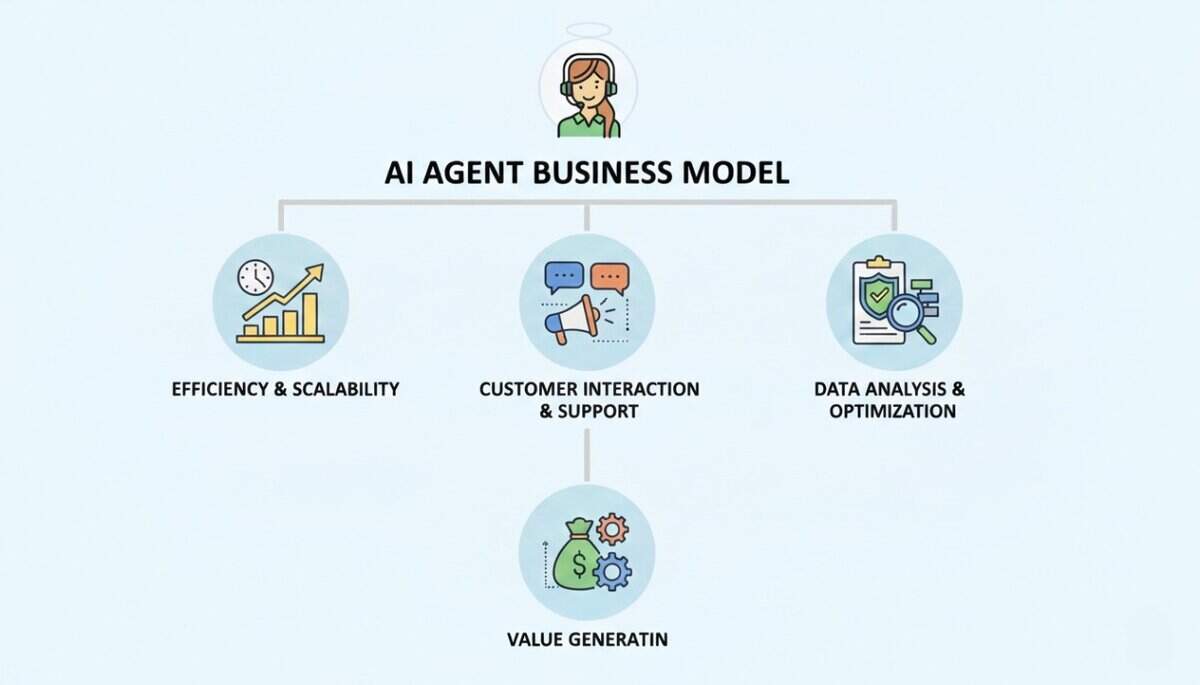
    An AI agent business model refers to how a company builds, delivers, and captures value using autonomous AI agents. It’s the framework for turning AI that can act independently into a profitable product.

    Here’s the shift: the agent itself becomes the core product. You’re not selling software with an AI feature tucked in the settings menu. You’re selling an autonomous worker that handles entire workflows without human intervention.

    Think about the difference between traditional SaaS and an AI agent business. With traditional SaaS, you buy project management software like Asana or Monday. You learn the interface, create boards, assign tasks, and update statuses. You’re the operator. 

    With an AI agent business, you’re buying an AI project manager that tracks deadlines, reassigns tasks when someone’s overloaded, sends progress updates, and flags blockers automatically. You hired a digital employee, not a tool you need to master.

    Aspect
    Traditional SaaS Business Model
    AI Agent Business Model
    Core Value Proposition
    Sells software tools that help users perform tasks more efficiently
    Sells autonomous agents that perform tasks and complete workflows on behalf of users
    Role of the User
    User operates the software and drives all actions
    User sets goals or instructions while the agent executes the work
    Revenue Model
    Mostly subscription-based, often priced per user or seat
    Subscription plus usage-based or outcome-based pricing tied to tasks completed
    Cost Structure
    Predictable infrastructure and development costs that don’t vary heavily with usage
    Higher variable costs due to AI model usage, compute power, and API calls per task
    Scalability Driver
    Growth comes from acquiring more users and teams
    Growth comes from increasing the volume and complexity of tasks handled by agents

    Types of AI Agent Businesses

    AI agent startups operate in different niches depending on what tasks their agents handle.

    1. Personal Productivity Agents

    These agents manage the daily grind for individuals and knowledge workers. Email assistants that draft responses, scheduling agents that find meeting times without the back-and-forth, personal task managers that prioritise your to-do list based on deadlines and energy levels. 

    Companies building these agents target professionals drowning in administrative work who’d rather focus on deep work. The agent becomes your personal assistant without the salary.

    2. Business Workflow Agents

    This category focuses on automating internal operations that bog down teams. CRM automation agents that update customer records after sales calls, report generation agents that pull data from multiple systems and create executive summaries, internal process automation for approvals and procurement workflows. SMBs and enterprise operations teams are the sweet spot here. 

    According to V7 Labs research on AI agent examples, operations teams using invoice matching and data validation agents report significant reductions in manual processing time. These agents handle the repetitive stuff that eats up hours every week.

    3. Customer-Facing AI Agents

    These agents interact directly with customers on behalf of the business. Support agents that resolve tickets end-to-end without escalating to humans, sales agents handling initial outreach and qualification before passing warm leads to reps. 

    Customer service and sales teams are the primary buyers. According to research, platforms like Sendbird help support teams deliver proactive, personalised customer service across channels. The agent doesn’t just answer questions. It understands context, follows up, and closes the loop.

    4. Developer and Data Agents

    These agents tackle technical and analytical work that requires specialised knowledge. Code review agents that catch bugs and suggest improvements, automated debugging tools that trace errors and propose fixes, data analysis agents that clean datasets and generate insights, SKU classification agents for e-commerce catalogues. 

    Engineering teams and data-heavy enterprises are the target market. The agent acts like a junior developer or analyst who never sleeps and processes information faster than any human could.

    How AI Agent Business Model Makes Money

    AI agent companies don’t reinvent monetisation from scratch, they borrow proven SaaS pricing models and tweak them to match automation and usage. The core difference is this: instead of just paying for access to software, customers are often paying for work done by the software.

    Here are the main ways AI agent businesses generate revenue:

    • Subscription Model – Fixed monthly or annual fee for ongoing access to the AI agent
    • Usage-Based Pricing – Customers pay based on how many tasks, actions, or API calls the agent performs
    • Tiered Plans – Different price levels tied to automation limits or feature access
    • Enterprise Licensing – Custom contracts for large organisations with broader usage and support
    • Outcome-Based Pricing – Pricing linked directly to results delivered, not just activity

    Comparison of AI Agent Revenue Models

    Model
    How It Works
    Best For
    Why Customers Like It
    Example
    Subscription
    Flat monthly or yearly fee for access
    Personal productivity agents, internal tools
    Predictable costs, simple budgeting
    $20/month for unlimited use of a writing assistant
    Usage-Based
    Pay per task, action, or API call
    Customer support, data processing, automation-heavy tools
    Pay only for what you use
    $0.05 per support ticket handled
    Tiered Plans
    Pricing increases with higher limits or features
    Growing startups and SMBs
    Easy to scale as needs grow
    $49 for 100 tasks, $199 for 1,000
    Enterprise Licensing
    Custom pricing for large teams or org-wide use
    Enterprises with large workflows
    Dedicated support, bulk value
    $50,000/year for company-wide deployment
    Outcome-Based
    Pay for successful results delivered
    High-trust, high-impact use cases
    Direct ROI alignment
    $2 per ticket resolved without human help

    Cost Structure of an AI Agent Business

    AI agent businesses face both traditional software startup costs and AI-specific expenses that scale with usage.

    What surprises most founders is how variable the costs become compared to typical SaaS. Traditional software has predictable infrastructure costs, but AI agents? Every customer interaction literally costs you money.

    AI Model and API Usage

    Costs from OpenAI, Anthropic, or other LLM providers. Every agent action burns tokens, making this a variable cost that scales with customer usage. If your agent suddenly goes viral and processes 10x the queries, your API bill follows right behind.

    Cloud Hosting and Infrastructure

    Servers, databases, and compute resources to run the agents 24/7. Plus the API gateways, load balancing, and observability tools to make sure everything stays running smoothly when your customer expects their agent to work at 2 AM.

    Engineering and Product Development

    Building and maintaining the agent logic, integrations, and improving reliability. You’re constantly tweaking prompts, adding new integrations, and fixing edge cases where the agent does something unexpected.

    Customer Support

    Ironically, AI agent companies still need humans to help customers set up and troubleshoot their agents. Someone has to explain why the agent misunderstood a particular request or help configure it for a customer’s specific workflow.

    Sales and Marketing

    Getting in front of potential customers, especially in enterprise where deals take months. You’re not just explaining what your product does, you’re educating buyers on what AI agents even are and why they should trust autonomous software with business-critical tasks.

    How AI Businesses Get Their First Users

    Most AI agent startups don’t launch with a full product. They start small, test interest, and grow with feedback from early users.

    Step 1: Create a Simple Landing Page

    Founders build a basic page explaining what the AI agent does, who it’s for, and what problem it solves. The goal is clarity, not fancy design.

    Step 2: Show the Agent in Action

    A short demo video helps people understand the value fast. Instead of big promises, startups show the agent completing real tasks.

    Step 3: Set Up a Waitlist

    Before the product is fully ready, startups collect emails from interested users. This validates demand and builds an early audience.

    Step 4: Build Trust with a Branded Website

    To look credible, founders launch the page on their own domain instead of using a generic link. This usually starts with domain registration to secure the product name before promoting it. A proper domain makes the AI agent feel like a real product from day one.

    Step 5: Share in the Right Communities

    Startups post in places where their target users already hang out: Product Hunt, AI forums, LinkedIn groups, and niche Slack communities.

    Step 6: Learn from Early Users

    The first users give feedback on what’s confusing, what’s useful, and what’s missing. Startups use this input to improve the agent before scaling.

    Step 7: Use AI to Find More Users

    Many founders also use AI tools for prospect research and personalised outreach, helping them reach the right audience faster and at lower cost.

    Examples of AI Agent Startups

    Here are a few companies already building businesses around AI agents.

    1. Sierra

    Sierra develops AI agents that handle customer service tasks like processing exchanges and updating subscriptions without human involvement. It mainly serves e-commerce and subscription-based businesses that deal with high volumes of repetitive support requests.

    How it makes money: Likely through enterprise contracts combined with usage-based pricing, where clients pay more as the agent handles more customer interactions.

    2. Moveworks

    Moveworks provides AI agents that support employees inside large organisations. These agents help resolve IT issues, answer workplace questions, and retrieve internal knowledge automatically.

    How it makes money: Enterprise pricing, often based on the number of employees using the system or the volume of queries handled.

    3. Beam AI

    Beam AI offers a platform that lets enterprises build and manage multiple AI agents across different workflows. These agents automate operational processes across teams and departments.

    How it makes money: Platform licensing fees plus usage-based pricing tied to how extensively companies deploy and run their agents.

    Advantages of the AI Agent Business Model

    AI agent businesses have structural advantages over traditional SaaS that make them particularly attractive to investors and founders.

    1. High Scalability: Once built, agents can handle thousands of customers simultaneously without proportional cost increases. Adding the 1,000th customer doesn’t require hiring more support staff or expanding infrastructure in the same way a service business would. The marginal cost of each new customer approaches zero while revenue keeps climbing.

    2. Recurring Revenue: Subscription and usage-based models create predictable, recurring revenue that compounds over time. Customers who integrate agents into their daily workflows rarely churn because pulling out the agent means rebuilding processes from scratch. That stickiness translates into reliable cash flow you can count on month after month.

    3. Deep Product Stickiness: When an agent learns a customer’s specific workflows, preferences, and data patterns, switching costs become massive. You’d have to retrain a completely new agent, migrate all your data, and teach your team new processes. Most customers would rather stick with what’s working than go through that hassle, which keeps churn incredibly low.

    4. Strong Automation Value: Customers see direct ROI by replacing human hours with agent automation, making the purchase decision straightforward. It’s easy to justify the expense when you’re saving 20 hours a week on data entry or customer support. That clear value proposition shortens sales cycles and makes renewals almost automatic because the ROI speaks for itself.

    Challenges in AI Agent Business Model

    AI agents can automate real work, but turning them into reliable, profitable businesses comes with serious challenges.

    • Model Reliability and Accuracy: AI agents can make mistakes, and when they act autonomously, those mistakes can have real consequences. Wrong customer responses or incorrect data handling can quickly damage user trust.
    • High Compute Costs: Every action an AI agent takes consumes API calls and cloud resources. As usage grows, costs can rise sharply, making pricing and cost control critical for sustainability.
    • Trust and Adoption Barriers: Many employees and organisations are still hesitant to let AI make decisions without oversight. This slows adoption and often requires extra approval layers that reduce the efficiency gains agents promise.
    • Data Privacy and Security Risks: AI agents often need access to sensitive customer and company data. This creates compliance, security, and legal risks, especially in regulated industries like healthcare and finance.
    • Competition from Big Tech: Large companies like Google and Microsoft are building their own AI agent platforms. Startups must focus on niche problems, specialization, or industry-specific solutions to compete effectively.

    The Future of AI Agent Businesses

    The next phase isn’t about single agents handling isolated tasks. It’s about multi-agent systems where specialised agents collaborate on complex workflows. Enterprises are moving from single agents to orchestrated multi-agent systems that can handle complex, multi-dimensional tasks. 

    What this means for you: agents will work across multiple tools like CRM, email, and project management seamlessly, without humans switching between apps. One agent gathers information, another analyses it, a third takes action based on the analysis, all coordinated automatically.

    The bigger shift is from “software tools” to “software workers.” We’re seeing the rise of AI-native startups that are built around agents from day one, not traditional companies tacking on AI features. According to PwC’s AI agent survey, enterprise budgets for AI agents are surging with measurable ROI being realised. 

    The companies winning this transition aren’t just automating tasks—they’re reimagining entire workflows around what agents can do autonomously. AI agents aren’t just changing how software works; they’re fundamentally reshaping how software delivers value by doing the work instead of enabling humans to do the work.

  • E-Commerce Risk Management: Tips, Tools and Examples

    E-Commerce Risk Management: Tips, Tools and Examples

    E-commerce is growing fast, but so are the risks that come with it. Online fraud alone is expected to double in the next few years, jumping from $44.3 billion in 2024 to $107 billion by 2029. And for most online businesses, fraud is only the beginning of the problem.

    Today’s e-commerce risks go far beyond stolen credit cards. A single system outage can bring sales to a halt during peak hours. A weak plugin can expose customer data. Supply chain delays can leave you with empty shelves, while missed compliance rules can lead to heavy fines.

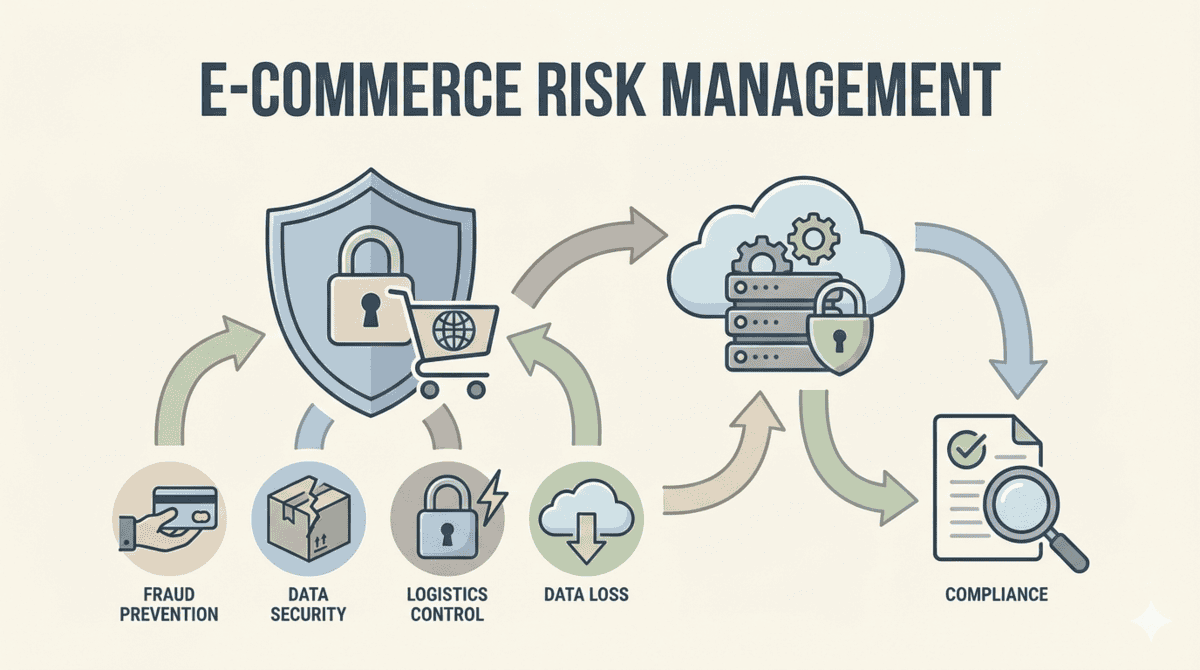
    E-commerce risk management is no longer just about protecting payments. It’s about protecting your entire business, from your website and vendors to your customers, data, and reputation.

    Types of Risks Faced by E-commerce Businesses

    Running an online store means juggling risks that span way beyond the checkout page. You’re dealing with financial threats, operational headaches, technical vulnerabilities, and regulatory minefields all at once. 

    Here’s what each of these risk categories actually looks like in practice.

    1. Financial Risks

    Payment fraud hits hard, but chargebacks might be costing you even more. Chargeback rates jumped 222% from 0.15% in Q1 2023 to 0.47% in Q1 2024.

    What makes this worse? Most chargebacks aren’t even real fraud. 75% of chargebacks are friendly fraud, where customers dispute legitimate purchases.

    Returns abuse is spiraling too. Customers buying items, using them, then returning them. Or claiming packages never arrived when they did. These first-party misuse tactics drain profits faster than most merchants realise.

    2. Operational Risks

    Your supply chain is more fragile than you think. One vendor delay or shipping disruption can cascade into inventory shortages, missed delivery windows, and angry customers.

    30% of global supply chain activities are affected by tariffs right now. That means unpredictable costs and delays you can’t always plan around.

    Fulfillment errors add another layer. Wrong items shipped, damaged packaging, lost orders. Each mistake chips away at customer trust and eats into your margins with replacement costs and refunds.

    3. Technical and Platform Risks

    Your store runs on interconnected systems. When one breaks, it all breaks. System downtime means lost sales. Payment gateway failures mean abandoned carts. Platform vulnerabilities mean breaches.

    Third-party apps create hidden exposure points. The Consentik Shopify app breach exposed over 4,180 stores to potential attacks. This wasn’t even a payment app. It was a cookie consent tool that leaked store admin tokens and advertising credentials.

    Payment infrastructure adds its own complexity. Payment systems involve multiple integration points, and each connection is another potential failure point. Gateway outages, API changes, authentication issues. Any of these can halt transactions instantly.

    4. Compliance and Regulatory Risks

    You’re not just following one set of rules. You’re navigating a maze of overlapping regulations that change by region and keep getting updated.

    Multi-jurisdictional requirements like GDPR, CPRA, DSA, and PCI DSS v4.0 all demand different compliance measures. Miss one, and you’re facing fines that can cripple your business.

    EU customs reforms are adding product safety liability to the mix. You’re now responsible for ensuring products meet safety standards, not just shipping them. Tax compliance varies by state and country. Data privacy laws keep evolving with stricter penalties for violations.

    5. Reputational Risks

    One data breach can destroy years of trust-building. When customer information leaks, they don’t just stop buying from you. They tell everyone else to avoid you too.

    Poor security practices become public fast. Review sites, social media, news coverage. Your reputation spreads beyond your control. Negative reviews about security issues or mishandled data stick around long after you’ve fixed the problem.

    That’s exactly why reputational damage often outlasts the initial incident. You might recover financially, but winning back customer confidence takes years.

    How to Manage E-commerce Risks

    Effective risk management requires both proactive prevention and reactive response strategies. Here’s how you can protect your business from the threats we just covered.

    1. Implement layered security controls: Use SSL/TLS encryption, enable two-factor authentication for admin and customer accounts, rely on secure payment gateways, and run regular security audits.
    2. Monitor transactions in real time: Use fraud detection tools to flag suspicious behaviour such as failed payment attempts, mismatched addresses, or unusually large orders before transactions are completed.
    3. Establish clear policies and documentation: Publish transparent refund, shipping, and return policies so customers know what to expect and disputes are reduced.
    4. Report extortion attempts immediately: If you receive threats demanding payment to avoid mass chargebacks, fake reviews, or DDoS attacks, document everything and file a merchant extortion report form with your payment processor and local authorities.
    5. Conduct regular risk assessments: Review systems, workflows, and vendor relationships quarterly or semi-annually to identify vulnerabilities early.
    6. Train your team on security protocols: Ensure staff can recognise phishing attempts, handle customer data correctly, and respond quickly to incidents.
    7. Build vendor and third-party oversight: Review app permissions, vet vendor security practices, and monitor supply chain partners to reduce external risk.

    Tools That Help Identify and Reduce Risk

    The strategies we talked about work best when they’re backed by the right technology. Modern risk management tools combine automation with real-time monitoring and analytics to catch threats before they turn into financial losses. 

    You’re no longer manually reviewing every transaction or policy violation. Instead, these platforms process thousands of data points in seconds, flagging unusual patterns and helping you respond faster.

    1. Fraud Detection and Prevention Tools

    Platforms like Sift, Signifyd, and Riskified use machine learning to spot payment fraud, account takeover attempts, and policy abuse as they happen. These tools analyse buyer behavior, device fingerprints, and transaction history to assign risk scores in real-time. That means you can block suspicious orders before they ship while letting legitimate customers check out without friction.

    2. Chargeback Management Software

    Solutions like Chargeflow and Chargeback Gurus automate the entire dispute process, from evidence collection to submission. 

    Here’s what matters: merchants using automation report a 75% chargeback win rate compared to the 12% industry average for manual disputes. The software pulls transaction data, customer communication, and delivery confirmations to build your case without you lifting a finger.

    3. Governance, Risk, and Compliance (GRC) Platforms

    Enterprise tools like Archer, OneTrust, and Navex handle compliance tracking across multiple frameworks while managing third-party risk assessments. These platforms now include AI governance modules that help you track how algorithms make decisions and ensure they align with regulatory requirements. They’re built for businesses juggling multiple compliance standards at once.

    4. Cybersecurity and Monitoring Tools

    Specialised e-commerce security platforms provide SSL certificate monitoring, vulnerability scanning, DDoS protection, and threat intelligence feeds. These tools run continuous checks on your infrastructure and alert you the moment something looks off. They integrate with your existing systems to close security gaps before attackers find them.

    5. Payment Security Solutions

    PCI DSS-compliant payment processors work alongside tokenisation services and 3D Secure authentication tools to protect transaction data. Tokenisation replaces card numbers with random identifiers, so even if your database gets breached, the stolen data is useless. 3D Secure adds an extra authentication layer that shifts liability for fraudulent transactions away from your business.

    6. Risk Assessment and Analytics Software

    Tools like LogicGate Risk Cloud offer automated risk scoring that updates as your business changes. The platform includes workflow management and continuous control monitoring that tracks whether your security measures are actually working. You get dashboards showing which risks need immediate attention and which ones you’ve successfully mitigated.

    Practical Risk Management Tips for Online Sellers

    You’ve seen the risks and the tools. Now here are 10 vendor-neutral steps you can take today to protect your e-commerce business, regardless of what platform you sell on or how big your operation is.

    • Enable multi-factor authentication everywhere: Turn on MFA for admin panels, payment processors, hosting accounts, and third-party tools that access customer data.
    • Keep software and plugins updated: Regular updates fix known vulnerabilities and reduce the risk of attacks that target outdated systems.
    • Use AVS and CVV checks: Require address verification and card security codes to block many fraudulent card transactions early.
    • Set transaction velocity limits: Limit how many purchases a customer can make in a short period to prevent card testing and abuse.
    • Maintain detailed transaction records: Save order details, shipping proofs, customer communication, and IP logs to support chargeback disputes.
    • Review third-party app permissions regularly: Check which apps have access to store data and remove permissions for tools you no longer need.

    Real World Examples of E-commerce Risk Management

    Theory only takes you so far. Let’s look at actual incidents that shaped how businesses approach risk today.

    The Consentik Shopify App Breach

    In what became one of Shopify’s most sobering third-party security incidents, the Consentik app exposed over 4,180 stores to potential attacks. The app, ironically designed to help merchants comply with privacy regulations, ran an unsecured server that leaked Shopify personal access tokens and Facebook ad credentials.

    What made this particularly damaging was the token access. Attackers could gain full administrative control over stores, manipulate customer data, inject malicious code, or launch fraudulent ad campaigns charged to the merchant’s account. The app had a 4.9-star rating and Shopify’s “Made for Shopify” badge, which shows that reputation alone doesn’t guarantee security.

    The lesson here is clear: vet every third-party integration beyond surface-level reviews. Check security practices, audit access permissions regularly, and rotate tokens whenever you remove or change apps. Your store’s security is only as strong as the weakest plugin you’ve installed.

    Amazon Seller Account Compromises

    Amazon sellers face a different beast entirely. Seller account hacks have become a recurring pattern, with attackers targeting high-volume merchants to redirect funds or hijack product listings. One documented campaign hit 100 seller accounts over six months, siphoning funds before merchants even realised what happened.

    What’s tricky about these attacks is they exploit platform-specific vulnerabilities. Standard consumer security like basic two-factor authentication often isn’t enough when you’re managing inventory worth thousands. Attackers use credential stuffing from previous breaches or phishing emails that look identical to Amazon’s official communications.

    The takeaway: platform-specific threats need platform-specific defences. Use dedicated email addresses for seller accounts, enable all available security features Amazon offers, and monitor account activity daily. What protects your personal email won’t necessarily protect your business on a marketplace.

    Chargeback Automation Success

    Here’s a more optimistic example. Merchants using automated chargeback management systems achieve 75% win rates compared to the 12% average for those handling disputes manually. That’s not a small improvement, it’s the difference between losing money and protecting your margins.

    The gap comes down to response time and evidence quality. Automated systems submit disputes within minutes with properly formatted documentation, while manual processes often miss deadlines or submit incomplete evidence. One mid-sized retailer recovered an additional $47,000 in a single quarter after implementing automation.

    What this proves: specialized tools deliver measurable ROI when they address specific pain points. The upfront cost of automation pays for itself quickly when you’re dealing with high transaction volumes.

    How to Build a Long-Term Risk Management Strategy

    Risk management is not a one-time task. It needs to evolve as your business grows, fraud tactics change, and new vulnerabilities appear. A strong long-term strategy focuses on consistency, ownership, and regular improvement.

    1. Conduct a risk audit: Review your payment flows, systems, and processes to identify vulnerabilities and establish a clear baseline.
    2. Define risk tolerance levels: Decide which risks must be eliminated and which can be monitored based on business impact and customer experience.
    3. Assign clear ownership: Assign responsibility for financial, operational, technical, compliance, and reputational risks so issues are not overlooked.
    4. Implement controls and monitoring: Deploy fraud tools, security controls, and real-time alerts to catch threats at different stages.
    5. Create standard procedures: Document how your team should respond to incidents like fraud spikes, breaches, or downtime.
    6. Review and update regularly: Run quarterly reviews to assess incidents, tool performance, and new risk patterns.
    7. Train teams continuously: Provide regular training on emerging threats, phishing attempts, and security best practices.
    8. Work with security partners: Maintain relationships with payment providers, vendors, and industry groups for early threat insights.
    9. Test response plans: Run simulations for breaches, outages, and dispute spikes to ensure teams are prepared.
    10. Track and report key metrics: Monitor fraud rates, chargebacks, false positives, and response times to measure effectiveness.
  • AI Website Builder vs. WordPress: Which Is Better?

    AI Website Builder vs. WordPress: Which Is Better?

    WordPress has been the go-to for years, powering 43% of all websites globally. That’s over 518 million sites. But AI website builders just saw a 46% usage increase in 2025, changing how people build websites online.

    We’re comparing both options head-to-head. What they cost, how fast they work, and which one actually fits your needs.

    What Is WordPress?

    WordPress was launched back in 2003 as a simple blogging platform. Fast forward to today, and it’s the biggest player in the website game. It owns 61.3% of the CMS market. 

    This dominance happened because WordPress evolved from a blogging tool into a full website builder. Now it can handle everything from personal blogs to online stores to corporate sites.

    There are two versions: WordPress.org and WordPress.com. 

    WordPress.org is the self-hosted version where you download the software, find your own hosting, and control everything. You own your site completely. You’ll need to choose from various wordpress hosting plans offered by companies like Bluehost, SiteGround, or HostGator, with prices and features that vary based on your needs.

    WordPress.com is a hosted service that handles the technical setup for you. It’s easier to start with, but you’re renting space on their servers and have less freedom to customise.

    What Are AI Website Builders?

    AI website builders are platforms that use artificial intelligence to automate the process of creating a website. These tools ask you a few questions about your business and then generate a complete site for you. 

    With WordPress, you pick the theme, install plugins, adjust settings, arrange widgets. With AI builders, the system handles design choices automatically. It selects colour schemes based on your industry, places content sections where they statistically perform best, and even writes initial copy for your pages. 

    The big promise is speed. WordPress sites typically take days or weeks to build, even with templates. You’re configuring hosting, installing WordPress, browsing themes, learning the editor. AI builders claim to deliver finished sites in minutes. 

    According to recent data, no-code and low-code platforms now support 42% of all new website builds, showing this speed advantage resonates with users who want results fast.

    Some Commonly Used AI Website Builders 

    AI website tools fall across a spectrum, from pure no-code builders to AI-assisted coding platforms.

    Traditional AI Website Builders:

    • Wix ADI: One of the first AI-powered website creators, launched in 2016, that generates complete sites by asking questions about your business
    • Hostinger AI Builder: Creates websites through conversational prompts and includes AI writing tools for content
    • Jimdo Dolphin: Builds sites by analysing your social media presence and business information
    • Durable: Generates business websites in under a minute with AI-written copy tailored to your industry

    Vibe Coding Tools:

    • Lovable: AI-assisted platform that generates full-stack web applications from natural language descriptions
    • Bolt.new: Lets developers build and deploy apps through AI-generated code with real-time previews
    • Replit: Collaborative coding environment with AI that writes and debugs code as you work
    • v0: Generates React components and interfaces from text prompts for developers
    • Cursor: AI-powered code editor that assists with writing, refactoring, and understanding codebases

    The first category targets business owners who want finished sites without touching code. The second serves developers who want AI to speed up coding rather than replace it. Both use AI, but for different audiences with different skill levels.

    WordPress vs AI Website Builders: Quick Comparison

    Before we break down each factor, here’s a side-by-side look at how WordPress stacks up against AI website builders. This gives you a quick snapshot of what to expect from each option.

    Factor
    WordPress
    AI Website Builders
    Ease of Use
    Moderate learning curve
    Beginner-friendly
    Learning Curve
    Weeks to months
    Minutes to hours
    Setup Time
    Hours to days
    Minutes
    Design Flexibility
    Unlimited with themes
    Limited to templates
    Customization Options
    Full control possible
    Guided choices
    Cost
    Varies widely
    Fixed subscription
    Scalability
    Highly scalable
    Depends on the platform
    SEO Capabilities
    Advanced with plugins
    Basic to moderate
    Control & Ownership
    Full ownership
    Platform-dependent
    Technical Skills Required
    Some coding helps
    None required
    Community & Support
    Massive global community
    Vendor support 
    Best For
    Custom, complex sites
    Quick, simple sites

    Each of these factors plays a different role depending on your specific needs. Let’s break down what they actually mean for your project.

    Detailed Comparison: WordPress vs AI Website Builders

    Choosing between WordPress and AI website builders can feel overwhelming when you’re trying to get your site up and running. Both options will get you online, but they work in completely different ways. 

    Let’s break down exactly how these two options compare across everything that matters.

    Ease of Use and Learning Curve

    Getting started with a new platform is always a bit of a journey. WordPress wants you to learn its system first, while AI builders just want to get you online as quickly as possible.

    WordPress:

    • Requires learning its interface with themes, plugins, and dashboard settings that can feel cluttered at first
    • The Block Editor (Gutenberg) simplified things, but you’re still working with a system built for flexibility over simplicity
    • Some trial and error involved as you click around menus and figure out where settings live
    • Becomes easier the more you use it – once you understand how themes and plugins work together, building gets faster
    • The learning curve pays off if you’re building multiple sites or need complex changes later
    • When you want something specific, you can Google a solution and install a plugin

    AI Website Builders:

    • Skip the learning process entirely – you describe what you want and the tool generates a site
    • Visual editors show exactly what you’re changing in real-time
    • No backend navigation, no plugin hunting, no wondering if you broke something
    • Stay simple throughout – drag, drop, and adjust elements quickly
    • Hit a ceiling when you want something the tool didn’t anticipate
    • Either support your need out of the box or they don’t
    • Win for someone launching their first site who just wants it done

    Design Flexibility and Customisation

    Making your site look the way you want is where these two platforms really show their differences. WordPress is like having a toolbox with every tool imaginable, while AI builders are like having a smart assistant who does things their way.

    WordPress:

    • Offers thousands of themes as starting points, each customizable through code or visual builders
    • Page builders like Elementor or Divi add drag-and-drop control without touching code
    • Complete access to CSS, HTML, and PHP means you can change literally anything if you know how
    • Supports custom post types, taxonomies, and database structures for unique content layouts
    • Works with design plugins that add specific elements like sliders, galleries, animations, interactive maps
    • Mix and match tools until your site looks exactly how you pictured it

    AI Website Builders:

    • Generate designs based on your industry and preferences using prompts
    • Let you tweak colours, fonts, and layouts within predefined templates
    • Keep designs clean and modern by limiting choices to what works well together
    • Make it hard to break things visually – the tool prevents obvious design mistakes
    • Restrict you to what the platform supports with no custom code injection or plugin marketplace
    • Work great if the generated design fits your vision, frustrating if you want something unique
    • Handle 80% of design needs quickly but struggle with the remaining 20%

    Time to Launch

    How fast can you actually get your website live? The answer depends on which platform you choose and how much you already know.

    WordPress:

    • Takes longer initially as you choose a theme, install essential plugins, and configure settings
    • Requires decisions about hosting, security plugins, SEO tools, and contact forms before going live
    • Each plugin adds setup time for reading documentation and testing functionality
    • Builds while you learn, which slows down the first project but speeds up future ones
    • Typically takes a few days to a week for someone new to launch a basic site

    AI Website Builders:

    • Generate complete sites in minutes after answering a few questions
    • Handle hosting, security, and technical setup automatically
    • Let you go from idea to published site in the same afternoon
    • Skip the plugin research phase – essential features come built into the platform
    • Make launching fast but rebuilding slow if you want major changes later
    • Work best for time-sensitive launches like event pages, portfolio updates, or testing business ideas

    Cost Considerations

    Money matters when you’re building a website. WordPress lets you control your spending by picking what you need, while AI builders bundle everything into one monthly fee.

    WordPress:

    WordPress costs are variable. You’re piecing together your own setup:

    • Hosting fees start around $3-15/month for basic shared hosting. Managed WordPress hosting offers premium features at higher pricing.
    • Domain registration runs $10-20 annually, though many hosts throw in a free first year.
    • Premium themes cost $30-100 typically, but free options work perfectly fine.
    • Premium plugins range from $15 to $200+ each. Some charge one-time fees, others hit you annually.
    • Plugin pricing ranges wildly from $2 to $1,000 per year based on functionality.
    • Developer costs come into play if you need custom work or hit technical walls.

    The total depends entirely on your wordpress hosting plan and which features you need. You could run a solid site for under $100/year or spend thousands.

    AI Website Builders:

    Subscription models make budgeting straightforward:

    • Monthly or annual plans bundle everything into one predictable payment
    • Free tiers exist but they’re limited with branded URLs and restricted functionality
    • Scaling costs up as you grow – more storage, advanced features, and e-commerce capabilities increase your monthly bill
    • No surprise charges for plugins or themes since everything’s included in your subscription level

    That $20/month plan seems reasonable until you realise you’re locked in forever. WordPress’s upfront investments often pay for themselves after year one.

    Scalability and Growth Potential

    Your website might start small, but what happens when your business grows or your needs change? The platform you pick now affects how easily you can expand later.

    WordPress:

    WordPress scales like few platforms can:

    • Start with a simple blog, expand to full business site, then scale to enterprise level on the same platform
    • WooCommerce transforms your site into a full e-commerce store handling thousands of products
    • Build membership sites, online forums, booking systems, learning management platforms with the right plugins
    • Handle viral moments or steady growth to millions of monthly visitors
    • Resource-intensive at scale – big sites need better hosting, optimisation, and sometimes developer help

    You never outgrow WordPress. You just upgrade your hosting and tools as needed.

    AI Website Builders:

    These platforms work great but:

    • Small to medium sites thrive here – local businesses and portfolios rarely hit the ceiling
    • Platform limitations become real as you grow with custom functionality needs
    • Migration challenges mean moving to WordPress or another system often requires rebuilding from scratch
    • Sufficient for many businesses that don’t need enterprise-level features
    • Check what’s possible at higher tiers before committing

    SEO Capabilities

    Getting found on search engines matters for most websites. How much control you have over SEO can make a real difference in how many people find you.

    WordPress:

    WordPress offers comprehensive SEO control:

    • Plugins like Yoast and Rank Math give granular control over meta descriptions, title tags, XML sitemaps, breadcrumbs
    • Complete control over technical SEO – optimise URL structures, implement redirects, manage canonical tags
    • Fast loading achievable with optimisation plugins and proper hosting
    • Schema markup support through plugins helps search engines understand your content
    • Proven SEO track record with highest-ranking sites running on WordPress
    • Both Rank Math and Yoast maintain A-grade Core Web Vitals performance

    AI Website Builders:

    SEO here is more hands-off:

    • Basic SEO features included – meta descriptions, alt text, mobile responsiveness
    • Less granular control with limited access to advanced settings on some platforms
    • AI-generated metadata improving with suggested titles and descriptions based on content
    • Platform-dependent performance – site speed depends on the builder’s infrastructure
    • Adequate for most needs, especially local businesses not heavily dependent on search traffic

    Control and Ownership

    Who actually owns your website? This matters more than you might think, especially if you ever want to switch platforms or if your builder changes its rules.

    WordPress:

    You get full ownership of everything:

    • Your content, your code, your data – all yours
    • Export and migrate whenever you want
    • Host anywhere you choose without rebuilding
    • Direct access to your database
    • True independence with no platform controlling your site

    AI Website Builders:

    Platform lock-in is real. It’s like building on rented land:

    • Limited data export options – rarely the full site structure
    • Your site only exists as long as you keep paying
    • Terms of service can change at the platform’s discretion
    • Content types or business models might get restricted
    • Trading convenience for control

    Technical Requirements and Maintenance

    Every website needs ongoing care to stay secure and working smoothly. The amount of work you’ll do depends on which platform you choose.

    WordPress:

    • Regular updates required for core software, themes, and plugins
    • Security monitoring is your responsibility
    • Backup management – set up automatic backups or risk losing everything
    • Plugin conflicts happen and require troubleshooting
    • Technical knowledge helps but coding isn’t required

    AI Website Builders:

    • Maintenance handled by the platform with background updates
    • Automatic security updates roll out seamlessly
    • Security included – SSL certificates, firewalls, monitoring covered
    • Minimal technical overhead lets you focus on content
    • Peace of mind for non-technical users

    Community and Support

    When you need help, where can you turn? The size and quality of support communities varies dramatically between platforms.

    WordPress:

    WordPress has a massive global community spanning millions of users and developers. This means you’ll find countless tutorials across YouTube, blogs, and documentation sites covering virtually every issue you might encounter. Forums are everywhere – from the official WordPress forums to Reddit communities and Facebook groups where people actively help each other solve problems.

    Stack Overflow alone has thousands of answered WordPress questions that you can search through. Beyond online support, local meetups and WordCamps happen in cities worldwide, giving you chances to learn in person and network with other WordPress users. When you need professional help, developers are readily available for hire on platforms like Upwork, or you can work with specialised WordPress agencies.

    AI Website Builders:

    AI builders take a more centralised approach to support. Platform-provided support via email or chat comes included with your subscription, giving you direct access to the company’s help team. However, smaller communities mean fewer user-generated solutions floating around online.

    The documentation is improving as these platforms mature and grow their user bases. Chat support is common with paid plans, offering real-time help when you’re stuck. The downside is fewer third-party resources like tutorials and blog posts, so you’re mostly relying on official documentation and the platform’s support team rather than a broad community of users sharing tips and solutions.

    When to Choose WordPress

    WordPress makes sense when your project demands more than what templated solutions can offer. You’re looking at building something that needs to grow, change, and adapt over time without hitting walls.

    1. Complex Websites with Custom Functionality: If you need features that don’t come in a standard template, WordPress is your answer. You can build exactly what you envision with plugins and custom code.
    2. E-commerce at Scale: Running an online store with hundreds or thousands of products requires serious infrastructure. WooCommerce powers some of the largest online stores. When you’re processing dozens of orders daily, you need that level of control.
    3. Content-Heavy Publications or Blogs: If you’re publishing multiple articles daily with different authors, categories, and content types, WordPress was literally built for this. The content management system lets you organise thousands of posts, create editorial workflows, and maintain archives that stay fast and searchable.
    4. Full Control and Ownership: You own every file, every line of code, and every piece of content. If you want to move hosts, modify core functionality, or export everything tomorrow, you can. That ownership matters when your website represents years of work and business value.
    5. Specific Integrations or Features: Need to connect your CRM, email platform, payment processor, and inventory system? WordPress has plugins for virtually every business tool out there. When off-the-shelf integrations don’t exist, developers can build custom connections.
    6. Long-term Growth and Flexibility: Your site today might be simple, but what about in three years? WordPress grows with you from a basic blog to a multi-site network spanning different countries and languages. You’re not locked into someone else’s roadmap.
    7. SEO-Critical Projects: When organic search drives your business, you need complete control over technical SEO elements. WordPress lets you optimise everything from URL structures to schema markup, giving you every advantage in search rankings.

    WordPress is the choice when you know your website will evolve beyond its initial scope. You’re investing time upfront to build something that won’t limit you later.

    When to Choose an AI Website Builder

    AI website builders shine when speed and simplicity matter more than customisation. You’re not building a complex application, you just need a solid web presence that works.

    1. Need a Website Quickly: When you need to launch in hours rather than weeks, AI builders deliver. Type what you do, pick a style, and you’ve got a live site before lunch. This speed matters when you’re announcing a new business, launching a campaign, or simply can’t afford to wait.
    2. Have Limited Technical Skills: If terms like FTP, database, or PHP version make your head spin, that’s fine. AI builders handle all the technical stuff behind the scenes. You focus on your content and images while the platform manages everything else.
    3. Running a Small Business or Portfolio Site: Your local bakery, consulting practice, or photography portfolio doesn’t need complex features. You need clean pages showing what you offer, how to contact you, and maybe a booking form. AI builders nail these straightforward sites perfectly.
    4. Have a Tight Budget: When hiring a developer costs thousands and WordPress hosting plus plugins add up monthly, AI builders often include everything in one predictable price. Hosting, security, updates, and support are bundled.
    5. Want Zero Maintenance Hassle: No plugin updates that break your site. No security patches to install. No compatibility issues. The platform handles maintenance automatically while you focus on running your business.
    6. Testing an Idea or Building an MVP: Before investing heavily in a full WordPress site, you might want to test if your concept resonates. AI builders let you launch quickly, gather feedback, and validate demand before committing to something more complex.

    AI builders work best when your website needs are straightforward and you value ease over endless possibilities. You’re getting a professional web presence without the complexity.

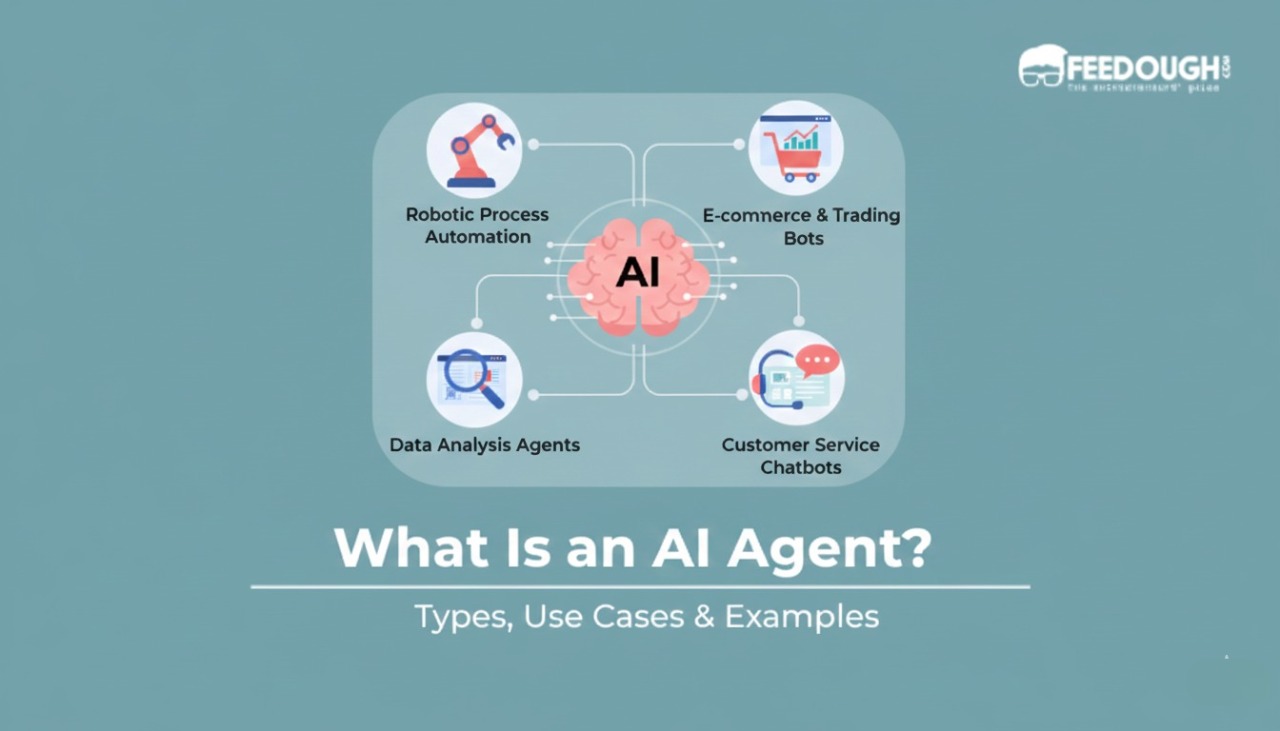
  • What is an AI Agent? Types, Use Cases & Examples

    What is an AI Agent? Types, Use Cases & Examples

    Your phone reminds you about a meeting, adjusts your calendar, and books a taxi to get you there on time. All of this happens without you lifting a finger. That’s an AI agent at work.

    These autonomous systems are changing how we interact with technology. They make decisions, solve problems, and take action on their own. 

    But what exactly are they? How do they work? And why should you care?

    Let’s break it down.

    What Is an AI Agent?

    AI agent is like a smart assistant that doesn’t need constant instructions. According to research from the University of Wisconsin, an AI agent is an autonomous entity that perceives its environment through sensors, processes the information, and takes actions to achieve specific goals.

    Here’s what that means in plain English: You give it a goal, and it figures out how to reach it.

    Say you need to schedule five meetings with different people across different time zones. A regular calendar app just shows you free slots. You still do the work. But an AI agent? It checks everyone’s availability, considers time zones, sends invites, and confirms the meetings. Done.

    That’s the difference. Traditional software waits for your commands. AI agents take initiative.

    Regular software follows rigid rules. If this happens, do that. It’s like following a recipe to the letter. AI agents adapt. They learn from their environment. They handle unexpected situations without calling for help.

    That’s why they’re different from the AI you might already use. A chatbot answers your questions. An AI agent books your flight, reschedules it when there’s a delay, and orders a ride to the airport.

    AI Agents vs Traditional AI Systems

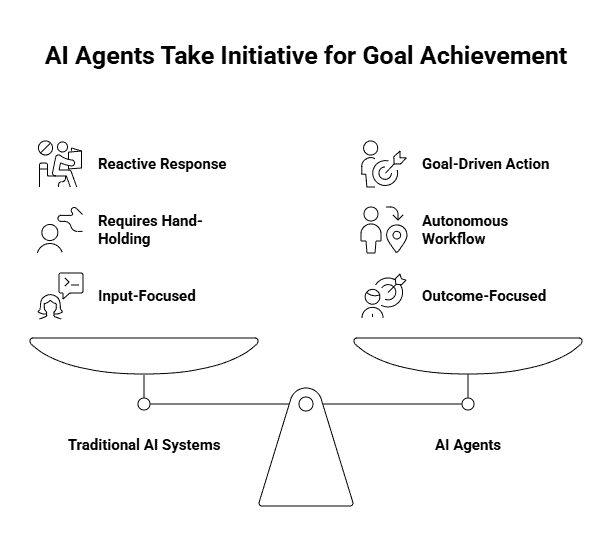
    Traditional AI systems are reactive. You ask a question, they give an answer. Think about ChatGPT or any chatbot. You type something in, it responds, and then it waits for your next move.

    AI agents flip this script.

    They’re goal-driven. You tell them what you want done, and they figure out how to do it. No hand-holding required. A traditional AI might tell you the weather forecast if you ask. An AI agent would notice you have a morning flight, check the weather, realise there’s a storm, and automatically rebook you on an earlier flight.

    Here’s what makes this possible: agents can autonomously design their workflow and use available software tools to get things done. They plan, adapt, and execute without you mapping out every step.

    Traditional AI responds to inputs. AI agents achieve outcomes. One waits for instructions. The other takes initiative to reach a goal you set.

    How Do AI Agents Work?

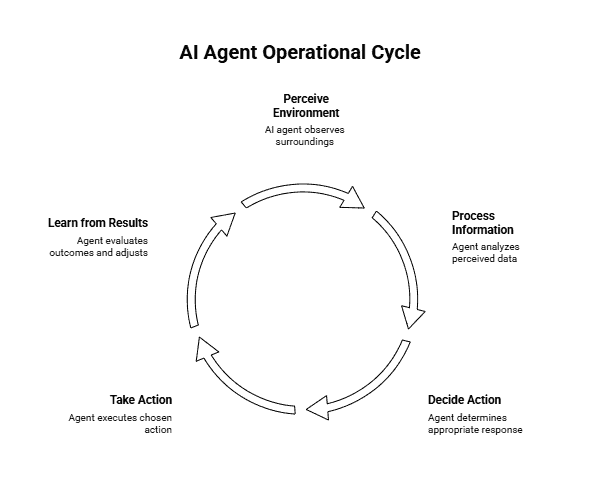
    Think of AI agents as operating in a constant loop. They perceive what’s happening around them, process that information, decide what to do, take action, and learn from the results. Then they start over again.

    Here’s how it plays out: Say you’re using an AI agent to manage your calendar. It perceives an incoming meeting request for Friday at 2 PM. It processes your existing schedule and notices you have a conflict. It decides to check alternative times that work for both parties. It takes action by manipulating tools like your email and calendar apps to propose a new time. Then it learns from whether that worked or caused issues.

    This cycle runs continuously. The agent doesn’t just respond once and stop. It keeps monitoring, adjusting, and refining its approach based on what’s actually happening. That’s what separates it from a basic chatbot that waits for your next command.

    The loop is what makes autonomy possible. Because the agent can perceive changes and act without you stepping in every time.

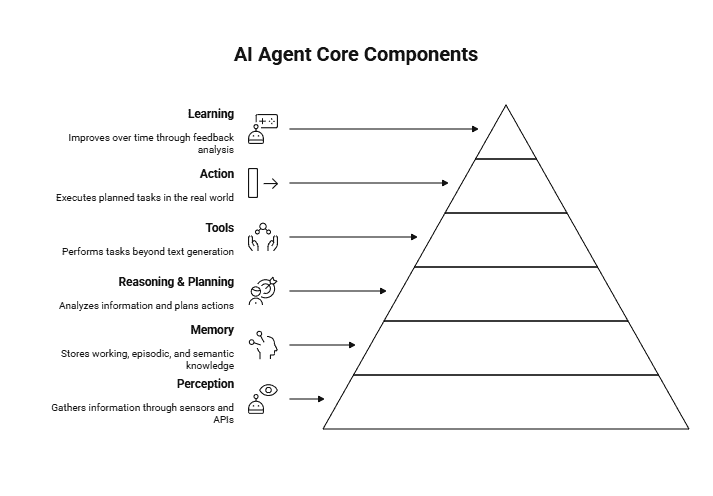
    Core Components of AI Agents

    Think of AI agents as systems made up of several core components working together. Each component handles a specific role, and all of them are required for an agent to function reliably.

    • Perception: How the agent observes its environment by receiving inputs from users, sensors, APIs, or data streams. Without perception, the agent has no awareness of what is happening around it.
    • Memory: How the agent stores and recalls information so it can stay consistent over time. This includes working memory for current context, episodic memory for past interactions, and semantic memory for general knowledge.
    • Reasoning and Planning: How the agent processes information, breaks down goals into smaller steps, and decides what to do and in what sequence, instead of acting randomly.
    • Tools: External capabilities the agent can use to perform tasks beyond text generation, such as calling APIs, searching databases, or interacting with other software systems.
    • Action: The execution layer where the agent carries out decisions, such as sending messages, updating records, or triggering workflows.
    • Learning: The mechanism that allows the agent to improve over time by evaluating outcomes and adjusting future behaviour based on feedback.

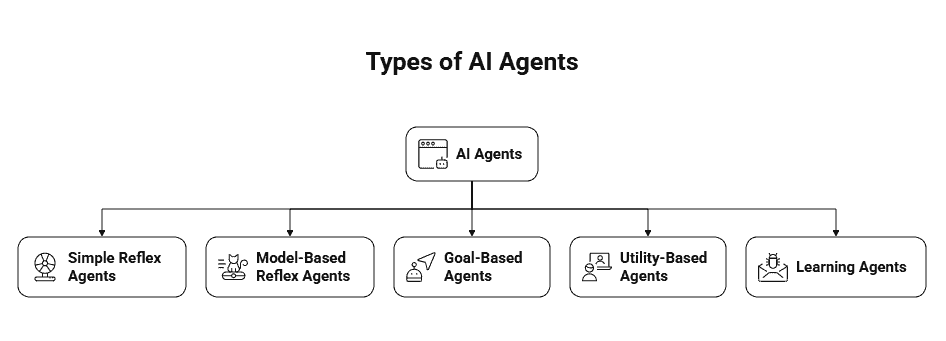
    Types of AI Agents

    Not all AI agents are built the same. Some follow basic rules, while others learn and adapt over time. Here’s how they differ.

    1. Simple Reflex Agents

    These are the most basic type. They react to what’s happening right now using predefined rules. No memory, no learning, just immediate responses. Think of a thermostat that turns on heating when the temperature drops below a set point. 

    If this happens, do that. That’s it. They work well for straightforward tasks but can’t handle situations that need context or planning.

    2. Model-Based Reflex Agents

    These agents maintain an internal model of their environment. They track what they can’t directly see, which helps them make better decisions. A robot vacuum that maps your home as it cleans is a good example. 

    It remembers where it’s been and what obstacles exist, even when those obstacles aren’t currently in view. This memory lets it navigate more efficiently than a simple reflex agent.

    3. Goal-Based Agents

    Instead of just reacting, these agents plan ahead to achieve specific objectives. They evaluate different paths and choose actions that bring them closer to their goal. A GPS navigation system works this way. It knows where you want to go and calculates the best route to get you there, considering traffic and road conditions.

    4. Utility-Based Agents

    These agents don’t just aim for a goal. They evaluate multiple factors and trade-offs to find the optimal solution. An AI that schedules meetings considers everyone’s availability, time zones, and preferences before suggesting a time. It’s weighing competing priorities to maximise overall satisfaction, not just completing the task.

    5. Learning Agents

    The most sophisticated type. These agents improve through experience and feedback. A spam filter that gets better at catching junk emails based on what you mark as spam is learning from your actions. Over time, it adapts to your specific needs and becomes more accurate. This is where AI agents start feeling truly intelligent.

    AI Agent Examples

    You see AI agents everywhere now, even if you don’t realise it. Virtual assistants like Siri and Alexa respond to your voice commands, set reminders, and control your smart home devices. When you chat with customer service and get instant responses, that’s often a chatbot analysing your question and pulling solutions from a knowledge base.

    Autonomous vehicles use AI agents to process sensor data, make split-second driving decisions, and navigate traffic. Netflix and Spotify use recommendation systems that learn your preferences and suggest content you’ll probably enjoy. The global AI agent market is projected to reach $7.63 billion in 2025, with expectations to hit $47.1 billion by 2030. That growth shows how quickly these systems are becoming essential across industries.

    In business operations, robotic process automation handles repetitive tasks like data entry, invoice processing, and report generation. What ties all these together is their ability to sense, decide, and act without constant human input.

    Benefits of AI Agents

    AI agents are valuable because they combine speed, scale, and consistency.

    1. Availability: Agents operate 24/7 without breaks, handling tasks continuously.
    2. Automation: Repetitive and time-consuming work is offloaded, freeing humans for higher-value tasks.
    3. Scalability: A single agent can handle hundreds or thousands of requests simultaneously.
    4. Data processing: Agents analyse large volumes of data quickly and identify patterns humans would miss.
    5. Cost efficiency: After setup, agents handle increased workload without proportional increases in labour costs.
    6. Consistency: They apply the same logic every time, without fatigue or variability.

    Limitations of AI Agents

    Despite their strengths, AI agents have clear constraints.

    • Lack of emotional intelligence: They struggle with empathy, nuance, and social context.
    • Dependence on data quality: Biased or incomplete training data leads to flawed decisions.
    • Poor handling of novel situations: Unexpected scenarios can cause errors that humans would avoid.
    • High upfront costs: Implementation requires technical expertise and initial investment.
    • Ongoing maintenance: Agents need monitoring, updates, and retraining as conditions change.

    AI agents are powerful, but they work best with human oversight rather than as fully autonomous replacements.

  • What is RAG in AI? Use Cases, Benefits & Comparison

    What is RAG in AI? Use Cases, Benefits & Comparison

    You ask your AI assistant a question about your company’s latest product specs. It responds confidently with information from three months ago. The specs changed last week. Now you’re making decisions based on outdated data, and you don’t even know it.

    This is the hallucination problem. AI models are trained on fixed datasets, so they can’t access information beyond their training cutoff. They make things up when they don’t know the answer. They sound certain even when they’re completely wrong.

    RAG changes that. Instead of forcing AI to rely purely on memory, it lets the model search through your actual documents, databases, and knowledge bases before generating a response. Think of it as the difference between taking a test from memory versus taking an open-book exam.

    What Is RAG?

    RAG stands for Retrieval-Augmented Generation. It’s a technique that combines two steps: first, the system searches for relevant information from external sources. Then, it uses that retrieved context to generate accurate, grounded responses.

    When you ask a question, the RAG system doesn’t immediately start generating an answer. It first retrieves the most relevant documents or data chunks from your knowledge base. Only after gathering this context does the AI model create its response, using the retrieved information as a reference.

    This approach solves the knowledge gap problem. The AI isn’t limited to what it learned during training. It can access up-to-date information, company-specific data, or specialised knowledge that wasn’t in its original training set.

    That’s exactly why 30-60% of enterprise AI use cases now rely on RAG. Companies need AI that works with their proprietary information, not just generic knowledge. RAG makes that possible without retraining expensive models from scratch.

    Why RAG Was Developed

    You can’t just throw more data at an LLM and expect it to stay current. The architecture itself has limitations that make traditional approaches impractical.

    The Knowledge Cutoff Problem

    When GPT-4 was trained, its knowledge stopped at April 2023. GPT-3.5? January 2022. That’s not a minor quirk. It means these models can’t tell you about yesterday’s product launch, last month’s regulatory change, or this year’s research findings.

    Retraining a model every time something new happens isn’t realistic. We’re talking millions in compute costs and weeks of processing time. You’d be outdated again before training even finished.

    Hallucination Issues in LLMs

    Here’s what makes hallucinations tricky. LLMs don’t actually “know” things. They predict what word should come next based on probability. So when you ask a question, the model generates an answer that sounds plausible, even if it’s completely wrong.

    Think of it like this: if you asked someone who never studied medicine to explain a surgical procedure, they might string together medical terms in ways that sound convincing. That’s essentially what an LLM does when it hallucinates.

    For enterprises, this is a dealbreaker. A customer service bot that makes up return policies or a legal assistant that invents case law creates liability, not value.

    The Need for Domain-Specific Accuracy

    Your company has internal documentation, proprietary research, customer data, and specialised processes that don’t exist in any public dataset. You can’t feed all that into a public LLM’s training data without serious privacy and security concerns.

    Even if you trained a private model on your data, you’d face the same retraining nightmare every time someone updates a policy document or adds new product specs. According to enterprise adoption research, companies need systems that can work with constantly evolving internal knowledge bases without exposing sensitive information.

    That’s where RAG changes the game. It lets models access your specific documents in real-time without baking that data into the model itself. Your proprietary information stays behind your firewall, but the AI can still use it to generate accurate responses.

    How RAG Works

    When you send a query to a RAG system, four distinct steps happen in a matter of seconds. Here’s how the process unfolds.

    Step 1: Query Processing

    You type in your question, let’s say, “What’s the warranty coverage for water damage?” The system doesn’t immediately search for those exact words. Instead, it converts your query into a mathematical representation called an embedding. 

    Think of it like translating your question into coordinates on a map. This lets the system understand the meaning behind your words, not just the words themselves. A question about “coverage for liquid spills” would land near your water damage query, even though the phrasing differs completely.

    Step 2: Information Retrieval

    With your question now in searchable format, the system scans through its knowledge base, usually stored in what’s called a vector database. It’s hunting for documents that match the intent of your query. If you ask about “refund policy,” it might pull up sections labelled “return procedures” or “money-back guarantee” because they’re semantically similar. 

    This beats old-school keyword matching, which would miss relevant documents just because they used different terminology. The system typically retrieves the top 3-5 most relevant chunks of information.

    Step 3: Context Augmentation

    Here’s where things get interesting. The system takes those retrieved documents and packages them alongside your original question. 

    This creates what developers call an “enriched prompt.” It’s like handing someone a textbook opened to the right page before asking them to answer your question. 

    The LLM now has specific reference material to work with instead of relying solely on patterns it learned during training.

    Step 4: Response Generation

    The LLM reads both your question and the retrieved context, then generates its answer. But unlike a standard chatbot making predictions based on training data, it’s synthesising information from the documents you just provided.

    It can quote specific policy sections, reference exact dates, or cite particular guidelines.
    The model isn’t guessing what your warranty might cover it’s reading the actual policy and explaining it to you.

    RAG vs Traditional Memory Systems

    AI memory isn’t one-size-fits-all. You’ve got models with massive context windows that can hold entire conversations in active memory. Then you’ve got RAG systems that pull information on demand. Both let AI work with information beyond its training data, but they do it in completely different ways.

    The approach you pick changes how your AI performs, how much it costs to run, and what kinds of tasks it can actually handle. A long context window works like keeping every page of a book open on your desk. RAG works like having a filing cabinet where you grab exactly what you need.

    Here’s where each one makes sense.

    What Is a Context Window?

    A context window is the amount of text an LLM can process at once. Think of it as the model’s working memory. When you’re having a conversation with ChatGPT, it remembers what you said three messages ago because those messages are still inside its context window.

    Early models had tiny windows. GPT-3 could only handle about 4,000 tokens, roughly 3,000 words. That’s barely enough for a short article. You’d hit the limit mid-conversation, and the model would forget what you talked about at the start.

    Now we’re seeing models with context windows in the millions of tokens. Claude can process 200,000 tokens. Gemini 1.5 Pro pushes that to 1 million. You could feed it an entire novel, and it would remember every plot point while answering your questions.

    But here’s the catch. Bigger context windows mean exponentially higher costs. Processing millions of tokens for every query burns through compute resources fast. Plus, there’s a performance issue called “lost in the middle”, models sometimes miss relevant information buried deep in a massive context.

    Key Differences Between RAG and Context Windows

    The biggest difference is selectivity. A context window processes everything you feed it. If you dump 50 documents into the prompt, the model has to work through all of it, relevant or not. RAG searches first, then only processes what matters.

    Say you need information about a specific clause in a 500-page contract. With a long context window, you’d load all 500 pages and ask your question. The model reads everything, finds your clause, and generates an answer. You just paid to process 499 pages of irrelevant content.

    RAG flips that script. It searches the contract, identifies the three paragraphs that mention your clause, and only sends those to the model. You get the same answer for a fraction of the cost.

    Then there’s the freshness factor. Context windows work with whatever you manually include in each query. If your company policy changed yesterday, you need to remember to include the updated version in your prompt. RAG automatically pulls from your knowledge base, so it always fetches the current version without you thinking about it.

    Accuracy differs too. Models can still hallucinate with long context windows, especially when information is scattered across hundreds of pages. RAG systems ground responses in specific retrieved passages, making it easier to trace where information came from and catch potential errors.

    When to Use RAG vs Long Context Windows

    Choosing between RAG and long context windows depends on what the model needs to do and how much information it needs at once.

    • Use long context windows when understanding the whole document matters.
      They work best when the model needs to see relationships across an entire text. For example, analysing how characters evolve from Act 1 to Act 3 in a screenplay, or understanding arguments that build gradually across a document.
    • Use long context windows for complex, cross-referenced reasoning.
      Tasks like legal contract analysis benefit when all sections are loaded together. Clauses in one part often depend on definitions or conditions elsewhere, and having everything in memory helps the model reason accurately.
    • Use RAG for large-scale question answering. Customer support bots or internal knowledge systems don’t need every document at once. They just need the few most relevant ones. RAG retrieves those and ignores the rest.
    • Use RAG when cost and scale matter. Processing massive context windows for thousands of daily queries gets expensive fast. RAG keeps costs down by retrieving only what’s needed per query.
    • Use a hybrid approach when you need both efficiency and depth.
      Many systems retrieve relevant chunks using RAG, then pass them into a longer context window for deeper reasoning. This combines cost efficiency with better analysis.
    • For most enterprise use cases, RAG is the practical default.
      It scales better, stays up to date easily, and makes answers auditable. Long context windows are powerful, but unless full-document reasoning is essential, RAG usually delivers better value.

    Real-World Applications of RAG

    RAG shows up in places you probably interact with daily. Customer support chatbots use it to pull answers from company knowledge bases, referencing specific policies or product documentation instead of guessing. That’s why some support bots can cite exact help articles while others just make things up.

    Enterprise search tools lean on RAG to help employees find information scattered across internal documents. Instead of reading through hundreds of PDFs, a worker asks a question and gets an answer pulled from the relevant files. 

    Healthcare systems use RAG to help doctors reference medical literature during patient consultations, pulling from thousands of research papers without memorising them. Financial analysts use it to query reports and regulatory documents, getting specific data points without manual searches.

    According to recent analysis, RAG is becoming the baseline for enterprise AI in 2025. Ship an AI system without retrieval, and you’re betting on hallucinations.

    Benefits of Using RAG

    RAG’s value isn’t theoretical; it directly improves reliability and control.

    • Higher accuracy: Answers are grounded in real documents, which significantly reduces hallucinations.
    • Lower costs and faster responses: Only relevant chunks are processed instead of entire knowledge bases.
    • No retraining required for updates: Add or update documents and the system can reference them immediately.
    • Better privacy control: Proprietary data stays in your database, not embedded in model weights.
    • Improved transparency and auditability: You can trace answers back to source documents, which is critical for accountability.
    • Reduced misinformation in high-stakes decisions: Research shows advanced RAG systems, especially those using knowledge graphs, significantly lower misinformation risk in areas like finance and legal discovery.
  • What is Prompt Chaining? Step-by-Step Guide

    What is Prompt Chaining? Step-by-Step Guide

    You’ve probably asked an AI to handle something complex, only to get a response that’s halfway decent but not what you needed. The output feels generic. It misses key details. Or it just doesn’t build on itself the way you expected.

    Here’s the thing: most AI models work best when you break big tasks into smaller, connected steps. That’s where prompt chaining comes in. 

    Instead of throwing one massive prompt at an AI and hoping for the best, you create a sequence. The output from one prompt becomes the input for the next. Each step builds on the last, creating a logical flow that helps the AI understand context and deliver better results.

    What this means for you is more control, better accuracy, and outputs that actually match what you’re trying to accomplish. Let’s look at how this actually works.

    What Is Prompt Chaining?

    Think of prompt chaining like cooking a meal. You don’t just throw all the ingredients into a pot at once and hope for the best. You prep the vegetables first. Then you cook them in stages. Each step feeds into the next, and the final dish is better because of that structure.

    Prompt chaining works the same way. The output of one AI prompt becomes the input for the next, forming a logical sequence of tasks

    Each prompt focuses on one specific job. The first prompt gives you raw material. The second shapes it. The third polishes it. What makes this powerful is that the AI isn’t starting from scratch each time. It’s building on what came before, which helps it maintain context and stay focused.

    According to CodeSignal, chain-of-thought prompting helps AI models break down problems into logical sequential steps. That’s exactly what prompt chaining does, but across multiple prompts rather than within a single one. The AI tackles complex workflows by handling them piece by piece.

    This sequential approach also means you can course-correct along the way. If the first prompt’s output isn’t quite right, you can adjust before moving to the next step. You’re not locked into one long, complicated prompt that either works perfectly or fails completely.

    Prompt Chaining vs Chain-of-Thought Prompting

    Here’s where things get interesting. A lot of people mix up prompt chaining with chain-of-thought prompting. They sound similar, but they work completely differently.

    Chain-of-thought prompting happens inside a single prompt. You’re asking the AI to show its reasoning process as it thinks through a problem. Think of it like asking someone to “show their work” on a math problem. The AI breaks down its thinking step-by-step, but it’s all happening in one conversation.

    For example, you might ask: “Calculate the total cost of 15 items at $3.50 each, plus 8% tax. Show your reasoning.” The AI would then explain each calculation step before giving you the final answer.

    Prompt chaining is different. You’re connecting multiple separate prompts where each output becomes the next input. It’s about building a workflow across several AI interactions, not just detailed thinking within one.

    So when should you use each? Chain-of-thought works great when you need detailed reasoning for complex problems like financial calculations or technical troubleshooting. The AI needs to think deeply but can handle it in one go.

    Use prompt chaining when your task has distinct phases that need different approaches. Writing that blog post? Research first, then outline, then draft, then edit. Each step needs focused attention and produces something concrete for the next phase.

    The main thing to remember: chain-of-thought is about how the AI thinks. Prompt chaining is about how you structure your workflow.

    Types of Prompt Chaining

    Not all chains work the same way. Depending on what you’re building, you’ll structure your prompts differently. Some tasks need a straight line from start to finish. Others need to make decisions along the way or handle multiple things at once.

    1. Sequential Chaining

    This is the most straightforward type. One prompt finishes, its output feeds into the next, and so on. Think of it like an assembly line where each station waits for the previous one to complete its work.

    Say you’re writing a research report. The first prompt pulls relevant data from sources. The second organises that data into an outline. The third writes the actual content based on that outline. Each step builds directly on what came before it.

    IBM Think notes that frameworks like LangChain let you create reusable chains with this linear progression. It’s ideal when your task has a clear order that can’t be shuffled around.

    2. Conditional Chaining

    Here’s where things branch. The chain doesn’t follow one path. Instead, it makes decisions based on what the previous output contains.

    Picture a customer service system. If someone’s message contains angry language, the chain routes to an escalation prompt that crafts an apology. If it’s a simple question, it goes to a FAQ lookup prompt. If it’s a technical issue, it triggers a troubleshooting sequence.

    You’re basically building “if this, then that” logic into your prompts. It’s more complex to set up, but it handles situations where different inputs need different treatment.

    3. Parallel Chaining

    Sometimes you don’t want to wait. Multiple prompts can run at the same time, then combine their outputs at the end.

    Let’s say you’re launching a product. One prompt writes the marketing copy. Another generates technical specifications. A third calculates pricing tiers. They all work simultaneously, then a final prompt weaves everything together into one cohesive product page.

    This speeds things up, but you need to coordinate carefully. The outputs need to fit together without contradicting each other.

    Benefits of Prompt Chaining

    Now that you know what prompt chaining is and how it works, let’s talk about why you’d actually use it. Here’s what this approach brings to the table.

    • Improved output quality: Breaking tasks into smaller, focused prompts produces better results than cramming everything into one large prompt. Each step handles a specific job, which reduces confusion and lets you optimise each part individually before issues compound.
    • Better context management: The AI builds on previous outputs step by step instead of being overloaded with context all at once. This helps maintain tone, terminology, and continuity across longer workflows.
    • Enhanced task control: You can review and adjust outputs between steps instead of discovering problems at the end. This makes debugging easier and prevents large-scale rewrites based on early mistakes.
    • Cost efficiency: Not every step needs an expensive model. Simpler tasks can use lighter models, focused prompts use fewer tokens, and overall response times and costs go down at scale.

    Drawbacks of Prompt Chaining

    Prompt chaining works well, but it comes with trade-offs that are worth considering.

    • Time-consuming setup: Designing, testing, and refining a prompt chain takes longer upfront compared to writing a single prompt.
    • Management complexity: More steps mean more things to track, document, and maintain, especially in team environments.
    • Context loss risk: Important information can get diluted across steps if context isn’t carefully carried forward, requiring deliberate repetition and balance.

    How To Implement Prompt Chaining

    You’ve seen what prompt chaining can do. Now let’s build one. The process is straightforward once you break it into manageable steps.

    Step 1: Break Down Your Task

    Start with your end goal and work backwards. What’s the final output you need? Then ask yourself what needs to happen right before that. And before that.

    Write out each step as a discrete task. If you’re building a blog post, your chain might look like this: research the topic → create an outline → write the introduction → draft body sections → edit for clarity. Each step should produce something concrete that feeds the next one.

    The key is finding natural breaking points. Where does one type of thinking end and another begin? Research is different from organising. Organising is different from writing. Those are your chain links.

    Step 2: Design Individual Prompts

    Now write a focused prompt for each step. Be specific about what you’re feeding in and what you want out.

    Here’s what that looks like: “Analyse this customer feedback data: [input]. Extract the 5 most common complaints and list them in order of frequency.” Notice how it states the input format and desired output clearly.

    Test each prompt on its own before connecting anything. Does it produce what you expected? If Step 2 gives you garbage, Step 3 will amplify that garbage. Fix weak prompts now, not after you’ve built the whole chain.

    Your prompt should also specify format. Do you want a bulleted list? A paragraph? JSON? Tell the AI exactly what structure you need.

    Step 3: Connect the Chain

    This is where you define the handoffs. How does the output from Step 1 become the input for Step 2?

    Be explicit about what information carries forward. If Step 1 identifies three main themes, Step 2 needs to know those themes. Your prompt might say: “Using these themes: [Step 1 output], write a paragraph explaining how they connect.”

    Set up your connection points carefully. Some chains pass everything forward. Others only pass specific pieces. Decide what each step actually needs. More context isn’t always better, especially if it includes irrelevant details that distract the AI.

    Step 4: Test and Refine

    Run your full chain with real data. Not hypothetical examples, actual use cases.

    Watch where the chain breaks. Does Step 3 misunderstand Step 2’s output? Does context get lost between Step 4 and Step 5? Those are your weak links.

    Adjust your prompts based on what happens. You might need to add more context to one step or simplify the output format from another. Sometimes you’ll realise you need an extra step you didn’t plan for.

    Once it works smoothly, document your workflow. Write down the exact prompt sequence, what formats you use, and any quirks you discovered. Future, you will thank the present you.

    Prompt Chaining Examples

    Let’s look at how this works in practice. These examples show different approaches to chaining based on what you’re trying to accomplish.

    Content Creation Workflow

    Here’s a concrete chain for writing an article about email marketing.

    Step 1: “Research and list 10 key benefits of email marketing for small businesses. Include one supporting statistic for each benefit.”

    Step 2: “Using this research: [output from Step 1], create a detailed outline with 5 main sections. Each section should cover 2 related benefits.”

    Step 3: “Based on this outline: [output from Step 2], write a 150-word introduction that hooks readers interested in growing their business through email.”

    Step 4: “Using the first section from this outline: [output from Step 2] and this research: [output from Step 1], write a 200-word section explaining these benefits with examples.”

    Notice how each step explicitly references what it needs. Step 4 pulls from both Step 1 and Step 2 because it needs both structure and substance. That’s sequential chaining with memory.

    Data Analysis Process

    Analysing customer survey data works differently. You’re moving from raw information to actionable insights.

    Step 1: “Review this survey data: [dataset]. Extract and categorise all responses into positive, negative, and neutral sentiment.”

    Step 2: “Using these categorised responses: [output], identify the top 3 patterns in negative feedback and top 3 patterns in positive feedback.”

    Step 3: “Based on these patterns: [output], generate 5 specific recommendations for improving customer satisfaction. Prioritise actions that address the most common negative patterns.”

    Chaining helps here because each step requires different thinking. Classification is mechanical. Pattern recognition is analytical. Recommendations are strategic. Asking the AI to do all three at once produces shallow results.

    Customer Support Automation

    Support workflows benefit from conditional chaining. Different inputs trigger different paths.

    Step 1: “Analyse this customer inquiry: [message]. Classify it as: technical issue, billing question, feature request, or general feedback.”

    Step 2a (if technical): “This is a technical issue: [message]. Check our knowledge base: [database] and provide step-by-step troubleshooting instructions.”

    Step 2b (if billing): “This is a billing question: [message]. Review the customer’s account: [account data] and explain their charges in simple terms.”

    Step 3: “Take this response: [output from Step 2] and personalise it using the customer’s name: [name] and purchase history: [history]. Match their tone, friendly or formal.”

    The chain adapts based on what Step 1 discovers. That’s how you handle variety without writing a separate workflow for every scenario. One classification step routes everything else.

    Tools for Prompt Chaining

    You’ve got options when it comes to building prompt chains. Some tools require coding knowledge, while others let you build workflows visually.

    1. LangChain is the go-to framework for developers. It manages LLMs like IBM Granite and OpenAI’s GPT models, lets you define custom prompts, and connects them into reusable chains. Think of it as the foundation for building complex AI workflows that need flexibility and control.
    2. ChatGPT API gives you custom integration possibilities. You can build chains programmatically, passing outputs between prompts and controlling exactly how your AI processes information. It requires some technical setup, but the control is worth it.
    3. Make.com and Zapier are your no-code options. These automation platforms let you connect ChatGPT with other tools in your workflow. Trigger a chain when a form is submitted, process the data through multiple prompts, and send the results wherever you need them. Perfect if you’re not comfortable writing code.
    4. Claude and custom implementations offer similar capabilities. Claude’s API supports conversational context naturally, making it easier to maintain thread continuity. Custom implementations give you complete control but require development resources.

    Start with what matches your skill level. You can always build more complex chains as you get comfortable with the basics.

    Best Practices for Effective Prompt Chaining

    Here’s what actually works when building chains:

    • Keep each step focused on one task. A prompt that tries to analyse, summarise, and format all at once will give you messy results. Break it down. One prompt analyses. The next summarises. The third formats.
    • Use consistent formatting across prompts. If your first prompt outputs bullet points, don’t suddenly expect paragraphs in step two. Consistent structure helps the AI understand what you’re asking and reduces errors in the chain.
    • Always restate important context. Like we mentioned in the drawbacks section, AI doesn’t naturally remember everything. When you move to a new prompt, explicitly reference the output from the previous step. “Based on the summary above…” or “Using the keywords identified in step 1…” keeps the chain grounded.
    • Test and refine iteratively. Your first chain won’t be perfect. Run it with different inputs. See where it breaks. Adjust the prompts until the outputs consistently meet your needs. This is normal.
    • Document your chains. Write down what each step does and why. Future you (or your team) will thank you when you need to troubleshoot or modify the chain months later.
    • Start simple, add complexity gradually. Build a two-step chain first. Make sure it works. Then add a third step. This approach saves you from debugging a massive chain where you can’t tell which step is causing problems.

    The thing is, prompt chaining gets easier the more you practice. Start with a simple workflow you’re already doing manually. Build a chain for it. Watch how it performs. You’ll quickly develop an instinct for what works and what doesn’t.

  • Outsourcing vs In-House Hiring: What to Choose?

    Outsourcing vs In-House Hiring: What to Choose?

    Your company just hit product-market fit. You need developers, marketers, and designers. But here’s the problem: hiring a single tech employee costs around €78K annually, and the recruitment process alone drains $4,800 per hire before they even start.

    You’re not alone in this. The global outsourcing market hit $302 billion in 2025 because businesses realised something: you can tap into talent from anywhere without the overhead of full-time hires. 

    But that raises the real question: Should you build an in-house team or outsource?

    Both options have serious implications for your budget, speed, and product quality. Let’s break down what actually works for growing businesses trying to scale without burning through cash or compromising on talent.

    What Is Outsourcing?

    Outsourcing is when a company hires an external provider to handle specific tasks or services instead of doing them in-house. Think of it like this: rather than hiring a full-time accountant, you contract with an accounting firm that handles your books. 

    The external team does the work, you pay for the service, and your internal team stays focused on what they do best.

    Common Business Functions Companies Outsource

    Most companies outsource tasks that are necessary but don’t require full-time staff. Here’s what gets outsourced most often:

    • IT & Software Development: Building apps, maintaining servers, and handling cybersecurity
    • Marketing & Content Creation: Managing social media, writing blog posts, and running ad campaigns
    • Customer Support: Answering emails, managing live chat, and handling phone support
    • HR & Recruitment: Screening candidates, onboarding new hires, and managing payroll
    • Finance & Accounting: Bookkeeping, tax preparation, and financial reporting

    Here’s something interesting: 37% of small businesses already outsource accounting or IT services. That’s more than a third choosing external help for these critical functions.

    Types of Outsourcing Models

    Where your outsourced team sits changes the cost, communication flow, and time zone overlap. Here are the three main models:

    1. Offshore Outsourcing: Hiring teams in distant countries like India or the Philippines. Biggest cost savings, but you’ll deal with time zone gaps.
    2. Nearshore Outsourcing: Working with providers in nearby countries with similar time zones. Companies can see 30-50% cost savings in nearshore locations like LATAM while keeping easier communication.
    3. Onshore Outsourcing: Contracting with providers in your own country. Higher costs, but zero language barriers or time zone headaches.

    For startups watching every dollar while trying to scale fast, nearshore hits a sweet spot between affordability and accessibility.

    What Is In-House Hiring?

    In-house hiring means bringing people directly onto your payroll as employees of your company. They work exclusively for you, report to your managers, and are fully integrated into your team and culture. It’s a commitment; you’re responsible for their salaries, benefits, training, and long-term development.

    Roles Commonly Hired In-House

    Some positions just make sense to keep internal. Here’s what most companies hire in-house:

    • Core leadership roles – Executives, department heads, and managers who shape company direction
    • Product and strategy teams – People building your core product or service and making key decisions
    • Long-term operational roles – HR, finance, and operations staff who keep daily business running
    • Client-facing and sensitive positions – Account managers, customer success teams, and roles handling confidential data

    Outsourcing vs In-House Hiring

    Here’s what most companies miss: the cost of hiring isn’t just about salaries. When you’re comparing outsourcing and in-house hiring, you’re really looking at two completely different cost structures. 

    One hits you upfront with everything bundled in. The other sneaks up on you with hidden expenses that keep piling up months after someone joins.

    outsourcing vs in house hiring comparison

    1. Costs Involved in In-House Hiring

    That base salary you budgeted for? It’s just the starting point. The all-in annual cost for an employee in Western Europe hits around €78,000 when you factor everything in. Though this varies significantly by location and role. 

    For US companies, the burden includes health insurance premiums (averaging $5,000–$7,500 annually per employee) and 401(k) matching, etc. On the other hand, as per UK hiring guide, employers there have different obligations. Mandatory pension auto-enrolment, and statutory benefits including 28 days paid holiday and sick pay. 

    So, here’s where your money actually goes:

    • Salaries and benefits: Base pay, health insurance, retirement contributions, paid leave, bonuses. These typically add 20-30% on top of the salary you advertised.
    • Office space and infrastructure: Desks, equipment, software licenses, utilities. Every person you hire needs somewhere to sit and something to work on.
    • Training and onboarding: The first few months are spent getting people up to speed. They’re on payroll but not fully productive yet.
    • Compliance and HR overhead: Payroll processing, legal compliance, performance reviews. Internal HR teams spend an average of $2,524 per employee annually just on administrative tasks.

    Costs Involved in Outsourcing

    With outsourcing, you’re mainly paying for finished work without the overhead baggage. Here’s how the cost structure breaks down:

    • Project-based or hourly fees: You pay for the work itself. No benefits, no office space, no long-term commitments. The rate is higher per hour, but you’re only paying when work is actually happening.
    • Reduced overhead costs: No need to budget for desks, equipment, or HR administration. The outsourcing partner handles all of that on their end.
    • Minimal onboarding expenses: You’re working with people who already have the skills. There’s a brief ramp-up to understand your project, but you’re not paying for months of training.

    In-house hiring costs more upfront and keeps costing you monthly, while outsourcing gives you flexibility to scale spending up or down based on actual needs.

    2. Speed, Scalability & Flexibility

    Building an in-house team takes time. Like, actual weeks and months. The average company needs 36-42 days just to fill one position. That’s posting the job, screening candidates, running interviews, negotiating offers, and waiting through notice periods. Now multiply that by every role you need. 

    With outsourcing, you skip most of that. Many agencies can get you a working team within days or weeks, not months. Plus, scaling becomes way easier. Outsourcing lets you match your team size to actual demand, not what you predicted six months ago.

    3. Control, Quality & Team Management

    Speed’s great, but it comes with trade-offs. The biggest one? How much control you actually have over the work getting done. This matters more than people think, especially when quality standards are non-negotiable.

    Control in In-House Teams

    With in-house teams, you’re in the driver’s seat:

    • Direct oversight – You see what people are working on in real time. Need to shift priorities? Walk over and tell them.
    • Better cultural alignment – Your team knows your company values, understands the product vision, and cares about the same outcomes you do.
    • Easier collaboration – Same office, same time zone, same tools. Brainstorming sessions and quick check-ins actually work.

    Control in Outsourced Teams

    Outsourcing flips that dynamic:

    • Limited direct supervision – You’re managing through project managers or account reps, not the actual developers. There’s always a layer between you and the work.
    • Dependency on processes and contracts – Everything runs on documentation and agreements. Want something changed? That might need a formal request or cost adjustment.
    • Communication challenges – Different time zones mean delayed responses. Cultural differences can lead to misunderstandings about priorities or expectations.
    • Communication challenges – Different time zones mean delayed responses. Cultural differences can lead to misunderstandings about priorities or expectations.

    4. Access to Talent & Expertise

    The people working on your project matter just as much as the budget or timeline. Where you find those people, and how quickly you can bring them in, looks different depending on which model you pick.

    Skill Availability in Outsourcing

    1. Access to global talent: You’re not limited to your city or even your country. You can tap into developers in Eastern Europe, designers in South America, or specialists in Southeast Asia.

    2. Specialised and niche expertise: Need someone who knows a specific framework or emerging tech? 78% of tech roles now require AI skills, and outsourcing agencies have already hired for those gaps. You’re borrowing from their bench instead of building your own from scratch.

    3. Faster onboarding of experts: These folks have done similar projects before. They come in ready to execute without months of ramp-up time.

    Skill Development in In-House Teams

    1. Long-term skill building: Your team grows with every project. They learn your systems, your quirks, and your industry over time.

    2. Company-specific knowledge: In-house employees understand your product roadmap, customer pain points, and internal processes in ways external teams can’t replicate quickly.

    3. Stronger internal ownership: When your team builds something, they stick around to maintain it, improve it, and troubleshoot when things break.

    5. Security, Compliance & Confidentiality

    If you’re handling sensitive data, IP, or operating in a regulated industry, you’re probably wondering how safe your information is with each model. Let’s break down what the risks actually look like.

    Risks in Outsourcing

    • Data security concerns: You’re sharing access with people outside your firewall. That means trusting their infrastructure, their access controls, and their employee vetting processes.
    • IP protection challenges: If your product’s secret sauce is in the code, handing that over to an external team requires tight contracts and clear ownership terms.
    • Compliance across borders: Different countries have different data protection laws. If you’re in healthcare or finance, making sure your outsourcing partner meets HIPAA, GDPR, or SOC 2 standards adds complexity.

    Why In-House Hiring Feels Safer

    • Direct control over data: Everything stays on your servers, under your monitoring tools, with access limited to people on your payroll.
    • Easier compliance management: You’re not coordinating across time zones or jurisdictions. Your legal team knows exactly who has access to what.
    • Stronger confidentiality: Employees sign NDAs, go through background checks, and have more to lose if they violate trust. The relationship is long-term, not project-based.
    • Stronger confidentiality: Employees sign NDAs, go through background checks, and have more to lose if they violate trust. The relationship is long-term, not project-based.

    How to Decide What’s Right for Your Business?

    There’s no universal answer here. Your choice depends on what you’re trying to build, how fast you need it done, and what resources you’re working with. 

    Some projects demand the deep alignment of an in-house team. Others benefit from the speed and specialised skills that outsourcing provides.

    Choose Outsourcing If:

    • You need quick execution without the wait of a hiring process
    • Budget is limited, and you want to avoid overhead costs
    • The task is non-core to your business or short-term in nature
    • You need specialised expertise that’s expensive or hard to find locally
    • Your project scope is well-defined and doesn’t require daily collaboration

    Choose In-House Hiring If:

    • The role is business-critical and touches your core operations
    • Long-term commitment is required and the work is ongoing
    • You need deep company alignment and cultural fit
    • Intellectual property protection is a top priority
    • Daily collaboration and immediate problem-solving matter more than cost savings

    Hybrid Hiring Model 

    Here’s what smart companies are figuring out: you don’t have to choose one or the other.

    The hybrid approach keeps strategic leadership in-house while outsourcing specialised execution. Think in-house product managers who set the vision, paired with outsourced developers who build it. You maintain control over direction without carrying the full cost burden.

    This isn’t some experimental setup. According to recent industry analysis, over 40% of knowledge workers now operate in remote or hybrid models. Companies expanding internationally or navigating complex hiring decisions across regions often find the hybrid approach gives them exactly what they need.

    The tiered model makes even more sense: AI and automation handle repetitive tasks, nearshore or offshore teams tackle complex development work, and your in-house crew focuses on strategy and client relationships. Companies report 30-50% cost savings with 20%+ productivity gains.

    You get budget flexibility without sacrificing oversight. That’s the balance most growing businesses actually need.

  • How to Create Consistent Characters with AI: A Guide

    How to Create Consistent Characters with AI: A Guide

    You spend a lot of time creating the perfect AI-generated character. She has the right expression, the exact hairstyle you imagined, even the lighting is spot-on. Then you try to generate her in a different scene, and… you get someone who barely looks related.

    This is a common problem a lot of users face.

    Here’s the thing though. Getting the same character across multiple images isn’t about luck or regenerating 50 times until something matches. There are actual methods that work. 

    This guide walks you through the practical workflows, the tools that actually deliver on consistency, and the step-by-step techniques you need to Create Consistent Characters with AI and reuse them everywhere.

    Why Character Consistency Matters

    If you’re working on a comic or storyboard, your readers need to recognise your protagonist on every page. A character who looks different in each panel breaks the narrative flow, which is why learning how to Create Consistent Characters with AI is essential for comics, storyboards, and visual storytelling.

    Content creators building YouTube channels or social media presence around a character face the same challenge. Your character becomes your brand. If they look different in every thumbnail or post, your audience won’t build that connection. They need to see the same face to feel like they’re following a consistent personality.

    How to Create Consistent Characters with AI

    You need two elements working together: a solid character reference that captures your character’s details, and the right AI techniques to make those details stick. 

    The process works across most AI image generators, but some handle consistency better than others. We’ll walk you through the step-by-step approach that works regardless of which tool you pick.

    Step 1: Choose Your AI Image Generator

    Not all AI tools handle character consistency the same way. Some have built-in features like character reference controls and training capabilities, while others require more manual workarounds. 

    The tool you pick affects how much effort you’ll put into keeping your character looking the same across different images. If you’re planning to create multiple images of the same character, choosing a platform with strong consistency features saves you hours of frustration.

    Here are five tools worth considering:

    • Gemini: Great for planning your character details and generating solid prompts. It helps you think through specifics before you start creating images. For cartoon-style characters, specialised AI cartoon generator tools can offer style-specific consistency features.
    • ChatGPT: Easy to use if you’re new to AI image generation. The image tool is built right into the interface, so you don’t need to learn a separate platform.
    • Leonardo AI: The best all-around option for character consistency. It offers multiple models and custom training features that lock in your character’s look. 
    • Flux: Produces high-quality images with good flexibility. Solid choice if you want quality without too steep a learning curve.
    • Midjourney: Creates stunning, artistic images but consistency takes more work. You’ll need to get creative with your prompts and reference images.

    Step 2: Create a Character Sheet

    Before generating your first image, write down everything about your character’s appearance. This becomes your reference document. Every time you create a new image, you’ll pull details from this sheet to keep things consistent. 

    Without it, you’re relying on memory, and small details start shifting between images.

    What to Include in Your Character Sheet

    1. Demographics: Name, Age, Gender, Height and build

    2. Physical Details:

    • Face shape
    • Eye color and shape
    • Nose type
    • Mouth and lips
    • Hair (colour, length, style, texture)
    • Skin tone
    • Any scars, tattoos, or distinguishing marks
    • Glasses or accessories

    3. Clothing Style: Signature outfit description, Colour palette, Style preferences, Key clothing items

    4. Personality Basics: 3-5 main traits, How they speak, Key behaviors (these help inform poses and expressions)

    Example Character Sheet Template

    “Name: Sarah Chen
    Age: 28
    Demographics: Asian woman, 5’6″, athletic build
    Face: Oval face shape, warm brown almond-shaped eyes, small nose with slight upturn, full lips with natural pink tone
    Hair: Black hair, shoulder-length, straight with subtle layers, usually worn down or in a low ponytail
    Skin: Light tan complexion, small mole above right eyebrow
    Clothing: Casual professional style, favors navy blazer over white tee, dark jeans, white sneakers. Wears thin gold necklace and small stud earrings.
    Personality: Confident, approachable, analytical, slightly introverted”

    Step 3: Create Your First Character Image

    Now you’ll generate your reference image. This first image becomes the foundation for all future variations. You’re not trying to create the perfect illustration yet. You’re establishing what your character looks like so you can recreate them later.

    How to Write a Good Prompt

    Use this structure: [Shot type] + [Physical description from your character sheet] + [Clothing] + [Setting] + [Style/quality tags]

    Example: “Portrait photograph of an Asian woman, age 28, oval face, warm brown almond eyes, straight black shoulder-length hair, light tan skin, small mole above right eyebrow, wearing navy blazer over white t-shirt, thin gold necklace, neutral background, professional photography, high detail, soft lighting”

    Step 3: Create Your First Character Image

    Generate Multiple Options

    Don’t stop at one image. Here’s what to do:

    1. Create 4-6 variations using the same prompt. The AI produces slightly different results each time.
    2. Pick the one that matches your mental image best. Look for clarity in facial features since those are hardest to keep consistent.
    3. Save this image with a clear filename like “sarah-chen-reference.png” so you can find it easily.
    4. Note any details that came out differently than expected. Update your character sheet if the AI created something you like better than your original description.

    Step 4: Use Consistency Methods to Generate Your Character in New Scenes

    You’ve got your reference image and character sheet locked down. Now comes the fun part, putting your character in different scenes while keeping them recognisable.

    We’ll walk through all four approaches so you can pick what works for your tool.

    Method 1: Character Reference (Best Method)

    This is the gold standard. You upload your reference image, and the AI uses it as a visual guide for every new generation. The image acts as your “visual anchor” while your prompt guides the scene, pose, and action. 

    Here’s how to use it:

    1. Upload your reference image to the tool
    2. Turn on the character reference feature if available; if not, then mention in the prompt that this is your reference image 
    3. Write your new scene prompt, keeping the core physical features identical
    4. Add “Same character as reference image” at the start of your prompt
    5. Describe the new action or setting: “[character name] sitting in a coffee shop, looking out the window, warm afternoon light”
    6. Generate and adjust strength if the character looks too different or too rigid

    Example prompt: “Same character as reference image, Mira standing on a foggy dock at sunrise, hands in jacket pockets, contemplative expression, cinematic lighting”

    Method 1: Character Reference (Best Method)
    Method 1: Character Reference (Best Method)

    Method 2: Detailed Prompts (Good for Most Tools)

    When your tool doesn’t have a character reference feature, you’ll rely on detailed text descriptions. This means copying the entire physical description from your character sheet into every single prompt. It’s more manual, but it works across almost any AI image generator.

    Use this template: “Same character, [name], [all physical features from character sheet], now [new action/scene]”

    Full example: “Same character, Mira, woman in her late 20s, shoulder-length wavy auburn hair, bright green eyes, light freckles across nose and cheeks, warm smile, wearing dark green jacket and jeans, now walking through a farmers market carrying a bouquet of sunflowers, golden hour lighting”

    Method 3: Seed Number (Quick Method)

    Some AI tools like Leonardo AI, let you save a “seed number” from one generation to recreate similar results. Think of it like a code that tells the AI to start from the same creative starting point. The catch? OpenAI’s public API lacks official seed parameters, so this won’t work with ChatGPT’s image generator.

    To use seeds:

    1. Generate your reference image and save its seed number (usually found in image details or settings)
    2. When creating new images, use that same seed
    3. Keep your character description word-for-word identical
    4. Only change the scene or action portions of your prompt

    Fair warning: this works best when you want similar poses or angles. Change too much, and the seed can’t maintain consistency.

    Method 4: Train a Custom Model (Advanced)

    If you’re planning a long comic series, multiple books, or building an AI influencer, training a custom model (called a LoRA) gives you the most control. 

    You’re teaching the AI what your specific character looks like by feeding it 20-50 images. According to Cutscene AI’s LoRA guide, this costs between $5-50, takes 30 minutes to 4 hours, and requires 20-100 training images.

    Here’s the basic process:

    1. Collect 10-20 images of your character in different poses, angles, and lighting
    2. Use Leonardo AI’s custom training feature (or similar tools like Civitai)
    3. Upload your images and start the training process
    4. Once trained, use your custom trigger word in prompts (like “mira_character” + your scene description)

    This method takes more upfront work, but once trained, you can generate hundreds of consistent images just by including your trigger word.

    Step 5: Test Your Character in Different Scenes

    You’ve set up your consistency method. But here’s the thing, you won’t know if it actually works until you stress-test it. Running your character through different scenarios now saves you from discovering inconsistencies later when you’re deep into your project. Think of it like checking if a recipe works before cooking for guests.

    Scenes to Test

    Put your character through these variations:

    1. Close-up portrait
    2. Full body shot
    3. Side view / profile
    4. Different expressions (happy, sad, angry)
    5. Different poses (sitting, standing, walking)
    6. Different outfits
    7. Different lighting
    8. Different backgrounds

    Each scenario pushes your consistency method in a new way. A close-up reveals facial details, while a full body shot tests if the proportions hold up. Side views often break consistency because the AI hasn’t “memorised” that angle as well.

    Check Each Image For

    Compare your test images carefully. Look for:

    • Same face shape
    • Same eye color
    • Same hair (colour, length, style)
    • Same body type
    • Same distinctive features (scars, moles, accessories)
    • Same overall “feel” and personality coming through

    If something’s off, tweak your prompt or adjust your reference image. This trial-and-error phase helps you dial in what works before you start creating the scenes that actually matter.

    Creating Consistent Characters With Different AI Tools

    You know the process, now let’s watch in happen in real-time with some examples and prompts:

    1. ChatGPT

    You can use ChatGPT as both a planning tool and a generation tool. The CHARACTER DNA TEMPLATE approach treats your character like a real person with documented features that stay locked across every image.

    Step 1: Create Your Character Sheet in ChatGPT

    Paste this prompt into ChatGPT:

    “You are an AI art director and prompt engineer.

    Your job is to design ONE recurring visual character, and to define them so clearly that any model can reproduce them consistently.

    1. Ask me 10–15 focused questions about this character’s visual identity only:

       – age, gender, ethnicity

       – face shape, eyes, nose, mouth, jawline

       – hairstyle and colour

       – body type and height

       – default outfit and colour palette

       – notable features (scars, tattoos, accessories)

       – default art style (e.g., realistic photo, anime, 3D, watercolour)

    2. After I answer, create a structured “Visual Character Sheet” with sections:

       – Identity

       – Face details

       – Hair details

       – Body & posture

       – Clothing & color palette

       – Art style & rendering notes

       – NEVER CHANGE list (the core traits that must always remain the same in every image)

    Write the sheet so that it can be pasted directly into any AI image prompt.”

    Answer ChatGPT’s questions; this becomes your character’s visual blueprint.

    Visual Character Sheet

    Step 2: Generate Image Prompts

    Now use this prompt in the same ChatGPT chat:

    “Using the Visual Character Sheet we created, extract a compact “identity block” of 1–2 sentences that MUST be included at the start of every AI image prompt for this character.

    Requirements for the identity block:

    – Mention age, gender, ethnicity

    – Precisely describe face, hair, and body type

    – Mention default outfit and colour palette

    – Mention the art style (e.g., “realistic cinematic photo” or “clean anime illustration”)

    Then:

    Output the identity block alone and the image prompts.”

    ChatGPT will give you an identity block (your character’s core description) and the image prompts. You can also specify what scenes you want.

    character's core description

    Step 3: Generate Images

    Copy each prompt from ChatGPT one by one and paste them into the chat to get consistent character images: 

    Copy each prompt from ChatGPT one by one and paste them into the chat
    Copy each prompt from ChatGPT one by one and paste them into the chat
    Copy each prompt from ChatGPT one by one and paste them into the chat
    Copy each prompt from ChatGPT one by one and paste them into the chat

    Paste Prompt 1 → generate image. Paste Prompt 2 → generate image. The character stays consistent because the identity block is identical in every prompt.

    2. Gemini

    Gemini excels as a meta-prompt generator that can build comprehensive system instructions for your image work. It’s especially useful when you’re planning comics, storyboards, or any project where you need multiple scenes mapped out before you start generating.

    Step 1: Choose the Right Gemini Mode

    Open Gemini web/app or AI Studio and select an image-capable model (e.g., “Gemini 2.5 Flash”). Stay in a single conversation for the entire project so Gemini can preserve the same character across all prompts.

    Step 2: Define Your Character

    Paste this prompt into Gemini:

    “You are an AI art director for a children’s picture book (change use case).

    Design one main character that will appear consistently across the entire book.

    Ask me 8–10 questions about the character’s age, gender, ethnicity, face shape, eyes, nose, mouth, hair style and colour, body type, clothing, colour palette, and personality.

    Then summarise the answers as a “Storybook Character Sheet” with:

    – Identity (name, age, short description)

    – Face details

    – Hair details

    – Body & proportions

    – Clothing & color palette

    – Expression & personality

    – Art style (e.g., “soft watercolour children’s illustration”)

    – NEVER CHANGE list for the traits that must remain identical in every image

    Write this so it can be reused inside image prompts.”

    Answer Gemini’s questions, this becomes your character’s visual blueprint.

    character's visual blueprint

    Step 3: Generate Your First “Reference” Image

    After Gemini creates your Character Sheet, use this prompt:

    “Using the Character Sheet above, generate a single image of this exact character.

    Requirements:

    – Full-body shot of the character standing in a simple, uncluttered background

    – Show the face clearly from the front, with their default expression and outfit

    – Use the specified art style from the sheet

    – Make this the reference look we will reuse for the entire storybook”

    Step 3: Generate Your First "Reference" Image

    Save this image, it’s your reference for all future scenes.

    Step 4: Create New Scenes with the Same Reference Image

    For each new scene, use prompts like this:

    “Now generate a new image using the same character as the previous image, keeping the same face, body type, hairstyle, and clothing colour palette.

    Scene: [describe your scene, e.g., “the child is sitting under a big banyan tree reading a book, daytime, soft light”]

    Instructions:

    – This must be the exact same character, with the same facial structure and proportions

    – Keep the same art style as before

    – You may change pose and facial expression slightly to match the scene, but keep identity and outfit clearly recognisable”

    Key phrase: Always say “the same character as the previous image” or “this exact character again” to maintain consistency.

    Create New Scenes with the Same Reference Image
    Create New Scenes with the Same Reference Image
    Create New Scenes with the Same Reference Image
    Create New Scenes with the Same Reference Image

    Character Drifting? Fix It

    Use this if Gemini starts changing your character’s appearance:

    “The last image changed the character too much.

    Please regenerate the image, keeping the exact same character from the first hero image and the Character Sheet:

    – Same age, facial structure, hairstyle, and outfit colours

    – Same art style and rendering

    – Only change the pose and background to match this description: [describe your scene]”

    3. Leonardo AI

    Leonardo AI is where you get actual built-in consistency tools rather than prompt workarounds. It’s designed for this. The platform offers multiple models like Lucid Origin, Flux, and GPT-1, plus custom training options. 

    Leonardo gives you flexibility to choose the right tool for your specific consistency needs. You’re not fighting against the platform anymore.

    Using Character Reference

    Leonardo’s character reference feature is basically “here’s who I want, make more images of them.” You upload an existing image, and Leonardo uses it as a visual anchor. This beats typing descriptions because the AI sees exactly what you mean.

    Here’s the workflow:

    1. Create your base character image using Leonardo (generate from scratch or upload an existing character). 

    Use prompt like “Tara, 9-year-old Indian girl with a round face, warm brown skin, big dark brown eyes, small button nose, shoulder-length wavy black hair in two low pigtails with yellow ribbons, small gap between her front teeth, slim child body, wearing the same yellow t-shirt with a small star and blue denim overalls, now sitting under a big banyan tree reading a book, soft watercolor children’s book illustration style, full body, soft pastel colors, clean background, highly detailed, sharp focus”

    Using Character Reference

    2. Open a new generation and upload that image as a reference using the reference image panel

    Open a new generation and upload that image as a reference using the reference image panel

    3. Enable “Character Reference” in the settings panel (it’s a toggle switch)

    4. Set reference weight to 70-80% to start (you’ll adjust based on results)

    5. Keep core physical description in your prompt: “Same character, [name], [physical features]”. Add new scene details: “sitting in library, reading, warm lighting”

    For example, “the same young girl from my character reference image, keeping the exact same face, skin tone, hairstyle with two low pigtails and yellow ribbons, and the same yellow t-shirt with a star and blue denim overalls, now running through a green park with a kite, smiling, soft watercolor children’s book illustration style, full body, soft pastel colors, simple background, highly detailed, sharp focus”

    6. Generate and compare to reference (look at face shape, eye color, hair, distinctive marks)

    Generate and compare to reference

    Create more images with your character consistent in each.

    Create more images with your character consistent in each.
    Create more images with your character consistent in each.

    The reference weight is your control dial. At 90%, you get near-identical copies. At 60%, you get the general vibe but more creative freedom.

    Common Mistakes to Avoid

    Most consistency failures happen because of these preventable mistakes. Catch them early, and you’ll save yourself hours of regenerating images that don’t match.

    • Vague character descriptions. Saying “pretty face” or “tall guy” gives AI nothing to work with. It needs specifics: “oval face with high cheekbones” or “6’2″ with broad shoulders.” The more precise you are, the more consistent your results.
    • Changing your prompt structure between generations. If you list hair colour first in one prompt and last in another, AI treats that as a signal to change priorities. Stick to the exact same formula every time.
    • Skipping the character sheet step. Trying to remember details from your head causes drift fast. Write it down once, copy-paste forever.
    • Not testing different scenarios before committing. Generate your character in at least 3-4 different poses and lighting conditions. If consistency breaks during testing, it’ll break during your actual project.
    • Using inconsistent terminology. Calling hair “auburn” in one prompt and “reddish-brown” in the next confuses AI. Pick one term and stick with it throughout your entire project.
    • Ignoring distinctive features. That scar above the left eyebrow or that silver ring on the right hand? Those details make characters recognisable. Include them in every prompt.
    • Setting the reference strength too low. Anything below 60% lets AI wander too far from your original. Start at 70-80% for tight consistency.
    • Not saving reference images and seed numbers. You’ll kick yourself when you need to recreate a character and can’t remember which image or settings you used.
    • Switching tools mid-project without adapting. Midjourney prompts don’t work the same in DALL-E. If you switch platforms, rebuild your workflow from scratch.
    • Over-relying on AI memory without explicit reminders. Even tools with memory features need you to repeat key details in your prompts. Don’t assume it remembers everything.
  • Benefits of Using AI in Healthcare: How the Industry is Changing

    Benefits of Using AI in Healthcare: How the Industry is Changing

    Healthcare isn’t just experimenting with AI anymore. It’s leading the charge. According to recent data, healthcare now has a 22% AI adoption rate compared to just 9% across other industries. That’s more than double.

    We’re seeing AI show up everywhere in the medical field. Doctors use it to spot diseases earlier. Researchers use it to develop new drugs faster. Hospitals use it to personalise patient treatment plans. The shift is happening across diagnosis, drug discovery, and everyday patient care.

    So what does this actually mean for healthcare? That’s what we’re breaking down here. You’ll see the specific benefits AI brings to the table and how it’s changing the way medicine works right now.

    Current State of AI in Healthcare

    According to recent research, 100% of healthcare systems now use ambient clinical documentation powered by AI. Around 80% of hospitals are using AI for some form of patient care, and 71% of acute-care hospitals have predictive AI built into their electronic health records. 

    What types of AI are hospitals actually using? Machine learning algorithms predict patient risks like sepsis or heart failure before symptoms show. Natural language processing handles clinical documentation so doctors can talk instead of type. Computer vision analyses medical images and spots patterns radiologists might miss. 

    We’re also seeing agentic AI use cases in healthcare, smart systems that can work independently on complex tasks without needing constant supervision. They’re helping with remote patient monitoring, speeding up drug discovery, and personalising treatment plans, all while working in the background to keep healthcare running smoothly.

    Here’s the thing though. We’re still in the early stages. AI adoption in healthcare nearly doubled from 4.6% in 2023 to 8.7% in 2025. That’s fast growth but shows most facilities are just starting. The pace is picking up. The FDA approved 115 radiology algorithms in just the first six months of 2025. That’s a new AI tool every 1.5 days.

    Key Benefits of AI in Healthcare

    From catching diseases earlier to cutting down on paperwork that burns out doctors, the benefits of using AI in healthcare are showing up in hospitals and clinics every day. Let’s break down exactly how AI is making healthcare better for both patients and providers.

    1. Enhanced Diagnostic Accuracy

    Doctors are brilliant, but they’re human. They get tired, miss subtle patterns, or face time pressure that affects their judgment. AI doesn’t have those limitations. It can scan thousands of medical images in seconds and spot abnormalities that might slip past even experienced eyes.

    • Image analysis for radiology and pathology: AI algorithms examine X-rays, MRIs, CT scans, and tissue samples with consistent precision. They don’t blink or lose focus after reviewing the hundredth scan of the day.
    • Pattern recognition in medical scans: The technology identifies subtle patterns in imaging data that human eyes might overlook. It compares each scan against millions of previous cases to flag potential concerns.
    • Early disease detection: AI catches diseases at earlier, more treatable stages by detecting micro-changes that haven’t yet produced obvious symptoms or dramatic visual markers.
    • Reducing human error: Diagnostic errors cause thousands of preventable deaths annually. AI acts as a safety net, cross-checking human assessments to minimise mistakes.
    • AI as a second opinion: Physicians use AI tools as consultation partners, especially for complex or borderline cases where a second perspective matters most.

    2. Faster and More Efficient Drug Discovery

    Developing a new drug traditionally takes about 10-15 years and costs over $2 billion. Pharmaceutical companies test thousands of compounds, most of which fail at various stages. It’s expensive, slow, and frustrating for patients waiting for treatments.

    • Analysing molecular structures: AI evaluates how different molecules interact with disease targets, predicting which compounds might actually work before scientists spend years in the lab.
    • Predicting drug interactions: The technology simulates how potential drugs behave in the human body, identifying dangerous interactions or side effects before human trials begin.
    • Reducing trial-and-error: Instead of testing compounds randomly, AI prioritizes the most promising candidates based on data patterns from previous research.
    • Accelerating timelines: What used to take years of laboratory work now happens in months or even weeks through computational modeling and virtual testing.
    • Cost savings: By eliminating dead-end compounds early, pharmaceutical companies save billions that can fund more research or reduce drug prices.

    3. Personalised Treatment Plans

    Your DNA, medical history, and lifestyle make you unique. So why should your treatment be identical to everyone else’s? That’s the question driving precision medicine. AI makes it possible to tailor healthcare to each individual patient instead of using the same protocol for everyone.

    • Analysing patient genetics and history: AI processes genetic markers, past medical records, family history, and lifestyle factors to understand what makes each patient’s situation different.
    • Tailoring treatments: Based on this analysis, the technology recommends specific therapies most likely to work for that particular patient’s biological makeup.
    • Predicting treatment responses: AI forecasts how individual patients will respond to different medications or procedures, helping doctors choose the most effective option first.
    • Optimising medication dosages: The right dose varies widely between patients. AI calculates personalised dosages based on factors like body weight, metabolism, and genetic variations that affect drug processing.
    • Reducing adverse reactions: By identifying patients at higher risk for specific side effects, AI helps doctors avoid treatments that could cause harm rather than healing.

    4. Predictive Analytics and Preventive Care

    Healthcare has always been reactive. You wait until something breaks before fixing it. But what if you could spot the cracks before the collapse? That’s the shift predictive analytics is bringing to modern medicine. This shift toward prevention is one of the most impactful benefits of using AI in healthcare, helping providers intervene earlier and reduce long-term costs.

    • Identifying high-risk patients: AI scans patient records, genetic data, and lifestyle factors to flag people who might develop conditions like diabetes or heart disease years before symptoms appear.
    • Predicting disease progression: For chronic conditions like kidney disease or COPD, algorithms track subtle changes in lab results and vital signs to forecast how quickly a condition might worsen.
    • Early intervention opportunities: When you know a patient is heading toward trouble, you can step in with preventive treatments, lifestyle modifications, or closer monitoring before they land in the emergency room.
    • Population health management: Health systems use predictive models to identify community-wide health trends and allocate resources where they’ll make the biggest impact.
    • Reducing hospital readmissions: AI predicts which patients are most likely to bounce back to the hospital after discharge, so care teams can provide extra support during that critical transition period.

    5. Administrative Efficiency and Cost Reduction

    Here’s something nobody talks about enough: healthcare workers spend nearly half their time on paperwork. That’s not because they’re inefficient. It’s because the system drowns them in documentation, billing codes, and administrative tasks that pull them away from actual patient care.

    • Automating medical coding and billing: AI reads clinical notes and automatically assigns the correct billing codes, catching errors that might lead to claim denials or compliance issues.
    • Streamlining appointment scheduling: Smart systems handle booking, rescheduling, and reminder calls without tying up front desk staff, while optimising schedules to minimise gaps and wait times.
    • Reducing paperwork: Voice recognition and ambient documentation tools transcribe patient conversations in real-time, turning natural dialogue into structured clinical notes.

    Ambient AI documentation saves physicians 2.5 hours daily, which enables them to see 2 additional patients per day. For a typical practice, that translates to $1.5 million in additional annual revenue. 

    6. 24/7 Patient Support and Monitoring

    Healthcare doesn’t stop when the clinic closes. Patients have questions at midnight. Symptoms change over weekends. Chronic conditions need constant attention. That’s where always-on AI support fills a gap that’s been there forever.

    • AI chatbots for basic queries: Virtual assistants answer common questions about medications, appointment preparation, or when symptoms warrant urgent care, without making patients wait on hold.
    • Virtual health assistants: More sophisticated systems guide patients through symptom assessment, medication adherence tracking, and post-operative care instructions with personalised responses.
    • Remote patient monitoring: AI analyses data from home devices measuring blood pressure, glucose levels, or oxygen saturation, alerting providers when readings fall outside safe ranges.
    • Wearable device integration: Smartwatches and fitness trackers feed continuous health data into systems that spot concerning patterns in heart rate, sleep quality, or activity levels.
    • Continuous care between visits: Instead of healthcare being a series of disconnected appointments, AI creates an ongoing relationship where your health is monitored even when you’re not in the doctor’s office.

    7. Improved Surgical Precision

    The operating room is where medicine meets craftsmanship. A surgeon’s skill can mean the difference between full recovery and lifelong complications. AI isn’t replacing that expertise—it’s amplifying it with precision that human hands alone can’t match.

    • Robot-assisted surgery: AI-powered robotic systems translate a surgeon’s movements into micro-precise actions, filtering out hand tremors and enabling minimally invasive procedures through tiny incisions.
    • Real-time guidance during procedures: Computer vision systems track surgical instruments and anatomical structures, providing visual overlays that help surgeons navigate complex areas while avoiding critical blood vessels or nerves.
    • 3D modeling and planning: Before making the first incision, surgeons use AI to analyze CT scans and MRIs, creating detailed 3D models that let them rehearse the procedure and identify potential complications.
    • Reduced complications: When movements are more precise and planning is more thorough, patients experience fewer infections, less blood loss, and lower rates of surgical errors.
    • Faster recovery times: Smaller incisions and more accurate procedures mean less trauma to surrounding tissue, which translates to shorter hospital stays and quicker returns to normal life.

    8. Accelerated Medical Research

    Medical research used to move at a crawl. Reviewing literature, designing trials, and analyzing results could take years. AI is compressing that timeline dramatically.

    • Analysing vast research databases: AI processes millions of published studies in hours, identifying relevant findings that would take human researchers months to uncover
    • Identifying patterns in clinical trials: Machine learning spots subtle trends across thousands of trial participants, revealing which patient subgroups respond best to specific treatments
    • Literature review automation: Researchers ask specific questions and AI synthesizes answers from decades of published work, complete with citations
    • Connecting disparate findings: AI links discoveries across different specialties and research areas, uncovering connections human researchers might never notice
    • Democratizing research capabilities: Smaller institutions without massive research teams can now leverage AI tools to contribute meaningful findings to medical science

    Real-World Applications of AI in Healthcare

    Talking about AI’s potential is one thing. Seeing it work in actual hospitals and clinics is another. Here’s how AI is already transforming healthcare across different specialties, with results that go beyond proof-of-concept into genuine patient impact.

    1. AI in Oncology: Detects breast cancer in mammograms up to 30% more accurately than traditional methods and suggests personalised treatment protocols based on tumour characteristics and genetic markers.
    2. AI in Cardiology: Analyses ECGs in real-time to flag dangerous rhythms and can predict heart attacks days before traditional symptoms appear by identifying subtle patterns.
    3. AI in Radiology: Analyses X-rays, CT scans, and MRIs in minutes, catching tiny fractures and early-stage tumours. FDA cleared 115 AI algorithms in just six months during 2025.
    4. AI in Mental Health: Therapy chatbots like Woebot and Wysa offer 24/7 support using cognitive behavioural therapy techniques, making mental healthcare more accessible for those in rural areas or unable to afford traditional therapy.
    5. AI in Emergency Medicine: Triage systems assess patients faster and more consistently. Cleveland Clinic’s AI sepsis detection system achieved an 18% reduction in mortality by catching warning signs early.

    AI’s Impact on Healthcare Professionals

    AI isn’t just changing how patients receive care, it’s changing what it means to be a healthcare professional. Doctors, nurses, and medical staff are finding their daily routines shifting as AI takes on more tasks. Let’s look at how these changes are playing out in hospitals and clinics.

    Changing Roles and Responsibilities

    If you’re a doctor reading this, you might be wondering if AI is coming for your job. Here’s the thing: AI isn’t replacing physicians. It’s changing what their day-to-day work looks like. And for many, that’s actually a relief.

    Think about how much time doctors spend on routine tasks like reading normal test results, documenting visits, and answering basic questions. AI is taking over this grunt work, which frees physicians to focus on what they actually trained for, complex decision-making and patient care.

    The role is shifting from data processor to data interpreter. Instead of spending time gathering and organising information, doctors are spending time understanding what that information means for this specific patient.

    New Skills and Training Requirements

    Here’s something medical schools didn’t prepare current physicians for: working alongside AI. That’s creating a training gap that the healthcare industry is scrambling to fill.

    Doctors need AI literacy now. Not coding skills or the ability to build algorithms, but understanding what AI can and can’t do. This requires new knowledge like:

    • How to interpret AI recommendations and know when to trust or override them
    • Understanding that AI trained on one demographic might perform worse on others
    • Recognising that AI predictions come with confidence levels—low confidence means trust your gut
    • Learning to use AI as a second opinion, not a final answer
    • Being aware of algorithm bias and ethical considerations in AI use

    Medical schools are starting to add courses on data interpretation, algorithm bias, and ethical AI use alongside traditional anatomy and pharmacology. The doctors graduating in five years will be much better prepared for working with AI than those who trained before it became common.

    Benefits for Patients

    All this technology and transformation ultimately comes down to one question: what’s in it for you as a patient? That’s where the real benefits of using AI in healthcare become clear. Turns out, quite a lot.

    • Earlier Disease Detection: AI can spot patterns in your health data years before symptoms appear. Early detection consistently leads to better outcomes and less invasive interventions.
    • More Accurate Diagnoses: Getting the right diagnosis the first time means you start the right treatment sooner. AI reduces diagnostic errors by providing doctors with additional perspectives and flagging possibilities they might not have considered.
    • Personalized Care: Your treatment plan gets tailored to your specific genetics, lifestyle, and medical history instead of following a one-size-fits-all protocol.
    • Reduced Wait Times: Automated scheduling, faster test result processing, and more efficient triage mean less time sitting in waiting rooms.
    • Better Access to Care: Telemedicine powered by AI diagnostics brings specialist-level care to rural areas and underserved communities. AI-assisted primary care can handle routine concerns, saving specialist appointments for people who truly need them.
    • Lower Healthcare Costs: Catching diseases early costs less than treating advanced conditions. Reducing unnecessary tests and procedures saves money. 

    Challenges and Limitations

    Despite the benefits, AI in healthcare faces several important challenges. The technology might be advancing quickly, but that doesn’t mean adoption is smooth or simple. From protecting patient data to making sure algorithms work fairly for everyone, there’s a lot to figure out before AI becomes standard practice everywhere.

    • Data Privacy and Security Concerns: AI systems need massive amounts of sensitive healthcare data to learn, creating tensions between innovation and patient privacy protection under HIPAA compliance.
    • Algorithmic Bias and Health Disparities: AI learns existing healthcare inequalities from training data, leading some diagnostic tools to show lower accuracy for people with darker skin tones.
    • Regulatory and Approval Hurdles: Getting AI medical devices approved takes time, especially since AI keeps learning and changing unlike traditional medical devices that work the same way every time.
    • Integration with Existing Systems: Most hospitals have legacy electronic health record systems that weren’t designed for AI, and different systems don’t speak the same language.
    • Trust and Acceptance Issues: Many doctors are skeptical about relying on algorithms, and the “black box” problem means AI often can’t explain why it reached a conclusion.
    • Cost of Implementation: Initial investments can run into millions for large hospitals and are unaffordable for small rural clinics, potentially widening healthcare disparities.

    The Future of AI in Healthcare

    The AI we have now is just the beginning. Quantum computing could transform drug discovery by simulating molecular interactions at scales and speeds impossible for traditional computers. What currently takes years of trial and error in pharmaceutical development might eventually happen in months. We’re not there yet, but the groundwork is being laid.

    AI-powered genomics is getting more sophisticated. Brain-computer interfaces are moving from science fiction to clinical trials. These systems could help paralysed patients control prosthetics with their thoughts or allow direct neural monitoring for conditions like epilepsy. 

    Some researchers are exploring diagnostic nanobots that could travel through your bloodstream, detecting diseases at the cellular level before symptoms appear. It sounds wild, but the early research is promising. These aren’t technologies you’ll see next year, but they’re in active development. The next decade could bring breakthroughs that seem impossible today.

    Predictions for the Next 5-10 Years

    By 2030, AI will probably be as common in healthcare as digital thermometers are now. Most patients won’t think of it as special or noteworthy. It’ll just be how medicine works. Diagnostic imaging without AI assistance will seem as outdated as paper charts do now.

    New applications will keep emerging. We’ll likely see AI managing chronic diseases in real-time through continuous monitoring and automatic treatment adjustments. Mental health care might include AI therapists that provide 24/7 support between human sessions. Surgery could involve AI systems that guide surgeons through complex procedures or even handle routine aspects autonomously while humans focus on the difficult decisions.

    Regulatory frameworks will mature. Right now, everyone’s figuring things out as they go. In five years, there will be established international standards and clearer approval pathways. That’ll speed up adoption and make it easier for innovations to reach patients. We’ll probably see some major failures too. Not every AI healthcare initiative will succeed. Some will be hyped technologies that don’t deliver. Others might cause harm before being pulled from the market. That’s part of the learning process.