
Paraphrasing Tool
Paste any text and get a clean rewrite in seconds, in the tone and length you pick.
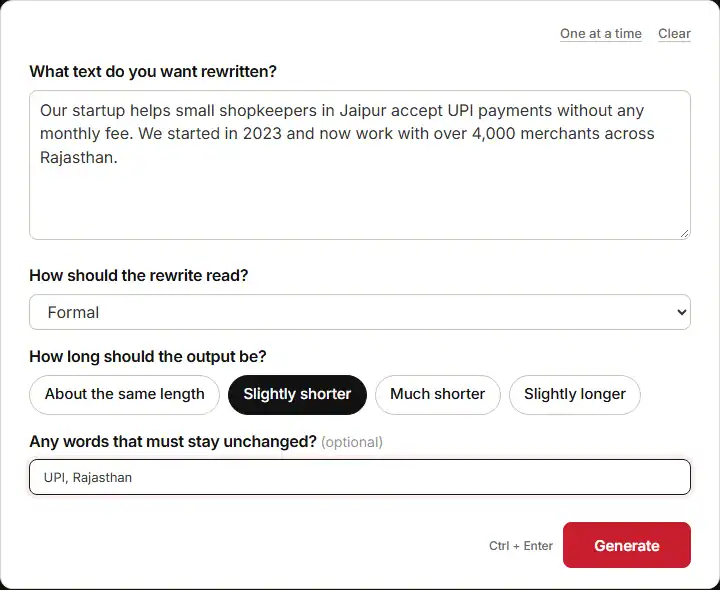
Use the paraphrasing tool right above this page to rewrite any text in seconds. You paste your draft, pick how you want it to read, and it hands back the same message in fresh words. The form asks four things before it runs:
- What text do you want rewritten? The paragraph, email, or essay you want changed.
- How should the rewrite read? Standard, fluent and natural, formal, simple and clear, shortened, or more descriptive.
- How long should the output be? About the same length, slightly shorter, much shorter, or slightly longer.
- Any words that must stay unchanged? Names and terms the rewrite must not touch.
What comes back is your text in new clothes. Same facts, same order, new voice or new length. That is the job of a paraphraser. It moves the words without breaking the meaning underneath.
How To Get A Good Result From Every Input
A paraphrase tool is only as good as what you feed it. Each of the four inputs pulls a different lever. Here is what works and what falls flat.
The Text You Paste In
Give it one clear idea per block. Short lines help. Numbers and names help more.
- Weak input: “We help shops take payments and do other things too, and we are growing fast. Make it sound more formal.” There are no facts here to keep, so the tool pads the result out.
- Strong input: “Our startup helps small shopkeepers in Jaipur take UPI payments with no monthly fee. We started in 2023 and now work with over 4,000 merchants.” Now each claim is pinned down, so the rewrite can only reword it.
If you have no draft yet, write the raw idea first. The paragraph generator turns a one-line thought into a short block you can then rework.
How The Rewrite Should Read
This box sets the tone, and picking the wrong one is the fastest way to get a bad result.
- Formal fits pitch decks, grant forms, and client mail. It swaps “helps shops take payments” for “assists retailers in receiving payments.”
- Simple and clear fits help pages and class notes. It breaks long clauses into short ones.
- Fluent and natural keeps a human beat, which is what you want for blogs and posts.
- More descriptive adds detail, but it adds detail you never gave it. Read it close.
There is a free-text box too. Type the voice you want, like “warm but not childish,” and this ai paraphrasing tool will follow it. Plain words beat long notes here.
How Long The Output Should Be
Length is a choice about meaning, not a choice about looks. Cutting text always drops something.
- Much shorter works on a long-winded intro. It does not work on terms and rules that must stay, since they get cut.
- Slightly longer helps when a block feels thin. The tool tends to pad with join words, so trim those back yourself.
- About the same length is the safe pick for most rewrites.
Words That Must Stay Unchanged
This box looks spare, and it is, but it saves you from the most common slip. Brand names, short forms, and key terms get bent by rewriters all the time. UPI can turn into “digital wallet transfer.” GST can turn into “tax amount.”
- Weak: leave the box blank and hope.
- Strong: list “UPI, Rajasthan, SEO” so the paraphrase generator treats them as fixed.
Everything else in the line still moves. Only the locked terms stay exactly as typed.
What A Real Run Of This Paraphrasing Tool Looks Like
Here is one full run, with no edits. The input was the shopkeeper text from earlier. Tone was set to Formal, length to Slightly shorter, and “UPI, Rajasthan” were locked. The first line came back like this:
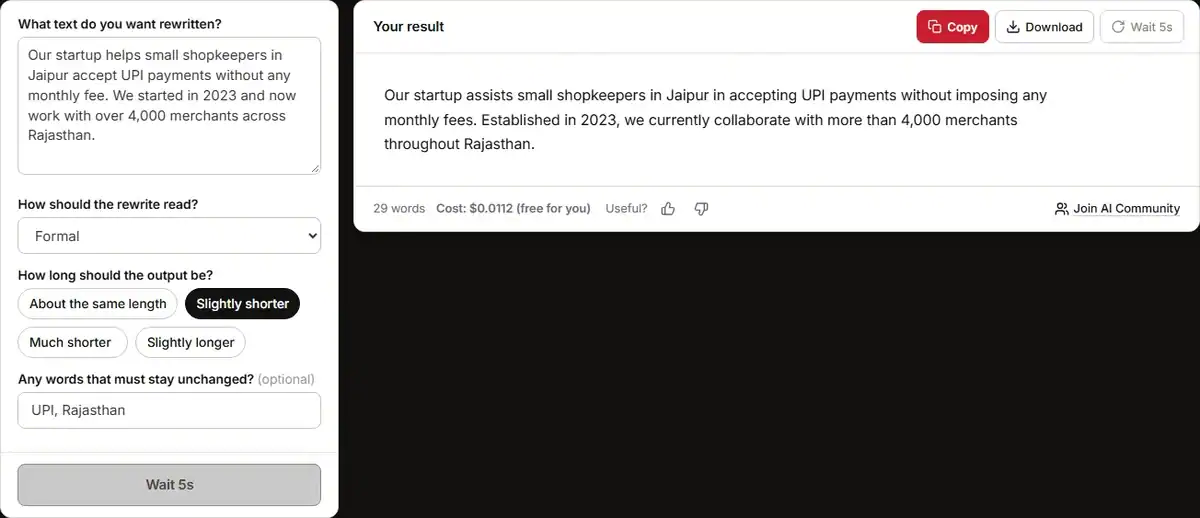
“Our startup assists small retailers in Jaipur in receiving UPI payments without incurring any monthly charges.”
What works here is worth a close look, because it shows what a good rewrite does.
- The facts survived. Jaipur, UPI, no monthly fee. Nothing was added and nothing was lost.
- The locked words held. UPI came through clean, which is the whole point of that last box.
- The tone moved on cue. “Helps shopkeepers take” became “assists small retailers in receiving.” That is formal register, not just fancy words.
- Length stayed on target. Two lines, with no filler clause bolted on to hit a word count.
Now the edits I would still make. This is where the human comes in. The line “assists small retailers in Jaipur in receiving UPI payments” stacks two “in” phrases back to back. I would cut it to “helps small retailers in Jaipur take UPI payments.” Formal does not have to mean stiff.
Second, the full output turns “we work with over 4,000 merchants” into a longer, softer phrase. “Work with” means a deal. The rewrite hints at a close tie instead. If these are paying shops, say so. The number stayed, but the link behind it got looser. Small change, real gap in meaning.
Third, it opens with “Our startup.” Fine for a site about page. For a pitch to a fund, put the name first. The tool does not know who reads it, so that call stays yours.
When This Tool Is The Wrong Choice
A paraphrase tool rewords text. It does not check it, back it, or think about who reads it. There are clear times to leave it alone.
- Claims you cannot back. If your draft says “most shoppers now prefer UPI,” the rewrite will keep that line and make it sound sure. Trust starts with checking it. Run weak claims past the AI fact checker before you polish the words.
- Direct quotes. A quote is a quote. The moment you reword it, it stops being proof. Keep it as it is and reword your own line around it instead.
- Legal, health, and money text. “Without incurring any monthly charges” is loose wording, not a fee clause. Small shifts change what you owe here.
- Anything you pass off as your own find. A reworded block is still the same idea as the text you started with. Build the base from your own notes. For a title you can trust, use a headline generator rather than lifting one.
- Jokes and brand voice. Tone does the heavy work in a tagline or a joke. A rewrite flattens the very thing that makes it land.
One more check most people skip. Read the two texts side by side, line by line. Slow. Word by word. A rewriter can swap a clear term for a fuzzy one, or drop a small word like “up to” or “on average.” Those two words can turn a fair line into a big claim. Put them back if you spot one.
And if you are stuck on what to say at all, get the raw idea down first. Shape it into a draft, then bring it here to polish. Starting from a blank page is a job for a different kind of tool.
Final Thoughts
A paraphrasing tool pays off when the thinking is done and only the words need work. Give it facts, pick a tone that fits your reader, lock the terms that must not move, and you get a clean draft in one pass.
Then read it like a first-time reader. Fix the stiff lines, put back anything the rewrite softened, and check each number at the source. That quick pass is what turns a fast rewrite into one you can trust.