

You’re spending hours crafting prompts that should take minutes. The AI prompt generator market hit $456 million in 2024, growing at 12% annually, yet most tools still produce vague, generic output that needs heavy editing.
Bad prompts waste your AI subscriptions, mediocre content, and hours of rewrites. According to PromptQuorum’s 2026 market overview, the global LLM prompt generation tools market is projected to reach $1.02 billion by 2031, but tool quality varies wildly.
I tested over 20 prompt generators this year looking for ones that actually save time instead of adding another step. Some work brilliantly for content creators. Others are built for developers. A few are just repackaged templates with a fancy interface.
I narrowed it down to 6 prompt generators that actually deliver.
The Rundown
- Get Claude-Optimized XML Prompts: Interactive Prompt Maker, “This Claude artifact asks you clarifying questions, then builds an XML-structured prompt tuned specifically to how Claude processes instructions.”
- Build Better Prompts Without Signing Up: Feedough AI Prompt Generator, “Type a rough idea and get a detailed prompt in seconds, with 13+ frameworks and zero sign-up required.”
- Turn Vague Ideas Into Sharp Prompts: Prompt Crafter GPT, “Custom ChatGPT agents that refine your rough idea into structured prompts, though new GPT creation now requires a Business or Enterprise account.”
- Reverse-Engineer Any Image Into Prompts: Vheer, “Upload any photo and get simple, detailed, or creative prompts with auto-generated tags, optimized for Midjourney, DALL-E, and Stable Diffusion.”
- Write Better Prompts for AI Coders: NxCode, “Describe your app idea, pick your coding tool, and get a structured prompt that Cursor or Copilot actually understands.”
- Get Platform-Specific Video Prompts: VideoPromptLab, “Turn a rough video idea into a six-component prompt pack adapted for Kling, Runway, Veo, or whichever platform you use.”
The Best Ai Prompt Generators

Interactive Prompt Maker
Pricing | Free (Claude Artifact) |
Best For | Turning rough ideas into structured prompts |
Ease of Use | High |
Learning Curve | Low |
Platforms | Claude web, API |
I tried this Artifact after struggling with vague prompts that got messy results. The idea is simple: you tell Claude what you need, and it asks clarifying questions before building a structured prompt.
What I liked was the interactive approach. It doesn’t just spit out a template. It guides you through goals, constraints, and style preferences. The output uses XML tags like <context> and <task>, which is exactly how Claude prefers to work.
Anthropic’s own documentation recommends using XML tags to help Claude parse complex prompts. This Artifact follows that pattern, and I noticed my results were more organized when I used the generated prompts.
The tool is a Claude Artifact, not a standalone product. You need a Claude account to use it. It’s built into the platform, so there’s no separate login or pricing. If you already use Claude, it’s right there in the artifacts sidebar.
One thing you’ll notice is the lack of advanced customization. You can’t tweak the underlying logic or save multiple prompt styles. It’s more of a guided helper than a full prompt engineering suite.
I’d recommend it for Claude users who write prompts often but don’t want to learn XML tagging manually. It’s a quick way to get better prompt engineering results without a steep learning curve. If you need something for ChatGPT or other models, look elsewhere.

Feedough AI Prompt Generator
Pricing | Free |
Free Plan | Unlimited generations, no login required |
Best For | Text, image, and video prompt creation |
Prompt Frameworks | 13+ including ORACLE, RACE, CARE, APE, CREATE |
Platforms | ChatGPT, Claude, Gemini, Midjourney, Stable Diffusion, Sora, Runway |
For beginners who want better AI outputs without learning prompt engineering.
The first thing I noticed is the zero friction. No account. No sign-up wall. You type a basic idea and get a detailed prompt back. That alone puts it ahead of most tools in this category.
What surprised me was the range. Feedough handles text prompts for ChatGPT and Claude, image prompts for Midjourney and Stable Diffusion, and video prompts for tools like Sora and Runway. It covers GPT-5.4, Gemini 3.1, and Claude Opus 4.6 as of its June 2026 update.
I tested it with a simple one-line request: “Write a professional email to decline a meeting.” The output included tone, structure, purpose, and even word count. As one LinkedIn user put it, “It’s a free tool that turns your dodgy prompts into laser focused ones.” That matched my experience exactly.
There are 13+ prompt frameworks built in. ORACLE, RACE, CARE, and others. I didn’t try all of them, but the variety means you can pick one that fits your use case instead of getting a generic rewording.
The trade-offs are real though. There’s no API, no way to test prompts inside the tool, and you have to manually copy-paste everything into your AI platform. An educator documented using it successfully for differentiated lesson planning across 13 years of teaching, but she also predicted tools like this will eventually get absorbed into AI platforms directly.
Browser extensions for Chrome and Firefox exist, which saves some clicking around. If you’re someone who writes prompts daily, those small conveniences add up.
For anyone who just wants better AI results without a learning curve, this is probably the easiest starting point.

Prompt Crafter GPT
Pricing | Free (requires ChatGPT account) |
Category | Custom GPT for prompt engineering |
Best For | Beginners who struggle with writing effective AI prompts |
Platform | ChatGPT GPT Store |
Ease of Use | Very simple, type and get a refined prompt |
I should be upfront. I could not find a specific tool called “Prompt Crafter GPT” in the GPT Store. What I found instead is an entire category of custom GPTs built to do this exact thing: take a rough idea and turn it into a structured, usable prompt. Ruben Hassid’s “Prompt Maker” is the most popular example, with over 1 million uses on ChatGPT.
I tested several of these prompt-crafting GPTs. The experience is consistent. You type something like “a prompt to write LinkedIn hooks” and get back a longer, structured prompt with role assignments, context, and output format. It’s meta. You’re using AI to teach yourself how to talk to AI better.
According to SQ Magazine, structured prompts can reduce computational costs by 76% and cut errors by 31%. That’s a real gap between “write me a blog post” and a prompt that specifies tone, length, audience, and format.
What I liked was how fast these GPTs remove the blank-page problem. You get something useful in under a minute. My main issue? The generated prompts were often too long and generic. I’d still need to trim them and add context before using them.
One heads-up: as of February 2026, OpenAI no longer allows personal accounts to create new GPTs. Only Business, Enterprise, and Edu accounts can publish now. Existing GPTs still work, but the ecosystem is shrinking.
If you type “make me a social media post” and wonder why the output is mediocre, trying one of these prompt-crafting GPTs is a solid first step. It won’t make you a prompt engineer overnight, but it shows you what a well-structured prompt actually looks like.

Vheer
Pricing | Free (50 credits/month); Premium from $9.99/month |
Prompt Styles | Simple, Detailed, Creative |
Works With | Midjourney, DALL-E, Stable Diffusion |
Privacy | Browser-based processing, no server uploads |
Trustpilot | 4.3/5 across 999 reviews |
I spent a week uploading random images into Vheer’s Image to Prompt tool. The idea is simple: you give it a picture, it gives you text you can paste into Midjourney or Stable Diffusion. What surprised me was the three distinct output styles. Simple gives you a clean one-liner. Detailed breaks down textures, lighting, and composition like a professional brief. Creative adds expressive language that actually reads well for AI generation storytelling or editorial work.
I tested all three with the same portrait photo. The Simple prompt captured the mood but missed details. The Detailed version nailed the shadow work and fabric texture. Creative gave me language I would never have written myself, which is honestly the whole point.
The auto-generated tags are a nice touch. Vheer pulls out visual elements as separate tags, which helps if you want to remix specific parts of an image in future generations.
On Trustpilot, Vheer holds a 4.3 out of 5 rating across 999 reviews. Users praise the clean interface and free access. A YouTube creator tested the tool and called the prompt generator something that will save your life. The community clearly values that it works without signup or watermarks.
Here is what frustrated me. The free tier caps you at 50 credits per month and locks model selection behind ads. Some Trustpilot reviewers reported that the tool ignored their uploaded images entirely after updates. I noticed the prompts occasionally drifted from the source image, especially with complex scenes containing multiple subjects.
Still, for a free tool that bridges the gap between visual inspiration and AI generation, Vheer does something most prompt generators skip entirely. It reads your images instead of asking you to describe them from scratch.
NxCode
Pricing | Free |
Tool Compatibility | Cursor, Copilot, Claude, Bolt.new |
Best For | Vibe coding prompt generation |
Learning Curve | Minimal |
Rating | 4.2/5 on AI Tool Scoop |
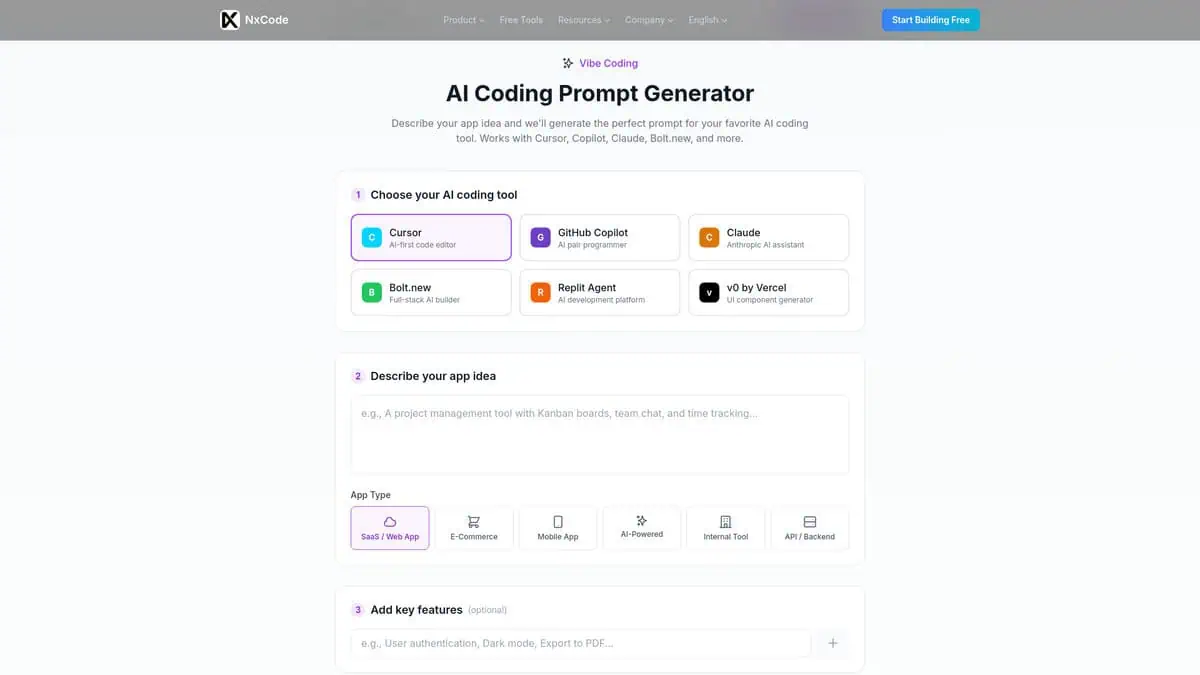
I tried NxCode’s prompt generator when I kept getting mediocre outputs from Cursor. I’d describe something like “build a task manager” and Cursor would give me something half-baked. The idea here is straightforward. You describe your app, pick your coding tool, and get a structured prompt that Cursor actually understands.
What I liked was the optional fields. You can just describe your idea and go, or you can add specific features and pick a tech stack. That extra detail matters. Cursor responds differently to a prompt that specifies React and Supabase than one that just says “make it nice.”
The tool doesn’t do anything magical. It’s a prompt formatter. But that’s exactly the point. Most vibe coders don’t struggle with the concept. They struggle with describing what they want in a way AI tools can execute. NxCode bridges that gap.
NxCode is primarily an vibe coding AI app builder, not just a prompt tool. AI Tool Scoop rated the overall platform 4.2/5, with ease of use scoring highest at 4.4. The prompt generator is free and doesn’t require an account. But if you like what you see, NxCode’s paid plans start at $5/month for actual app building.
One thing I noticed. The prompt generator works best for web apps. If you’re building a mobile native project or something outside the standard stack, you’ll get decent but not optimized output. The tool leans web-first, which tracks with their Cursor and Bolt.new focus.
Worth trying before you spend hours fighting with bad prompts. Even experienced developers might find the structured output saves time on initial setup.

VideoPromptLab
Pricing | 100% free (MVP) |
Best For | Multi-platform AI video creators |
Platforms Supported | Kling, Runway, LTX Video, Pika, Veo, ComfyUI |
Output Type | 6-component prompt pack |
Learning Curve | Minimal (describe idea, pick platform, get prompts) |
Most prompt generators spit out one generic paragraph and call it a day. VideoPromptLab does something different. It takes your rough video idea and generates a full structured prompt pack that adapts to whichever platform you’re using. That distinction sounds small until you’ve burned credits on Kling getting a prompt written for Runway’s style.
Each output includes six components: the final platform-specific video prompt, a shot-by-shot script with timestamps, keyframe image prompts for start/mid/end frames, a negative prompt covering common AI artifacts, a voiceover suggestion, and platform-specific notes. The platform adaptation is the real substance here. Kling gets motion and lighting detail, Runway gets continuity language, LTX gets short clear action beats, Veo gets natural language filmic direction, and ComfyUI gets separated positive and negative prompt blocks.
The structured approach isn’t just VideoPromptLab being clever. SocialCrawl’s June 2026 analysis independently validated that the format producing the most consistent results across Runway, Kling, Veo, and Sora follows a specific structure: camera angle, subject, action, lighting, style/mood, and duration hint. That’s essentially what this tool generates for you automatically.
Here’s what you should know going in. The prompt engine runs on local TypeScript templates in your browser, not an AI API. It’s fast and costs nothing, but the quality lives and dies by template sophistication. There are no independent reviews, no Reddit threads, no social media presence yet. It’s a Vercel-hosted MVP with placeholder sponsorship slots. That said, if you work across multiple video platforms and waste time rewriting prompts for each one, it’s worth fifteen minutes of your time while it’s free.


