
Here is how to add skills to GitHub Copilot: run the gh skill command. That is the quickest route. You can also install a skill from the VS Code marketplace, or drop a skill folder into .github/skills yourself.
GitHub’s agent skills documentation mentions no plan limit. Below, each route gets its own short set of steps.
How To Add Skills To GitHub Copilot With gh skill
If you have the GitHub CLI set up, this is the quickest way to add skills to GitHub Copilot. Just note: gh skill is in public preview and it needs GitHub CLI 2.90.0 or later, per the GitHub docs on adding skills.
Then run these three commands in order:
- Find one:
gh skill search TOPIC. - Look inside it first:
gh skill preview OWNER/REPOSITORY SKILL. - Install it:
gh skill install OWNER/REPOSITORY SKILL. For example:gh skill install github/awesome-copilot documentation-writer.
By default, a skill lands at project scope. Add --scope user to the install command if you want it in all your projects. Update your installed skills later with gh skill update --all.
One warning from those same docs: skills are not verified by GitHub. So treat each one with care before you run it.
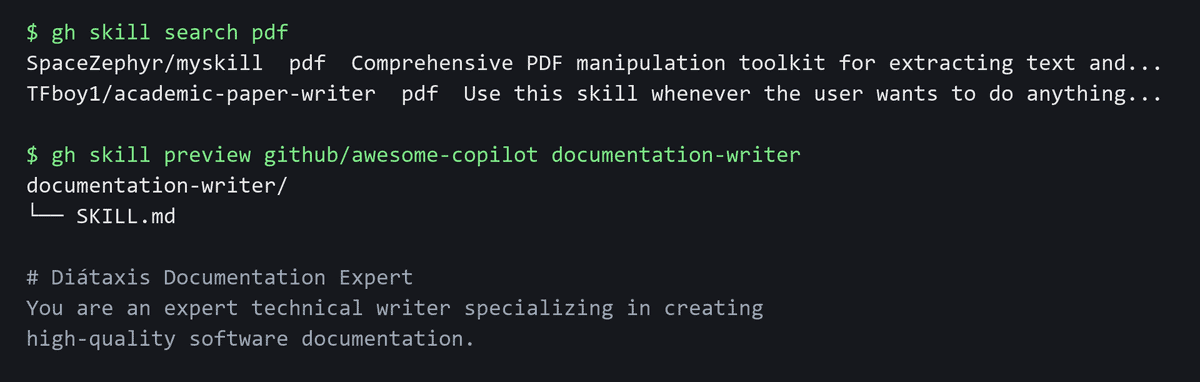
gh skill search and gh skill preview, cut for length.Add A Skill In VS Code
Prefer clicks over commands? In VS Code you can install a skill from the marketplace. The marketplace is in preview, per the VS Code agent skills documentation.
- Open the Agent Customizations editor. In the Chat view, select Open Customizations in the title bar.
- Select Browse.
- Pick GitHub Feed from the source menu.
- Search by name, or search with
@type:skill. - Select the skill, then select Install. Choose a user or workspace destination.
You can also write one yourself. Under Skills, select New Skill next to Workspace or User. Enter a name like test-changes. VS Code generates a SKILL.md file, and that file is where your instructions go.
Add A Skill By Hand
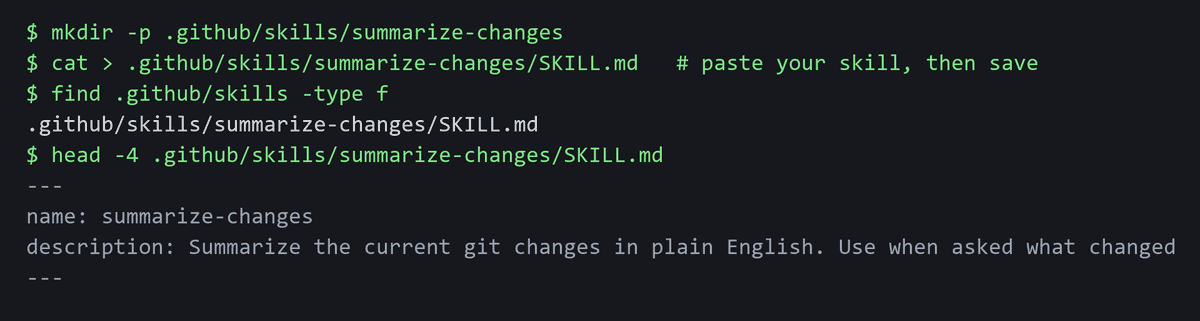
Prefer to write it yourself? The manual route takes two steps:
- Create a skills directory. Give each skill its own subfolder, such as
.github/skills/webapp-testing. That is one folder per skill, not one big folder for all of them. - Add a file named exactly
SKILL.md. That is the same file VS Code makes for you. Its frontmatter needs a name and a description.
Copilot CLI offers a shortcut here. Run copilot skill add <FILE | URL | DIRECTORY>. After adding one, run /skills reload. Then run /skills info SKILL-NAME to check it.
Where Copilot Stores Skills
Project skills live in the repo. Personal skills live in your home folder.
Scope | Paths |
|---|---|
Project | .github/skills, .claude/skills, .agents/skills |
Personal | ~/.copilot/skills, ~/.agents/skills |
One note: GitHub’s personal list does not include ~/.claude/skills. And VS Code’s page lists folders in two different ways. So if a skill in another folder is missing, select Open Customizations and check there.
How To Start A Skill
Once it is installed, starting it is simple:
- In VS Code, type
/in chat and select the skill from the list. - In Copilot CLI, name it with a slash in your prompt. For example:
Use the /frontend-design skill to create a responsive navigation bar in React.
Copilot can also pick a skill on its own from its description. So write a clear description in SKILL.md. It does some of the work for you.
One gap worth knowing: the docs give no way to start a skill by hand in cloud agent or code review. Check your own screen there, since that part may change.
Check A Skill Before You Add It
A skill can hold instructions and code. That means it can change what happens in your project. So treat adding one like installing software. Snyk’s research on malicious AI agent skills scanned 3,984 skills. It found 534 with at least one critical issue, plus 76 confirmed malicious payloads.
Before you add one, run three quick checks:
- See who made it. A name you know is a good sign.
- Read the
SKILL.md. That is where the instructions live. - Look at any scripts. They are the part that can run code.
gh skill preview lets you read a skill before you install it. Use it on anything new.
Want a skill to try? Start with our list of anti AI slop skills. New to this? Read what an AI agent is.
Now open Copilot and add one small skill first.