
How to add skills to OpenCode comes down to one thing: folders. The docs show no install command. You add a folder with a SKILL.md file inside it, and OpenCode finds the skill on its own.
It also reads .claude and .agents folders, so skills you already have may just work as they are. The OpenCode skills documentation lists every folder it checks.
How To Add Skills To OpenCode
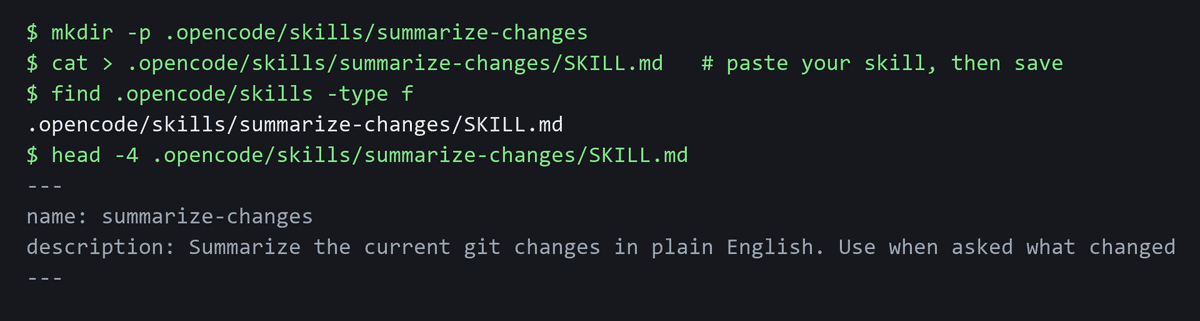
Adding a skill is folder work from start to finish. Here is the exact sequence, and none of it needs a command.
- Create the skill folder. For one project, make
.opencode/skills/<name>/inside that project. For every project on your machine, make~/.config/opencode/skills/<name>/instead. - Add the file. Inside that folder, add a file called
SKILL.md. - Set the frontmatter. That is the settings block at the top of the file. In it, fill in
nameanddescription.
Both fields are required, so do not save the file with either one blank. The name has to run 1 to 64 characters. Use lowercase letters and numbers, with single hyphens between them. It also has to match the folder name exactly. So a folder called pdf-export needs name: pdf-export, not PDF_export.
The description is required as well. It runs 1 to 1024 characters, so you have room to say what the skill does in plain words.
Where OpenCode Looks For Skills
Scope | Paths |
|---|---|
Project | .opencode/skills/, .claude/skills/, .agents/skills/ |
Global | ~/.config/opencode/skills/, ~/.claude/skills/, ~/.agents/skills/ |
Any of those six paths works. Pick the scope you want: project for one repo, global for every project on your machine.
For the project paths, OpenCode starts at your current folder and searches up to the git worktree. So the skill folder can sit at any level in between.

opencode debug skill lists the new skill.How To Add Skills In OpenCode Desktop
The desktop app has no separate install step in the docs. It reads skill folders too, so add the folder as shown above. Skills from ~/.claude/skills/ also appear in it.
- Open your project in OpenCode Desktop.
- Click the prompt box and type
/. - Find your skill in the list, or keep typing to filter it.

/ menu in OpenCode Desktop. Skills sit in the same list as commands, so /customize-opencode here is a built-in skill.You can download it from the OpenCode download page.
How To Start A Skill
The docs show no user command. OpenCode’s agent loads a skill through its built-in skill tool. It picks the skill based on the description in the frontmatter. So write that line in a specific way, and name the tasks the skill is for.
You can control which skills load too. In opencode.json, use "permission": { "skill": { ... } }. Set allow, deny or ask per pattern.
If A Skill Does Not Show Up
A missing skill usually comes down to one of four small mistakes. Work through this list before you change anything else.
- File name. It is
SKILL.mdinside the skill folder, not beside it. - Name field. The
namematches the folder name exactly, and follows the rules above. - Description. The
descriptionis filled in, not left blank. - Permissions.
opencode.jsonis not set todenythe skill.
Check A Skill Before You Add It
A skill can hold instructions and code. So treat adding one like installing software. Snyk’s scan of AI agent skills found 534 out of 3,984 skills with at least one critical issue, plus 76 confirmed malicious payloads.
Before you add anything, run three checks:
- Who made it. Look for a name or a project you can trust.
- What
SKILL.mdsays. Read the whole file, not just the frontmatter. - What the scripts do. Open any script files and scan them first.
New to this? Read what an AI agent is, or our guide on how to build an AI agent.
Once you are happy, open OpenCode and add one small skill first.