Feedough Logo

Blog

  • How to Use AI in Excel: A Complete Step-by-Step Guide

    How to Use AI in Excel: A Complete Step-by-Step Guide

    Excel has been around for decades, but the way people use it is changing fast.

    AI tools now make it possible for anyone to write complex formulas, clean messy data, build pivot tables, analyse thousands of rows, and even generate VBA macros, all without needing to memorise formulas or code.

    There are four different ways you can bring AI into your Excel workflow, and each works differently depending on what you need and what tools you have access to.

    This guide covers all four methods, with step-by-step instructions, real prompts you can use immediately, and clear guidance on which approach fits your situation best.

    What Is AI in Excel?

    AI in Excel refers to using artificial intelligence to perform tasks inside or alongside Excel. This includes writing formulas, cleaning and organising data, analysing datasets, building pivot tables, creating charts, writing VBA macros, and summarising information.

    The key shift AI brings is this: instead of needing to know the exact syntax of a function or the right sequence of menu clicks, you simply describe what you want in plain English, and the AI determines how to do it.

    There are four main ways people use AI with Excel today:

    ChatGPT (copy-paste method): You go to ChatGPT, describe what you need, copy the formula or code it provides, and paste it into Excel. No plugins, no installation, and it works on any version of Excel.

    ChatGPT (file upload method): You upload your actual Excel or CSV file directly into ChatGPT and ask it to analyse, clean, or summarise your data. This requires ChatGPT Plus.

    Microsoft Copilot: Microsoft’s built-in AI assistant lives directly inside Excel’s interface. You type prompts in a sidebar and Copilot acts on your spreadsheet directly. This requires a Microsoft 365 subscription.

    AI add-ins: Third-party tools such as GPT for Work install inside Excel and allow you to use AI directly in your cells through functions. These work independently of Copilot and often offer free starter plans.

    Here is a quick comparison of all four methods so you can decide where to start:

    Method
    What It Is
    Best For
    Requires
    ChatGPT (copy-paste)
    Use ChatGPT to write formulas or macros, then paste into Excel
    Formulas, VBA macros, quick help
    Free ChatGPT account
    ChatGPT (file upload)
    Upload your .xlsx or .csv file directly into AI for analysis
    Data analysis, cleaning, charts
    ChatGPT Plus ($20/mo)
    Microsoft Copilot
    AI built into Excel’s ribbon and sidebar
    All-in-one native workflow
    Microsoft 365 + OneDrive
    AI Add-ins
    Third-party tools like GPT for Work that add AI inside Excel cells
    Bulk processing, no Copilot needed
    Add-in install (many free)

    How to Use AI in Excel

    This is the main section of the guide. Below you will find detailed steps for each of the four methods, including what to click, what to type, and example prompts you can copy and use immediately.

    Method 1: Use AI Add-ins Inside Excel

    AI add-ins install directly inside Excel and bring AI into your spreadsheet cells through functions. 

    Instead of switching to another tool, you write an AI prompt as a cell formula and the result appears right in your sheet. This is the best method for bulk processing large datasets and for users who do not have Copilot access.
    How to install an AI add-in

    1. In Excel, go to the Insert tab in the ribbon.
    2. Click Get Add-ins or Add-ins depending on your Excel version.
    3. Search for the tool you want, for example GPT for Work, Formula Bot, Ajelix, or GPTExcel.
    4. Click Add and follow the setup steps.
    5. Most add-ins will add a new button or tab to your ribbon. Some require you to connect your own API key during setup.

    You can write AI prompts directly as cell formulas and apply them down entire columns at once. If you have 5,000 rows of customer feedback and need each one classified, summarised, or translated, you write one formula and copy it down. The AI processes every row automatically.

    Here are some example formulas you can use once an add-in is installed:

    Prompt:  =GPT(“Classify this customer feedback as Positive, Negative, or Neutral. Reply with one word only.”, A2)

    Prompt:
    =GPT(“Extract only the city name from this address string. Reply with the city name only.”, A2)

    Prompt:
    =GPT(“Translate this product description from English to Spanish.”, A2)

    Prompt:
    =GPT(“Summarize this customer review in one sentence.”, A2)

    Write the formula once, drag it down the column, and the add-in processes every row in the background.

    Note: Most AI add-ins require connecting your own API key.
    Costs are typically very low for standard tasks but check each tool’s pricing before running large batches.

    Method 2: Use ChatGPT to Write Formulas and Macros (No Plugin Needed)

    This is the most accessible method and works for everyone, even on the free version of ChatGPT. You do not need to install anything or have a special subscription. The idea is simple: you ask ChatGPT to write a formula or piece of code, then paste it into Excel yourself.

    This method is best for writing formulas you do not know, understanding formulas you have inherited, generating VBA macros, and getting step-by-step instructions for Excel tasks.

    • Go to chat.openai.com and sign in or create a free account.
    • Open your Excel file in a separate window.

    How to get a formula from ChatGPT

    1. First, look at your spreadsheet and clearly identify what you want to calculate.
    2. Next, note the relevant column letters and row numbers. For example, Column A might contain product names and Column B might contain sales figures.
    3. Then open ChatGPT and write a clear prompt explaining your column structure and what you want to calculate.
    4. ChatGPT will provide a formula along with an explanation of how it works.
    5. Click the copy button on the formula code block in ChatGPT.
    6. Go back to Excel, click the cell where you want the formula, paste it using Ctrl + V, and press Enter.
    7. Finally, test the formula on a few rows to make sure it works correctly.

    Example prompts you can use

    Prompt:
    Write an Excel formula to calculate total sales in column D where the region in column C is “West. My data starts at row 2.

    Prompt:
    I have customer IDs in column A and need to look up their email addresses from a separate table where column F has IDs and column G has emails. Write the XLOOKUP formula.

    Prompt:
    Write a formula that checks if the value in column E is greater than 1000. If it is, return “High”. If it is between 500 and 1000, return “Medium”. If it is below 500, return “Low”.

    Prompt:
    I have full names in column B in the format “Last Name, First Name”. Write a formula that extracts just the first name into column C.

    Prompt:
    Write an Excel formula to calculate the average sales for Q1 only. Column A has dates and column D has sales values.

    How to get a VBA macro from ChatGPT

    ChatGPT can write complete VBA macros based on a plain English description. Here is how to use them:

    • First, describe the task you want to automate in detail so ChatGPT understands exactly what you need.
    • Then copy the VBA code that ChatGPT provides.
    • Open Excel and press Alt + F11 to open the Visual Basic Editor.
    • In the editor, click Insert, then choose Module.
    • Paste the copied VBA code into the module window.
    • Finally, press F5 or click Run to execute the code.

    Example prompts for macros

    Prompt: Write a VBA macro that copies all rows where column C says ‘Pending’ to a new sheet called ‘Pending Items’.

    Prompt: Write a VBA macro that applies bold formatting to the header row, adds alternating row colors to the data, and auto-fits all column widths.

    Prompt: Write a VBA macro that loops through all rows, checks if the value in column D is blank, and highlights those rows in yellow.

    Note: Always test macros on a copy of your file first. Macros cannot be undone with Ctrl+Z.

    How to Use ChatGPT to Explain or Fix an Existing Formula

    If you have inherited a spreadsheet with formulas you do not understand, just paste the formula into ChatGPT and ask it to explain what it does.

    Prompt: Can you explain what this Excel formula does?

    =IFERROR(INDEX($G$2:$G$100,MATCH(1,(A2=$E$2:$E$100)*(B2=$F$2:$F$100),0)),””)

    ChatGPT will break it down function by function in plain English. 

    You can also paste a formula that is throwing an error and ask it to find and fix the problem.

    Method 3: Upload Your Excel File to ChatGPT for Data Analysis

    If you want to skip formulas entirely and simply ask questions about your data, this is the method to use.
    Instead of writing formulas yourself, you attach your Excel or CSV file directly to an AI chat and ask it to analyse the data.

    • First, open ChatGPT and start a new chat.
    • Click the paperclip or attachment icon in the message input bar.
    • Select your .xlsx or .csv file and wait for it to upload.
    • In the same message box, type a clear prompt describing what you want ChatGPT to do with the data.
    • Press Enter. ChatGPT will show an “Analysing” or “Thinking” indicator while it processes the file.
    • Finally, review the response. You can ask follow-up questions in the same chat to explore the data further.

    Example prompts for file analysis

    Prompt: I’ve uploaded a sales report for Q3. The columns are Date, Product Name, Region, Units Sold, and Revenue. Please give me a summary of total revenue by region.

    Prompt: Here is my customer data file. Can you identify which customers have not placed an order in the last 90 days? The order date is in column C.

    Prompt: Please clean this dataset. Remove any duplicate rows, standardise all dates in column A to MM/DD/YYYY format, and flag any rows where column D is blank.

    Prompt: Create a bar chart showing monthly revenue trends from this data. The date column is column A and revenue is column E.

    Prompt: What are the top 5 performing products by total units sold? Summarise the results in a table.

    Note: ChatGPT reads your file as static values. It cannot recalculate live Excel formulas. If your file is formula-heavy, export it with values only (Paste Special → Values) before uploading.

    Method 4: Use Microsoft Copilot (Built Into Excel)

    Microsoft Copilot is an AI built directly into Excel’s interface. Unlike the methods above, Copilot acts on your spreadsheet in real time.

    You type a prompt in the sidebar and Copilot makes changes, creates pivot tables, writes formulas, builds charts, and cleans data directly in your file without requiring copy-and-paste.

    Copilot is the most seamless of the four methods but also the most restricted in terms of access.

    • Open your Excel file and make sure it is saved to OneDrive. You can check this by looking for the AutoSave toggle in the top-left corner and turning it on.
    • Next, click the Home tab in the ribbon.
    • On the right side of the ribbon, click the Copilot button (sparkle icon).
    • The Copilot sidebar will open on the right side of your screen.
    • Finally, type your request in the chat box at the bottom of the sidebar and press Enter.

    Note: If you do not see the Copilot button, your account may not have Copilot enabled. Check your plan at account.microsoft.com or contact your IT administrator.

    Using Copilot to generate formulas

    Type a plain English description into the sidebar and Copilot will write the formula and offer to insert it directly into your selected cell.

    Prompt: Calculate the total revenue for all rows where the Region column says ‘North’. My data is in columns A through E.

    Prompt: Write a formula that looks up the customer name in column A and returns their total spend from the summary table on Sheet2.

    Prompt: Flag every row where the profit margin in column F is below 15% with the word ‘Review’. 

    Using Copilot to clean data

    Prompt: Remove all duplicate rows from this dataset based on the values in column B.

    Prompt: Standardise all entries in column D. Right now, some say ‘USA’, some say ‘United States’, and some say ‘US’. Change them all to ‘United States’.

    Prompt: Find all blank cells in the dataset and add the text ‘Missing’ in a new column called Data Status.

    Note: Copilot always shows a preview before applying any destructive changes. You will see a confirmation step before anything is deleted or overwritten.

    Using Copilot to analyse data and build pivot tables

    Prompt: Which product category generated the most revenue in Q2? Show me the breakdown.

    Prompt: Create a pivot table showing total sales by region and product category. Put it on a new sheet.

    Prompt: Sort the pivot table by highest revenue first and add a slicer so I can filter by year.

    Prompt: What trends do you see in the monthly sales figures in column D?

    Using Copilot to create charts

    Prompt: Create a line chart showing monthly revenue trends for 2025 using the data in columns A and E.

    Prompt: What chart type would best represent this data and why?

    Using Copilot to write VBA macros

    Copilot can write macros just like ChatGPT, but it inserts them directly into the Excel VBA editor for you.

    Prompt: Write a macro that highlights every row where the value in column C is greater than 500 in green.

    Prompt: Write a macro that copies the contents of Sheet1, pastes it into a new sheet, and saves the file with today’s date in the filename.

    Benefits of Using AI in Excel

    Here is a clear picture of what actually changes when you bring AI into your Excel workflow:

    Benefit
    What It Means in Practice
    No formula memorisation
    Describe what you want in plain English and AI writes the formula, including complex ones like XLOOKUP, SUMIFS, and INDEX MATCH
    Faster data cleaning
    Tasks like removing duplicates, fixing formats, and standardising text that take 30 to 45 minutes manually are done in seconds
    Accessible to non-experts
    Users who have never written a macro or built a pivot table can now do both through a simple typed request
    Works at scale
    Add-ins like GPT for Work apply AI operations across thousands of rows at once, which is not practical to do manually
    Fewer formula errors
    AI-generated syntax is almost always correct, eliminating bracket mistakes, typos, and wrong function names
    Faster reporting
    Whole workflows from cleaning to analysis to chart creation can run in a single session without switching tools

    Best Practices for Using AI in Excel

    Using AI in Excel can save hours of manual work, but the quality of your results depends on how you use it. Clear instructions, clean data, and the right workflow make a significant difference.

    Be specific about your data structure. Instead of saying “Analyse my sales data,” clearly mention the column letters, what each column represents, and the result you want.

    Always include your column layout in formula prompts. AI tools do not know your spreadsheet structure, so specifying which column contains what ensures the formula references the correct cells.

    Use follow-up prompts instead of starting over. Since AI remembers the context of your conversation, refine the result if it is close rather than rewriting the entire prompt.

    Verify formula logic before applying it at scale. Even if the formula does not show errors, test it on 5 -10 rows before applying it to thousands.

    Protect your original data. When asking AI to clean or restructure data, specify that the original data should not be modified and that the output should appear in a new column or sheet.

    Clean your data before uploading files. Remove merged cells, ensure the first row has clear headers, delete empty rows, and remove sensitive information for better analysis.
    Pick the right method for the task. Use the copy-paste method for quick formulas, the file-upload method for full dataset analysis, Copilot for working directly inside Excel, and bulk-processing add-ins for handling large volumes of data.

  • SaaS Pricing Models Explained: How to Choose the Right One

    SaaS Pricing Models Explained: How to Choose the Right One

    Pricing is one of the most important decisions any SaaS company has to make.

    Most founders start by looking at what competitors charge, picking a number that feels reasonable, and moving on. But choosing the right SaaS pricing model is not just about picking a number. It shapes who buys from you, how fast they grow with you, and whether you can expand revenue from existing customers without constantly chasing new ones.

    This guide breaks down every major SaaS pricing model, how each one works, the pros and cons of each, and a clear framework to help you choose the right one for your product and stage.

    What Is a SaaS Pricing Model?

    A SaaS pricing model is the structure a software-as-a-service company uses to charge its customers. It answers one core question: what does a customer actually pay for?

    Do they pay for the number of people using the product? The amount they consume? A fixed monthly fee regardless of usage? Or the results the software delivers? Each answer represents a different pricing model.

    It helps to separate three terms that often get used interchangeably but mean very different things:

    • Pricing model is the billing structure: per user, flat rate, usage-based, tiered. It defines the mechanics of how money changes hands.
    • Pricing strategy is the thinking behind your price: whether you’re pricing based on the value you deliver, what competitors charge, or your own cost structure.
    • Pricing metric is the specific unit you charge on within a given model: a seat, an API call, a contact, a GB of storage.

    You need all three to work together. But the pricing model is the foundation. It shapes everything else: what your invoices look like, how customers budget for your product, and how your Saas billing platforms need to be set up.

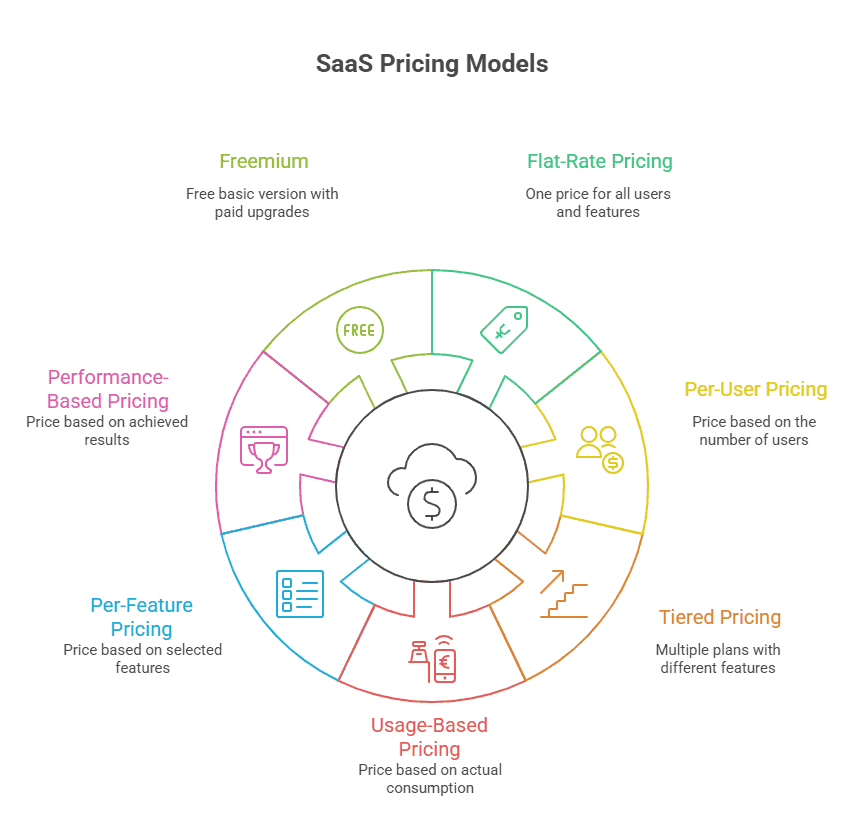
    Types of SaaS Pricing Models

    Not all SaaS pricing models are built the same. The right one depends on your product, your customers, and how value is actually delivered.

    Before getting into which model fits your business, let’s look at the main types of SaaS pricing models:

    Types of SaaS Pricing Models

    1. Flat-Rate Pricing

    Flat-rate pricing is exactly what it sounds like: one price, one plan. Everyone pays the same amount regardless of how many people use the product or how much they consume. There are no tiers, no usage limits, no upsell paths. You pay a fixed fee and get access to everything.

    It is the simplest model to communicate and the easiest to manage from a billing perspective.

    A well-known example is Basecamp, which charges $299 per month for unlimited users and unlimited projects. Their decision to stick with flat-rate pricing is deliberate, simplicity is part of what they sell.

    Best for: Early-stage products with a single, clearly scoped use case and a relatively uniform customer base. It is also worth considering if simplicity is genuinely part of your value proposition, not just a default.

    2. Per-User (Seat-Based) Pricing

    With per-user pricing, customers pay a fixed amount for each person who has access to the software. Add a new team member, pay a little more. Remove someone, pay a little less.

    How it works in practice:

    • Each user gets a login and occupies one “seat.”
    • Some companies charge for every seat provisioned; others (like Slack) charge only for active users.
    • Seats are often combined with feature tiers, so a user on the Pro plan costs more per seat than one on the Starter plan.
    • Many companies offer discounts for committing to a larger number of seats upfront.

    Why it works:
    The model scales naturally with a customer’s growth. As they hire more people, they use the product more, and they pay more. This alignment between product adoption and revenue is why per-user pricing has been dominant across collaboration tools, CRMs, and project management software for years.

    Best for: Collaboration tools, CRMs, project management platforms, and any product where value clearly scales with the number of people using it.

    3. Tiered Pricing

    Tiered pricing offers multiple plans at different price points, each with a defined set of features or limits. Customers pick the plan that fits their current needs and upgrade as they grow.

    Most SaaS companies today use some version of this structure, the classic Good, Better, Best layout.

    A few things to get right with tiered pricing:

    • Keep the number of tiers manageable. More than four options creates decision paralysis. Most customers will not carefully compare five tiers, they will get confused and leave.
    • Gate the right features. The features that separate your tiers should be things customers actually want, not features you arbitrarily held back. If customers do not feel the difference between tiers, they will not upgrade.
    • Design an intentional upgrade path. The jump from one tier to the next should feel natural, not punishing. A customer should hit the ceiling on their current plan right around the time they are ready to grow.

    Best for: Products with a wide range of customer types, from individuals and small teams to mid-market and enterprise buyers. Tiered pricing works especially well when different segments have meaningfully different needs and budgets.

    4. Usage-Based Pricing

    With usage-based pricing, customers pay based on what they actually consume. The bill goes up when they use more and down when they use less. There is no fixed monthly fee tied to headcount or feature access, the cost is directly tied to activity.

    This model comes in two distinct forms:

    Pay-as-you-go

    The bill fluctuates month to month based on actual consumption. No commitment, no minimum. Customers only pay for what they use. 

    Examples include AWS (compute hours), Twilio (messages sent), and Algolia (search requests). 

    The barrier to entry is very low, but revenue is less predictable for the vendor.

    Usage Drawdown (Usage Subscription)

    Customers buy a bundle of usage upfront, say, 10,000 API calls or 1,000 form responses and draw it down throughout the billing period. It resets at the start of the next cycle. 

    Examples include Typeform (form responses per month) and Wix (video hosting hours).

    This gives vendors more revenue predictability while still aligning cost with consumption.

    Best for: Infrastructure products, API-first tools, developer platforms, and AI applications where consumption varies significantly and value is clearly tied to usage volume.

    5. Per-Feature Pricing

    Per-feature pricing charges customers based on which specific features or modules they have access to, rather than how many people use the product or how much they consume. Each feature or add-on has its own price, and customers build a bundle based on what they need.

    This is common in enterprise software. 

    Salesforce, for example, does not sell one product, it sells a set of modules (Sales Cloud, Service Cloud, Marketing Cloud) that customers license separately. 

    ERP software works similarly. 

    HubSpot charges separately for its Marketing, Sales, and Service hubs, plus additional fees for add-ons like reporting or custom objects.

    The appeal is flexibility: customers only pay for what they use. The risk is complexity. If pricing becomes too modular and difficult to understand, customers get frustrated before making a decision.

    Best for: Mature, modular products with a wide variety of use cases, especially when features have genuinely different delivery costs or value, and when a sales team can guide customers through the selection process.

    6. Performance-Based Pricing

    Performance-based pricing ties what a customer pays directly to the results they achieve. Instead of paying for access or usage, they pay based on outcomes, leads generated, hours saved, revenue influenced, or tickets resolved.

    It is the most customer-aligned model on this list. If the product does not deliver, the customer does not pay (or pays less). The price is proportional to the value received.

    The reason this model is still relatively rare comes down to measurement. To charge based on outcomes, you must reliably attribute those outcomes and that is harder than it sounds.

    Best for: AI-native products with measurable, high-value outputs; professional services-adjacent SaaS; and enterprise deals where risk-sharing creates a competitive advantage and outcomes are clear and attributable.

    7. Freemium

    Freemium gives users permanent access to a limited version of the product for free, with paid plans above it for additional features, higher usage limits, or team functionality.

    Important: Freemium is an acquisition model, not a pricing model.

    The underlying pricing model is still tiered, per-user, or usage-based. Freemium describes how customers enter that structure, not the structure itself.

    This distinction matters because treating freemium as a pricing strategy often leads to underinvestment in the conversion path that actually generates revenue.

    For freemium to work:

    • The free tier must deliver real value, but not so much that users never need to upgrade.
    • Upgrade triggers must be intentional: usage limits, team features, advanced capabilities, or integrations.
    • The product typically needs scale or strong viral/network effects.

    The average free-to-paid conversion rate sits between 2–5%. By comparison, a well-designed free trial often converts at 15–25%, a better return for products without inherent virality.

    Best for: Products with strong viral or network effects, low marginal cost per user, and a clear upgrade trigger. Not recommended as a default strategy for products without natural sharing or collaboration mechanics.

    How to Choose the Right SaaS Pricing Model

    There is no single best pricing model. There is only the right one for your product, your users, and your stage.

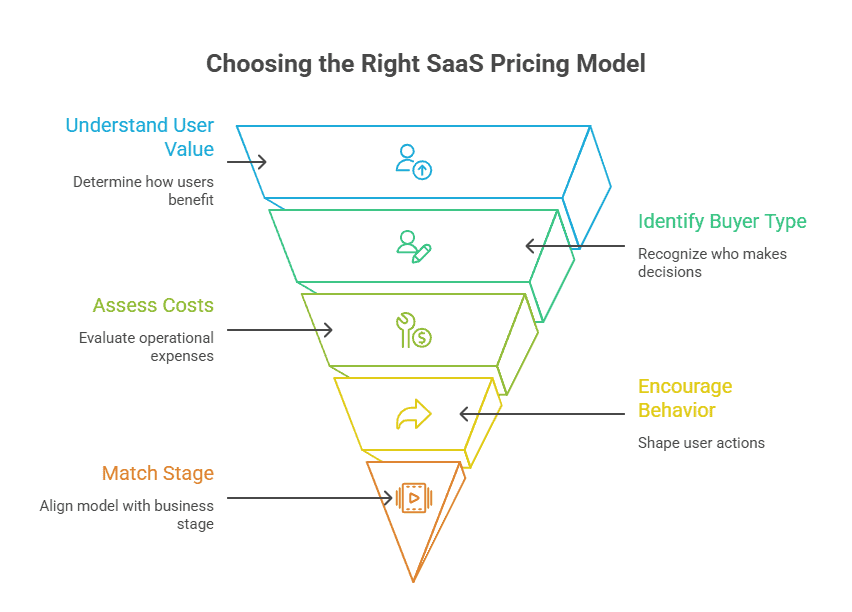
    Step 1: Understand How Users Get Value

    This is the most important question.

    Does value scale with the number of people using the product? Per-user pricing makes sense.

    Does it scale with consumption? Usage-based pricing is likely a better fit.

    Are users paying primarily for access? A flat subscription may work.

    Get this wrong and pricing will always feel misaligned, no matter how strong the product is.

    choosing the right SaaS Pricing Model

    Step 2: Know Who You’re Selling To

    Your buyer type changes everything.

    • Individuals and small teams want simple, easy-to-justify pricing.
    • B2B buyers want structured plans they can compare and budget for.
    • Enterprise clients expect custom deals and annual contracts.

    Price for the actual decision-maker,  not a vague idea of your customer.

    Step 3: Be Honest About Your Costs

    If your costs increase every time a user performs an action: AI tokens, API calls, compute time, unlimited flat pricing can destroy your margins.

    In that case, usage-based pricing or tiered limits are not just strategic decisions; they are necessary for sustainability.


    Step 4: Decide What Behavior You Want to Encourage

    Pricing shapes behavior.

    • Want top-of-funnel growth? Freemium reduces friction.
    • Want serious users from day one? A paid-only model filters noise.
    • Want expansion revenue? Tiered upgrades create a natural path upward.

    Step 5: Match the Model to Your Stage

    A rough stage-to-model guide:

    Stage
    ARR
    Recommended Model
    Pre-PMF
    <$1M
    Flat-rate or per-user
    Early Growth
    $1M – $10M
    Tiered
    Growth
    $10M – $50M
    Tiered + freemium acquisition
    Scale
    $50M+
    Hybrid (subscription + usage)
    AI-Native
    Any
    Credits or usage + subscription base

    Step 6: Test and Adjust

    Pricing is not set once and forgotten.

    You will know it is working when:

    • Free users convert consistently
    • Customers upgrade without heavy sales pressure
    • Revenue grows without constantly increasing marketing spend

    If heavy users abuse the free plan or no one upgrades, the structure needs to change.

    The best SaaS companies revisit pricing regularly and treat it as an ongoing strategic decision.

    How AI Is Changing the SaaS Pricing Equation

    Traditional SaaS operates at 80–90% gross margins. AI-enabled SaaS often runs at 50–60% due to compute costs. That margin gap changes the math behind every pricing decision.

    Three major shifts are happening:

    1. The CFO Problem
    AI invoices now resemble utility bills, variable and difficult to forecast.
    61% of IT leaders cut projects in 2025 due to unplanned SaaS cost increases. Credit-based and hybrid models are winning enterprise deals because they restore predictability.

    2. The Seat Model Is Breaking
    AI agents do not occupy seats the way humans do. They run 24/7, execute thousands of actions, and can serve multiple use cases simultaneously. Per-seat pricing is fundamentally misaligned with an agentic model.

    3. Price Increases Are Masking Model Changes
    SaaS prices rose 8.7% year-over-year in 2025.
    44% of SaaS companies now charge separately for AI features. Many bundle AI into existing tiers without a separate line item, effectively raising prices without announcing an increase.

    Metrics That Tell You If Your Pricing Model Is Working

    Model selection without measurement is guesswork.

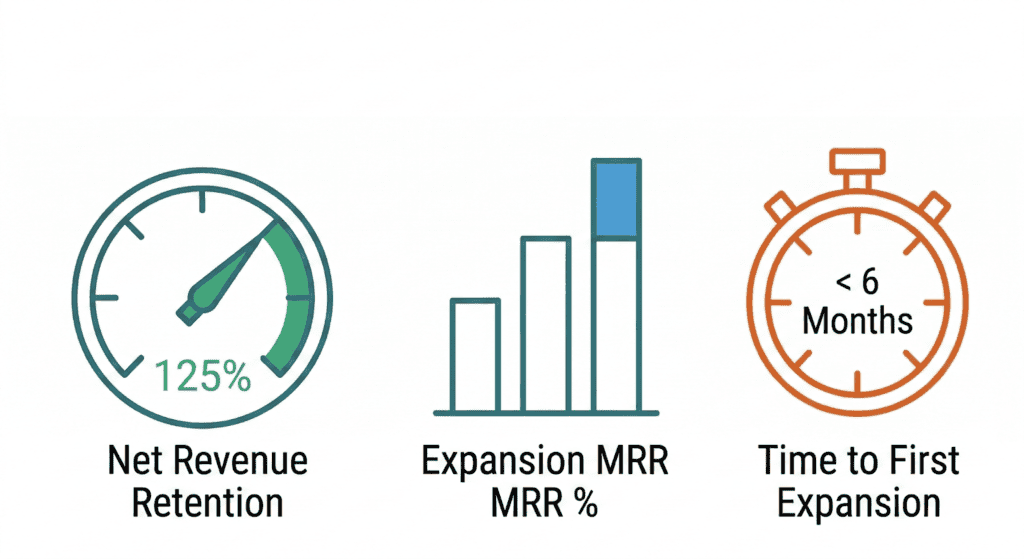
    The three most important signals to watch:

    • Net Revenue Retention (NRR)
      Top SaaS companies hit 115–125% NRR. If yours is below 100%, you are losing revenue from existing customers faster than you are expanding it.
    • Expansion MRR %
      Usage and hybrid models should drive 30–50%+ of new MRR from existing accounts. If expansion is near zero, your model lacks a natural upsell motion.
    • Time to First Expansion
      How long before the average customer upgrades or exceeds base usage? 

    A healthy benchmark is under six months. Longer timelines often signal misaligned pricing thresholds or value metrics.

    Common SaaS Pricing Mistakes to Avoid

    • Copying competitors without understanding their customer base. Their pricing reflects their customers, not yours.
    • Choosing a model your billing stack cannot support, leading to manual invoicing, errors, and churn from billing friction.
    • Getting the value metric wrong. The Mixpanel “events” mistake is not unique; audit whether your pricing metric creates the right incentives before scaling.
    • Treating pricing as a one-time decision. The top 500 SaaS companies averaged 3.6 pricing changes in 2025. Quarterly pricing reviews are now table stakes.
    • Ignoring AI margin implications. Pricing built for 80–90% margins can destroy profitability at 50–60%.
  • Payroll Management in 2026: Process, Tools & Best Practices

    Payroll Management in 2026: Process, Tools & Best Practices

    Payroll management is no longer just about calculating salaries and issuing payslips. It includes compliance tracking, tax automation, employee self-service portals, and whatnot.

    As regulations evolve and workforces become more global and remote, businesses need a structured payroll process, the right tools, and clear best practices to avoid costly mistakes.

    This guide breaks down payroll management in 2026, including the setup process, recommended tools, and proven best practices to help you run payroll efficiently and stay compliant.

    What Is Payroll Management?

    Payroll management is how a business pays its employees accurately and on time, every pay period. That sounds simple, but it covers more than most people expect.

    It includes calculating gross and net pay, withholding the right taxes, handling benefits deductions, paying contractors, filing with the IRS and state agencies, and keeping records in case anything is ever questioned.

    When any part of that breaks down, it costs money. The National Federation of Independent Business found that small businesses pay an average of $845 per year in IRS penalties from payroll mistakes alone.

    It’s one of those business functions where getting it right goes unnoticed, but getting it wrong has real consequences.

    Why Is Payroll Management Important?

    Payroll is not just an administrative task. It touches nearly every part of your business.

    • It keeps you legally compliant: Payroll involves federal, state, and local tax obligations. Miss a deadline or miscalculate a withholding and you are looking at IRS penalties, state fines, or in serious cases, audits. 
    • It affects how employees feel about working for you: People depend on their paycheck. A late or incorrect payment creates immediate stress and erodes trust fast. 
    • It protects you during audits: Clean payroll records are your first line of defence if the IRS or Department of Labour ever comes knocking. Having a reliable pay stubs template ensures your records stay consistent and complete. Disorganised or incomplete records make a routine audit much harder than it needs to be.
    • It helps you understand your actual labour costs: Payroll data shows you exactly what you are spending on people, including base pay, overtime, benefits, and employer-side taxes. 

    Payroll Management Methods

    Before setting up a system, you need to choose how you want to manage payroll. There are three main approaches, each with different trade-offs depending on your team size, budget, and internal capacity.

    Manual Payroll

    Manual payroll means handling calculations yourself using spreadsheets or paper records. No software, no automation.

    This works for very small operations like a sole proprietor with one or two employees. But it does not scale. The American Payroll Association estimates that manual payroll for a 10-person team takes around 5 hours per pay period. More time also means more room for error, and manual processes give you zero automatic updates when tax laws change.

    Outsourced Payroll

    Outsourcing means hiring a third-party provider, such as a Professional Employer Organisation (PEO) or a payroll bureau, to handle everything for you.

    Pros:

    • Compliance responsibility is largely transferred to the provider
    • Built-in expertise on tax law and filings
    • Frees up internal HR time

    Cons:

    • Higher cost than software-only solutions
    • Less direct control over your data
    • Data security depends on your provider’s standards

    Outsourcing works best for businesses without dedicated HR or finance staff who need compliance handled without building internal capacity.

    Payroll Software

    Cloud-based payroll software automates calculations, tax withholdings, filings, and compliance updates. This is now the dominant method for small and mid-size businesses.

    In 2026, the gap between manual and software-assisted payroll has widened significantly. Most mid-tier platforms now include AI features that were enterprise-only two years ago, including anomaly detection, automatic tax table updates, and predictive labour cost reporting. More on that in the AI section below.

    How to Set Up a Payroll Management System

    Whether you are starting fresh or rebuilding a process that has gotten messy, the setup follows the same core steps.

    1. Register as an employer with your tax authority: Every country requires businesses to register before running payroll. The process and the authority you register with will vary depending on where you operate, so check with your local tax office before your first pay run.

    2. Classify your workers correctly: Determine who is a salaried or hourly employee and who is an independent contractor. Getting this wrong is expensive regardless of where you operate. Misclassification can trigger back taxes, penalties, and in some countries retroactive benefits obligations.

    3. Collect employee information: Before the first pay run, you need completed tax forms, employment eligibility documentation, and bank transfer details. The specific forms vary by country, so make sure you are using the correct ones for each location you hire in.

    Also decide on pay frequency. This varies by country and industry. Weekly and biweekly schedules are common in North America while monthly pay is more standard across much of Europe.

    4. Set up deductions and withholdings: Configure all deductions before the first pay run. While the specifics differ by country, most payroll systems will include:

    • Income tax withheld at source
    • Social security or national insurance contributions
    • Pension or retirement contributions
    • Health insurance premiums where applicable
    • Any voluntary deductions the employee has elected

    5. Set up documentation and recordkeeping: Most countries require payroll records to be kept for several years, though the exact timeframe varies. Every pay period, each employee should receive a pay stub documenting their gross pay, deductions, and net pay. This is a legal requirement in most jurisdictions and is your primary paper trail for compliance and disputes.

    6. Run payroll and file: Once everything above is in place, the pay run follows this sequence:

    1. Calculate gross pay including overtime, bonuses, and commissions
    2. Apply all deductions and withholdings
    3. Distribute wages via direct deposit or bank transfer
    4. File payroll taxes with the relevant authority on time
    5. Issue annual income statements to all employees at year end

    Filing frequencies and deadlines differ by country, so build a payroll calendar that accounts for every jurisdiction you operate in.

    AI in Payroll Management

    AI in payroll is no longer a future trend. As of 2026, the major payroll platforms all include AI-assisted features in some form. The question is not whether to use them but whether you are using them well.

    McKinsey’s research on workplace automation estimates that more than half of payroll processing tasks can be automated with current AI technology. ADP’s Research Institute has found that businesses using fully automated payroll spend significantly less time on processing compared to manual or semi-manual methods.

    What AI Does in Payroll Today

    1. Anomaly detection – AI scans payroll data before a run and flags irregularities like duplicate payments, outlier hours, or tax rate mismatches. It catches the kind of errors that are easy to miss when you are reviewing hundreds of lines manually.

    2. Automatic tax table updates – When federal or state tax laws change, AI-powered platforms update their tax tables automatically. This matters a lot given recent federal tax structure changes. You should not have to manually update a withholding table.

    3. Predictive labour cost reporting – Some platforms now forecast upcoming payroll costs based on scheduled hours, planned headcount changes, and benefits enrollment data. This helps finance teams plan ahead instead of reacting.

    4. Natural language reporting – Tools like Rippling and Workday let HR managers ask payroll questions in plain English. Instead of pulling a custom report, you can ask “What was our overtime spend in Q1 versus Q4?” and get an instant answer.

    What AI Still Cannot Replace

    AI handles the mechanical layer of payroll well. It does not handle judgment calls.

    • Worker classification edge cases still require human review and sometimes legal counsel
    • Compensation strategy and pay equity decisions are not something you should automate
    • Final payroll approval should always sit with a human who owns accountability
    • When a new law is ambiguous, AI can flag the issue but a person or attorney has to interpret it

    Payroll Management Software to Use 

    Choosing payroll software isn’t just about brand recognition; it’s about pricing structure, automation depth, and whether the tool fits your team size and operational complexity. 

    Here’s a side-by-side comparison of widely used payroll platforms based on publicly available pricing and feature capabilities to help you consider what actually matters.

    Tool
    Best For
    Starting Price
    AI Features
    Gusto
    SMBs, 1–100 employees
    ~$46/mo + $6/employee
    Basic
    ADP Run
    Growing SMBs
    Custom
    Advanced
    Rippling
    Tech-forward teams
    ~$8/employee/mo
    Strong
    Paychex Flex
    Mid-market
    Custom
    Moderate
    Deel
    Global or contractor-heavy teams
    ~$19/contractor/mo
    Moderate
    QuickBooks Payroll
    Existing QuickBooks users
    ~$45/mo + $6/employee
    Basic

    Verify current pricing on each vendor’s site before making a decision. Payroll software pricing changes frequently.

    Beyond price, ask these four questions before committing to any platform:

    1. Does it automatically update tax tables when federal or state law changes?
    2. What are your data export rights if you want to switch vendors later?
    3. Does it integrate with your existing accounting and HR tools?
    4. Is AI anomaly detection included in the base plan or is it a paid add-on?

    The base subscription price is rarely the full cost. Factor in implementation, onboarding, and any migration fees if you are switching from another system.

    Best Practices For Payroll Management

    Knowing the process is one thing. Running it consistently without errors or compliance gaps is another. 

    These six practices keep payroll clean throughout the year.

    1. Verify compliance rules before each tax year begins: Tax thresholds, contribution rates, and minimum wages change regularly in most countries. Confirm your software has updated its rules before your first pay run of the year.

    2. Build a payroll calendar for every country you operate in: Filing deadlines, payment dates, and annual reporting requirements differ everywhere. A shared calendar that maps out every key date across your operating locations is one of the simplest ways to avoid missed deadlines.

    3. Audit payroll more than once a year: Most businesses only check payroll at year-end. By then, errors have compounded. Quarterly audits for teams over 50 and semi-annual for smaller teams catch misclassifications and deduction errors before they become expensive.

    4. Separate who processes payroll from who approves it: No single person should both process and approve payroll. According to reports, the median loss per payroll fraud incident is $50,000.

    5. Keep pay documentation consistent and complete: Pay stub requirements vary by country and sometimes by region within a country. A standardised template applied every pay period protects you during audits and gives employees the documentation they need for taxes, rental applications, and loan approvals.

    6. Take data privacy seriously: Payroll systems store highly sensitive employee data including bank details, tax records, and personal identification. Data privacy laws govern how this information must be stored and accessed, and these laws vary by country. Role-based access and multi-factor authentication are not optional anymore.

    7. Get local expertise when expanding into new countries: Every new market brings new payroll rules. If you are entering a country for the first time, work with a provider that has in-country compliance knowledge or consider an Employer of Record model until you are established.

  • How to Use AI for Lead Generation: A Strategic Guide

    How to Use AI for Lead Generation: A Strategic Guide

    According to recent data, 90% of businesses have adopted AI to stay competitive, but only a fraction are seeing real results. The difference isn’t the technology. It’s how they use it. 

    Here’s what most businesses get wrong about AI lead generation: they treat it like a shortcut. They buy a tool, automate a few emails, and wonder why nothing changed. 

    The businesses actually winning with AI aren’t using more tools, they’re using smarter systems.

    That’s exactly what this guide covers: how to use AI for lead generation in a way that actually works, not just adds to your tech stack.

    What Is AI Lead Generation?

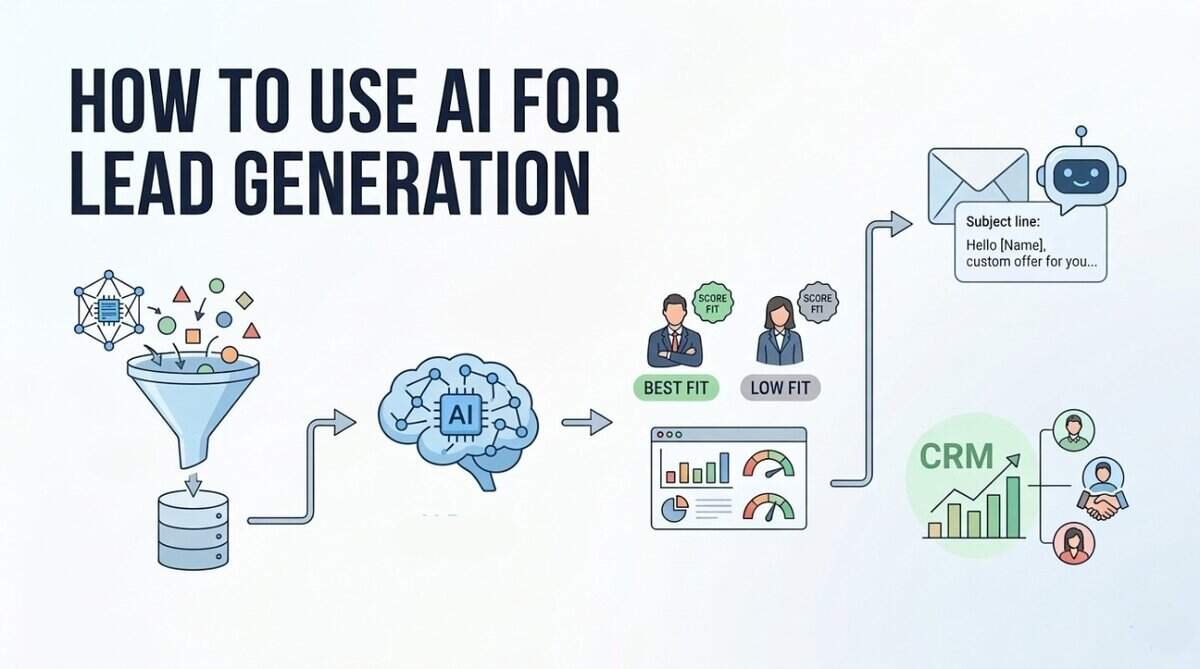
    AI lead generation is using artificial intelligence to automatically find and qualify potential customers for your business.

    AI tools scan data sources like LinkedIn, websites, and CRM history to spot patterns in who actually buys from you. It then finds new people who match that pattern, scores them by likelihood to convert, and can even send the first outreach automatically.

    The numbers show why this matters. Companies using AI for lead generation report 75% higher conversion rates compared to traditional methods. That’s because AI doesn’t just guess which leads are hot – it learns from your past successes to spot similar patterns in new prospects.

    Why Should You Use AI for Lead Generation?

    Let’s talk numbers. The ROI case for AI for lead generation isn’t just theoretical – it’s backed by real data showing significant improvements across every metric that matters. 

    Here’s what you can expect when you implement AI properly:

    • Generate more leads: AI sales tools can increase your lead volume by 50%. That’s because AI works 24/7, never gets tired, and can process thousands of data points simultaneously to identify opportunities you’d miss manually.
    • Cut lead costs by 60%: The same research shows AI can reduce your cost per lead by up to 60%. Traditional lead generation involves paying for ads, content creation, and manual outreach. AI automates much of this work, dramatically lowering your expenses while maintaining quality.
    • Save 10 hours per rep each week: Sales teams using AI tools save an average of 10 hours per rep weekly. That’s time they can spend actually selling instead of researching and qualifying leads.
    • Improve conversion rates by 25%: Companies using AI-powered lead scoring report conversion rate improvements of up to 25%. The AI identifies which leads are most likely to buy, so your team focuses on the right prospects.
    • Increase lead quality significantly: Machine learning lead scoring delivers 75% higher conversion rates compared to traditional methods. The AI analyses thousands of data points to separate serious buyers from window shoppers.
    • Scale without hiring: AI handles the repetitive work that would normally require additional staff. You can double your lead generation efforts without doubling your team size, making growth much more cost-effective.

    How to Use AI for Lead Generation

    Let’s talk about how to actually use AI for lead generation. 

    Think of these six strategies as building blocks – each one addresses a different part of the lead generation process. When you combine them, you create a system that works consistently without constant manual effort.

    We’ll start with the foundation: finding the right people to talk to.

    1. AI-Powered Prospecting & Lead List Building

    This is where most sales teams waste time. Manual prospecting means hours spent searching LinkedIn, company websites, and databases trying to find potential customers. AI lead generation changes this completely.

    How to implement it:

    First, define your ideal customer profile. What industries, company sizes, and job titles match your best customers? Feed this information into an AI prospecting tool.

    Then let the AI scan databases and public sources. It looks for companies and people who match your criteria, then verifies contact information automatically.

    Third, prioritise the list. The AI scores leads based on how closely they match your ideal profile and their likelihood to respond.

    Tools to use:

    Tools like Cognism and Apollo.io use AI to build targeted lead lists. They analyse millions of data points to find companies that fit your criteria, then provide verified contact information.

    Metric to track:

    Watch your “research time per lead.” This should drop significantly as the AI handles the heavy lifting. Also track the quality of leads generated – are they better matches for your ideal customer profile?

    The key here is letting AI do the searching while your team focuses on connecting. You get more targeted leads in less time, which means more conversations and more opportunities.

    2. Personalised Outreach Automation

    You probably delete generic emails without reading them. But when someone mentions your company, your role, or a specific challenge you’re facing, you pay attention. That’s what personalised outreach automation does at scale. 

    Spam is sending the same message to everyone. Personalised outreach is sending the right message to the right person at the right time.

    The numbers show why this matters. Personalised emails improve open rates by 20-40% compared to generic campaigns. Plus, 82% of email marketers say personalisation boosts their open rates.

    Here’s what to do:

    1. First, segment your leads based on data from your CRM. Group them by industry, job title, company size, or engagement level.
    2. Second, create templates with personalisation fields. Use placeholders for names, companies, and specific pain points that the AI can fill in automatically.
    3. Third, set up triggers based on lead behaviour. When someone downloads a whitepaper or visits your pricing page, the AI sends a relevant follow-up email within minutes. You can also pair this with a landing page creator to build targeted pages that match the exact message in the email, so when a lead clicks through, the experience feels conversion-ready.
    4. Fourth, test and optimise. The AI should analyse which subject lines, messaging, and timing work best for different segments, then adjust automatically.

    Tools to use:

    Tools like Outreach.io and Salesloft use AI to personalise outreach sequences. These AI tools for lead generation analyse which messages get responses and optimise your campaigns over time.

    Metric to track:

    Watch your “personalised email open rate” compared to generic campaigns. Also track reply rates – personalised outreach should generate more conversations, not just opens.

    3. Predictive Lead Scoring

    Traditional lead scoring is like guessing which apples will be ripe based on their colour. Predictive lead scoring is like having a fruit expert who’s tasted thousands of apples and knows exactly which ones will be sweet based on dozens of factors you can’t see.

    The AI analyses your past successful deals – who bought, what they looked at, how they interacted with you – then finds similar patterns in new leads. 

    How to implement it:

    1. First, feed your CRM data into the system. The AI needs to see your historical wins and losses to learn what success looks like.
    2. Second, let it analyse current leads. It looks at website visits, email opens, content downloads, and dozens of other signals you’d never track manually.
    3. Third, prioritise based on scores. The AI gives each lead a score from 1-100 showing how likely they are to buy. Your team focuses on the highest scores first.

    Tools to use:

    Tools like HubSpot’s predictive lead scoring and Salesforce Einstein analyse your data automatically. They work with your existing CRM to add intelligence without changing your workflow.

    Metric to track:

    Watch your “conversion rate by lead score.” You should see significantly higher conversion rates from leads with high scores versus low scores. This tells you the AI is learning correctly.

    4. AI Chatbots for Lead Capture

    Here’s a problem you’ve probably faced: someone visits your website, looks around, then leaves without telling you who they are. Traditional contact forms have terrible conversion rates – most people just won’t fill them out.

    AI chatbots change this completely. They start conversations with visitors, answer questions, and collect contact information naturally. Business leaders report a 67% increase in sales through chatbot assistance.

    The thing is, modern chatbots don’t feel robotic. They understand context, remember what you’ve discussed, and can qualify leads while having natural conversations.

    How to implement it:

    1. First, set up your chatbot to greet visitors. Program it with common questions about your products or services.
    2. Second, train it to qualify leads. Ask simple questions like “What problem are you trying to solve?” or “When do you need a solution?”
    3. Third, connect it to your CRM. When someone provides contact information, the chatbot should create a lead record automatically with all the conversation history.

    Tools to use:

    Tools like Intercom and Drift offer AI chatbots that integrate with your website. They learn from conversations and get better at qualifying leads over time.

    Metric to track:

    Track “chatbot conversion rate” – what percentage of chatbot conversations turn into qualified leads? Compare this to your traditional form conversion rates. You’ll likely see a significant improvement.

    5. AI-Driven Data Enrichment

    Here’s a problem you might not see until it’s too late: your lead data is decaying faster than you think. People change jobs, companies rebrand, and contact information becomes outdated.

    Data enrichment is like having a research assistant who constantly updates your CRM. It adds missing information, corrects errors, and keeps your database current. 

    1. First, connect your CRM to a data enrichment tool. The AI scans your existing contacts and identifies missing or outdated information.
    2. Second, set up automatic updates. The tool should refresh contact details, job titles, company information, and social profiles regularly.
    3. Third, verify email addresses before outreach. The AI checks if emails are valid and active, preventing bounces before they happen.
    4. Fourth, enrich new leads automatically. When someone fills out a form or your chatbot captures a lead, the AI immediately adds company size, funding information, and other relevant details.

    Tools to use:

    Tools like Clearbit and ZoomInfo use AI to enrich lead data. They connect to multiple data sources and keep your CRM accurate without manual work.

    Metric to track:

    Track your “data decay rate” – how many contacts become outdated each month. Also watch email bounce rates and engagement metrics. When your data is accurate, your outreach performs better.

    6. Intent Data & Trigger-Based Outreach

    Trigger-based outreach means reaching out at exactly the right moment. When someone shows intent signals, you contact them while they’re actively looking for solutions. According to Mixology Digital’s research, 70% of B2B teams now use intent data for digital marketing. Plus, companies using intent data effectively see 2-4x improvement in pipeline conversion.

    How to implement it:

    • First, set up intent data monitoring. Connect a tool that tracks when companies search for keywords related to your industry. Look for patterns like multiple people from the same company researching similar topics.
    • Second, create trigger rules. Define what actions should trigger outreach. This could be when a target account visits your pricing page, downloads a competitor comparison, or searches for specific solution keywords.
    • Third, automate your response. When a trigger fires, send personalised outreach within hours – not days. The message should reference what they were researching and offer relevant help.
    • Fourth, track engagement. Monitor which triggers lead to conversations and adjust your rules based on what works.

    Tools to use:

    Tools like 6Sense and ZoomInfo offer intent data capabilities. They monitor web activity and alert you when target accounts show buying signals.

    Metric to track:

    Watch your “trigger-based response rate.” Compare how leads from intent signals respond versus cold outreach. You should see significantly higher engagement from people who were already researching.

    Best AI Lead Generation Tools 

    Now that you understand the strategies, you need the right tools to implement them. The AI lead generation space has matured significantly, with different tools specialising in specific parts of the process. 

    Here’s a comparison of the top options for:

    Each tool has its strengths. Apollo.io works well if you want everything in one place without enterprise costs. ZoomInfo dominates for large companies needing comprehensive data. LeadIQ excels if your team lives on LinkedIn. Lusha focuses on verified contact accuracy.

    Your choice depends on your team size, budget, and which part of the lead generation process needs the most help. Start with one tool that solves your biggest pain point, then expand as you see results.

    Common Mistakes to Avoid

    Here’s what you need to watch out for when implementing AI lead generation. These mistakes can derail your efforts before you see any real results.

    • Buying tools before cleaning data: AI works with the data you feed it. If your CRM has outdated contacts or duplicate records, the AI will make bad decisions. Clean your data first, then implement tools.
    • No clear ideal customer profile: Without defining exactly who you’re targeting, AI can’t prioritise effectively. You’ll waste time and money on leads that will never convert.
    • Expecting instant results: AI needs time to learn your patterns and optimise. Most teams see meaningful improvements within 30-60 days, not overnight.
    • Over-automating outreach: Too much automation feels robotic and spammy. Balance automated sequences with personalised human touchpoints.
    • Ignoring compliance: GDPR and CAN-SPAM regulations apply to AI outreach too. Make sure your tools and processes respect privacy laws and consent requirements.
    • No feedback loop for scoring model: If you don’t tell the AI which leads converted and which didn’t, it can’t improve. Regularly update your scoring model with real outcomes.
    • Tool sprawl without integration: Using five different tools that don’t talk to each other creates more work, not less. Choose tools that integrate with your existing systems.

    The biggest mistake you can make is treating AI as a magic solution. It’s a tool that amplifies your existing strategy. If your strategy is flawed, AI will just execute flawed strategy faster.

    Start small, measure everything, and avoid these common pitfalls. That’s how you build sustainable AI-powered lead generation that actually grows your business.

    Measuring Success: KPIs to Track

    Here’s the thing about AI lead generation: if you’re not tracking the right numbers, you won’t know what’s working. That’s why you need a 30/60/90-day review cycle. 

    Check your metrics monthly, make adjustments quarterly, and do a full strategy review every 90 days.

    Focus on these five key metrics to measure your AI lead generation success:

    1. Lead Volume (Baseline vs Target): Track how many leads you’re generating compared to your baseline. Successful AI implementations typically see 50-100% increases in lead volume within the first 90 days. Set specific weekly and monthly targets based on your growth goals.
    2. Lead Quality Score (Average Score Target): This is where AI really shines. Your lead scoring system should give each lead a quality score from 1-100. Aim for an average score of 65+ for qualified leads. Companies using AI-powered scoring report 75% higher conversion rates compared to traditional methods.
    3. Cost Per Lead (Industry Average vs AI Target): The average cost per qualified lead in 2026 is $198. B2B industries typically see $150-$450 per lead. With AI, aim to reduce this by 40-60% through automation and better targeting.
    4. Lead-to-Opportunity Conversion Rate (Benchmark): This measures how many leads turn into real sales opportunities. B2B companies average 3-5% conversion rates. AI should help you reach the upper end of this range or better.
    5. Time Saved per Rep (Hours Reduction): Track how much time your sales team saves on manual tasks. The benchmark is 10+ hours per rep each week. This time should be redirected toward actual selling activities, which directly impacts revenue.
  • How to Appear in AI Search Results: A Complete Guide

    How to Appear in AI Search Results: A Complete Guide

    People are typing fewer keywords into Google and asking ChatGPT full questions instead. You might think search is still the same game it was five years ago, but the way people find information online is shifting faster than most businesses realise. 

    AI search engines are answering questions directly, without making users click through ten blue links. AI platforms now surface brands through citations and mentions within generated answers, not just rankings. 

    Understanding these differences is crucial for improving your on-page SEO for AI search, especially as search behaviour shifts toward AI-generated answers.

    If you’re still optimising content like it’s 2019, you’re about to get left behind. The good news? You’re not too late to adapt. 

    Let’s figure out what AI search optimisation actually means and how you can start ranking where your audience is already looking.

    What Are AI Search Results?

    AI search results come from tools like ChatGPT, Perplexity, Google’s AI Overviews, and other platforms that use large language models to answer your questions. Instead of giving you a list of websites to browse, these tools generate direct answers by pulling information from multiple sources and synthesising it into one response.

    The key difference? Traditional search shows you where to find answers. AI search gives you the answer. 

    According to research on AI search behaviour, AI search interprets the meaning behind natural language queries to synthesise answers, even if the exact phrasing doesn’t match what’s in the original source material.

    When you ask Google “best running shoes for flat feet,” you get links to articles and product pages. Ask the same question to ChatGPT or Perplexity, and you get a complete answer with specific recommendations, comparisons, and reasoning. 

    What makes this shift interesting is how people phrase their searches. You’re not limited to short keywords anymore. AI search focuses on natural language questions rather than keyword-based queries. That means people ask “What should I eat before a morning workout if I hate breakfast?” instead of typing “pre workout meal no breakfast.” The AI understands context and intent, not just matching words.

    Why AI Search Optimisation Matters

    Gartner predicts website traffic from traditional search engines will fall by 25% by 2026, with AI search engines growing at 50-100%+ year-over-year. That’s not some distant future scenario. We’re talking about next year. 

    Even more telling, 5.6% of U.S. search traffic on desktop browsers already goes to AI-powered models like ChatGPT or Perplexity. That percentage might sound small, but it represents millions of searches that are bypassing Google entirely.

    Here’s what surprised me while researching this: 38% of people have adopted AI tools, yet 95% still rely on search engines. More than 1 in 5 Americans use AI tools heavily. People aren’t abandoning Google, they’re adding AI search to their routine. That means your content needs to work in both worlds.

    The thing is, if your brand isn’t showing up in AI-generated answers, you’re invisible to a growing chunk of your audience. When someone asks ChatGPT for software recommendations or Perplexity for marketing advice, will your company be mentioned? If not, your competitors who understand AI search optimisation will be. This isn’t about jumping on a trend. It’s about staying visible where people are actually searching.

    How AI Search Engines Work

    Understanding the mechanics behind AI search helps you optimise better. These systems work differently than the crawl-index-rank approach you’re used to with traditional search engines. 

    Here’s what’s actually happening behind the scenes.

    Natural Language Processing

    AI search engines rely on natural language processing to understand what you’re really asking. Instead of matching keywords, NLP analyses the context, phrasing, and intent behind your query. 

    Google introduced AI Overviews in May 2024, which uses this technology to grasp the nuances of conversational questions. When you type “best running shoes for flat feet,” the AI doesn’t just spot those exact words. It understands you’re looking for footwear recommendations based on a specific medical condition. 

    The system picks up on relationships between concepts, recognises synonyms, and figures out whether you want to buy, learn, or compare.

    Data Sources and Crawling

    AI search engines pull information from multiple sources across the web. They crawl websites like traditional search engines do, but they also prioritise structured data that’s easier to process. 

    AI-powered search engines like Bing Chat and Google AI Overview utilise structured data to deliver contextually rich responses. The systems scan your content, metadata, schema markup, and even user-generated content like reviews.

    What’s different is how they treat this data. Rather than just indexing it for ranking purposes, AI systems analyse it to understand relationships, extract facts, and build knowledge bases they can tap into when generating answers.

    Answer Generation Process

    Once the AI understands your query and accesses relevant data, it synthesises information from multiple sources to create a coherent answer. This isn’t about showing you a list of links. The AI reads through various pages, identifies the most relevant information, and combines it into a single response. Sometimes it cites sources, sometimes it doesn’t. 

    The system weighs factors like content authority, freshness, and how well the information matches the query intent. That’s why appearing in AI-generated answers requires more than just ranking high. Your content needs to be clear, factual, and structured in a way that AI can easily extract and repackage.

    Key Differences: Traditional SEO vs AI Search Optimisation

    You’ve been doing SEO for years, but AI search changes the game. Understanding these differences is crucial, especially for AI search visibility for agencies that need to educate clients on why their optimisation strategy needs to evolve. 

    Here’s what’s actually different when you’re optimising for AI-generated answers instead of traditional rankings.

    How to Appear in AI Search Results?

    Here’s how you can appear in AI search results: follow these steps:

    Step 1: Create Clear, Conversational Content

    AI search engines process queries the way people naturally speak. When someone asks their voice assistant a question or types into ChatGPT, they’re not using keywords. They’re having a conversation. Your content needs to match that style.

    Here’s how to write content that AI engines can easily understand and recommend:

    Write Like You’re Explaining to a Friend

    Drop the corporate speak. If you’d say “help you save money” in person, don’t write “facilitate cost reduction initiatives” on your site. AI models trained on natural language prefer straightforward explanations over jargon.

    Example: Instead of “Our solution leverages advanced methodologies,” write “We use a simple three-step process.” The second version is what someone would actually search for.

    Answer Questions Directly in the First Sentence

    Don’t make AI models dig through three paragraphs to find your answer. Put it upfront. If someone asks “How long does shipping take?” your content should immediately say “Standard shipping takes 3-5 business days” before explaining the details.

    Use the Words Your Audience Uses

    Pay attention to how real people phrase questions in forums, social media, or customer support tickets. If customers call something a “pricing plan” but you call it a “subscription tier,” you’re creating a disconnect. AI search pulls from actual queries, so match that language.

    Keep Paragraphs Focused on One Idea

    AI models break down content into digestible chunks. When you stuff multiple concepts into one paragraph, it’s harder for these systems to extract the right information. One paragraph should cover one point, then move on.

    Step 2: Structure Your Content for AI Understanding

    Content structure isn’t just about looking organised. It’s about creating clear signals that help AI understand what each section covers and how information connects. Think of it as building a map that guides both readers and AI engines through your content.

    Use Descriptive Headings

    Your headings should tell AI exactly what’s coming next. Generic labels like “Overview” or “More Information” don’t help. Specific headings like “How to Install Solar Panels on a Tile Roof” or “Average Cost of Kitchen Remodelling in 2024” give AI engines clear context.

    Bad heading: “Getting Started”
    Good heading: “3 Steps to Set Up Your First Email Campaign”

    Bad heading: “Features”
    Good heading: “Key Features That Reduce Customer Support Time”

    The difference? Specific headings contain the actual terms people search for and clearly indicate what the section delivers.

    Add Schema Markup

    Schema markup is code that helps AI systems understand what your content is actually about. Think of it as labels on your content that say “this is a recipe,” “this is a product review,” or “this is a how-to guide.”

    You don’t need to be a developer to add schema. Tools like Yoast SEO or Rank Math can add basic schema automatically. For more specific markup, you can use Google’s Schema Markup Generator.

    Here’s what to prioritize:

    1. FAQ schema: If you have a Q&A section, mark it up. AI engines love pulling direct answers from FAQ schema.
    2. How-to schema: For step-by-step guides, this tells AI exactly what each step involves.
    3. Article schema: Basic but important. It identifies your headline, author, and publication date.

    The thing is, schema doesn’t just help AI find your content. It helps AI understand the relationship between different pieces of information on your page. When AI can see that your bullet points are steps in a process, not random facts, it’s more likely to use your content when answering “how to” questions.

    You can test your schema using Google’s Rich Results Test. Just paste in your URL and it’ll show you what structured data it detects.

    Implement Clear Hierarchies

    Use heading tags in order: H2 for main sections, H3 for subsections, H4 for specific points within those subsections. Don’t skip levels. This hierarchy helps AI models understand which information is most important and how subtopics relate to main topics.

    Also, use bullet points and numbered lists when breaking down steps or listing features. AI engines parse these formats efficiently because they signal organised, scannable information.

    Step 3: Optimise for Question-Based Queries

    People ask AI search engines questions. Not “best CRM software” but “What’s the best CRM software for small teams?” Your content needs to mirror these question patterns to get recommended.

    Start by identifying the different question types your audience asks:

    • Who questions help with credibility and expertise. “Who should use project management software?” or “Who qualifies for this service?” Position yourself or your offerings as the answer.
    • What questions need clear definitions. “What is influencer marketing?” or “What tools do I need to start a podcast?” Lead with a straightforward explanation before diving deeper.
    • Where questions matter for location-based content. “Where can I find organic coffee beans?” or “Where to host a corporate event in Boston?” Include specific geographic references.
    • When questions address timing. “When should I refinance my mortgage?” or “When is the best time to post on Instagram?” Provide specific timeframes or conditions.
    • Why questions dig into reasoning and benefits. “Why do startups fail?” or “Why switch to cloud storage?” Connect causes to effects and explain underlying reasons.
    • How questions demand actionable steps. “How to write a business plan” or “How does solar energy work?” Structure these answers as clear processes with numbered steps when possible.

    The trick is using these question formats as actual subheadings or incorporating them naturally into your first sentence. When your H2 reads “How to Reduce Customer Churn in SaaS” instead of just “Reducing Churn,” you’re matching the exact phrasing AI engines encounter in queries.

    The trick is using these question formats as actual subheadings or incorporating them naturally into your first sentence. When your H2 reads “How to Reduce Customer Churn in SaaS” instead of just “Reducing Churn,” you’re matching the exact phrasing AI engines encounter in queries.

    Step 4: Build Authoritative Content

    AI search engines don’t just look at what you say. They evaluate whether you’re credible enough to cite. That means backing up your claims with data, expert perspectives, and verifiable sources. Here’s how to build content that AI systems trust enough to recommend.

    1. Cite Data and Statistics: When you mention numbers or research findings, link to the original source. AI models prioritise content that references credible data over generic claims. Instead of saying “most businesses struggle with email marketing,” say “67% of small businesses report low email open rates” and cite where that number comes from.

    2. Include Expert Quotes or Insights: If you can interview industry experts or reference their published work, do it. AI systems recognise authoritative voices and give more weight to content that features them. Even pulling a relevant quote from a recognised expert’s blog post and properly attributing it strengthens your authority.

    3. Update Content Regularly: Fresh content signals reliability. AI engines favour recently updated pages over outdated ones, especially for topics where information changes frequently. Add a “Last updated” date at the top of your articles and revisit them every few months to refresh statistics or examples.

    4. Show Your Credentials: If you’re writing about finance, mention your background in the industry. If you run a fitness blog, share your certifications. AI models trained to assess expertise look for signals that you actually know what you’re talking about. A simple author bio with relevant qualifications makes a difference.

    Common Mistakes to Avoid

    You can do everything right and still mess up your AI search visibility with a few simple mistakes. Here are the ones that trip up most people:

    1. Burying Your Answer: You might think building suspense makes content engaging, but AI engines give up fast. If someone asks “how much does a website cost” and you spend three paragraphs on background before answering, AI will pull from a competitor who answers in the first sentence.

    2. Overcomplicating Your Language: Using technical jargon or complex sentence structures makes it harder for AI to extract clean answers. Write like you’re explaining to someone who’s smart but unfamiliar with your industry. Simple beats clever every time.

    3. Ignoring Schema Markup: Skipping structured data is like not labelling items in your store. AI can still find things, but it takes longer and might misunderstand what you’re offering. Even basic article schema gives you an edge over competitors who ignore it completely.

    4. Focusing Only on Keywords: You’re still optimising like it’s 2015 if you’re stuffing keywords into content. AI search responds to natural phrasing and complete answers, not keyword density. Match how people actually ask questions instead of forcing awkward phrases into your copy.

    5. Creating Thin Content: Short, surface-level articles don’t give AI much to work with. If your post on “email marketing tips” is 300 words of generic advice, AI will favour the 1,500-word guide that actually walks through specific strategies with examples. Depth matters more than ever.

    Future-Proofing Your AI Search Strategy

    Here’s the thing about AI search: it’s moving fast, and what works today might shift by next quarter. But certain principles will hold up regardless of which AI models dominate or how search behaviour evolves.

    Focus on creating genuinely helpful content that answers real questions. AI models get better at detecting fluff and rewarding substance. The brands that stay visible are the ones solving actual problems with clear, detailed information. That won’t change even as algorithms improve. Also, stay flexible with your content strategy. Monitor where your audience is searching and be ready to adapt. If a new AI search tool gains traction in your industry, test it. See what content gets cited and adjust your approach based on what you learn.

    The shift to AI search isn’t about abandoning everything you know about SEO. It’s about expanding your optimisation mindset to include conversational language, structured data, and authority building. You’re not starting from scratch. You’re adding new skills to what you already do well. Start with one or two changes from this guide, test what happens, and keep refining. The businesses that win in AI search are the ones that start adapting now instead of waiting until the shift is complete.

  • How To Use AI for Marketing: A Complete Guide

    How To Use AI for Marketing: A Complete Guide

    Right now, 78% of organisations use AI in at least one business function. But here’s what’s interesting – most marketers are still figuring out how to use AI for marketing effectively.

    AI is changing marketing because it can do things humans can’t. It analyses data faster, spots patterns we’d miss, and personalises content at scale. Think about how Netflix recommends shows you’ll actually watch – that’s AI understanding your preferences better than any human could.

    By 2026, this transformation accelerates. AI won’t just be a tool you use occasionally. It will become your marketing partner, handling routine tasks while you focus on strategy and creativity.

    That’s why learning how to use AI for marketing matters now. In this article, we’ll cover practical ways to integrate AI for marketing success, from content creation to customer insights.

    What Is AI Marketing?

    AI marketing uses artificial intelligence to handle marketing tasks that normally need human thinking. It analyses data, spots patterns, and makes decisions faster than people can. Think of it like having a super-smart assistant who never sleeps and can process millions of data points in seconds.

    This technology helps marketers understand customers better and deliver personalised experiences at scale. Instead of guessing what customers want, AI uses actual behaviour data to predict needs and preferences. The result is marketing that feels more relevant to each person.

    Key Characteristics of AI Marketing

    • Data-driven decisions: AI analyses customer behaviour, purchase history, and engagement patterns to guide marketing choices
    • Automated personalisation: It tailors content, offers, and recommendations to individual preferences automatically
    • Predictive capabilities: AI forecasts future trends, customer behaviour, and campaign performance
    • Real-time optimisation: Marketing adjusts instantly based on current data and performance metrics

    Examples of Artificial Intelligence in Marketing

    Product recommendation engines like Amazon’s “customers who bought this also bought” section use AI to analyse purchase patterns and suggest relevant items.

    Dynamic pricing algorithms change prices based on demand, competition, and customer behaviour. Airlines and ride-sharing services use this approach – prices adjust automatically when demand spikes or inventory changes.

    Chatbots handle customer inquiries 24/7, learning from each interaction to provide better answers over time. Email marketing platforms use AI to determine the best send times for each recipient based on their opening patterns.

    Social media algorithms that decide what content appears in your feed are another example. They analyse your engagement history to show you posts you’re most likely to interact with.

    Benefits of Using AI in Marketing

    AI gives marketers a strategic edge by handling repetitive tasks and uncovering insights humans might miss. This frees you to focus on creative strategy while AI manages the heavy lifting of data analysis and optimisation.

    • Hyper-personalisation: AI analyses individual customer behaviour to deliver tailored content, offers, and recommendations that feel relevant to each person.
    • Efficiency boost: It automates routine tasks like email scheduling, social media posting, and basic content creation, saving you hours each week.
    • Data-driven decisions: Instead of guessing what works, AI uses real customer data to guide your marketing choices and predict what will perform best.
    • Scalability: You can personalise experiences for thousands of customers simultaneously, something impossible to do manually.
    • Better ROI: Marketing teams using AI report an average 300% ROI through improved targeting and reduced wasted spend.
    • 24/7 optimisation: AI continuously monitors campaign performance and makes adjustments in real-time, even when you’re not working.

    How to Use AI for Marketing

    Now that you understand AI marketing’s benefits, let’s explore practical applications. We’ll cover specific ways to use AI across different marketing functions, starting with content creation.

    AI for Content Creation

    AI transforms how you create marketing content by handling writing, ideation, and visual assets. Tools like Jasper help marketers generate blog posts, social media captions, and email campaigns quickly. You give it a topic and tone, and it produces draft content you can refine.

    For visual content, tools like Midjourney create images from text descriptions. Need a product photo or social media graphic? Describe what you want, and AI generates options. This approach saves hours on content production while maintaining quality.

    AI also handles tasks that used to require brainstorming sessions, a name generation tool can produce hundreds of product names, campaign titles, or brand names in seconds, which you then refine based on your strategy.

    The key is using AI as your creative assistant, not a replacement. You provide strategy and brand voice while AI handles the heavy lifting of initial drafts and variations.

    SEO with AI

    AI SEO tools like Surfer SEO handle keyword clustering, content gap analysis, and technical audits automatically. 

    For marketers launching new brands or product lines, combining SEO research with a name generation tool helps find business names that are both brandable and search-friendly, checking domain availability and keyword potential at the same time.

    These AI tools analyse top-ranking pages to suggest optimal content structure, word count, and internal linking patterns.

    AI also helps in performing technical SEO audits, spotting issues like slow page speed or broken links that hurt rankings. This saves hours of manual analysis while improving search performance.

    AI in Email Marketing

    AI changes email marketing by optimising every element for better performance. Tools like Bloomreach analyse historical data to generate subject lines that increase open rates. The AI studies which words and phrases worked best with your audience before.

    These platforms also predict the best send times for each subscriber based on their past engagement patterns. Dynamic content blocks automatically adjust email content based on individual preferences and behaviour. This means two people receive the same email campaign but see different product recommendations or offers.

    The result is emails that feel personally crafted rather than mass-sent. You get higher open rates, better engagement, and more conversions without manual guesswork.

    AI for Social Media Scheduling & Optimisation

    AI-powered social media tools like Blink AI analyse when your audience is most active and likely to engage. Instead of guessing posting times, the AI studies historical performance data to schedule content when it will perform best.

    These tools forecast which content types will resonate with your specific followers. They suggest relevant hashtags based on trending topics and your audience’s interests. The AI even predicts engagement rates before you post, helping you refine content for better results.

    This approach moves beyond simple scheduling to intelligent optimisation. Your social media strategy becomes data-driven rather than based on intuition alone.

    Chatbots & Conversational AI

    AI chatbots provide 24/7 customer service without human intervention. Tools like Intercom handle common questions, freeing your team for complex issues. The chatbots learn from each interaction, improving their responses over time.

    These systems qualify leads by asking relevant questions and scoring prospects based on their responses. For e-commerce, conversational AI acts as personalized shopping assistant, recommending products based on customer preferences and browsing history.

    The chatbots integrate with your CRM to provide context-aware support. They remember previous conversations and customer preferences, creating seamless experiences across multiple touchpoints.

    AI for Audience Segmentation

    AI transforms audience segmentation by using machine learning to identify micro-segments you’d miss manually. Tools like Madgicx analyse real-time behavioural patterns to create hundreds of dynamic customer groups.

    The AI studies purchase intent, engagement signals, and browsing behaviour to predict what customers will do next. Instead of broad categories like “women aged 25-35,” you get specific segments like “mobile users who abandoned carts after viewing product videos.”

    This approach lets you personalise marketing at scale. You can target each micro-segment with messages that match their exact interests and behaviour patterns.

    AI for Sentiment Analysis & Brand Monitoring

    AI tracks brand health across social media and review sites in real-time. Tools like Sprinklr use natural language processing to analyse whether mentions are positive, negative, or neutral.

    The AI monitors conversations 24/7, alerting you to potential crises before they escalate. It identifies trending topics and sentiment shifts around your brand, products, or industry.

    This gives you immediate feedback on marketing campaigns and product launches. You can see how customers really feel rather than relying on surveys or guesswork.

    AI in Market Research & Competitive Intelligence

    AI analyses competitor content automatically to spot trends and extract consumer insights. Tools like Klue scan social media, websites, and marketing materials to identify what competitors are doing. The AI looks for patterns in messaging, product features, and pricing strategies.

    These tools track consumer conversations across platforms to understand what people really want. Instead of manual research, AI processes thousands of data points in minutes. You get real-time alerts when competitors launch new campaigns or change strategies.

    AI for Predictive Analytics & Forecasting

    AI predicts future sales, customer lifetime value, and campaign ROI before you spend money. Tools like Hurree analyse historical data to forecast which marketing efforts will perform best. The AI studies past customer behaviour to predict future purchases.

    These systems calculate customer lifetime value by analysing purchase patterns and engagement. They forecast campaign ROI by comparing similar past campaigns. This helps you allocate budget to the highest-performing channels and strategies.

    AI for Influencer Marketing

    AI identifies authentic influencers and predicts campaign success while detecting fake followers. Tools like VerifyCreator analyse follower quality and engagement patterns to spot fraud. The AI checks for bot activity and fake engagement.

    These platforms predict which influencers will deliver the best ROI for your specific audience. They analyse past campaign performance and audience overlap to make accurate forecasts. This prevents wasted spending on influencers with fake followers or poor engagement.

    Best AI Marketing Tools

    Choosing the right AI marketing tools matters because specialised tools beat generic platforms every time. Different tools excel at specific tasks, from content creation to customer insights.

    Here are some of the best AI marketing tools that focus on particular marketing functions:

    Prompt Engineering for Marketers

    Getting AI to give you what you want comes down to how you ask. Precise prompts matter because vague questions get vague answers. Think of it like giving directions – “go somewhere nice” versus “find a quiet coffee shop with outdoor seating near the park.” The better your instructions, the better your results.

    Here are 7 actionable prompts you can use right now:

    • Email subject line generator: “Create 10 email subject lines for a [product/service] launch targeting [audience]. Make them curiosity-driven and include power words. Keep each under 50 characters.”
      This gives you tested subject line formulas that boost open rates.
    • Social media post creator: “Write 5 Instagram captions for [topic] aimed at [demographic]. Include 3 relevant hashtags and a call-to-action. Use [tone: casual/professional/inspirational] voice.”
      Creates platform-specific content that matches your brand voice.
    • Blog outline builder: “Generate a detailed outline for a 1,500-word blog post about [topic]. Include H2 and H3 headings, key points for each section, and 5 target keywords to include naturally.”
      Structures long-form content with SEO optimisation built in.
    • Customer persona developer: “Create a detailed customer persona for someone who buys [product]. Include demographics, pain points, goals, preferred communication channels, and objections they might have.”
      Helps you understand and target your ideal customers better.
    • Ad copy variations: “Write 3 different versions of Facebook ad copy for [product]. Version 1: benefit-focused. Version 2: problem-solution. Version 3: social proof. Include headlines and primary text for each.”
      Provides A/B testing options to find what converts best.
    • Content repurposer: “Take this [blog post/article text] and turn it into: 1) 5 tweet threads, 2) 3 LinkedIn posts, 3) an email newsletter summary, 4) 10 Instagram story ideas.”
      Maximises your content investment across multiple channels.
    • Competitor analysis prompt: “Analyse [competitor’s website/social media] and identify: 1) Their top 3 content themes, 2) Engagement patterns, 3) Gaps in their content strategy, 4) 5 content ideas we could create that they’re missing.”
      Turns competitive research into actionable insights.

    What’s interesting about these prompts is that they’re specific enough to get useful results but flexible enough to adapt to your needs. The prompt engineering market is growing at 32.8% annually, showing how valuable this skill has become. Good prompts save time and improve quality – you get marketing assets that actually work instead of generic content.

    Challenges & What No One Is Telling You

    AI marketing tools depend completely on your data quality. If your customer data has gaps or errors, the AI makes decisions based on bad information.

    These tools often work like “black boxes” – you see the recommendations but not how they got there. When AI suggests a marketing strategy, you can’t always trace the logic behind it. This makes it hard to explain decisions to your team or adjust when things go wrong.

    Integration costs add up quickly too. You might pay for the AI tool, then discover you need expensive connectors to your existing systems. 

    Plus, when everyone uses similar AI tools, marketing content starts looking the same across different brands. A study found that generative AI can lead to content homogenization, where different brands end up with similar-sounding marketing messages.

    What Marketers Need to Learn

    Marketing is changing fast, and your skills need to keep up. AI isn’t just another tool – it’s reshaping what marketing work looks like. The marketers who succeed will be those who blend traditional creativity with new technical abilities.

    • Data literacy: You need to understand what the numbers mean. AI gives you tons of data, but you have to spot patterns and make smart decisions from it. This means knowing which metrics matter and how to interpret results.
    • Strategic AI implementation: It’s not about using every AI tool available. You need to pick the right tools for your specific goals and integrate them into your workflow. Think about what problems you’re solving, then choose AI solutions that actually help.
    • Ethical AI oversight: As AI handles more marketing tasks, you become responsible for ensuring it’s used responsibly. This includes checking for bias in algorithms, protecting customer privacy, and maintaining brand voice consistency.
    • Human-AI collaboration: The best results come from combining AI efficiency with human creativity. Learn when to let AI handle routine tasks and when to step in with strategic thinking and emotional intelligence.
    • Continuous learning: AI tools evolve quickly. You need to stay updated on new capabilities and best practices. This means regularly testing new approaches and adapting your strategies as technology improves.

    These skills aren’t about replacing what you already know. They’re about building on your marketing foundation with new capabilities that make you more effective in an AI-driven world.

  • AI in Finance: Applications, Use Cases & Benefits

    AI in Finance: Applications, Use Cases & Benefits

    AI is changing how finance departments work. Not in some far-off future, but right now. Companies are using it to automate grunt work, catch fraud faster, and make smarter decisions with their money. 

    Your finance team spends hours each day doing work AI could finish in minutes. Scanning invoices. Flagging suspicious transactions. Predicting cash flow. Answering the same customer questions over and over. 

    This article breaks down what AI actually does in finance, how it works, and where you can use it in your operations.

    What is AI in Finance?

    AI in finance means using software that learns and adapts to handle financial tasks. Instead of following rigid rules you programmed, these systems spot patterns in your data and get better over time. 

    Here’s what makes it different from regular software. Your accounting system follows steps you built in: if X happens, do Y. AI tools actually study your historical data and figure out the patterns themselves. They notice that customers who buy product A usually buy product B within 30 days. Or that expense reports submitted on Fridays have more errors. Things you might never catch manually.

    The practical side? AI handles three big jobs in finance. It automates repetitive work like data entry and report generation. It analyses massive amounts of information to predict trends or risks. And it makes decisions in real-time, like approving loans or blocking fraudulent payments. What used to take your team days now happens in seconds. That’s the shift happening across financial operations right now.

    How AI Works in Finance

    AI in finance isn’t one single technology. It’s actually four different types working together or separately, depending on what you need. Each handles specific jobs in your operations. Let’s break down how each one actually works.

    Machine Learning in Financial Operations

    Machine learning is AI that teaches itself by studying examples. You feed it data, and it finds patterns without you spelling out every rule. In finance, this is huge because your data is messy and full of exceptions that break simple rules.

    Here’s how it works in practice. Say you want to predict which invoices will be paid late. You give the ML system your past five years of invoice data: payment dates, customer info, amounts, industries, everything. The system studies thousands of invoices and spots patterns. Maybe customers in retail pay faster in Q4. Or invoices over $25,000 take 15 days longer on average. It learns what signals actually matter.

    Natural Language Processing for Data Analysis

    While ML works great with numbers, finance teams deal with tons of text. Emails from vendors. Contract terms. Customer complaints. Regulatory filings.

    That’s where Natural Language Processing comes in.

    NLP teaches computers to read and understand human language. Not just matching keywords, but actually grasping context and meaning.

    An NLP system can scan all 50 contracts in minutes. It pulls out every payment term, flags unusual clauses, and highlights contracts with unfavourable conditions. One company using this approach cut their contract review time by 60%.

    Deep Learning for Pattern Recognition

    Taking this further, deep learning works like stacked layers in your brain.

    Regular ML looks at data in one pass. Deep learning examines it through multiple layers, with each layer catching more complex patterns. The first layer might spot simple things. Deeper layers connect those simple patterns into sophisticated insights.

    Financial institutions using deep learning for fraud detection report false positive reductions of up to 70%. That means fewer legitimate transactions get blocked while actual fraud gets caught faster.

    What makes deep learning powerful is it doesn’t need you to tell it which patterns matter. It figures that out by analysing millions of transactions.

    Generative AI for Finance Tasks

    Everything we’ve covered so far analyses existing information. Generative AI creates new content.

    You feed it data, and it writes reports. Drafts emails. Builds financial summaries. Generates forecasts with explanations.

    Generative AI reads your financial data and writes that narrative. “Revenue in the Northeast region decreased 12% month-over-month, primarily driven by delayed enterprise contract renewals. Operating expenses increased due to the Q3 marketing campaign launch, consistent with budget projections.”

    It’s not just summarising. It’s connecting dots and explaining relationships between numbers.

    AI vs Traditional Finance Software

    So what does this mean for your finance operations? If you’re evaluating tools right now, you’re probably wondering whether you actually need AI or if your current setup works fine. 

    Let’s break down how these approaches handle real finance work differently.

    Aspect
    Traditional Finance Software
    AI-Powered Finance Software
    Handling exceptions
    Stops on unknown formats; needs manual fixes
    Handles new formats using learned patterns
    Learning over time
    No learning; behaviour stays the same
    Improves accuracy with more usage
    Setup effort
    Rule-based setup for each scenario
    Trained on historical data
    Adapting to change
    Manual rule updates required
    Adapts through new examples
    Accuracy pattern
    Perfect for known cases only
    Improves over time, needs monitoring

    Top AI Applications in Finance

    Now let’s look at where finance teams actually put it to use. These aren’t future predictions, they’re tools working right now.

    Fraud Detection and Prevention

    AI watches every transaction that flows through a bank’s system and flags the suspicious ones before money leaves an account. 

    Payment fraud hit €4.2 billion in losses across Europe in 2024, up from €3.5 billion the year before. Traditional rule-based systems would miss these patterns because fraudsters constantly change their tactics. AI adapts as it sees new fraud attempts, learning what the latest scams look like without anyone reprogramming it.

    What makes AI different here is pattern recognition at scale. It’s analysing millions of transactions simultaneously, spotting connections between seemingly unrelated purchases that signal identity theft or account takeover.

    Credit Scoring and Risk Assessment

    Banks traditionally look at your credit score, income, and debt when deciding whether to approve your loan. AI digs deeper into data points that traditional systems ignore.

    Let’s say you’re a freelancer with irregular income. A traditional credit model might reject your application because you don’t have steady paychecks. But AI can analyse your bank transaction history and see that you consistently earn $5,000 monthly, it just comes from different clients at different times. It can also look at your utility payment history, rental payments, even your education level.

    This helps both sides. You get approved for a loan you can actually afford. The bank reduces risk by understanding your real financial behaviour, not just a three-digit score. According to a 2024 survey, 86% of lenders now feel confident using alternative data for credit risk assessment.

    Process Automation and Workflow Optimisation

    AI tackles repetitive finance tasks that used to eat up hours of manual work. Invoice processing becomes automatic as systems extract vendor details, match purchase orders, and flag discrepancies. 

    What’s more interesting is how AI agents for finance teams handle entire workflows without constant supervision. These aren’t just scripts running on autopilot. They manage multi-step processes like procure-to-pay, where they verify budget availability, route approvals to the right people, update inventory systems, and schedule payments.

    This kind of automation adapts to changes in your processes without needing someone to reprogram it every time a rule shifts.

    Customer Service Automation

    Banks and financial firms now rely on AI-powered chatbots to handle thousands of customer interactions daily. These virtual assistants answer common questions about account balances, transaction history, password resets, and fee structures without needing a human agent.

    Nearly 89% of contact centres already use AI for digital chatbots, and it’s easy to see why.

    The AI handles routine queries while humans tackle complex problems. This split keeps wait times short and lets customer service teams focus on issues that actually need their expertise.

    Regulatory Compliance and Monitoring

    AI systems now monitor transactions continuously against Anti-Money Laundering (AML) and Know Your Customer (KYC) requirements. Financial institutions are shifting toward real-time monitoring powered by AI to catch suspicious patterns as they happen rather than weeks later during manual reviews.

    Predictive Analytics and Forecasting

    AI doesn’t just tell you what happened. It predicts what’s coming next based on patterns in your historical data. This is where those machine learning concepts we covered earlier really shine.

    Take cash flow forecasting. Traditionally, your team looks at last year’s numbers and makes educated guesses about next quarter. AI examines years of data, seasonal patterns, customer payment behaviour, vendor terms, economic indicators, and projects your cash position weeks or months ahead. It notices that enterprise clients pay 8 days slower in December, or that certain vendors always invoice early in the month.

    One manufacturing company used AI forecasting to predict cash shortfalls three months out. They adjusted payment schedules and avoided expensive short-term loans. The system spotted patterns their finance team couldn’t see buried in spreadsheets.

    The accuracy improves over time too. As the AI sees actual outcomes versus its predictions, it adjusts. Your Q4 forecast becomes more reliable because the system learned from Q1, Q2, and Q3 data. That’s ML getting smarter with experience.

    Portfolio Management and Robo-Advisors

    Robo-advisors are AI-powered investment platforms that build and manage portfolios without human financial advisors making every decision. You tell them your goals and risk tolerance. They handle the rest.

    These tools cost less than traditional advisors, usually 0.25% of assets versus 1% for human management. They work 24/7, executing trades at optimal times based on market conditions. But they’re not perfect for complex situations. If you’re navigating estate planning or tax-loss harvesting across multiple accounts, you might still need human expertise.

    The sweet spot? Robo-advisors handle routine portfolio management while human advisors focus on strategic planning and life changes. Many firms now blend both approaches.

    Key Benefits of AI in Finance

    You’ve seen what AI can do in specific use cases. At a department level, here’s where it delivers real, measurable impact.

    • Enhanced Efficiency & Automation: Automates data entry, invoice matching, and repetitive workflows so your team spends less time processing and more time on strategic work.
    • Improved Accuracy & Fewer Errors: Maintains consistent accuracy at scale by catching duplicates, mismatches, and calculation errors that humans often miss under pressure.
    • Cost Reduction: Lowers operational costs by reducing manual labour, preventing overpayments, avoiding penalties, and scaling instantly during peak workloads.
    • Better Decision-Making with Data Insights: Analyses large volumes of financial data to surface spending patterns, risks, and forecasts that support smarter, faster decisions.
    • Enhanced Customer Experience: Speeds up responses, approvals, and fraud detection, giving customers quicker resolutions without increasing support staff.
    • Real-Time Processing & 24/7 Operations: Monitors transactions, flags risks, and processes payments around the clock, keeping finance operations running beyond business hours.

    Real-World Examples of AI in Finance

    Theory’s great, but let’s look at companies actually using this stuff. These aren’t carefully curated success stories from vendor marketing materials. They’re real implementations with measurable outcomes that show what AI can actually do when you put it to work in finance operations.

    JPMorgan Chase: Contract Intelligence Platform

    JPMorgan Chase built COiN, Contract Intelligence, to handle commercial loan agreements. Their legal team used to spend 360,000 hours annually reviewing these contracts. That’s basically 173 full-time employees doing nothing but reading loan documents. 

    COiN uses machine learning to extract key data points, clauses, and obligations from loan agreements in seconds. The system now reviews documents in seconds that took lawyers 36 hours to process manually. 

    The bank redeployed those employees to higher-value work like complex negotiations and regulatory strategy. What’s interesting here isn’t just the time savings, it’s that error rates dropped because the system catches clause variations humans miss after reading their 50th contract of the day.

    PayPal: Fraud Detection at Scale

    PayPal processes over 20 million transactions daily across 200 markets. Traditional rule-based fraud systems couldn’t keep up with how quickly fraud patterns evolved. They implemented deep learning models that analyse hundreds of variables per transaction, device fingerprints, location data, purchase patterns, account history, and behavioural signals. 

    PayPal’s AI-powered fraud detection now catches fraudulent transactions with 97% accuracy while reducing false declines that frustrate legitimate customers. The system blocked $1.8 billion in fraud losses in a single year. That’s money that would’ve disappeared before human reviewers could’ve flagged the patterns.

    Betterment: Automated Portfolio Management

    Betterment pioneered robo-advisory services by using AI to manage investment portfolios for over 800,000 customers. Their algorithms build diversified portfolios based on individual risk tolerance and goals, then automatically rebalance holdings as markets shift.

    The platform handles tax-loss harvesting, monitors asset allocation, and adjusts strategies as customers age or their circumstances change. What makes this work is the scale, managing 800,000 unique portfolios would require thousands of human advisors. 

    Betterment charges 0.25% annually compared to 1% for traditional advisors, making professional portfolio management accessible to people with smaller account balances. The AI executes these adjustments continuously based on market conditions rather than waiting for quarterly reviews.

    Kabbage: AI-Powered Small Business Lending

    Kabbage changed small business lending by using AI to evaluate creditworthiness beyond traditional credit scores. Their system analyses real-time business data, bank account transactions, accounting software records, payment processor volumes, even social media activity, to assess risk. 

    Kabbage had extended over $9 billion in loans to 350,000 small businesses. The AI made lending decisions faster and with better risk assessment than human underwriters reviewing tax returns and balance sheets.

    Mastercard: Decision Intelligence

    Mastercard’s Decision Intelligence platform uses AI to evaluate transactions in real-time across their global network. The system examines billions of data points to calculate fraud probability scores for each transaction as it happens. 

    What’s different here is context, the AI knows your typical spending patterns, compares them to fraud trends globally, and makes approval decisions in milliseconds. Mastercard reports their AI reduced false declines by 40% while improving fraud detection accuracy. That means fewer legitimate purchases getting blocked at checkout, which used to frustrate customers and cost merchants sales. The system processes the equivalent of 140 million complex calculations per second across their network. No human team could operate at that speed or scale.

    Best AI Tools For Finance

    Here are some of the best AI tools for finance, depending on what you need, whether that’s smarter investing, faster modelling, cleaner audits, or better trading decisions:

    1. Kavout: Uses machine learning to score and rank stocks by combining fundamental, technical, and alternative data. Great for portfolio optimisation and backtesting.
    2. AlphaSense: An AI-powered research platform that lets you search and analyse financial documents, earnings calls, SEC filings, and news all in one place.
    3. Claude Enterprise: Strong at financial reasoning, dataset analysis, and generating Excel models and reports with source attribution. Popular with banks and financial advisors.
    4. Shortcut: Builds integrated three-statement financial models directly from SEC filings. Particularly well-regarded for investment banking workflows.
    5. DataSnipper: Works inside Excel to help audit teams automate reconciliations, extract data, and verify evidence without switching between tools.
    6. Xero Analytics Plus: Surfaces AI-generated insights from your financial data, flagging trends, anomalies, and recommendations to support better advisory decisions.
    7. Trade Ideas: Scans markets in real time to identify trading opportunities using technical indicators, sentiment, and volume analysis.
    8. Zest AI: Builds fairer, more accurate credit models using machine learning, analysing thousands of variables to reduce bias in lending decisions.

    Future of AI in Finance

    AI is already part of finance teams, but it will soon run more work on its own. Agentic AI will manage full processes like invoice handling, cash flow checks, and month-end close. It will fix common issues, follow set rules, and ask humans only when needed. Finance teams will supervise, not manually manage every step.

    Generative AI will move beyond reports. It will help build budgets, test scenarios, and suggest next steps based on real data. Instead of weeks of back-and-forth, teams will review AI-generated options and make decisions faster. Planning becomes quicker and less manual.

    By 2025–2026, finance will be more real-time. Data will update throughout the day, not just at month-end. AI will flag risks early and handle routine messages with vendors and customers. These changes aren’t dramatic, they’re just AI becoming reliable enough to handle everyday finance work.

  • AI in Identity and Access Management: Meaning, Impact & Risks

    AI in Identity and Access Management: Meaning, Impact & Risks

    Every day, your employees log in dozens of times. Email. CRM. Project management tools. Cloud storage. HR systems. Each login is a potential security gap.

    Traditional security threw more walls around these access points. More passwords. More verification steps.

    AI flips that model. Instead of just blocking threats, it learns normal behaviour and spots the subtle anomalies that signal real danger. It automates the tedious work of managing who gets access to what. And it does this while actually making login experiences faster for legitimate users.

    That’s the shift we’re seeing in identity and access management. AI isn’t just an add-on feature anymore. It’s becoming the foundation of how organisations protect their systems while keeping their teams productive.

    Here’s how AI is changing IAM and what it means for your security strategy.

    What Is Identity and Access Management (IAM)?

    Identity and Access Management is the framework that controls who gets access to your systems, applications, and data. It’s the infrastructure that verifies someone is who they claim to be, then determines what they’re allowed to do once they’re in.

    Think of IAM as your organisation’s digital bouncer and credential system combined. It handles the entire lifecycle of user access, from onboarding new employees with the right permissions to revoking access when someone leaves.

    Here’s what IAM actually manages:

    • Authentication: Verifying user identities through passwords, biometrics, or multi-factor authentication
    • Authorisation: Determining what resources each verified user can access
    • User provisioning: Creating, modifying, and removing user accounts and permissions
    • Access policies: Setting rules for who can access what, when, and from where
    • Audit trails: Logging all access attempts and changes for security reviews

    The challenge with traditional IAM? It’s reactive and rule-based. You set policies manually. You review access logs after something goes wrong. You rely on users to report suspicious activity.

    AI in identity and access management changes this by making IAM proactive and adaptive. Instead of following rigid rules you programmed months ago, AI-powered IAM learns from patterns, predicts risks, and adjusts security measures in real-time based on actual behaviour.

    Why Traditional IAM Is No Longer Enough

    Manual provisioning creates bottlenecks where new hires wait days for the right access while former employees still have active accounts.

    The thing is, 80% of enterprises migrating from legacy IAM to cloud-native solutions by 2025 recognise these pain points can’t be fixed with just more rules.

    Aspect
    Traditional IAM
    AI-Powered IAM
    Access Control
    Static roles assigned manually based on job title
    Dynamic permissions that adjust based on behaviour patterns and context
    Threat Detection
    Flags threats after breaches occur using predefined rules
    Identifies anomalies in real-time before damage happens
    User Provisioning
    IT tickets and manual approval workflows taking days
    Automated onboarding with appropriate access granted in minutes
    Authentication
    Password-based with occasional MFA prompts
    Risk-based authentication that adapts to login context and location
    Access Reviews
    Quarterly audits with spreadsheets and manual checks
    Continuous monitoring with automated recommendations for removal
    System Integration
    Custom connectors for each application requiring maintenance
    Self-learning integrations that adapt to new platforms automatically

    The Role of AI in Identity and Access Management

    Traditional IAM tools can’t keep pace with modern threats. They rely on fixed rules and manual oversight, which means threats slip through and legitimate users get blocked. 

    AI in Identity and Access Management uses machine learning to monitor logins, detect threats, and control user access in real time.

    Instead of waiting for breaches to happen, AI learns what normal looks like for your organisation and spots the weird stuff before it becomes a problem. Here’s how it’s reshaping every critical aspect of access security.

    1. Behavioural Analytics and Anomaly Detection

    AI watches how people actually work. It tracks when you log in, where you’re connecting from, which devices you use, and what actions you typically take. Over time, it builds a profile of your normal behaviour. 

    This isn’t about rigid rules. The system adjusts as your habits change. Maybe you start working remotely or switch to a new phone. AI adapts to those shifts while still catching genuine threats. AI-driven threat detection and behavioural analytics can identify compromised credentials and insider threats that traditional security tools completely miss.

    2. Automated Threat Detection and Response

    Humans can’t review thousands of access attempts every hour. AI can. It scans login patterns, permission requests, and data access in real time, identifying threats that would take security teams days to uncover manually. 

    When it spots something suspicious, like a user suddenly requesting access to sensitive files they’ve never needed before, it alerts your team immediately.

    The real advantage? Machine learning gets smarter with experience. Early IAM systems bombarded security teams with false alarms, making it hard to spot real threats. AI learns which alerts matter and which don’t, cutting through the noise. Plus, AI automating user provisioning and access reviews means responses happen in seconds, not hours. It can automatically revoke suspicious access or require additional authentication without waiting for human intervention.

    3. Smarter Handling of Privileged Access

    Traditional IAM systems often give administrator privileges permanently. Someone in IT gets high-level access on day one and keeps it forever, even when they’re just doing basic tasks. That creates a big security risk. If an attacker gets hold of just one of these accounts, they could gain control over critical systems.

    Modern security practices are moving away from this model. Instead of keeping powerful permissions active all the time, companies now grant elevated access only when it’s actually needed and remove it once the task is done. This approach, called just-in-time privileged access management, limits how long sensitive access exists and reduces the number of accounts that attackers can target.

    AI can support this process by helping review access requests, checking context, and spotting unusual activity, but the core idea is about reducing permanent privileged access.

    4. Intelligent User Provisioning and De-Provisioning

    When someone joins your company, they need access to specific tools based on their role. When they leave or switch departments, those permissions should change immediately. Manually handling this creates delays and mistakes. New hires wait days for access they need to do their jobs. Departed employees keep credentials active for weeks, creating security risks.

    AI automates the entire lifecycle. It recognises when someone joins, transfers, or exits based on HR system updates. Then it provisions exactly the right access based on role, department, and responsibilities. 

    5. Adaptive Access Policies

    Static rules don’t work anymore. A policy that says “marketing team can access the CRM” ignores crucial context. Is that marketer logging in from the office or a coffee shop in another country? Are they using a company device or a personal tablet? Is it Tuesday afternoon or Saturday at midnight?

    AI considers all these factors before granting access. It calculates a risk score based on location, device security, time of day, and recent behaviour. Low-risk scenarios get quick approval. High-risk situations trigger additional verification or block access entirely.

    Benefits of AI-Powered IAM for Businesses

    Once you move to AI-powered IAM, improvements show up quickly in three key areas:

    Cost Reduction

    • Fewer helpdesk tickets because password resets and access requests are handled automatically
    • Less time spent preparing for audits since activity is logged and documented by the system
    • No wasted software licenses from old or unused accounts

    Security Improvement

    • Suspicious activity is detected in real time, reducing the risk of breaches
    • Fewer permanent admin accounts, which lowers the chances of attackers misusing high-level access
    • Faster response to threats because issues are flagged immediately

    Compliance Acceleration

    • Ongoing access reviews instead of stressful quarterly audits
    • Automatic audit trails make it easy to show who accessed what and when
    • Easier to meet standards like SOC 2, GDPR, and HIPAA because controls are always active

    AI in IAM for Startups vs Enterprises

    Startups need simple, fast security that doesn’t slow growth. They rely on easy sign-on, basic multi-factor authentication, and quick onboarding, with AI helping automate routine security and compliance tasks.

    Enterprises handle far more complexity, from thousands of users to legacy systems and strict regulations. They use AI to monitor large environments, manage sensitive access, and spot unusual activity at scale.

    Factor
    Startups
    Enterprises
    Budget
    $50-500/month for basic plans, pay-as-you-grow pricing
    $50K-500K+ annually with custom contracts
    Compliance Timing
    Need SOC 2 Type 1 within 6-12 months for first enterprise deals
    Already certified, need continuous multi-framework compliance (ISO 27001, GDPR, HIPAA)
    Feature Priorities
    SSO, basic MFA, quick onboarding, mobile access
    PAM, risk-based authentication, legacy connectors, detailed analytics
    Scalability Needs
    10-500 users, expect 3-5x growth annually
    10,000+ users, contractors, partners across global offices

    Challenges and Risks of AI in IAM

    AI brings powerful capabilities to identity management, but it’s not a perfect solution. Like any technology, it comes with limitations and risks that organisations need to understand before implementation. 

    Being aware of these challenges helps you build more robust systems and avoid pitfalls that could undermine your security posture.

    • AI bias – If the data used to train AI systems contains bias, the system may make unfair access decisions that affect certain users more than others.
    • Lack of transparency – Some AI models don’t clearly explain why they made a decision, which can make audits and compliance checks harder.
    • False alerts – If the system is too sensitive, it may flag normal behaviour as risky, frustrating users and overwhelming security teams.
    • Privacy concerns – AI relies on user behaviour data, raising important questions about how much monitoring is appropriate and how long data should be stored.
    • Overreliance on automation – AI should support human teams, not replace them entirely, especially for high-risk or unusual access decisions.

    The Future of AI in Identity Security

    The future of identity security isn’t just about making today’s systems faster. It’s about changing how we prove who we are and how access is protected in a world where machines and automated systems are everywhere. AI is helping security move from fixed rules to smarter, real-time decisions based on behaviour and risk.

    Passwords are slowly being replaced by easier and safer options like fingerprints, face scans, and secure passkeys. At the same time, identity systems are starting to manage not just people, but also AI agents, bots, and automated services that now use company systems just like employees do. 

    Security is also preparing for future threats by adopting stronger encryption that can resist attacks from powerful quantum computers. Instead of trusting users by default, modern systems continuously check behaviour and context, adjusting access in real time to keep systems safe without slowing people down.

  • Will AI Take Over Cybersecurity? Role, Risks & Impact

    Will AI Take Over Cybersecurity? Role, Risks & Impact

    AI can scan millions of network events in seconds and spot threats that would take human analysts hours to find. It’s happening right now in security operations centres around the world.

    The thing is, this shift is making a lot of people nervous. Security professionals are watching AI systems get smarter at detecting malware, predicting attacks, and responding to breaches. And they’re asking a fair question: will these machines eventually replace us?

    Let’s break down what AI can actually do in cybersecurity, where it falls short, and what this means for the future of security work.

    State of Cybersecurity Before AI

    Before AI became part of security operations, cybersecurity followed a more structured and rule-based approach. Security teams relied on clearly defined processes, predefined alerts, and manual oversight to keep systems secure. 

    IT and security teams were responsible for configuring and maintaining core security infrastructure. This includes setting up firewalls, managing user permissions, reviewing system logs, and handling routine requirements like Windows VPN access for employees working remotely. These tasks required careful planning and consistent monitoring to ensure systems stayed compliant and functional.

    Pre-AI cybersecurity typically involved the following responsibilities:

    • Alert-driven monitoring: Security teams tracked system alerts and notifications to identify potential issues as they surfaced
    • Manual log review: Analysts examined logs and activity records to investigate suspicious behaviour
    • Rule- and signature-based tools: Security solutions relied on known threat signatures and predefined rules to detect risks
    • Hands-on security management: Teams actively managed access controls, network configurations, and endpoint policies
    • Human-led incident response: Analysts evaluated incidents, determined impact, and decided on containment steps

    This approach worked well for its time and established the foundation of modern cybersecurity practices. But it required significant human involvement and careful coordination across teams.

    Role of AI in Cybersecurity Today

    AI has shifted cybersecurity from a reactive game to a proactive defence. Instead of waiting for attacks to happen and then scrambling to respond, AI-powered systems now detect threats as they emerge by analysing massive volumes of data in real-time. 

    These systems continuously learn from new attack patterns, adapting their detection methods automatically. Plus, AI handles the repetitive tasks that used to eat up hours of human analyst time, scanning logs, identifying anomalies, flagging suspicious activity, which frees up security teams to focus on strategic decisions rather than drowning in alerts.

    AI Adoption Rate in Cybersecurity

    The numbers show how quickly organisations are embracing this shift:

    • According to ISC2’s AI Pulse Survey, 30% of cybersecurity professionals currently use AI security tools in their daily work
    • CrowdStrike’s State of AI Survey found that 76% of security teams prefer AI tools designed specifically for cybersecurity over generic AI solutions
    • The World Economic Forum’s Global Cybersecurity Outlook 2026 revealed that 64% of organisations now assess AI tool security before deployment, up from just 37% in 2025

    What AI Does Better Than Humans in Cybersecurity

    AI isn’t meant to replace security teams, but it clearly outperforms humans in areas that demand speed, scale, and constant monitoring. These are tasks where consistency and rapid processing matter more than human judgment.

    • Processes massive data at high speed: Enterprise networks generate millions of events daily. AI analyses them in real time and flags threats instantly, while human review takes hours or days.
    • Monitors systems 24/7 without fatigue: AI provides continuous monitoring at all hours, catching suspicious activity during off-hours when human attention may drop.
    • Detects subtle anomalies: AI identifies small deviations in behaviour or traffic patterns that are easily missed within large volumes of normal activity.
    • Responds instantly to threats: AI can automatically isolate systems, block malicious traffic, and stop attacks as soon as they’re detected, reducing response time to seconds.
    • Continuously improves from new threats: Each incident helps AI refine its detection models, allowing it to adapt quickly to evolving attack techniques.

    Where AI Falls Short 

    Despite all the speed and pattern-matching power, AI systems have serious weaknesses that can actually make your security worse if you’re not careful about them.

    It can’t think outside the box, understand why your company cares more about protecting customer data than last year’s marketing reports, or tell the difference between a genuine emergency and a weird-but-harmless anomaly. These aren’t small gaps you can patch with better algorithms. They’re fundamental limitations that make human oversight absolutely critical.

    • False positives and alert noise: AI security tools can generate thousands of alerts every day. With many of these being false alarms, security teams often spend more time reviewing noise than responding to real threats.
    • Vulnerable to adversarial attacks: Attackers can manipulate AI systems using carefully crafted data. Small changes that look harmless to humans can cause AI to misclassify threats, turning the system itself into a weakness.
    • Lacks business context: AI cannot understand what matters most to your organisation. It treats all data equally, while human analysts know that some systems and information are far more critical than others.
    • No ethical or legal judgment: AI cannot evaluate legal, ethical, or compliance implications. Decisions like blocking regions or shutting down live systems still require human judgment.
    • Requires continuous human oversight: Threats evolve, and AI models can drift over time. Without regular monitoring and adjustment by security professionals, over-reliance on AI can create new risks.

    Impact of AI on Cybersecurity Jobs

    What’s actually happening is a shift in what cybersecurity work looks like, not a reduction in how many people we need doing it.

    According to research, skills shortages now eclipse staff shortages as the primary concern. You might have a full team on paper, but if they can’t work with AI tools or interpret what those systems flag, you’re still vulnerable. 

    Plus, non-technical skills like communication and critical thinking are becoming just as important as knowing how to configure a firewall. AI handles the repetitive grunt work, which means humans need to focus on the judgment calls machines can’t make.

    • The job market stays tight: Those 3.5 million unfilled positions show that demand for cybersecurity talent far exceeds supply, even as AI adoption accelerates.
    • Skills matter more than headcount: Organizations report that having the right capabilities matters more than simply having more people on the team.
    • Skills will keep growing in importance: The World Economic Forum’s Future of Jobs Report found that 76% of surveyed professionals see cybersecurity skills increasing in importance through 2030.
    • Upskilling becomes priority number one: That same WEF report shows 80% of organisations are prioritising workforce upskilling to keep pace with AI-driven changes.
    • Roles are being reimagined: A separate ISC2 AI Pulse Survey found that 44% of organisations are reconsidering what types of roles they actually need as AI reshapes the workflow.

    Best AI Cybersecurity Tools

    AI cybersecurity tools use machine learning and behavioural analysis to detect threats that traditional tools often miss, such as zero-day attacks and ransomware. These platforms help security teams automate detection and response while reducing alert fatigue and improving overall visibility.

    1. Darktrace: An AI-powered cybersecurity platform that learns normal behaviour across networks, cloud environments, endpoints, and IoT devices to identify unusual activity. It is commonly used for detecting insider threats, preventing ransomware, and protecting remote work environments.

    2. CrowdStrike Falcon: A cloud-native endpoint security platform that uses AI-driven behavioural analytics to detect and stop threats in real time. It is widely used for endpoint protection, ransomware prevention, and maintaining visibility across large enterprise environments.

    3. SentinelOne Singularity: It is an autonomous AI security solution that protects endpoints and cloud workloads using behavioural analysis and automated response. It is best suited for zero-day threat prevention, attack recovery, and real-time threat containment.

    4. Vectra Cognito: AI-based network detection platform that analyses network traffic to uncover hidden and advanced attacks. It is commonly used for detecting lateral movement, monitoring device behaviour, and conducting threat investigations.

    5. Microsoft Security Copilot: An AI-powered security assistant that helps teams investigate incidents using natural language and global threat intelligence. It is especially useful for threat hunting, forensic analysis, and accelerating security operations within Microsoft environments.

    Will AI Take Over Cybersecurity?

    No. AI won’t take over cybersecurity, but it will change how security teams work. The future isn’t about replacing people, it’s about supporting them. AI handles tasks that require speed and scale, while humans provide judgment, context, and ethical decision-making. Cybersecurity works best when both operate together.

    The data support this. Only about 30% of organisations currently use AI security tools, yet there is still a global shortage of 3.5 million cybersecurity professionals. If AI were replacing human roles, this gap would be shrinking. Instead, demand for skilled security professionals continues to grow because organisations understand that AI alone isn’t enough.

    AI can detect threats in seconds, but it can’t assess business impact. It doesn’t know whether shutting down a critical system during peak hours will cause more harm than good. That kind of decision still requires human expertise.

    This is why most organisations are focusing on upskilling rather than replacement. Around 80% of companies are training their existing teams to work alongside AI tools. AI identifies unusual activity and flags risks. Security professionals investigate those alerts, decide which ones matter, and choose the right response based on business priorities.

  • How To Automate Customer Support (Tools, Workflows & Benefits)

    How To Automate Customer Support (Tools, Workflows & Benefits)

    Most customer support teams aren’t overwhelmed because of difficult problems. They’re overwhelmed by repetitive ones.

    The same questions show up every day: order status, password resets, billing details. These don’t need human creativity or judgment, yet they take up most of your team’s time.

    Customer support automation handles those repetitive tasks automatically, so your agents can focus on the conversations that actually require a human touch.

    What is Customer Support Automation?

    Customer support automation uses software to handle repetitive support tasks without human intervention. When a customer asks “Where’s my order?” at 2 AM, automation pulls their tracking number and sends it instantly. When someone submits a ticket about billing, automation routes it to your finance team instead of sitting in a general queue.

    This works through two main approaches. Rules-based systems follow if-then logic you set up. If a customer types “refund,” the system tags it as urgent and sends it to a specific team. 

    AI-powered systems go further, they learn from past conversations and can understand what customers mean, not just what they type. A chatbot using AI knows that “I can’t log in” and “forgot my password” are the same problem.

    Why Automate Customer Support (And When Not To)

    Customer support automation improves speed, reduces costs, and frees your team to focus on complex issues. But it only works well when used in the right places.

    What You Gain

    • Lower support costs: Automation handles 40–60% of routine tickets at a fraction of the cost of human agents, reducing cost per interaction significantly.
    • Faster response times: Customers get instant answers to common questions instead of waiting hours for a reply.
    • Better use of human agents: Your team spends less time on repetitive tasks and more time solving complex, high-value customer problems.
    • Higher customer retention: Faster support and quicker resolutions reduce frustration and lower the chance of customers switching to competitors.
    • Improved team morale: Agents focus on meaningful work instead of answering the same basic questions all day, which helps reduce burnout.

    When You Shouldn’t Automate

    • Emotionally charged situations: Angry or frustrated customers need empathy and human judgment, not scripted responses.
    • Complex or unusual issues: Problems that require investigation, exceptions, or decision-making should go directly to a human.
    • Broken internal processes: Automation amplifies existing problems. Fix confusing policies and workflows before automating them.
    • When you can’t maintain it: Automation needs regular updates as products, policies, and customer questions change. Outdated automation hurts trust.

    Types of Customer Support Automation

    Customer support automation isn’t one single thing. It’s a collection of different technologies that work together to handle various parts of the support process. Some handle conversations, others organise tickets, and some reach out before customers even notice a problem.

    Chatbots and Conversational AI

    AI in customer service chats with customers in real-time on your website or app. These tools can answer common questions, help customers track orders, or collect information before handing off to a human agent. For example, a chatbot on an e-commerce site might instantly tell a customer their shipping status instead of making them wait for an agent.

    Automated Ticket Routing

    This technology reads incoming support tickets and sends them to the right team or person based on keywords, customer type, or issue complexity. If someone emails about a billing problem, the system routes it straight to the billing team instead of landing in a general queue where it might sit for hours.

    Knowledge Base and Self-Service

    These are the help centres and FAQ sections where customers find answers on their own. The automation part comes in with smart search that suggests relevant articles as customers type, or AI that recommends helpful content based on what page they’re viewing. A software company might show setup guides to new users before they even ask.

    Automated Email Responses

    When a customer sends an email, they get an instant confirmation that you received it. Beyond that, these systems can send templated replies for common questions or update customers automatically when their ticket status changes. No one has to manually type “We got your message and will respond within 24 hours” fifty times a day.

    Workflow Automation

    These are the behind-the-scenes rules that trigger actions based on conditions. If a ticket isn’t touched in 4 hours, escalate it to a manager. If a customer rates their experience below 3 stars, notify the team lead. If the same customer contacts you three times in a week, flag their account for priority handling. 

    These workflows often integrate with internal communication platforms to keep teams aligned when automation triggers an action. For example, support systems can integrate with tools that offer Slack for customer support, like Suptask, to send real-time alerts when tickets are escalated or require cross-team input. 

    Proactive Support

    Instead of waiting for customers to reach out, this type of automation contacts them first. That tracking number email you get right after ordering something? That’s proactive support. So is the notification that says “We’re experiencing issues with our payment system and are working on a fix.” You’re solving problems before customers know they exist.

    Tools for Customer Support Automation

    The market is packed with tools that promise to automate your support. Each one handles different pieces of the puzzle, and what works for a startup might not fit an enterprise team. Here’s what’s out there and what each type actually does.

    Chatbot and AI Tools

    These platforms power the conversations between your customers and automated systems.

    • Intercom combines live chat with bots that can qualify leads, answer questions, and route conversations to the right team member. It’s built for both sales and support teams.
    • Zendesk AI plugs directly into Zendesk’s ticketing system and uses AI to understand customer intent and suggest responses. It learns from your past tickets to get better over time.
    • Botpress is a flexible platform for building AI-powered chatbots with customizable conversation flows and knowledge-based responses. It supports multi-channel deployment, workflow automation, and smooth handoff to human agents when conversations become too complex.
    • Drift focuses on conversational marketing and support, letting you create chatbot flows that feel more natural than traditional menu-based bots. It’s popular with B2B companies.
    • Ada is a no-code platform that lets you build sophisticated chatbots without developer help. It handles complex conversations across multiple channels and languages.

    Help Desk and Ticketing Systems

    These are your central command centres where all customer conversations live and get organised.

    • Zendesk is the heavyweight in this space, offering ticketing, knowledge bases, chat, and phone support all in one platform. It scales from small teams to massive enterprises.
    • Freshdesk provides similar features to Zendesk but at a lower price point. It’s known for being easier to set up and includes gamification features to motivate support teams.
    • Help Scout keeps things simple with an interface that looks like email but adds collaboration tools and automation. Teams that want something straightforward without overwhelming features gravitate toward it.
    • HubSpot Service Hub ties support directly to your CRM data, so agents see the customer’s entire history. It’s ideal if you’re already using HubSpot for marketing or sales.

    Workflow Automation Platforms

    These tools connect your different systems and create automated workflows between them.

    • Zapier lets you build automations between thousands of apps without coding. You might create a Zap that adds high-value customers to a special support queue or sends Slack notifications when urgent tickets arrive.
    • Make (formerly Integromat) offers more complex automation capabilities than Zapier with visual workflow builders. It’s powerful for teams that need conditional logic and multi-step processes.
    • N8n is a flexible, open-source automation tool that gives you more control over complex workflows. It’s ideal for teams that want to self-host, customise logic, or connect internal systems with support tools.
    • HubSpot Workflows automates tasks within the HubSpot ecosystem. You can trigger ticket assignments, send follow-up emails, or update customer properties based on support interactions.
    • Salesforce Flow handles automation for teams using Salesforce. It’s particularly strong for enterprises that need approval processes and complex business rules tied to customer data.

    How to Choose the Right Tools

    Picking the right automation tools comes down to your specific situation. Start with what systems you already use. A tool that doesn’t play nice with your CRM or help desk creates more problems than it solves. 

    Look at your team’s technical skills too. Some platforms require developers to set up, while others let anyone build automations. Think about where you’ll be in two years, not just today. That cheap tool might not scale when you go from 100 to 1,000 tickets daily. Budget matters, but don’t just look at the monthly price. 

    Factor in implementation costs and the time your team will spend learning the system. Check what kind of support the vendor offers. It’s ironic when a customer support tool has terrible support. Finally, list your must-have features versus nice-to-haves. You might not need every bell and whistle if the core functionality solves your biggest pain points.

    How to Implement Customer Support Automation 

    Here’s where most companies trip up. They pick a tool, flip the switch, and wonder why things feel broken. The truth is, automation works when you build it on solid ground. That means understanding what you have, what you need, and how to get from here to there without throwing your team into chaos.

    Step 1: Audit Your Current Support Process

    Start by mapping what’s actually happening right now. Review every channel where customers reach you, email, live chat, phone, social media, maybe even carrier pigeon if that’s your thing. Track the questions coming in and look for patterns. 

    Password resets every five minutes? Order status requests filling your inbox? Write it down. Then notice where tickets get stuck. Maybe they sit in the queue too long, or they bounce between three agents before someone solves them. 

    Pay attention to the tasks your team does over and over without thinking. And measure your current metrics, response time, resolution time, ticket volume. Tracking these numbers gives you a baseline to measure improvement against. You can’t fix what you don’t measure.

    Step 2: Identify Automation Opportunities

    Now that you know what’s happening, figure out what to automate first. Look for high-volume, low-complexity questions, the stuff that makes your agents want to copy-paste responses all day. Password resets, order tracking, and basic FAQs about your return policy. These are your quick wins. 

    Find tasks that follow the same pattern every time. If the answer is always “check this page” or “here’s your tracking number,” that’s a candidate.

     Calculate how much time you’d save if a bot handled 100 of these requests instead of your team. Prioritise based on impact versus effort. Start with the easy stuff that saves the most time. That builds momentum and proves the concept before you tackle the complicated workflows.

    Step 3: Map Your Workflows

    This step separates successful automation from expensive disasters. Diagram your current process step by step. Draw it out on a whiteboard or use flowchart software, whatever helps you see the whole thing. Identify every decision point and trigger. When does a ticket get escalated? What happens if a customer says “yes” versus “no”? Determine what the automation can handle and where you need a human to step in. 

    Then create the ideal automated workflow. What should happen in a perfect world? Test that logic with real examples from your ticket history. Walk through five or ten actual cases and see if your workflow holds up. Companies that skip process mapping often automate inefficient workflows, which just means you’re failing faster instead of actually improving.

    Step 4: Choose and Configure Your Tools

    Use the criteria from earlier to pick your tools. But here’s the thing, don’t overhaul your entire tech stack at once. Start with one or two tools that solve your biggest pain points. Configure the settings carefully. 

    Connect your integrations so data flows between systems. Build your initial automations based on those workflows you just mapped. 

    And this is critical: set up proper escalation paths to humans. Your automation should know when it’s in over its head and hand off smoothly to an agent who has full context on what already happened.

    Step 5: Train Your Team

    This is where you address the elephant in the room. Your agents are wondering if they’re about to be replaced. Be upfront about why you’re automating, it’s about efficiency, not elimination. Show them how to work alongside the automation. Train them on when to override a bot’s response or escalate to a supervisor. 

    Get their feedback on what’s working and what feels clunky. They’re the ones using this stuff every day, so their input matters. Address job security concerns directly. 

    The reality is automation handles the boring tasks so your team can focus on the complex, interesting problems that actually need human judgment. That makes their work more valuable, not less.

    Step 6: Test, Launch, and Optimise

    Don’t go live with all your customers on day one. Test internally first. Have your team interact with the automation like they’re customers. Find the bugs and weird edge cases before they embarrass you publicly. Then roll out to a small percentage of real customers—maybe 5 or 10 percent. 

    Customer Support Workflows You Should Automate

    Not every workflow needs automation. But some eat up so much time that automating them frees your team to focus on the stuff that actually needs human judgment. Here are five workflows where automation makes the biggest difference.

    Ticket Routing and Assignment

    When a ticket lands in your system, automation reads the content and figures out where it should go. Keywords like “refund,” “technical,” or “billing” trigger rules that assign tickets to the right team. 

    Customer type matters too, VIP accounts might route to senior agents while basic questions go to tier-one support. You can even set complexity triggers. If a ticket mentions multiple issues or contains frustrated language, it gets flagged for your most experienced people.

    First Response Automation

    The moment someone reaches out, they want to know you got their message. Automated acknowledgment emails confirm receipt and set expectations: “We received your request and will respond within 4 hours.” For common questions, password resets, order status, return policies—automation can send the full answer right away. The system checks the question against your knowledge base and replies with the exact article or steps. 

    Here’s where it gets smart: if the answer doesn’t fully address the issue or the customer replies again, the ticket escalates to a human. A customer asks “Where’s my order?” Automation checks the tracking number, responds with current status, and includes a direct tracking link. 89% of customers feel valued when they get a fast first response, even if it’s automated.

    Customer Onboarding

    New customers need guidance but you can’t manually walk each one through setup. Automated welcome sequences send a series of messages over the first week. Day one: welcome email with getting started guide. Day three: check-in asking if they have questions. Day seven: tips for getting the most value from your product. 

    The system tracks what they’ve completed, if they haven’t activated their account by day two, it sends a gentle nudge with setup help. If they open but don’t complete setup, that triggers a different message offering live assistance. 

    A SaaS company might send a welcome email immediately, then an automation guide on day two, a feature highlight on day four, and finally connect them with their account manager on day seven. Each message builds on the last without your team lifting a finger.

    Escalation Management

    Some tickets can’t wait. Automation monitors every open ticket for escalation triggers—time elapsed, priority level, or customer sentiment. If a “high priority” ticket sits unanswered for 30 minutes, it escalates to a supervisor. If sentiment analysis detects angry language, it bumps the priority automatically. 

    Same thing happens when customers are at risk of churning or represent significant revenue. A basic support ticket sits for two hours with no response. The system escalates it to your team lead, who gets a notification. If another hour passes, it escalates again to your support manager. You’ve built a safety net that catches tickets before they become problems. This works especially well for teams handling high ticket volumes where manual monitoring isn’t realistic.

    After-Hours Support

    Customers don’t stop having problems at 5 PM. Chatbots handle the simple stuff when your team is offline, checking order status, finding articles in your help centre, collecting information for morning follow-up. The bot asks qualifying questions, gathers details, and creates a ticket for your team to pick up first thing. 

    For truly urgent issues, it can trigger an on-call escalation. A customer reaches out at 11 PM asking about a failed transaction. The chatbot confirms their account details, checks recent transactions, and explains what likely happened. If they need more help, it collects specifics about the error and promises a human will follow up by 9 AM. The customer isn’t stuck waiting, and your team has everything they need when they clock in.

    Measuring Success: Metrics That Matter

    You don’t need dozens of dashboards; just track performance across these three areas to know if automation is actually helping.

    • Speed and Efficiency Metrics: Focus on how quickly and efficiently issues are handled. Track first response time, average resolution time, ticket deflection rate (how many issues automation resolves without agents), and how much repetitive workload is removed from your team.
    • Quality and Customer Satisfaction Metrics: Fast replies don’t matter if they’re wrong. Measure CSAT scores after automated interactions, recontact rate (customers coming back for the same issue), automation accuracy, and how often customers successfully solve problems through self-service.
    • ROI Tracking: Automation should lower costs over time. Compare cost per ticket before and after automation, calculate total agent hours saved, and weigh those savings against your automation tool expenses to see real financial impact.

    Common Mistakes to Avoid

    Even good automation strategies fail when companies rush or remove the human element completely. Watch out for these common pitfalls.

    1. Over-automating complex issues: Automation works best for predictable, repetitive questions. Trying to handle emotional complaints, billing disputes, or unusual edge cases with bots often leads to frustration and escalations.
    2. No human escalation path: Customers should never feel trapped in a loop with a bot. Always provide a clear and easy way to reach a human agent when automation can’t solve the issue.
    3. Poor AI training and outdated data: Automation is only as good as the information behind it. If your system isn’t regularly updated with real conversations and product changes, it will start giving incorrect or irrelevant answers.
    4. Forcing automation on every customer: Some users prefer human help, especially for sensitive or urgent matters. Removing the option for human support can damage trust and satisfaction.
    5. Ignoring ongoing maintenance: Support content, policies, and products change over time. Automation systems need continuous updates and monitoring to stay accurate and useful.
    6. Automating broken processes: If your existing workflow is confusing or inefficient, automation will only scale those problems. Fix the process first, then automate it.
    7. Launching too fast without testing: Rolling automation out to everyone at once increases the risk of large-scale failures. Start small, test with real scenarios, and expand gradually.

    Best Practices for Customer Support Automation

    Successful automation improves efficiency while still protecting the customer experience.

    • Start with simple, high-volume use cases: Automate predictable tasks like order status, appointment reminders, or password resets before moving to more complex scenarios.
    • Always keep humans in the loop: Make it easy for customers to escalate to a person, and ensure agents can step in smoothly when automation hands off a case.
    • Train and update your system regularly: Feed your automation tools real customer conversations and refresh them whenever products, policies, or services change.
    • Measure quality as well as speed: Faster responses don’t help if they’re inaccurate. Track satisfaction, resolution rates, and recontacts alongside efficiency metrics.
    • Keep the brand voice consistent: Your automated responses should sound like your company, not a generic robot. Tone and clarity matter.
    • Involve your support team in building automation: Agents know the most common issues and the best ways to explain solutions. Their input makes automation far more effective.