
AI Humanizer
Paste AI-written text and get a natural, human-sounding rewrite that keeps your meaning, facts and numbers intact.
An AI humanizer cannot turn a flat draft into great writing. What it does is narrower, and much more useful: it takes text that reads like a template and makes it sound like a person typed it.
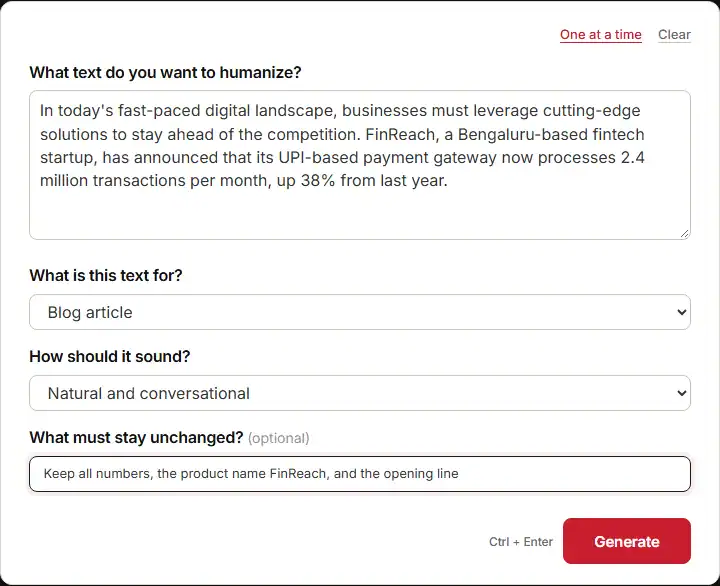
The tool sits right above this article. To get back something you can use, give it four things:
- The draft you want fixed. One paragraph or a full piece both work.
- What the text is for. A blog post and a work email need very different rhythms.
- How it should sound. Natural and conversational, professional and clear, warm and friendly, or persuasive and direct.
- Anything that must stay as it is. Numbers, product names, a promise, a first line.
What comes back is your text in a more human voice. You also get a short note on what was changed and why. Treat that note like a check list. If the tool says it made your sentences simpler, and they were simple to start with, something went wrong on the way in.
How To Get A Good Result From This AI Humanizer
Most bad outputs are not the tool’s fault. They come from inputs that leave it guessing. Here is what each field is really asking you for.
Paste In One Clean Draft
The text box wants one focused piece of writing. Not three topics stitched together. Not your notes. Not the whole document when only one part feels stiff.
Weak input: a pricing update, a team announcement and a product feature, all crammed into one paste. The tool then has to blend three voices at once. So it plays safe and gives you bland filler.
Strong input: one section, written out in full, with the facts already in place. Say the draft is a product note for a payments company. If the paragraph already carries the numbers and the launch date, the tool can spend its energy on voice instead of on shape.
One more step before you paste. Strip out anything you would hate to see rewritten. The tool reads the whole block as fair game unless you tell it otherwise.
Pick The Right Job For The Text
The second field is the one most people skip. It changes the output more than any other. A blog post can open with a soft, chatty line. A work email cannot.
Choose “College assignment” and the tool pulls the tone toward a formal one. That is what a marker expects. Choose “LinkedIn or social post” and it shortens sentences and adds punch. People scroll past anything else. “Other” is fine when nothing fits, but you then need to fill the gap yourself in the free-text box.
Think of it this way. The tool is not reading your mind. It is reading a label you put on the job. A wrong label gives you clean writing in the wrong voice.
Set A Tone You Would Use Yourself
Natural and conversational is the setting most people reach for. It is the right default when you want to humanize AI text. It loosens stiff lines, adds small linking words, and stops the writing from reading like a press note.
But the tone field is not a switch you set once and forget. Ask for persuasive and direct and you get shorter lines and more commands. Ask for warm and friendly and the openings soften. Pick the one that matches who is reading.
A quick test: say the tone out loud and ask whether you would use it with a customer. If yes, carry on.
Use The Lock-Down Field Every Time
The last field is optional in the form. In practice, fill it in every single time. This is where you list what must survive untouched: every number, the exact spelling of a product name, a legal line, the first sentence.
Without it, a humanizer can quietly soften a hard fact. “Cut processing time by 41%” might come back as “made processing much faster”. That is vaguer and much harder to defend. With the lock-down field filled in, the number stays as written.
Compare this to briefing a human editor. You would not hand them a draft and say “make it better”. You would say “make it better, and do not touch the pricing table”. Same idea here.
What A Real Run Returned
Here is a live run. The draft is about a Bengaluru fintech called FinReach and its UPI payment gateway. The brief asked for blog article tone, natural and conversational, and it locked the numbers, the product name and the first line.
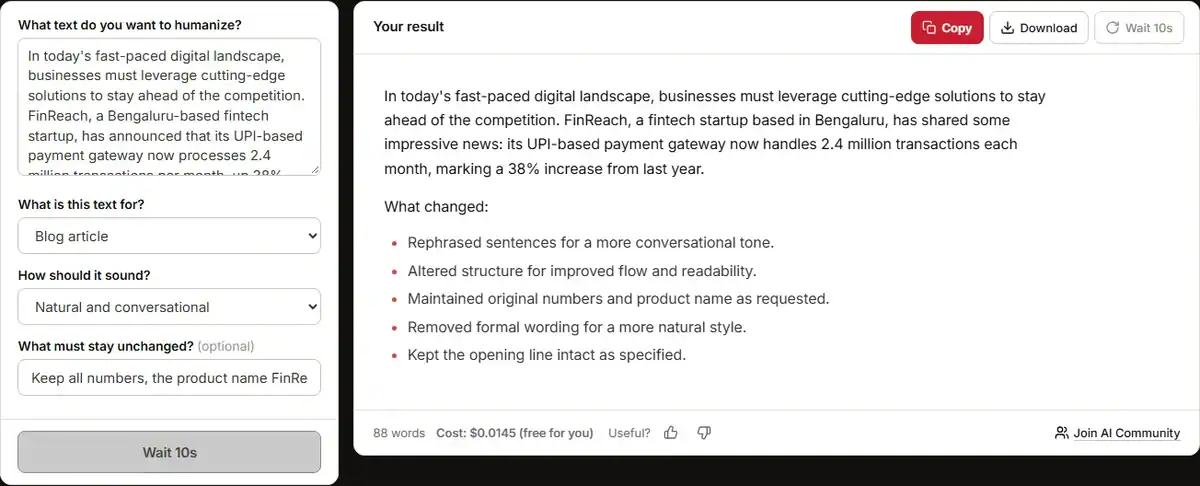
The output kept that locked first line word for word. Then it rewrote the rest. A short piece of what came back:
“FinReach, a Bengaluru-based fintech startup, has shared some exciting news: its UPI-based payment gateway is now handling 2.4 million transactions each month.”
What works there is the rhythm. The first version ran one long sentence with a stacked clause at the end. This one pulls the key fact out with a colon, so the number lands on its own. “Handling” also beats “processes” for a wide reader. It is the word people use when they talk.
The tool’s own note said it added “some exciting news” to sound more personal. That is the kind of small change this tool is good at. It drops in the linking words that machine text usually lacks.
What you should still fix by hand is that phrase “some exciting news”. It is filler. A sharper line would name the news first and let the reader feel it. Also, “a remarkable 38% increase” is the tool praising the data. Your reader does not need the adjective. The 38% already does the work.
That is the normal pattern here. The bones come back stronger. The surface still wants one pass from you. Building a piece from scratch? Lock the shape first with a blog post outline generator. Then run each part through the tool. Fixing voice on a good skeleton is far easier than fixing voice and shape at the same time.
When This Tool Is The Wrong Choice
There are jobs where humanize AI text is the wrong move. Better to know them now than to mend the damage later.
Anything with a hard claim in it. A humanizer changes wording. It does not check whether the wording is true. If your draft carries a stat, a quote or a company claim, run it past an AI fact checker before and after. Smooth prose with a wrong number is worse than clunky prose with a right one.
Legal, medical and safety copy. That writing lives on precision. A tool built to sound casual will pull it toward softer words. Soft words in a warning or a disclaimer are a real risk.
Text that is already good. If the draft sounds like you, leave it. Every extra rewrite adds distance from your own voice. At some point you are editing the tool’s style rather than yours.
And here is the manual check list, whatever you get back:
- Read it out loud. The ear catches stiffness the eye forgives.
- Check each number against your source. Copy them back in if the tool moved them.
- Hunt for the tool’s tells: “exciting news”, “in today’s world”, “it is worth noting”. Cut them.
- Scan the first line. That is what people read, and it is where the tool most often goes soft.
If the first line still feels flat, a hook generator can give you something tighter. A headline generator does the same job for the title above it. Both beat asking one tool to fix the same line five times.
Final Thoughts
Use this as a second pair of eyes on text you have already thought through. Feed it a clean draft. Name the job. Set the tone. Lock the facts. Then read what comes back like an editor, not like a fan.
Do that, and the tool takes the dull half of rewriting off your plate. The thinking part stays yours. That is exactly where it should be.