
Feedough / AI resources / Claude Code mods
Claude Code Mods & Plugins Library
7,350 Claude Code mods in one searchable list. Each card says what the mod does, where it shows up, what it can access and how to install it. Filter by category or access, sort by GitHub stars, and copy the install command.
Install a mod in three steps
- Update to Claude Code 2.1.287 or later.
- Open a mod below and copy its install command.
- Run it in a Claude Code session, then
/reload-plugins.
Browse 928 Claude Code mods
fm
kunchenguidShow a sailboat working animation and a conversation-only transcript in Claude Code

storybloq
StorybloqStore tickets, issues, handovers and lessons in a .story/ folder inside your repo
npm install -g @storybloq/storybloq@latest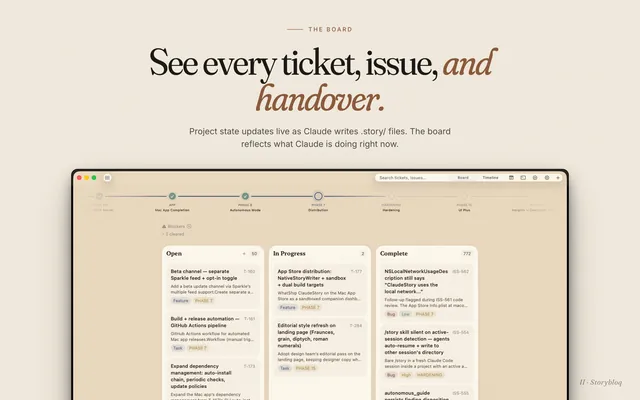
shared-session
Paradigm-StudyShare a Claude Code session with a link so teammates can join and prompt it live
claude plugin install shared-session@claude-share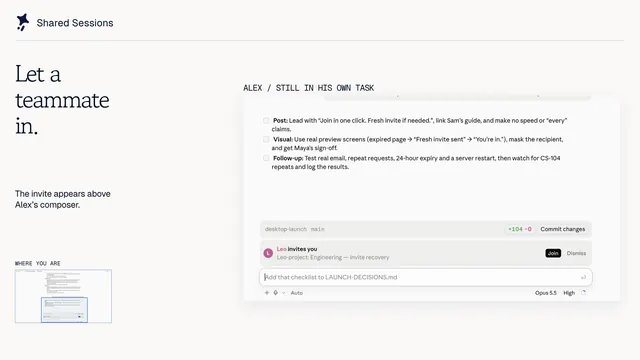
jev-auto-compact
notquePrunes stale tool calls at 60% context instead of generating compaction summaries
claude plugin install jev-auto-compact@jev-auto-compact -y
textless
HeyCubitReplace the chat's step-by-step output with one pixel-art card while Claude works
/plugin install textless --marketplace HeyCubit/effortless
lesson-cards
yonatangrossShows lesson hint cards under tool rows when tool calls match known patterns
show-your-work
iamumeransariShow Claude's screenshots, videos and before/after QA in the chat
/plugin install show-your-work@iamumeransari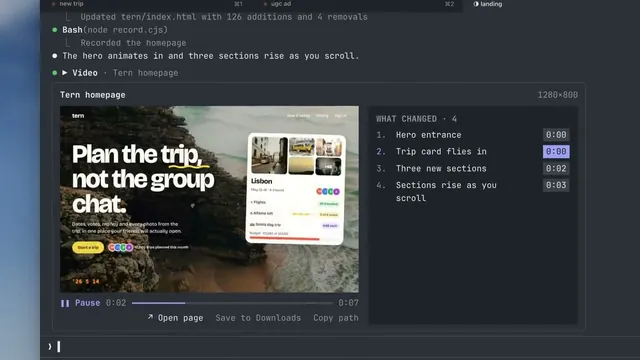
prismantis
NahumLitvinRenders Claude Code replies with themes, colored tables, code, charts and diagrams
/plugin install prismantis@prismantis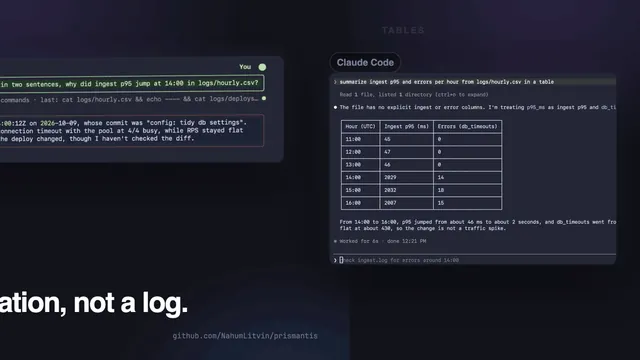
after
midudevQueue follow-up prompts with /after so they run after the current task
/plugin install after@better-claudemulti-core
greenpoloUse ChatGPT, Cursor, Zen, Antigravity and Grok models in one Claude Code session
vibeclaude
transkatgirlDrive a vibration device from Claude Code activity via Intiface Central
cd ~/.claude/vibeclaude && npm installcc-intelligent-ui
razorback16Renders Claude's answers as typeset Markdown, math, charts and diagrams in the terminal
/plugin install cc-intelligent-ui --marketplace razorback16/cc-intelligent-ui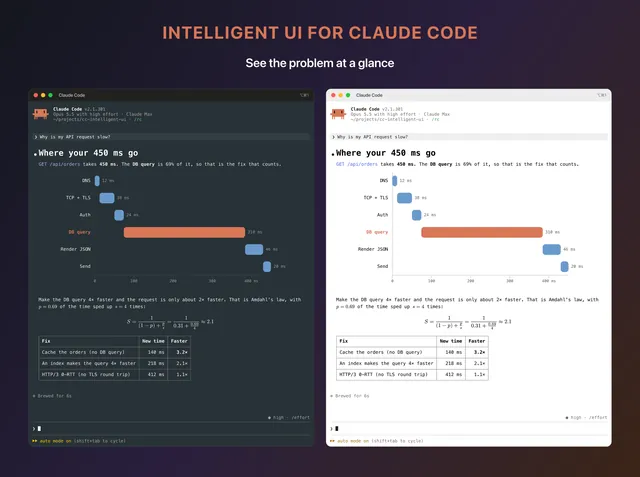
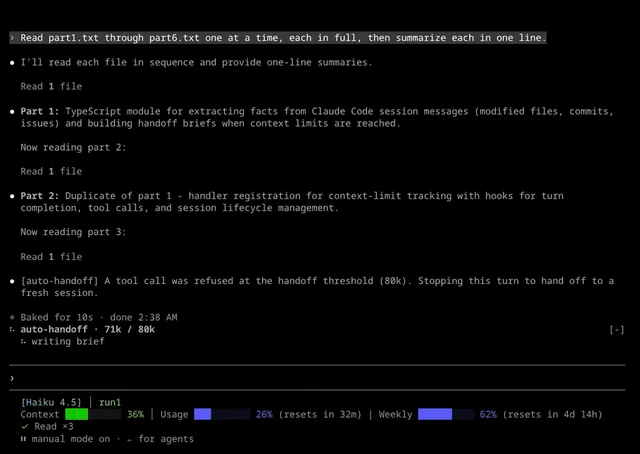
auto-handoff
alexknowshtmlHand a session off to a fresh one before the context fills up
inbox
petekpCollects questions, tasks, findings and PRs from a session into one organized list
/plugin install inbox --marketplace petekp/inboxagent-usage-guard
rbartoliHold subagent fan-out, heavy context and retry loops before they spend your usage window
/plugin install agent-usage-guard@agent-usage-guard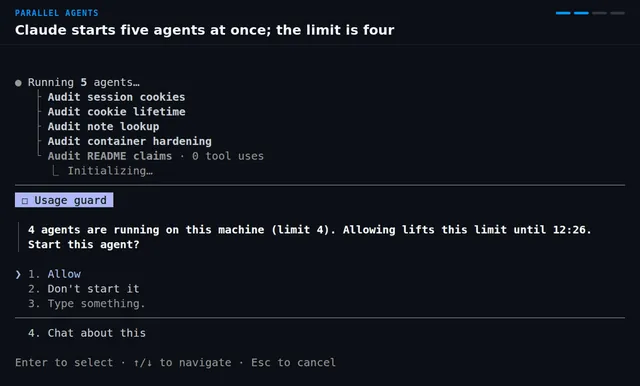
glamour-dark
TickloopRenders the model's text replies with Glamour's default dark style
claude plugin install glamour-dark@claude-modsase
rseAdds agent skills, hooks, and a task store for plan-driven work in Claude Code
/plugin install ase --marketplace rse/ase
paste-preview
alan890104See thumbnails of images you paste and mark them up before sending to Claude
/plugin install paste-preview --marketplace alan890104/claude-code-paste-previewoh-my-fable
Junhan2Load Anthropic's prompting-guide rules into every Claude Code session automatically
claude plugin install oh-my-fable@oh-my-fableproject-sentinel
Arjun0014Keep long Claude Code runs on track with a status bar, handoffs and guardrails
/plugin install project-sentinel --marketplace Arjun0014/project-sentinelprompt-rail
oikon48Jump back to any prompt in the session from a rail of clickable bars
claude plugin install prompt-rail@oikon48cs
hexDraws a rotate band above the prompt and forces rotation past a context limit
optim-jev
Oqura-aiCuts token use in long Claude Code sessions with compaction, routing, skill lists
claude plugin install optim-jev@optim-jev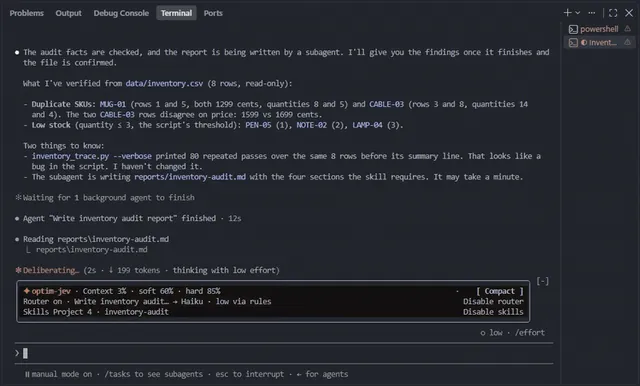
cc-image-view
GGGODLINShow pasted images as thumbnails above the prompt and under sent prompts
claude plugin install cc-image-view@cc-mod-image-view --scope userfable-pin
karanb192Pin every subagent to the fable model, ignoring what the spawn asks for
claude plugin install fable-pin@claude-code-modsglowup
NovusEdgeAdd a side pane for changes, subagents and context, plus themes and a pet
curl -fsSL https://glowup.khimani.dev/install.sh | sh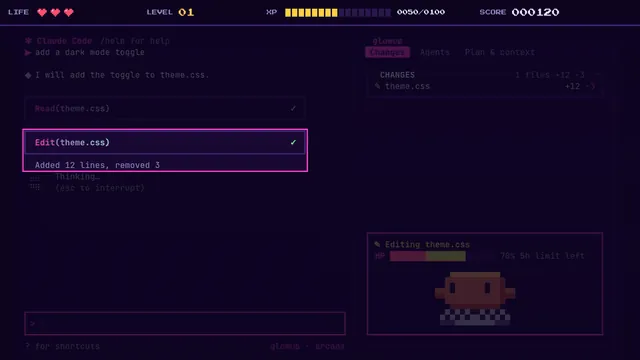
human-in-the-loop
tzafrirClaude assigns you tasks only you can do; they wait in a My tasks pane until you answer
/plugin install human-in-the-loop@human-in-the-loop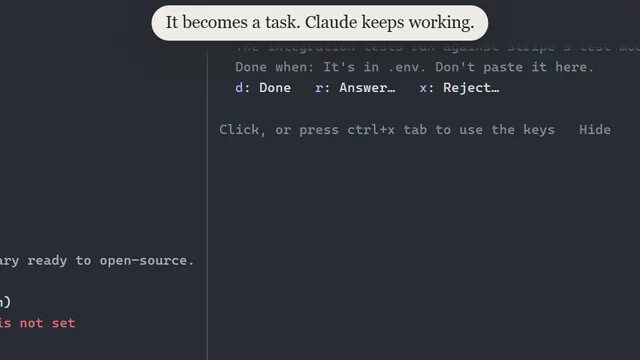
jev-permission-gate
madisonrickertAllow or deny routine tool calls in auto mode before the built-in classifier runs
claude plugin install jev-permission-gate@claude-skillseklavya
ProjectAJ14Quiz you on the code Claude writes and remember past sessions per project
/plugin install eklavya --marketplace ProjectAJ14/eklavya
phase-runner-hud
AyeJKToast when a Phase Runner run needs you, and run /phase-status with no model call
/plugin install phase-runner-hud --marketplace AyeJK/phase-runnerextra-mods
Jhonatan-de-SouzaAdds a Zen mode, themes, model and effort controls, and a status line to Claude Code
claude plugin install extra-mods@jdsjh-mods --scope user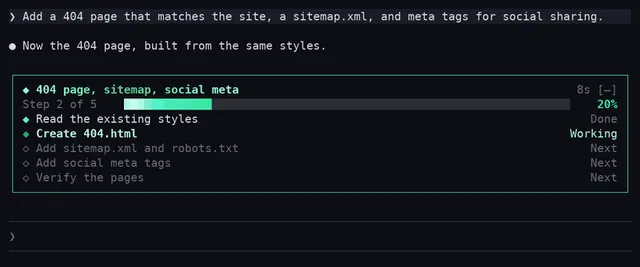
threads
promptadvisersStart and steer separate Claude Code sessions from one lead chat
/plugin install threads --marketplace promptadvisers/claude-mods-computer-use-threads
gfm-render
briangtnRender alerts, task lists, strikethrough and Mermaid diagrams inside Claude Code replies

usage-band
JetsonChanShow 5h and 7d limits, context window and cache hit rate above the prompt
/plugin install usage-band@cc-usage-bandidle-compact
takahiromCompact the conversation once after 50 idle minutes before the prompt cache expires
/plugin install idle-compact@takahirom-claude-code-marketplacecc-split-diff-view
neteye-platformDraw Edit and Write diffs as two side-by-side columns instead of one stacked list
claude plugin install cc-split-diff-view@neteye-platform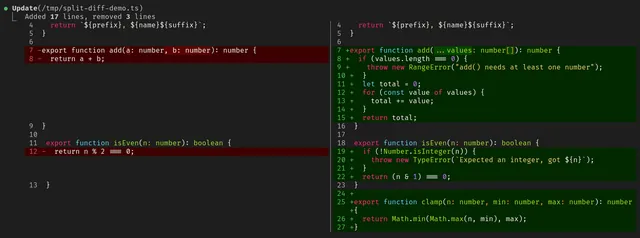
glass
rashedInt32Restyles the Claude Code transcript with cards, tool trees and palettes
/plugin install glass --marketplace rashedInt32/glass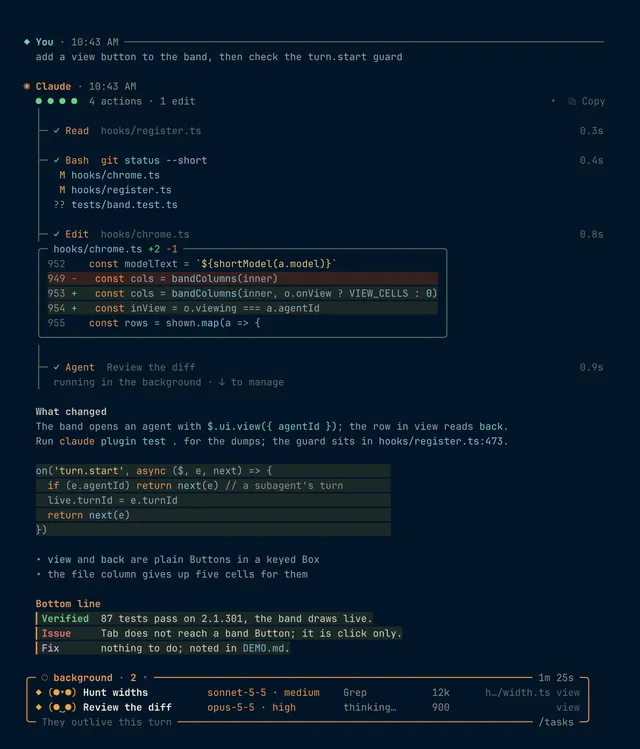
dispatch-relay
HangghostForwards a worker's result file and final reply to the dispatch station at turn end
/plugin install dispatch-relay --marketplace Hangghost/learning-hacker-claude-modfigures
natsukiumDraw diagrams, LaTeX math, and tool-result images inline in the terminal
claude plugin install figures@figures
flow-scenes
robdmacRuns animated ambient scenes above the prompt that speed up as Claude Code works
/plugin install flow-scenes@robdmacpinboard
sirkitreePin open decisions, the task list and links in a pane beside the chat
claude plugin install pinboard@pinboard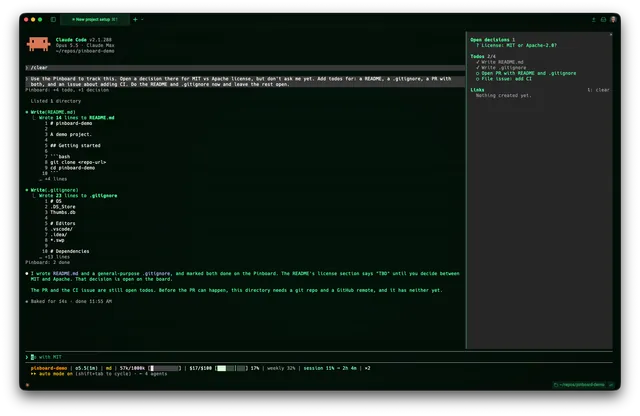
action-pin
KilimcininKorOgluName the commit SHA to pin a GitHub Actions step to after an edit
claude plugin install action-pin@kilimcininkoroglu-modsworkflow-conductor
bruwPlan, run and monitor multi-step agent workflows on a visual board in Claude Code
/plugin install workflow-conductor --marketplace bruw/workflow-conductor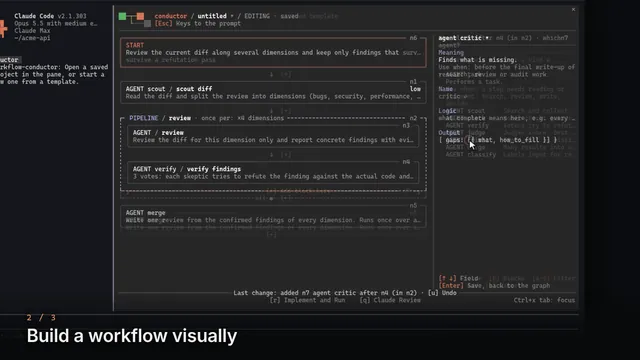
handoff-compact
trytofly94Replace Claude Code's compaction with a structured handoff from a forked session
/plugin install handoff-compact@handoff-compactbudget-guard
Arunjay4213Stop a Claude Code session before it runs past a cost or plan window limit you set
claude plugin install budget-guard@claude-mods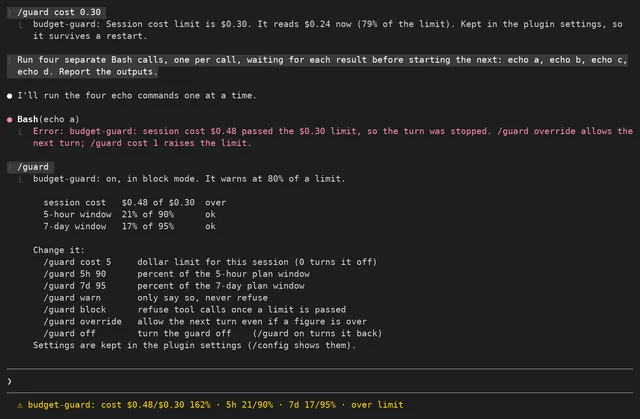
commonplace
noopzTurns any folder of notes into a knowledge vault Claude reads and maintains
fanyi
JrCx7scCTranslate your prompts to English and replies back into your language
claude plugin install fanyi@claude-code-fanyilimits-meter
ice-lfernandesShow plan limits, cache countdown and context use above the prompt
/plugin install limits-meter --marketplace ice-lfernandes/claude-code-mods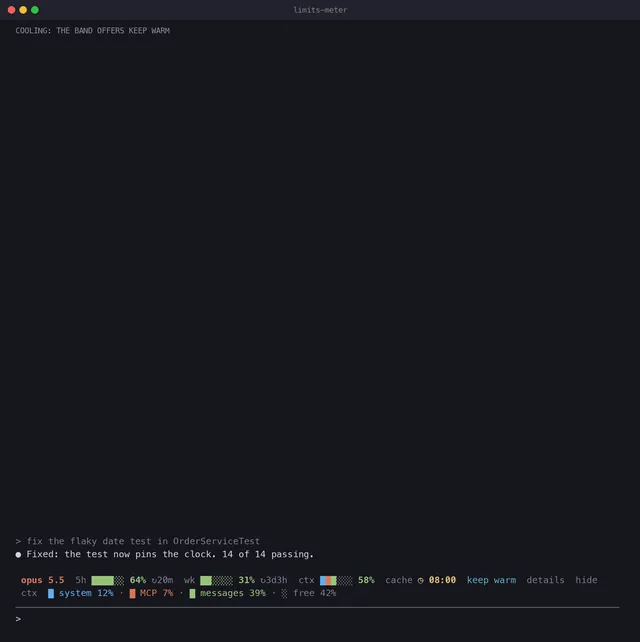
What Are Claude Code Mods?
A Claude Code mod is a plugin that runs JavaScript or TypeScript functions inside a Claude Code session. Those functions can draw interface parts and change behaviour, not only run commands. Mods are on by default and need Claude Code 2.1.287 or later.
Anthropic announced mods for customising behaviour and the interface in the terminal and in the desktop app, and ships built-in mods such as diff, sec-default and telemetry. Mods can add a band above the prompt with context fill, usage and session cost, open a browser or file tree in a side pane, render Mermaid diagrams and tables in replies, play a sound when a long turn ends, or hold risky shell commands until you confirm.
Mods vs Plugins vs Hooks vs Skills
Claude Code has three custom layers and they do different work.
- Mods are the newer layer. They run JavaScript or TypeScript functions inside the session and can draw interface parts, so they change what you see as well as what happens.
- Shell hooks are the older layer. They run a command at fixed events during a session. They act, but they cannot draw anything in the interface.
- Skills are instructions Claude reads from a
SKILL.mdfile. They guide how Claude works and do not change the interface at all.
Mods install as plugins, so each one appears in the /plugin list.
How to Install a Claude Code Mod
Install a mod from a GitHub marketplace in a Claude Code terminal session. Run /plugin install <mod-name> --marketplace <owner>/<repo>, then run /reload-plugins.
Many READMEs give a different pair instead: claude plugin marketplace add <owner>/<repo>, followed by claude plugin install <mod>@<marketplace>. To try a mod from a folder on your machine, start Claude Code with claude --plugin-dir ./path/to/plugin.
The install command on each card is copied from the mod’s own README, or taken from the scan when the README has no install section. To turn a mod off or remove it, open /plugin and pick it. All listed mods are open source on GitHub and free to install.
Are Claude Code Mods Safe?
Read the source before you install. Access levels on this site come from a static scan of the source, not from running the mod. The levels are Draws only (562 mods), Reads (1,970), Writes or runs (3,822), Network (775) and Not fully known (221).
A static scan is not a safety rating. Validation checks the source without running it and does not guarantee safe behaviour. Some spend tokens, for example cache warmers that re-send requests to keep the prompt cache warm. Some call other services. The source of every listed mod is public on GitHub, so you can check what it does and what it accesses before adding it to a session.
How This Library Picks and Describes Mods
The list comes from a public scan of GitHub repositories on 1 November 2026 that looked for every Claude Code mod it could find and ran claude plugin validate on each one. All 7,350 are listed, including mods that failed validation and mods in archived repositories, and those carry a note.
821 mods sit in repositories with at least 5 GitHub stars and passed validation. Those get a detailed card written from the mod’s own README: what it does, where it shows up in Claude Code, who it is for, and what to know before installing. Their categories are assigned by an AI judge model, and each card is checked against the README before it goes up. The remaining mods show the description and access data from the scan.
Popular Kinds of Claude Code Mods
The list breaks down like this:
- Status lines & HUDs (2317 mods) show a band above the prompt with context fill, 5-hour and weekly usage, session cost and other readouts.
- Side panes & tools (1425) open a browser, file tree or dashboard beside the conversation.
- Usage & cost meters (1288) track 5-hour and weekly usage and session cost, count down until the prompt cache goes cold, or keep the cache warm.
- Git & CI (977) handle git and CI work in the session.
- Subagents & orchestration (870) coordinate subagents and multi-step work.
- Safety guards (735) hold risky shell commands like
rm -rfor force push until you confirm. - Context, memory & handoff (621) covers context, memory and handoff between sessions.
Claude Code Mods FAQ
Quick answers about installing, removing and choosing Claude Code mods.
Which Claude Code version do mods need?
Mods need Claude Code 2.1.287 or later. With that version they are on by default, so no feature flag is needed. Older shell hooks still run commands at fixed events, but they cannot draw interface parts the way mods can.
Do mods work in the Claude Code desktop app?
Anthropic announced mods for both the terminal and the desktop app, but some mods draw only in the terminal or need a specific terminal. Each detailed card says where the mod shows up and lists limits like these under Know before you install.
How do I remove or turn off a mod?
Open /plugin in a Claude Code session and pick the mod you want to turn off or remove. Mods install as plugins, so they show up in that list. The install commands on this page only add mods.
Are Claude Code mods free?
Every mod listed here is open source on GitHub and free to install. Some connect to paid services or use extra tokens, for example cache warmers that re-send requests to keep the prompt cache warm. Check the card and the README for those costs first.
How often is this list updated?
The list is refreshed from new GitHub scans. The current list comes from the scan run on 1 November 2026, which found 7,350 Claude Code mods and ran validation on each one. The 7,350 figure and the cards all come from that scan.
Can I build my own mod?
Yes. Anthropic's getting-started guide for Claude Code mods covers building, testing and sharing one. Community skills such as mod-builder can also plan and build a mod with Claude. Publish it on GitHub as a plugin and it can be installed like any mod listed here.