
Feedough / AI resources / Claude Code mods
Claude Code Mods & Plugins Library
7,350 Claude Code mods in one searchable list. Each card says what the mod does, where it shows up, what it can access and how to install it. Filter by category or access, sort by GitHub stars, and copy the install command.
Install a mod in three steps
- Update to Claude Code 2.1.287 or later.
- Open a mod below and copy its install command.
- Run it in a Claude Code session, then
/reload-plugins.
Browse 928 Claude Code mods
aicq
ashfulcraShows AICQ agent collaborations and what needs you inside Claude Code
/plugin install aicq --marketplace ashfulcra/fulcra-toolscode-mode
gabe4codingRun MCP tools from one sandboxed JavaScript program instead of many calls
/plugin install code-mode@claude-code-mode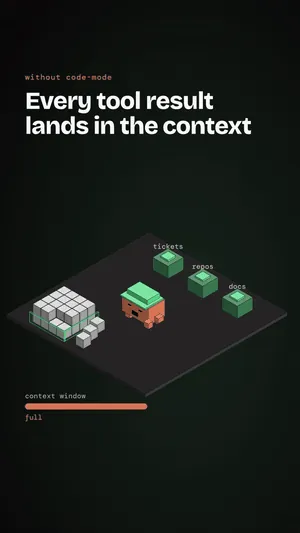
debrief
sxhmilyoyoDraw the latest Debrief block as a card above the prompt with Copy and Pin
/plugin install debrief@sundayhao-pluginsrich-terminal
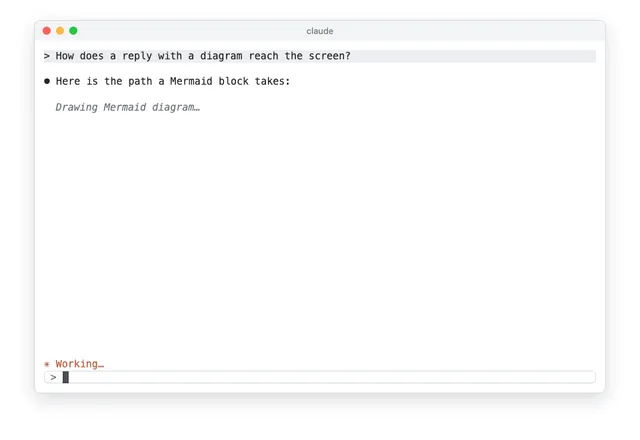
xiaolaiDraw Mermaid diagrams inside replies and add a truecolor status line under the prompt
autotel
jagreehalRecord OpenTelemetry traces of every Claude Code hook and tool call
npm install autotel-claude-codedecision-popup
SzotaszTurn every Claude Code decision into a one-key question inside a framed popup
claude plugin install decision-popup@claude-modsfast-compact
NodarDavituriCut old tool output to its start and end in about a second
claude plugin install fast-compact@fast-compact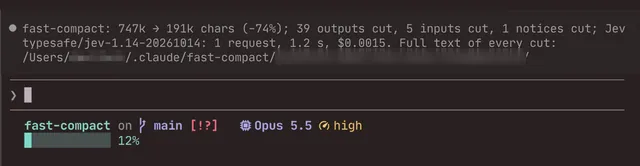
glanceflow
Antreas-StrbReplace tool rows with a plain-English checklist above the prompt showing progress and state
claude plugin install glanceflow@claude-mods
html-shelf
ronanworksOpen file paths in Claude's replies with one click and copy code as cards
claude plugin install html-shelf@claude-code-mods
whats-agent-doing
tzafrirShow what Claude Code is doing right now, in plain English, above the prompt
/plugin install whats-agent-doing@tzafrir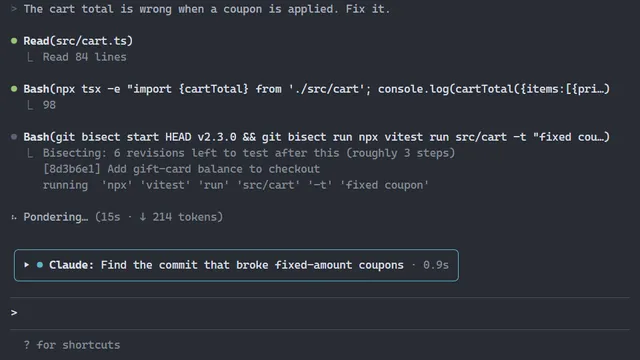
brand-theme
charlie947Dress Claude Code in your brand: spinner, tool rows, question dialog and a prompt band
/plugin install brand-theme --marketplace charlie947/mod-maker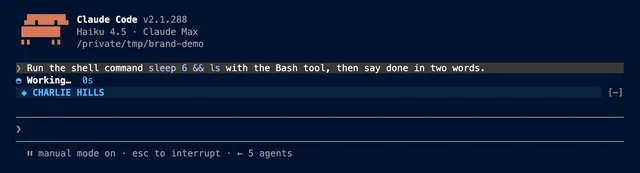
jev-guard
muratcakmakScore tool calls and answers against your rules and deny the ones that break them
export JEV_API_KEY=... # or TYPESAFE_API_KEYjev-search
mukiwuAnswer Claude Code's WebSearch with Jev ranked multi-engine results
claude plugin install jev-search@muki-ai-pluginslatex-math
atomashevicTypesets the LaTeX math in Claude's replies as images in the terminal
/plugin install latex-math
mdview
xuanji86Click a .md path to read it rendered beside the session and edit its blocks with Claude
/plugin install mdview@claude-mdviewmermaid-mod
ngothanhlucDraw Mermaid blocks in Claude's replies as Unicode diagrams, in place
/plugin install mermaid-mod@claude-mermaid-mod
orc
HigorAlvesRun the full SDLC loop in Claude Code with hook-enforced guardrails
curl -fsSL https://raw.githubusercontent.com/HigorAlves/orc/main/cli/install.sh | shultramod
mertkayacsGuard risky commands, mask secrets, and add a usage HUD and per-turn receipts
/plugin install ultramod --marketplace mertkayacs/ultramodanswer-buttons
mutlumehmetAdd Plain English, Shorter and Plain & short buttons under Claude's last answer
/plugin install answer-buttons@mehmetmutlu
aot-evals
Mahalanobis-SystemsBuild, run and judge evals for your own agent inside Claude Code
claude plugin install aot-evals@aot-evals
autodev-core
djnsty23Run an autonomous development workflow from brainstorm to ship inside Claude Code
/plugin install autodev-core@autodevgoblin-chrome
JasonWarrenUKDraw a goblin in the status band that reacts to the session and skills
claude plugin install goblin-chrome@goblin-modegriller
bengousHide Claude's recommended answers so you commit to yours before seeing them
/plugin install griller@bengous-plugins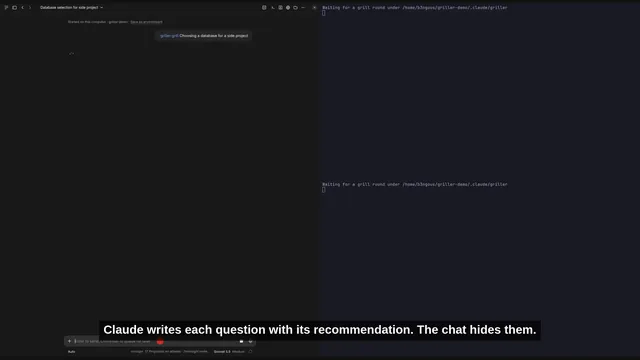
gsd-status-mod
helenkwokShow a live GSD project dashboard in Claude Code with roadmap, agents and cost
claude plugin install gsd-status-mod@helenkwok-mods
harness-scope
shimo4228Turn global skills, rules, agents and tools on or off per repo with named profiles
/plugin install harness-scope --marketplace shimo4228/harness-scopehide-diffs
gixxy22Swap long diffs for a one-line summary and fold shell commands to one line
/plugin install hide-diffs@gixxy22-pluginskeepwarm
declanbxKeep an idle session's prompt cache warm before the 1-hour cache TTL lapses
kgai-mod
kgaidevRecord kgai decisions during code edits and draw kgai tool calls as one line each
/plugin install kgai-mod --marketplace kgaidev/kgai
md-render
deepskyblue86Redraws assistant replies as styled markdown once the message finishes streaming
claude plugin install md-render@md-render-marketplace
ripple
nsodhi-cmuMap what your code change reaches and what it breaks
/plugin install ripple --marketplace nsodhi-cmu/claude-code-rippletime-blame
karanb192Split each turn's time into Claude, tools, you and other, then print a /blame receipt
claude plugin install time-blame@time-blame
token-monster
ugglrPixel-art monster in a side pane that eats tokens and shows context, limits and activity
/plugin install token-monster@token-monster
typesafe-mod
BeLazy167Route this-or-that questions and skill picks to TypeSafe's Jev model
claude plugin install typesafe-mod@typesafe-modcache-bell
hollerbellCompact the conversation at a size you set and keep the prompt cache warm
claude plugin install cache-bell@cache-bellcharts
hashd1veRender chart blocks in Claude's replies as inline terminal charts
/plugin install charts --marketplace hashd1ve/agent-charts
crayon
jonpojonpoColor assistant replies with themed Markdown and inline style tags the model writes
/plugin install crayon@cc-crayon
effort-cycle
AnercoStep each agent's effort level from the keyboard and see it in a footer meter
/plugin install effort-cycle@anerco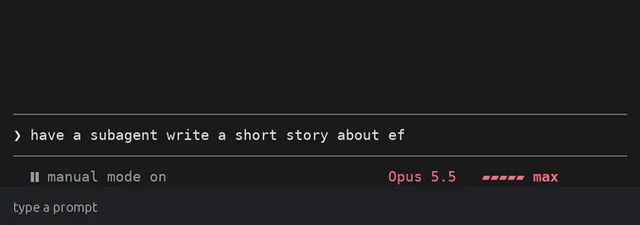
image-preview
JonasR-GitShow thumbnails of the pictures in your prompt above the input box
/plugin install image-preview@jonasr-plugins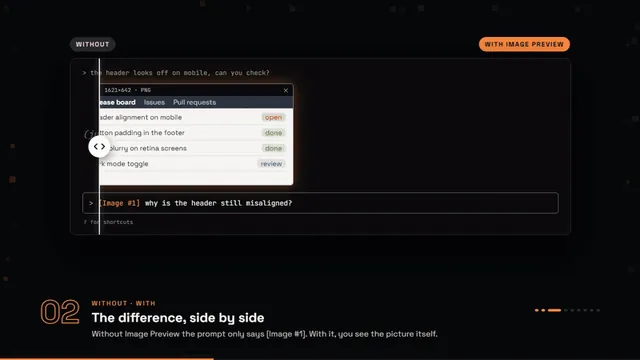
katharsis
OpenScribblerClassify each message by exchange type and shape the reply to fit it
/plugin install katharsis@openscribbler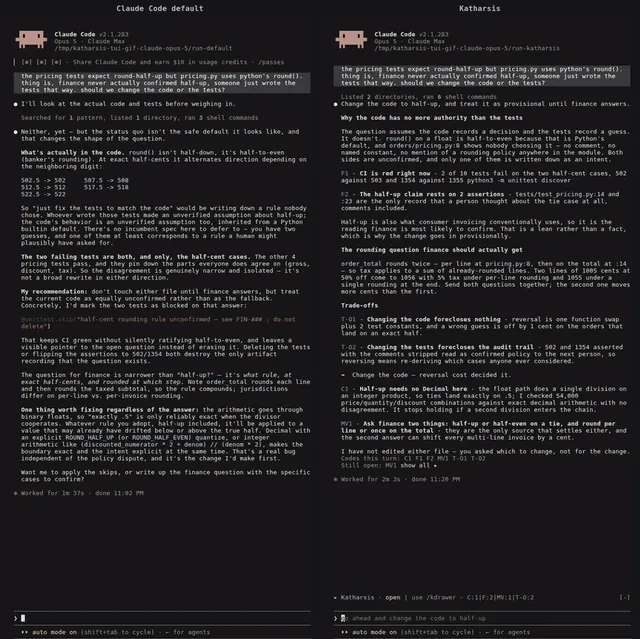
mermaid-draw
galElmalahDraw mermaid blocks from Claude's replies as coloured ASCII art in the transcript
claude plugin install mermaid-draw@gal-modsnibbl
nuromirzakHatch a pixel pet above the prompt that reacts to errors, tests and commits
/plugin install nibbl@nibblopm
harshadmadayeRuns a spec-driven, test-first workflow across subagents with a plan and verification
/plugin install opm --marketplace harshadmadaye/OPMpokemon
JinHang02Run a pixel Pokémon party above the prompt that reacts to your work and evolves
/plugin install pokemon@claude-code-pokemonstraw-boss
wayne930242Routes each task to the smallest sufficient loop of workers
/plugin install straw-boss@straw-bossassumption-tracker
YeonwooSungTrack assumption claims with evidence, confirmations, and refutations
claude plugin install assumption-tracker@my-claude-code-mods --scope usertool-lines
TickloopDraw each tool call as one compact line and hide its result block
claude plugin install tool-lines@claude-modscs-mermaid
hexDraws supported Mermaid flowcharts inline in Claude Code replies as coloured blocks and lines
readable-layout
GarvitNangruLay out the terminal transcript as labeled boxes, colored bold text, and a rule per turn
/plugin install readable-layout --marketplace GarvitNangru/claude-code-mods
What Are Claude Code Mods?
A Claude Code mod is a plugin that runs JavaScript or TypeScript functions inside a Claude Code session. Those functions can draw interface parts and change behaviour, not only run commands. Mods are on by default and need Claude Code 2.1.287 or later.
Anthropic announced mods for customising behaviour and the interface in the terminal and in the desktop app, and ships built-in mods such as diff, sec-default and telemetry. Mods can add a band above the prompt with context fill, usage and session cost, open a browser or file tree in a side pane, render Mermaid diagrams and tables in replies, play a sound when a long turn ends, or hold risky shell commands until you confirm.
Mods vs Plugins vs Hooks vs Skills
Claude Code has three custom layers and they do different work.
- Mods are the newer layer. They run JavaScript or TypeScript functions inside the session and can draw interface parts, so they change what you see as well as what happens.
- Shell hooks are the older layer. They run a command at fixed events during a session. They act, but they cannot draw anything in the interface.
- Skills are instructions Claude reads from a
SKILL.mdfile. They guide how Claude works and do not change the interface at all.
Mods install as plugins, so each one appears in the /plugin list.
How to Install a Claude Code Mod
Install a mod from a GitHub marketplace in a Claude Code terminal session. Run /plugin install <mod-name> --marketplace <owner>/<repo>, then run /reload-plugins.
Many READMEs give a different pair instead: claude plugin marketplace add <owner>/<repo>, followed by claude plugin install <mod>@<marketplace>. To try a mod from a folder on your machine, start Claude Code with claude --plugin-dir ./path/to/plugin.
The install command on each card is copied from the mod’s own README, or taken from the scan when the README has no install section. To turn a mod off or remove it, open /plugin and pick it. All listed mods are open source on GitHub and free to install.
Are Claude Code Mods Safe?
Read the source before you install. Access levels on this site come from a static scan of the source, not from running the mod. The levels are Draws only (562 mods), Reads (1,970), Writes or runs (3,822), Network (775) and Not fully known (221).
A static scan is not a safety rating. Validation checks the source without running it and does not guarantee safe behaviour. Some spend tokens, for example cache warmers that re-send requests to keep the prompt cache warm. Some call other services. The source of every listed mod is public on GitHub, so you can check what it does and what it accesses before adding it to a session.
How This Library Picks and Describes Mods
The list comes from a public scan of GitHub repositories on 1 November 2026 that looked for every Claude Code mod it could find and ran claude plugin validate on each one. All 7,350 are listed, including mods that failed validation and mods in archived repositories, and those carry a note.
821 mods sit in repositories with at least 5 GitHub stars and passed validation. Those get a detailed card written from the mod’s own README: what it does, where it shows up in Claude Code, who it is for, and what to know before installing. Their categories are assigned by an AI judge model, and each card is checked against the README before it goes up. The remaining mods show the description and access data from the scan.
Popular Kinds of Claude Code Mods
The list breaks down like this:
- Status lines & HUDs (2317 mods) show a band above the prompt with context fill, 5-hour and weekly usage, session cost and other readouts.
- Side panes & tools (1425) open a browser, file tree or dashboard beside the conversation.
- Usage & cost meters (1288) track 5-hour and weekly usage and session cost, count down until the prompt cache goes cold, or keep the cache warm.
- Git & CI (977) handle git and CI work in the session.
- Subagents & orchestration (870) coordinate subagents and multi-step work.
- Safety guards (735) hold risky shell commands like
rm -rfor force push until you confirm. - Context, memory & handoff (621) covers context, memory and handoff between sessions.
Claude Code Mods FAQ
Quick answers about installing, removing and choosing Claude Code mods.
Which Claude Code version do mods need?
Mods need Claude Code 2.1.287 or later. With that version they are on by default, so no feature flag is needed. Older shell hooks still run commands at fixed events, but they cannot draw interface parts the way mods can.
Do mods work in the Claude Code desktop app?
Anthropic announced mods for both the terminal and the desktop app, but some mods draw only in the terminal or need a specific terminal. Each detailed card says where the mod shows up and lists limits like these under Know before you install.
How do I remove or turn off a mod?
Open /plugin in a Claude Code session and pick the mod you want to turn off or remove. Mods install as plugins, so they show up in that list. The install commands on this page only add mods.
Are Claude Code mods free?
Every mod listed here is open source on GitHub and free to install. Some connect to paid services or use extra tokens, for example cache warmers that re-send requests to keep the prompt cache warm. Check the card and the README for those costs first.
How often is this list updated?
The list is refreshed from new GitHub scans. The current list comes from the scan run on 1 November 2026, which found 7,350 Claude Code mods and ran validation on each one. The 7,350 figure and the cards all come from that scan.
Can I build my own mod?
Yes. Anthropic's getting-started guide for Claude Code mods covers building, testing and sharing one. Community skills such as mod-builder can also plan and build a mod with Claude. Publish it on GitHub as a plugin and it can be installed like any mod listed here.