
Feedough / AI resources / Claude Code mods
Claude Code Mods & Plugins Library
7,350 Claude Code mods in one searchable list. Each card says what the mod does, where it shows up, what it can access and how to install it. Filter by category or access, sort by GitHub stars, and copy the install command.
Install a mod in three steps
- Update to Claude Code 2.1.287 or later.
- Open a mod below and copy its install command.
- Run it in a Claude Code session, then
/reload-plugins.
Browse 928 Claude Code mods
fleet-delivery
wrg32786Delivers a seat's Room inbox and job results into the session as queued prompts
/plugin install fleet-delivery@aigent-osask-autopick
KilimcininKorOgluPicks the recommended option of a question left unanswered so the session keeps going
claude plugin install ask-autopick@kilimcininkoroglu-modsfile-view
ushironokoOpen a file's contents in a pane beside the transcript
pro-hud
VedantAndhaleShow live usage gauges for your 5-hour session, week and context above the prompt
/plugin install pro-hud@claude-pro-kit
plain-view
ice-lfernandesQuiet the transcript and show the agent's plan as a card above the prompt
/plugin install plain-view --marketplace ice-lfernandes/claude-code-mods
focus-mode
SzotaszHide tool calls and prompts, show only subtasks with progress bars and the final answer
claude plugin install focus-mode@claude-modsimage-peek
arasovicShows pasted images as thumbnails above the prompt and larger in the chat
claude plugin install image-peek@claude-code-mods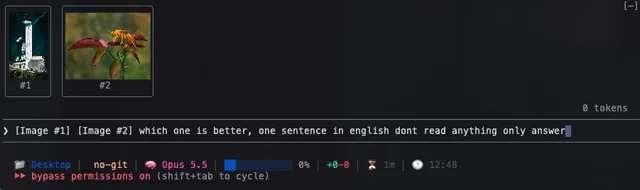
usage-hud
ronanworksDraw a pixel crab and a usage panel around the Claude Code prompt
claude plugin install usage-hud@claude-code-mods
fork-tab
zhebilFork the running Claude Code session into a new terminal tab
/plugin install fork-tab --marketplace zhebil/claude-code-pluginspdpa-thai
Boom-VittRedact Thai and international personal data before it is sent to Claude
claude plugin install pdpa-thai@boombignose-modshunch
saadshahdTry experimental skills and plugin features before they graduate or die
/plugin install hunch --marketplace saadshahd/moo.mdagent-monitor
GarvitNangruShow a progress bar above the prompt and a panel of plan and subagent stats
/plugin install agent-monitor --marketplace GarvitNangru/claude-code-modscoral-skin
promptadvisersReskin Claude Code message and tool rows in coral, ink and cream
/plugin install coral-skin --marketplace promptadvisers/claude-mods-starter-kitface
nekyialabsShow a kaomoji face and a short status line above the prompt
desk-look
KyongSik-YoonRedraw the Claude Code transcript to look like the Claude desktop app's Code tab
/plugin install desk-look --marketplace KyongSik-Yoon/cc-desktop-modreply-view
zhebilDraw Mermaid diagrams as Unicode box art and open file paths in Zed on Ctrl-click
/plugin install reply-view --marketplace zhebil/claude-code-pluginscontext-alarm
mutlumehmetWarn when the context window fills and suggest /save-context before compaction
/plugin install context-alarm@mehmetmutlu
pinpoint
bengousPoint at your running app and send clicks and drag zones to Claude as a prompt
/plugin install pinpoint@bengous-pluginsdelegate
wdsewdser-bitHand tasks to cheaper models through a local proxy from Claude Code
/plugin install delegate --marketplace wdsewdser-bit/claude-code-modscommand-shelf
YeonwooSungStore successful Bash commands and replay them on demand with /shelf
claude plugin install command-shelf@my-claude-code-mods --scope usercache-clock
hamzaferShow prompt-cache time left, hit rate and misses below your status line
/plugin install cache-clock --marketplace hamzafer/claude-code-modsrecording-mode
nateherkaiKeep keys, names, and figures off screen while you record Claude Code
claude plugin install recording-mode@nateherk-modsdisplay-redaction
melodic-softwareMask emails and secret-shaped text on screen for recordings and screen shares
/plugin install display-redaction@melodic-softwarematrix
ucsandmanFreezes a tool call before it runs and asks you to continue or deny it
mission-control
charlie947Show your plan, current step and ticked-off asks in a panel above the prompt
/plugin install mission-control --marketplace charlie947/mod-makerruflo-business-pods
ruvnetBlock secret-bearing pod templates with a tighten-only tool guard
/plugin install ruflo-business-pods --marketplace ruvnet/ruflosecrets-veil
yonatangrossMask secret values in tool results before Claude Code reads them
quick-peek
midudevPreview file paths in Claude's replies on hover, open them in the file manager on click
/plugin install quick-peek@better-claudelemo-ask
lemomo-aiAdd a message number and question count header to the question dialog
/plugin install lemo-ask --marketplace lemomo-ai/lemo-modharness-ops
melodic-softwareAudit and run Claude Code itself with eighteen operational skills
/plugin install harness-ops --marketplace melodic-software/claude-code-pluginsimage
nekyialabsGenerate and edit images from the agent through a pluggable engine
launchpad
ice-lfernandesShow a menu of one-click buttons that run your commands, skills and agents
/plugin install launchpad --marketplace ice-lfernandes/claude-code-modsruflo-ddd
ruvnetScaffold Domain-Driven Design contexts, aggregates and events in your codebase
/plugin install ruflo-ddd --marketplace ruvnet/ruflodecision-ledger
YeonwooSungRecord explicit design decisions with rationale, rejected alternatives and file refs
claude plugin install decision-ledger@my-claude-code-mods --scope userprompt-bouncer
ray-amjadDrops vague prompts before Claude sees them and suggests the project's own term
claude plugin install prompt-bouncer@claude-code-mods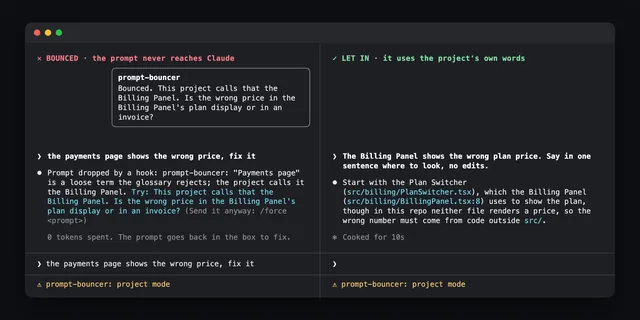
cache-warm
KilimcininKorOgluKeeps Claude Code's prompt cache warm and shows what a cold cache costs
/plugin install cache-warm --marketplace KilimcininKorOglu/claude-code-modsprismantis
ahmadhammoud56Color Claude Code replies: tables, code, mermaid diagrams, charts and math
/plugin install prismantis@prismantisread-dedup
wdsewdser-bitCuts duplicate file reads to a one-line notice or just a diff
/plugin install read-dedup --marketplace wdsewdser-bit/claude-code-modsruflo-deepseek-harness
ruvnetBlocks Bash commands that pass secrets into the DeepSeek chat and reason scripts
/plugin install ruflo-deepseek-harness --marketplace ruvnet/ruflocommit-cadence
KilimcininKorOgluNames uncommitted files each turn and nudges the model to commit work as it lands
claude plugin install commit-cadence@kilimcininkoroglu-modsrelay-bar
hoobnnShow what dispatched relay agents are doing in a band above the prompt
claude plugin install relay-bar@hoobnn-agent-modstranscript-redactor
ray-amjadSwap secrets and emails for placeholders before they reach the session transcript
claude plugin install transcript-redactor@claude-code-mods
run-command
bendruckerPick a reply's `!` command suggestion by click or digit to fill it into the shell prompt
/plugin install run-command --marketplace bendrucker/claudeconfig-parse
KilimcininKorOgluFlag JSON, YAML, TOML and .env parse errors right after an edit
claude plugin install config-parse@kilimcininkoroglu-modsusage-band
SzotaszShow the model, context window and 5-hour and weekly limits in the status line
claude plugin install usage-band@claude-modssecret-redactor
escapeboyHide tokens, keys and passwords in tool output and restore them when needed
/plugin install secret-redactor --marketplace escapeboy/claude-code-kitlemo-lot
lemomo-aiAdds a draw_lot tool so Claude draws lots and shows them as fortune cards
/plugin install lemo-lot --marketplace lemomo-ai/lemo-modcontext-restore
KilimcininKorOgluSends the model the current text when a skill, command or rules file changed on disk
claude plugin install context-restore@kilimcininkoroglu-modsWhat Are Claude Code Mods?
A Claude Code mod is a plugin that runs JavaScript or TypeScript functions inside a Claude Code session. Those functions can draw interface parts and change behaviour, not only run commands. Mods are on by default and need Claude Code 2.1.287 or later.
Anthropic announced mods for customising behaviour and the interface in the terminal and in the desktop app, and ships built-in mods such as diff, sec-default and telemetry. Mods can add a band above the prompt with context fill, usage and session cost, open a browser or file tree in a side pane, render Mermaid diagrams and tables in replies, play a sound when a long turn ends, or hold risky shell commands until you confirm.
Mods vs Plugins vs Hooks vs Skills
Claude Code has three custom layers and they do different work.
- Mods are the newer layer. They run JavaScript or TypeScript functions inside the session and can draw interface parts, so they change what you see as well as what happens.
- Shell hooks are the older layer. They run a command at fixed events during a session. They act, but they cannot draw anything in the interface.
- Skills are instructions Claude reads from a
SKILL.mdfile. They guide how Claude works and do not change the interface at all.
Mods install as plugins, so each one appears in the /plugin list.
How to Install a Claude Code Mod
Install a mod from a GitHub marketplace in a Claude Code terminal session. Run /plugin install <mod-name> --marketplace <owner>/<repo>, then run /reload-plugins.
Many READMEs give a different pair instead: claude plugin marketplace add <owner>/<repo>, followed by claude plugin install <mod>@<marketplace>. To try a mod from a folder on your machine, start Claude Code with claude --plugin-dir ./path/to/plugin.
The install command on each card is copied from the mod’s own README, or taken from the scan when the README has no install section. To turn a mod off or remove it, open /plugin and pick it. All listed mods are open source on GitHub and free to install.
Are Claude Code Mods Safe?
Read the source before you install. Access levels on this site come from a static scan of the source, not from running the mod. The levels are Draws only (562 mods), Reads (1,970), Writes or runs (3,822), Network (775) and Not fully known (221).
A static scan is not a safety rating. Validation checks the source without running it and does not guarantee safe behaviour. Some spend tokens, for example cache warmers that re-send requests to keep the prompt cache warm. Some call other services. The source of every listed mod is public on GitHub, so you can check what it does and what it accesses before adding it to a session.
How This Library Picks and Describes Mods
The list comes from a public scan of GitHub repositories on 1 November 2026 that looked for every Claude Code mod it could find and ran claude plugin validate on each one. All 7,350 are listed, including mods that failed validation and mods in archived repositories, and those carry a note.
821 mods sit in repositories with at least 5 GitHub stars and passed validation. Those get a detailed card written from the mod’s own README: what it does, where it shows up in Claude Code, who it is for, and what to know before installing. Their categories are assigned by an AI judge model, and each card is checked against the README before it goes up. The remaining mods show the description and access data from the scan.
Popular Kinds of Claude Code Mods
The list breaks down like this:
- Status lines & HUDs (2317 mods) show a band above the prompt with context fill, 5-hour and weekly usage, session cost and other readouts.
- Side panes & tools (1425) open a browser, file tree or dashboard beside the conversation.
- Usage & cost meters (1288) track 5-hour and weekly usage and session cost, count down until the prompt cache goes cold, or keep the cache warm.
- Git & CI (977) handle git and CI work in the session.
- Subagents & orchestration (870) coordinate subagents and multi-step work.
- Safety guards (735) hold risky shell commands like
rm -rfor force push until you confirm. - Context, memory & handoff (621) covers context, memory and handoff between sessions.
Claude Code Mods FAQ
Quick answers about installing, removing and choosing Claude Code mods.
Which Claude Code version do mods need?
Mods need Claude Code 2.1.287 or later. With that version they are on by default, so no feature flag is needed. Older shell hooks still run commands at fixed events, but they cannot draw interface parts the way mods can.
Do mods work in the Claude Code desktop app?
Anthropic announced mods for both the terminal and the desktop app, but some mods draw only in the terminal or need a specific terminal. Each detailed card says where the mod shows up and lists limits like these under Know before you install.
How do I remove or turn off a mod?
Open /plugin in a Claude Code session and pick the mod you want to turn off or remove. Mods install as plugins, so they show up in that list. The install commands on this page only add mods.
Are Claude Code mods free?
Every mod listed here is open source on GitHub and free to install. Some connect to paid services or use extra tokens, for example cache warmers that re-send requests to keep the prompt cache warm. Check the card and the README for those costs first.
How often is this list updated?
The list is refreshed from new GitHub scans. The current list comes from the scan run on 1 November 2026, which found 7,350 Claude Code mods and ran validation on each one. The 7,350 figure and the cards all come from that scan.
Can I build my own mod?
Yes. Anthropic's getting-started guide for Claude Code mods covers building, testing and sharing one. Community skills such as mod-builder can also plan and build a mod with Claude. Publish it on GitHub as a plugin and it can be installed like any mod listed here.