Most businesses handle maintenance the same way: wait for something to break, then fix it. This reactive approach seems easier until you calculate the real costs: emergency repairs, production delays, and frustrated customers.
Preventive maintenance changes this. You maintain equipment on schedule, catching small issues before they become big problems. The result? Lower costs, less downtime, and equipment that lasts longer.
In this guide, you’ll discover what preventive maintenance actually involves, the business benefits it delivers, and practical steps to get started.
What Is Preventive Maintenance?
Preventive maintenance is simple: you fix things before they break.
Instead of waiting for equipment to fail, you maintain it on a schedule. Regular inspections, cleaning, lubrication, and parts replacement happen at planned intervals.
The core principle is scheduled intervention. You create a maintenance calendar based on time (weekly, monthly, yearly) or usage (every 1,000 cycles, every 500 hours). When that milestone hits, maintenance happens whether the equipment seems fine or not.
What makes it work? Consistency. You’re not guessing when to maintain equipment. You’re following a plan that keeps assets running smoothly.
Preventive Maintenance vs Reactive Maintenance
Reactive maintenance, sometimes called breakdown maintenance, works on a simple rule: if it’s not broken, don’t fix it. You wait for equipment to fail, then run to repair it.
This approach might seem cheaper upfront. No maintenance staff is scheduling regular checks. No replacement parts sitting in inventory. But when that machine breaks suddenly during your busiest production run, the real costs hit hard.
Emergency repairs cost more than planned ones. Technicians charge premium rates for urgent calls. Overnight shipping for parts adds up. Plus, your entire operation stops while you wait.
Preventive maintenance flips this around. You maintain equipment during scheduled downtime. Parts are ordered in advance at regular prices. Your team plans the work when it’s convenient, not when it’s critical.
Why Preventive Maintenance Matters in Business Operations?
Emergency repairs cost three times more than scheduled maintenance. But many businesses still operate reactively. Understanding the importance of preventive maintenance can shift your approach from constantly fighting struggles to preventing them altogether.
1. Cost Savings and ROI
Smart factories switching to preventive maintenance save up to 40% compared to reactive approaches. That’s not a small difference when you’re running tight margins.
In the HVAC sector alone, preventive maintenance delivers 545% ROI. That’s money back in your pocket, not handed over to emergency repair crews at midnight rates.
2. Reduced Downtime
Unplanned downtime is productivity poison. Preventive maintenance reduces unplanned downtime by 35-45%. What that means for you: production lines keep running, deliveries go out on time, and customers stay happy.
There’s a reason 42% of manufacturers prioritise downtime reduction as their main motivation for adopting preventive maintenance. When machines stop, money stops flowing. It’s that simple.
3. Extended Equipment Lifespan
Equipment doesn’t die overnight. It deteriorates slowly until one day it quits entirely. Regular maintenance catches that deterioration early. You replace a bearing before it destroys the motor. You clean filters before they choke the system. Small fixes now prevent major replacements later.
This isn’t just about avoiding catastrophic failures. It’s about getting every possible productive year out of your capital investments.
4. Safety and Compliance
Non-compliance risks drop by 66% through timely preventive maintenance. That matters when regulators show up or when workplace accidents can shut you down entirely.
Malfunctioning equipment puts people at risk. Regular inspections catch frayed wiring, leaking hydraulics, and worn safety guards before they hurt someone. Plus, documented maintenance keeps you compliant with OSHA and industry regulations.
5. Quality Consistency
Equipment that’s running optimally produces consistent results. A printing press with properly calibrated rollers doesn’t randomly smudge pages. A CNC machine with maintained bearings doesn’t drift off tolerance halfway through production.
Your customers don’t care why quality slipped. They just know it did. Preventive maintenance keeps your output consistent, which keeps your reputation intact.
Key Components of a Preventive Maintenance Program
Setting up a preventive maintenance program isn’t about buying fancy software and calling it a day. You need specific building blocks to make it actually work.
Here’s what every solid PM program needs:
1. Equipment inventory and assessment: List every piece of equipment that needs maintenance. That HVAC unit, the forklift in the warehouse, and even that coffee maker in the break room are critical to operations. Rate each one by how important it is and what happens if it breaks.
2. Maintenance scheduling: Decide when to service each item. Some equipment needs attention every month. Others need it after 1,000 hours of use, while some require checks when sensors show wear. Pick what makes sense for each asset.
3. Standard operating procedures: Write down exactly what needs to be done during each maintenance task. Checklists work best. “Check oil level, inspect belts, test safety switches” beats “general inspection” every time.
4. Documentation system: Keep records of what you did and when. A maintenance log shows patterns. If that pump fails every six months despite maintenance, you’ll spot it. Plus, warranty claims need proof that you kept up your end.
5. Clear responsibilities: Someone needs to own this. Assign who does what. Who performs the maintenance? Who schedules it? Who orders parts? Confusion here means tasks slip through the cracks.
6. Performance tracking: Measure how well your program works. Track equipment uptime, maintenance costs, and how often emergency repairs happen. These numbers tell you if your program needs tweaking.
Types of Preventive Maintenance Activities
Preventive maintenance isn’t one thing. It’s a mix of different activities that keep equipment healthy.
Routine inspections: Walk around and look. Check for leaks, unusual noises, loose parts, or anything that seems off. Think of it like a doctor’s checkup before symptoms appear.
Cleaning and lubrication: Dirt and friction kill machines. Regular cleaning prevents buildup that causes overheating. Oil and grease keep moving parts from grinding themselves down.
Scheduled parts replacement: Some parts wear out on a predictable timeline. Filters, belts, and brake pads all have expected lifespans. Replace them before they fail, not after.
Calibration and adjustments: Equipment drifts out of spec over time. Sensors read slightly wrong. Machines run a bit too fast or slow. Regular calibration keeps everything accurate.
Testing and monitoring: Run diagnostics. Check safety systems. Test backup generators. Verify that protective equipment actually protects. This kind of testing catches problems that don’t show up in visual inspections.
Software updates: Modern equipment runs on code. That CNC machine or building automation system needs updates just like your phone. Patches fix bugs and security holes that could cause failures.
Industries That Benefit Most from Preventive Maintenance
Every business can gain from preventive maintenance. But some industries rely on it more than others. Equipment failures in these sectors don’t just cost money. They can shut down operations, compromise safety, or even put lives at risk.
1. Manufacturing and Production
Production lines depend on dozens of machines working in sync. When one assembly line robot breaks down, the entire operation stops. Preventive maintenance keeps CNC machines, conveyor systems, and hydraulic presses running smoothly. It prevents the domino effect, where one failed component halts your whole production schedule.
2. Healthcare Facilities
Hospitals can’t afford equipment failures. MRI machines, ventilators, and sterilisation equipment must work when patients need them. Regular maintenance on these critical systems isn’t optional. It’s about patient safety and meeting strict regulatory standards.
3. Transportation and Fleet Operations
A broken delivery truck means missed deadlines and angry customers. Fleet managers use preventive maintenance to check brake systems, tire wear, and engine performance before vehicles hit the road. This approach keeps drivers safe and ensures on-time deliveries.
4. Hospitality and Facilities Management
Hotels and office buildings juggle HVAC systems, elevators, plumbing, and electrical systems across massive properties. A broken air conditioner in summer or a stuck elevator during business hours creates immediate problems. Scheduled maintenance catches these issues before guests or tenants even notice.
5. Food Service and Processing
Refrigeration units, ovens, and processing equipment control food safety. A failing freezer can spoil thousands of dollars in inventory overnight. Preventive checks on temperature controls and sanitation equipment protect both your products and your customers’ health.
6. IT Infrastructure and Data Centres
Server downtime costs money every minute. Data centres maintain cooling systems, backup generators, and network equipment on strict schedules. Even a brief power failure or cooling system malfunction can damage sensitive hardware and disrupt services for thousands of users.
How to Implement a Preventive Maintenance Strategy?
Starting a preventive maintenance program from scratch feels overwhelming. But break it down into clear steps, and you’ll have a working system faster than you think.
Step 1: Assess Current Maintenance Practices
Look at what you’re doing now. Track how often equipment breaks down, how much emergency repairs cost, and where most problems happen. This baseline shows you exactly what needs fixing and helps you measure improvement later.
Step 2: Identify and Prioritise Critical Equipment
Not every piece of equipment deserves equal attention. Focus on machines that would hurt your operations most if they failed. Is that HVAC system keeping your data centre cool? High priority. The backup printer in accounting? Lower priority. List your equipment by criticality and potential failure impact.
Step 3: Create Maintenance Schedules
Check manufacturer recommendations for each critical asset. They’ll tell you when to inspect, clean, lubricate, or replace parts. Build these tasks into a calendar that spreads the work evenly throughout the year. You want consistent maintenance activity, not everything piling up in December.
Step 4: Choose Your Tools and Systems
Small operations can start with spreadsheets. But as you grow, you’ll need CMMS software to track work orders, schedule tasks, and manage inventory. Pick tools that match your team’s technical comfort level. The best system is the one people actually use.
Step 5: Build Your Team and Assign Responsibilities
Decide who handles what. Do you have in-house technicians, or will you hire contractors for specialized work? Assign a maintenance coordinator to oversee the program. Make sure everyone knows their role and has the training to do it right.
Step 6: Set Budgets and Allocate Resources
Calculate what you’ll spend on labour, parts, tools, and software. Yes, it’s an upfront investment. But compare it to what you’re currently losing on breakdowns and emergency repairs. Most companies find that preventive maintenance pays for itself within the first year through reduced downtime and longer equipment life.
Common Challenges and How To Overcome Them
You’ll hit some bumps when rolling out preventive maintenance. Here’s what to expect and how to handle it.
1. Initial investment and budget constraints. Yes, the PM costs money upfront. But frame it differently. Show decision-makers the cost of your last three breakdowns, downtime, emergency repairs, and rush shipping. That’s your PM budget right there. Start with your most critical assets first. You don’t need to cover everything on day one.
2. Resistance to change from a reactive culture. Your team’s used to fixing things when they break. That’s how it’s always been. The shift happens when you involve them early. Ask technicians what always breaks and what they wish they could prevent. When they help build the program, they’ll champion it.
3. Balancing production time with maintenance windows. This one’s tricky. Production managers hate stopping lines. Schedule PM during planned downtimes, shift changes, weekends, and slower seasons. Better yet, show them the numbers. A planned two-hour maintenance window beats an unexpected eight-hour breakdown every time.
4. Keeping accurate records and documentation. Paper logs disappear. Memories fade. Use whatever system your team will actually use—even a simple spreadsheet beats nothing. The key is consistency. Make it part of the routine, not an afterthought. Digital tools help, but only if people use them.
5. Staff training and buy-in. You can’t expect people to do PM tasks they’ve never learned. Invest in training. Pair experienced techs with newer ones. Create simple checklists they can follow. When people understand why they’re doing something, not just what to do, they do it better.
AI can already write requirements, analyse data, and generate process maps in seconds. So why do companies still need business analysts?
You’ve also probably tested ChatGPT or similar tools yourself and thought, “Well, that’s concerning.” And you’re not alone. McKinsey reports that employees are three times more likely to be using GenAI today than their leaders expect.
But can AI actually replace the nuanced work business analysts do? This article breaks down what’s changing, what’s staying, and what you need to know about your role’s future.
What Does A Business Analyst Do?
Before we talk about AI replacing anything, let’s be clear about what business analysts actually handle day-to-day.
Requirements gathering: A business analyst has to sit with stakeholders to figure out what they need (not just what they say they want). This means asking the right questions until you uncover the real problem.
Stakeholder management: Managing competing priorities between departments. Finance wants one thing, operations wants another, and IT needs both to be realistic.
Process improvement: Mapping current workflows, spot bottlenecks, and design better ways to get work done. This often means challenging how things have “always been done”.
Data analysis: Find patterns, validate assumptions, and build cases for change. Spreadsheets are your second language.
Translation work: Bridge technical teams and business teams. Developers need clear specs, executives need business cases, and users need solutions that actually work for them.
What AI Can Do Today For Business Analysts
Tools like ChatGPT, Claude, and specialised business intelligence platforms can already handle several business analysts’ tasks. They pull data from multiple sources. They spot trends you might miss. They draft requirement documents that are, honestly, pretty decent starting points.
According to Fortune’s analysis of McKinsey Global Institute research, AI agents and robots can already automate over 57% of work activities across industries.
Most companies are still figuring out how to actually use AI. You’re not seeing AI takeovers happening overnight; you’re seeing slow, careful adoption.
Tasks AI Already Automates
So what’s AI actually doing right now? Let’s break down the stuff it handles without human hand-holding.
Data Collection and Cleaning: AI tools scrape information from databases, APIs, and even messy Excel files. They standardise formats, catch duplicate entries, and flag obvious errors.
Report Generation: You feed AI data, and it gives out reports with charts, summary statistics, and key findings. Tools like Power BI and Tableau now have AI features that auto-generate insights. The reports aren’t perfect, but they give you 80% of what you need without the manual grunt work.
Documentation: AI can even draft initial requirement specs based on recorded conversations with stakeholders. You still need to review and refine, but you’re not starting from a blank page anymore.
Basic Pattern Recognition: AI excels at spotting patterns in historical data. Sales trends, user behaviour clusters, and process bottlenecks. It runs through thousands of data points faster than any human could.
Tasks AI Struggles With
AI can crunch numbers and spot patterns all day long, but there are parts of a BA’s job that it cannot do:
Stakeholder Communication: AI can’t read a room. When a project sponsor says “this looks fine”, but their body language screams concern, a human BA picks up on that immediately.
Understanding Business Context: AI analyses what you feed it, but it doesn’t understand why your company’s procurement process involves three approval layers because of that disaster project from 2019.
Creative Problem Solving: When stakeholders want contradictory things, AI suggests compromises based on past solutions. But sometimes you need to step back and redesign the entire approach.
Change Management: Rolling out a new system involves navigating human emotions, resistance, and organisational politics. AI can create training materials, but it can’t calm down the department head who feels threatened by process changes.
Current AI Adoption Among Business Analysts
RAND research shows adoption of generative AI into business practices is moving surprisingly slowly. The gap between what AI can theoretically do and what companies actually implement is massive.
Companies don’t want generic automation; they need deep customisation aligned to their specific internal processes. A healthcare company’s requirements gathering looks completely different from a fintech startup’s approach.
Most organisations are still in the experimentation phase. Business analysts test AI tools for specific tasks like meeting summaries or data visualisation, but they’re not handing over core responsibilities. The technology exists, but what about the trust, infrastructure, and process redesign needed for full adoption? That’s moving at a human pace, not a technological one.
AI’s Impact On Business Analysts’ Jobs And Hiring Trends
BA jobs aren’t vanishing. They’re shifting.
PwC’s 2025 Global AI Jobs Barometer analysed close to a billion job ads and found something surprising. Job numbers are growing in virtually every AI-exposed occupation, including roles like financial analysts and business analysts.
Skills sought by employers are changing 66% faster in occupations most exposed to AI, but the jobs themselves? They’re expanding.
Turns out, companies are using AI to make workers more productive, not to cut headcount. Workers with AI skills command a 56% wage premium compared to last year’s 25%. That’s not the pattern you’d see if employers were phasing out these roles.
Demand is shifting toward BAs who can oversee AI outputs, validate insights, and translate technical findings into strategy. Pure execution work is shrinking. Strategic oversight work is growing.
Skills Business Analysts Need To Learn
What this means for you: the skill set is evolving fast. BAs who adapt are becoming more valuable. Here’s what’s worth your attention.
1. Data Literacy
You need to read data like you read emails. That means understanding what SQL queries actually do, spotting when datasets are messy or biased, and knowing if a correlation makes sense or if it’s statistical noise. AI tools spit out numbers, but you’re the one deciding if those numbers are trustworthy.
2. AI Tool Proficiency
Get comfortable with tools like Power BI, Tableau, and AI-powered analytics platforms. You’re not building the models, but you should know how to feed them the right data and interpret what comes back.
3. Strategic Thinking
AI handles the “what happened” part. You handle the “so what” and “now what” parts. That means connecting business outcomes to data patterns, asking questions AI doesn’t know to ask, and challenging assumptions when outputs don’t match reality. Machines crunch numbers. You figure out what those numbers mean for the business.
4. Prompt Engineering
This one’s newer, and honestly, you’re still figuring out how critical it’ll become. But knowing how to ask AI the right questions is very important. How to frame prompts that get useful outputs instead of generic fluff is turning into a real skill. The better you get at directing AI, the more leverage you have. Tools like an AI prompt generator can help you with this too. It’s like learning to manage a very literal, very fast junior analyst.
AI Tools Business Analysts Should Know
If you’re a BA and haven’t looked at these tools yet, now’s the time. You don’t need to master all of them, but knowing what’s out there helps you stay relevant.
Power BI and Tableau: These visualisation tools now have AI features that auto-generate insights from your data. They’ll spot trends you might miss, but you still need to interpret whether those trends actually matter.
Alteryx: Automates data prep and blending. What used to take hours of manual work now happens in minutes. The thing is, you still need to know what data to feed it and how to clean up its mistakes.
ChatGPT and Claude: Yeah, the chatbots. They’re surprisingly good at drafting requirements documents, creating user stories, and even spotting gaps in your logic. You’ll find yourself using them as thinking partners more than you’d expect.
Microsoft Copilot: Built into Office 365, so it’s probably already in your workflow. It can summarise meeting notes, draft emails, and pull together reports. Not perfect, but it saves time on the boring stuff.
UiPath and Automation Anywhere: RPA platforms that handle repetitive tasks. As a BA, you’re increasingly the person who identifies what should be automated and how.
The Hybrid Model: AI + Business Analysts
Here’s what the actual working relationship looks like. AI handles the grunt work. Data processing, pattern recognition, and initial analysis. You handle everything that requires judgment.
AI can process thousands of customer feedback forms and categorise them by sentiment. You’re the one who reads between the lines and figures out what customers actually want versus what they’re saying.
The hybrid model works because AI and humans are good at opposite things. AI excels at speed and consistency. You excel at nuance and strategic thinking. Where it gets messy is figuring out where to draw the line between the two.
Will AI Replace Business Analysts?
Let’s be upfront about something. AI won’t replace business analysts entirely, but it’s already replacing parts of what they do. The job is transforming, not disappearing.
Will some BA roles disappear? Yeah, probably the ones focused purely on data manipulation and reporting. Will new opportunities emerge? Also, yes, especially around AI oversight, implementation strategy, and ethical considerations.
So if you’re a business analyst right now, the practical move isn’t to panic or ignore what’s happening. It’s time to start experimenting with AI tools, figuring out where they help and where they fall short.
Learn enough about how they work to guide their use. And keep developing the human skills. Communication, critical thinking, and stakeholder management are things that AI still can’t touch.
Most analysts expected ChatGPT’s lead to hold indefinitely. The usage curve for Gemini suggests otherwise.
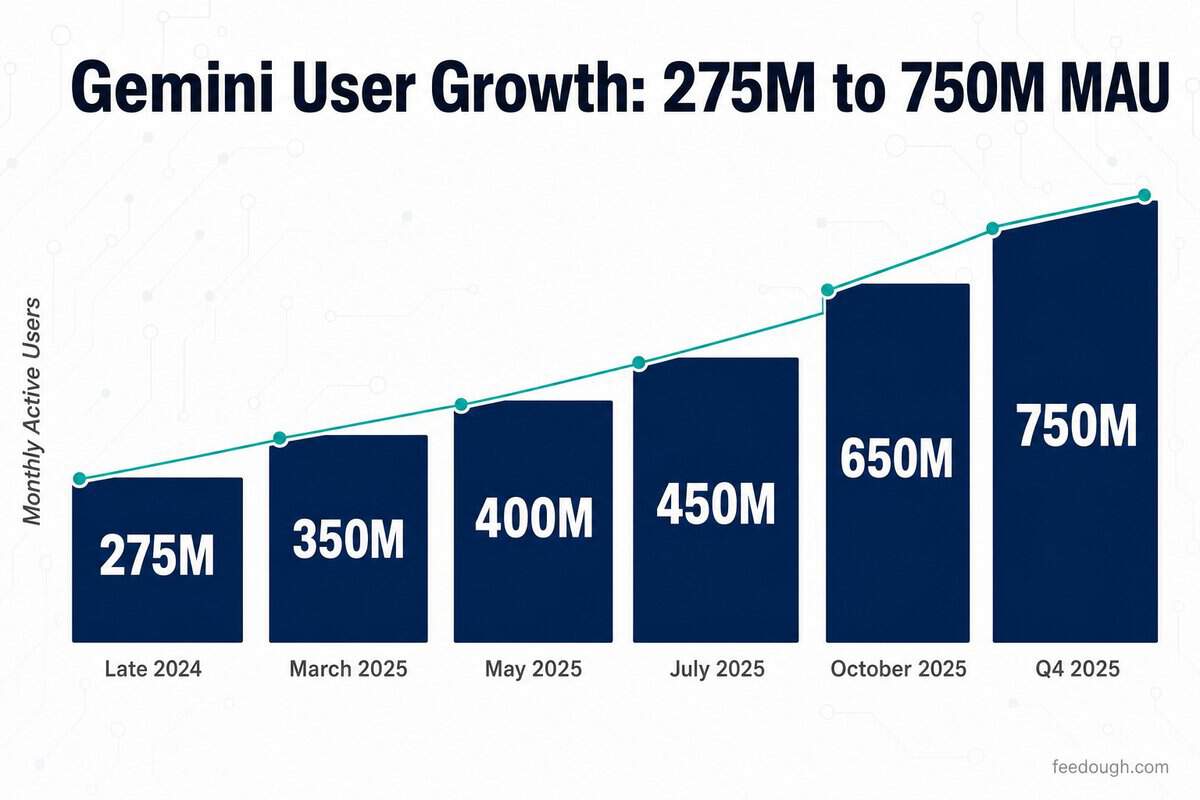
Gemini usage statistics confirm the app crossed 450 million monthly active users by July 2025, with daily requests growing over 50% from the previous quarter. By Q4 2025, that figure had climbed to 750 million, closing the gap on ChatGPT’s estimated 810 million. Gemini now holds 8.99% of the global AI chatbot market, ranking second behind ChatGPT’s 76.92% share, according to Statcounter.
What the numbers show about who is driving that growth, where adoption is concentrated, and how fast the competitive picture is shifting is what this data breaks down.
Key Gemini Usage Statistics
Gemini’s trajectory shifted sharply in 2025: here are the numbers that define where it stands today.
Gemini has 450 million monthly active users as of Q2 2025, with daily requests growing over 50% from Q1, confirmed by Google CEO Sundar Pichai on the Q2 2025 earnings call
40–45 million daily active users reach the platform every day
24% market share among global LLM tools
Google Gemini held a 13.7% share of generative AI chatbot traffic as of March 2025, recovering from a low of 13.3% in July 2024, according to First Page Sage data
21% of global generative AI search interactions happen on the platform
32% market share in mobile AI use cases
180% year-over-year growth in Africa shows rapid regional expansion
AI Overviews in Google Search reached 2 billion monthly users across 200+ countries and territories as of Q2 2025, up from 1.5 billion in May 2025
69.4% of traffic comes from desktop devices
73.51% of traffic arrives through direct access
Gemini User Growth Statistics: Monthly Active Users Over Time
Gemini went from 275 million to 750 million monthly active users in under nine months. No other consumer AI product has scaled at that pace across a comparable base.
Period
Monthly Active Users
Source / Event
Late 2024 (baseline)
275 million
Google internal data
March 2025
350 million
Google antitrust trial disclosure
May 2025 (Google I/O)
400 million
Sundar Pichai announcement
July 2025 (Q2 earnings)
450 million
Alphabet Q2 2025 earnings call
October 2025 (Q3)
650 million
Epoch AI / Google disclosure
Q4 2025
750 million
Alphabet Q4 2025 earnings call
Daily active users tracked the same trajectory. Internal data from the antitrust trial showed DAUs growing nearly four-fold between October 2024 and March 2025, from roughly 9 million to 35 million. By Q2, Sundar Pichai confirmed daily requests had grown over 50% quarter-on-quarter.
These Gemini user growth statistics reflect a structural advantage most AI products lack. Gemini does not need users to change habits or install anything new. Search surfaces it, Workspace embeds it, and Android ships with it. The growth curve is, in large part, a distribution curve.
Gemini vs ChatGPT Market Share Comparison
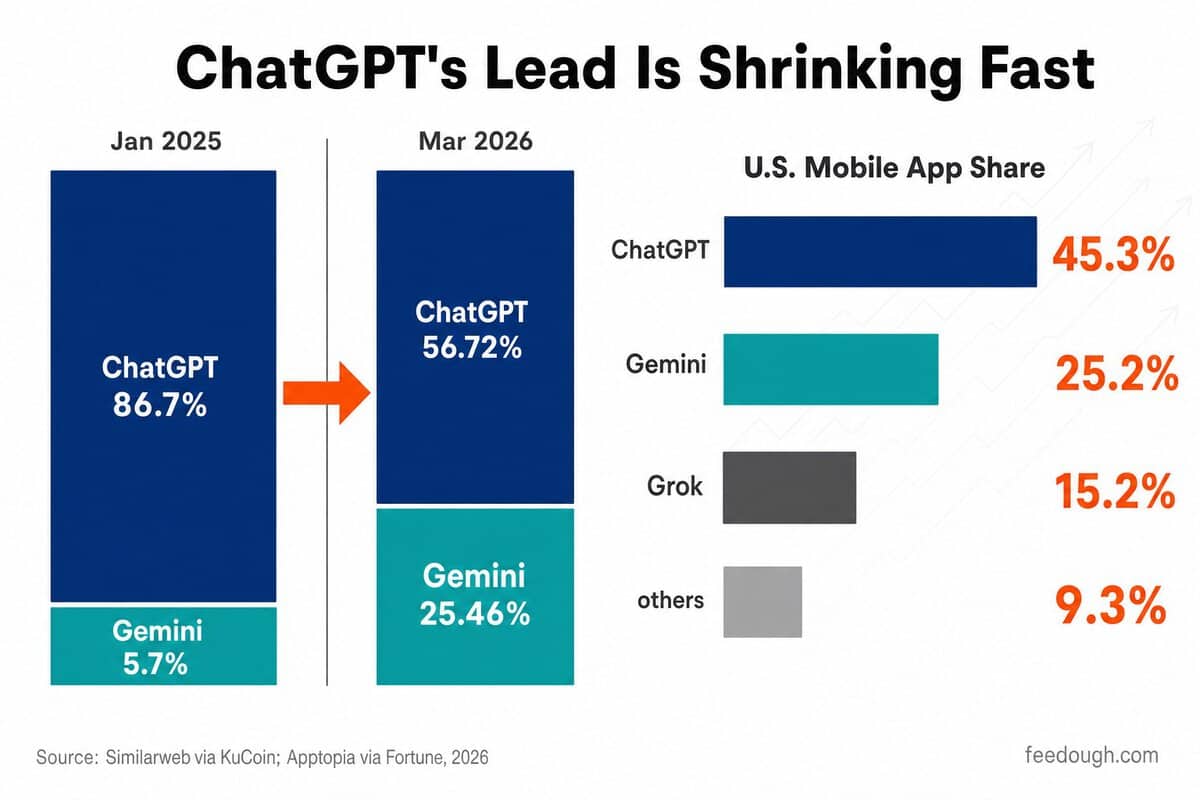
ChatGPT still leads. But it has surrendered more than 22 percentage points of generative AI web traffic share in a single year, and Gemini absorbed most of the loss. By March 2026, Gemini held 25.46% of generative AI web traffic (up from 6% a year prior) while ChatGPT had declined to 56.72%, according to Similarweb data reported by KuCoin.
Platform
Web Traffic Share (Jan 2025)
Web Traffic Share (Mar 2026)
Change
ChatGPT
86.7%
56.72%
-29.98 pts
Gemini
5.7%
25.46%
+19.76 pts
Others
7.6%
17.82%
+10.22 pts
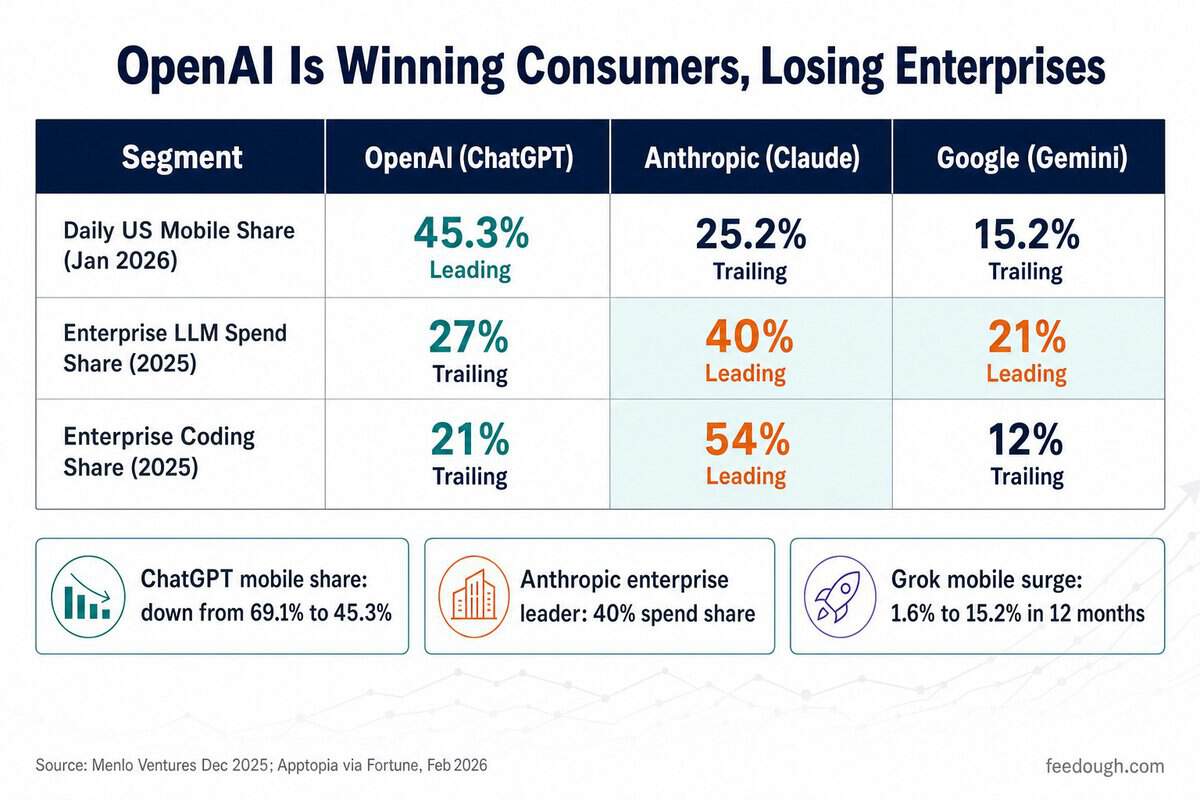
The shift is even sharper on mobile. Apptopia data reported by Fortune shows ChatGPT’s U.S. app market share fell from 69.1% to 45.3% between January 2025 and early 2026, as these Gemini vs ChatGPT market share figures confirm the mobile battleground is where ground is changing fastest:
Gemini’s U.S. mobile app share rose from 14.7% to 25.2% in the same period, according to Apptopia
Grok entered the picture, climbing from 1.6% to 15.2% U.S. app share between January 2025 and January 2026
In the global AI chatbot market as of April 2026, Gemini ranks second at 8.99% behind ChatGPT’s 76.92%, ahead of Perplexity (7.7%), Microsoft Copilot (3.74%), and Claude (2.64%), per Statcounter
ChatGPT’s mobile DAU share fell to 38.7% in March 2026, the fourth consecutive monthly decline and the first time it has dropped below 40%, per Apptopia
Android’s global dominance is a structural tailwind Gemini has that no other AI competitor can replicate. In mobile-first markets, the install step that separates ChatGPT from a new user does not exist for Gemini. That friction gap, compounded across billions of devices, is visible in the numbers.
Gemini Geographic Distribution Statistics
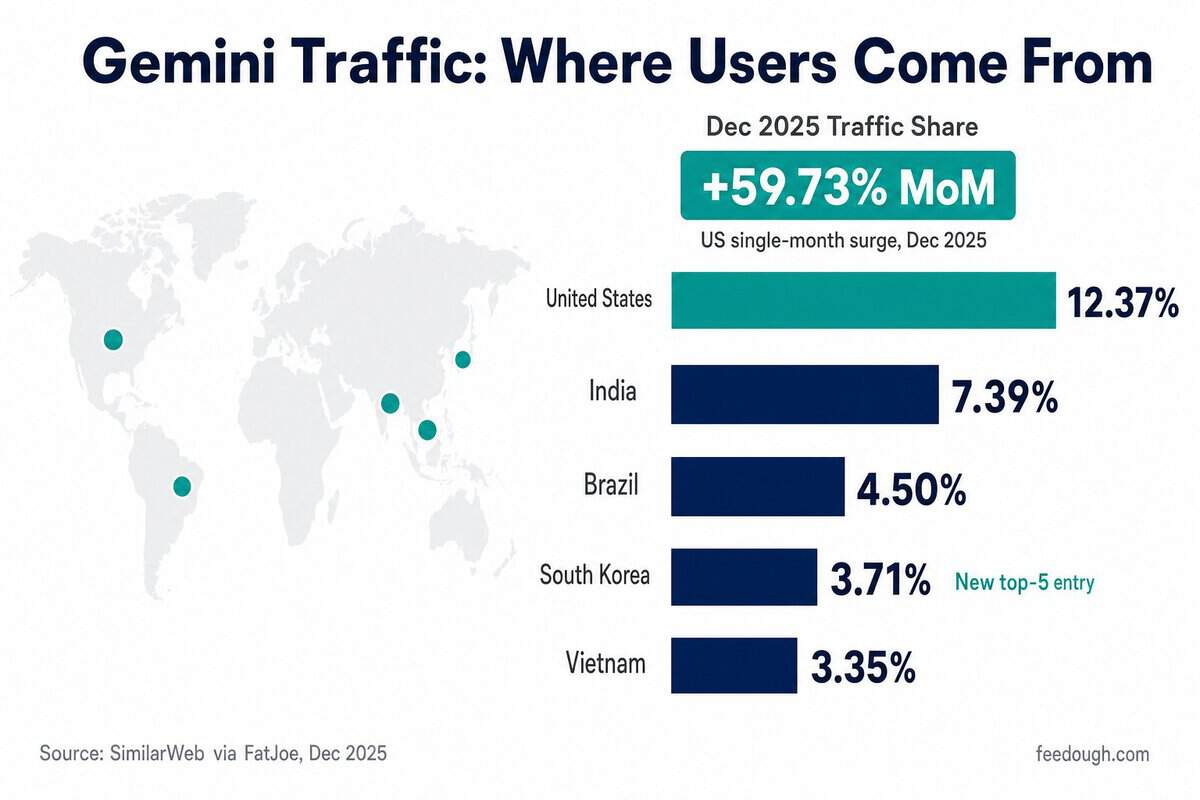
The United States still leads Gemini’s web traffic, but its dominance narrowed sharply. As of December 2025, the US held 12.37% of traffic (down from 17.5% earlier in the year), yet posted a 59.73% month-over-month surge in December alone — the largest single-month spike among the top five countries, according to SimilarWeb data reported by FatJoe. South Korea entered the top five in the same period, displacing Indonesia.
Country
Traffic Share (Dec 2025)
Context
United States
12.37%
+59.73% MoM surge in December 2025
India
7.39%
+11.5% MoM as of November 2025
South Korea
3.71%
New top-five entry; +19.66% MoM in November 2025
Brazil
4.5%
Stable share, consistent across months
Vietnam
3.35%
Down from 4.4% earlier in 2025
These Gemini geographic distribution statistics show a user base that is genuinely global rather than US-centric. India, South Korea, Brazil, and Vietnam together account for roughly 19% of traffic, compared to the US’s 12%. The composition of that top group is also shifting: South Korea’s entry reflects enterprise and developer adoption in a high-smartphone-penetration market, while Indonesia’s exit from the top five may reflect competitive pressure from locally favored apps. Africa’s 180% year-over-year growth sits outside the top five but signals where the next layer of expansion is forming, as Android device penetration and mobile internet access continue to widen the addressable base.
Gemini User Demographics Statistics
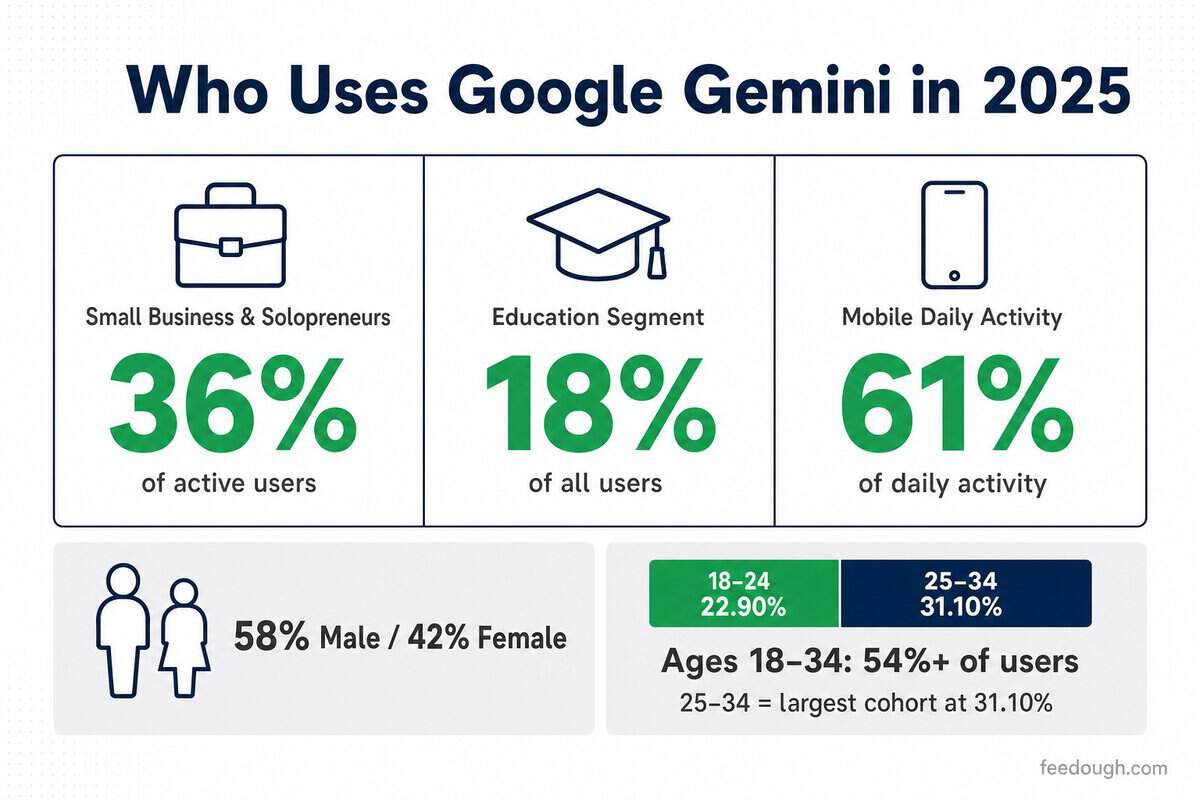
Ages 25–34 account for up to 31.10% of Gemini’s user base — the single largest age cohort — and the 18–34 bracket combined holds over 54%. That concentration tells a familiar early-adopter story. What is less expected is that small businesses and solopreneurs now represent 36% of active Gemini users, primarily for content creation, pointing to a demographic shift well beyond tech-savvy Gen Z.
Age Group
Share of Users
Notes
18–24
23.27%
Gen Z accounts for 32% of new users in 2025
25–34
29.66–31.10%
Largest single demographic cohort
35–44
Growing
Workplace and enterprise adoption driving uptake
45–54
Growing
Embedded via Google Workspace integrations
Gender skews male at approximately 58% versus 42% female. Mobile usage among all demographics rose 210% year-over-year, reaching 61% of daily activity, according to SQ Magazine data reported by ElectroIQ. These Gemini user demographics statistics break down further by user segment:
Small businesses and solopreneurs represent 36% of active users, primarily for content creation, according to SQ Magazine data reported by ElectroIQ
Education accounts for 18% of users as of 2025, according to SQ Magazine data reported by ElectroIQ
Gemini for Education is integrated into over 1,000 U.S. higher education institutions and has reached more than 10 million students as of 2025, according to Google’s year-end education report cited by The Tech Buzz
Professional and knowledge workers remain the primary user base, concentrated in data analysis and writing tasks
Students and researchers form a strong secondary segment, reinforced by the platform’s growing institutional presence
Gemini Enterprise Adoption Statistics
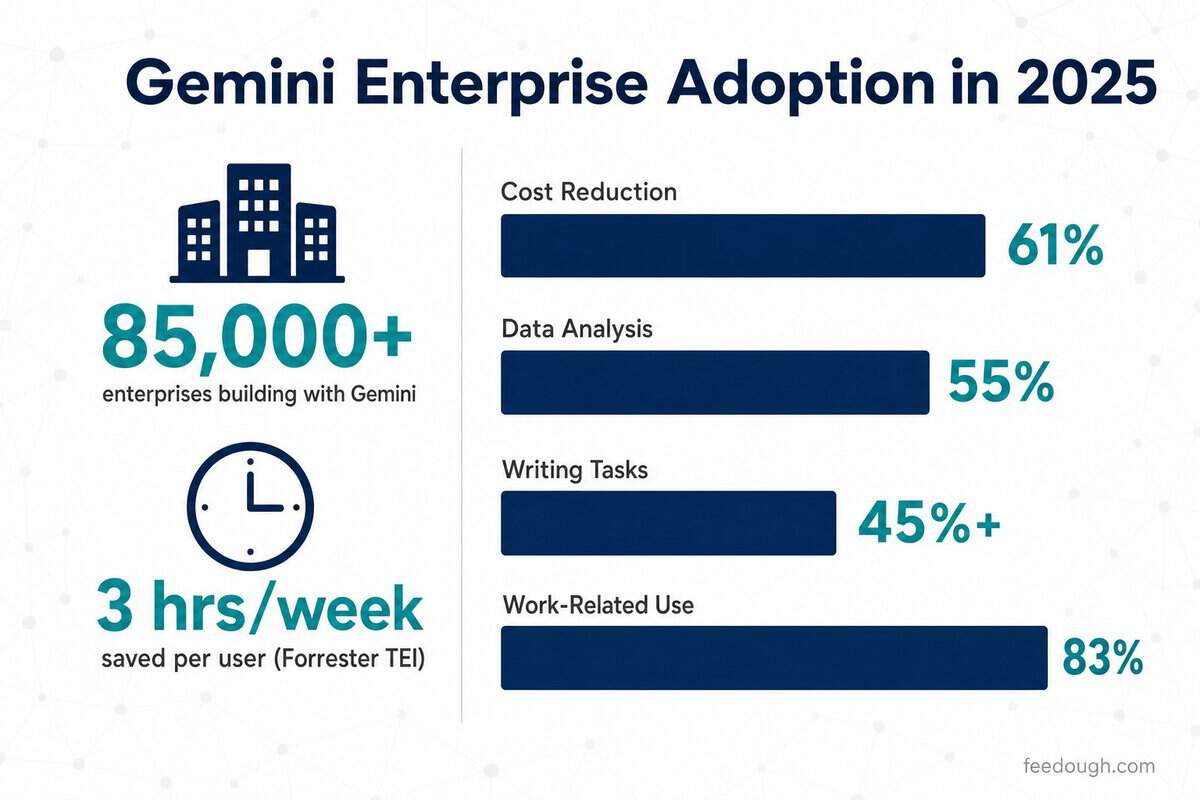
By Q2 2025, more than 85,000 enterprises were actively building with Gemini, driving 35x year-over-year growth in platform usage, according to Google’s Q2 2025 earnings disclosures. The productivity case is no longer theoretical: Forrester’s Total Economic Impact study found that approximately 80% of employees across interviewed enterprise organizations used Gemini regularly, saving an average of 3 hours per week per user.
Metric
Value
Source / Period
Enterprises building with Gemini
85,000+
Google Q2 2025 earnings
YoY growth in Gemini usage (Q2 2025)
35x
Google Q2 2025 earnings
Paid Gemini Enterprise seats sold (Q4 2025)
8 million+
Google Q4 2025 earnings, reported by Panto AI
Companies with paid seats (Q4 2025)
2,800+
Google Q4 2025 earnings, reported by Panto AI
Customer interactions handled per quarter (Q4 2025)
5 billion+, up 65% YoY
Google Q4 2025 earnings, reported by Panto AI
Google Cloud customers using Google AI products (Q3 2025)
70%+
Google Q3 2025 earnings, reported by Panto AI
Annual hours saved per 20,000-person organization
2.4 million
Forrester TEI study, 2025
These Gemini enterprise adoption statistics show where the deployment is landing across specific functions. Use case data from Worklytics’ Copilot & Gemini Adoption Benchmarks 2025 report and related research breaks down as follows:
61% of organizations believe cost reduction will be the biggest benefit of implementing AI in IT operations, according to Atomicwork, as cited by Worklytics
55% of enterprise AI respondents cite data analysis as a key area of AI impact, according to Worklytics citing Morgan Stanley and RSM research
45%+ of users apply it to writing and content tasks
83.13% of AI users apply it to work-related tasks
Generative AI revenue built on Google’s models grew more than 200% year-over-year in Q3 2025 (according to Google’s earnings disclosures), which means the enterprises that moved early are now expanding, not just renewing. That compounding commitment is harder for competing platforms to displace than a first-time purchase would be.
Gemini Historical Growth Trends and Future Projections
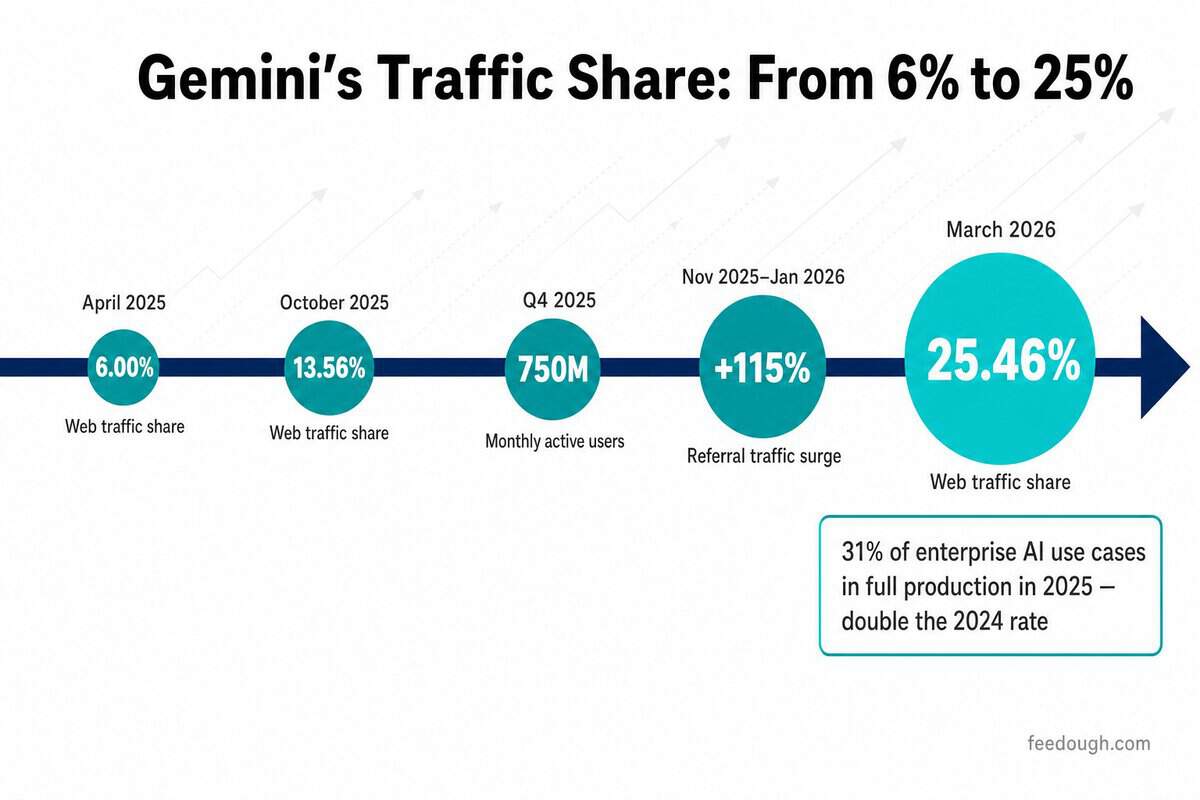
Gemini’s web traffic share stood at 6% in April 2025. By March 2026, it had reached 25.46%, according to Similarweb data reported by KuCoin. That is not gradual growth — it is a platform crossing an inflection point, driven by model releases and a referral traffic surge that more than doubled in two months following the Gemini 2 model rollout.
Period
Metric
Value
April 2025
Generative AI web traffic share
6.00%
October 2025
Generative AI web traffic share
13.56%
March 2026
Generative AI web traffic share
25.46%
Q4 2025
Monthly active users
750 million
Nov 2025–Jan 2026
Referral traffic growth (website visits from Gemini)
+115% over two months
Q2 2025
Google AI Overviews monthly users
2 billion across 200+ countries
These Gemini historical growth trends carry a forward implication that the traffic curve alone does not show. McKinsey’s State of AI 2025 survey found that nearly two-thirds of organizations have not yet begun scaling AI across the enterprise, with most still experimenting or piloting. ISG’s State of Enterprise AI Adoption report adds a sharper data point: 31% of enterprise AI use cases reached full production in 2025, double the rate recorded in 2024. The bulk of the transition from pilot to deployment is still in progress. For a platform that grows in proportion to how broadly Google’s products are used, that gap is less a risk than a runway.
Now, businesses store everything digitally, but that brings its own problems. Files scattered across email, shared drives, and individual computers. Finding what you need takes too long, and keeping track of different versions is difficult.
That’s where document management systems come in. A DMS gives you one place to store, find, and manage all your documents. It’s not just digital storage, it’s a system that organises files, tracks changes, and lets your team collaborate without the usual chaos.
In this guide, we’ll walk you through what a DMS actually does, how it works, and how to pick the right one for your needs.
What Is a Document Management System?
A document management system is software that stores, organises, and tracks your digital files in one place.
Instead of going through folders on your computer or shared drives, a DMS lets you find any document in seconds. It works with all file types, PDFs, Word docs, images, and even spreadsheets.
Here’s what it actually does: It captures documents from different sources, tags them with searchable information, and stores them securely. When you need something, you type in a keyword and it appears.
How Document Management Systems Work
A DMS follows a simple path: capture, store, organise, and retrieve. You bring documents into the system, it sorts them intelligently, and you pull them up when needed.
Let’s break down what happens at each stage.
Document Capture and Import
This is how files enter the system. You can scan paper documents, upload digital files, or even drag emails straight into the DMS. Some systems connect to other tools like accounting software, so invoices flow in automatically. The system converts everything into a digital format it can read and organise.
Storage and Organisation
Once captured, documents live in a centralised database. The system creates a logical structure, like departments, projects, or document types. But unlike traditional folders, you’re not locked into one location. A contract can appear under “Legal” and “Client Name” at the same time without making copies.
Indexing and Metadata
The DMS then tags each document with metadata, details like author, date created, document type, and keywords. Some systems read the content and auto-tag based on what they find.
You can add custom tags too. This creates multiple ways to find the same document later.
Retrieval and Search
When you need a document, you search by any tag or keyword. The system scans metadata and even text inside documents. Type “Q4 budget presentation” and it surfaces everything related, even if the file is named “final_v3_UPDATED.pptx.” You can filter by date, author, or document type to narrow results.
Many new systems also let you preview files directly in your browser. You can embed Excel workbooks online for viewing and even basic editing without downloading anything, which speeds up collaboration when teams need to reference data quickly.
Version Control and Tracking
The system tracks every change made to a document. When someone edits a file, it saves the new version but keeps the old ones. You can see who made changes and when. If someone messes up, you roll back to a previous version.
Key Features of a DMS
Not all document management systems are built the same. The right combination of features can make the difference between a system that saves time and one that creates bottlenecks.
Here’s what you should look for:
Version Control: Tracks every change made to a document and lets you restore previous versions if needed.
Access Permissions: Controls who can view, edit, or delete specific documents based on their role. It’s like giving different people different keys to different rooms.
Workflow Automation: Routes documents through approval processes automatically, like sending invoices to the right manager without manual forwarding.
Collaboration Tools: Lets multiple people work on the same document simultaneously with real-time updates and commenting features.
Compliance Tracking: Monitors document retention schedules and creates audit trails showing who accessed what and when. Essential for industries with strict regulations.
Integration Capabilities: Connects with your existing tools like email, CRM, or accounting software so documents flow between systems seamlessly.
Advanced Search: Finds documents instantly using keywords, dates, or content within files. It’s like having Google for your company’s files.
Mobile Access: Lets you view and approve documents from your phone or tablet when you’re away from your desk.
Types of Document Management Systems
Document management systems aren’t one-size-fits-all. They come in different forms based on how they’re deployed, what they do, and who uses them. Understanding these types helps you figure out which setup matches your actual needs rather than settling for something that’s either overkill or underwhelming.
By Deployment Model
Where your DMS lives matters. Some systems run entirely online, others sit on your own servers, and some split the difference. Here’s how each approach works:
Cloud-Based DMS: Lives entirely online and accessed through your browser. The vendor handles updates, backups, and server maintenance. Popular with remote teams since everyone can access files from anywhere with internet.
On-Premise DMS: Software and documents sit on servers you own and control. Your IT team manages everything from installation to security patches. Companies in heavily regulated industries like healthcare or finance prefer this because it keeps sensitive data within their walls.
Hybrid DMS: Combines both approaches. You might store active documents on local servers while archiving older files in the cloud, or use on-premise for sensitive data and cloud for collaboration. Flexible but requires managing two systems at once.
By Functionality
Different systems focus on different tasks. Some just digitise paper, while others automate entire workflows. Here’s what each type specialises in:
Document Imaging Systems: Specialise in converting paper into digital files. Focus on capture and retrieval without much else. Good for offices drowning in physical paperwork who need a straightforward digitisation solution.
Enterprise Content Management (ECM): The heavyweight option that handles way more than just documents, emails, images, videos, records, everything. Includes retention rules, automated workflows, and connects with other business systems.
Records Management Systems: Focus specifically on handling records according to legal and regulatory requirements. Track retention schedules, trigger automatic deletions when allowed, and maintain audit trails. Government agencies and legal departments rely on these to stay compliant without manually tracking every document’s lifecycle.
Workflow Management Systems: Route documents through approval processes automatically. A purchase order goes from requester to manager to finance to vendor without anyone manually forwarding it.
By Scale
The size of your organisation determines what system makes sense. Small teams need different features than multinational companies. Here’s how systems scale:
Departmental DMS: Designed for single teams like HR or legal. Solves one department’s specific document challenges without trying to serve the entire company. Limited user count with focused features.
Small Business DMS: Streamlined systems with essential features and pricing that doesn’t require enterprise budgets. Sacrifice some advanced capabilities for simplicity and affordability. Perfect when you need better than filing cabinets but don’t require complex integrations.
Enterprise DMS: Built for thousands of users across multiple locations and departments. According to market research, the US document management system market hit $2.17 billion in 2025 and is expected to reach $7.25 billion by 2033, growth driven largely by enterprise adoption. These systems offer extensive customisation, integration with existing software ecosystems, and the infrastructure to handle massive document volumes.
Examples of Popular Document Management Systems
The DMS market offers plenty of options, from enterprise-level platforms to nimble cloud solutions. Here’s what you’ll find if you start shopping around for a system.
1. Microsoft SharePoint
This is a hybrid platform that large organisations rely on. SharePoint works as both a DMS and collaboration hub, which means teams can manage documents while chatting, sharing calendars, and running project workflows in one place.
Enterprises like it because it integrates with the Microsoft ecosystem they’re probably already using. The learning curve can be steep, but for companies deep into Office 365, it makes sense.
2. DocuWare
DocuWare is cloud-based and appeals to mid-sized businesses that want quick digitisation without heavy IT involvement. It’s modular, so you can pick the features you actually need instead of paying for everything up front.
Companies in manufacturing and accounting use it a lot because it handles invoices, purchase orders, and compliance paperwork pretty smoothly. The interface is straightforward enough that employees don’t need days of training.
3. M-Files
M-Files takes a different approach by organising documents based on what they are, not where they’re stored. Instead of digging through folder hierarchies, you search by metadata like client name or project type. Professional services firms and legal teams find this useful because they deal with complex document relationships. It’s flexible enough to connect with existing systems without forcing you to migrate everything at once.
4. Box
Box is fully cloud-based and targets businesses that prioritise remote collaboration. It’s simpler than enterprise systems like SharePoint but more robust than basic file storage. Tech companies and creative agencies use it because sharing files externally is painless.
The security features meet compliance requirements without getting complicated. It plays nice with third-party apps, which matters if your team uses a mix of tools.
5. Laserfiche
Laserfiche focuses on workflow automation alongside document storage. Government agencies and healthcare organisations pick it because it handles records retention and regulatory compliance well.
It can process high volumes of paperwork, think permits, patient records, or legal filings, and route them automatically based on rules you set up. The system works on-premise or in the cloud, depending on your data policies.
How to Choose the Right DMS?
Picking a document management system isn’t like choosing office supplies. Get it wrong, and you’re stuck with clunky software nobody wants to use. Get it right, and your team works faster with less frustration.
Assess Your Business Needs
Start by asking yourself what’s actually broken. Are you losing files? Spending hours searching for documents? Struggling with version control?
Think about scale too. A five-person team needs something different than a company with 500 employees. If you’re planning to grow, you’ll want a system that grows with you. According to Grand View Research, the US document management market is expanding at 14.9% annually, driven largely by security and compliance demands.
Write down your top three problems. That’s your starting point.
Evaluate Key Selection Criteria
Once you know what you need, here’s what to look for:
Ease of use: If your team can’t figure it out in 10 minutes, they won’t use it
Scalability: Can it handle 10x your current document volume without choking?
Security features: Look for encryption, access controls, and audit trails
Pricing model: Monthly per user? One-time fee? Storage limits? Read the fine print
Customer support: When things break at 4 PM on Friday, can you reach someone?
Test the system yourself before buying. Most vendors offer free trials. Click around. Upload files. See if it feels intuitive or frustrating.
Consider Integration Requirements
Your DMS needs to play nice with the tools you already use. Email, CRM, accounting software, project management apps. If it sits in isolation, you’re creating more work, not less.
Ask yourself: What systems do we use daily? Does this DMS connect to them? Some platforms offer hundreds of integrations. Others are more limited.
Check if the vendor provides APIs for custom connections. You might need them later.
Review Vendor Support and Training
Even the best system is useless if nobody knows how to use it. Look for vendors who offer onboarding help, training materials, and ongoing support.
What does their implementation process look like? Do they assign a dedicated person to help you migrate? Are there video tutorials, documentation, or live training sessions?
Read reviews about their support team. Response time matters when you’re stuck.
Benefits of Using a DMS
You’ve got the features. You’ve compared the types. Now here’s what actually changes when you implement a DMS, the real-world outcomes that affect your bottom line and day-to-day operations.
Reclaim Hours Lost to Document Hunting: A DMS puts everything in one searchable place, so finding a document takes seconds instead of derailing someone’s entire morning.
Slash Physical Storage Costs: No more renting storage units or dedicating entire rooms to paper archives. One company storing 2 million documents annually can save thousands just by going paperless.
Lock Down Security and Compliance: A DMS gives you permission controls, audit trails, and encryption. You know who accessed what and when. For industries with strict regulations, that’s not just convenient, it’s required.
Enable Real Collaboration: Teams can work on the same document simultaneously. Marketing reviews the contract while legal adds notes. No email chains. No “final_final_v3” filenames.
Protect Against Disasters: If your office goes down, your files don’t. You’re back in business faster because nothing’s actually lost.
Speed Up Decision-Making: When executives need last quarter’s report, they get it instantly. No waiting for someone to find it. No delays because Karen’s on vacation and she’s the only one who knows where it’s filed. Faster access means faster decisions.
Challenges and How to Address Them
Getting a DMS up and running isn’t always smooth sailing. You’ll likely hit a few bumps along the way, and that’s completely normal. What matters is knowing what to expect and having a plan to work through it.
Here’s what trips up most organisations:
Employee pushback: People get comfortable with their current workflow. Switching to a new system feels like extra work, even when it’ll save time later.
Migration headaches: Moving years of documents from filing cabinets or old servers into a DMS takes time. You’re not just uploading files; you need to organise them properly.
Budget concerns: The upfront cost can be intimidating, especially when you factor in training and potential IT support.
Training gaps: A powerful system means nothing if your team doesn’t know how to use it. Half-trained employees will either avoid the system or use it incorrectly.
Start small. Pick one department or document type to migrate first.
For employee resistance, involve people early. Ask what frustrates them about current document handling. When they see the DMS solving their actual problems, they’ll get on board.
Spread out costs by choosing a cloud-based DMS with monthly payments instead of a massive upfront investment. You can also phase the rollout, basic features first, advanced tools later.
Make training ongoing, not a one-time event. Short video tutorials work better than lengthy manuals. Assign a go-to person in each department who can answer quick questions without waiting for IT.
You might think AI is neutral, just crunching numbers without prejudice. But what if the algorithms making decisions about your life carry the same biases we’ve been trying to eliminate for decades?
A 2025 report from the Pew Research Center found that two-thirds (66%) of US adults are highly concerned about people getting inaccurate information from AI. That’s because biased AI doesn’t just make mistakes, it can reinforce discrimination at scale.
This article looks at where AI bias shows up most, who it affects, and what we’re doing about it. We’ll cover the surprising statistics, the different types of bias that creep into algorithms, and how these issues impact various demographic groups differently.
What is AI Bias?
AI bias happens when artificial intelligence systems make unfair decisions. These systems learn from data, and if that data contains human prejudices, the AI picks them up too. Think of it like a child learning language – if they only hear certain words or phrases, that’s all they’ll know.
The problem is that AI doesn’t just copy biases. It often makes them worse. A small bias in training data can become a big problem when the system makes thousands of decisions automatically. That’s why understanding AI bias matters for anyone using these tools.
You might think bias only affects social issues like hiring or lending. But it hits businesses where it hurts – their bottom line. Companies lose millions when biased AI makes poor decisions or leads to lawsuits.
Where Does AI Bias Come From?
AI bias usually starts with the data used to train these systems. If your training data shows historical patterns of discrimination, your AI will learn those patterns. It’s like teaching someone using only old textbooks – they’ll learn outdated ideas.
Here are the main sources of AI bias:
Training data issues: 73% of AI systems have problems with biased training datasets. These datasets often don’t represent everyone equally.
Algorithm problems: The math behind AI can introduce bias even with good data. Some algorithms favor certain patterns over others.
Team diversity gaps: 62% of AI development teams lack enough diversity. When teams don’t represent different perspectives, they miss potential biases.
Costly mistakes: Data quality issues cause serious financial damage. Over 25% of organisations lose more than $5 million yearly due to poor data quality. Some lose $25 million or more.
Types of AI Bias
AI bias comes in different forms, each with its own challenges. Understanding these types helps you spot problems before they become expensive.
Historical bias: When AI learns from past data that reflects old prejudices. Like Amazon’s hiring tool that downgraded resumes with “women” in them because it trained on male-dominated tech hiring data.
Selection bias: When training data doesn’t represent the real population. Facial recognition systems often struggle here, with racial accuracy gaps because they’re trained mostly on lighter-skinned faces.
Measurement bias: When the way you measure something introduces errors. Like using zip codes to predict credit risk – this can unfairly penalise certain neighborhoods.
Aggregation bias: When treating different groups the same way leads to unfair outcomes. Medical AI sometimes has this problem when algorithms work well for one group but not others.
How Common Is Bias in AI Systems?
You might think AI bias is rare, something that only happens in extreme cases. But the numbers tell a different story. Bias in AI systems is surprisingly common, and it’s costing companies real money every day.
Here’s what the data shows about how widespread this problem really is:
72% of companies reported AI-related risks in 2025, up from just 12% in 2023. That’s a massive jump in just two years.
77% of companies had bias-testing tools in place but still found bias in their systems, showing current solutions aren’t working well enough.
Only 13% of companies are actively testing for bias in their AI systems, according to industry research.
Financial services saw the biggest jump in AI risk reports – from 14 companies in 2023 to 63 companies in 2025.
Healthcare companies reporting AI risks increased from 5 to 47 during the same period.
Industrial companies went from 8 to 48 companies reporting AI-related problems.
The total combined losses from AI bias incidents reached $4.4 billion across affected industries.
38% of companies say reputational risk is their most frequent AI concern.
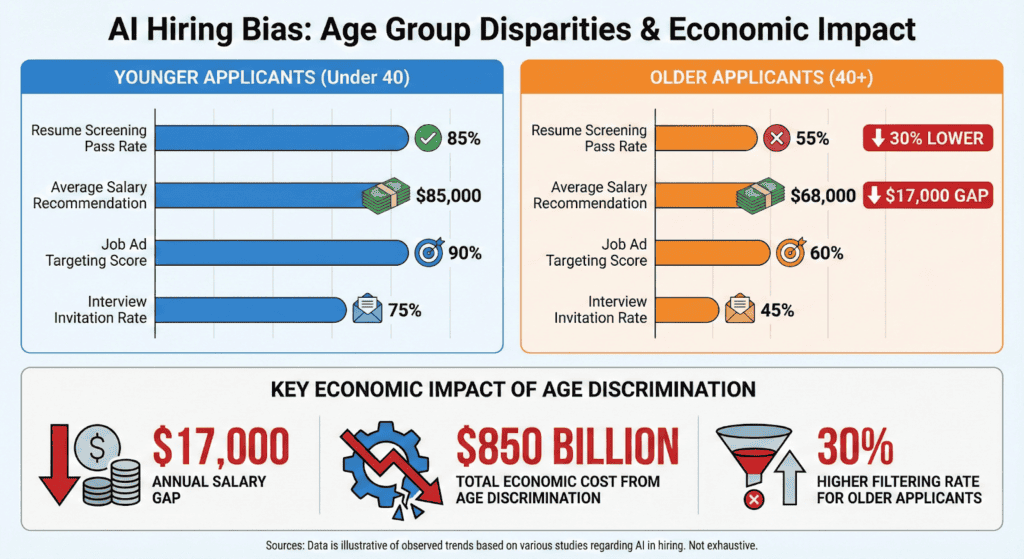
AI recruitment tools are 30% more likely to filter out candidates over 40 compared to younger applicants.
The bias and fairness management segment of the AI governance market is growing at 28.55% annually through 2031.
What’s interesting is that companies know about the risks. They’re reporting them more often. But they’re not testing for bias enough. That gap between awareness and action is where problems happen.
The financial services industry shows this clearly. They went from 14 companies reporting issues to 63. That’s not because bias suddenly appeared. It’s because they’re using more AI and finding more problems.
Generative AI Bias Statistics
Generative AI bias is especially concerning because these systems create new content rather than just analysing existing data. When a language model generates biased text or an image generator creates stereotypical pictures, it’s not just reflecting past prejudices, it’s actively producing new biased content at scale.
What makes this particularly tricky is that generative AI often hides its biases behind seemingly neutral outputs. A resume generator might subtly favour certain educational backgrounds. A marketing copy tool might use language that appeals more to one demographic than another. These biases get baked into the content businesses use every day.
Recent research reveals:
34% of marketers report that generative AI sometimes produces biased information, according to industry data
ChatGPT agreed with over 70% of political statements with green/left-leaning positions compared to right-leaning ones
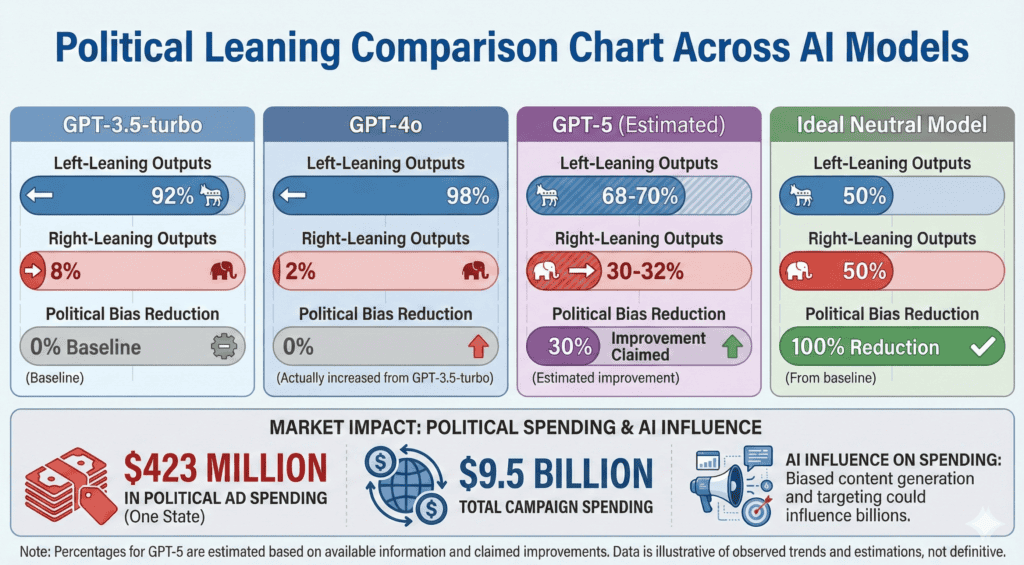
GPT-3.5-turbo produces 92% left-leaning outputs and only 8% right-leaning when generating political content
GPT-4o shows even stronger bias with 98% left-leaning outputs and just 2% right-leaning
Image generation tools show significant racial and gender disparities, with studies finding they tend toward stereotypical outputs for job roles and responsibilities
When evaluating images, AI tools give lower “intelligence” and “professionalism” scores to braids and natural Black hairstyles compared to white women’s hair
Only 13% of companies actively test their generative AI systems for bias despite widespread adoption
The generative AI market reached $44.89 billion in 2025, up 54.7% from 2022
Private investment in generative AI hit $33.9 billion in 2024, up 18.7% from 2023
Companies spent $37 billion on generative AI in 2025, up from $11.5 billion in 2024
$44 billion was invested in AI startups in just the first half of 2025
Despite massive investments, 95% of generative AI projects are failing according to MIT research
The hospitality generative AI market is currently $632.18 million and projected to reach $3.58 billion by 2032
75% of automotive companies are experimenting with at least one generative AI use case
74% of organisations say their most advanced generative AI initiative meets or exceeds ROI expectations
Financial losses from AI bias incidents across all industries reached $4.4 billion
The bias and fairness management segment of the AI governance market is growing at 28.55% annually through 2031
Gender Bias in AI Statistics
When algorithms learn from historical data that contains gender inequalities, they don’t just copy those patterns – they often amplify them. This happens across hiring, finance, healthcare, and everyday technology.
The problem is that gender bias in AI isn’t always obvious. It can hide in resume screening algorithms, credit approval systems, or even voice assistants. These systems make thousands of decisions automatically, and small biases add up to big disparities.
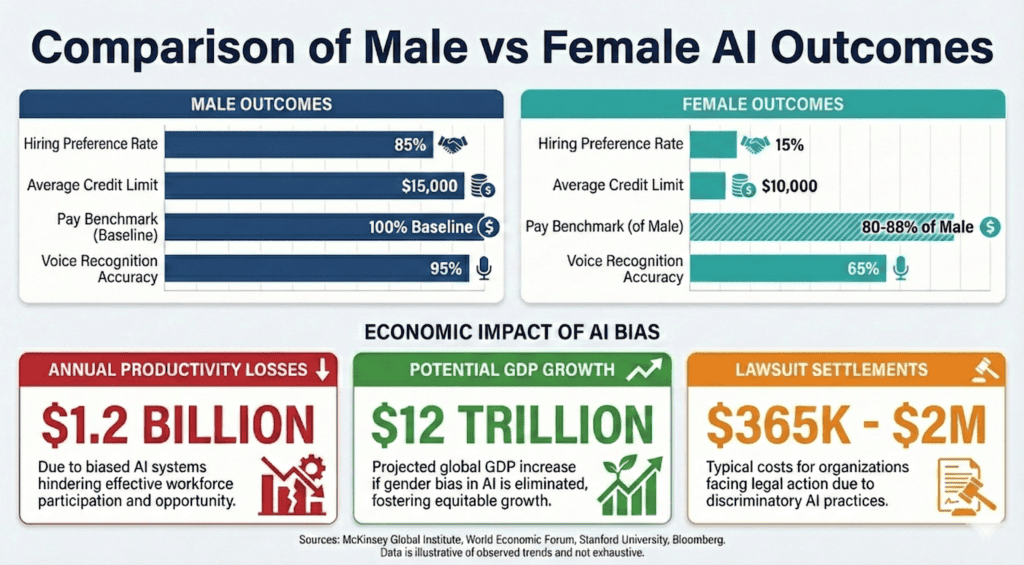
Hiring preference rates: AI resume screening tools show clear gender biases, with white male names ranking higher 85% of the time compared to other demographic groups
Resume screening disparities: ChatGPT shows significant gender bias in HR recruitment, with 17% fewer positive recommendations for women in some AI hiring systems
Pay gap predictions: AI pay benchmarking algorithms suggest salaries 12-20% lower for female-dominated roles compared to male-dominated roles with similar requirements
Credit limit disparities: Women receive credit limits averaging $5,000-$10,000 lower than men with identical financial profiles when AI systems analyse historical lending data
Voice assistant biases: Voice recognition systems are 30% more accurate for male voices than female voices, and even less accurate for non-binary or gender-nonconforming speech patterns
Image search biases: AI image generators produce stereotypical results for gender roles, with studies finding they default to male images for leadership positions and female images for caregiving roles
Healthcare outcome differences: AI diagnostic tools for heart disease are 20% less accurate for women because they’re trained primarily on male patient data
Lawsuit settlement amounts: Companies have paid settlements ranging from $365,000 to over $2 million for gender discrimination in AI hiring and screening systems
Lost productivity costs: Gender-biased AI systems cost companies an estimated $1.2 billion annually in lost productivity from excluding qualified female candidates
Economic opportunity if bias eliminated: Eliminating gender bias in AI could add $12 trillion to global GDP by 2025 according to World Economic Forum estimates
Leadership perception bias: AI systems evaluating leadership potential show 25% lower scores for female managers compared to male managers with identical qualifications
Promotion algorithm disparities: Internal promotion algorithms recommend women for advancement 15% less frequently than men with similar performance metrics
Maternal health gaps: AI pregnancy monitoring systems miss 30% more complications for women of colour compared to white women due to training data gaps
What’s concerning is how these biases compound. A woman might face bias in hiring, then get lower pay recommendations, then receive less credit, then have health issues missed. Each biased decision makes the next one more likely.
Racial Bias in AI Statistics
Racial bias in AI shows up most clearly in facial recognition systems, where error rates vary dramatically based on skin colour. This isn’t just a technical glitch – it’s a pattern that repeats across healthcare, finance, and criminal justice systems.
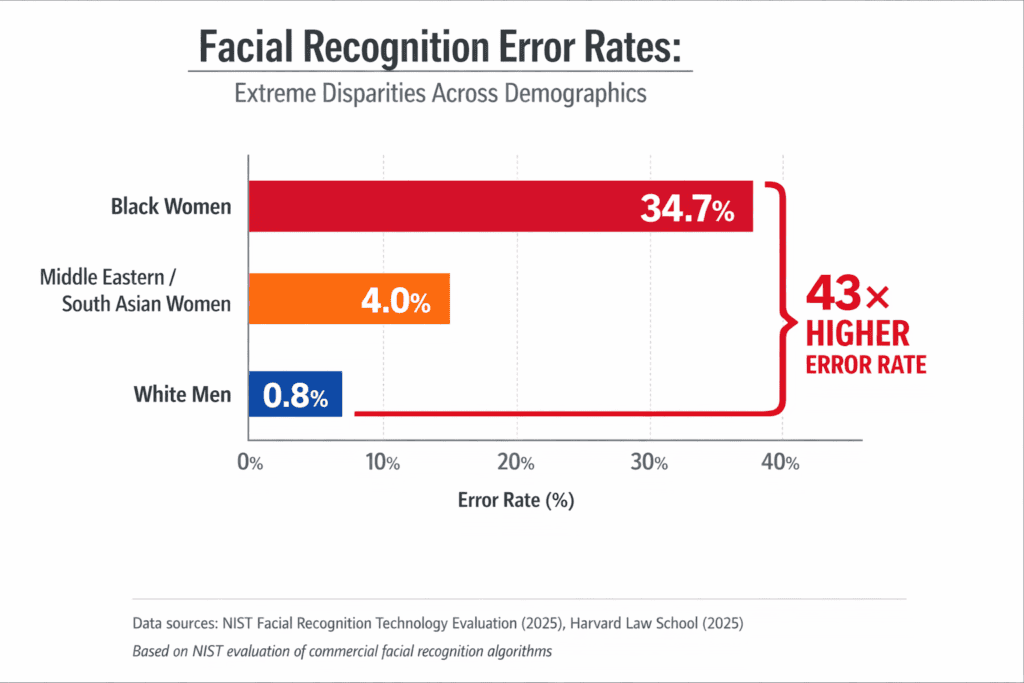
Facial recognition error rates: Dark-skinned women face 34% misclassification rates compared to just 0.8% for light-skinned men. That’s over 40 times more errors.
Healthcare outcome disparities: AI diagnostic tools for heart disease are 20% less accurate for Black patients because training data lacks diversity.
Criminal justice statistics: AI risk assessment tools used in courts show significant bias against Black defendants, with false positive rates nearly twice as high.
Speech recognition accuracy gaps: Speech recognition systems misunderstand 35% of words spoken by Black people compared to 19% for white speakers.
Loan approval rate differences: White applicants are 8.5% more likely to be approved than Black applicants with identical financial profiles.
Average dollar differences in loans: Black borrowers pay interest rates 0.10-0.12 percentage points higher than white borrowers with the same credit scores.
Mortgage denial disparities: Black applicants face 19% denial rates compared to 11.27% for all applicants.
Discrimination lawsuit settlements: Companies have paid millions in settlements, including SafeRent’s multi-million dollar settlement for algorithmic discrimination.
Economic impact on communities: Racial bias in lending algorithms contributes to the $4.4 billion in total AI bias losses across industries.
Healthcare treatment recommendations: AI systems show racial bias in psychiatric treatment suggestions, with different recommendations based on patient race.
Credit limit disparities: Black applicants receive credit limits averaging $5,000-$7,000 lower than white applicants with identical financial histories.
Employment screening biases: AI resume screening tools rank white male names higher 85% of the time compared to Black applicants with identical qualifications.
Insurance claim processing: Black homeowners face different treatment in AI-driven insurance claim assessments, leading to discrimination lawsuits.
These numbers translate into real-world consequences. When facial recognition misidentifies a Black woman 34% of the time, that means wrongful arrests. When speech recognition misunderstands Black voices twice as often, that means voice assistants don’t work properly for millions of people. When loan algorithms charge Black borrowers higher rates, that means less generational wealth building.
A Black applicant might face bias in hiring, then get lower credit limits, then pay higher mortgage rates, then have insurance claims scrutinised differently. Each biased decision makes the next one more likely.
Age Bias in AI Statistics
Age discrimination in AI systems manifests in the following ways:
Hiring algorithm age preferences: AI resume screening tools show clear bias against older applicants, with research showing hiring discrimination intensifies for people in later-career stages as job competition increases
Resume screening pass rates by age: AI recruitment tools are 30% more likely to filter out candidates over 40 compared to younger applicants with identical qualifications
Credit scoring differences: Older applicants face different treatment in AI-driven credit decisions, with algorithms sometimes penalising age-related factors like retirement planning or career transitions
Job ad targeting disparities: AI-powered job advertising systems show age-based targeting patterns, with certain positions disproportionately shown to younger demographics
Wage prediction gaps in dollars: AI salary recommendation algorithms suggest lower compensation for older workers, with gaps reaching 15-25% for similar roles and experience levels
Lost income figures for older workers: Age discrimination costs the economy billions annually, with AARP research finding discrimination against people age 50 and older robbed the economy of $850 billion in 2018
Age discrimination costs: Companies face significant legal and financial risks, with lawsuits alleging age discrimination against AI screening tools resulting in settlements and regulatory actions
Older worker experiences: Almost two-thirds of workers age 50-plus reported seeing or experiencing age discrimination in their work settings according to AARP’s 2024 research
Generative AI age bias: Stanford researchers found widespread evidence of bias against older women on popular image and video sites and in AI tools like ChatGPT, with models often distorting reality regarding gender and age
Glassdoor mentions: Mentions of ageism in job-seeker reviews rose 133% year-over-year in the first quarter of 2025, showing growing awareness and reporting of age discrimination issues
Age bias hits particularly hard because it compounds over time. A 50-year-old facing discrimination might have fewer years to recover financially. They might accept lower pay just to get work. Then they face retirement with less savings. The economic impact ripples through their entire financial life.
What makes age bias in AI especially concerning is how it interacts with other biases. Stanford’s research shows older women face double discrimination – age bias plus gender bias. AI systems trained on data that undervalues both older workers and women create a perfect storm of disadvantage.
Political Bias in AI Statistics
Political bias in AI isn’t just about which candidate gets mentioned more – it’s about whose viewpoints get amplified and whose get filtered out.
When AI systems favour certain political positions, they don’t just reflect bias. They shape public opinion at scale. This matters because AI now helps write news articles, moderate social media content, and even generate political messaging. The numbers show this isn’t a theoretical concern – it’s happening right now.
Political leaning percentages: ChatGPT shows clear left-leaning bias, agreeing with over 70% of political statements with green/left-leaning positions compared to around 55% of conservative statements
Model comparison data: GPT-3.5-turbo produces 92% left-leaning outputs and only 8% right-leaning when generating political content
Latest model improvements: OpenAI claims GPT-5 has 30% less political bias than prior models, showing companies are aware of the problem
International political preferences: ChatGPT demonstrates consistent political bias favoring Democratic Party in US, Lula in Brazil, Labor Party in UK according to Stanford University research
Content moderation disparities: AI content moderation systems show viewpoint discrimination, with certain political perspectives being unfairly privileged or discriminated against in automated decisions
User perception statistics: Studies show users perceive automated moderation as more impartial with human oversight, and trust in AI moderation increases with transparency about how decisions are made
Response differences to political prompts: AI systems respond differently to identical prompts framed from different political perspectives, showing bias in how information is presented
Political ad spending impact: Political groups are projected to spend $423 million on campaign ads in Wisconsin alone in 2024, with AI potentially influencing which messages get amplified
Election market influence: House and Senate campaigns collectively spent $9.5 billion in 2024, nearly six times as much as previous cycles, with AI playing an increasing role in messaging and targeting
Media market distortion: Biased AI content generation could influence which stories get written and how they’re framed, potentially affecting media markets worth billions
Regulatory response metrics: Multiple states have introduced legislation addressing AI in political contexts, showing growing concern about political bias in automated systems
Transparency gap: Despite OpenAI claiming less than 0.01% of ChatGPT responses show signs of political bias, independent research consistently finds measurable political leanings
When people ask ChatGPT about political issues, they’re getting answers shaped by the system’s biases. When social media platforms use AI for content moderation, they’re filtering viewpoints based on algorithmic preferences.
This isn’t just about fairness. It’s about maintaining trust in information systems. If people believe AI tools have political agendas, they’ll stop trusting the information those tools provide. That undermines the whole point of using AI to help people understand complex issues.
AI Bias in Healthcare Statistics
Data from 2024 showed a 14% increase in malpractice claims involving AI tools compared to 2022. Most came from diagnostic AI used in radiology. When biased algorithms lead to missed diagnoses or wrong treatments, hospitals and doctors face massive lawsuits.
Misdiagnosis rates by demographic: AI misdiagnosis rates for minority patients are 31% higher than for majority patients, according to a 2023 JAMA study
Treatment recommendation disparities: The largest study on healthcare AI bias analysed over 1.7 million AI-generated vignette responses and found race, gender, income, and housing status influenced treatment recommendations
Pain assessment algorithm biases: AI systems show racial bias in pain assessment, with studies finding they perpetuate race-based pain treatment disparities
Health risk prediction accuracy gaps: AI diagnostic tools for heart disease are 20% less accurate for Black patients because training data lacks diversity
Resource allocation inequities: Medical testing rates for white patients are up to 4.5% higher than for Black patients with the same conditions
Cost differences in dollars: Healthcare companies reporting AI risks increased from 5 to 47 companies between 2023 and 2025, with estimated losses reaching $1.4 billion
Malpractice settlement amounts: Medical malpractice cases involving AI have reached settlements as high as $17 million, with parties reaching $17 million settlements in January 2025
Economic burden on communities: The total combined losses from AI bias incidents across all industries reached $4.4 billion, with healthcare representing a significant portion
Gender bias prevalence: Gender bias was the most prevalent healthcare AI issue, reported in 15 of 16 studies (93.7%)
Racial bias frequency: Racial or ethnic biases were observed in 10 of 11 healthcare AI studies (90.9%)
Testing rate disparities: Black patients face up to 4.5% lower medical testing rates than white patients with identical symptoms
Legal exposure growth: Malpractice claims involving AI tools increased 14% from 2022 to 2024, showing growing legal risks
Diagnostic accuracy gaps: AI systems miss 30% more pregnancy complications for women of colour compared to white women due to training data gaps
Treatment access disparities: AI-driven resource allocation systems can perpetuate existing healthcare access gaps based on demographic factors
AI Bias in Hiring & Recruitment Statistics
The numbers show hiring bias isn’t just a theoretical concern – it’s costing companies millions while missing out on top talent.
A resume screening tool might favor certain names or schools. A salary prediction algorithm might undervalue certain demographics. These biases don’t just affect fairness – they hit companies where it hurts: their bottom line.
Resume screening bias percentages: AI resume screening tools show clear racial and gender biases, with white male names ranking higher 85% of the time compared to other demographic groups
Interview selection rates: AI recruitment tools are 30% more likely to filter out candidates over 40 compared to younger applicants with identical qualifications
Salary prediction disparities: AI pay benchmarking algorithms suggest salaries 12-20% lower for female-dominated roles compared to male-dominated roles with similar requirements
Job ad targeting biases: AI-powered job advertising systems show age-based targeting patterns, with certain positions disproportionately shown to younger demographics
Offer amount disparities: AI salary recommendation algorithms suggest lower compensation for older workers, with gaps reaching 15-25% for similar roles and experience levels
Lost talent costs: Age discrimination costs the economy billions annually, with AARP research finding discrimination against people age 50 and older robbed the economy of $850 billion in 2018
Lawsuit settlement amounts: Companies have paid settlements ranging from $365,000 to over $2 million for discrimination in AI hiring and screening systems
Productivity impact: Gender-biased AI systems cost companies an estimated $1.2 billion annually in lost productivity from excluding qualified female candidates
Success rates comparison: Candidates who underwent AI-led interviews succeeded in subsequent human interviews at a significantly higher rate (53.12%) compared to traditional screening methods
Systematic favoritism: Research published through VoxDev in May 2025 found that AI hiring tools systematically favored female applicants over Black male applicants
Automation expectations: 1 in 3 companies anticipate AI running their entire hiring process by 2026 according to HR Dive research
Candidate screening concerns: 57% of companies are concerned AI could screen out qualified candidates, while 50% worry AI could introduce bias into hiring decisions
HR leader priorities: 75% of HR leaders cite bias as their top concern when evaluating AI tools, second only to data privacy
Public opposition: More than 7 out of 10 adults in the United States oppose making the final hiring decision using AI, according to Pew Research data
Legal exposure growth: AI hiring discrimination lawsuits have resulted in settlements exceeding $365,000, with 2024-2025 seeing an explosion of lawsuits and EEOC enforcement actions
Workday lawsuit allegations: The Mobley v. Workday lawsuit alleges that the company’s automated resume screening tool discriminates based on race, age, and disability status
The economic implications of hiring bias go far beyond lawsuit settlements. When AI systems filter out qualified candidates based on demographics, companies miss out on talent that could drive innovation and growth. That $850 billion in lost economic activity from age discrimination alone shows how much potential gets wasted.
75% of HR leaders list bias as their top concern with AI tools. But awareness doesn’t always translate to action. With 1 in 3 companies expecting full automation by 2026, the stakes keep getting higher.
Public Trust and Concern About AI Bias
You might use AI every day, but how much do you really trust it? The numbers show public confidence in AI systems is surprisingly low, and for good reason.
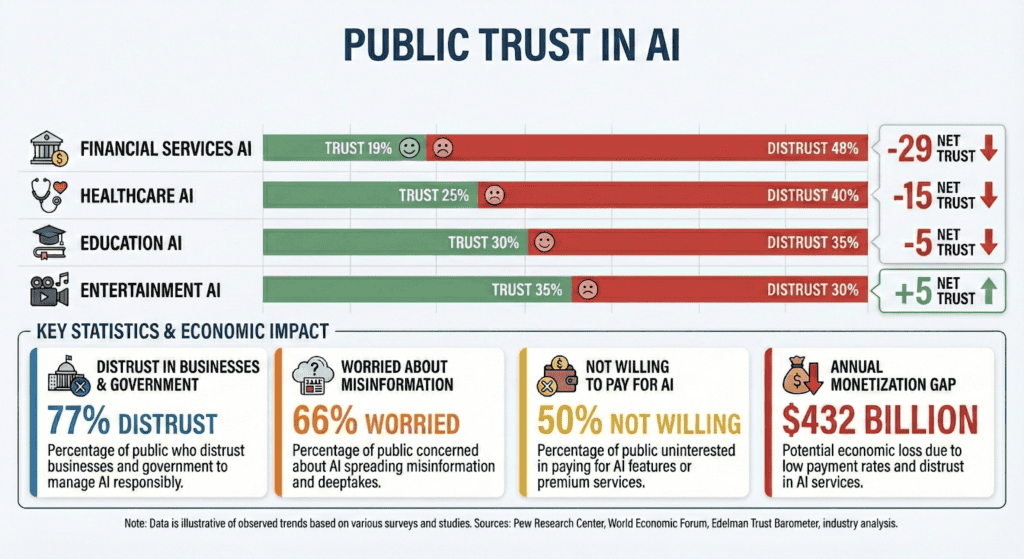
66% of US adults are highly worried about people getting inaccurate information from AI, according to Pew Research
77% of Americans distrust both businesses and government agencies to use AI responsibly, based on a Gallup-Bentley University survey
55% of both experts and the public say they’re highly concerned about bias in AI decisions
62% of the public have little or no confidence in government to regulate AI effectively
50% of Americans say they’re more concerned than excited about increased AI use in daily life, up from 37% in 2021
Only 21% of Americans said they trusted businesses on AI in 2023, though this has improved slightly since then
57% of the public is concerned about AI leading to less connection between people
32% of consumers now view generative AI as a negative disruptor in the creator economy, nearly double the 18% in 2023
50% of US smartphone owners say they’re not willing to pay extra for AI features on their phones
Only 11.6% of iPhone owners and 4.0% of Samsung Galaxy owners are willing to pay for AI subscription services
Consumer enthusiasm for AI-generated creator work has dropped from 60% to 26% since 2023
52% of consumers are concerned about brands posting AI-generated content without disclosure
Only 19% of consumers are willing to pay for generative AI shopping tools
Market impact of consumer distrust shows only about 3% of 1.8 billion AI users pay for premium services, leaving a $432 billion annual monetisation gap
People use AI tools but don’t trust them. That’s the paradox we’re seeing – widespread adoption alongside deep skepticism. Maybe that’s because people see the benefits but also recognise the risks.
When only 3% of AI users pay for premium services, that’s a massive market opportunity being missed. Companies could be making billions more if they could build trust. But right now, the gap between usage and payment shows people aren’t convinced AI is worth paying for.
Transparency seems to be the key. 57% of Americans say they’d be less concerned about AI if businesses were transparent about how they use it. 85% of consumers say companies should be required to disclose when AI is used. People don’t necessarily hate AI – they hate not knowing when they’re interacting with it.
AI Bias and Regulation Statistics
Here’s what the current regulatory environment looks like. The EU AI Act sets the global standard with fines up to €35 million or 7% of global annual turnover. In the US, states are passing their own laws at a rapid pace. Biden’s Executive Order established critical AI governance infrastructure, but state-level action is where most enforcement happens right now.
100+ new state AI laws were passed across the US in 2025, creating a complex patchwork of regulations
$2.5 million settlement from Massachusetts Attorney General with a student loan company for discriminatory AI practices
€35 million maximum fines under the EU AI Act, or 7% of global annual turnover
15 million euros alternative fines for other violations under EU regulations, or 3% of global revenue
28% of organisations most concerned about “changes in regulations that are missed in our program”
Enterprise security questionnaires added AI sections in 2025, showing how compliance requirements are expanding
€1.31 billion market size for AI in regulatory affairs in 2024, projected to reach €6.65 billion by 2033
18.60% annual growth rate for AI regulatory affairs market from 2025 to 2033
€34.99 billion compliance software market in 2025, growing to €38.36 billion in 2026
€3.3 billion market forecast for artificial intelligence in RegTech by 2026
36.1% annual growth rate for AI in RegTech market
69.23% cloud deployment share in compliance software market in 2025
57.14% large enterprise share in compliance software market in 2025
Countries leading in regulation: EU (most comprehensive), US (state-level patchwork), China (strict but centralised), Canada (proposed AI and Data Act)
Compliance percentages: Only 13% of companies actively test for bias, but 77% have bias-testing tools in place
Proposed vs enacted regulations: Hundreds of AI bills proposed in 2025, with approximately 100 becoming law
Enforcement budgets: Growing significantly as agencies hire AI experts and build enforcement capabilities
Language Bias in AI
Your voice should work the same as everyone else’s when you talk to AI. But that’s not how it plays out. AI systems favour some languages, accents, and speech patterns while quietly failing others. If you don’t sound like the data they were trained on, the system works against you.
The numbers make this clear:
Large language models show biased behaviour in around 40% of text quality evaluations across major benchmarks
High-resource languages like English dominate AI training, while low-resource languages are consistently underrepresented
36.44% of AI bias research focuses on English, compared to just 7.45% on Spanish and 6.38% on French
Multilingual models default to English viewpoints when responding to low-resource languages like Sanskrit
Benchmark datasets such as IndiBias show higher intersectional bias across 10 leading language models when English and Hindi are compared
Models trained with balanced multilingual data show lower bias levels than monolingual or English-heavy models
This isn’t just about bad translations or awkward phrasing. When AI prioritises certain languages, it decides who gets accurate answers and who gets ignored. Speakers of low-resource languages receive incomplete, distorted, or irrelevant responses.
Information collapses into an English-centric view of the world. Local context disappears. Entire communities get locked out of AI benefits not because they lack knowledge, but because their language was never treated as important enough to train on.
AI doesn’t struggle with language by accident. It reflects the choices made about which voices were worth listening to in the first place.
How Companies Are Trying to Reduce AI Bias
Businesses are starting to realise biased algorithms cost real money – lawsuits, lost talent, and damaged reputations. That’s why corporate responsibility around AI bias is growing, even if progress feels slow.
Companies are taking different approaches. Some focus on technical fixes like better testing tools. Others work on team diversity to catch biases early. The most forward-thinking companies combine both approaches. They understand that fixing AI bias isn’t just about better algorithms – it’s about better processes and people too.
Here’s what companies are actually doing to tackle AI bias:
40% of companies now collect and analyse diversity metrics across their HR processes, according to industry research. This helps them spot patterns before they become problems.
35% conduct regular audits of their HR processes to identify and address bias. These audits check everything from resume screening to promotion decisions.
32% ensure diverse representation in their talent pipelines. They’re not just fixing algorithms – they’re fixing the data going into those algorithms.
19% partner with external organisations to support diverse HR strategies. Sometimes you need outside help to see your own blind spots.
51% implement diverse hiring panels to reduce individual biases. More perspectives mean fewer missed problems.
36% develop standardised, bias-free job descriptions and interview questions. They’re removing bias at the very beginning of the hiring process.
35% utilise AI-driven tools specifically designed to eliminate bias. Yes, they’re using AI to fix AI – it’s a bit meta, but it works.
27% provide regular bias training for HR staff and hiring managers. Technology alone can’t solve human problems.
Companies are investing heavily in bias mitigation, with the AI regulatory compliance market reaching €34.99 billion in 2025 and growing to €38.36 billion in 2026.
The bias and fairness management segment is growing at 28.55% annually through 2031, showing increasing corporate investment.
Only 13% of companies actively test for bias in their AI systems, but 77% have bias-testing tools in place. The gap between having tools and using them properly is where problems happen.
Companies that do test properly see significant ROI – bias reduction initiatives can prevent lawsuits averaging $365,000 to over $2 million per incident.
Diversity in AI teams matters – companies with more diverse development teams catch 40% more bias issues before deployment.
The market for bias solution tools reached $1.31 billion in 2024 and is projected to hit $6.65 billion by 2033, growing at 18.60% annually.
AI in RegTech (regulatory technology) is forecast to reach $3.3 billion by 2026, growing at 36.1% annually as companies try to stay compliant.
Success rates vary – companies with formal AI bias strategies report 80% success in bias reduction, compared to 37% for those without strategies.
Most common mitigation techniques include diverse training data (adopted by 45% of companies), regular audits (35%), and explainable AI tools (28%).
The progress might feel slow, but it’s happening. Companies that used to ignore AI bias now face real consequences – lawsuits, regulatory fines, and public backlash. That financial pressure is driving change faster than ethical concerns alone ever could.
OpenAI’s valuation has gone from $300 billion to $730 billion in less than a year. That kind of acceleration does not happen on hype alone.
The numbers behind it are just as striking: 900 million weekly active users as of February 2026, a $40 billion funding round confirmed by CNBC as the largest private tech raise on record, and more than 2.5 billion prompts processed every single day. These OpenAI statistics from 2026 track a company moving faster than most industries can process.
Here is what the data shows about where the money is coming from, how fast the user base is growing, and what that means for the broader AI market.
Key OpenAI Statistics for 2026
OpenAI’s trajectory in 2025 and into 2026 is defined by one compounding fact: every major metric, from users to revenue to valuation, grew faster than the previous record it had just set.
900 million weekly active users globally as of February 2026, up from 800 million in October 2025
$20 billion+ in annualized revenue reached in 2025, confirmed by OpenAI CFO Sarah Friar, up from the $13 billion target set mid-year
$300 billion post-money valuation confirmed after the March 2025 funding round
$40 billion raised in March 2025, the largest private tech funding round on record at the time
$57.9 billion in total funding raised across 11 rounds as of May 2025, with additional rounds closing in late 2025 and 2026
1 million+ business customers worldwide using OpenAI products, confirmed by OpenAI in November 2025
2.5 billion daily queries processed globally across all ChatGPT users
36.5% of U.S. businesses adopted OpenAI services by July 2025
45.3% market share among daily U.S. mobile app users as of January 2026, down from 69.1% in January 2025, per Apptopia data reported by Fortune
330 million daily queries from U.S. users alone, representing roughly 13% of global query volume
49% of U.S. companies report using ChatGPT regularly in their workflows, per a ResumeBuilder/Digital Silk survey
ChatGPT adoption growth rates in the lowest-income countries were more than 4x those in the highest-income countries by May 2025, according to OpenAI’s own research
OpenAI Revenue Statistics and Financial Performance
OpenAI grew from $1.6 billion in revenue in 2023 to $13.1 billion in 2025. That is an 8x increase in two years. The losses kept pace: the company burned through roughly $8 billion in cash during 2025 alone, even while exceeding its own internal revenue targets.
Revised upward from original $29.4 billion internal target
These OpenAI revenue statistics show a 3.2x annualized growth rate since 2023, a pace that Epoch AI’s Companies Data Hub describes as among the fastest in tech history. But the revenue mix and margin picture are harder to ignore:
ChatGPT accounts for roughly 70% of total revenue, with enterprise solutions making up the remaining 30%
The enterprise segment now exceeds 40% of total revenue and is on track to reach parity with the consumer segment by end of 2026, per OpenAI’s March 2026 funding announcement
Adjusted gross margin fell to 33% in 2025, down from 40% in 2024, as inference costs quadrupled during the year
Cash burn in 2025 reached approximately $8 billion, below the company’s own $9 billion internal ceiling
The margin compression is structural, not incidental. Every new model generation requires more compute at inference, and OpenAI is deploying more capable models faster than it is reducing the cost to run them. Revenue scaling at 8x does not offset a gross margin falling 7 points in a single year.
OpenAI Valuation and Funding Statistics
No private company has appreciated faster. OpenAI went from a $29 billion valuation in 2023 to $852 billion by March 2026, a 29x increase in roughly three years. The funding that powered that climb is equally without precedent: $180 billion raised across 13 rounds, including two successive rounds that each broke the record for the largest private fundraise in history.
Date
Valuation
Round / Event
2023
$29 billion
Thrive Capital-led tender offer
Early 2024
$80 billion
Secondary share transaction
October 2024
$157 billion
Series E funding round
March 2025
$300 billion
Series F; $40 billion raised, led by SoftBank ($30 billion)
October 2025
$500 billion
Secondary share sale; surpassed SpaceX as most valuable private company
March 2026
$852 billion
Series G; $122 billion raised, led by SoftBank, Amazon, and Nvidia
These OpenAI valuation statistics carry a sharp contradiction at their core. The $852 billion figure sits alongside a projected $14 billion net loss for 2026 alone and cumulative losses of $44 billion expected through 2028. Investors are not betting on current profitability. They are betting that whoever controls the leading general-purpose AI infrastructure will not be displaced, and that the window to take that position is closing. SoftBank, Amazon, and Nvidia collectively put more than $150 billion into OpenAI across two years on exactly that thesis.
ChatGPT User Growth Statistics
ChatGPT hit 100 million weekly active users in November 2023. By February 2026, that number was 900 million. Almost no consumer platform in history has added 800 million users in roughly 27 months.
The pace did not hold steady: it accelerated. The jump from 500 million to 800 million weekly users took just seven months (March to October 2025), and year-over-year growth as of August 2025 was running at more than 4x, up from 2.5x at the same point in 2024. These ChatGPT user growth statistics also track where that growth is concentrated, and the answer is not where most people assume.
Date
Weekly Active Users
Notable Context
November 2023
100 million
First major WAU milestone disclosed publicly
End of March 2025
500 million
Baseline for seven-month sprint comparison
August 2025
~700 million
Year-over-year growth running at 4x+, per CNBC
October 2025
800 million
8x growth from November 2023 in under two years
February 2026
900 million
More than doubled from 400 million in February 2025 (125% YoY)
The demographic and geographic spread behind these numbers adds context the headline figures obscure. Women now make up 52% of identifiable ChatGPT users (up from 37% in January 2024), signaling a platform that has moved well past its early tech-enthusiast base. Geographically, the US accounts for roughly 18% of total users, with India at approximately 9% and Brazil at 5%. More telling: adoption growth in the lowest-income countries is running at more than 4x the rate seen in the highest-income countries, per OpenAI’s own September 2025 consumer usage study. The scale at which this is happening (3 billion messages sent per day across all products as of August 2025) suggests the platform is no longer competing for attention against other AI tools. It is competing against not using AI at all.
ChatGPT Usage Statistics: How People Actually Use It
The headline user numbers get the attention. But the usage data tells a more unexpected story: the platform’s explosive message growth between 2024 and 2025 was driven primarily by non-work activity, not professional use. That inversion matters for how the platform’s long-term role gets understood.
Message Category
Daily Volume (June 2024)
Daily Volume (June 2025)
Share Shift
Non-work messages
238 million (53%)
1,911 million (73%)
+20 percentage points
Work-related messages
213 million (47%)
716 million (27%)
-20 percentage points
Total daily messages
451 million
2,627 million
+483% year-over-year
Total daily messages grew more than 5x in a single year, according to OpenAI’s largest-ever consumer usage study published as an NBER working paper in September 2025. Work-related volume nearly tripled in absolute terms. But non-work messages grew 8x, pulling the share distribution sharply toward personal and conversational use. These ChatGPT usage statistics also break down what users are actually doing when they open the platform:
Nearly 80% of all conversations fall into three categories: practical guidance (29%), seeking information, and writing
40% of all work-related messages involve writing tasks, with two-thirds of those asking ChatGPT to modify existing text rather than generate new content
ChatGPT accounted for 69% of all AI tools web traffic in August 2025, reaching 5.846 billion website visits, per Similarweb
The mobile app generated $2.48 billion in worldwide consumer spending in 2025, a 408% year-over-year increase from $487 million in 2024
ChatGPT became the fastest app to reach 1 billion global downloads across iOS and Google Play combined, per Sensor Tower’s State of AI Apps Report 2025
The editing-over-generating finding in writing tasks points to a platform that has settled into a role as a revision layer, not a replacement for original thought. Users are bringing their own work and asking for it to be improved, not asking ChatGPT to start from scratch.
OpenAI Traffic Statistics: openai.com vs. chatgpt.com
chatgpt.com ranked 5th among all websites on earth in March 2026, sitting behind only Google, YouTube, Facebook, and Instagram. That context reframes every openai.com engagement metric: the corporate site is a waypoint. The product is where users actually live.
These OpenAI traffic statistics cover both properties separately, because pooling them obscures what each one shows. openai.com pulls in massive visitor volume with shallow engagement. chatgpt.com shows the opposite: fewer absolute visits than the corporate site, but session behavior that looks more like a productivity tool than a web destination.
Metric
openai.com (Apr–Jun 2025)
chatgpt.com (March 2026)
Monthly visits
663.6 million
Not separately reported (ranked #5 globally)
Unique monthly visitors
237.7 million (2.89% of global population)
Not separately reported
Avg. visit duration
2 minutes 2 seconds
5 minutes 51 seconds
Pages per visit
2.50
3.56
Bounce rate
61.53%
33.13%
Visits per unique visitor
2.79
Not separately reported
Largest social traffic source
YouTube (42.18% of social referrals)
Not separately reported
The bounce rate gap is the most telling signal. Nearly 62% of openai.com visitors leave after a single page, a pattern consistent with users landing on a blog post or news item and moving on. chatgpt.com’s 33% bounce rate, combined with nearly six-minute average sessions, reflects a platform people are opening to complete tasks. YouTube driving 42% of openai.com’s social referrals reinforces the same point: most traffic to the corporate site arrives from content discovery, not from people seeking the product itself.
ChatGPT User Demographics Statistics
ChatGPT’s early user base looked like most consumer tech launches: young, male-skewed, and concentrated in high-income English-speaking markets. By mid-2025, that profile had changed on almost every dimension. The platform’s gender split has reversed, its age distribution has broadened significantly upward, and its fastest-growing users are in lower-income countries.
These ChatGPT user demographics statistics break down who is on the platform today across the four dimensions where the shift is most visible:
Age: the 25–34 bracket remains the largest single group at 28.84%, with 18–24-year-olds at 24.81%. Together, users under 35 account for more than half the platform. Adults 45 and older now represent more than a quarter of all users.
Gender: the platform launched with a clear male skew (53.84% male, 46.16% female). By July 2025, that skew had not only narrowed but reversed, per OpenAI’s September 2025 NBER consumer usage study.
Geography: the US leads at 14.13% of traffic, followed by India at 11.71% and Japan at 5.27%. The US share reflects the largest absolute user pool, but India’s proximity to the top signals where growth is concentrated.
Teen usage:59% of US teens ages 13–17 have used ChatGPT, per a Pew Research Center survey conducted September–October 2025, more than double the rate of the next most-used chatbot (Google Gemini at 23%).
Education Level
Share of US Adults Who Have Used ChatGPT
Postgraduate degree
52%
Bachelor’s degree
51%
Some college
33%
High school degree or less
18%
US adults overall (2025)
34%
US adults under 30
58%
The education gradient is among the sharpest demographic divides in the platform’s US data, per Pew Research Center’s February–March 2025 survey of 5,123 adults. College graduates are nearly three times as likely to have used ChatGPT as adults without a college degree. That gap partially reflects income and occupation, but it also signals that the platform’s most active use cases still skew toward knowledge work. Nearly half of all ChatGPT messages sent by adults come from users under 26, according to OpenAI’s September 2025 NBER study, suggesting age compresses the education gap at the younger end of the distribution.
ChatGPT Business Usage Statistics
Among Fortune 500 companies, ChatGPT adoption has reached 92%. Among all U.S. businesses, it sits at 49%, with another 30% planning to adopt soon. The gap between enterprise and small-business adoption is the defining fault line in how this technology is spreading through the economy.
Segment
Category
Company Count (ChatGPT Users)
By Industry
IT Services
1,171 companies
Computer Software
1,070 companies
Higher Education
401 companies
By Company Size
10–50 employees
1,400+
50–200 employees
1,275
10,000+ employees
900+
By Revenue
$1M–$10M
1,643 companies
$10M–$50M
1,300+
$1B+
1,232 companies
These ChatGPT business usage statistics extend beyond adoption counts into how frequently and exclusively employees are using the platform. Among workplace AI users, 70.8% have chosen ChatGPT as their primary tool, per a survey by Exploding Topics reported by FatJoe in 2026. More than half of workplace AI users engage with it four or more days per week, and daily usage among knowledge workers doubled in the year to mid-2025, according to Stanford research cited in OpenAI’s August 2025 workplace usage report. That same report, drawing on Pew Research Center data, found that 28% of employed U.S. adults were using ChatGPT at work by mid-2025, up from just 8% two years earlier. The 22% of workplace users who interact daily, with another 12% engaging weekly, reflects a platform that has moved from occasional tool to embedded workflow component for a meaningful share of the workforce.
OpenAI Product and GPT-5 Pricing Statistics
When GPT-5 launched on August 7, 2025, TechCrunch called it a potential price war starter. At $1.25 per million input tokens, it undercut prevailing frontier model rates by a wide margin. By May 2026, OpenAI had cut that price in half for the original GPT-5 model, reassigning the $1.25 rate to the newer GPT-5.1, in a compression cycle that shows no sign of stabilizing.
Model
Input (Standard)
Input (Cached)
Output
GPT-5 (at launch, Aug 2025)
$1.25 / million tokens
$0.125 / million tokens
$10 / million tokens
GPT-5 (May 2026, reduced)
$0.625 / million tokens
$0.125 / million tokens
Not separately updated
GPT-5.1 (May 2026)
$1.25 / million tokens
Not separately reported
Not separately reported
GPT-5 Mini (at launch, Aug 2025)
$0.25 / million tokens
Not separately reported
$2 / million tokens
GPT-5 Mini’s output tokens cost 80% less than the flagship model at launch ($2 vs. $10 per million), giving enterprise developers a viable cost path for high-volume applications. These GPT-5 pricing statistics reflect a deliberate strategy: compress access costs to accelerate adoption while the compute bill continues to grow underneath. The 2024 compute breakdown from The Information illustrates exactly how steep that bill is:
$2 billion spent running AI models (inference costs) in 2024
$3 billion spent training new models in 2024
$5 billion in total 2024 compute costs, exceeding the company’s entire annual revenue of $3.7 billion that year
Lowering API prices accelerates the adoption that justifies the next funding round. It does not reduce the compute cost per query.
OpenAI Traffic Sources Statistics
Most people assume social media drives AI tool discovery. For chatgpt.com, 74% of U.S. traffic in August 2025 arrived directly, with no referral source at all, per Similarweb data published on the Similarweb blog in September 2025. Organic search added roughly 19%. Social platforms, combined, contributed a small fraction.
Traffic Channel
Share of chatgpt.com U.S. Traffic (August 2025)
Direct visits
74%
Organic search
~19%
Paid search
~2.4%
Social referrals (combined)
Remainder
Within the social referral share, these OpenAI traffic sources statistics reveal a concentration that reflects how people learn about AI tools: not through feeds, but through demonstration content. The breakdown of desktop social media traffic to the OpenAI website between April and June 2025 is as follows:
Social Platform
Share of Desktop Social Referral Traffic (Apr–Jun 2025)
YouTube
42.18%
X (formerly Twitter)
13.95%
LinkedIn
11.66%
WhatsApp Web
8.16%
Facebook
7.35%
YouTube’s share is more than three times that of the next platform. Tutorials, walkthroughs, and capability demonstrations on video outperform every text-based or conversational social channel combined, which tells you more about how AI tool awareness spreads than any paid acquisition data could.
The geographic spread of chatgpt.com users shows a similar concentration at the top: the United States accounted for 14.72% of ChatGPT users between April and June 2025, rising to 15.09% by August 2025, per Similarweb. India followed at 9.02% (rising to 9.31% by August 2025). ChatGPT referral traffic to third-party websites grew 52% year-over-year from September to November 2025. Over the same period, Google Gemini’s referral traffic grew 388%, according to Similarweb data shared with Digiday in December 2025. That asymmetry is the most important competitive signal in the traffic data: ChatGPT’s referral footprint is large, but Gemini is closing the gap faster than the headline user numbers suggest.
GPT-5 Performance and Adoption Statistics
Within one week of GPT-5’s August 7, 2025 launch, reasoning workloads on OpenAI’s platform increased eightfold. That is not a benchmark result. It is what enterprises actually did when they got their hands on the model, and it is a more reliable signal of capability than any leaderboard position.
Benchmark
GPT-5 Score
Context
SWE-bench Verified (coding)
74.9%
State-of-the-art at launch, per OpenAI
Aider Polyglot (coding)
88%
State-of-the-art at launch, per OpenAI
AIME 2025 (math, no tools)
94.6%
Up from GPT-4o’s 42.1% on the same benchmark
GPQA Diamond (PhD-level science, no tools)
88.4%
GPT-5 Pro; state-of-the-art at launch
MMMU (college-level multimodal)
84.2%
Per OpenAI’s August 7, 2025 launch documentation
Frontend web development vs. o3
Wins 70% of the time
Internal testing; uses 22% fewer output tokens than o3
The benchmark picture is consistent: GPT-5 set new state-of-the-art results across coding, math, and science tasks at launch. The AIME jump from 42.1% (GPT-4o) to 94.6% is the sharpest single-generation gain in the table. Epoch AI’s analysis, published August 29, 2025, placed GPT-5’s overall capability gains in the same range as the GPT-3 to GPT-4 transition, which remains the benchmark for what a generational model shift looks like. On token efficiency, GPT-5 with thinking enabled outperforms o3 while using 50 to 80% fewer output tokens across visual reasoning, agentic coding, and graduate-level scientific problem solving.
These GPT-5 adoption statistics tell the enterprise side of the story more directly. Cursor, Vercel, JetBrains, Factory, Qodo, and GitHub Copilot all made GPT-5 the default model in key products within one week of launch, per CNBC reporting published August 14, 2025. Over that same period, coding and agent-building activity on OpenAI’s platform more than doubled. The 400K total context window (272K input tokens plus 128K output tokens) gave enterprise developers working with long codebases and complex document pipelines something GPT-4’s 128K window could not: room to fit the whole problem in a single call.
OpenAI Market Share Statistics and Competitive Landscape
ChatGPT still leads every major consumer category. But in the enterprise segment where contract values are largest, OpenAI has already lost the top position. Anthropic holds it now, and the gap is not narrow.
Segment
OpenAI (ChatGPT)
Anthropic (Claude)
Google (Gemini)
Grok (xAI)
AI search market share (Dec 2025)
61.3%
Not separately reported
13.4%
Not separately reported
Daily US mobile app share (Jan 2026)
45.3% (down from 69.1% in Jan 2025)
Not separately reported
25.2% (up from 14.7%)
15.2% (up from 1.6%)
Enterprise LLM spend share (2025)
27% (down from 50% in 2023)
40% (market leader)
21% (up from 7% in 2023)
Not separately reported
Enterprise coding use cases (2025)
21%
54% (dominant)
Not separately reported
Not separately reported
These OpenAI market share statistics show two diverging trajectories running simultaneously. The competitive movements behind each row carry their own context:
ChatGPT’s US daily mobile app share fell 23.8 percentage points in a single year (69.1% to 45.3%), dropping below 50% for the first time, even as the overall GenAI chatbot app market grew 152% year-over-year, per Apptopia data reported by Fortune, February 2026
Grok surged from 1.6% to 15.2% in US daily mobile share over the same 12-month period, fueled by deep integration within the X app, making it the fastest-growing AI chatbot by market share
Anthropic’s enterprise LLM spend share rose to 40% by December 2025, up from 32% by usage share earlier in the year, with coding dominance that has been nearly uninterrupted for 18 months since Claude Sonnet 3.5’s June 2024 release
Google Gemini grew enterprise share from 7% in 2023 to 21% in 2025; together, Anthropic, OpenAI, and Google account for 88% of all enterprise LLM API spend
U.S. enterprise LLM API spending reached $37 billion in 2025, up more than threefold from $11.5 billion in 2024, per Menlo Ventures’ 2025 State of Generative AI in the Enterprise report (December 2025, 495 U.S. companies surveyed)
The AI market is not heading toward a single winner. OpenAI’s consumer reach remains enormous, but Anthropic owns enterprise coding, Gemini is gaining enterprise wallet share fast, and Grok has demonstrated that platform integration can compress years of user acquisition into months.
OpenAI API Usage Statistics
In 2023, OpenAI’s API processed 300 million tokens per minute. By March 2026, that figure was 15 billion. That 50x increase in under three years is not developer experimentation scaling up. It is production infrastructure at a scope that few cloud platforms have reached this quickly.
Metric
Earlier Baseline
Latest Figure
Source / Date
Tokens processed per minute
300 million (2023)
15 billion (March 2026)
OpenAI DevDay Oct 2025; Panto AI Jan 2026
Daily API calls
1.3 billion (2024)
2.2 billion+ (2025)
69% year-over-year increase
Active developers on platform
2 million weekly (2023)
4 million (October 2025)
OpenAI DevDay, Sam Altman keynote, Oct 6 2025
ChatGPT workplace seats
Not separately disclosed
7 million+ (as of Dec 2025)
OpenAI State of Enterprise AI 2025 Report
ChatGPT Enterprise seat growth (YoY)
Baseline 2024
9x year-over-year
OpenAI State of Enterprise AI 2025 Report
What these OpenAI API statistics do not show in a table row is the depth of that enterprise usage. Among enterprise customers, reasoning token consumption per organization increased 320x year-over-year, and ChatGPT Enterprise message volume grew 8x over the same period, per OpenAI’s State of Enterprise AI 2025 Report (December 17, 2025), which analyzed de-identified, aggregated data across more than 1 million business customers. Those numbers describe a different kind of adoption than new seat counts do. Organizations that were running lightweight queries in 2024 are now running sustained, compute-intensive reasoning workloads at scale. The developer platform’s expansion into fine-tuning, custom GPTs, and agentic workflow tools gave those enterprises the surface area to go that deep.
Enterprise and Business Adoption Statistics
Most enterprise software adoption stories take years to verify. OpenAI’s did not. By November 2025, more than 1 million business customers were on the platform, and by early 2026 that translated into 9 million paying business users relying on ChatGPT for work — a scale that most SaaS companies take a decade to build. The question worth asking at this point is not whether enterprises adopted, but what they are actually doing with it.
Market
YoY Growth in Paying Business Customers (Nov 2024 – Nov 2025)
vs. Global Average (143%)
Australia
187%
+44 points above average
Brazil
161%
+18 points above average
Netherlands
153%
+10 points above average
France
146%
+3 points above average
Global average
143%
Baseline
UK / Germany
Not separately reported
Highest enterprise customer count outside US
Japan
Not separately reported
Leads corporate API customers outside US
International expansion is running ahead of most forecasts. Every one of the largest non-US markets grew faster than 143% year-over-year, per OpenAI’s State of Enterprise AI 2025 Report (December 17, 2025), which measured growth across more than 1 million business customers. These OpenAI enterprise statistics also capture what adoption looks like once it matures: workers using ChatGPT Enterprise report saving 40 to 60 minutes per active workday on average, with data science, engineering, and communications workers saving 60 to 80 minutes. Structured workflow usage (Projects and Custom GPTs) grew 19x year-to-date, with roughly 20% of all Enterprise messages now flowing through tailored assistants rather than open-ended queries. That shift from casual use to repeatable, integrated processes is the operational signal that 80% Fortune 500 adoption within nine months of launch was pointing toward. And across a survey of 9,000 workers at nearly 100 enterprises, 75% reported improved speed or quality of output, while another 75% reported completing tasks they previously could not perform at all.
OpenAI Computing Infrastructure Statistics
The Stargate program is targeting 10 gigawatts of AI data center capacity by 2029. To understand what that number means, consider the starting point: OpenAI ran its entire operation on 0.2 GW in 2023. The trajectory from there to 1.9 GW by the end of 2025 (confirmed by OpenAI CFO Sarah Friar in her January 18, 2026 blog post) already represents a nearly 10x expansion in two years. Stargate adds another order of magnitude on top of that.
Year / Period
Capacity (GW)
Key Context
2023
0.2 GW
Baseline; equivalent to ~175,000 average U.S. homes
2024
0.6 GW
3x year-over-year increase; confirmed by OpenAI CFO
End of 2025
1.9 GW
9.5x growth from 2023; sufficient to power ~1.66 million U.S. homes
Stargate Abilene flagship (April 2026)
0.3 GW operational
~250,000 H100-equivalent chips; full 1.2 GW buildout projected Q4 2026
Stargate total target (2029)
10 GW
$500B JV between OpenAI, SoftBank, and Oracle; ~7 GW planned across all U.S. sites by September 2025
These OpenAI infrastructure statistics carry more weight when read alongside the specific financial commitments behind each capacity milestone:
OpenAI and Oracle agreed to develop up to 4.5 GW of additional Stargate capacity across new Texas, New Mexico, and Midwest sites, in a partnership exceeding $300 billion over five years, confirmed by OpenAI’s September 23, 2025 Stargate expansion announcement
SoftBank and OpenAI jointly invested $1 billion in SB Energy in January 2026 to support the 1.2 GW Milam County, Texas Stargate campus, with SB Energy serving as the energy infrastructure developer for that site
OpenAI reduced its inference cost to under $1 per million tokens as of early 2026, achieved partly by mixing different types of data center hardware, per OpenAI CFO Sarah Friar’s January 18, 2026 blog post
OpenAI’s partnership-based model with cloud providers and data center operators (rather than building owned facilities) enabled the 0.2 GW to 1.9 GW expansion without the capital intensity of direct construction
The inference cost reduction to under $1 per million tokens is the metric that connects infrastructure scale to commercial viability: as capacity grows and hardware mixing improves efficiency, the per-query cost compresses, which is what makes the 2.5 billion daily prompts sustainable at a price point that retains users.
OpenAI Website Traffic and Engagement Statistics
A platform that crosses 6 billion monthly visits is no longer competing with other AI tools. It is competing with search engines and social media for a share of daily internet time. ChatGPT crossed that threshold by October 2025, reaching 6.2 billion visits in a month, up from 1.6 billion in January 2024. That trajectory covers 22 months and a nearly 4x increase in traffic volume.
Period
Monthly Visits
Context
January 2024
1.6 billion
First major monthly visit milestone publicly reported
November 2023
~1.7 billion
Corrected figure; original article misattributed this to July 2024
July 2024
2.4 billion
Surpassed January 2024 figure; per Similarweb data via Textero.io
August 2025
5.846 billion
489 million unique visitors; 115.9% year-over-year growth in late 2024
January 2026
5.723 billion
4th highest month on record at the time; 3.73% month-over-month growth
October 2025
6.2 billion
Highest monthly visit total reported through early 2026
These OpenAI website traffic statistics also capture who is arriving and how long they stay. As of February 2026, Similarweb reports chatgpt.com’s audience at 53.44% male and 46.56% female, a narrower gap than earlier figures suggested, with the split continuing to close as the platform expands well beyond its early tech-enthusiast user base, per data reported by The Digital Elevator. The openai.com corporate site draws 237.7 million unique monthly visitors generating 663.6 million total visits (April to June 2025), but with an average session of around two minutes, that traffic behaves like discovery browsing. chatgpt.com tells the opposite story: sessions averaging nearly six minutes, a sub-34% bounce rate, and 489 million unique visitors in August 2025 alone. The gap between those two properties is the clearest measure of what visit volume actually means once users reach the product.
Microsoft OpenAI Partnership Statistics
Microsoft’s investment in OpenAI has returned approximately 10x as of October 2025, per CEO Satya Nadella’s remarks at Microsoft’s fiscal Q1 2026 earnings call. That return has come alongside an agreement that looks almost nothing like the one Microsoft originally signed. The April 27, 2026 restructuring removed exclusivity, capped the revenue share, ended the AGI-linked termination trigger, and converted Microsoft’s IP license from exclusive to non-exclusive, all in a single renegotiation.
Partnership Term
Original / Prior Structure
After April 27, 2026 Restructuring
Total Microsoft investment committed
$13 billion total commitment; $11.6 billion funded as of September 2024
Unchanged; $3.1 billion equity method hit to Microsoft net income in fiscal Q1 2026
Microsoft stake in OpenAI Group PBC
~32.5% on as-converted basis (prior for-profit structure)
~27% on as-converted diluted basis; valued at ~$135 billion at October 2025 recapitalization
Cloud relationship
Exclusive Azure partnership for OpenAI API products
Non-exclusive; OpenAI launches first on Azure unless Microsoft cannot support required capabilities, but may serve any cloud provider freely
Revenue share (OpenAI to Microsoft)
~20% of OpenAI revenues; ends when AGI verified by independent expert panel
Capped total; continues through 2030 independent of AGI status; AGI-linked termination trigger removed
Revenue share (Microsoft to OpenAI)
Microsoft paid OpenAI a share of Azure OpenAI Service and Bing revenues relying on OpenAI technology
Microsoft stopped paying OpenAI a revenue share on Azure resales
IP license
Exclusive license to OpenAI’s models through 2032, excluding consumer hardware
Non-exclusive license through 2032, excluding consumer hardware; other cloud providers may also access OpenAI models
OpenAI Azure purchase commitment
Not separately disclosed at original deal terms
OpenAI committed to purchasing an incremental $250 billion of Azure services, confirmed October 28, 2025
The revenue share payment figures reveal how much was flowing under the prior structure. These Microsoft OpenAI partnership statistics from leaked financial documents reviewed by TechCrunch (November 14, 2025) show OpenAI paid Microsoft $493.8 million in revenue share in 2024, then $865.8 million in just the first three quarters of 2025, a near-doubling of the annual pace. At the 20% rate widely reported for the original agreement, those payments imply OpenAI revenues of at least $2.5 billion in 2024 and $4.33 billion in the first nine months of 2025, figures that align with the company’s confirmed full-year 2024 revenue of $3.7 billion. The April 2026 restructuring capped those outflows and removed the AGI trigger that had given OpenAI a theoretical path to ending the arrangement early. What replaced it is a fixed-term commercial relationship that runs through 2030 regardless of how either company’s technology develops.
OpenAI Employee and Workforce Statistics
The average stock-based compensation at OpenAI reached $1.5 million per worker in 2025, according to Wall Street Journal financial records reported by Fortune on February 18, 2026. That figure is approximately seven times higher than Google’s inflation-adjusted employee compensation in the year before its IPO, and the highest average equity compensation recorded for any major tech startup. The headcount behind that number grew nearly as fast as the compensation itself.
Date / Period
Employee Count
Context
November 2023
~770
Pre-scaling baseline
September 2024
3,531
Nearly 5x increase in under a year
July 2025
3,000+
Confirmed by OpenAI researcher Noam Brown on Twitter, per Epoch AI data published July 15, 2025
Early 2025
5,328
Peak figure reported; aggressive hiring across technical and operational roles
Q1 2026
~3,800 full-time
90% increase from ~2,000 in early 2025; per Searchlab analysis citing LinkedIn, The Information, and Bloomberg
These OpenAI employee statistics extend beyond headcount into what it costs to attract and retain the workforce building the models. Compensation data from nahc.io’s August 2025 analysis and Fortune’s February 2026 reporting breaks down as follows:
Median total compensation: $1,370,000 per year, with the 25th percentile at ~$925,000 and the 90th percentile reaching $2,792,200
Research engineers earn $295,000–$530,000 in base salary; software engineers earn $255,000–$590,000 in base salary
Revenue per employee at Q1 2026 headcount: approximately $3.3 million, compared to Google’s $1.8 million and Meta’s $1.6 million per employee
Educational concentration includes Stanford, MIT, and Berkeley, with the majority of roles in AI research and engineering
The $3.3 million revenue-per-employee ratio makes the compensation structure more sustainable than it looks at first glance: OpenAI is generating more output per person than any comparable tech company at this stage, which is partly a function of what the product does and partly a function of keeping headcount disciplined relative to revenue growth.
OpenAI Profit and Loss Statistics
The assumption is that revenue growing at 8x in two years should eventually close a loss gap. At OpenAI, the loss gap grew alongside the revenue. In 2024, the company spent approximately $9 billion in total operating costs while bringing in $3.7 billion in revenue — meaning it spent roughly $2.40 for every dollar it earned, according to Epoch AI’s analysis of OpenAI’s 2024 financials published October 10, 2025, citing reporting from The Information and The New York Times.
Cost Category
2024 Amount
Source
Training compute (model development)
~$3 billion
Epoch AI, October 2025
Inference compute (running models for users)
~$1.8–$2 billion
Epoch AI, October 2025
Employee salaries (excl. stock compensation)
Over $700 million
Epoch AI / The Information, October 2025
Other costs (data, hosting, sales, marketing, infrastructure)
Remainder to ~$9B total
Epoch AI, October 2025
Total operating costs
~$9 billion
Epoch AI analysis of The Information and NYT reporting
Net loss (excl. equity-based stock compensation)
~$5 billion
PYMNTS, September 27, 2024
These OpenAI profit and loss statistics carry a forward trajectory that is harder to read than the 2024 snapshot. A revised projection (separate from the widely cited $44B cumulative figure) puts cumulative losses through 2029 at $115 billion before profitability arrives in the early 2030s, per a document cited by RD World Online. The original $300 million in monthly revenue that OpenAI achieved in August 2024 (up 1,700% since the start of 2023, per PYMNTS) had already grown to $2 billion per month by March 2026. The losses are growing in parallel: OpenAI’s burn rate is projected to stay at 57% of revenue through 2027, compared to Anthropic, which projects its burn falling to just 9% of revenue by 2027 and expects to break even by 2028, roughly two years ahead of OpenAI’s timeline, according to financial documents analyzed by AI Insights News (March 2026). The gap between those two cost trajectories is the most commercially significant number in the AI industry right now, and it is not a benchmark score.
OpenAI Future Projections and Growth Forecasts
The internal targets are striking. The corrected timeline is more so. OpenAI’s forecasts point toward $125 billion in annual revenue by 2029, but the profitability date that originally anchored those projections (2029) has since been revised: independent analysis of OpenAI’s financial documents, cited by RD World Online, now places break-even in the early 2030s at the earliest. The company will be burning cash at an accelerating rate for longer than its earliest projections suggested.
Year / Target
Revenue Projection
Source / Notes
2024 (actual)
$3.7 billion
Confirmed; baseline for 8x growth calculation
2026 (internal target)
$29.4 billion
Confirmed by CNBC and The Information; represents ~8x growth from 2024
2027 (Altman signal)
~$100 billion
Sam Altman, November 2025 podcast with Brad Gerstner; two years ahead of prior 2029 projection
2027 (independent forecast)
$39 billion ARR (80% CI: $11B–$70B)
FutureSearch; expert forecasters Tom Liptay and Dan Schwarz, updated March 30, 2026
2029 (internal target)
$125 billion
CNBC, September 26, 2025; breakdown: 50%+ ChatGPT subscriptions, 20% API, 20% new products
2034 (global AI market)
$3.68 trillion (market context)
Precedence Research; 19.2% CAGR from $638B in 2024/2025
The FutureSearch confidence interval is the most honest number in this section. An 80% range of $11 billion to $70 billion for 2027 ARR reflects what an OpenAI growth forecast actually contains: a company expanding at an unprecedented pace into a market (agentic AI) that barely existed two years ago. The agentic AI market is now estimated at $40 billion in 2026 (range: $33B–$48B), projected to reach $140 billion by 2030 in the base case, per Information Matters’ Q1 2026 Agentic AI Market Report. OpenAI’s own internal forecast assigns nearly $25 billion of its projected $125 billion in 2029 revenue to agents and free-user monetization combined, per The Information. That is the segment where the projection is most dependent on a market that still has to develop.
The cash burn trajectory underneath these targets runs in the opposite direction from profitability. Annual losses are projected to more than double to over $17 billion in 2026, then reach $35 billion in 2027 and $45 billion in 2028, per The Information’s September 2025 report cited by CNBC on September 6, 2025. Whether the $125 billion revenue target is achieved in 2029 or whether Altman’s $100 billion-by-2027 signal proves accurate, the company will have consumed an extraordinary amount of capital to get there. The global AI market growing from $638 billion to $3.68 trillion by 2034 provides the addressable space. Whether OpenAI can maintain its technology lead long enough to claim a meaningful share of it is the variable no projection can price.
You’ve probably heard the pitch a hundred times: “Give us 20% of your company, and we’ll give you the capital to grow.”
Sounds simple, right?
But here’s what keeps you up at night – that 20% could be worth millions down the road. Or it could mean losing control of the company you built from scratch.
That’s where entrepreneurial debt comes in. It’s borrowed capital that lets you fuel growth without signing away pieces of your business. You’re still figuring out if it’s the right move for you, but understanding how it works is the first step. Let’s break down what entrepreneurial debt actually means and how it stacks up against traditional equity financing.
What Is Entrepreneurial Debt?
Entrepreneurial debt is money you borrow to grow your business, with the understanding that you’ll pay it back over time, plus interest. Think of it like a mortgage for your company. You get the capital you need now, and you make regular payments until the loan is settled.
What makes this appealing is simple: you keep full ownership. According to data from the Canadian venture debt market, entrepreneurial debt reached C$881 million in 2024, representing a 99% increase over 2023. That surge tells you something – more business owners are choosing debt over dilution.
Here’s a real-world example. Say you run a SaaS company bringing in $50,000 monthly recurring revenue. You need $200,000 to hire developers and expand your product. With debt, you borrow that money, pay it back over three years with interest, and your ownership stake stays exactly where it was. No new partners at the table. No one questioning your decisions.
Entrepreneurial Debt vs Equity Financing
Let’s think about this for a second. When you take equity financing, you’re trading a slice of your company for cash. When you take on debt, you’re borrowing money you’ll need to pay back. Both get you funded, but they work in completely different ways.
With equity financing, investors buy a percentage of your business. That means they own part of your future profits. They also get a say in major decisions – sometimes a small voice, sometimes a loud one. The upside? You don’t owe monthly payments. The money is yours to use, and if the business fails, you don’t have to pay it back.
Debt works the opposite way. You borrow a set amount and agree to repay it with interest over a specific timeline. You keep 100% ownership, which means you call all the shots. But here’s the catch. You’re on the hook for those payments whether your business is booming or barely breaking even.
What this means for you depends on where your company stands right now. If you’ve got steady revenue and can handle monthly payments, debt lets you grow without giving up control. If you’re pre-revenue or in a high-risk phase, equity might make more sense because it shares the risk with investors. You’re not alone in weighing this. Plenty of founders wrestle with the same decision. The thing is, there’s no one-size-fits-all answer. It comes down to how much control you want and how confident you are in your cash flow.
How Does Entrepreneurial Debt Work?
Now that you understand what sets debt apart from equity, let’s walk through what actually happens when you pursue this type of funding.
The process starts with your application. You’ll need to show lenders your business plan, financial statements, and proof of existing equity funding if you’ve raised any. Most lenders want to see that you have some runway already and aren’t using debt as a last resort. They’re looking at your burn rate, revenue growth, and how much cash you have on hand.
Here’s how the timeline usually plays out. Online lenders can approve and fund you within one to two business days. Traditional bank loans take longer. Expect at least a week, sometimes up to 30 days. SBA-backed loans sit on the longer end, typically 60 to 90 days from application to funding. The speed depends on how complex your business is and how quickly you can provide documents.
Once approved, you’ll see terms that include your interest rate, repayment schedule, and any collateral requirements. Interest rates vary widely. Venture debt might run 8% to 15% annually, while traditional bank loans could go lower if you have strong financials. Some lenders want collateral like equipment or inventory. Others rely more on your venture capital backing as security.
The thing is, venture debt activity reached $283 million in Canada in Q1 2025 alone. That tells you lenders are actively funding startups who meet their criteria. You draw down the loan amount, use it to hit your growth targets, and make monthly payments until it’s repaid. Most loans run 24 to 48 months, giving you time to scale without immediate pressure.
7 Types of Entrepreneurial Debt
Not all debt works the same way. What you need depends on where your business is right now and what you’re trying to accomplish next.
Some options work best when you’ve already raised venture capital. Others make sense if you’re bootstrapped but have steady revenue. A few are designed for specific purchases like equipment or inventory. Each type comes with its own requirements, costs, and ideal timing.
Let’s break down the seven main types you’ll come across. Understanding these helps you match your situation to the right funding source instead of forcing a fit that doesn’t work.
Venture Debt
This is specialized financing designed specifically for venture-backed startups that need extra runway. Think of it as the middle ground between burning through your equity round too fast and diluting yourself with another fundraise.
Here’s how it works. You typically get 25-35% of whatever your most recent equity raise was. Just closed a $5 million Series A? You might qualify for $1.25 to $1.75 million in venture debt. The thing is, you’re not putting up traditional collateral like real estate or equipment.
The global venture debt market is projected to reach $42.97 billion in 2025, which tells you this isn’t some niche option anymore. It’s mainstream.
Here’s when this works. You’ve got 12 months of runway left, but you’re six months away from hitting a major milestone that’ll boost your valuation. Instead of raising equity now at a lower price, you take venture debt to bridge that gap. You hit the milestone, then raise equity at better terms.
Term Loans
These are your traditional bank loans. You borrow a lump sum, pay it back on a fixed schedule over time, plus interest. Pretty straightforward.
What “fixed schedule” actually means is this: let’s say you get a $100,000 loan with a three-year term. You’ll make the same payment every month for 36 months until it’s paid off. No surprises, no flexibility. Just consistent payments that you can budget for.
The catch is banks want proof you can handle it. We’re talking about credit scores above 680, at least two years of business history, and steady revenue that shows you can cover the payments. Traditional business loans like these are best suited for established businesses with predictable cash flow.
Here’s a practical example. You run a profitable SaaS company pulling in $50,000 monthly. You want to hire three developers to build a new feature that’ll take eight months. A term loan gives you the upfront capital, and your existing revenue covers the monthly payments while your team builds.
Business Lines of Credit
This works like a credit card for your business. You get approved for a certain limit, say $50,000, but you only draw what you need when you need it. And you only pay interest on what you actually use.
That’s the key difference from a term loan. With a term loan, you get the full amount upfront whether you need it all right now or not. With a line of credit, you might draw $10,000 in March, pay it back in April, then draw $15,000 in June. It’s revolving credit.
This is perfect for working capital and short-term expenses. Your biggest client pays net-60, but you need to make payroll every two weeks? Draw from your line to cover payroll, then repay it when the client payment hits.
Here’s what that looks like in practice. You’re an e-commerce brand that needs to stock up on inventory before Black Friday. You draw $30,000 in October to buy products, sell them in November, and pay back the $30,000 plus interest by December. Your credit line resets, ready for the next time you need it.
Equipment Financing
Here’s something practical: you need a $50,000 piece of machinery but don’t want to drain your cash reserves. Equipment financing lets you buy what you need while the equipment itself acts as collateral.
This setup makes qualifying easier. The lender knows if you default, they can repossess the equipment and recover their money. That’s why you’ll often see better rates and terms compared to unsecured loans.
This works well if you’re buying tangible assets: manufacturing equipment, delivery vehicles, restaurant kitchen gear, or office technology. You spread the cost over time while using the equipment to generate revenue.
The practical advantage? You’re not tying up working capital in one large purchase. You pay as the equipment helps you earn. Plus, since the loan is tied to the asset’s value, lenders focus less on your credit history and more on whether the equipment makes financial sense.
Revenue-Based Financing
Let’s say your monthly revenue fluctuates between $30,000 and $80,000. Fixed loan payments can crush you during slow months. That’s where revenue-based financing adjusts to your reality.
You borrow a lump sum and repay a fixed percentage of your monthly revenue until you’ve paid back the agreed amount. If you bring in $50,000 one month at a 10% repayment rate, you pay $5,000. Next month you earn $80,000? You pay $8,000.
This flexibility works for businesses with recurring revenue but inconsistent cash flow; SaaS companies, subscription services, or seasonal businesses. When revenue dips, your payment dips. When business booms, you pay more and clear the debt faster.
The catch? You’re typically paying back more than you borrowed through that percentage structure. But you keep your equity and avoid the pressure of fixed payments during lean periods.
SBA Loans
Small Business Administration loans come with terms that make traditional lenders jealous. We’re talking lower down payments, longer repayment periods, and reduced collateral requirements.
The SBA doesn’t actually lend you money. They guarantee a portion of loans made by approved banks, which means those banks take less risk and can offer you better deals. You might secure funding at 6-8% interest when a regular bank would charge 10-12%.
Here’s the trade-off: better terms but longer processing. SBA loans can take weeks or months to approve because of the paperwork and requirements involved. You’ll need solid credit, a detailed business plan, and patience.
These loans work best if you’re established, planning significant growth, and can wait for approval. Startups with minimal history struggle to qualify, but businesses showing consistent revenue and clear expansion plans often find SBA loans worth the wait.
Convertible Notes
You’ve just launched your startup and need $100,000 to reach your next milestone, but you’re not ready to set a valuation yet. Convertible notes solve this timing problem.
This is technically debt. You’re borrowing money with interest. But instead of paying cash back, the loan converts to equity when you raise your next funding round. The investor who gave you that $100,000 gets shares at a discount or with favorable terms.
Founders use this strategically between funding rounds. Let’s say you raised seed money six months ago but need extra cash before your Series A. A convertible note bridges that gap without reopening valuation negotiations or diluting equity immediately.
The note typically includes a valuation cap or discount rate that rewards early investors for taking on more risk. When your Series A happens at a $5 million valuation, note holders might convert at a $4 million cap, getting more shares for their early bet on you.
When Should Entrepreneurs Use Debt Financing?
Debt works best when you’ve got predictable revenue coming in. If your business has been around for at least a year and you’re seeing consistent monthly income, you’re in a good position to handle regular payments. That’s the foundation lenders look for.
Think about equipment financing when you need physical assets that’ll generate revenue. Let’s say you run a coffee shop and need a new espresso machine. The machine pays for itself through increased sales while you pay off the loan.
Revenue-based financing fits perfectly when you’re growing fast but don’t have collateral. Your sales history becomes your qualification. Lines of credit make sense for managing cash flow gaps – like when you need to pay suppliers before customer payments arrive.
Before taking on any form of debt, set up a proper credit monitoring system. It helps you track your credit score, catch reporting errors early, and maintain lender confidence for future financing rounds.
Here’s when debt doesn’t fit: you’re pre-revenue, burning through cash, or testing an unproven concept. Those scenarios call for equity because you can’t afford mandatory payments yet.
The self-assessment is simple. Can you afford monthly payments even during slower months? Do you have assets or revenue to qualify? Will the borrowed money generate returns that cover the interest cost? If you answered yes to all three, debt financing might work for you.
Advantages of Entrepreneurial Debt
Keeping full ownership means you call every shot. No investor meetings to justify decisions. No one questioning your expansion plans. You build value that’s entirely yours to sell or pass down someday.
The tax benefit is real money back in your pocket. Interest payments are tax-deductible, which lowers your taxable income. If you’re paying $1,000 monthly in interest and you’re in a 25% tax bracket, you’re effectively saving $250 per month.
You’ll know exactly what you owe and when. A $50,000 term loan at 8% for five years means predictable monthly payments you can budget around. Compare that to equity investors who might expect 10x returns with no clear timeline.
Each on-time payment builds your business credit score. That seemingly boring benefit becomes powerful later. Better credit means lower interest rates on future borrowing, higher credit limits, and better terms with suppliers who check your credit.
The relationship with your lender ends when you make the final payment. Unlike equity investors who remain involved indefinitely, debt financing has a finish line. You borrow, you pay it back with interest, you’re done. That clean exit appeals to founders who value independence.
Plus, you can borrow again once you’ve paid off a loan. Banks love repeat borrowers with solid repayment histories. Your second or third loan comes easier than your first.
Disadvantages of Entrepreneurial Debt
Payments don’t care about your bad months. You owe that money whether you landed a huge client or lost your biggest account. The loan doesn’t pause when your revenue drops 40% or when unexpected expenses hit.
Interest costs eat into your profit margin. That $100,000 loan at 10% interest costs you $10,000 in year one alone. Over five years, you might pay $25,000 or more in interest depending on the structure. That money could’ve hired someone or funded marketing instead.
Collateral puts your assets on the line. When you pledge your equipment, inventory, or property, you risk losing them if you can’t pay. Personal guarantees are even scarier – your house or personal savings become fair game if the business fails.
Default damages more than just your credit score. Late payments get reported and tank your score, making future borrowing expensive or impossible. But it goes further. Lenders can sue you, seize assets, or force bankruptcy. If you signed a personal guarantee, they can come after your personal accounts and property.
The stress of mandatory payments weighs on you mentally. Equity investors share your risk – if things go south, they lose their investment. Debt holders don’t care about your struggles. They want their money on schedule, which creates constant pressure that affects decision-making.
High debt loads limit your flexibility. That exciting opportunity to pivot your business model? Hard to pursue when you’re locked into payments for equipment that no longer fits your new direction.
How To Qualify For Entrepreneurial Debt
Your credit score matters most. Most lenders want at least 680 for favorable terms, though some SBA loans accept scores around 640. Anything below that and you’re either paying premium interest rates or getting rejected. Check your score before applying and fix any errors you find.
Time in business opens doors. Most lenders prefer at least two years of operating history. Newer businesses can still qualify for certain products like venture debt or revenue-based financing, but your options expand significantly after year two.
Revenue history proves you can pay them back. Lenders typically want to see consistent monthly revenue, not sporadic big wins. They’ll request bank statements showing regular deposits. For revenue-based financing, many lenders want at least $10,000 to $20,000 in monthly recurring revenue.
Your business plan shows you’re not winging it. A solid plan includes realistic financial projections, clear use of funds, and how the borrowed money generates returns. Skip the 40-page document. A concise 10-15 page plan with realistic numbers works better.
Collateral improves your chances and lowers your rate. Equipment, inventory, real estate, or even invoices can secure loans. No collateral? You’ll lean toward unsecured options like lines of credit or revenue-based financing, but expect higher interest rates.
Lower your debt-to-income ratio before applying. Lenders calculate how much debt you’re already carrying versus your income. Pay down existing debts when possible. The less leveraged you are, the more likely you’ll qualify.
You ask an AI model a tricky problem, and it gives out a wrong answer with total confidence. Sound familiar? The gap between what LLMs can do and what we need them to do becomes obvious fast when complexity shows up.
Simple prompts work fine for basic tasks. But throw in multi-step reasoning, logic puzzles, or anything that needs actual thinking? That’s where AI starts tweaking.
Chain of Thought prompting changes this. It’s the technique that turns your AI from a quick-answer machine into something that actually shows its work, and gets better results because of it.
What Is Chain of Thought Prompting?
Chain of Thought prompting is a technique that gets LLMs to break down complex problems into clear, step-by-step reasoning. Instead of jumping straight to an answer, the model walks through intermediate steps, kind of like how you’d solve a problem on paper.
Think of it this way. You wouldn’t solve “What’s 15% of 340, minus 12, divided by 3?” in your head all at once. You’d break it down. First, 15% of 340. Then subtract 12. Then divide. CoT prompting teaches AI models to do the same thing, tackle complex problems by showing their work.
It emerged as a breakthrough because it makes AI reasoning transparent. You can see where the model went right or wrong. Plus, it taps into what LLMs already do well: generating fluent, logical text. CoT just adds structure to that strength.
How Does Chain of Thought Prompting Work?
Here’s the thing. Standard prompting asks a question and expects an answer. CoT prompting asks the question, then nudges the model to generate intermediate reasoning steps before landing on the final answer.
Let’s say you prompt: “A store had 23 apples. They sold 8 in the morning and 6 in the afternoon. How many are left?”
Without CoT, the model might just output “9” (and sometimes get it wrong). With CoT, it generates something like: “Start with 23 apples. Sold 8 in the morning: 23 – 8 = 15. Sold 6 in the afternoon: 15 – 6 = 9. Answer: 9 apples left.”
The model mimics human problem-solving. It plans the approach, breaks down the problem, and solves each piece sequentially. What makes this work is that LLMs are trained on tons of text that includes logical reasoning, explanations, tutorials, worked examples. CoT taps into that training by asking the model to generate that same kind of step-by-step text.
You’re not teaching it new skills. You’re structuring the task so it uses what it already knows more effectively. That’s why it works across math problems, logic puzzles, commonsense reasoning, and more.
Types of Chain of Thought Prompting
Here’s where things get practical. There are two main ways to use CoT prompting, and they differ in how much setup you need to do. One approach is quick and simple, just add a trigger phrase. The other requires a bit more work upfront but gives you more control over how the model reasons through problems.
Zero-Shot Chain of Thought Prompting
This is the easier path. You don’t need examples or elaborate setup. Just add a simple trigger phrase to your prompt, something like “Let’s think step by step” or “Let’s break this down”, and the model automatically shifts into reasoning mode.
Here’s what that looks like in practice:
Prompt: “If a train travels 120 miles in 2 hours, then speeds up and travels 180 miles in the next 2 hours, what’s its average speed for the entire trip? Let’s think step by step.”
The phrase at the end triggers the model to show its work instead of jumping straight to an answer. What’s interesting is that recent research on zero-shot CoT shows modern LLMs like Qwen2.5 handle this approach surprisingly well. You’re essentially asking the model to reason without showing it how, and it works because these models already learned logical patterns during training.
The appeal here is simplicity. No crafting examples, no extra tokens, just a straightforward addition to your prompt.
Few-Shot Chain of Thought Prompting
This approach takes more setup but gives you steering power. You include example problems with complete step-by-step solutions before asking your actual question. The examples show the model exactly what reasoning format you want.
Here’s the structure:
Example 1: “Problem: 15 + 27
Solution: First, I’ll add the ones place: 5 + 7 = 12. Write down 2, carry 1. Then add the tens place: 1 + 2 + 1 = 4. Answer: 42″
Example 2: [Another similar problem with steps]
Your question: “Problem: 38 + 56”
The model follows the pattern you established. This works well when you need specific reasoning styles, like showing financial calculations in a particular format or following domain-specific logic in medical or legal contexts. The examples act as a template.
You’d lean toward this when your task has nuances that a simple trigger phrase might miss.
Zero-Shot vs Few-Shot Chain of Thought
So which one should you actually use? That’s where recent findings get interesting.
Zero-shot is faster to set up and uses fewer tokens. Few-shot requires crafting examples but theoretically guides the model better. But here’s the thing: Modern, capable models, zero-shot often match few-shot performance. The examples in few-shot prompts mainly help with output formatting rather than improving the actual reasoning quality.
What this means for you: start with zero-shot. Add that “Let’s think step by step” phrase and see how the model performs. It’s simpler, cheaper (fewer tokens), and works well for most reasoning tasks.
Switch to few-shot when you need one of these:
A specific output format (like showing calculations in a particular structure)
The examples aren’t teaching the model to reason, they’re teaching it how you want that reasoning presented. That’s the real difference. For pure problem-solving ability, modern LLMs already have strong reasoning capabilities built in. You’re just choosing whether to activate them with a simple phrase or guide their expression with examples.
How To Use Chain of Thought Prompting
Knowing how CoT works is one thing. Actually using it? That’s where the practical stuff matters. Let’s walk through the process so you can start getting better reasoning from your AI models today.
Step 1: Identify Tasks That Benefit from CoT
CoT works best for complex reasoning tasks, math problems, logic puzzles, multi-step analysis, or anything requiring careful thinking. If the task involves calculations, requires breaking down information, or needs you to consider multiple factors, CoT probably helps.
Simple factual questions don’t need it. “What’s the capital of France?” doesn’t benefit from step-by-step reasoning. But “If a train leaves Paris at 2 PM travelling 80 km/h…” absolutely does.
Quick test: Would you need to think through steps yourself to solve it? If yes, use CoT. If it’s a straight lookup or one-step answer, skip it.
Step 2: Choose Your CoT Approach
You’ve got two options: zero-shot or few-shot. Default to zero-shot for most situations. It’s simpler, faster to set up, and as we covered earlier, modern models handle it well.
Switch to few-shot when you need specific formatting or when your problem type is unusual. Maybe you want the reasoning displayed in a particular way, or you’re working with a domain that needs extra guidance.
Keep token costs in mind. Few-shot uses more tokens because you’re including multiple worked examples. If you’re processing hundreds of prompts, that adds up. Zero-shot keeps things lean.
Step 3: Structure Your Prompt
Start with a clear problem statement. Spell out exactly what you’re asking. Vague questions get vague reasoning.
Add context if it matters. Constraints, requirements, and specific formats include anything the model needs to know. If you’re solving a budget problem, mention the budget limit upfront.
Here’s what good structure looks like: “A store has 48 apples. They sell 15 in the morning and 22 in the afternoon. How many apples remain? Show your reasoning step by step.”
The problem is clear. The context is there. The trigger phrase sits at the end, ready to activate the reasoning process. That’s the formula.
Step 4: Add Reasoning Triggers or Examples
For zero-shot, add phrases like “Let’s think step by step” or “Show your reasoning” at the end of your prompt. “Let’s break this down” works too. These phrases signal to the model that you want intermediate steps, not just a final answer.
For few-shot, include 2-3 worked examples that match your problem type. If you’re doing geometry, show geometry examples with complete reasoning. Consistency matters, use the same format across all examples so the model picks up the pattern.
Place your trigger at the end of your prompt. It’s the last thing the model sees before generating, which makes it more effective at shaping the response.
Step 5: Review and Refine the Output
Check if the reasoning actually makes sense. Does each step logically follow from the last? Does the final answer match the logic shown?
Look for gaps or jumps. If the model suddenly skips from step 2 to step 5, something’s missing. If the math doesn’t add up or the logic feels off, your prompt needs work.
This is iterative. Your first attempt might not nail it. Adjust your problem statement to be clearer. Try different trigger phrases. If you’re using few-shot, swap in better examples. The output tells you what needs tweaking.
Chain of Thought Prompting Examples
Let’s see how this actually works with real prompts and responses.
Example 1: Math Problem Solving
Problem: A bakery sells cupcakes for $3 each. If they sold 45 cupcakes in the morning and 38 in the afternoon, but had to throw away 7 that didn’t sell, how much money did they make?
Prompt: “Solve this step by step: A bakery sells cupcakes for $3 each. If they sold 45 cupcakes in the morning and 38 in the afternoon, but had to throw away 7 that didn’t sell, how much money did they make?”
Model Response:
“Let me work through this:
1. Morning sales: 45 cupcakes
2. Afternoon sales: 38 cupcakes
3. Total cupcakes sold: 45 + 38 = 83 cupcakes
4. Note: The 7 thrown away don’t count since they weren’t sold
5. Revenue: 83 × $3 = $249
The bakery made $249.”
The trigger phrase “step by step” pushed the model to separate each calculation instead of jumping to the answer. That extra step where it noted the thrown-away cupcakes don’t count? That’s the kind of clarification that prevents mistakes.
Example 2: Logical Reasoning
Problem: All marine biologists study ocean life. Dr. Chen is a marine biologist. Does Dr. Chen study plants?
Prompt: “Let’s think this through carefully: All marine biologists study ocean life. Dr. Chen is a marine biologist. Does Dr. Chen study plants?”
Model Response:
“Let me reason through this:
1. Given: All marine biologists study ocean life
2. Given: Dr. Chen is a marine biologist
3. Therefore: Dr. Chen studies ocean life
4. Ocean life includes both plants (like seaweed, kelp) and animals
5. So yes, Dr. Chen likely studies plants—specifically marine plants that are part of ocean life.”
This shows how CoT catches subtle details. Without breaking down the logic, a model might say “no” because it separates “ocean life” from “plants” mentally. The step-by-step approach reveals the overlap.
Example 3: Multi-Step Analysis
Problem: Your team needs to launch a feature. Option A takes 2 weeks, costs $5,000, and reaches 10,000 users. Option B takes 4 weeks, costs $3,000, and reaches 25,000 users. You have a $4,000 budget and need to launch within 3 weeks. Which option should you choose?
Prompt: “Walk me through the decision process: [same problem details]”
Model Response:
“Let me evaluate each constraint:
1. Budget constraint: We have $4,000
– Option A: $5,000 (exceeds budget by $1,000)
– Option B: $3,000 (within budget)
2. Time constraint: Must launch within 3 weeks
– Option A: 2 weeks (within timeframe)
– Option B: 4 weeks (exceeds deadline by 1 week)
3. Neither option satisfies both constraints
4. Recommendation: Negotiate either more budget for A or extended timeline for B.”
This type of analysis benefits hugely from CoT because it forces the model to check each constraint separately. Without it, you might get an incomplete answer that only considers one factor.
When To Use Chain of Thought Prompting
CoT works best when you’re dealing with problems that need multiple thinking steps. Think math calculations, logical puzzles, planning tasks, or analysing data from different angles. If you’re asking an AI to calculate profit margins across five product lines, CoT will help. Same goes for tasks like “compare these three marketing strategies and recommend one based on cost, reach, and timing.”
Here’s when you should skip it: simple questions with direct answers. If you’re asking “What’s the capital of France?” or “Define photosynthesis,” CoT just adds unnecessary words. Also skip it when speed matters more than accuracy. You’re paying for more tokens and waiting longer for responses.
The quick rule? If a problem needs you to think through several steps on paper, use CoT. If you can answer it in one sentence without thinking, don’t.
Benefits of Chain of Thought Prompting
The biggest win is accuracy. Research shows CoT improves performance on complex reasoning tasks, especially with larger language models. You’re not just getting an answer you’re seeing how the AI arrived there.
That transparency matters. When you can read the reasoning steps, you catch errors before they become problems. If an AI calculates your quarterly revenue wrong, you’ll spot exactly where the math broke down.
CoT also handles multi-step problems way better than direct prompting. Planning a project with dependencies? Analysing if a business decision makes financial sense? The step-by-step format keeps everything organised.
Plus, when something goes wrong, you know where. Instead of a mysterious incorrect answer, you see “Step 3 used the wrong tax rate.” That makes fixing your prompts way easier.
Limitations of Chain of Thought Prompting
Let’s be honest about the downsides. CoT uses more tokens, which means higher costs and slower responses. If you’re running thousands of queries, that adds up fast.
The reasoning can still be wrong. Just because an AI shows its work doesn’t mean the work is correct. Recent research questions whether CoT reasoning represents true logical thinking or just sophisticated pattern matching based on training data. The AI might confidently walk through flawed logic.
For simple tasks, CoT creates unnecessary bloat. You’ll get three paragraphs explaining something that needed one sentence. That’s frustrating when you just want quick information.
And here’s the thing CoT doesn’t guarantee correctness. It increases accuracy on average, but you still need to check the reasoning yourself. Think of it as showing the AI’s work, not verifying it.
Best Practices for Chain of Thought Prompting
Start with zero-shot CoT. Add “Let’s think step by step” to your prompt and see what happens. If results aren’t great, then move to few-shot with examples. No need to overcomplicate things right away.
Write clear, specific problem statements. Vague questions get vague reasoning. Instead of “Should we expand?” try “Should we expand to the Denver market given our $200K budget, three competitors already there, and 18-month timeline?”
Test different trigger phrases. “Let’s work through this step by step” might work better than “Think carefully about this” for your specific use case. Structured approaches help you find what works consistently.
Review the reasoning steps, not just the final answer. That’s the whole point. If Step 2 makes a weird assumption, catch it there.
Keep your few-shot examples relevant. If you’re solving chemistry problems, don’t use economics examples. The AI learns from what you show it.
Balance detail with efficiency. You want enough steps to ensure accuracy, but not so many that you’re burning tokens on obvious transitions. If the AI explains that 2+2=4 in three sentences, your prompt needs tightening.
For large-scale applications, factor in token costs. CoT might not be worth it if you’re processing thousands of simple queries daily. Save it for the complex stuff that actually needs it.
Think about the last time you asked an AI to do something specific. Maybe you wanted it to write emails in your company’s tone or format data exactly like your spreadsheet.
You probably typed detailed instructions, got something close but not quite right, then spent another 20 minutes tweaking the prompt.
Here’s the thing: you were probably missing the simplest trick in the book. Instead of explaining what you want, you could just show it.
What Is Few-Shot Prompting?
Few-shot prompting is when you give an AI model a few examples of what you want before asking it to do the task. That’s it. You show it two or three samples, then let it figure out the pattern.
Let’s say you want the AI to categorise customer feedback. Instead of writing a paragraph explaining your categories, you’d do this:
“The product arrived damaged” → Complaint
“Your team was super helpful” → Praise
“Does this come in blue?” → Question
Now categorise: “Shipping took three weeks” →
The AI sees the pattern and knows you want it to sort feedback into those three buckets. What’s interesting here is that you’re not teaching it what complaints or questions are. It already knows. You’re just showing it how you want things organised in your specific context.
This approach differs from zero-shot prompting, where you just give instructions without examples. Few-shot techniques help the model adapt to your exact format, tone, or structure faster than explaining everything in words. It’s like showing someone how to fold a paper airplane instead of describing each crease.
How Does Few-Shot Prompting Work?
Here’s what happens when you feed examples to an AI. The model scans through each example you provide and starts spotting patterns. It looks at the input-output pairs and builds a mental map of what you want.
Think of it like showing a kid how to tie shoelaces. You don’t hand them a manual. You do it once, twice, maybe three times. They watch your hands, notice the loop, the pull, the tuck. That’s pattern recognition.
The AI does something similar. When you give it examples, it identifies the structure, tone, and format you’re after. It’s not memorising your examples word-for-word. It’s inferring rules from what you show it.
The thing is, context matters big time here. The model uses your examples as a reference frame for the task ahead. If your examples are about translating casual English to formal tone, the AI picks up on that shift. It then applies the same transformation to new text you throw at it.
Why does this beat lengthy instructions? Simple. Instructions tell the AI what to do. Examples show it how. And for complex tasks like mimicking a writing style or formatting data in a specific way, showing beats telling every time.
That’s why few-shot prompting remains one of the top prompt engineering techniques used today. It taps into how these models actually learn from context instead of fighting against their design.
Few-Shot vs Zero-Shot vs One-Shot Prompting
The difference between these three approaches comes down to how many examples you give the AI. Let’s say you want to categorise customer feedback as positive, negative, or neutral. Here’s how each method handles that.
Zero-Shot Prompting
You give the AI zero examples. Just instructions.
Your prompt: “Categorise this feedback as positive, negative, or neutral: The app crashes every time I try to save.”
The AI figures it out from what it already knows. Zero-shot prompting works fine for straightforward tasks, but according to research on prompt engineering techniques, zero-shot can struggle when you need consistent formatting or specific criteria. It’s fast to set up, though. No examples to write.
One-Shot Prompting
In one-shot prompting, you show the AI one example before asking it to perform the task.
Your prompt: “Categorise feedback as positive, negative, or neutral.
Example: ‘The new update is amazing’ = Positive
Now categorise: The app crashes every time I try to save.”
That single example gives the AI a clearer picture of what you want. It’s the middle ground. Takes a minute to create one good example, but you get better consistency than zero-shot.
Few-Shot Prompting
In few-shot prompting, you provide multiple examples so the AI spots the pattern.
Your prompt: “Categorise feedback as positive, negative, or neutral.
Example 1: ‘The new update is amazing’ = Positive
Example 2: ‘It’s okay but nothing special’ = Neutral
Example 3: ‘Worst experience ever’ = Negative
Now categorise: The app crashes every time I try to save.”
Those three examples show the AI exactly how you judge sentiment. The tradeoff? You use more context space and need time to craft good examples. But when you need precision and consistency across hundreds of tasks, that setup time pays off.
When To Use Few-Shot Prompting
You want few-shot prompting when you’re asking the AI to follow a specific format or structure. Let’s say you’re extracting customer feedback into a standard JSON format with specific field names. Showing 2-3 examples of how you want that output structured will get you there faster than writing paragraph-long instructions.
It’s also your go-to when you need to match a particular style or tone. If you’re generating social media captions that need to sound like your brand, maybe quirky with specific emoji patterns, examples teach the model what “your voice” actually means. Instructions alone rarely capture those nuances.
Here’s where it really shines: custom categorisation schemes. If you’re sorting support tickets into “Billing – Refund,” “Technical – Login,” and other categories only your team uses, examples show the AI exactly how to make those judgment calls.
The thing is, few-shot works best when consistency matters across multiple outputs. You’re not just generating one thing; you’re processing dozens of product descriptions, customer emails, or data entries that all need to follow the same pattern.
When Not To Use Few-Shot Prompting
Skip it for straightforward tasks where simple instructions work fine. If you’re asking, “Summarise this article in 3 sentences,” you don’t need examples. You’re just adding unnecessary context.
But here’s the catch that surprised us: Few-shot can actually hurt performance on reasoning tasks. According to recent research on reasoning models, techniques like few-shot prompting can degrade performance when the AI needs to think through complex problems. The examples sometimes constrain the model’s reasoning process instead of helping it.
You’ll also want to avoid it when you’re bumping against context length limits. Each example eats up tokens, space you might need for actual task content. If your prompt is already long, examples become expensive real estate.
And honestly? If you don’t have good examples, don’t force it. Bad or inconsistent examples teach the model the wrong patterns. Better to stick with clear instructions than mislead with mediocre demonstrations.
How To Use Few-Shot Prompting (Step-by-Step)
Here’s the thing: few-shot prompting isn’t complicated, but getting it right matters. Follow these five steps to create prompts that actually work.
Step 1: Define Your Task Clearly
Before you grab examples, nail down what you want. Are you asking the AI to classify sentiment, extract data, or write in a specific style? Get specific. Instead of “help me write better emails,” try “write professional follow-up emails to clients who haven’t responded in two weeks.” The clearer your task definition, the easier it becomes to pick examples that match. You’re basically setting the rules of the game before showing how to play it.
Step 2: Select Quality Examples
Your examples shape everything the AI produces, so choose carefully. Pick ones that cover different scenarios your task might encounter. If you’re classifying customer feedback, include examples of positive, negative, and neutral responses. Also, grab edge cases, the tricky ones that could confuse the model.
A complaint disguised as a compliment, for instance. When crafting effective examples, diversity matters more than quantity. One solid tip: test your examples yourself first. If you can follow the pattern, the AI probably can too.
Step 3: Format Examples Consistently
This is where most people mess up. Every example needs identical formatting. If your first example uses “Input: / Output:” labels, all of them should. If you separate sections with line breaks, do it the same way each time. The AI looks for patterns, and inconsistent formatting breaks that pattern recognition. Even small changes, like switching from colons to dashes, can confuse the model.
Step 4: Determine The Optimal Number of Examples
You might think more examples equal better results, but that’s not always true. Most tasks work best with 2-5 examples. Two examples help the AI spot a pattern. Three to five examples reinforce it without overwhelming the prompt. Go beyond that and you’re eating up your context window without much benefit. Start with three examples. If results are shaky, add one or two more. If they’re already solid, you’re done.
Step 5: Structure Your Prompt
Put your examples first, then add your actual task at the end. This order lets the AI learn the pattern before applying it. Here’s the layout: your examples (with consistent formatting), then a clear instruction like “Now classify this customer review,” followed by the new input. Keep it clean. No extra explanation between examples, just let the pattern speak for itself. That structure gives the AI everything it needs to deliver what you want.
Few-Shot Prompting Examples
Text Classification
Let’s say you’re sorting customer support tickets by urgency. Here’s how you’d set it up:
Prompt:
Classify the urgency of customer messages as “High,” “Medium,” or “Low.”
Message: “My payment went through twice and I need a refund immediately.”
Urgency: High
Message: “I have a question about your return policy for next month.”
Urgency: Low
Message: “The app crashes every time I try to upload a photo.”
Urgency: Medium
Message: “I can’t log into my account and I have a meeting in 30 minutes.”
Urgency:
The model learns your urgency criteria from the examples. You’re showing it what “High” looks like (financial issues, time-sensitive) versus “Low” (general questions, no rush).
Content Generation
Say you’re writing product descriptions that need a specific tone. Here’s what that looks like:
Prompt:
Write product descriptions in a friendly, benefit-focused style.
Product: Wireless Earbuds
Description: Your commute just got better. These earbuds block out subway noise so you can actually hear your podcast. Plus, the battery lasts your entire workday.
Product: Standing Desk
Description: Your back will thank you. Switch between sitting and standing without breaking your focus. Takes 30 seconds to adjust, fits any workspace.
Product: Smart Thermostat
Description:
You’re teaching the AI your brand voice through examples. Notice how each one starts with a benefit, keeps sentences short, and speaks directly to the reader’s life.
Data Extraction
You need to pull specific details from messy text. Here’s how:
Prompt:
Extract the meeting date, time, and attendees from these messages.
Text: “Hey team, let’s meet Tuesday at 2pm. Sarah and Mike should join.”
Date: Tuesday
Time: 2pm
Attendees: Sarah, Mike
Text: “Conference call scheduled for March 15th, 10:30am with the design team.”
Date: March 15th
Time: 10:30am
Attendees: design team
Text: “Can we do a quick sync tomorrow morning around 9? Need you and Alex there.”
Date:
Time:
Attendees:
The examples show the AI exactly what format you want. It learns to handle different phrasings while maintaining consistent output structure.
Code Generation
You want code written in your team’s specific style. Here’s the setup:
Prompt:
Write Python functions with descriptive names, type hints, and inline comments.
Task: Convert temperature from Celsius to Fahrenheit
Code:
Your examples define the coding standards. The AI picks up on naming conventions, comment style, and type annotation patterns.
Best Practices For Few-Shot Prompting
Run your examples through the AI yourself before handing them off to anyone else. What looks clear to you might confuse the model, and you’ll only catch that by testing. If the output feels off, tweak your examples until it clicks.
Treat your examples like living documents. As you see what actually works in practice, swap out weaker examples for stronger ones. The first set you create rarely ends up being the best set.
Here’s something that trips people up: they pull examples from whatever’s easiest to find. But your examples need to match the real scenarios you’re dealing with. If you’re writing product descriptions for tech gadgets, don’t use clothing examples just because they’re simpler.
Balance matters too. You want enough variety that the model doesn’t just memorise one pattern, but not so much that it gets confused about what you’re actually asking for. Two to four examples usually hits that sweet spot.
Watch your outputs closely, especially at the start. If something’s not working, it’s usually your examples sending mixed signals. Refine them based on what you’re seeing, not what you think should work.
Common Mistakes To Avoid
Mixing examples from different domains tanks your results. One example about customer service emails and another about technical documentation? The model won’t know which style or structure to follow. Stick to one context.
Inconsistent formatting between examples creates chaos. If your first example uses bullet points and the second uses paragraphs, the AI won’t know which format you actually want. Keep the structure identical across all examples.
Cramming in too many examples backfires. You’re eating up context space and potentially confusing the model with information overload. More isn’t always better here.
Examples that contradict each other are worse than no examples at all. If one example is formal and another is casual, you’re basically telling the AI to do two opposite things. That’s on you, not the model.
Skipping the test run before you scale is how you waste time and money. One quick test with your examples can save you from processing hundreds of bad outputs.
The thing about few-shot prompting is that it gets better the more you use it. Start small, test what works, and build from there. Your first attempts won’t be perfect, and that’s completely normal.
You type a few words into ChatGPT, and seconds later, it writes an entire email for you. Or you ask it to explain quantum physics like you’re five, and it actually makes sense. What’s happening in that split second between hitting “enter” and getting a response?
That’s the power of a prompt. It’s not magic, it’s structure. And once you understand how to control it, you’ll get better results from any AI tool you use.
What Is an AI Prompt?
An AI prompt is a structured text instruction that guides artificial intelligence models to generate specific responses or outputs. These aren’t just casual questions you throw at a chatbot. They’re carefully constructed inputs that tell the AI exactly what you want it to do.
Here’s the thing: a prompt can be as simple as “Write a poem about rain” or as complex as “Act as a senior marketing analyst and create a 90-day content strategy for a B2B SaaS startup targeting CFOs in the healthcare industry.” Both are prompts, but one gives the AI far more direction.
Think of it this way. If someone asked you “food?”, you’d be confused. But if they said “Can you recommend a good Italian restaurant near downtown that’s open past 9 PM?”, now you know exactly what they need. That’s the difference between a vague input and a structured prompt.
How AI Prompts Work
When you type a prompt, you’re not actually talking to a thinking being. You’re feeding instructions into a pattern-recognition system that’s been trained on massive amounts of text data.
The AI breaks your words into smaller pieces called tokens. It then analyses those tokens based on billions of patterns it learned during training. What comes next isn’t the AI “understanding” your request in the human sense, it’s predicting the most likely sequence of words that should follow, based on what it’s seen before.
Let’s say you prompt: “Explain photosynthesis to a 10-year-old.” The AI recognises “explain,” knows it needs simplified language because of “10-year-old,” and identifies “photosynthesis” as a scientific concept that needs breaking down. It then generates a response by predicting which words typically appear in beginner-friendly science explanations.
That’s why specificity matters. The more context you give, tone, audience, format, constraints, the better the AI can predict what you actually want. You’re essentially programming it with natural language instead of code.
AI Prompt vs Simple Instructions
Think of the difference like asking someone to cook dinner. You could just say “make food,” but what would you get? A sandwich? A five-course meal? Something burnt?
That’s what happens with simple instructions to AI. When you type “write an email,” the AI has to guess everything. It doesn’t know if you’re emailing your boss or your friend. It can’t tell if you need something formal or casual. So it picks something generic that probably won’t fit what you actually need.
Here’s what a simple instruction looks like:
Simple: “Write an email about the meeting.”
Now compare that to a structured prompt:
Structured: “You’re a project manager writing to your team. We need to reschedule next Tuesday’s budget review meeting because the finance director is travelling. Write a brief, friendly email suggesting two alternative dates and asking for their availability.”
See the difference? The structured version tells the AI who you are, what situation you’re in, who you’re talking to, and what tone to use. You’re not leaving anything to chance.
This is why structure matters. More details mean more control. You’re guiding the AI toward exactly what you need instead of hoping it guesses right. And the best part? Once you know how to structure prompts, it takes maybe 30 seconds longer to write, but saves you from multiple revisions.
Key Components of an AI Prompt
The University System of Georgia’s AI Literacy Guide breaks down effective prompts into four elements: Role, Context, Task, and Format. Think of these as the building blocks that transform vague requests into specific instructions.
Let’s break down each one.
1. Role
Role tells the AI what perspective to take. Are you asking it to be a teacher, a marketer, a friend, or a technical expert? This shapes the language it uses and how it approaches your request.
Example: “You’re a fitness coach working with beginners” makes the AI use encouraging, simple language. “You’re a sports scientist” would give you technical, research-focused answers instead.
The role sets the personality and expertise level. When you’re clear about this, you avoid getting responses that feel off-target.
2. Context
Context is the background information the AI needs to understand your situation. What problem are you solving? Who’s involved? What constraints do you have?
Example: Instead of “suggest a gift,” try “My sister just graduated med school and loves hiking. Budget is $50.” Now the AI knows who the gift is for, what they like, and what you can spend.
Without context, AI makes assumptions. With it, you get relevant suggestions that actually match your situation.
3. Task
Task is the clearest part. What do you want the AI to do? Write something? Analyse data? Generate ideas? Be specific about the action.
Example: “List five podcast topics” is better than “help with my podcast.” “Rewrite this paragraph to be more conversational” beats “improve this.”
Use action verbs. Create, analyse, summarise, rewrite, generate, explain. The more precise your verb, the better your output.
4. Format
Format tells the AI how to structure its response. Do you need bullet points? A paragraph? A table? A step-by-step list?
Example: “Give me three meal ideas in a numbered list with prep time for each” creates something you can actually use. Compare that to just “suggest meals” which might give you a rambling paragraph.
Format makes the output immediately usable. You’re not wasting time reformatting what the AI gives you.
Types of AI Prompts
Not all prompts work the same way. Think of them like different tools in a toolbox—each one solves problems differently.
Here are the three main types you’ll use most often.
1. Zero-Shot Prompts
This is the simplest approach. You give the AI a task without any examples.
Just tell it what you want, and it figures out the rest based on its training.
Example: “Write a professional email declining a meeting request.”
The AI has never seen your specific situation before, but it understands what a professional decline email looks like. Zero-shot works great for straightforward tasks where the format is standard—emails, summaries, basic explanations.
But here’s the thing. When you need something more specific or formatted in a particular way, zero-shot can miss the mark.
2. Few-Shot Prompts
This is where you show the AI what you want by including examples.
According to Vendasta’s 2025 prompting guide, few-shot prompting significantly improves accuracy because the AI learns your exact style and format from the examples you provide.
Example:
“Convert these product names to SKU codes. Here are two examples:
Blue Cotton T-Shirt → BLU-COT-TSH
Red Leather Jacket → RED-LEA-JAC
Now convert: Green Wool Sweater”
The AI sees the pattern—first three letters of each word, separated by hyphens. It’ll respond with “GRE-WOO-SWE.”
Few-shot prompts work best when you need consistency across multiple outputs or when the task has a specific format that’s unique to your needs.
3. Chain-of-Thought Prompts
Sometimes you need the AI to think through a problem step-by-step instead of jumping to an answer.
That’s what chain-of-thought prompting does. You ask the AI to show its reasoning process.
Example:
“A store offers 20% off all items, then an additional 10% off at checkout. If a jacket costs $100, how much will I pay? Show your work step-by-step.”
The AI will break it down:
1. First discount: $100 – 20% = $80
2. Second discount: $80 – 10% = $72
3. Final price: $72
This approach shines when you’re dealing with complex problems, math, logic puzzles, or decisions that need careful reasoning. It also helps you spot if the AI made a mistake somewhere in its thinking.
What’s interesting here is that chain-of-thought prompts often get better results than direct questions because they force the AI to work through the problem methodically instead of guessing.
How To Write an Effective AI Prompt
Knowing prompt types is one thing. Writing prompts that actually work is another.
Here’s how to craft prompts that get you the results you need.
Be Clear and Specific
Vague prompts get vague results.
Instead of “Write about marketing,” try “Write a 200-word explanation of email marketing for small business owners who’ve never used it before.”
See the difference? The second version tells the AI exactly what to write, how long it should be, and who it’s for.
Specificity eliminates guesswork. When you’re precise about what you want, the AI doesn’t have to fill in the blanks with assumptions that might not match your needs.
Provide Sufficient Context
The AI doesn’t know your situation unless you tell it.
Let’s say you want help with a customer complaint. A weak prompt: “How should I respond to this complaint?”
A strong prompt: “I run a small bakery. A customer complained that their birthday cake arrived two hours late. We offered a refund, but they’re still upset and posted a negative review. How should I respond publicly to their review?”
That context, your business type, what happened, what you’ve already done, and where they complained, gives the AI everything it needs to craft a relevant response.
Think of it like briefing a coworker. You wouldn’t just say “help me with this” without explaining the situation.
Specify the Output Format
Tell the AI exactly how to structure its response.
Want a bullet list? Say so. Need a table? Request it. Looking for a specific structure? Describe it.
Example: “List five benefits of remote work. Format as a numbered list with each benefit followed by a one-sentence explanation.”
Without format instructions, the AI might give you paragraphs when you needed a quick list, or a simple list when you needed detailed explanations.
This is especially helpful when you’re copying the output into another tool or document. Getting the right format the first time saves you from reformatting later.
Include Examples When Needed
Remember few-shot prompts? This is where they come in handy.
When you need the AI to match a specific style, tone, or format, show it what you want.
Example:
“Write product descriptions in this style:
Product: Wireless Mouse
Description: Click, scroll, conquer. This mouse cuts the cord without cutting performance.
Now write one for: Noise-Cancelling Headphones”
The AI picks up on the punchy, benefit-focused style and mirrors it.
You don’t need examples for every prompt, just when you’re after something specific that’s hard to describe with words alone.
What Is an Image Prompt?
Image prompts are text descriptions you give to AI image generators like DALL-E, Midjourney, or Stable Diffusion. Instead of generating words, these prompts create visual content.
Here’s the thing: you’re essentially painting with words. The more visual details you include, the better control you have over what the AI creates. Think of it as giving directions to an artist who can’t see what’s in your head.
Say you type “dog.” You’ll get a dog, sure. But what kind? What’s it doing? Where is it? Now try “golden retriever puppy playing in autumn leaves, soft afternoon sunlight.” See the difference? That’s the power of descriptive prompting.
Unlike text prompts that focus on tasks and instructions, image prompts need to be intensely visual. You’re not asking the AI to do something; you’re describing what you want to see. Effective image prompts typically include six core elements: subject, environment, lighting, composition, style, and mood. Master these, and you’ll generate images that actually match your vision.
Structure of an Image Prompt
Let’s break down what makes an image prompt work. Each element adds another layer of control over your final image. A clear format for image prompts is:
This is what’s actually in your image. A person? An object? A landscape? Get specific here.
Compare these two prompts:
“A woman” vs. “A woman in her 30s with curly red hair wearing a leather jacket”
The second one gives the AI much more to work with. Include details about age, appearance, clothing, poses, or actions. If it’s an object, describe its material, condition, and size. For scenes, mention what elements are present and how they relate to each other.
Environment
Environment describes the setting or location where your subject exists. It brings context and story to your image, influencing not just what you see but how you feel about it. Specificity helps the AI build a world around your subject and ensures the result matches your vision.
Compare these two uses:
“A woman in a city” vs. “A woman in her 30s with curly red hair wearing a leather jacket, on a rain-soaked neon-lit street in Tokyo at midnight”
The second prompt uses the environment. It tells the AI not just the location, but the ambience, urban details, and even hints at the story (midnight, neon, rain).
Style and Artistic Direction
This tells the AI what artistic approach to take. Do you want something photorealistic? A watercolour painting? Digital art? Anime style?
You can reference specific artists or art movements. “In the style of Van Gogh” creates something very different from “photorealistic studio photography” or “minimalist line drawing.”
The style you choose completely transforms the output. A prompt for “a castle” becomes wildly different when you add “fantasy concept art” versus “architectural blueprint” versus “impressionist painting.”
Lighting and Mood
Lighting sets the emotional tone of your image. It’s what makes a photo feel warm and inviting or cold and dramatic.
Try specifying things like “golden hour sunlight,” “harsh fluorescent lighting,” “soft diffused light,” or “dramatic shadows.” Each creates a totally different atmosphere.
You can also add mood descriptors: “melancholic,” “energetic,” “peaceful,” “tense.” These guide the AI toward the feeling you want to convey. A forest scene with “eerie morning mist” hits differently than the same forest with “bright cheerful sunlight.”
Composition and Camera Angle
Think like a photographer here. Where’s the camera positioned? How close are we to the subject?
Specify angles like “bird’s eye view,” “worm’s eye view,” “close-up portrait,” or “wide landscape shot.” You can also mention depth of field, “shallow depth of field with blurred background” creates that professional photography look.
Adding composition details like “rule of thirds,” “centred composition,” or “subject in foreground with mountains in background” gives you precise control over how elements are arranged in your image.
Types of Image Prompts
Not all image prompts work the same way. Depending on what you’re trying to create, you’ll pick different approaches. Here are the three main types you’ll run into.
Text-Only Prompts
This is where most people start. You write out what you want, and the AI generates it from scratch.
Think of it like ordering food without showing a picture. You describe exactly what you want: “A steaming bowl of ramen with soft-boiled eggs, green onions, and thin slices of pork in a ceramic bowl.” The more specific you get, the closer the result matches your vision.
Text-only prompts give you complete creative control. You’re not limited by existing images. But they also require more precision in your descriptions.
Image-to-Image Prompts
Here’s where things get interesting. You upload a reference image, then add text instructions to modify it.
Say you have a photo of your living room. You can upload it and prompt: “Same room but with Victorian furniture and warm sunset lighting through the windows.” The AI keeps the room’s layout but transforms the style.
This works great when you want variations on something that already exists. Product designers use this to test colour schemes. Architects use it to show clients different finishing options for the same space.
Negative Prompts
Sometimes it’s easier to say what you don’t want than to describe everything you do want.
Negative prompts tell the AI what to avoid. If you’re generating a portrait and keep getting results with extra fingers or blurry backgrounds, you’d add: “blurry, distorted hands, out of focus, low quality.”
The thing is, AI tools sometimes add common elements you didn’t ask for. Negative prompts help you steer away from those default patterns. You’re setting boundaries instead of just giving directions.
Image Prompt Examples
Let’s look at how different platforms handle the same concept. According to Vertu’s platform comparison, each AI generator responds better to specific prompt structures.
Midjourney Example
Midjourney loves artistic references and style keywords. It excels when you mention art movements or specific artists.
Prompt: “A cosy coffee shop interior, warm Edison bulb lighting, exposed brick walls, customers reading books, shot on film, cinematic composition, in the style of Wes Anderson –ar 16:9 –v 7”
Notice the style reference at the end? That’s what makes Midjourney shine. The “–ar 16:9” sets the aspect ratio, and “–v 7” specifies the model version. These technical tags help refine the output.
ChatGPT Example
ChatGPT handles natural, conversational language better than others. You can write prompts like you’re talking to a friend.
Prompt: “Create an image of a golden retriever wearing sunglasses, sitting at a beach cafe table with a tropical drink, ocean view in the background, sunny day, photorealistic style”
See how it reads almost like a sentence? ChatGPT interprets context well. You don’t need special syntax or technical modifiers. Just describe what you see in your head.
Stable Diffusion Example
Stable Diffusion responds best to detailed, technical prompts with specific modifiers and quality tags.
Prompt: “Portrait of a woman with red hair, green eyes, freckles, natural lighting, 85mm lens, shallow depth of field, (highly detailed:1.3), (photorealistic:1.2), professional photography, 8k uhd, sharp focus”
The numbers in parentheses like “(highly detailed:1.3)” are weight modifiers. They tell the AI to emphasise those qualities more. Stable Diffusion lets you fine-tune each element’s importance, which is why technical users love it.
What Is a Video Prompt?
Video prompts create moving images. That’s the simple part. The tricky bit? You’re not just describing what something looks like anymore, you’re directing what happens over time.
Think about it. With an image prompt, you capture one frozen moment. With video, you’re telling a story that unfolds across seconds. The camera needs to know where to move. Objects need to know how to behave. Actions need to flow in a sequence that makes sense.
This makes video prompts more complex than their image cousins. You’re essentially a director now, not just a photographer. You need to think about continuity, how one frame connects to the next. You need to consider pacing, does the action happen fast or slow?
Tools like Sora, Runway, and Pika turn your text into short clips. But they need more guidance than image generators. You’re not just saying “what”, you’re explaining “how” and “when.”
Structure of a Video Prompt
Breaking down video prompts into four core elements helps you think like a director. Each piece controls a different aspect of your scene.
Scene Description
Start with the setting and main elements. What’s happening in your video? This is your foundation, the stage where everything unfolds.
Instead of just “a woman in a park,” you’d write “a woman jogs through a foggy park at dawn, passing empty benches and lamp posts.” You’re establishing the world before adding motion to it.
Keep this concrete. The AI needs to know what exists in the scene before it can animate it.
Camera Movement
Here’s where you add drama. How does the camera behave? Does it stay locked in place? Follow your subject? Drift slowly across the scene?
Camera movement shapes how viewers experience your video. A slow pan creates calm. A quick zoom builds tension. A tracking shot following someone walking pulls viewers into the journey.
Common movements to specify: static shot, pan left/right, zoom in/out, dolly forward/back, tracking shot, handheld shake, aerial view descending. Each creates a different feel.
Actions and Timing
What changes during your clip? This is your sequence of events. Does someone turn around? Does a leaf fall? Does light shift across a wall?
Be specific about what moves and when. “The cat stretches, then jumps onto the windowsill” gives clear direction. “A cat moves” leaves too much to chance.
Think in beats. What happens first? What happens next? Video AI needs this roadmap to create smooth transitions between actions.
Mood and Cinematography
Now layer in the emotional tone and visual style. Are you shooting a dreamy indie film? A crisp documentary? A moody thriller?
Terms like “cinematic depth of field,” “golden hour lighting,” “handheld documentary style,” or “slow-motion capture” tell the AI what kind of film language to use. This affects everything from colour grading to how motion blurs.
The mood ties your technical elements together into something that feels intentional, not random.
Video Prompt Examples
Seeing structure in action helps. Let’s look at how two major platforms handle prompts differently.
Sora Example
Sora excels at narrative, cinematic sequences. Recent examples show it handles complex scenes with natural motion and realistic physics.
Here’s a full Sora-style prompt:
“Several giant wooly mammoths approach, treading through a snowy meadow. Their long wooly fur lightly blows in the wind as they walk. Snow-covered trees and dramatic snow-capped mountains fill the distance. Mid-afternoon light with wispy clouds and a sun high in the distance creates a warm glow. The low camera view captures the large furry mammals with beautiful photography, depth of field.”
Notice how it weaves scene description (mammoths in snowy meadow), action (walking, fur blowing), camera position (low view), and cinematography (warm glow, depth of field) into one flowing description. Sora responds well to this storytelling approach.
Runway Example
Runway tends toward more technical, effects-focused prompts. It’s particularly strong when you’re working from an existing image or need precise motion control.
“The camera dollies forward slowly through the abandoned warehouse. Dust particles float through beams of light from broken windows. The subject turns their head gradually to look behind them. Handheld camera with slight natural shake. Industrial atmosphere with high contrast lighting.”
This breaks down camera motion (dolly forward), environmental action (floating dust), subject movement (turning head), shooting style (handheld), and mood (industrial, high contrast) into clear, separate instructions. Runway’s engine uses these discrete elements to build the scene methodically.
What Is an Audio Prompt?
Audio prompts tell AI tools what sounds to create. Think music tracks, voiceovers, or sound effects.
Tools like ElevenLabs, Suno, and Udio turn your text descriptions into actual audio. You describe the mood, instruments, or voice characteristics you want, and the AI generates it.
According to Grand View Research, the AI voice generator market is projected to grow from $3.5 billion in 2023 to $21.7 billion by 2030. That’s because creators need custom audio fast, without hiring musicians or voice actors.
Audio prompts work differently from text or image prompts. You’re describing what something should sound like, not what it should look like. Your prompt needs to capture tempo, tone, instruments, emotional quality, and duration.
Structure of an Audio Prompt
Audio prompts have three core elements. Miss one, and you’ll get generic results that don’t match what you’re hearing in your head.
Sound Type and Purpose
Start by telling the AI what you’re making. Music? Voiceover? Sound effect?
This sets the foundation. If you want background music for a meditation app, say “calm ambient music for meditation.” If you need a podcast intro, specify “energetic voiceover for podcast introduction.”
The tool needs to know if it’s generating a 30-second jingle or a 3-minute track. Purpose shapes everything that follows.
Descriptive Elements
This is where you paint with words. Describe mood, instruments, tempo, and style.
For music, mention genre, instruments, and feeling. “Upbeat acoustic guitar with light percussion, folk style, optimistic mood.”
For voices, specify gender, age, accent, and emotion. “Middle-aged male voice, British accent, warm and trustworthy tone.”
For sound effects, describe the source and context. “Heavy wooden door creaking open slowly in an empty hallway.”
The more sensory detail you include, the closer the output matches your vision.
Duration and Intensity
Tell the AI how long and how intense the audio should be.
Duration matters for pacing. A 15-second music snippet needs different structure than a 2-minute track. Most tools let you specify length directly.
Intensity describes volume dynamics and energy level. “Gradually building from soft to powerful” creates a different feel than “consistent medium volume throughout.”
For voices, intensity affects delivery speed and emphasis. “Slow, deliberate speech with pauses for emphasis” sounds completely different from “quick, energetic delivery.”
Audio Prompt Examples
Let’s look at how these structures work in practice across different audio types.
Music Generation
“Create a 90-second lo-fi hip hop track with mellow piano melody, soft vinyl crackle, and steady drum beat at 70 BPM. Relaxed, nostalgic mood perfect for studying. Include subtle bass line and occasional hi-hat flourishes.”
This prompt specifies duration, genre, specific instruments, tempo, mood, and texture details. The AI knows exactly what sonic landscape to build.
Voice Generation
“Generate a 45-second narration in a young female voice, American accent, enthusiastic and friendly tone. Clear pronunciation with slight upward inflection at end of sentences, as if explaining something exciting to a friend. Medium pace with natural pauses.”
Here you’re describing not just the voice itself but how it should deliver the content. Personality comes through in those details.
Sound Effect
“Create a 3-second sound effect of thunder rumbling in the distance, starting quiet and building to a low, powerful crescendo before fading out. Deep bass frequencies with atmospheric quality, suitable for a storm scene.”
Sound effects need precise duration and clear progression. You’re describing what happens over time, not just what it sounds like at one moment.
Common Mistakes To Avoid When Writing Prompts
You’ve learned the frameworks. Now let’s talk about what trips people up.
Being too vague. “Make me a nice image” tells the AI nothing. What subject? What style? What colours? The AI will guess, and you probably won’t like the guess. Add specifics.
Overcomplicating everything. Cramming 15 different ideas into one prompt creates chaos. The AI tries to include everything and produces a messy result. Pick one clear direction per prompt.
Not iterating. Your first prompt rarely nails it. You need to generate, review, adjust, and try again. Treat prompting like a conversation, not a one-shot command.
Ignoring platform differences. Each AI tool has strengths and limitations. A prompt that works great in Midjourney might fail in DALL-E. Read the documentation. Learn what your specific tool does best.
Forgetting context. If you’re generating content for social media, specify aspect ratio. If it’s for kids, mention an age-appropriate tone. Context shapes everything.
Tips For Improving Your Prompts
Here’s how to get better results consistently.
Start simple, then refine. Begin with a basic prompt. See what the AI produces. Then add details to steer it closer to your vision. This beats trying to write the perfect prompt on attempt one.
Study examples. Look at prompt libraries and communities. See what works for others. Notice patterns in successful prompts, specific word choices, structure, detail level.
Use the RCTF framework. For any prompt type, think Role, Context, Task, Format. This structure keeps you organised and ensures you include essential elements.
Iterate based on results. If the output is close but not quite right, don’t start over. Adjust your prompt based on what you see. Too cartoony? Add “photorealistic.” Too serious? Add “playful tone.”
Save what works. When you nail a prompt, save it. Build a personal library of effective prompts you can adapt later. You’re not starting from scratch every time.
Prompting is a skill. You get better with practice. The more you write prompts, the faster you’ll know what works and what doesn’t. Start experimenting today.
Hey, I'm Aashish
Each week I share research backed AI oriented content in my newsletter.
There are AI ideas, AI trends, tutorials, and guides.
24k entrepreneurs read it. I'd love you to join.