
AI Rewriter
Paste any text and get a clean rewrite in your chosen style, with the original meaning kept intact.
Everything you need sits in the ai rewriter right above this guide. Paste in the text you want changed, pick how you want it changed, and read what comes back.
Give it four things:
- The text you want rewritten, pasted as it is.
- The rewrite mode, picked from the list, or typed in your own words.
- The reader you have in mind, so the wording fits them.
- Any words that must stay as they are, like brand or product names.
What comes back is the same point in new clothes. The facts stay put. The tone, the length and the rhythm change with what you asked for. Done well, it saves the slow second pass where you fix clunky lines one at a time. Done badly, it gives you words that sound fine and mean a bit less than what you wrote. Below is how to land on the first kind.
How To Get A Good Result From Each Input
The tool only knows what you type in. That holds whether you use it as a sentence rewriter for one line or an article rewriter for a full post. Weak input gives flat output. Here is what each box wants.
The Text To Rewrite
Feed it one clear idea at a time.
Good input: “We help small businesses accept UPI payments with zero setup cost and next day settlements.” One claim, one crowd, one line.
Bad input: three pages of your site, a price table and four bullet lists all in the same box. The tool rewrites what is there. It will not re-shape a whole file for you, and it will not work out which part matters.
So cut long text into pieces and rewrite each one. If you are starting from a blank page rather than a rough draft, a paragraph generator is the better first step.
The Rewrite Mode
The list has seven options. Pick the one that fits the job, not the one that sounds nice.
- Make it simpler works for readers who skim, and for readers who do not use English every day.
- Make it more professional suits mail to investors, partners or senior buyers.
- Make it more engaging suits social posts and landing page text.
- Shorten it and Expand it fix length when you have a hard word limit.
- Improve the flow is for text that is right but stumbles when read out loud.
- Make it more persuasive suits sales pages and pitch decks.
Good input: picking “Make it simpler” for a note meant for shop owners.
Bad input: “make it better” typed into the custom box. The tool has no clue what better means to you. Try “sound like a text to shop owners on WhatsApp” instead. Clear beats vague each time.
The Reader
This box is optional. Fill it in all the same. It is the fastest way to shift the level of the words.
Good input: “Small business owners in Tier 2 cities”. That tells the tool to keep words short and skip finance jargon.
Bad input: “everyone”, or a blank box on a niche subject. When the reader is vague, the tool aims for the middle, and the middle reads like a brochure.
The Words That Must Stay
Name the words that cannot move. Brand names, product names, short forms, legal terms.
Good input: “UPI, GST, Paytm”. Short, exact, no extras.
Bad input: a blank box while the text is full of names. Rewriting is a reword job, and reword tools like to smooth proper nouns over. Also, do not lock full lines here. If a line must stay as it is, keep it out of the input box and paste it back later.
What This AI Rewriter Did With A Real Brief
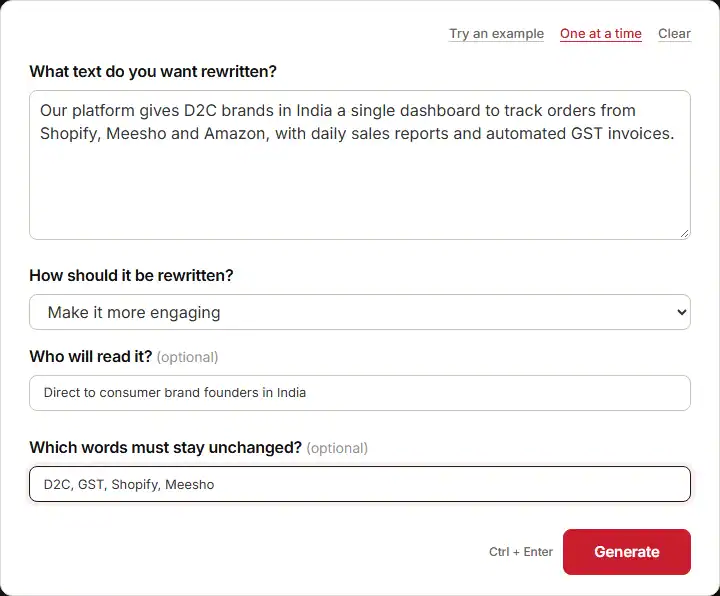
Here is a real run. The input was one short line: a platform that gives D2C brands in India a single dashboard to track orders from Shopify, Meesho and Amazon, with daily sales reports and GST invoices created on their own. The mode was “Make it more engaging”. The reader was D2C brand founders in India. The locked words were D2C, GST, Shopify, Meesho.
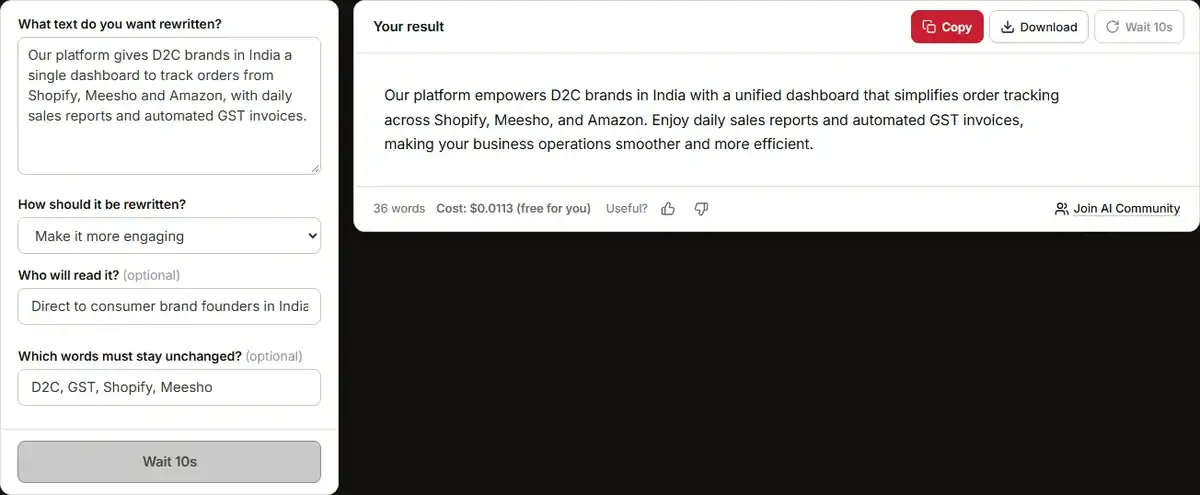
The tool came back with two lines. The key one read:
“a unified dashboard that streamlines order tracking across Shopify, Meesho, and Amazon.”
What Works In It
- Each locked word made it through. D2C, GST, Shopify and Meesho are all as typed.
- No fact moved. Daily sales reports and GST invoices are both still there, and nothing new was made up about the product.
- The long first line got split in two. That is the main reason it reads better than what you wrote.
What You Would Still Edit
Two words jump out. “Empowers” and “streamlines” are the kind of business words that sound big and mean close to nothing. A founder reading this has seen them a hundred times this week.
Then there is the tail of the second line: “all in one easy-to-use interface”. That adds a claim the source never made. The first text said nothing about the tool being easy to use. Small adds like that show up a lot in rewritten copy. When a line goes out, run it past an AI fact checker first.
One more nitpick. “Single dashboard” turned into “unified dashboard”, which is a step down in clarity. You would swap that back. The rest is close to ready, which is what one pass gives you: good bones, two or three word-level fixes.
When To Skip The Rewrite And Check By Hand
This text rewriter is a speed tool. It is not a proofreader and it is not a fact checker. Some jobs should not go to it alone.
Numbers, Prices And Dates
Reword tools are careful with claims and careless with figures. “Next day settlements” can turn into “fast settlements”, and now your price page is vague. Any line with a number in it needs a word by word read after the pass.
Legal And Rule-Based Text
Refund rules, terms of service, GST wording, disclaimers. One reworded line can change what you owe the buyer. Get a person who knows the rule to write those.
Copy Where One Word Carries The Meaning
Tech docs, onboarding steps, medical or money guides. If “tap Cancel” turns into “tap the close button”, the user is lost. Keep those lines close to the source.
SEO Copy With Exact Phrases
A paragraph rewriter will swap “ai rewriter” for “rewriting aid” without a thought. If a search term has to show up word for word, check it after the pass, or keep the phrase in the must-stay box. For the title line itself, a headline generator gives you sharper picks than a rewrite would.
Anything With A Strong Voice
Founder stories, personal essays, jokes. The tool pulls text toward a flat middle. That is fine for a product blurb and bad for a story where the rough bits are the point. If a line sounds like a thing only you would say, leave it be.
Final Thoughts
Used well, this ai rewriter gives back the hour you spend on your own tangled lines. Feed it one idea at a time, name your reader, lock the words that count, and the first draft it hands you will be close.
Treat it as a draft, not the last word. Read each number, check each claim, and put your own voice back where the tool smoothed it flat. That last pass is yours.