AI Photo Prompt Generator
Describe the photo or the edit to your own photo and get a ready-to-paste prompt for Gemini or ChatGPT that keeps your face the same. Free, no login.
Since January 2026, you can edit photos in Google Photos just by asking. You can ask in English or in Indian languages such as Hindi and Tamil.
Asking is easy now. Writing a prompt that fits your photo is the hard part. Viral prompts were written for someone else’s photo. Paste them on yours and the results drift. Faces change, and the look is not the one in the trend post.
The AI photo prompt generator above writes one ready-to-paste prompt for Gemini (Nano Banana) or ChatGPT. It builds the prompt around your photo and names the light, camera and aspect ratio. For edits, it keeps the face unchanged. Free, no login.
How to Use the AI Photo Prompt Generator
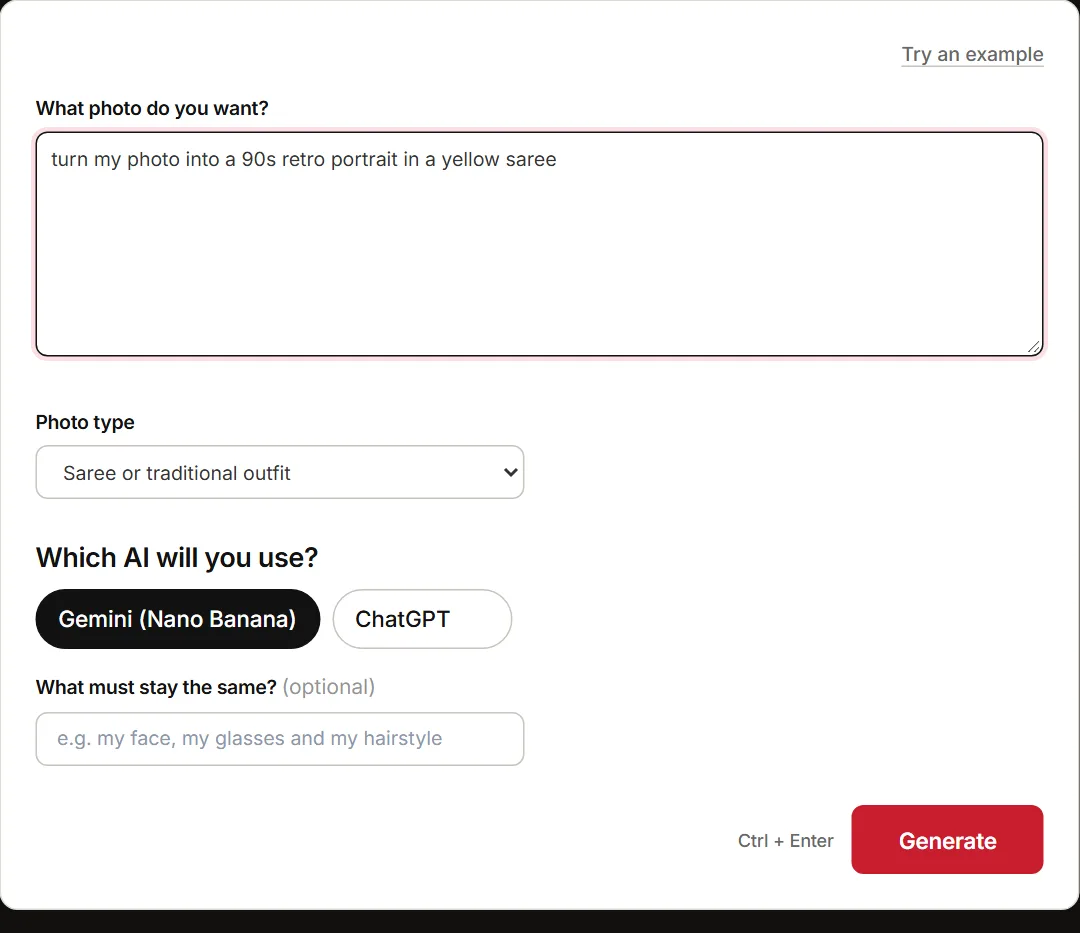
The form sits right above this guide. It has four fields, and you can fill them in under a minute.
- “What photo do you want?” This field is required. Describe a new photo or an edit of your own photo. For example: “turn my photo into a 90s Bollywood poster”.
- “Photo type” Pick from the dropdown: portrait, couple photo, family photo, saree or traditional outfit, retro or vintage look, festival photo, professional headshot, product photo, or travel photo.
- “Which AI will you use?” Choose Gemini / Nano Banana or ChatGPT. The prompt is worded for the one you pick.
- “What must stay the same?” Optional. Name the details to protect: glasses, beard, hairstyle, a tattoo, the background.
- Copy the prompt. Open Gemini or ChatGPT. For an edit, attach your photo, paste the prompt, and send.
What comes back is one ready-to-paste prompt. For edits, it keeps the face unchanged, and it names the light, camera and aspect ratio. Couple and family prompts keep every face and position as they are.
Below the main prompt, you also get two short variations under “Try also”. Swap one in to test a second look without rewriting anything.
What a Generated Photo Prompt Looks Like
Three real outputs from the tool are below. They are pasted as they came, with no edits from us.
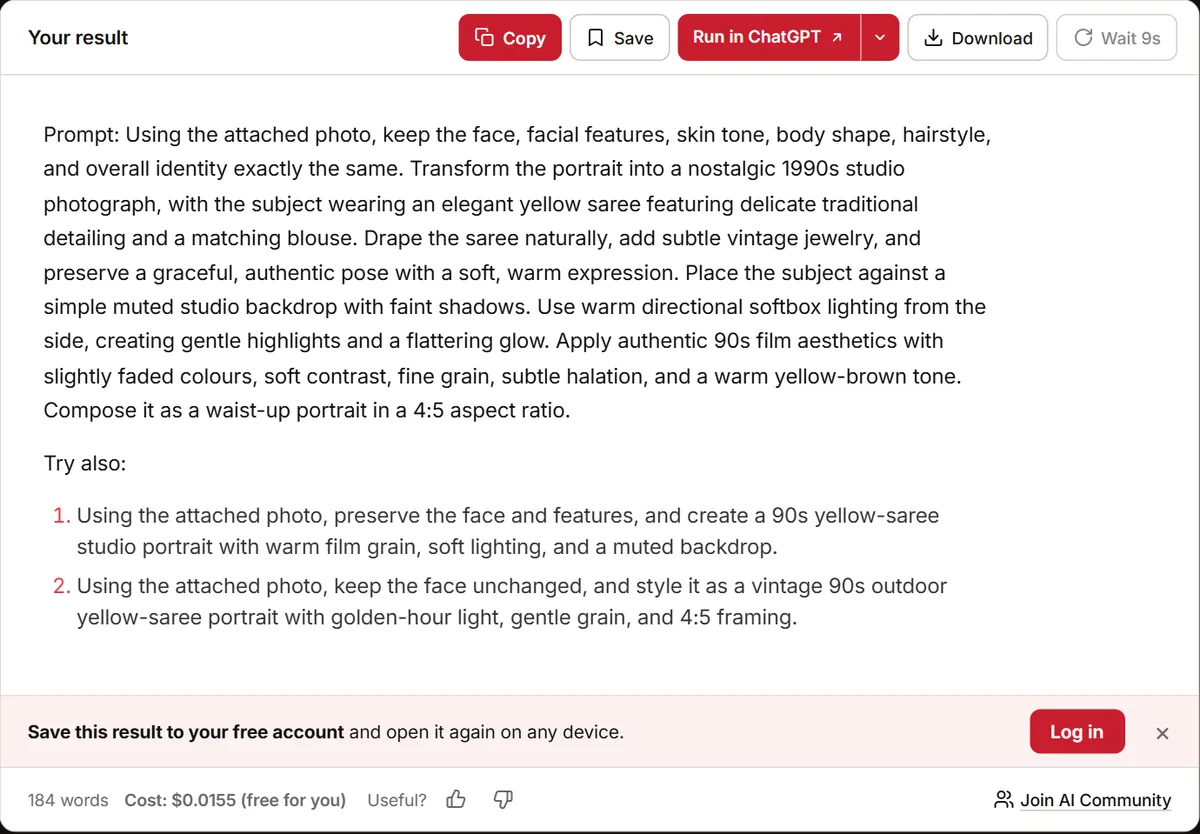
A 90s Retro Yellow Saree Portrait for Gemini
What you enter: “turn my photo into a 90s retro portrait in a yellow saree”, photo type Saree, Gemini / Nano Banana.
Prompt:
Using the attached photo, keep the face, facial features, skin tone and body shape exactly the same. Transform the photo into a 90s retro portrait with the person wearing a bright yellow silk saree with a golden border, paired with traditional gold jewellery including jhumka earrings and a small bindi. Style the hair in soft curls swept to one side. Pose her with a gentle smile, one hand resting near her shoulder, waist-up framing. Set the background as a plain muted beige studio wall with a soft vignette. Use warm, soft golden light from the left side, like an old studio flash, with faded colours and fine film grain for an authentic 90s film photo look. Aspect ratio 4:5.Try also:
1. Edit the attached photo, keep the face and skin tone the same, dress her in a yellow saree with gold border, soft curls, gentle smile, warm retro film grain, 4:5.
2. Using the attached photo, keep the face unchanged, place her on a vintage wooden bench outdoors at golden hour in a yellow saree, hard sunlight from the right, faded 90s film look, 9:16.
The look holds because the prompt names the decade, the light source and the film finish.
A LinkedIn Headshot for ChatGPT That Keeps the Glasses and Beard
What you enter: “professional headshot from my selfie for LinkedIn”, photo type Professional headshot, ChatGPT, with “my glasses and my beard” in the keep field.
Prompt:
Edit the attached photo to create a professional LinkedIn headshot while keeping my face, facial features, skin tone, glasses and beard exactly the same. Dress me in a well-fitted navy blazer over a crisp white shirt. Show me from the chest up, facing slightly toward the camera with a calm, confident, friendly expression and a natural smile. Place me in a softly blurred modern office background with neutral tones. Use soft, diffused studio lighting from the front-left for even, flattering illumination on the face. Render it as a clean, sharp corporate headshot in a 1:1 aspect ratio, suitable for a profile picture.Try also:
1. Edit the attached photo keeping my face, glasses and beard unchanged; put me in a charcoal suit against a plain light-grey studio backdrop with soft even lighting, chest-up, 1:1.
2. Edit the attached photo keeping my face, glasses and beard the same; waist-up in a smart white shirt and blazer, blurred city office window behind me, warm soft daylight from the side, 1:1.
It opens with “Edit the attached photo”, and it names the glasses and beard as fixed.
A Diwali Couple Photo
What you enter: “me and my husband celebrating Diwali on a balcony with diyas”, photo type Couple photo, Gemini / Nano Banana.
Prompt:
Using the attached photo, keep both of our faces, facial features, skin tones and body shapes exactly the same, and keep us standing side by side in the same positions. Transform the scene into a festive Diwali celebration on a warm apartment balcony at dusk. I am wearing a deep red silk saree with gold bangles and small jhumka earrings, and my husband is wearing a cream kurta with a golden Nehru jacket. …
Both faces get named, and so does your position side by side.
How to Keep Your Face the Same in AI Photo Edits
One line at the top of an edit prompt does most of the work. It says what changes and what must stay. Google’s Nano Banana prompting guide says editing needs a different mindset. Its rule: be explicit about what to keep exactly the same.
OpenAI is the one that talks about faces. In a clothing edit, its guide says to state which parts of the person stay fixed, and let only the clothing change. Its example locks the face, facial features, skin tone, body shape, pose and identity. That list sits in OpenAI’s image prompting guide.
Take a kurta-to-saree swap. The lock line keeps the face, skin tone and pose. Only the outfit moves.
Your own details belong in the same place. In “What must stay the same?”, name your glasses, beard, a mole or your hairstyle. The generator writes them into the lock line for you.
One clean edit is not the end of it. OpenAI warns that repeated edits can drift and change details you meant to keep. Restate the constraints and check each result. When the face starts to slide, restart from the original photo instead of editing an edit again.
Gemini (Nano Banana) vs ChatGPT for Photo Edits
The tool words the same idea two ways. Google’s formula runs subject, action, location, composition, then style. It starts with a strong verb. ChatGPT prompts open with “Edit the attached photo” and name what stays fixed.
- Aspect ratio in words, not flags. Gemini accepts 1:1, 3:2, 2:3, 3:4, 4:3, 4:5, 5:4, 9:16, 16:9 and 21:9. OpenAI’s image docs allow custom sizes from 1:3 to 3:1.
- Where your photo lives. Nano Banana also runs inside Google Photos on Android. Handy when the photo already sits there.
Take one headshot idea: the Gemini prompt opens “Using the attached photo, keep the face”, and lists light and camera. The ChatGPT one opens “Edit the attached photo” and locks the glasses and beard first.
So pick by where your photo is and what ratio you need. A 9:16 story and a 4:5 feed post ask for different framing. For finer control over Gemini prompts, try the Nano Banana prompt generator.
AI Photo Prompt Ideas to Try
Most popular looks rest on one detail. Name that detail and the prompt holds.
- Saree or traditional outfit. Name the fabric, colour, drape and light. Try “yellow chiffon saree at golden hour”. The saree trend prompt Esquire India updated in October 2026 reads like a camera brief. It runs face, outfit, background and light, then lens and grading.
- Retro or vintage. Name the decade and the film look. A 1980s colour film portrait with grain beats a plain “old photo”.
- Couple photo. Keep both faces and say who stands where. For a Holi couple photo, put the colours on the clothes, not the faces.
- Festival photo. Say where the light falls. For Eid, place the lights behind and keep the face soft.
- Professional headshot. Plain background, soft light, shoulders-up crop. Ask for 4:5 when it is for a feed post.
For hundreds of ready prompts, open the AI image prompt library.
Privacy and Consent Before You Upload a Photo
That Diwali couple photo or family group photo you want to edit is data once it goes into Gemini. The Gemini Apps Privacy Hub, updated on 26 October 2026, spells out where it goes. Human reviewers read a subset of chats, and reviewed chats are kept up to three years, disconnected from your account. Google asks you not to enter anything you would not want a reviewer to see.
With Keep Activity on, chats and uploads are saved, with auto-delete at 18 months by default. You can switch that to 3 months, 36 months or never. With it off, chats are still kept for 72 hours.
So ask your partner, parent or friend before you edit a photo with them in it. Skip photos of children you do not look after.
Common AI Photo Prompt Mistakes
Five mistakes show up again and again. Each one wastes a generation.
- Pasting a viral prompt unchanged. It describes someone else’s face, clothes and setting. Change those details to yours before you send it.
- Asking to “make me look good”. The model needs a named light, a camera and a ratio. Write “soft window light, 4:5 crop” instead.
- Asking for five changes at once. Change one or two things per round. Then check the result and do the next one.
- Using Midjourney flags. “–ar 9:16” is Midjourney syntax. For Gemini or ChatGPT, write “vertical 9:16” in plain words.
- Using the wrong model’s prompt. A ChatGPT prompt starts “Edit the attached photo”, and Gemini’s does not. Regenerate with the right model picked in the form.
For the full workflow, see how to edit photos using AI.
FAQ
Yes. The AI photo prompt generator is free to use and needs no login. Fill in the form and copy the prompt.
Nano Banana is the name for Google’s Gemini image model. It generates and edits images in the Gemini app and in Google Photos.
Attach your photo for an edit, paste the prompt, and send it. In ChatGPT, keep the opening line “Edit the attached photo” as it is.
Yes. Describe the new photo in the first field and skip the upload. The generator writes a prompt for a fresh image.
No, it is built for photos. For drawings and art styles, use the AI art prompt generator.