
Home / AI tools / GEO audit tool
Free GEO audit tool.
Run a free GEO audit on any page: 85+ checks show if ChatGPT, Claude, Perplexity and Google AI can reach, read and cite it. No login.
The free GEO audit tool above checks any public page for the things AI search engines need before they can cite it. Paste in a page address and get a full GEO audit in about 5 to 10 seconds.
It is free and needs no login. You get a GEO score out of 100, every finding with its fix, and copy-ready snippets for the parts you need to change.
GEO Audit At A Glance
- What it is: A GEO audit checks whether ChatGPT, Claude, Perplexity, Gemini and Google AI Overviews can reach, read, trust and cite a page.
- What it checks: About 85 checks across 8 categories plus 12 optional Feedough AI content checks, running in 5 to 10 seconds, free, no login.
- Fix first: Anything holding the score at 35: blocked crawlers, noindex, bot walls, JavaScript-only content.
- What it does not do: It measures readiness; whether an AI answer cites you also depends on the question and competing pages, which the real-search test samples.
- How often: Run after template, robots.txt, CDN or firewall changes, and monthly for key pages.
How To Run A GEO Audit With Feedough
Five steps take you from a page address to a fix list. Each one builds on the last.
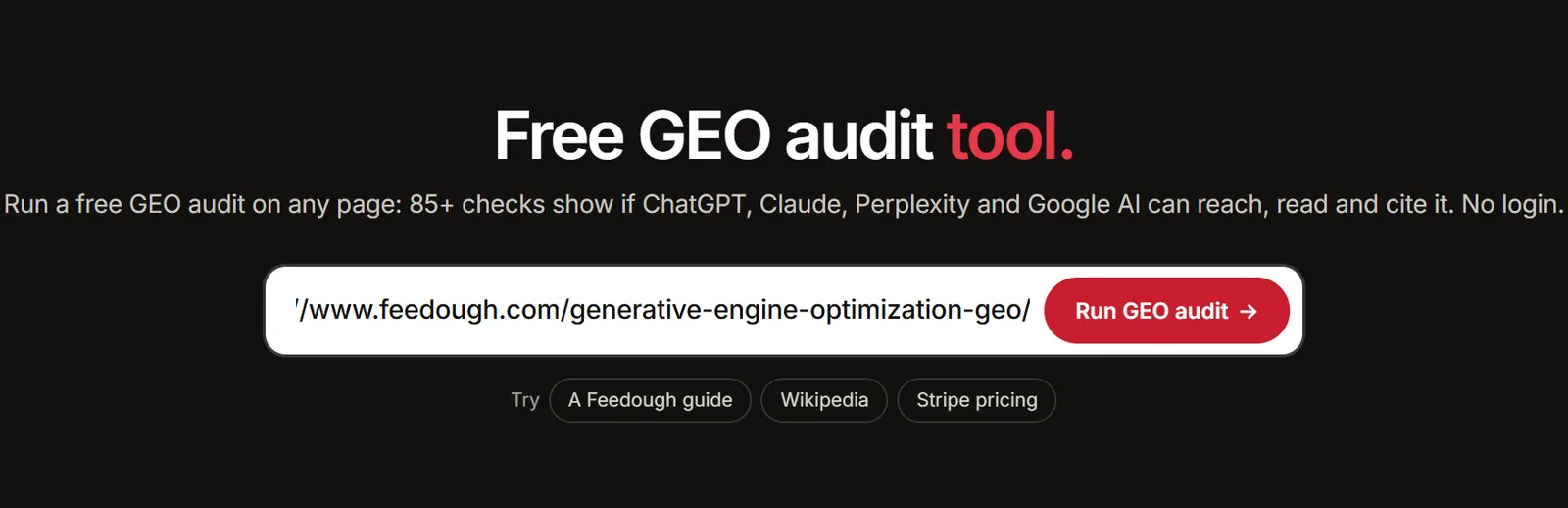
Step 1: Paste The Page Address
Put any public page address into the box and click “Run GEO audit”. Feedough’s server fetches the page the way AI crawlers do: raw HTML with no JavaScript run, plus the HTTP headers, robots.txt, llms.txt, llms-full.txt, the XML sitemap and the RSS feed.
The GEO audit tool also probes the edges of the site. It requests a made-up address to confirm missing pages return a real 404, follows the http:// and www/non-www versions, checks the canonical target, and fetches the same page again as GPTBot, OAI-SearchBot, ChatGPT-User, ClaudeBot, PerplexityBot and Perplexity-User. That last part shows whether a firewall serves AI crawlers a different page than a visitor gets.
Step 2: Read Your GEO Score
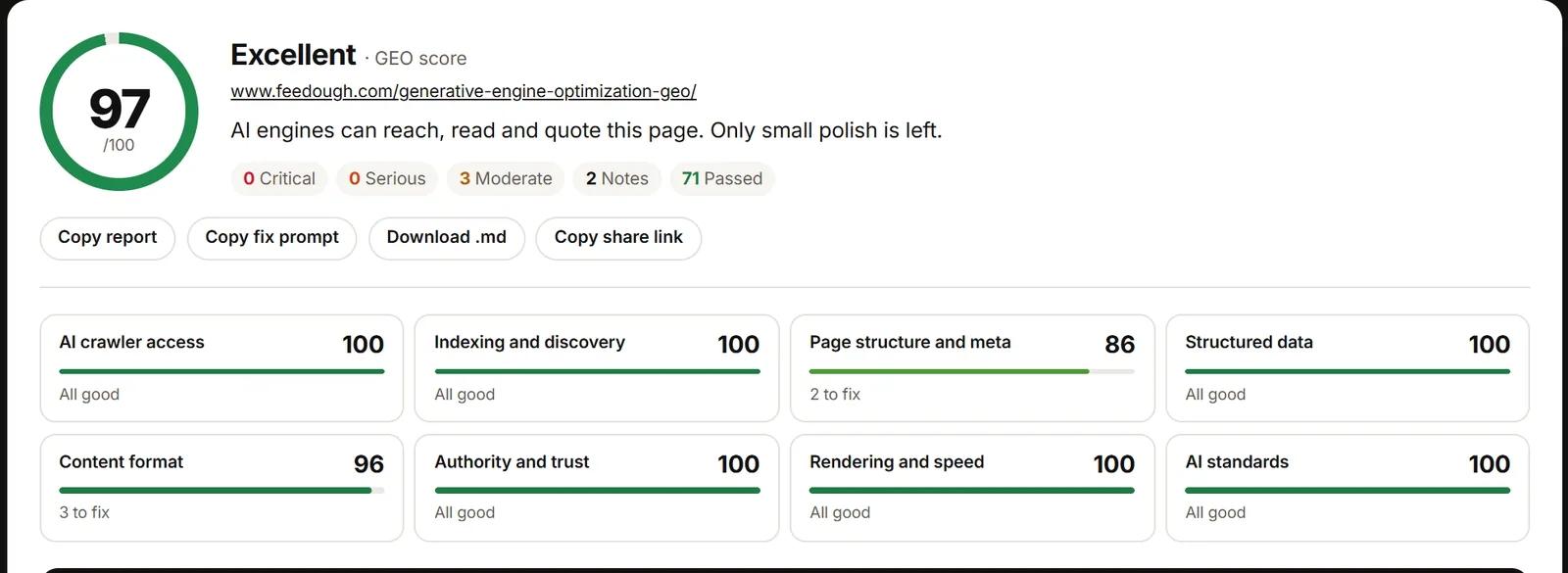
The GEO score runs from 0 to 100. About 85 checks sit in 8 categories: AI crawler access, indexing and discovery, page structure and meta, structured data, content format, authority and trust, rendering and speed, and AI standards.
Each finding carries a severity, from Critical down to Note, and every category gets its own score so you can see where the page is weakest. The full rules, including the cap that holds a blocked page at 35, are in How The GEO Score Is Calculated below.
Step 3: Fix Issues From The Top
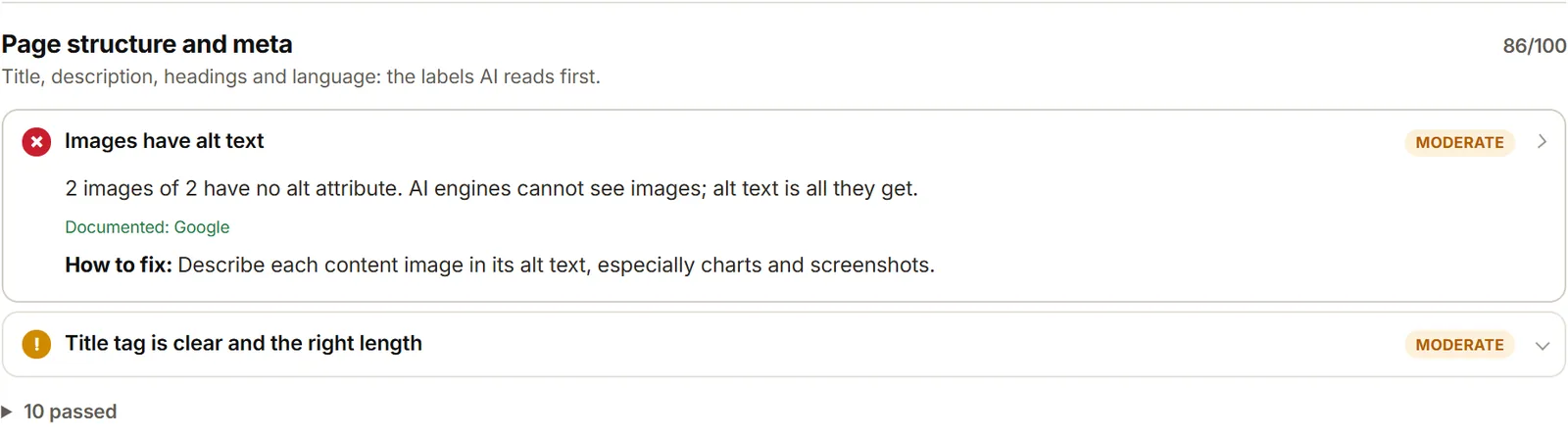
Work down the report in severity order. Every finding shows what the GEO checker found, how to fix it, and often a copy-ready snippet: robots.txt lines, a canonical tag, JSON-LD, or a starter llms.txt.
Each finding also names where its rule comes from. “Documented” means the source is Google, Bing, OpenAI, Anthropic, RFC 9309 or Lighthouse. “Best practice” means the rule comes from SEO and GEO tools rather than an engine’s own documentation. Google’s AI optimization guide says there is no ideal page length and no need to chunk content, so the content-shape checks carry the best-practice label.
Just below the score, “Fix these first” lists the five fixes worth the most points and links each one to its finding. The “Fix it with AI” panel turns every open issue, its fix and the snippets into one prompt, with versions for a coding agent, for WordPress and for ChatGPT or Claude chat. “Share” creates a permanent link to the report and one-click posts to X, LinkedIn, WhatsApp and email. “Download” saves the report as a PDF, a share image, a single HTML file, Markdown or JSON.
Step 4: Run The Feedough AI Content Check
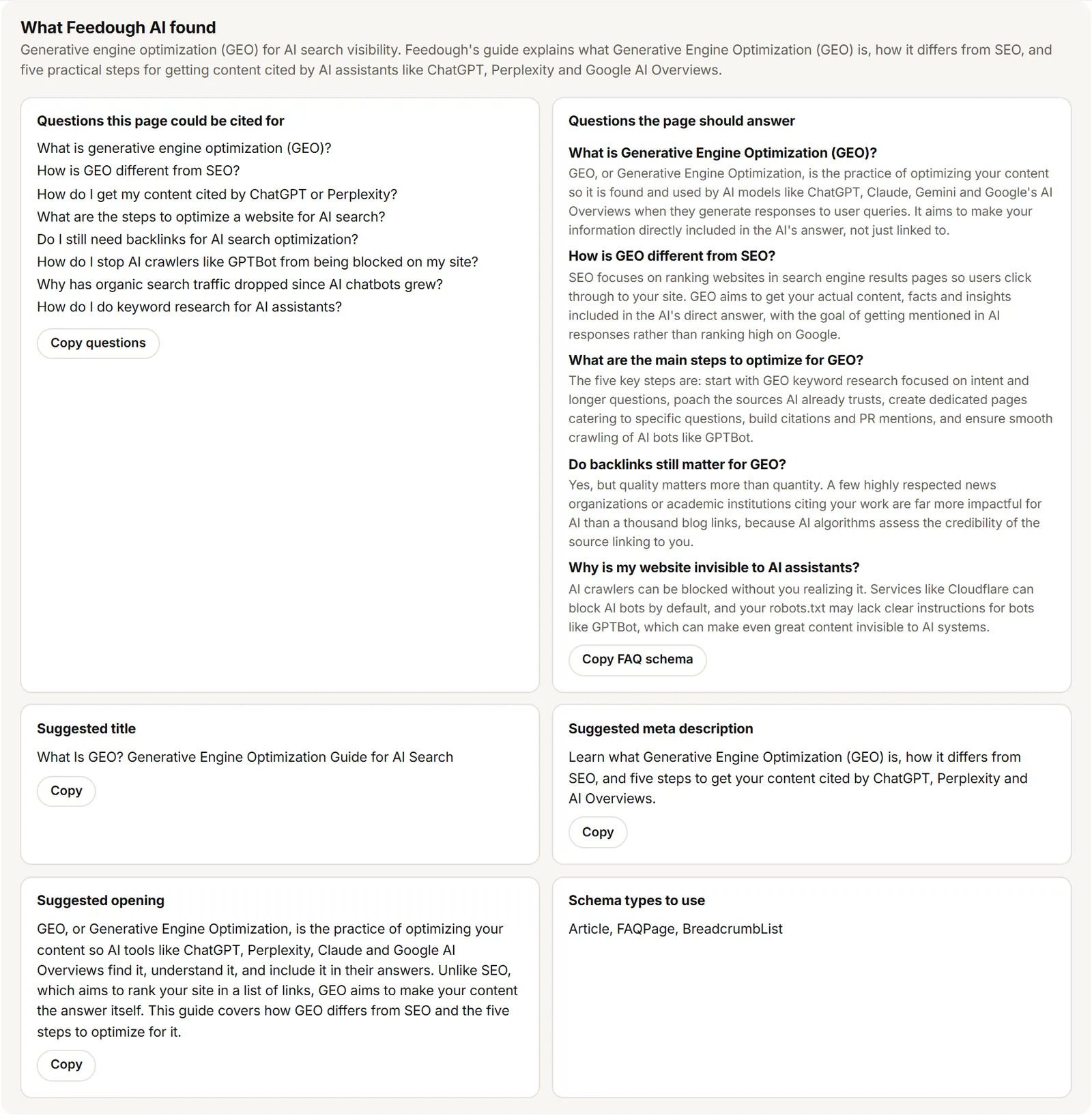
Under the score sits an optional button, “Run content check”. Feedough AI reads the words on the page, takes about 30 seconds, and scores 12 checks from 0 to 10: answers first, defines the topic in one sentence, quotable standalone sentences, sections that make sense alone, headings that say what they answer, sticks to one topic, covers follow-up questions, claims backed by sources, dense with specific facts, facts are current, shows first-hand expertise, and title and description matching the content.
The content check also lists the questions the page could be cited for, the questions it should answer with FAQ schema to copy, and a suggested title, meta description and opening. Content-check results count double in the score.
Feedough’s own GEO guide shows what this catches. It scored well on the technical checks, and Feedough AI flagged that its opening was a personal story instead of an answer and that its statistics named no sources.
Step 5: Test Real Searches
The “Test real searches” button runs the page’s questions through Brave and Google, the indexes AI assistants retrieve from. It shows where the site ranks in the top 10 and which sites rank instead. This test is separate from the GEO score.
The same test checks whether the brand has a Wikipedia article and a Wikidata item that lists the site as its official website. For “Marketing Software”, Google ranked hubspot.com at number 8, and Wikidata item Q5926631 lists hubspot.com as HubSpot’s official website. If an engine does not answer, the report says so instead of guessing.
What Is A GEO Audit?
A GEO audit checks whether AI search engines such as ChatGPT, Perplexity, Claude, Gemini and Google AI Overviews can reach a page, read it, trust it and cite it.
The audit has two halves. Readiness covers what this GEO audit tool measures: access, indexing, structure, schema, content, trust, speed and AI standards. Visibility covers whether AI answers already mention or cite you, which the real-search test samples.
Readiness is the half you control today. You can open the door to AI crawlers, serve them clean HTML, mark up your entities and date your facts. Visibility follows, and it takes longer, because it depends on what the engines already retrieve and rank.
Both halves sit inside generative engine optimization, the practice of shaping pages so AI systems can quote them accurately.
GEO Audit Vs SEO Audit
A GEO audit shares ground with an SEO audit but asks a different question. An SEO audit asks whether a search engine can rank a page. A GEO audit asks whether an AI answer engine can fetch the page, understand it well enough to quote, and trust it enough to cite. GEO builds on SEO, so a page that fails SEO basics fails GEO too.
Area | SEO audit | GEO audit |
|---|---|---|
Goal | Rank in the ten blue links | Get fetched, read and cited inside AI answers |
Crawlers checked | Googlebot, Bingbot | Googlebot and Bingbot plus OAI-SearchBot, ChatGPT-User, ClaudeBot, PerplexityBot, Perplexity-User and the rest of the AI answer crawlers |
robots.txt rules | Allow or block the main search bots | Separate rules for AI search crawlers, user-triggered fetchers and training crawlers, plus the cross-vendor __usage_ai-training group |
Snippet controls | Titles, meta descriptions, rich results | nosnippet and max-snippet limits, Bing’s noarchive and ai-grounding:disallow, data-nosnippet coverage |
Content | Keyword targeting, depth, freshness | Quotable standalone sentences, answers first, sources named, facts dated, no hidden instructions aimed at AI |
Structured data | Rich result eligibility | Schema that matches the visible text so engines can trust what they extract |
Success measure | Rankings, clicks, impressions | GEO score, citations in AI answers, presence in the indexes AI assistants retrieve from |
If the SEO side is new to you, start with the SEO guide for beginners and come back to the GEO layer once the basics hold. For speeding up the classic SEO work itself, see how to use AI for SEO.
What The GEO Checker Tests
The GEO checker runs about 85 checks across 8 categories, plus 12 optional Feedough AI content checks.
Category | What it checks | Example fix |
|---|---|---|
AI crawler access | Whether robots.txt allows Googlebot, Bingbot, AI search crawlers and user-triggered fetchers, read the way the robots.txt standard (RFC 9309) and Google’s parser read it. Also whether each AI crawler gets the same page a visitor gets. | Add Allow: / under a User-agent: OAI-SearchBot block so ChatGPT can index the page. |
Indexing and discovery | noindex in meta robots or X-Robots-Tag, Bing’s noarchive and ai-grounding:disallow, canonical, redirect chains, 404 behaviour, XML sitemap, hreflang. | Remove a bingbot-only noindex, which drops the page from Bing, DuckDuckGo, Yahoo and Copilot at once. |
Page structure and meta | Title length, meta description, html lang, one H1, heading outline, main or article element, Open Graph tags, viewport, image alt text, link text. | Add a 140 to 155 character meta description so engines have a clean summary to show (the AI Meta Description Generator drafts one). |
Structured data | Valid JSON-LD, a type for the page, Organization, Article and BreadcrumbList markup, and Google’s required properties for Product, SoftwareApplication, VideoObject, LocalBusiness, Review and Event. | Add dateModified and an author name to the Article schema so the page looks maintained. |
Content format | Hidden prompt injection, sentence length, paragraphs that open with “it” or “this”, unsourced statistics, 300 words of main content, text without JavaScript, question-style headings, lists and tables. | Name the source next to each statistic, the way a news article links the study behind a number. |
Authority and trust | A real byline, consistent brand name, author profile link, publish and update dates, links to outside sources, About and Contact pages, privacy policy, sameAs profiles. | Replace “Admin” with the writer’s full name and link it to a short bio page. |
Rendering and speed | Time to first byte, HTML size, compression, render-blocking files, DOM size, text-to-code ratio. | Cache the HTML or put a CDN in front of it to bring time to first byte under 0.8 seconds. |
AI standards | Optional checks: llms.txt format, llms-full.txt, Content-Signal lines, noai tags, Markdown alternate, RSS freshness, data-nosnippet coverage. | Add an llms.txt file with an H1, a “> summary” line and Markdown links to key pages. |
GEO Audit Checklist
This is the same GEO audit checklist the tool runs, written so you can walk through it by hand. It follows the order a crawler meets a page: reach, permission, indexing, reading, trust, quoting.
- The page returns HTTP 200 on HTTPS, not a redirect or an error.
- Missing pages on the site return a real 404, not a soft 404.
- The http:// version and the other www form redirect permanently to the live URL.
- robots.txt loads with a 200 or a plain 404. A 429 or 5xx makes crawlers treat the whole site as blocked.
- robots.txt allows Googlebot and Bingbot.
- robots.txt allows AI search crawlers: OAI-SearchBot, Claude-SearchBot, PerplexityBot, Applebot, DuckAssistBot, MistralAI-Index, Meta-WebIndexer, Amzn-SearchBot.
- robots.txt allows user-triggered fetchers: ChatGPT-User, Claude-User, Perplexity-User, MistralAI-User, Google-Agent, Meta-ExternalFetcher, Amzn-User.
- Training crawlers like GPTBot, ClaudeBot and Google-Extended are handled on purpose, not by accident.
- Each AI crawler gets the same page a visitor gets, not a 403 or a bot check page from a firewall.
- No noindex sits in meta robots or the X-Robots-Tag header.
- No crawler-specific block hides the page from one engine, such as a bingbot-only noindex.
- Bing’s noarchive, nocache and ai-grounding:disallow are understood before you use them.
- The canonical tag is absolute, points to the live page, and the target is indexable.
- Redirect chains are short, and hreflang pairs point to each other.
- The page is listed in the XML sitemap, and the sitemap is named in robots.txt.
- The main content is present in the raw HTML, without JavaScript.
- The page has one H1, a clean heading outline, and a main or article element.
- Structured data matches the visible text and passes Google’s required properties.
- A real person signs the page, with a profile link, publish date and a recent update.
- Statistics name their source, and About, Contact and privacy policy links exist.
How The GEO Score Is Calculated
The GEO score runs from 0 to 100. Every check carries a severity: Critical, Serious, Moderate or Note. A failed check costs its full weight, and a warning costs half.
Checks that do not apply to a page type are skipped, so author checks do not drag down a product page. Feedough AI content checks count double when you run them.
One rule overrides the rest. If something stops AI engines from using the page at all, the score is held at 35 or lower until that is fixed. A non-200 status, a bot check wall, a noindex tag, Google or Bing blocked, most AI search crawlers blocked, or content that only appears after JavaScript all trigger the cap.
Score | Band | What it means |
|---|---|---|
90 to 100 | Excellent | AI engines can reach, read and quote the page. Fix the remaining notes when you next update it. |
75 to 89 | Good | Solid base with a few gaps that limit how often the page gets cited. |
55 to 74 | Needs work | Real barriers to AI search visibility. Start with the Critical and Serious findings. |
Below 55 | Poor | AI engines likely skip or misread the page. Fix access and indexing first. |
Documented Rules Vs Best Practice
Every finding in the report is labelled with where the rule comes from. “Documented” means an engine published it, with the source named: Google, Bing, OpenAI, Anthropic, RFC 9309 or Lighthouse. “Best practice” means the rule comes from SEO and GEO tools rather than an engine’s own documentation.
The split matters most for content shape. Google’s AI optimization guide says there is no ideal page length and no need to chunk content, so checks like paragraph length and subheading frequency are labelled best practice. Treat them as useful signals, not rules Google enforces.
AI Crawler Checker: The Bots We Test
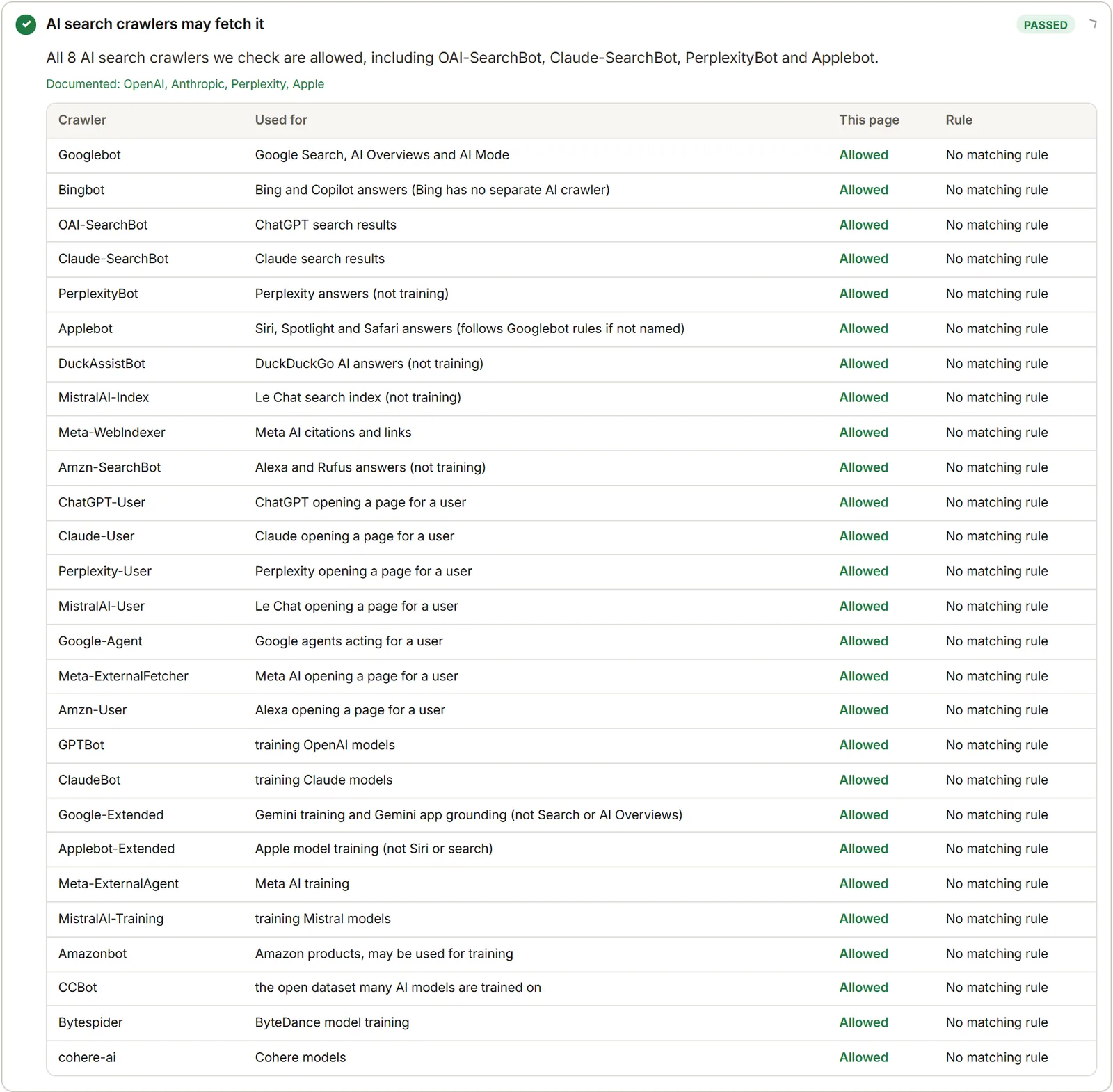
The AI crawler checker reads your robots.txt rules for 27 crawlers, then fetches the page live as six of them to see what each one actually receives.
Crawler | Company | Type | Used for |
|---|---|---|---|
Googlebot | Google | Search engine | Google Search and AI Overviews |
Bingbot | Microsoft | Search engine | Bing, DuckDuckGo, Yahoo, Copilot |
OAI-SearchBot | OpenAI | AI search crawler | Indexing pages for ChatGPT search |
Claude-SearchBot | Anthropic | AI search crawler | Indexing pages for Claude search |
PerplexityBot | Perplexity | AI search crawler | Indexing pages for Perplexity answers |
Applebot | Apple | AI search crawler | Siri, Spotlight and Safari answers (follows Googlebot rules if not named) |
DuckAssistBot | DuckDuckGo | AI search crawler | DuckDuckGo AI answers |
MistralAI-Index | Mistral | AI search crawler | Indexing for Mistral’s assistant |
Meta-WebIndexer | Meta | AI search crawler | Indexing for Meta AI answers |
Amzn-SearchBot | Amazon | AI search crawler | Indexing for Amazon AI shopping answers |
ChatGPT-User | OpenAI | User-triggered fetcher | Fetching a page when a ChatGPT user asks |
Claude-User | Anthropic | User-triggered fetcher | Fetching a page on a Claude user’s request |
Perplexity-User | Perplexity | User-triggered fetcher | Fetching a page on a Perplexity user’s request |
MistralAI-User | Mistral | User-triggered fetcher | Fetching a page on a user’s request |
Google-Agent | Google | User-triggered fetcher | Fetching a page for Google’s AI agents |
Meta-ExternalFetcher | Meta | User-triggered fetcher | Fetching a page for Meta AI on a user’s request |
Amzn-User | Amazon | User-triggered fetcher | Fetching a page for Amazon AI on a user’s request |
GPTBot | OpenAI | Training crawler | Training OpenAI models |
ClaudeBot | Anthropic | Training crawler | Training Anthropic models |
Google-Extended | Google | Training crawler | Gemini training and Gemini app grounding (a control token, not a crawler; it does not affect Search or AI Overviews) |
Applebot-Extended | Apple | Training crawler | Apple model training (a control token; it does not affect Siri or search) |
Meta-ExternalAgent | Meta | Training crawler | Training Meta models |
MistralAI-Training | Mistral | Training crawler | Training Mistral models |
Amazonbot | Amazon | Training crawler | Amazon products, and may be used for training |
CCBot | Common Crawl | Training crawler | Building the Common Crawl dataset |
Bytespider | ByteDance | Training crawler | Training ByteDance models |
cohere-ai | Cohere | Training crawler | Training Cohere models |
The report also checks the new cross-vendor __usage_ai-training robots.txt group. Anthropic reads it now, Bing starts in February 2027, and Google follows in 2027. One group can then state a single training choice for every vendor that reads it, and crawler-specific groups still take precedence.
Six of them (GPTBot, OAI-SearchBot, ChatGPT-User, ClaudeBot, PerplexityBot and Perplexity-User) are also fetched live against your page. The report shows whether each one received the same page a visitor gets, with the same title, H1, canonical and robots tags, or a 403, a 402 pay-per-crawl wall or a bot check page from a firewall. One caveat: some firewalls verify crawlers by IP address and block anyone else using their name, including this test. A live-test failure means check your firewall, not proof of a block. The crawler names follow the published lists from OpenAI, Anthropic and Perplexity.
llms.txt Validator
The llms.txt validator checks whether your site publishes an llms.txt file and whether that file follows the format set out at llmstxt.org. A file that exists but is malformed gives AI crawlers nothing useful to work with.
The GEO audit tool tests each of these points:
- llms.txt exists at the site root and is served as plain text, not as an HTML page with a 200 status slapped on a soft 404.
- The file opens with a single “# ” title line.
- A “> ” summary line follows the title and describes the site in one or two sentences.
- Links are Markdown links with full URLs, not relative paths or bare text.
- The file stays a short map. Anything over 50 KB gets flagged, because full text belongs in llms-full.txt.
- llms-full.txt exists, if you publish one.
Google said in June 2026 that Search does not need llms.txt and that it does not affect ranking. That matches what the Google AI optimization guide states. The file still helps other AI systems understand your site quickly, so the checks are labelled optional in the AI standards category.
Here is a minimal llms.txt for a fictional company called Example Co:
# Example Co

> Example Co sells project management software for small teams. This page lists the key documentation and product pages.

## Product

- [Product overview](https://example.com/product): Features, pricing and screenshots.
- [Pricing](https://example.com/pricing): Plans and what each includes.

## Company

- [About Example Co](https://example.com/about): Who we are and what we build.
- [Contact](https://example.com/contact): Sales and support.
Each finding in this section also shows a copy-ready starter file, so you can paste it into your site root and adjust the links.
AI Visibility Checker: Does AI Search Find Your Page?
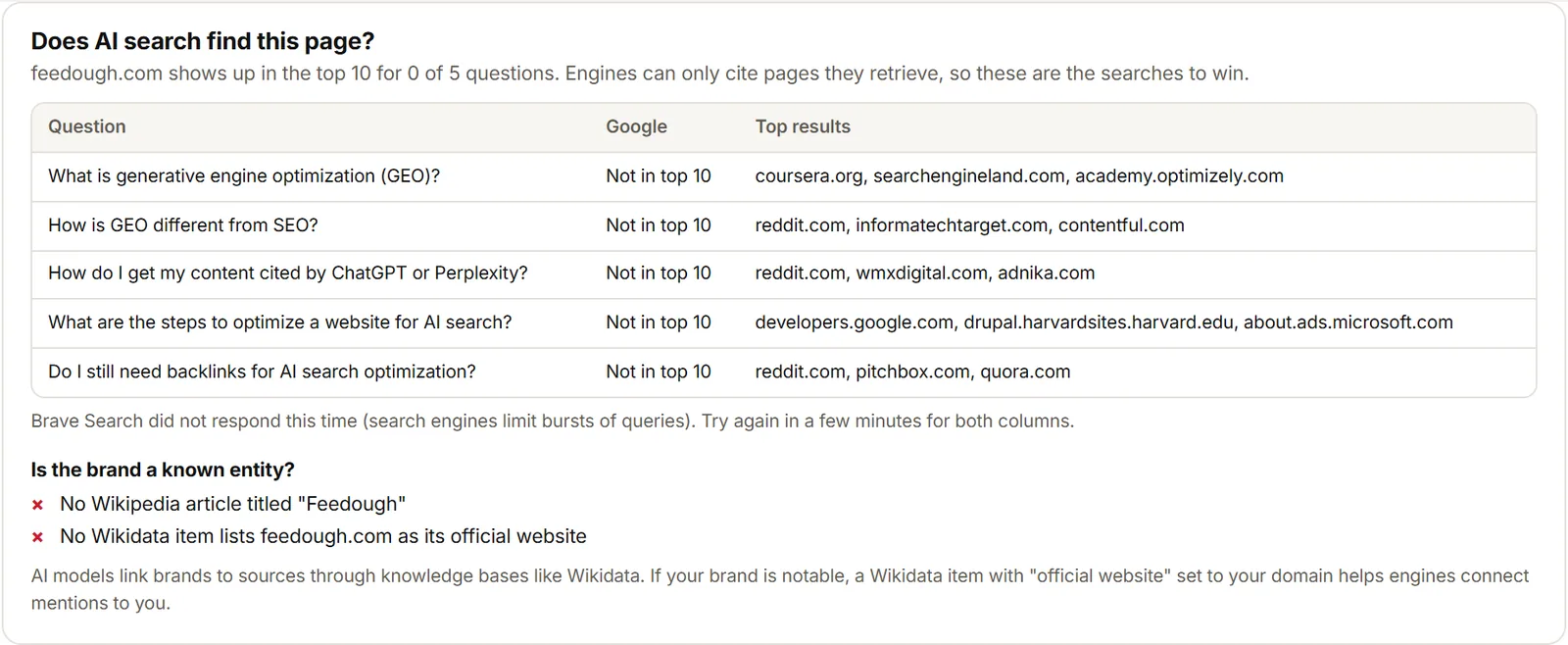
The AI visibility checker runs the page’s real questions through Brave and Google, the indexes AI assistants retrieve from, and shows where the site ranks in the top 10. It answers a different question than the GEO score: not “is the page ready for AI crawlers” but “does it actually show up”.
Click “Test real searches” and the tool pulls the questions Feedough AI found on the page, or uses the page’s main heading if none were found. For each question it reports three things:
- Rank in Brave and Google. A number from 1 to 10 means the page appears in the top results for that question. “Not in top 10” means the site did not make it.
- Who ranks instead. The tool lists the sites that took the spots, so you know who you are competing with for that answer.
- “Did not answer”. Search engines sometimes refuse a burst of queries; Brave rate-limits busy periods. The report says so instead of guessing a rank.
The entity check looks at whether the brand has a Wikipedia article and a Wikidata item that lists the site as its official website. Knowledge bases like Wikidata are one of the ways engines connect a brand name to its official domain. For “Marketing Software”, Google ranked hubspot.com at number 8, and the Wikidata item Q5926631 lists hubspot.com as HubSpot’s official website.
These results sit beside the GEO score, not inside it. Ranking depends on competition, domain strength and what the engine decides to show, none of which a page can control from its own HTML. The score measures what you control. The visibility test measures what happened.
Need more questions to test? The Query Fan-Out Generator shows the sub-queries AI search runs behind one question, which makes good raw material for this test.
The GEO Audit Chrome Extension
The “GEO Audit & AI Search Checker – Feedough” Chrome extension runs a GEO audit on the page you are viewing, without copying the URL anywhere. Click once and the report opens in Chrome’s side panel next to the page.
The extension adds one thing the web tool does not: a comparison between the server HTML that AI crawlers get and the page after JavaScript runs. It checks the title, H1, meta description, canonical, robots meta, word count and schema items on both versions, then warns when text or schema only exists after JavaScript runs. That gap makes a page invisible to AI crawlers that skip JavaScript, even though it looks fine in your browser.
The extension keeps your last 15 audits in your browser so you can compare runs. It works on any page Chrome can open. Private or staging pages behind a login cannot be fetched by Feedough’s server, and AI crawlers cannot reach them either.
Common GEO Audit Failures And How To Fix Them
Most GEO audit failures come from a short list of causes. Here is what each one looks like and what to change.
AI Search Crawlers Blocked In robots.txt
nytimes.com blocks OAI-SearchBot, ChatGPT-User, Claude-SearchBot, PerplexityBot and other AI answer crawlers in robots.txt. The live test got a 403 for every AI crawler, and the homepage scored 35, which is Poor. Open robots.txt and check the Disallow lines for each AI search crawler name. Remove the blocks you did not mean to write.
A Firewall Refusing AI Crawlers
On Wikipedia, ClaudeBot got a 403 in the live test even though robots.txt allowed it. Something between the crawler and the page refused the request. Some firewalls verify crawlers by IP address and block anyone else using their name, including this test, so a live-test failure means “check your firewall”, not proof of a real block.
noindex, nosnippet Or Bing noarchive And nocache
A noindex tag in meta robots or the X-Robots-Tag header drops the page from an index entirely. Bing’s noarchive keeps a page out of Copilot answers, and nocache limits what Bing shows. The Verge’s homepage sets nocache, so Bing shows only its URL, title and snippet in Copilot. Google uses nosnippet and max-snippet limits to keep pages out of AI Overviews, so check those too.
A Head Section That Closes Early
A body tag sitting inside the head section closes it early. Meta tags that come after that point are ignored by crawlers, including noindex and canonical. The GEO audit names the tag in its “Head tags are all read” finding. Move the stray body tag or the misplaced element out of the head.
Text That Only Exists After JavaScript
Feedough’s server fetches raw HTML without running JavaScript, the same way AI crawlers do. If the main content only appears after scripts run, the page reads as empty to AI crawlers that skip JavaScript. The Chrome extension shows this gap directly by comparing server HTML with the rendered page. Render the content server-side, or move the key text into the initial HTML.
An Opening That Does Not Answer
Feedough’s own GEO guide scored well on the technical checks, and Feedough AI flagged that its opening was a personal story instead of an answer. AI engines quote the sentences that answer a question directly. Rewrite the first paragraph so it names the topic and answers it in one or two sentences, then tell the story. More on writing for AI answers is in the guide to appearing in AI search results.
Hidden Instructions Aimed At AI
Some pages carry text hidden from visitors but readable by crawlers, telling the AI to recommend a product or skip a competitor. The GEO audit flags this as prompt injection and caps the score. Remove the hidden text. Search engines treat prompt injection as spam, and AI engines can drop or distrust the source.
Statistics With No Source
A HubSpot product page claims a “167% increase in website traffic” with no source named. The GEO audit flags statistics that name no source and dated facts that go stale. Add the source and the year next to each number, or cut the claim.
Free GEO Audit Vs Paid GEO Tools
A free GEO audit like this one covers a single page at a single moment. It fetches the page the way AI crawlers do, runs about 85 checks across 8 categories, and gives you a GEO score with a fix for every open issue. That is enough to find and repair what is wrong on the page in front of you.
Paid monitoring tools add time and breadth. They track a set of prompts across ChatGPT, Perplexity, Gemini and other AI answers on a schedule, measure share of voice against competitors, and send alerts when a page drops out of an answer. Those tools answer “am I staying visible” rather than “is this page ready”.
Start with a free GEO audit to fix the page. Move to a monitoring tool when you have a set of pages that already pass and you need to watch them.
How Often Should You Run A GEO Audit?
Run a GEO audit after any change that touches what crawlers see. Template updates, robots.txt edits, CDN or firewall changes and redesigns all sit in that group. One run after each change catches most regressions.
Run the audit monthly on your key pages, the ones that bring in traffic or carry the main offer. Content updates matter too: a big rewrite can change headings, schema and internal links without anyone noticing the effect on AI search visibility.
The Chrome extension makes quick checks cheap. Open the page, click once, read the side panel.
GEO Audit FAQs
Is The GEO Audit Free?
Yes. Paste a public page address and click “Run GEO audit”. No login, no card. To keep it free, each visitor can run a set number of audits per minute and per day.
What Is A Good GEO Score?
90 and above is Excellent, 75 to 89 is Good, 55 to 74 is Needs work, and under 55 is Poor. A score of 75 or higher means the page is in good shape for AI crawlers. Anything that stops AI engines using the page at all holds the score at 35 or lower until you fix it.
Does A High GEO Score Guarantee ChatGPT Will Cite My Page?
No. The score measures what you control on the page. Whether ChatGPT cites you also depends on competition, the question asked and what the model decides to quote. The AI visibility checker shows where you rank for real questions, which is the closest you can get to an answer.
Should I Block GPTBot?
GPTBot is a training crawler, so blocking it keeps your content out of OpenAI’s training data. OAI-SearchBot is the crawler that reads pages for ChatGPT search answers, and ChatGPT-User fetches pages on a user’s request. Blocking GPTBot does not block those two. The GEO audit lists training crawlers as info so you can decide per crawler.
Do I Need llms.txt?
No. Google said in June 2026 that Search does not need llms.txt and that it does not affect ranking. Other AI systems read it to understand a site quickly, so it is worth adding if you publish a lot of documentation. The llms.txt validator checks the format if you do.
What Is The Difference Between GEO and AEO?
AEO, answer engine optimization, is the same goal under another name: getting your page cited in AI-generated answers. The checks overlap almost fully. GEO is the term used for generative engine optimization, and it is the one this tool uses.
Can I Audit A Page Behind A Login?
No. Feedough’s server fetches the page from the public internet, so private or staging pages behind a login cannot be reached. AI crawlers cannot reach them either, which is worth knowing in itself. Test a public version of the page instead.
More free tools
- Query Fan-Out GeneratorSee the searches AI runs behind one question.
- AI Meta Description GeneratorWrite the summary engines show for a page.
- Marketing Copy GeneratorDraft copy for any page or channel.
- AI Prompt GeneratorWrite a better prompt for any AI tool.