Feedough Logo

Blog

  • Maslow’s Hierarchy of Needs Explained

    Maslow’s Hierarchy of Needs Explained

    A homeless person’s primary concern isn’t to build friendships or achieve a career milestone but rather to bring food to the plate and seek shelter. Similarly, someone living in a war-torn country will not be bothered by social validation but instead focus on staying safe from physical harm. This shows how human beings prioritise specific needs depending on their circumstances.

    Abraham Harold Maslow, an American psychologist, carefully studied this behaviour and developed a theory, popularly known as the “hierarchy of needs”, explaining the same.

    So what exactly is Maslow’s hierarchy of needs? And how does it influence a person’s actions?

    What Is Maslow’s Hierarchy Of Needs?

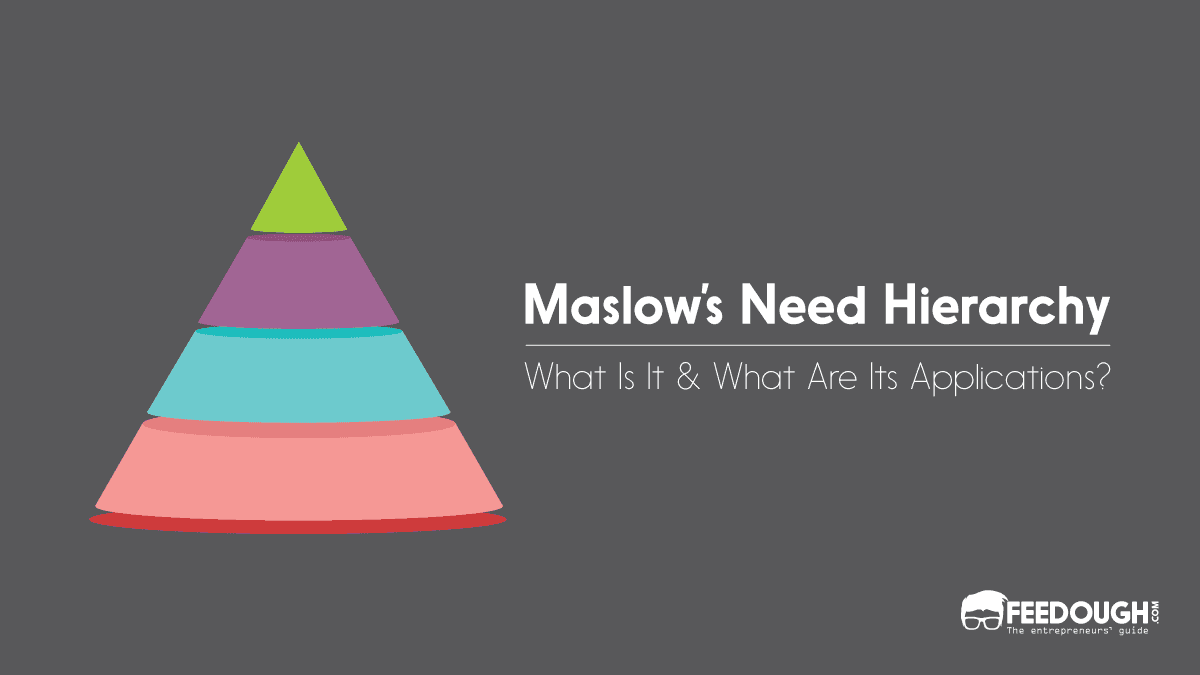
    Maslow’s hierarchy of needs is a motivational theory in psychology explaining a five-tier hierarchical model of human needs that dictate an individual’s behaviour.

    Conceptualised by Abraham Maslow in 1943, this theory states that people have different levels of needs, and they have to fulfil the lower level needs before moving on to the higher level. These five categories of needs are (in hierarchical order)

    • Physiological needs (food, water, shelter),
    • Safety needs (protection from harm), 
    • Social needs (love & belongingness),
    • Esteem needs (self-respect, respect by others) and
    • Self-actualisation needs (fulfil one’s potential).

    According to Maslow, humans always focus on fulfilling their basic needs first. These needs are non-negotiable and are universally true for all human beings. After fulfilling these needs, a person can focus on a more individualistic, emotionally complex set of needs.

    The Five Levels Of Maslow’s Hierarchy Of Needs
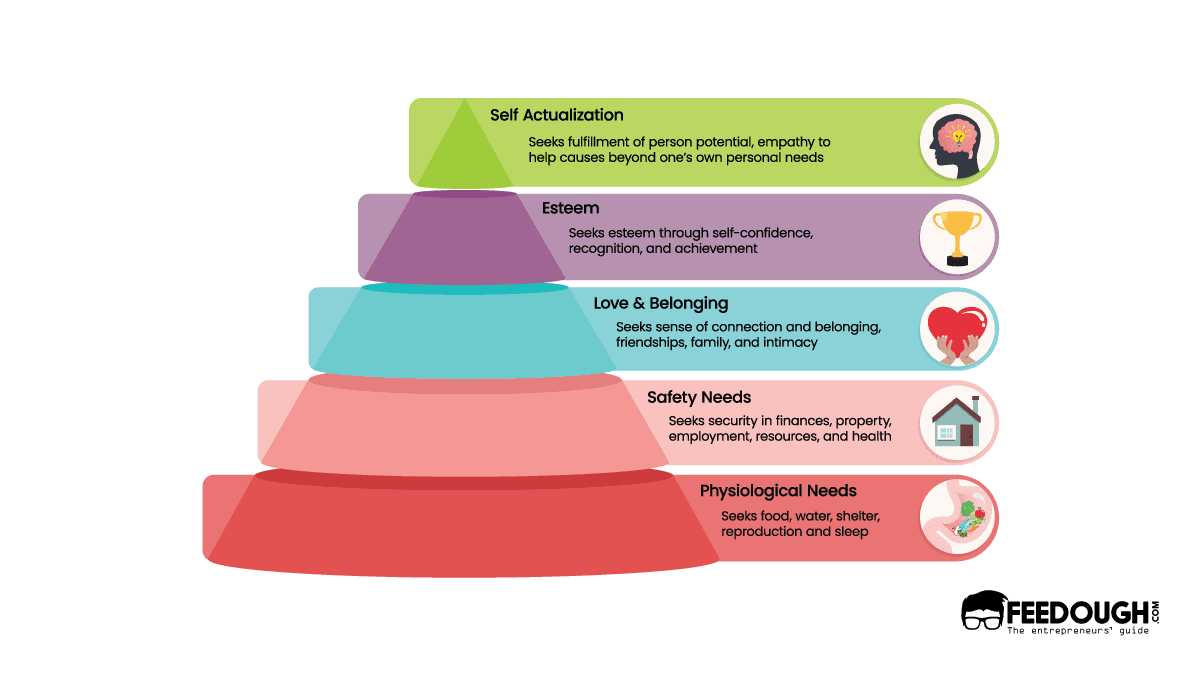
    maslow's need hierarchy

    According to Maslow, humans have five levels of needs that must meet in a specific order, and it is described as follows:

    Physiological Needs

    For human beings, the most basic needs deal with the maintenance and functioning of the body. Maslow describes these basic needs as physiological needs since they are vital for survival. Without food to eat, water to drink, a shelter to live in and proper rest, a person will struggle to function properly in society. Maslow believed these needs are the most instinctive needs as everything else becomes secondary until these needs are met.

    For instance, a person recently impacted by lay-offs will immediately seek alternative employment to earn money and fulfil their basic needs of food, water and shelter. Only after securing a new job and fulfilling the most basic needs of survival can a person move on to the next level of needs.

    Safety Needs

    Once there’s enough food and water in the belly with a comfortable shelter to rest in, human beings start to prioritise urgent bodily security and safety from attack. This is what Maslow describes as safety needs. For instance, refugees flee war, violence, conflict or persecution and cross international borders to seek urgent physical safety. Similarly, if a natural disaster strikes a region, people immediately leave their houses seeking physical protection and security.

    There’s no way a person can focus on pursuing their high-level needs if they feel unsafe in their immediate surroundings. For example, a person living in a dangerous neighbourhood will prioritise physically removing themselves from that environment above anything else. They will relocate to an area that has a relatively low crime rate. Once the person is sure of their physical safety, they can move on to fulfilling their emotional needs.

    Social Needs

    According to Maslow, humans also need to feel a sense of belonging and acceptance among social groups. This is what Maslow describes as social needs. For example, a person experiencing loneliness feels the need for companionship, so they decide to find a partner, get married and start a family. All the depression, anxiety and loneliness have now been replaced by happiness, companionship, love and a fulfilling relationship.

    Apart from their immediate familial relations, humans also feel the urge to create meaningful relationships and friendships in their community. Therefore, a person can decide to join a local book club or a cycling club to meet people with similar interests to further experience this feeling of belongingness with other members of society.

    Esteem Needs

    After fulfilling physiological, safety, and social needs, humans become keen on gaining esteem, self-confidence and respect from peers. For example, let’s think of a rich person who likes to show off his wealth to his peers by purchasing luxury items. In contrast, there’s an artist who paints solely to master his craft and become confident in his abilities. Whether the source of admiration is others or one’s own self, these scenarios create a positive self-image and help people define their self-worth. This is what Maslow describes as esteem needs and further divides it into two versions:

    • Lower version: The need to be respected by others includes status, fame, prestige, recognition, and attention.
    • Higher version: The need for self-respect includes self-confidence, independence, freedom, mastery, strength, and competence.

    When esteem needs don’t meet, humans experience feelings of inferiority. For example, two friends, A & B, are applying for the same college. Both of them worked equally hard to make their applications stand out. However, A’s application gets rejected, and B’s application gets accepted. A will start to feel inferior to his friend B, which will also affect his self-esteem and self-confidence.

    Higher needs, starting from self-esteem, are ego-driven needs. Once the needs at the bottom three levels are fulfilled, ego-driven needs play a more significant role in motivating a human being’s actions.

    Self- Actualisation Needs

    Once a human being’s physiological, safety, social, and esteem needs are fulfilled, they shift their focus towards reaching their full potential. For example, a successful investment banker may start a tech company solely because he’s passionate about it. Although there’s little to no money in this new venture at the beginning, he still enjoys his work immensely and cannot think of anything else to do in life. Maslow describes this as the last stage of the hierarchy of needs, in a now legendary term called self-actualisation.

    Maslow also points out that the drive for self-actualisation is based on a person’s personal motives and individualistic goals. That’s why the nature of this need is extremely subjective. For example, an individual may desire to succeed as a world-famous athlete, while someone else may find fulfilment in becoming a good parent.

    Progressing Through Maslow’s Pyramid Of Hierarchical Needs

    As one moves up through the hierarchy, the needs change, and the motivation to fulfil these needs also changes. Therefore, Maslow’s separated his hierarchy of needs into two sections:

    Deficiency Needs

    Maslow recognises physiological, security, social, and esteem needs under deficiency needs or D-needs. The motivation to fulfil these needs arises due to deprivation. Once these needs are met, motivation decreases. Also, The longer the duration that one’s D-needs go unmet, the stronger the motivation to fulfil them becomes. For example, a person’s hunger will only grow the longer they wait to eat something. 

    Growth Needs

    Maslow categorises self-actualisation as the only growth need or B-need. Growth needs stem from the desire to develop and grow as a person. Unlike deficiency needs, when an individual pursues their growth needs, the desire to fulfil them becomes even stronger. For instance, a person learning to play an instrument may get frustrated initially. Still, as they get progressively better, the desire to master the instrument becomes increasingly intense, and once the person fully masters the instrument, the satisfaction also feels increasingly profound.

    The Expanded Hierarchy of Needs

    Maslow built upon his original hierarchy in the later years and introduced three additional needs at the top of the pyramid, making it a total of 8. These needs are described as follows:

    • Cognitive needs: This refers to the human need to understand and make sense of their surroundings while being able to come up with novel solutions to problems. For example, a person could develop their critical thinking skills and learn a new language.
    • Aesthetic needs: This refers to the need to search for and appreciate beauty, balance and form. It could involve exploring the world of art, music and culture.
    • Transcendence needs: This refers to the need to go beyond one’s own self, whether by religious, mystical, spiritual, aesthetic, ethical or ideological pursuits. For example, a person could become involved in humanitarian or environmental causes. This is the highest level of Maslow’s Hierarchy of Needs and involves self-actualisation, self-transcendence and a sense of purpose.

    Application Of Maslow’s Hierarchy Of Needs

    Maslow’s need hierarchy finds its way into many aspects of daily life, business, marketing, human resource management and even psychology. Here are a few examples:

    • In Marketing: Maslow’s need hierarchy helps marketers craft an ideal buyer persona and decide what triggers an individual to purchase a product. A product targeted specifically at people at the esteem level of Maslow’s hierarchy is more likely to be marketed as an item that will bring recognition and respect. For example, Apple’s products are often seen as something to be proud of and can aid in a person developing self-confidence instead of as something to fulfil a basic need.
    • In Human Resource Management: Human resource managers use Maslow’s need hierarchy to understand what motivates employees and how to keep them satisfied. For example, a manager may realise that an employee is motivated by feelings of accomplishment and recognition rather than monetary rewards. They can ensure greater job satisfaction and productivity by adjusting their management style to accommodate the employee’s needs.
    • In Education: In the classroom, Maslow’s need hierarchy can be used to encourage positive behaviour. For example, if a student is displaying negative behaviour, it could be due to their unmet lower-level needs, such as safety and security. By addressing these needs first and then focusing on higher-level needs like self-actualisation, teachers can help foster an environment of learning, exploration and growth.
    • In Governance: The government can use Maslow’s need hierarchy as a guide when making decisions on policies. For example, when tackling poverty and income inequality, it is important to first address the lower-level needs of food, shelter and clothing before focusing on higher-level needs such as self-actualisation.

    Go On, Tell Us What You Think!

    Did we miss something? Come on! Tell us what you think about our article on Maslow’s need hierarchy in the comments section.
  • What Is An infographic? – Types & Examples

    What Is An infographic? – Types & Examples

    It’s a proven fact that the human brain is more attracted to visuals than plain text. People understand visuals faster and remember them for a longer duration. This is where infographics come into play.

    Consider infographics as the modern-day equivalent of a poster. It’s an easy-to-comprehend visual representation of data, facts and figures that helps communicate complex information quickly and clearly.

    But, for a newbie, ‘infographic’ could probably be an unveiled word. Here’s a guide that explains everything about infographics – from their definition to different types of infographics, examples, design tips and templates.

    What Is An Infographic?

    An infographic (information graphic) is a visual representation of information, data, and facts in an easy-to-digest format intended to present information concisely and quickly. 

    It includes visuals like graphs, charts, maps, icons, and illustrations that make complex information easier to understand and interpret.

    Infographics are used in various fields such as business, marketing, education etc. and are shared widely across social platforms like Twitter, Instagram, and Facebook.

    They are often used to explain a topic, products or services and to convey important messages using visuals.

    For instance,

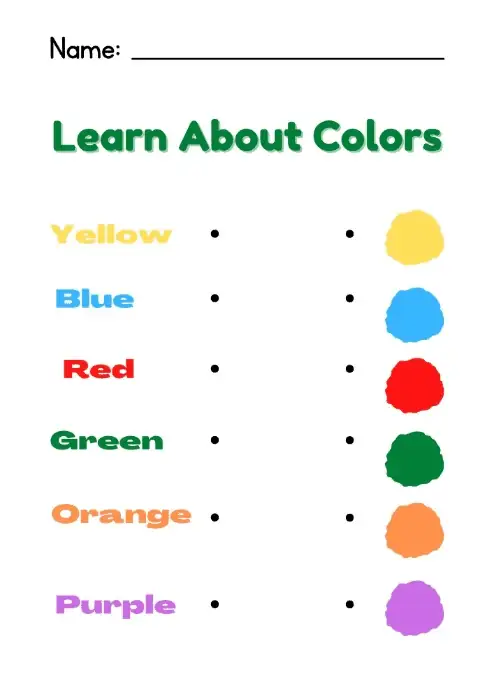
    It is easier for a teacher to explain colours to students using an infographic than describing them in words.

    infographic about colors

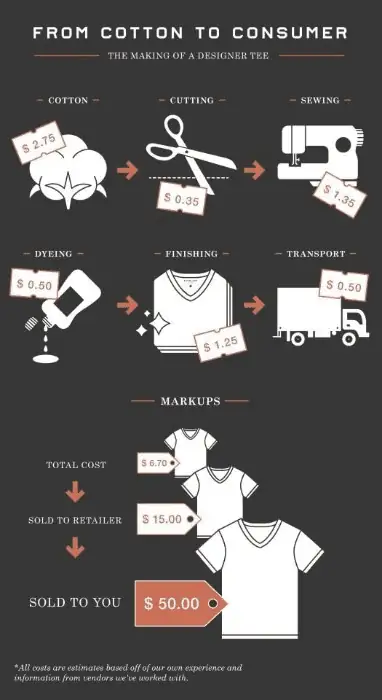
    Similarly, a marketer can break down the pricing of a cotton t-shirt right from when it was a cotton ball to the shop shelf using an infographic.

    infographic about pricing

    Infographics stand out and are made for a purpose, as they make difficult topics more accessible by breaking them down into visually appealing pieces of content. 

    The Purpose Of An Infographic

    Infographics are used to simplify complex topics and present them in an easy-to-understand format.

    This allows readers to digest information quickly, understand it better, remember it longer and even share it with others.

    The purpose of infographics is to communicate information quickly and effectively by combining icons, charts, images, text and colour to convey a message.

    Marketers use infographics to:

    • Educate their audience
    • Draw attention to important information like business achievements
    • Generate shares and backlinks for SEO
    • Engage better with their target audience

    Consultants use infographics to:

    • Present data to a client in a more exciting way
    • Make points more clear using infographics that include stats, graphs, and more
    • Deliver every day, weekly, monthly, or just regular project update reports to clients 

    Small businesses and entrepreneurs use infographics to:

    • Create a style guide for the brand
    • Highlight their offerings – products or services
    • Promote business
    • Showcase expertise on an industry-relevant topic to engage the audience
    • Create better visual assets

    Nonprofit organisations use infographics to:

    • Raise awareness about a cause and the impact of a work
    • To show data and statistics on the impact of a fundraiser that can be sent to donors
    • Explain a cause in an easy and understandable way
    • Prepare a visual impact report to showcase the success 

    Government use infographics to:

    • Circulate information about policies, programs, and services to the public
    • Share census data and statistics to support a points
    • Outreach, educate, and engage citizens about important issues

    Similarly, infographics find their use in other industries like healthcare, education, entertainment, and more.

    Types Of Infographics

    Infographics are powerful tools to increase engagement with the audience, which helps to boost communication effectiveness.

    Today almost every industry leverages these visual assets to convey complex information more quickly, attract more attention and draw more recognition.

    Here are some creative examples of how businesses use infographics:

    Guides Infographic

    Guides infographics are intended to provide a general overview of the topic without going too much into detail.

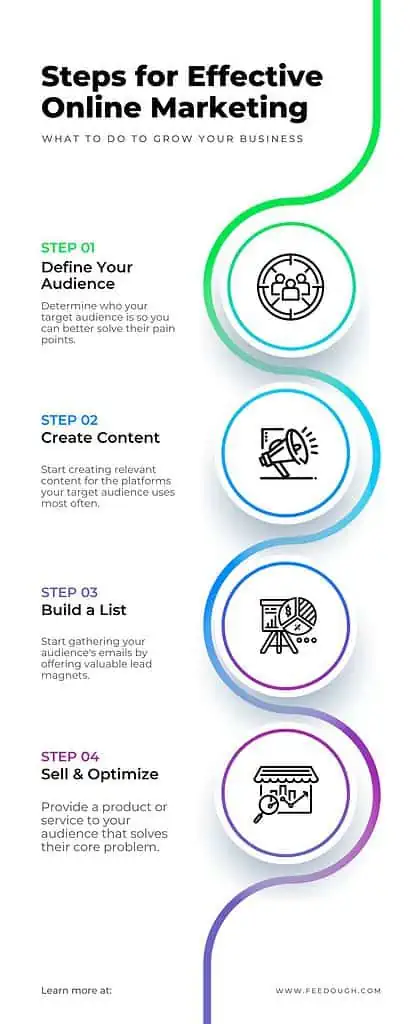
    They’re usually composed of reference points, steps and/or processes of information and represent a visual journey.

    Guides Infographic

    Scientific Data And Research Infographic

    Scientific infographics are designed to represent complex data in a visually appealing way.

    Organisations use these visuals to explain their research and findings in a more comprehensive manner, without relying on words alone.

    This type of infographic is often used to represent statistics and facts, as well as to illustrate the correlation between different factors.

    Scientific Data And Research Infographic

    Historical Events And Timelines Infographic

    Historical infographics are used to represent the events and developments of a particular period.

    These visuals may be composed of timelines, maps and visuals that explain the various advancements or occurrences over time.

    By representing historical information in an infographic format, organisations are able to draw attention and interest to these stories while simplifying their complexity.

    Historical Events And Timelines Infographic

    Statistical Information Infographic

    Statistical infographics are used to represent the data and findings of research or studies.

    They can be used to illustrate trends, demonstrate correlations between variables, compare different sets of information and incorporate hard facts and figures into visual representations.

    Statistical Information Infographic

    Maps And Geographical Data Infographic

    Infographics are also used to create maps and visually represent geographical data.

    This kind of infographic can be used to present changes in population, migration patterns or land use over time.

    It could also be used to compare areas in terms of certain aspects such as income levels, educational attainment or quality of life.

    Maps And Geographical Data Infographic

    Characteristics Of Infographics

    Even though infographics come in all shapes and sizes, there are some common characteristics that make them effective.

    These include:

    • A clear, concise and easy-to-understand structure,
    • Visual elements that make the data easier to comprehend,
    • Relevant and up-to-date information,
    • An engaging design that catches your attention,
    • Data points that are clearly labelled and organised.

    Infographics are also tailored to the audience they’re intended for. This is important so that readers can easily understand the information being presented.

    Steps To Creating An Infographic

    Pairing images with short-form text is proven to become one of the most effective ways to communicate with the audience. However, creating an effective infographic isn’t as simple as just throwing together a bunch of facts, figures and images. Here is the typical process used to make an infographic:

    1. Identify the audience: Identifying who will benefit from the visual information sets the tonality for the content and visuals that shall be used in the infographic.
    2. Research the topic: An infographic without information is just a fancy image. Finding the right information from internal and external sources is imperative to creating a good infographic.
    3. Make a plan and determine what information will be conveyed: Once the audience and information insights are in place, the designer creates an outline of how the information will be conveyed. This forms the spine of the infographic and decides the type of infographic to be used.
    4. Choose a relevant infographic design platform: Different design platforms cater to different users based on their design experience level. For expert designers, Adobe Creative Suite works well, while for non-designers, template-oriented platforms like Canva and Visme provide drag-and-drop editors with thousands of templates to choose from.
    5. Choose a design style, including colours and layouts: Once the designer zeros on the platform, they then move to choose the design layout including colours, visuals, images, and other visual elements and align them in a sensible format according to the outline.
    6. Share the finished product: Once done, the designer or the marketer either shares the infographic on their website, social media handles or embeds it into the blog posts.

    Go On, Tell Us What You Think!

    Did we miss something? Come on! Tell us what you think about our article on what is an infographic in the comments section.
  • How To Make An Infographic: Step-By-Step Guide

    How To Make An Infographic: Step-By-Step Guide

    The human brain processes an image 60,000 times faster than text and can quickly identify an image seen for as little as 13 milliseconds. This fact was the reason why marketers made a shift towards sharing information visually.

    Whether you are a marketer, student, or a teacher; to make an infographic, you need three things to get started:

    • Ideas – The idea is a formulated thought you would like to share with your audience. It decides what the entire presentation is going to be about – it is the spine of your infographic.
    • Platform – Not all platforms are custom-fit for all types of presentations. For instance, Visme is suitable for data-oriented infographics, Adobe Illustrator is good for professional ones, and Canva is excellent for all kinds of creative infographics.
    • Information –  Information brings that conceptualisation to reality and helps you convert the idea into a visual explanation. It includes the key facts, visuals, data, and more information that will support your idea and keep your audience engaged.

    Creating good infographics is a crucial skill for marketers to communicate better with the audience. And creating one isn’t hard once you know the proper steps and have the apt infographic tools to create it.

    Tool
    What is it?
    Who is it for?
    Cost
    A collection of software tools for graphic design, video editing, and web development
    Professional designers and creatives
    $239.88 per year
    A user-friendly template-oriented graphic design tool for non-designers.
    Individuals and small businesses
    Free or $12.99/month for premium features
    A data-oriented infographic-making tool 
    Individuals, businesses, and marketers
    Free or $12.25/month for premium features
    A tool for non-designers to help create professional infographics, presentations, and other visual content
    Businesses, marketers, and designers
    Free or $10/month for premium features
    A platform for hiring freelance designers and creatives for custom infographic projects
    Businesses and individuals looking for custom infographic design
    Rates vary based on freelancer’s experience and skills
    A platform for hiring freelance designers and creatives for custom infographic projects
    Businesses and individuals looking for custom infographic design
    Rates vary based on freelancer’s experience and skills but starts at $5

    This complete step-by-step guide will help you make an effective infographic. 

    What Is An Infographic?

    An Infographic (a.k.a. Information graphic) is a visual representation of data, information, or knowledge. It concisely presents complex information using data visualisations and imagery, like pie charts, graphs, steps and minimal text to illustrate data visually.  

    Since infographics are easy to understand, they can be used to present information on scientific concepts, historical events, and statistical data. You can also share them with a wide audience quickly.

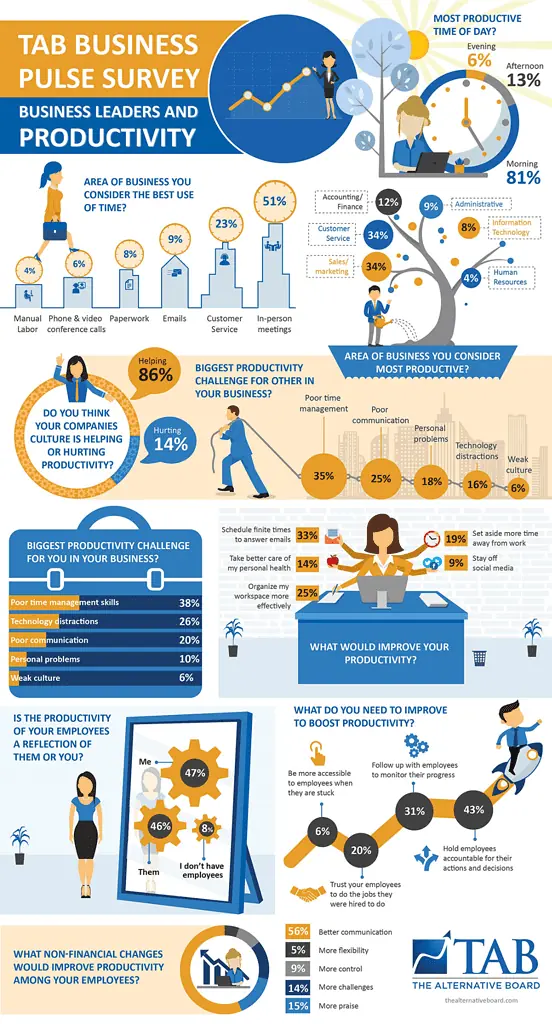
    For instance, it is much easier to understand this complex business pulse survey in this infographic than it would have been on sheets.

    infographic example

    How To Make Infographics – Step-By-Step Process

    No matter the topic’s complexity, anyone can make an infographic, given the right steps and tools. Here are the six simple steps to follow when creating an infographic:

    Identify The Audience

    If you create an infographic to please everyone – you end up pleasing no one.

    When you are making an infographic – it is essential to know:

    • Who is it for?
    • Who is it not for?

    Knowing who your target audience is will help you know:

    • What data to add
    • How explicit should you be with the details
    • What should an infographic look like
    • What technical terms, lingos, and jargon can you use

    For instance, if your audience is your team, you skip adding basic details, be strategic, and go more in-depth. However, if your target audience is interns, you need to create a build-up.

    Identify The Goal Of Your Infographic

    The goal of an infographic can be many. It can be creating different types of infographics, including:

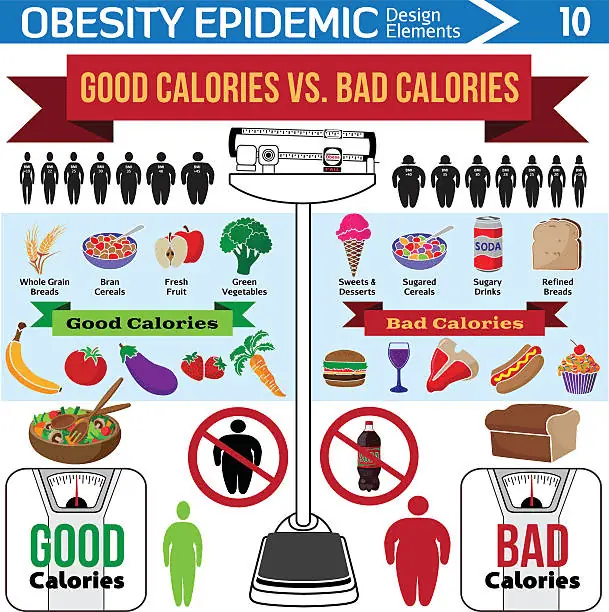
    Comparison Infographic 

    Comparison infographics that explain the complex and minor differences visually help the audience to comprehend differences effectively. For instance, this infographic makes the difference between good and bad calories and their consequences easy to understand.

    Comparison Infographic 

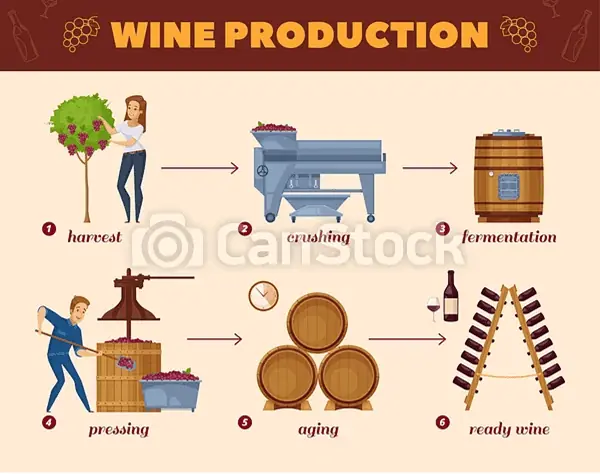
    Flowchart Infographic

    Flowchart infographic makes it easier to understand the entire process and its work in just one glance. For instance, this image makes the whole process of wine production very clear in just one appearance.

    Flowchart Infographic

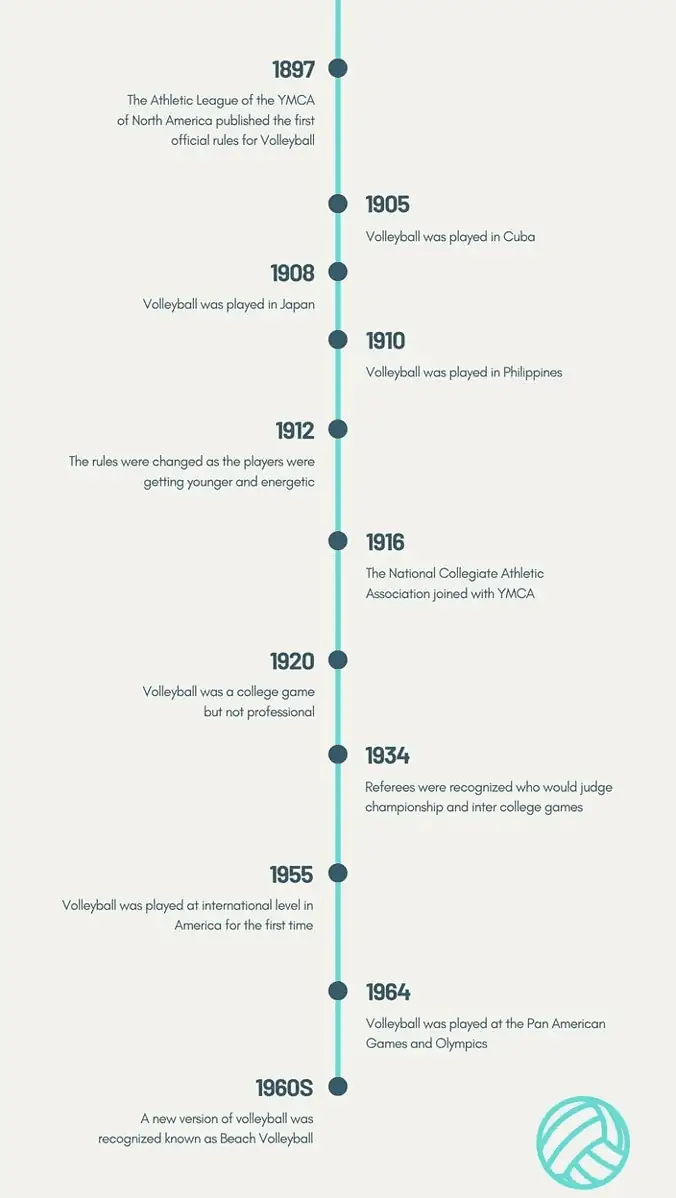
    Timeline Infographic

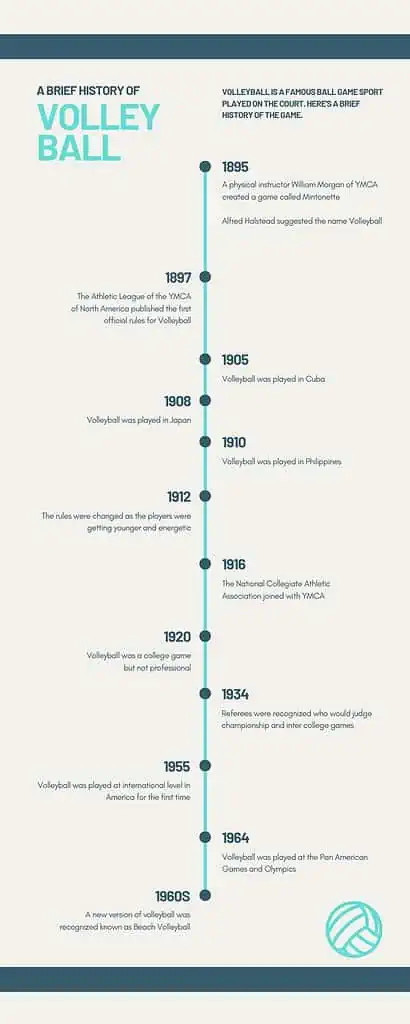
    Timeline infographics make it easier to display information in time progression content visually. For instance, this infographic below shows the entire history of volleyball from 1985 to the 1960s in one shot.

    Timeline Infographic

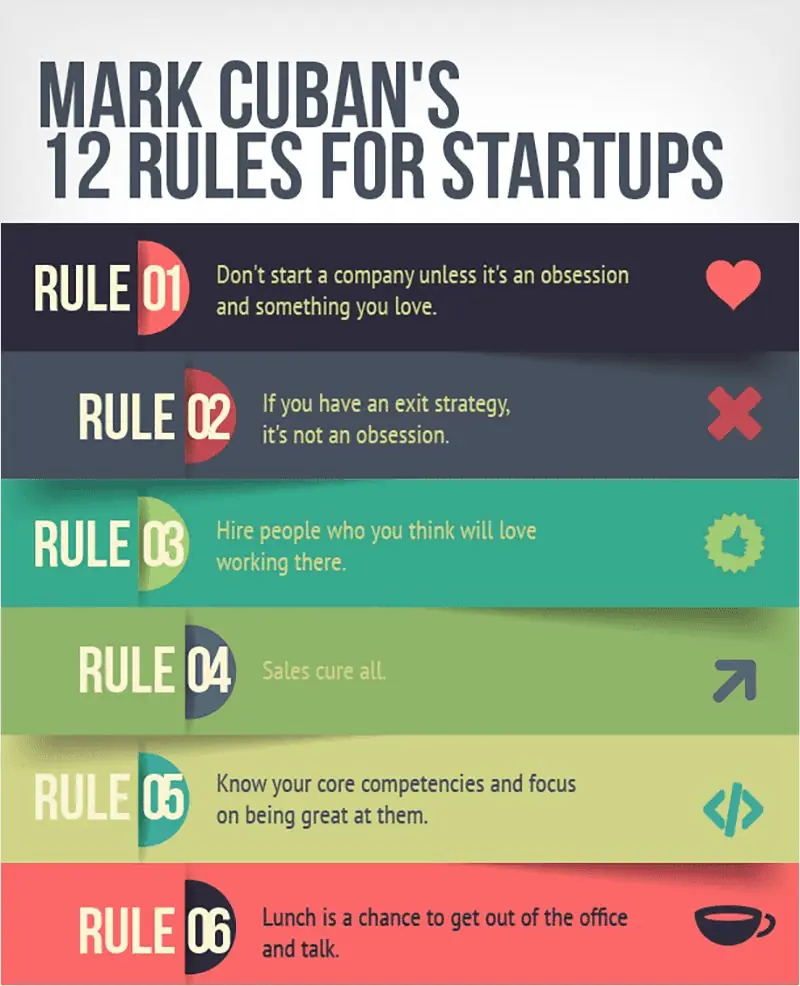
    Listicle Infographic

    Timeline infographics make it easier to display information in time progression content visually. For instance, this infographic below shows the 12 rules Mark Cuban follows to ensure his startups succeed.

    Listicle Infographic

    Educational Infographic

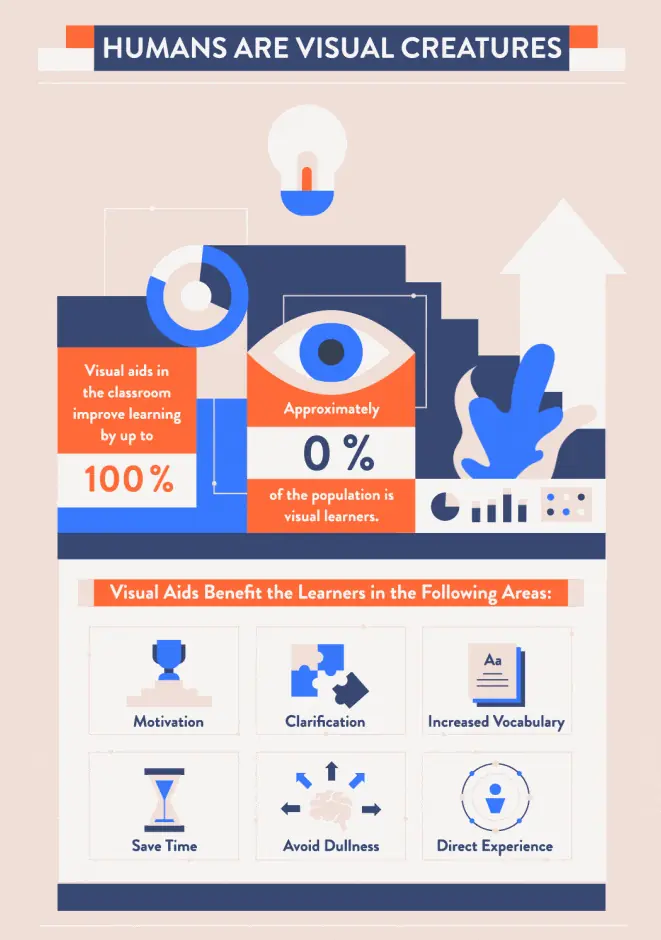
    Educational infographics help businesses and educational institutes relay information in a logical and visual way. For instance, this infographic very well explains why humans are visual creatures and how it benefits learning.

    Educational Infographic

    Process Visualisation Infographics

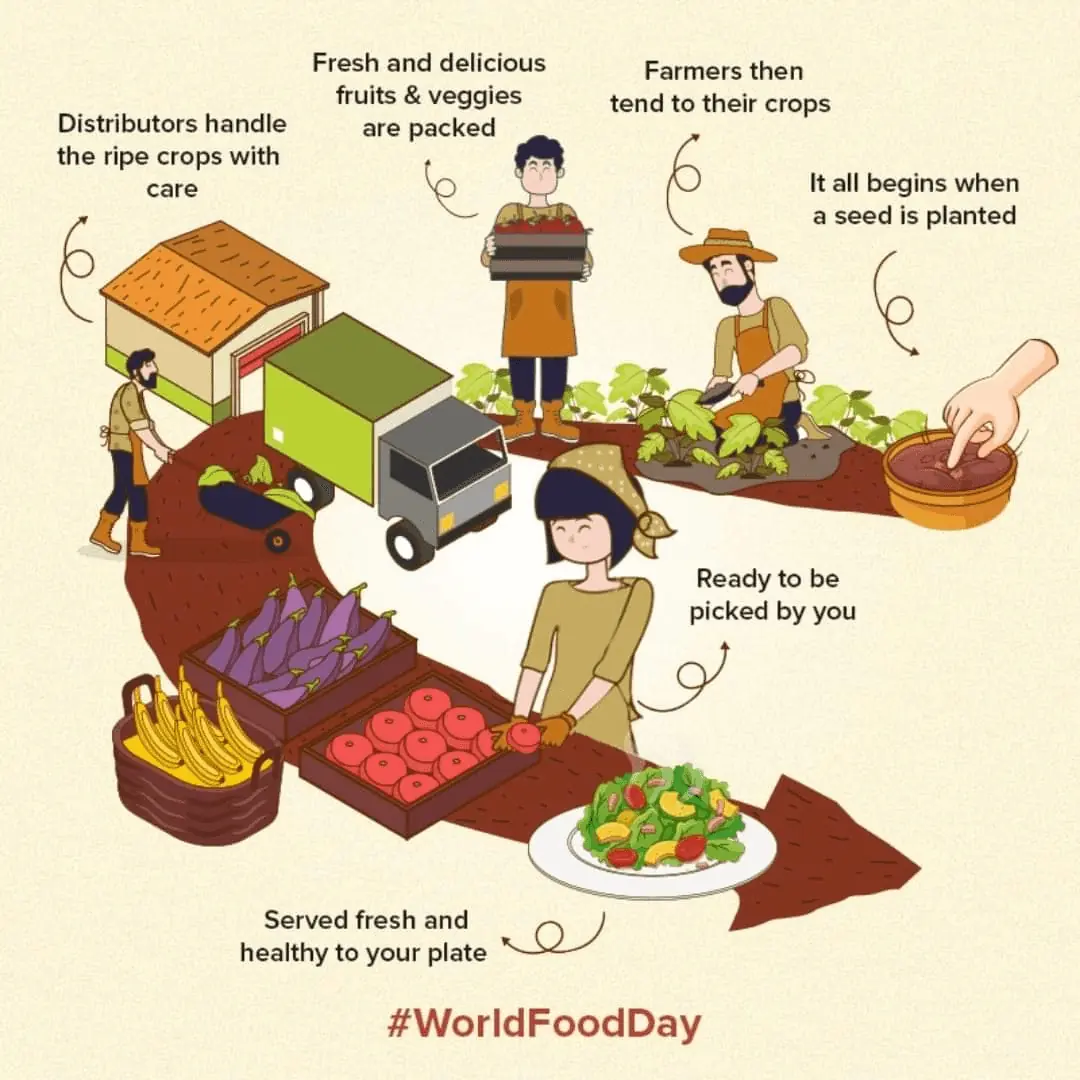
    Process-oriented infographics make it effortless to understand a process in a go. This infographic I found on World Food Day is an excellent example of a process explained well. It walks us through each step it takes to get us food – from seed to food on the plate.

    Process Visualisation Infographics

    Project Impact Report Infographic

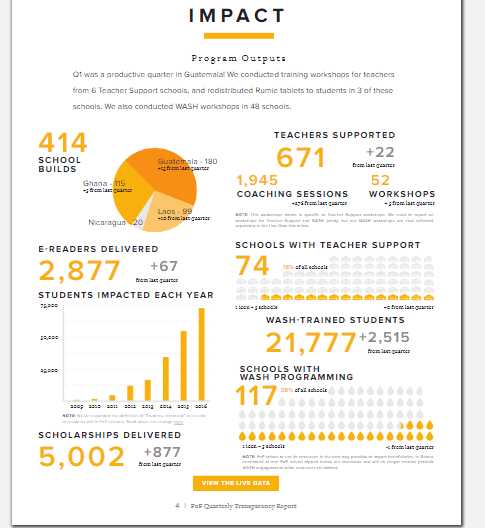
    Project impact report infographics explain different areas of success, failures, areas of improvement, and all other data and stats in just one image, dismissing the need to go through those heavy excel sheets. For instance, this infographic using different data explains the output of a program.

    Project Impact Report Infographic

    Fetch Data For Your Infographic

    When preparing an infographic, the data you present to your audience must be real and existential to create meaningful infographics. You can not add the general information available on the internet.

    So, the question is, what is the best place to get authentic data?

    It depends on the type of infographic.

    If it’s internal – get data from your departments.

    If you plan to create an infographic on external data or stats, websites and research companies like Statista, Gartner, Pew Research, CB Insights, etc. could be your go-to data platforms. Or you can simply start with “*niche* statistics” Google search to start with your research.

    Always remember to use legitimate data for your infographic and add source somewhere on the image.

    Create A Logical Layout Of Your Infographic

    The first breakthrough with making an infographic is hard. That is why you must create an outline or layout and structure your information and data first.

    Decide the hierarchy, where to add which data, what text to add with which image, and plan your entire infographic.

    Doing this will give you clarity over the project and help you create a visually appealing infographic.

    Convert Data Into Visuals

    Once you have your data, you will have to decide how you want to represent it visually. You can do this in three ways:

    • Create the entire infographic yourself using expert-oriented software like Adobe Photoshop, Illustrator, etc.
    • Get the help of a designer. You can go to marketplaces like Fiverr or find an expert design freelancer through platforms such as 99Designs.
    • Or, use template-based SAAS like Canva, Visme, Piktochart, etc.

    Go with Adobe creative suite if you have the expertise. It offers a lot of features and options, so you can create anything from a simple one-page infographic to a more complex one with multiple sections.

    But if you don’t have the time or money to learn it, get professional help or go for template-based solutions.

    Freelancers are usually time-efficient, and their work quality is often just as good (if not better) than what you can get from professional designers. Plus, they’re more likely to be able to customise your infographic according to your needs. 99Designs is a good place to start for designer freelance hunting.

    But freelancers can be costly, so if you need to keep your budget lower, then go for template-based software. This type of software includes options such as Canva and Visme, both offering plenty of features to create beautiful infographics with minimal effort.

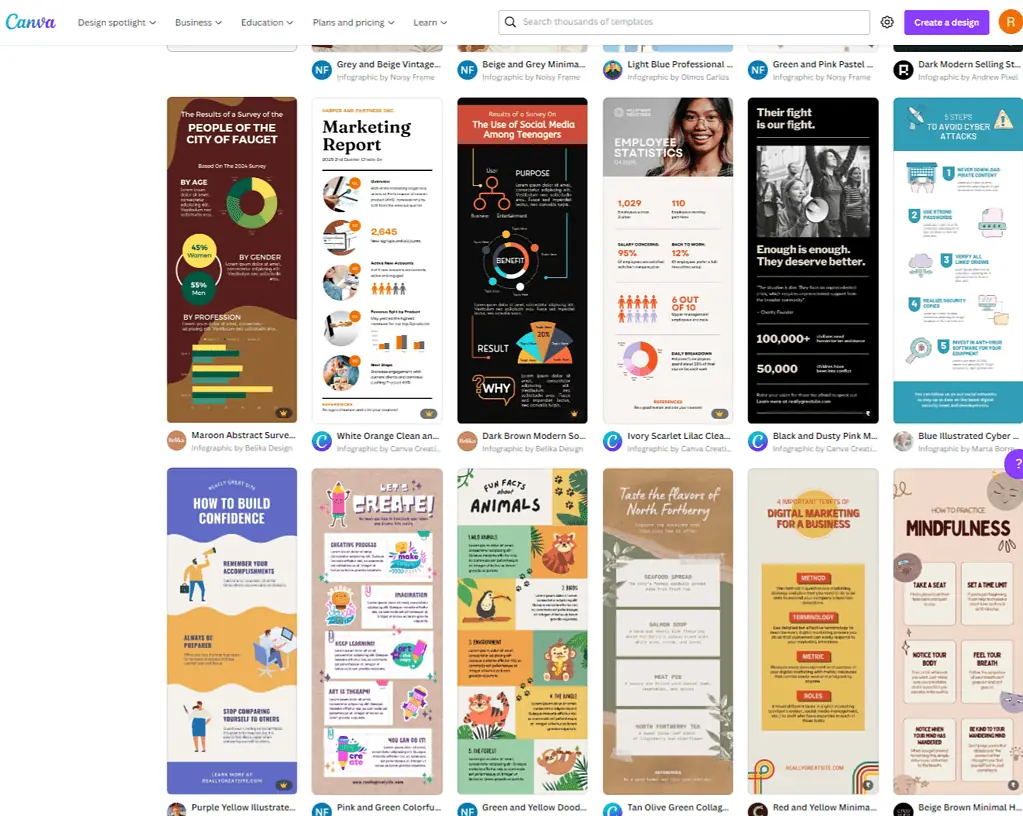
    To create an infographic on Canva:

    • In your Canva account, click on ‘create design’
    • In design the editor, click on the ‘Uploads’ tab and select – the ‘Upload your own images’ options
    • Click on the ‘Browse’ button to find the data sheets, including google sheets, excel, or more, from which you want to import the data.
    • After uploading the file, you can resize, crop, or add filters to the images
    Canva

    To import data into Visme, follow these steps:

    • Click on the Import Data tab on the left
    • Choose the source from which you want to import data – google Sheets, excel or more.
    • After you have added the link to the file or uploaded the excel sheet, get your graph ready to customise and use.
    https://www.loom.com/share/b95708ebcbc44b62804709cd43ded033

    Bottom-Line?

    To make an infographic, all you have to do is follow these five steps.

    1. Identify The Audience
    2. Identify The Goal/Type Of Your Infographic
    3. Fetch Data For Your Infographic
    4. Create a logical Layout Of Your Infographic
    5. Convert Data Into Visuals

    The best part? You don’t need to be a designer to convert your data into visuals. Ensure you know what you’re doing, align the data logically, and use good templates to create an infographic.

    Go On, Tell Us What You Think!

    Did we miss something? Come on! Tell us what you think about our article on how to make an infographic in the comments section.
  • What Is Augmented Product? (Importance & Examples)

    What Is Augmented Product? (Importance & Examples)

    Starbucks is best known for its exceptional coffee and roastery reserves, but that isn’t all for the quintessential Starbucks experience. As the brand itself states, “more than just coffee”, Starbucks offers various augmented products, such as free WiFi access, a relaxing atmosphere, great music, charging sockets, comfy lounge furniture and so on. 

    In fact, sometimes, a customer might simply visit a nearby Starbucks to enjoy the value-added amenities and not necessarily buy coffee, which is the company’s core product.

    So, what exactly is an augmented product? Why is it important? And how does it benefit a business?

    What is Augmented Product? 

    An augmented product is an offering of enhanced features that contribute toward defining the perceived value of the existing product, goods, or services.

    These enhanced features can be offered in the form of discount offers, product warranties, refunds, free delivery, free samples, etc. 

    In simple words, it is the benefit received by customers that adds extra value to their purchase. For example, a customer buys a laptop but also receives a laptop carry bag free of cost. This ‘add-on’ is not essential to the laptop’s core benefit but will certainly help the customer to carry the laptop around with ease, further adding value to the purchase. 

    Importance of Augmented Product

    Augmented product plays an important role in achieving customer satisfaction and loyalty. The right combination of core and augmented products can help businesses differentiate their offering from their competitors. 

    For example, in a market where every airline offers the same core service i.e. transport from one point to another, it is the augmented services such as in-flight meals or entertainment that help an airline to differentiate itself to attract more customers.

    Examples of Augmented Product

    Companies can enhance customers’ buying experience by being innovative in their offerings. Here are a few examples to illustrate the same: 

    Spotify

    Spotify’s core product is a music streaming service but the company has added extras to it in order to differentiate itself from its competitors. It offers a year-end review of its users’ listening history as Spotify Wrapped. Besides this, there’s also Instagram partnership and podcasts that form part of the augmented product.

    Apple iPhone

    The Apple iPhone is a great example of an augmented product. The core offering from Apple is its iconic smartphone but it has added many features to differentiate itself from other players in the market. This includes features such as iCloud, Face ID, 3D Touch and so on which makes the experience for customers unique.

    Types of Augmented Products

    There are numerous ways to enhance an offering. Here are the most common types of product augmentation:

    1. Brand name: Successful brand image easily sets a business apart from the competition. For instance, when given to choose between a pair of ripped jeans from Zara & a pair of ripped jeans from a relatively smaller, newer brand, a customer will most likely choose Zara. Reason being that Zara is globally recognized for fast and high-quality fashion at low costs. The brand lives up to its title of “affordable luxury” and has cemented itself as a reliable, customer-oriented business among its target audience.
    2. Product warranty: Typically, this offering applies to electronic appliances & gadgets. Companies use this product augmentation to assure buyers that the product is of good quality and promise to fix any issues as per the specified terms and conditions of the warranty.
    3. Free delivery: Brands from different industries make use of this offering. For instance, food delivery apps or restaurant chains offer free delivery if the customer fulfills or exceeds the minimum order value.
    4. Installation & configuration: Companies can offer to provide technicians who can install or configure a product free of cost. For example, a company that sells electronic devices can send a technician to install a new TV set or air conditioner for the customer.
    5. Updates: A company must continuously upgrade its existing products to delight and surprise its users. For example, Apple constantly upgrades their existing iPhone models in terms of shape, size, color, software updates, camera quality, and so on.
    6. Refunds: Companies also provide a ‘refund option’ to clients if they aren’t satisfied with their purchase which further helps in building trust and customer loyalty.
    7. Free samples: Cosmetic stores often give free samples on spending a certain amount, adding an additional value to the client’s purchase. Companies can also use this strategy to offer free samples of newly launched products alongside the purchase of the primary product to catch a buyer’s attention and boost sales.
    8. Free trials: Many online streaming services such as Amazon Prime Video, Hulu, Apple TV Plus, etc. provide a free trial period that allows the customer to verify whether the provider offers everything they’re looking for before spending a penny.

    Benefits of Augmented Product

    The goal of providing extra value is to benefit both the seller and the buyer. Focusing on the latter, here’s how businesses can benefit from product augmentation:

    Increases Revenue Streams

    Product augmentation allows a company or business to expand and grow. For instance, Nike’s remarkable success in the footwear industry also allowed the company to incorporate athleisure & sporting equipment, further expanding the business.  

    Builds Customer Loyalty

    A brand must constantly upgrade its existing offerings so that the clients feel valued at all times. A satisfied customer is more likely to purchase products or make recommendations to others. Loyal customers also personally advocate for the brand’s reputation and may also choose to become life-long customers, further boosting a brand’s image. 

    Increases demand

    Loyal customers can help drive more business and boost leads as they may make recommendations to their family members or friends based on their personal experience.

    Go On, Tell Us What You Think!

    Did we miss something? Come on! Tell us what you think about our article in the comments section.
  • What Is A Core Product? (Importance & Examples)

    What Is A Core Product? (Importance & Examples)

    The actual product the end consumer receives is a mixture of two elements: a core product, and some augmented features.

    Here’s an example, an average customer’s main motive for visiting Starbucks is to purchase a cup of coffee. In this case, the core product is coffee; the augmented features could be anything from free Wifi, laptop charging points, exclusive flavours, and even a comfortable atmosphere.

    Hence, the core product is the main reason why customers purchase a particular offering.

    But what is a core product, exactly? Why is it important? And what are some examples?

    What Is A Core Product?

    A core product is the primary or fundamental utility or benefit a customer receives when they purchase an offering.

    In simple terms, it is the purpose of an offering – energy drink to provide energy, electric toothbrush to clean teeth, etc.

    This core product can be tangible, such as a physical item (e.g., clothing), or intangible, such as an experience (e.g., getting their nails done).

    It answers the what and why behind the purchase decision.:

    • WHY would a customer buy a certain item?
    • WHAT fundamental utility does a customer get from making this purchase?

    For example, a customer buys packaged drinking water because the core product is hydration, not the bottle itself. The other features form the other levels of this product that add to the appeal but don’t provide the primary utility.

    The Five Levels Of Product

    The product that the customer receives is the actual product. It is made up of five levels and the core product forms only a part of the entire product.

    The five levels of a product are core, generic, expected, augmented, and potential products.

    • Core product: The primary focus of customer needs and wants. It serves as the most important element as it answers their need or desire. For example, a toothbrush’s core product is to clean teeth, not its handle shape or colour.
    • Generic product: A version of the product that includes attributes & features that are absolutely necessary for it to function. For example, a toothbrush won’t be of any use if it didn’t have bristles.
    • Expected product: These are the features customers expect from a specific product. For example, customers expect toothbrushes to be of a certain shape and size and made with durable bristles.
    • Augmented Product: The additional features which enhance the core product but are not the buyer’s primary focus. For example, a toothbrush may come in many colours and shapes, which are not essential to its core purpose of cleaning teeth. But they may help the customer choose what is most aesthetically pleasing or ergonomic.
    • Potential product: These are additional features which could be built into the product to meet customer needs but have not yet been developed. For example, a toothbrush may come with an app that tracks your brushing habits and provides feedback on how you can improve oral hygiene.

    The Importance Of Core Product

    The core product forms the spine of the actual product. If packaged drinking water doesn’t quench a customer’s thirst, the other aspects of it won’t matter.

    Besides this, here are some of the reasons why core products are so important:

    • Resolve customer pains: The core product determines an offering’s value proposition, aiming to resolve customers’ specific pain points.
    • Forms the base for augmented products: The core product is the platform to which augmented features are added.
    • Determines customer experience: A good core product determines the overall customer experience and sets up expectations.

    Examples Of Core Product

    While one may consider the core product of any offering to be its primary function, countless examples illustrate this concept.

    Core Product Of A Shampoo Brand

    For example, a shampoo brand like Dove can be boiled down to its core product: a cleansing shampoo. This core product can then be augmented with added features like anti-frizz, volumising, and dandruff control.

    Core Product Of A Phone Service Provider

    Airtel, for example, would fail if it didn’t provide reliable phone service as its core product. This is because all of the additional features, such as call forwarding, voicemail, and text messaging, require a solid foundation of phone service.

    Core Product Of A Software

    Microsoft’s Powerpoint will be of no use to its users if it fails to provide the core product of presentation software. This means that all other features, such as animation, transition effects, and support for high-definition video, must be built on top of this core product in order to make Powerpoint useful.

    Go On, Tell Us What You Think!

    Did we miss something? Come on! Tell us what you think about our article in the comments section.
  • 10 Proven Ways To Make Money With Your Car

    10 Proven Ways To Make Money With Your Car

    If you have access to a fairly reliable car and have some time to spare. Bingo! You found yourself a quick and effective way to make money.

    Many companies pay you just for owning a car and renting it out so they can use it. Some pay you to drive them, and some even pay you to use them for their requirements.

    The best part? You can make up to $5,000 a month.

    But, some high-paying opportunities do demand a significant amount of driving on your end. If you enjoy driving or spending time in your car, you might as well get paid for it.

    However, some companies even offer passive income opportunities to make money with your car if you don’t want to stamp extra miles.

    You can easily monetise this opportunity to earn some extra cash and cover your car expenses at the least.

    Read on to find out ways you can use to make money with your car.

    Register On A Rideshare App

    Did you know Uber drivers can make up to $50,000 a year?

    Uber pays its rideshare drivers roughly $15 to $22 per hour. But you can end up earning even $50 an hour when surge pricing is present.

    Consider this –  driving around in the buzz of New York City will fetch you more money than in a random suburb on a Sunday afternoon. This happens due to the increased demand of Uber drivers.

    Ridesharing requires you to give rides to people from their pickup point to their destination, just like a local taxi driver. The only difference is that you will receive the ride invitations and major proceeds from the app itself.

    Depending on your locality, you can register on any rideshare app.

    • Uber: Registering on Uber is fairly simple
    • You must be at least 21 years of age
    • Carry a valid US license
    • Minimum one year of driving experience
    • Clean driving and criminal record
    • The vehicle can be four doored and newer than 15 years.

    Uber drivers are generally paid per mile driven or per hour basis.

    • Lyft: A major competitor in the market known to be more beneficial to drivers as tipping is customary.
    • You must be 21 years or older
    • Pass the driving test
    • Clean driving record
    • Have a 4-door vehicle

    Though the requirements for rideshare drivers are the same everywhere, they might differ in some states. So, make sure that your vehicle fulfils all the requirements.

    Become A Food Delivery Partner

    Being a food delivery partner is similar to being a rideshare driver, just without strangers.

    If delivering food through ordering apps is something you can do, then this might be the best opportunity for you.

    You can easily make up to up to $25 an hour, along with tips and other benefits. But, this pay can increase if you consider working shifts during lunch hour or dinnertime when the demand is usually high.

    Everyone wants food to be delivered to their doorstep, indicating a high demand for food delivery drivers.

    Even college students can register as delivery partners and work 15-20 hours a week to earn extra money.

    The most popular apps are:

    • Uber Eats: Brought to you by Uber, it’s a service where you will be driving food instead of people. The requirements are:
      • At least 19 years old
      • Have a valid driver’s license
      • A reasonably reliable car (works for bikes and scooters)
      • One year of experience
    • DoorDash: Another popular delivery service which requires:
      • At least 18 years old
      • Need to pass a background check
      • Any car, scooter or bicycle

    The plus point is that you will be guaranteed a minimum of $10 per hour even if the business is slow, and you get to keep 100% of your tips!

    Make Your Car A Moving Billboard

    Driving to your workplace every day adds to your cost but wrapping your car in an advertisement gets you paid in return!

    You don’t need to drive extra miles around the city. Instead, you will be paid for your regular driving.

    It is one of the best ways to earn passive income.

    Your car will be a moving billboard whether you attach a small ad on your windows or wrap your whole car with advertisements.

    The cash you earn depends on the size of the car and the number of hours you drive each day. A full wrap will be most lucrative (almost $400 a month), but even smaller ads can get you over $50 a month.

    Companies like Wrapify and Carvertise connect you with companies who wish to endorse their brand on your regular commute route.

    They do have certain requirements:

    • Minimum number of hours driven per day
    • Clean record
    • A car that passes their quality check

    Rent Out Your Car

    If you own a car but don’t use it often, Airbnb it! You can easily make $1100 a month just by renting it out.

    A few car-sharing services are available in the market. They utilise these vehicles for sightseeing, business travel, events, photoshoots or other transport services.

    It does have some downsides, like a potential risk of damage by strangers and extra miles stamped to your meter. But such companies do provide you with additional insurance coverage for the same.

    This service is most popular among people who buy a new car and rent out the older one to earn some extra cash.

    • Turo: List your car for free and become a vehicle host.
      • Pass a vehicle inspection
      • Clear background check
      • Eligible car

    The plus point is that you’re covered with $750,000 in insurance for any damage from travellers.

    • Getaround: Another company where you can list your vehicle for free.
      • Car must be 2005 or newer
      • Less than 125,000 miles on the meter
      • Eligible 4-wheel car

    List As A Carrier For Amazon

    Amazon pays you to deliver packages to its customers with Amazon Flex.

    You can make up to $18-$25 per hour delivering packages every day.

    Once you register on the Amazon Flex app as a delivery driver, you can set your availability block. All you need to do is reach the warehouse in the time frame, scan and load your package and deliver it to its destination.

    The app even has a GPS to guide you to the delivery location.

    You need to have:

    • A valid driver’s license
    • An eligible and reliable car
    • Clear a background check
    • Must be at least 21 years old

    Help People Move

    Your car’s empty trunk and backseat can be put to great use for helping people haul large furniture and other objects.

    Registering with dedicated apps gets you paid for your physical labour as well as help you make money with your car. You can make up to $20-$50 an hour, depending on what kind of services you offer.

    Apps like TaskRabbit allow customers to hire you for specific or combined tasks.

    Now you don’t always need cargo vans or SUVs to help people haul stuff.

    GoShare is an app that allows you to sign up even with smaller vehicles. However, Dolly, another app, allows only users with a pickup truck or van capable of lifting heavy loads to register as a user.

    Register For A Shuttle Service

    You can work for transportation services like HopSkipDrive, which is a shuttle service for children.

    Being a care driver pays you roughly $40 an hour plus bonuses. You can also enrol for nannying, babysitting, and driving to increase your pay scale.

    The app allows you to set your schedule even seven days in advance. To qualify, you should:

    • Be at least 23 years of age
    • Have childcare experience of 5 years

    Start A Pet Transport Service

    If you are an animal lover, then you can make money with your car by offering to transport pets.

    Your jobs can include taking the pets to the vet, breeders, and trainers or simply driving them back and forth from a pet care clinic.

    The earnings vary depending on the number of services you offer. Pet care facilities are generally located far from the customers, so they are willing to pay an extra price for that distance.

    Enrol As A Grocery Shopper

    Another side hustle you can go for is to sign up as a grocery shopper.

    Picking up people’s groceries from the store and driving it to their homes can fetch you $20 every hour.

     You can sign up on apps like :

    • Shipt: With Shipt, you are paid on an hourly basis. Once you receive an order request through the app, you shop for it, load it in your vehicle and deliver it to the destination.
      Shipt often offers one-hour delivery, so you must ensure that the order reaches within the stipulated time.
    • Instamart: This service also allows you to become a personal shopper for someone or an in-store shopper. You help them get home with their groceries and get paid for your services.

    Assist The Seniors And Disabled

    If you have a wheelchair-accessible vehicle like an attached ramp, you can assist senior citizens or people with disabilities in their regular commute.

    You can look for people in your neighbourhood or at a nearby clinic who are willing to pay you for your services.

    Their medical conditions or circumstances restrict them from using public transport, and assisting them would get you easy extra cash.

    Bottom-Line?

    When it comes to making money with your car, there are innumerable ways to monetise opportunities coming your way. Owning a car is possibly one of the most lucrative assets you can have, among others.

    Take advantage of the opportunity you have with you and capitalise in the best possible to earn some extra money. This would, at the least, help you cover your insurance and maintenance expenses to break even.

    Go On, Tell Us What You Think!

    Did we miss something? Come on! Tell us what you think about our article on make money with your car in the comments section.

  • Presentation Tips: 11 Simple Yet Effective Strategies

    Presentation Tips: 11 Simple Yet Effective Strategies

    There is a lot that can go wrong with a presentation. You may struggle to keep your audience engaged and focused, or you may give the presentation, but your audience does not understand anything. You might even find yourself running out of time or struggling to answer difficult questions from the audience or find yourself stuck in other issues.

    But I bet you don’t want that to happen. All you want is to deliver a good presentation, get your point across and leave a good impression.

    To make sure that happens, here are the tips you can use to create an impressive presentation and deliver it in the right way:

    Tips On How To Create A Presentation

    Your presentation is the key to your success. It should be properly designed and crafted with the correct content. Here are some tips you can use to create a good presentation:

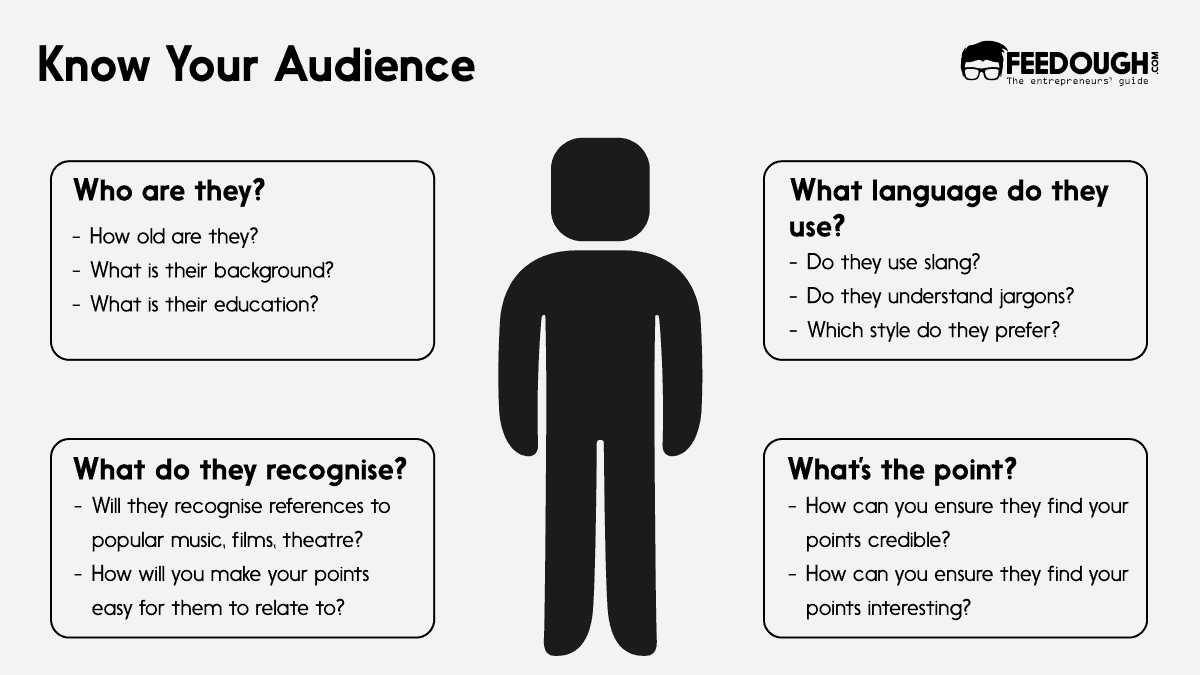
    Start With Understanding Your Audience

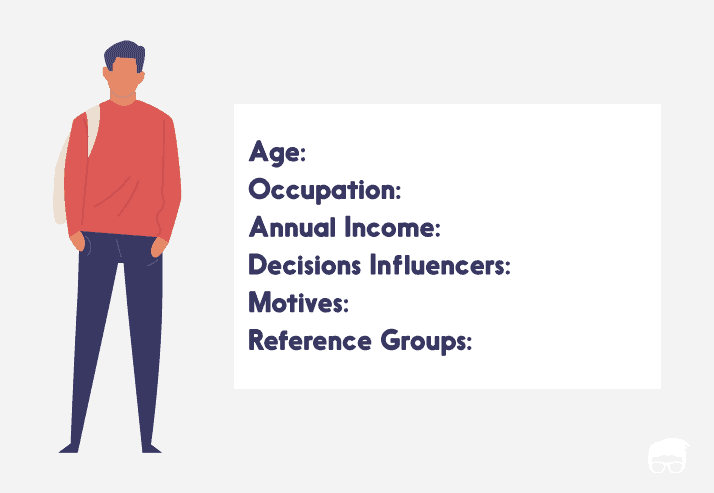
    audience persona

    The target audience is the magic ingredient of your presentation. You need to understand the people you will be presenting to. It’s important to consider their knowledge level, interests, and objectives. To do that, develop an audience transformation roadmap. It starts with you asking four questions:

    • What does my audience already know? (or don’t know)
    • What do they believe, or think they know?
    • What do they feel?
    • What do they do?

    For example, if you have to deliver a presentation on web 3.0 to IT professionals, they:

    • Might already know about what blockchain and cryptocurrency is
    • Believe in its future
    • Are excited about the changes it can bring to their business
    • May be researching how to apply blockchain technology.

    Once you have the answers, you have point A. Now consider your presentation to be a bridge to point B, where you intend your audience to be.

    Take Help Of Templates

    Take Help Of Templates

    If you are not a good designer or someone who makes presentations often, you might get these roadblocks:

    • Time constraints: Often you are given a deadline to complete the presentation, and it is difficult to design something attractive within that timeline.
    • Lack of consistency: You (a non-designer) would not be able to create a presentation with a consistent look and feel as you may lack an eye for detail.
    • Inconsistent branding: Your presentation might not have the same branding guidelines that your organisation follows.
    • Lack of structure: Your presentation might look cluttered and lack structure due to an absence of a design sense.
    • Poor design: You may end up with an unappealing presentation with poor visuals.

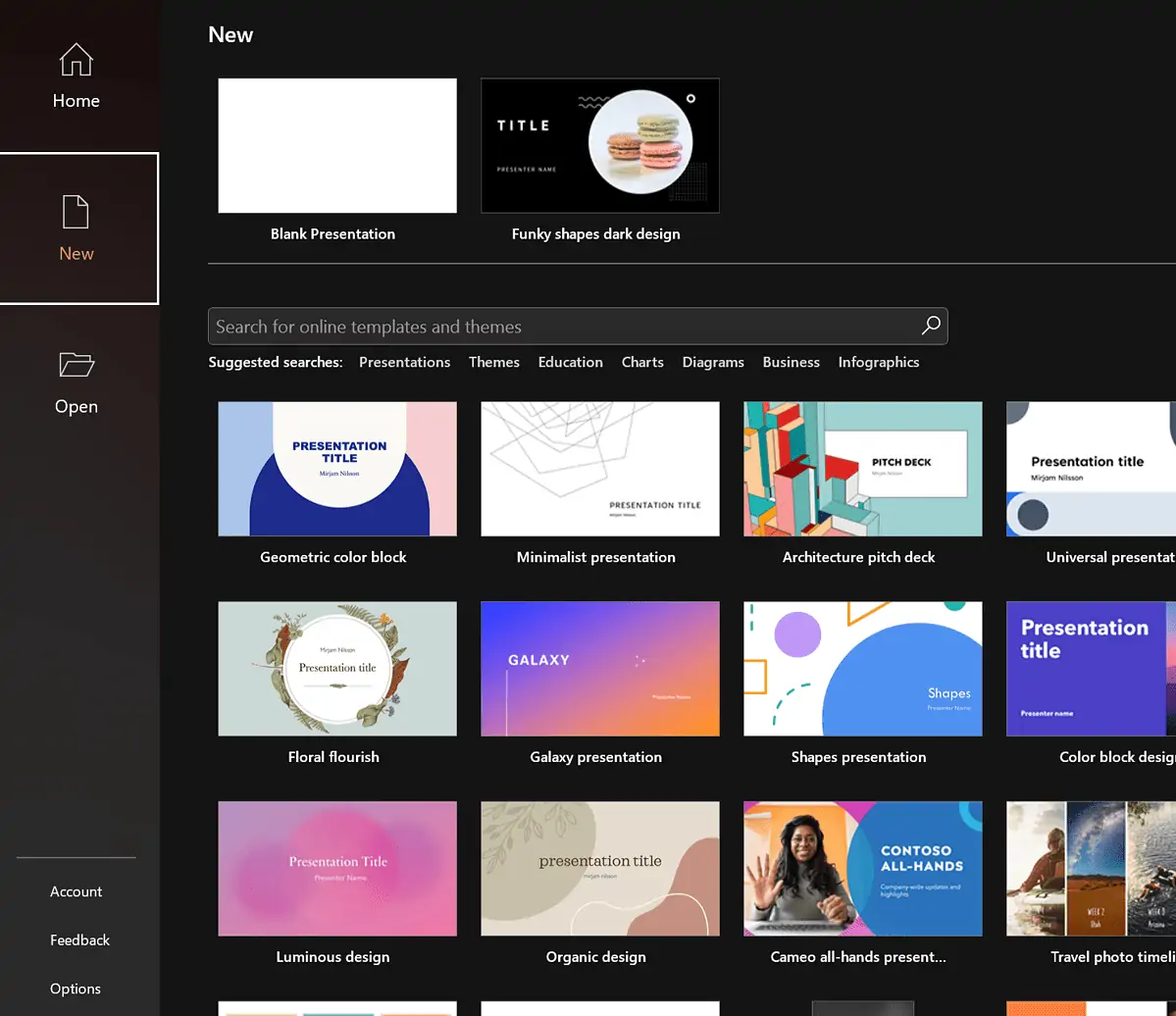
    Fortunately, there are several templates for almost every platform that you can use. These templates are pre-built based on category or general requirements. For example, you can get hundreds of pre-built designer templates for pitch decks (use-case), eco-friendly-oriented presentations (industry), retail marketing decks (department), and even food recipes (personal).

    For example,

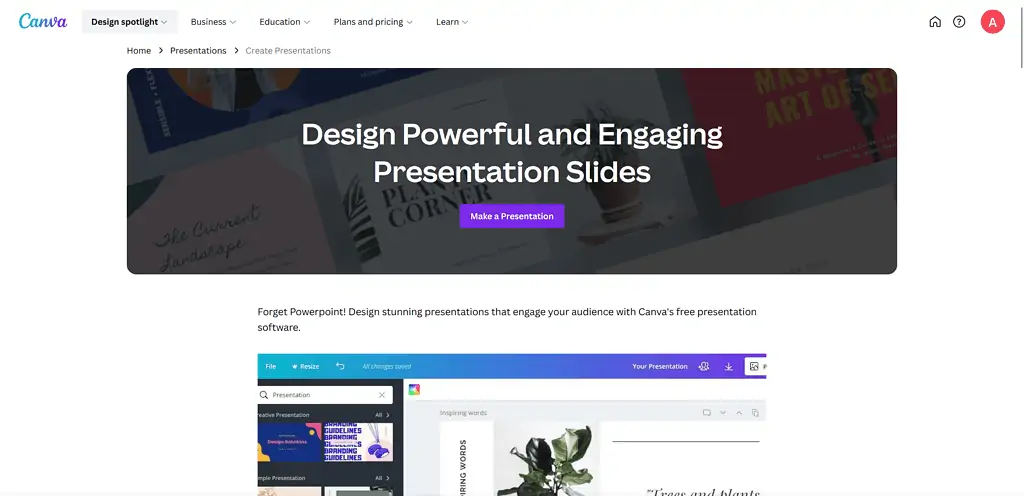
    • If you’re using Canva, you get thousands of presentation templates right in the Templates tab.
    • For PowerPoint, you must go to the Design tab and select a template from the Themes list.
    • For Google Slides, click on Template Gallery from the Home menu.

    Ensure Your Aspect Ratios

    Ensure Your Aspect Ratios
    Source: Invideo

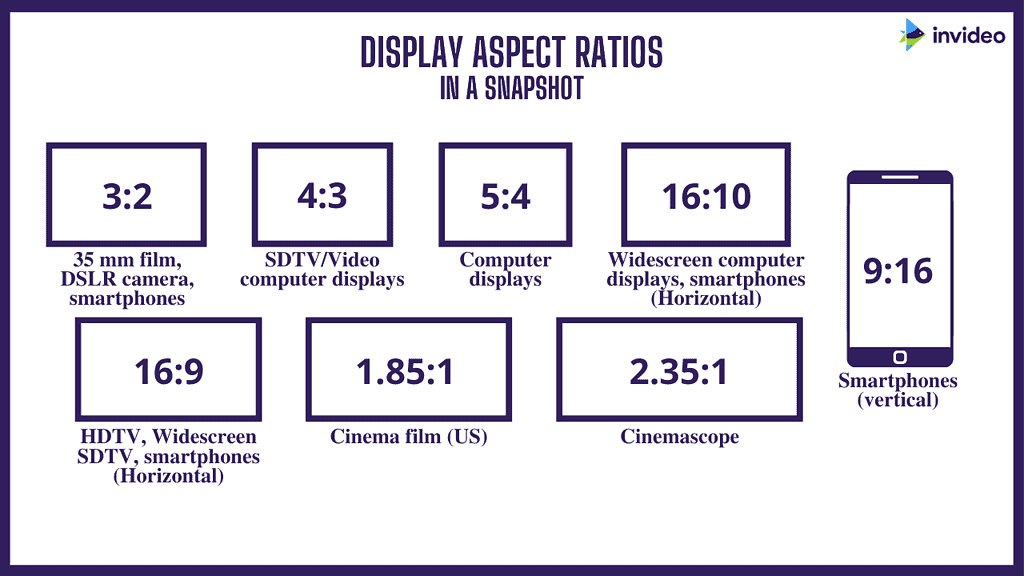
    The first thing to consider while choosing a template is the aspect ratio according to the platform on which you will present your presentation.

    If accessed on mobiles, a presentation made for TV screens and projectors will have too short icons, or vice-versa. Thus, to ensure that your presentation looks great on all platforms, you should choose an aspect ratio appropriate for your platform.

    In general, there are three different types of resolutions and aspect ratios:

    • 1920x 1080 and16 x 9 Full HD – for presentation on a flat-screen TV or modern projector
    • 1024x 768 and 4×3 – for webinars, YouTube, or iPad presentations
    • Mobile First Presentations (vertical oriented) if you want to share a presentation on mobile

    Set Up A Brand Kit

    Set Up A Brand Kit

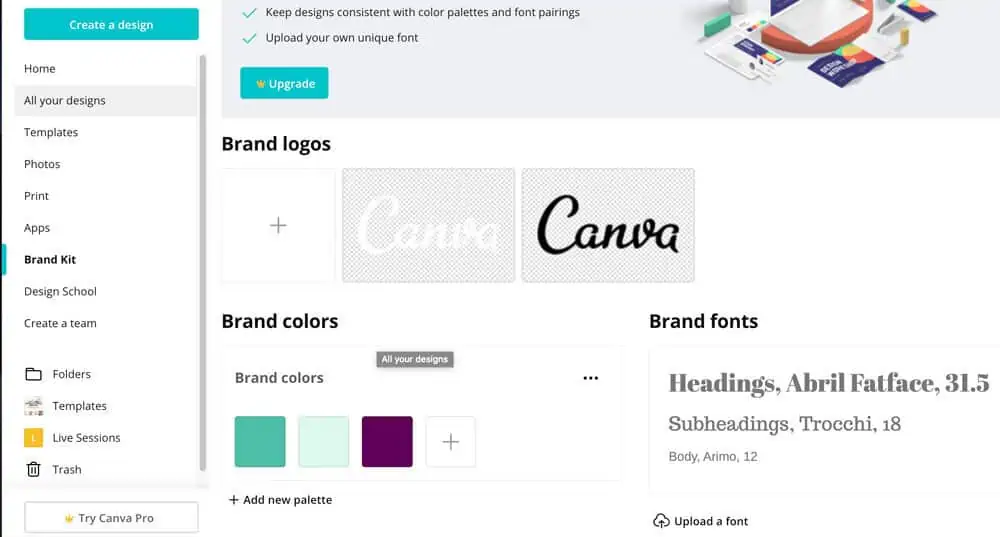
    Your brand kit is the collection of specific colours, fonts, and logos associated with your brand.

    Almost all the presentation tools have a feature to save your preferred brand kit and quickly apply it to every new presentation you create.

    Once you’ve set up your brand kit, you don’t need to worry about:

    • Making sure your presentation looks consistent
    • Accidentally using a font that isn’t in the same style as your brand
    • Remembering which colours you’ve used for backgrounds, shapes and text.

    It not only makes your presentation look professional but also saves time.

    Add Visual Effects

    Add Visual Effects

    When a presentation outlines no visual aids or motions, is filled with big data sheets, and is content-heavy, it may be difficult for the audience to understand and retain the presented information.

    The lack of visual aids can make the presentation monotonous and may lead to a loss of interest in the audience.

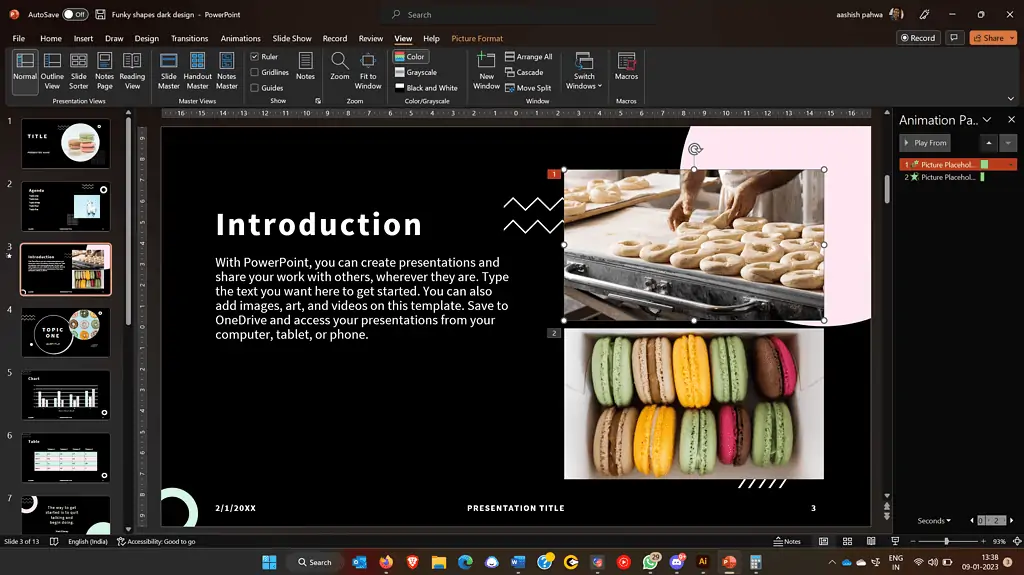
    For instance, this graph showing sales comparison charts from different channels is way better than those long sheets that would have explained this data.

    So, adding movements to your slides will make your presentation more visually attractive, help you in storytelling, and keep the audience engaged.

    You can add interactive elements, including:

    • Animations (stats)
    • Gifs
    • Small videos (available on Presentation software)
    • Moving Stickers
    • Embed Videos
    • Moving

    Use PowerPoint if you want to make animation-oriented presentations or when you get into the nitty gritty of your presentation.

    Prezi is perfect for storytelling and when you want to make a bold statement. It is perfect if you need to present the big picture or if you’re a student.

    Canva could be your one-stop-shop for all presentation design needs (It is for me) as it comes with thousands of effects, templates, designs and more. All you need to do is select a template, add your content, choose some effects, and have a brilliant presentation in minutes.

    Tips To Deliver An Effective Presentation      

    After you have created a beautiful set of slides and made a good presentation – the first thing that comes to mind is – how to present a presentation in an enjoyable but effective and best way.

    We all know we should add more visual aids, mind our body language, limit animation, add voice projections, be confident, keep the presentation simple, and be well-prepared. But there is much more on how you must present the presentation and here are some presentation tips that will guide you to deliver better –

    Ensure You Use The Presenter’s Notes

    Ensure You Use The Presenter's Notes
    Source: Microsoft

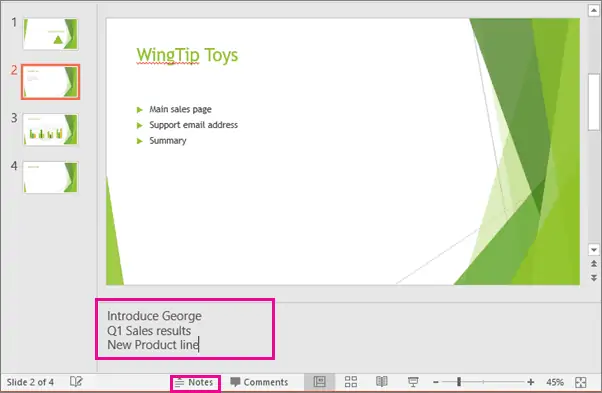
    The presenter’s notes are the key points that the presenter can refer to during the presentation. You can include key points, examples, and any other information that you want to remember to include in the presentation.

    Not using the presenter’s notes may cause potential issues like:

    • Forgetting to mention important points
    • Unclear information
    • Unorganised presentation flow.

    The presenter’s notes help you to avoid these issues.

    Make Use Of The Presenter Window

    Make Use Of The Presenter Window
    Source: Allthings.how

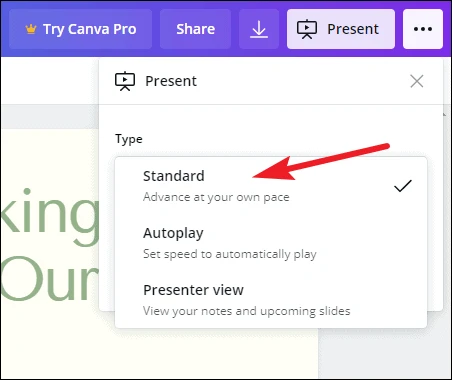
    Tools like Canva, PowerPoint, and Prezi have a presenter window that allows you (the presenter) to see the current slide, speaker notes, and a timer. While the audience only sees the current or the shared slides.

    Using the same helps you:

    • Keep a track of the time and switch between slides accordingly
    • See your notes in case you forget what to say
    • Know what the next slide will be and thus prepare yourself and your audience accordingly

    Add Interactive Elements

    Another presentation tip to make a good presentation is – to engage the audience and make them participate. It can make your presentation more memorable and effective. Consider including interactive elements, such as:

    • Polls
    • Q&A sessions
    • Add QRs of the presentation with a CTA (download something, give feedback, etc.)

    This way, you can help keep the audience interested and make the presentation feel more interactive and dynamic.

    Put Something Personal Into It

    Add something personal to the presentation which only you can say. But that does not mean you tell them what you had for breakfast – But it means your touch!

    It means that if someone in your place can give the same presentation, you did not put anything personal into it.  

    And believe me – that matters. Because when you share your touch – the audience care. To make it possible, show:

    • Why you care
    • Why it is essential for you
    • Show examples and stories from your experience
    • Add examples

    That matters because when you share – the audience care. Add your personal touch and make it more personal and memorable.

    Practice The Presentation Delivery 

    Practising the presentation before you deliver the presentation is another essential but quite underrated presentation tip.

    People make the presentation well but do not practice. And, If you do not practice your presentation delivery, several things could go wrong:

    • You may not be prepared and feel nervous or unsure of yourself during the actual presentation.
    • You may struggle to deliver your message clearly and effectively, making it difficult for your audience to understand and retain the information you are presenting.
    • You may not be confident, which can be noticeable to your audience and make them less likely to pay attention.
    • You are more prone to make mistakes during your presentation, such as forgetting essential points or mispronouncing words.
    • You may get stuck in time management and not deliver the entire presentation on time.

     So, practice your presentation beforehand to ensure smooth delivery. Rehearse:

    • Introducing yourself and the topic of your presentation
    • Key points and review the points you want to make during your presentation and practice explaining them clearly and concisely.
    • How will you move from one point to the next to maintain the flow
    • The presentation and take notes of your timing and pacing
    • Your closing remarks and practice summarising the main points of your presentation and driving home the key takeaways for your audience
    • To present your body language, vocal delivery, voice projection, and pacing

    Speak Audience-Centred Language & Interact With Them

    If you don’t speak audience-centred language in a presentation, you risk alienating your audience and not effectively communicating your message. It can lead to misunderstandings, confusion, and a lack of engagement from your audience.

    Thus, use a language that resonates with them, makes them comfortable, and makes your presentation appealing. You can use the following:

    • Inclusive language – It is a language that is respectful and considerate of all members of your audience, regardless of their background, identity, or culture.
    • Positive language – Use positive and constructive rather than negative or critical vocabulary.
    • Persuasive language – It is an influential and convincing language used to persuade your audience to adopt your perspective or take a specific action.
    • Emotional appeals – Use language that evokes emotions in order to connect with your audience on a deeper level and persuade them more effectively.
    • Rhetorical devices – Use rhetorical devices, such as small rhetorical questions and answer sessions, repetition, and rhetorical triangles, to add emphasis and impact to your message.
    • Storytelling techniques – Use storytelling techniques, such as anecdotes, examples, and narratives, to engage your audience and make your message more memorable.
    • Audience participation and interaction – It refers to involving the audience in the presentation. You can do it through conducting quick polls or surveys, asking questions, encouraging discussion or debate, or using interactive tools like hand-raising.
    • Create Interactions & Not A Monologue – Do not make the mistake of reading from slides for your audience. Instead, explain points, use relevant examples, use appropriate humour, and make it a two-way interaction, not a monologue.

    Bottom-line?

    In conclusion, a good presentation requires careful planning and execution. Understanding your audience and tailoring your content to their needs and interests is crucial.

    Using templates and maintaining a consistent brand identity can also help to create a visually appealing and professional presentation.

    When delivering the presentation, engaging your audience through interactive elements, personal anecdotes, and audience-centred language is crucial.

    Practising your delivery beforehand can also help to ensure that you are confident and prepared.

    A well-prepared and organised presentation helps engage and retain your audience’s attention, making it more likely that they will understand and remember the information you are presenting. On the other hand, a poorly executed presentation can be confusing, boring, or frustrating for the audience, which can make it difficult for them to absorb and retain the information presented.  

    Following these presentation tips shared above, you can create and deliver a compelling and effective presentation that keeps your audience engaged and focused.

    Go On, Tell Us What You Think!

    Did we miss something? Come on! Tell us what you think about our article on Tips To Make And Give An Effective Presentation in the comments section.

  • 18 Most Successful Small Business Ideas 

    18 Most Successful Small Business Ideas 

    Maybe you’re a recent college graduate looking to make a name for yourself.

    Or perhaps a stay-at-home parent wanting to go back into the workforce.

    Or maybe you’ve just been struck by the entrepreneurial bug.

    Regardless of your motivation, starting a small business can be an incredibly rewarding experience – both financially and emotionally.

    But the problem?

    Successful small business ideas don’t happen overnight.

    You need to brainstorm, research, and plan accordingly.

    Fret not, though! Here’s an extensive guide outlining the most successful small business ideas you can start today.

    For Sellers, Resellers, And Flippers

    Reselling can be your full-time high paying career option if you know what you’re selling and to whom. Here are some business models you can try:

    Dropshipping

    Dropshipping is an ecommerce business model where you don’t keep any inventory. Instead, when a customer purchases a product from your store, you place a similar order from a third-party supplier that ships the product directly to them.

    It’s the ultimate low-risk business model as you don’t have to purchase bulk inventory or handle any shipping yourself.

    Here’s an example. Let us say you have a store selling trendy phone cases. When a customer orders, you place an order with the manufacturer and they ship it directly to the customer.

    Drop Servicing

    Drop servicing is a service model based on the dropshipping principle where you don’t provide the service yourself but outsource it.

    For example, a client approaches you for a website design service. You create the budget and timeline, then outsource the job to a freelancer on Fiverr or Upwork who handle the actual work while you manage the project on behalf of your client. Similarly, you can outsource design on 99Designs, programming on Toptal, and many other services.

    Digital Assets Flipping

    Websites, applications, and even domain names are bought and sold on the internet. You can buy a website for hundreds or thousands of dollars, make some improvements to it, increase its traffic and user engagement, and then resell it for a hefty profit on marketplaces like Flippa and Empire Flippers.

    Even domain names can be flipped for a profit. If you have an eye for picking the right ones, then you could buy and sell domain names on popular platforms like GoDaddy Auctions or Sedo. Some domains even sell for millions of dollars when they are connected to a popular brand.

    Affiliate Marketing

    Affiliate marketing is a business model where you get paid a commission for promoting someone else’s product.

    Let’s say you own an anime-focused blog or a YouTube channel. You could join various affiliate programs, such as Amazon Associates, and then recommend related products to your readers. When someone clicks on one of the links you promote and makes a purchase (be it after one week), you get a percentage of that sale as your commission.

    If done right, affiliate marketing can be highly profitable since all it takes is a few clicks to generate a sale. You don’t need to handle any product fulfilment processes and can scale your business quickly with almost no overhead costs.

    All you need to do is to create accounts on affiliate marketplaces like Impact, CJ, Amazon, etc., find products to promote and start driving traffic to your blog.

    However, it is intensely niche-oriented so you’ll need to have a good handle on your readers’ interests in order to make it work.

    For the Mr. or Ms. Fix-It

    If you’re a handy person and have an eye for detail, here are a few small business ideas you can consider.

    Handyman Services

    A handyman is someone who can take care of minor repairs and maintenance jobs that require an expert’s touch. For example, fixing plumbing, electrical and carpentry jobs.

    You can either run your business as a home-based or by renting out space in an office or shop. You can even become a partner of an aggregator like Handy in the USA and Urban Company in India and work on the jobs they assign you.

    If you plan to handle the entire process independently, you’ll need to acquire the necessary certifications and licenses. Once done, you can easily be in the above-average income bracket making around $51,500 per month.

    Housekeeping Services

    Everyone needs their house to be kept in order, but many lack the time and energy to do it themselves. That’s where a professional housekeeping service comes in.

    You can provide services like dusting, vacuuming, mopping, and other cleaning tasks that involve deep cleaning of carpets, furniture, and other surfaces.

    However, know that this business requires physical labour and a high level of dedication, as well as obligating you to follow safety protocols when using certain cleaning products.

    You’ll need to acquire insurance and permits to operate your business, so make sure you have the necessary resources in place before launching.

    Home Repair Services

    One thing that never seems to lack demand is the need for home repair professionals.

    People are always looking for someone reliable to help them with small (or not-so-small) repairs around the house and all you need to get started is the right set of skills, some tools and a van or truck to transport them.

    You’ll need to acquire the necessary licenses, permits, and insurance in order to operate your business legally, but if you have some manual labour experience, this could be the perfect option for you.

    For The Number Whiz

    If you have a knack for working with numbers, there are several small business ideas that you might want to consider:

    Bookkeeping and Accounting Services

    Not every small business can afford to hire a full-time bookkeeper or accountant, but that doesn’t mean they don’t need one. This is where you come in. With the right accounting software and a few basic business skills, you can provide bookkeeping services to small businesses in your area.

    However, starting an accounting business requires you to have the right education and certifications, depending on the state you’re doing business in. Generally, a degree in accounting or a related field is needed along with CPA certification.

    Financial Planners

    You could also use your knack for numbers to provide financial planning services. Whether it’s helping people create budgets, invest their money, or plan for retirement, you can offer valuable advice and strategies that can put them on the path to financial freedom.

    As with accounting, you may need specific certifications and/or qualifications before providing financial planning services.

    Tax Preparation Services

    If you have a keen eye for detail and a good grasp of tax laws, you could offer your services as a tax consultant or preparer. Your job description would include helping individuals and businesses prepare their taxes, and ensuring that all records are kept up-to-date.

    Know that not everyone can become a tax preparer, as there are certain qualifications and certifications that you’ll need to meet if you want to become successful. You need a Preparer Tax Identification Number, for which you have to be an enrolled agent, CPA, or attorney.

    For Tech Whiz

    Technology is a booming industry, and it could be your gateway to success if you have the skills to stay ahead of new trends and products. Here are some ideas:

    Web And App Developer

    Almost every business in your area is either online or planning to be. You can become their go-to person for web development and app design.

    While such services require you to have certain coding skills, there are new no-code platforms like Bubble and WordPress that make it easier to build websites and apps without coding.

    All you need to do is market your services to the right people.

    SEO Expert

    SEO stands for search engine optimisation, which means helping businesses rank high on search engines like Google and Bing. The job involves identifying potential keywords, researching competitor websites and then tweaking your clients’ content to improve their site’s ranking.

    Besides this, you’re also responsible for backlinks (getting other websites to link to your own) and optimising for local search. Small businesses often hire SEO professionals since they usually lack the technical know-how and time to do this themselves.

    And this is in fact a high-demand industry. According to ZipRecruiter, SEO experts can earn up to $64,000 annually – depending on your clients and expertise.

    Virtual Assistant

    If you have a knack for organisation and administrative tasks, then becoming a virtual assistant could be your perfect small business idea.

    Virtual assistants help entrepreneurs with day-to-day tasks, like managing emails and scheduling meetings – without ever having to meet in person.

    Depending on your clients, you could even offer additional services such as bookkeeping or video editing.

    All you need is a laptop with reliable internet access and you’re ready to get started.

    Social Media Consultant

    Not every small business owner has the time, skills or knowledge to effectively manage their own social media channels.

    But social media marketing is a necessity to stay competitive in today’s market.

    That’s where you as a social media consultant come in – you help your clients create, manage and promote their content across multiple social media platforms.

    You handle their organic as well as paid campaigns, track the performance of their posts and analyse the data to provide insight into what’s working and what isn’t.

    The best part? You don’t require a degree or a certification to become a social media consultant – all you need is knowledge and expertise.

    Moreover, it’s an incredibly low-investment business idea as you only need some basic tools like a laptop or computer and a stable internet connection to get started. Sometimes, you do most of your work on your smartphone.

    And since more and more businesses are turning to social media for marketing their businesses, the opportunities for consultants are growing by leaps and bounds.

    For Eco-Warriors

    If you consider yourself someone who is passionate about the environment and climate change, then why not consider starting a green business?

    Green businesses are those that use sustainable materials and practices to create products or provide services. There’s a dedicated domain to it. You have green products, green marketing and green services.

    Start A Sustainable Fashion Brand

    Sustainable fashion refers to clothing and accessories that are designed, sourced and manufactured with sustainable practices in mind.

    The fashion industry is the second-most polluting industry in the world and is responsible for producing a tremendous amount of waste. This fact isn’t hidden from the public anymore. Hence, there is a growing demand for sustainable fashion.

    As a green business owner, you can start a fashion brand that uses sustainable materials and ethical practices. This could be an apparel line, footwear or accessories. You will need to research the different options available for more sustainable materials and processes, such as bamboo fabric, organic cotton and recycled plastic.

    The best part?

    You can initially capitalise on the demand on marketplaces such as Etsy and Amazon. This could be a great way to test the waters without investing too much money in your own website or brick-and-mortar store.

    Open A Nursery And Deliver Plants

    Over two third of Americans report having at least one houseplant in their home. And this trend is seeing only signs of increasing.

    If you have a green thumb and are passionate about plants, this is a great business idea to explore. You could open a nursery that focuses on houseplants and offer delivery services for your customers.

    You can even sell gardening goods to help your customers get the most out of their plants. It’s one of the most successful small business ideas as an average household spends at least $608.54 per year on gardening goods. Moreover, the demand for plants and plants-related goods is growing exponentially, especially among millennials as more people become aware of the benefits houseplants offer.

    For The Teachers

    If you like to teach, the time is for you to quit your day job and start your own teaching business. It isn’t about private teaching anymore – you can take your entire class online, create courses and other resources in the form of e-books, audio guides and even live workshops. Here are some ideas for teaching-related businesses:

    Develop Online Courses

    If you’re good with something even if it is non-academic, there’s an audience who might be willing to pay for your expertise.

    For example, there are people teaching vegetable gardening, baking cakes, giving music lessons or even teaching the basics of painting; all as a part of their teaching-related business.

    All you need is a computer, video recording software, and a confident personality to get started.

    Once you have developed your course, you can list it on various e-learning websites like Udemy or Skillshare and start earning good income.

    Even YouTube has its own educational marketplace called YouTube Courses, which is seeing a tremendous rise in popularity.

    The best part?

    Your course isn’t limited to the students in your area and can be sold to anyone around the world.

    Start A Podcast

    People now have less time and they are looking for on-the-go content.

    Podcasts are a great way to consume information while doing something else; like running, commuting or doing household chores.

    There are people making a living from their podcasts and it can become a great source of income when done right. All it takes is good niche knowledge, creativity, and sophisticated equipment to start your own podcast.

    Once you have built an audience, you can monetise your podcasts through sponsorships, advertisements, and affiliates or you can develop premium content for a fee.

    Tips To Starting A Successful Small Business

    A small business doesn’t mean you have to limit your ambitions. Small businesses can be incredibly successful when done right. Here are a few tips to get you started.

    1. Have A Clear Business Plan: Before starting a business, it’s important to have a clear plan outlining your business goals and how you intend to achieve them. This plan should include a budget for startup costs, market research, and marketing and growth strategies.
    2. Choose a business that suits you: While you’ll need to research the best small business ideas, it’s also important to ensure that whatever venture you choose is a good fit for your unique skillset and interests. If you don’t have a passion for the product or service you want to offer, it will make it much harder to stay motivated and dedicate yourself to seeing it succeed.
    3. Build relationships with customers: Small businesses depend on relationships between you and the customer, suppliers, and other stakeholders. Keeping these relationships strong is essential for growth, so make sure you have a plan to nurture them.
    4. Don’t do it all yourself: As a small business owner, you have two critical limitations – limited budget and overwork. But this doesn’t necessarily mean you have to do everything yourself. Plenty of resources are available for entrepreneurs and small business owners, from virtual assistants to freelancers who can help you get the job done. In fact, you can outsource to freelancers working from a low-income country for tasks like content marketing, accounting and even website designing.
    5. Focus on building an ‘A’ team: Small businesses require a dedication to details, hard work and a drive to succeed. You need to focus on building an ‘A’ team that is willing to take risks and has the skills necessary for your venture. Investing in a few talented individuals can go a long way in ensuring success.
    6. Take advantage of Small Business grants: Small businesses in the US have access to Small Business Administration (SBA) grants that can provide funding for their venture. These grants are available for a variety of purposes, from startup capital and emergency funds to expansion projects or research funding. Even other countries have their own Small Business grant programs.

    Bottom-Line?

    If you plan carefully, understand your market and focus on building an effective team, then starting a small business is an idea that can pay off. Small businesses are becoming increasingly popular and more successful every day, thanks to the internet, which allows entrepreneurs to reach a larger audience than ever before.

    But even if you get hundreds of successful small business ideas, you need to choose only one that:

    • Suits your skills
    • Fits the current market trend
    • Has potential to grow

    And, most importantly, you should be passionate about it. Once you’ve identified your niche and have a plan in place, focus on marketing your business and building relationships with customers. Success can soon become yours with hard work, dedication, and smart decision-making.

    Go On, Tell Us What You Think!

    Did we miss something? Come on! Tell us what you think about our article on most successful small business ideas in the comments section.
  • How To Make A Presentation – Step By Step Guide

    How To Make A Presentation – Step By Step Guide

    Making presentations is a valuable skill to add to your belt. It makes you an expert in holding non-verbal communication and speaking more visually. Whether it’s for business, school or another form of communication, your presentation depends on five key pillars:

    • Platform: Not every platform is tailored to all types of presentations, so choosing the right one is important. For example, Canva or Prezi are great for more creative presentations, while Powerpoint is better for business-oriented ones.
    • Content: The main body of your presentation. It forms the spine of your presentation and includes key facts, data and visuals to keep the audience engaged.
    • Visuals: Visuals like charts, graphs, photos, and videos help support your content and keep the audience engaged.
    • Structure: This is how the content of your presentation flows. It decides whether your audience will understand it or not.
    • Bottom line: It’s the takeaway you want the audience to remember.

    Creating a presentation isn’t hard once you have the right steps in place. Here’s a complete step-by-step guide to help you make an effective presentation.

    Here’s how it goes.

    Choose The Presentation Platform

    canva presentation maker

    Your presentation platform forms the foundation on which you will create your presentation. The platform can be anything from highly interactive multimedia software to simple presentation apps.

    Today, your presentations are no longer bound to be presented in person. You can stream them live over the internet, create an interactive presentation, or even upload them to a cloud storage service.

    There is an array of presentation software and tools for every use case. You can:

    • Use Canva if you are looking to make a presentation quickly without any technical or design knowledge. You’ll find hundreds of thousands of pre-built designer templates to choose from.
    • Use Prezi if you want to add a bit of panache to your presentation, as it is great for creating motion-based presentations in the cloud. Prezi is great for students.
    • Create professional diagrams using Visme’s drag-and-drop interface. It contains thousands of icons, images and illustrations to choose from. Perfect for data-oriented presentations.
    • Use Google Slides if you want to collaborate with others in real time. With Google Slides, you can make changes and share your presentation online for remote viewers.
    • Use Microsoft PowerPoint if you want to create complex animations or advanced transitions. It’s a great choice for experts who tend to manage every nitty-gritty.
    • Try Beautiful.ai for AI-powered presentations. AI does most of the job here. All you need to do is just provide it with data.

    For those who want to make a presentation in the most user-friendly way, I recommend using Canva. It provides simple templates and an intuitive editor so you don’t have to worry about the technical aspects of creating presentations.

    Develop A Persona

    customer persona

    Always begin with your audience and the people you’ll be addressing. Before you start writing or researching the topic, answer these questions:

    • Who is your target audience?
    • Why are you presenting to them?
    • What is the purpose, and what do you want to share with this presentation?

    Answers to these questions and knowing your audience’s pain points will help you determine the right direction and content to include in your presentation.

    Ignore them and risk the presentation being unfocused and vague.

    customer persona

    For instance, if you are presenting an idea to trainees, you have to clarify every point, jargon, and term and explain concepts from the beginning.

    But if you are talking to your team, you can expect a high-level understanding and focus only on justifying the problem and devising a solution.

    Moreover, not only do you need to know your audience, but you need to know their preferred language.

    Why, you ask?

    Because when you know their interest and attention span, it’s easier to build content to fit their needs. For example, Gen Z prefers visuals while Millennials prefer structured ideas. Hence, a presentation on EVs (electronic vehicles) could be visual or video-heavy for Gen Z and conceptually detailed for Millennials.

    Decide On A Type

    For every presentation, there is an end goal, and these goals can be summed up in the following five types of presentations – 

    • Informative: Mostly used in educational settings as they help explain a concept or present an idea. For example, if you’re trying to explain the working of an EV, this would be an ideal type to go for.
    • Persuasive: A great way to convince or persuade someone about a product or service you offer. For instance, a persuasive presentation works well when presenting EVs as a better alternative than ICEs (Internal Combustion Engines).
    • Entertaining: Presentations used to bring out an emotional or aesthetic response from the audience. For example, when presenting the unique features and design of an EV, this type of presentation works well.
    • Instructional: Aimed at providing instruction or demonstration on how to use a product or service. For instance, this type of presentation is best used when explaining the various safety features in EVs.
    • Inspiring – Inspiring presentations are to motivate people. It can include a company or a personal journey that is inspiring. For instance, a presentation about how EVs are helping create a cleaner and greener future.

    Your presentation can aim at one goal, be a mixture of two, or even be a combination of all four. But know that the more layered your presentation is, the more confused your audience could get. So try to focus on one goal and keep it simple.

    Platforms like Canva even have different templates for different goals to help you get a kick start.

    Know Your Topic Inside Out 

    When it is time to present, you need to be confident and presentable to win your audience’s trust.

    And you can do this when you know all the ins and outs of your topic.

    Focus on the topic’s who, what, where, when, why, and how.

    This will help you:

    • Be organised
    • Answer any questions that come up
    • Maintain your train of thought

    So, zoom in on your topic and know all that you can to make your slides better.

    Create An Outline 

    It is typically better to separate the pieces you need before you start building rather than digging into a bucket filled with mixed parts for every piece you need. 

    Begin by brainstorming your ideas and creating a rough outline. It will help you organise your thoughts and identify key points you want to cover. 

    While working on your outline, be sure to include headings and subheadings and specific talking points for each slide to help structure your content.

    For example, an outline for the topic “plant-based diets” would look like this: 

    • Introduction
    • Plant-based sources of protein and essential nutrients
    • How To Transition To A Plant-Based Diet
    • Conclusion

    This would be a headstart. You can fill this headings with subheads like this:

    • Introduction
      • Definition of a plant-based diet
    • Plant-based sources of protein and essential nutrients
      • Plant-based sources of omega-3 fatty acids
      • Plant-based milk alternatives for calcium
      • Fruits and vegetables for vitamins and minerals
    • How To Transition To A Plant-Based Diet
      • Incorporate plant-based meals gradually
      • Finding plant-based alternatives to your favourite dishes
      • Recipes and resources for plant-based cooking
    • Conclusion
      • Recap of the plant-based diet benefits
      • CTA

    The outline makes it easier to construct and organise the idea sequentially and thoughtfully.

    Create Slides And Add Content 

    Your outline usually decides how many slides your presentation will have. Once you create it, you can go ahead and add in all the content.

    The content of the slides is the real ‘meat’ of your presentation – be it data, writing content, or visuals.

    The best part?

    You can convert this content into three broad sections:

    • Introduction – A compelling and strong introduction that attracts and hooks viewers’ attention.
    • Body – The main content – facts and figures, analysis, case studies etc. It supports the core message of your presentation and unfolds slide-by-slide.
    • Conclusion – It variably includes key takeaways in a way that lets the viewer remind of what they are taking with them. And we add a CTA, which helps with decision fatigue and adds meaning to your content.  

    For instance, here’s an example of how you can structure your presentation on “plant-based diets”

    Introduction

    Start with a question to draw in the audience – “Have you ever considered going plant-based?”

    Alternatively, use an engaging fact like “There are over 20 varieties of edible plants on this planet!”

    Follow this slide with your original idea – the definition of a plant-based diet.

    Body

    This is where most of your presentation’s content lies. Unfold your thoughts in an organised manner.

    Start with a brief overview of the dietary habits associated with plant-based diets and explain why it is becoming increasingly popular.

    Then, transition into the benefits of adopting this type of diet: health, environmental, or ethical reasons.

    Include visuals like graphs, infographics, and videos to make your presentation more interesting.

    Finally, provide ways to incorporate plant-based meals into everyday life with simple recipes and meal plan ideas.

    Conclusion

    Sum up the main points of your presentation. Remind the audience what they’ve learned and highlight important takeaways that they can use in their own lives.

    End with a CTA (call to action) and invite the audience to whatever you’d like them to do – whether it’s trying out one of the recipes you featured or looking into more resources about plant-based nutrition.

    Create Your Visual Aids

    Here’s a simple fact – the human brain processes visual content 60,000 times faster than text. So when it comes to presentations, visuals can go a long way in helping your audience understand what you’re presenting.

    The visual graph below shows the traffic data accumulated through mobile, desktop and all devices with the help of a line graph.

    Create Your Visual Aids

    Imagine if this information was penned down in columns, tables, and big Excel sheets – boring to read?

    So it is for everyone. So, be more visual.

    Presentation tools like Canva, Visme, and Piktochart allow you to create custom visuals quickly using CSV files (spreadsheets) and their pre-made templates.

    Even PowerPoint has great graphics and animations that you can use to make your slides engaging. But it lacks the functionality to quickly create custom visuals.

    When creating a presentation, think about how you are going to support your narrative with visual aids. If speaking in front of an audience, the ‘show-and-tell’ method is highly effective here. Showing both elements (visual + verbal) will help reinforce understanding in the minds of your audience.

    Tips To Make An Effective Presentation

    An effective presentation requires careful planning and clear and concise delivery to engage the audience and convey information effectively. Here are the tips that can help you achieve your goal –

    Keep It Simple & Crisp

    Simplicity is vital if you want the idea to be accessible and easy to follow. You can keep your presentation simple and crisp by cutting down on text and big paragraphs and adding more punchy lines and bullet points.

    This makes the audience focus on key points and takes away with them the knowledge.

    Develop Clear Structure

    Things have to be cohesive and arranged on a logical ladder. Imagine yourself as a viewer and think of the best order for your presentation slides.

    You might rearrange sections, and slides, cut on content, add more graphs or images, or some humorous comics.

    Be Better At Visual

    When it comes to presentations, visuals always play as a wild card. It creates a synergetic interaction between the data and the audience making it easier for the audience to identify trends, patterns, and outliers in large data sets. It empowers the audience to correlate and summarise the findings more efficiently.

    To make your presentation visual, you can:

    • Explain your idea using a story
    • Create comics, and
    • Illustrate your points with more suitable images and not content-heavy slides.

    If you are a non-designer but want to create a visually communicative presentation, Canva can be your assistant. Its straightforward interface makes it painless to prepare any visuals you want to add to your presentation.

    Obey The 10-20-30 Rule

    Guy Kawasaki, one of the marketing specialists of Apple, author, and a Silicon Valley venture capitalist, said – Obey the 10-20-30 rule to deliver the best slideshow presentation. The 10-20-30 rule is simple – the presentation should NOT have more than 10 slides, last longer than 20 minutes, and use a font size smaller than 30.

    It is not an end-all-be-all rule, but it is great to follow as it keeps the presentation on track and does not overwhelm viewers with too many slides.

    Plan The Delivery

    You can have the best presentation prepared, but it can be a complete flop if you fail to deliver it right. Here are a few tips to give a killer presentation that helps you share your word across.

    • Practice as many times as you can. Because that is the only way to get perfect presentation delivery.
    • It is always better to memorise your presentation. The less ‘Ummm,s’ you do on stage, the better. But there is nothing wrong with bringing a note card to have your safety shield.
    • If you are not delivering the presentation in person and have to share it with a broader audience – Add voiceovers or a pre-recorded video of you to the presentation. In this, Canva, Loom, Beautiful.ai, and Vyond presentation software can be your help.
    • Add the Notes – The Notes pane is the place to rack the talking points that you want to talk about when you give your presentation. You can add notes for every slide.
    • Connect with your audience. And the best way to do so is – to research better. When you are comfortable with your audience, know their pain points, and understand what solutions they need, you’ll automatically connect with them and be more empathetic.
    • Start a presentation strong to hook your audience or have them ready to doze off. First impressions are extremely important. So, you can start with:
      • A personal story outline
      • A provocative (but subtle) statement
      • Adding a jaw-dropping statistic or fact
      • Asking a question
      • Show meaningful visuals or videos that create a build-up of your presentation

    Bottom-Line?

    Understanding how to plan, create, execute and deliver a presentation is an essential skill if you are a professional, teacher, or student. At some point in time, you will have to give a presentation. Despite being an important aspect, it is rarely taught to anybody, which is why we framed an entire article to help you overcome this challenge

    Using these steps and tips, you can create a presentation that:

    • Communicates effectively
    • Engages your audience
    • Ensures a smooth presentation
    • Achieves your desired outcome

    Following these best practices can create a successful presentation and share your message without making people have forty winks.

    Go On, Tell Us What You Think!

    Did we miss something? Come on! Tell us what you think about our article on how to make a presentation guide in the comments section.
  • What is Operations Management? – Purpose, Benefits, & Challenges

    What is Operations Management? – Purpose, Benefits, & Challenges

    There’s a lot that goes into a successful business. From having the right resources to managing what goes on with day-to-day operations, businesses must have access to efficient processes and systems. This is where operations management comes in.

    Operations management is the key to success for any business. But what is operations management, and why do businesses need it?

    What is Operations Management?

    Operations management is a business management discipline that oversees, designs, manages and controls the process of production and business operation to maximise efficiency.

    In simple terms, it refers to the planning, organising, directing, and controlling of the processes that produce a company’s offerings. It involves managing the entire production process and also the support activities required to produce goods and services.

    For example, in a retail clothing store, operations management would involve tasks such as forecasting demand for different types of clothing, ordering materials and supplies from vendors, setting prices for products, and managing the production process to ensure that clothes are made on time and to the desired quality standards.

    The operations manager might also be responsible for managing the logistics of distributing products to stores and managing inventory levels to ensure enough stock to meet customer demand.

    What Does Operations Manager Do?

    In general, the role of the operation manager is to oversee the production and distribution of the product. But when it comes to their roles, there are some key responsibilities of an operation manager, which include:

    • Design, implement and maintain the process of an organisation. It includes software and programs a company uses to function.
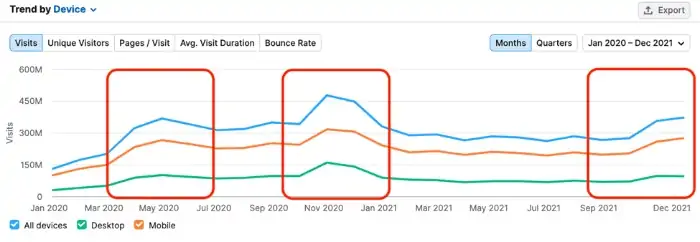
    • Schedule timely productions to maintain inventory. 
    • Develop, implement, and maintain the quality control system.
    • Collaborate and coordinate with all the organisation’s departments to ensure everyone is on the same page and meets the production goals competently.
    • Coordinate and supervise the work of each team to ensure smooth working.
    • Analyse and improve the production process to reduce waste and boost productivity.
    • Allocate production budgets and manage production activities.

    An example of operation management would be a car manufacturing company where an operations manager is responsible for the production of vehicles – from the acquisition of raw materials to the final output of the car. The operations manager would oversee all aspects of the production process to ensure that the production is efficient, cost-effective, and meets the company’s standards for quality and safety.

    What Is The Purpose Of Operations Management

    Operations management’s importance is controlling the production process from start to end.

    It involves everything from daily production activities to designing, operating, managing, and solving issues, to improving the production system for long-term growth.

    Operations management ensures:

    • The product meets the customer’s expectations
    • There is a balance between the operating cost and revenue to boost profits and
    • The overall success of the business.

    Systems Of Operation Management

    Modern operation management takes into consideration the following four theories:

    Business Process Redesign (BPR)

    Business process redesign is analysing a company’s current processes and systems, identifying the challenges, and redesigning the strategy. The BPR enables a company to dramatically change the way a company operates to improve efficiency and create higher value for customers.

    For instance, if offline stores foresee a future where people sell all their clothing online, that store would lose out to those who do. To remain competitive in the market, they need to build a strategy that focuses on shifting online and in order to do that, they need to redesign their approach from the ground up.

    Reconfigurable Manufacturing Systems

    Reconfigurable Manufacturing Systems are production systems (including hardware and software components) developed to take modifications and reconfigurations easily. It allows the system to quickly adjust its functionality and production capacity to accommodate changes in production volume.

    For instance, if the demand for a particular phone model increases, the company can quickly adjust the reconfigurable assembly system to produce more of that model without disrupting the reproduction of other models.

    This flexibility allows a company to respond to the customer’s changing demand and maintain a high level of productivity and efficiency.

    Six Sigma

    Six sigma directly deals with the quality of a product. The word ‘six’ in six sigma refers to controlling and maintaining limits, placed at six standard deviations starting at the mean of a normal distribution. The companies use statistical analysis and data in the Six Sigma method to identify and remove defects and errors and improve production efficiency.
    For instance, a company that manufactures laptops can use the six sigma method to identify & rectify the sources of variability and waste in a manufacturing process. 

    Lean Manufacturing

    Lean manufacturing is a systematic production process that eliminates waste and maximises productivity. This theory entirely focuses on using the resources to the fullest, simultaneously creating value for the customer and ensuring quality.

    For instance, if a bakery shop bakes cakes only when there are orders and not otherwise, it is using the lean manufacturing method. This method will eliminate waste and achieve the best possible efficiency.

    Benefits Of Operations Management

    If a company uses operations management and ensures smooth and effective production, and creates customer satisfaction, the discipline offers various benefits, including:

    • Improved efficiency – Product optimisation and waste elimination in operations management help the company increase efficiency and productivity while lowering operations costs and increasing customer satisfaction.

    • Innovation & Competitiveness – By continuously looking for new ways to improve and add new technologies, operations management plays a crucial role in innovation and keeping a business competitive.
    • Better Use Of Resources – Operations Management makes a company fully use its resources. Implementing operation management theories, technologies, and best practices into production eliminates waste and ensures the resources are used efficiently.
    • Create Value For Customers – By designing and managing the production process to meet the customer’s needs and preferences (timely production, less-priced product, effective use), operations management creates value for customers.
    • Improved Product Quality – Operations Management implements effective quality measures during production to improve product quality. It ensures the products are of the highest quality standards to meet the target customer’s expectations.

    Challenges Of Operations Management

    There are a few challenges that operations management faces daily, which are:

    • Globalisation: As many companies operate globally, operating through complex supply chains and navigating the dynamic environment can be challenging. While dealing with diverse languages, cultures, regulations, and labour markets makes it more difficult.
    • Technology: Technology is mostly the answer to many issues in operation management. But, finding the right tools and technology, keeping up with rapidly advancing technology, and integrating them into the production process can be challenging.
    • Talent Management: Attracting, training, and retaining high-quality employees is challenging for any operations manager. Besides, finding ways to keep the employees motivated and engaged is another demanding task managers work on to retain them.
    • Streamlining Processes: Streamlining processes in operations management can be difficult for the following reasons:
      • Determine which parts of the manufacturing process need to be improved or eliminated without adversely affecting the overall efficiency or effectiveness.
      • Changes in a process require significant time and resources, which can interrupt production.
      • It can be challenging to analyse the success of process improvement, making it difficult to determine if the changes have the desired output.

    Bottom-Line?

    Operations management involves managing a lot of tasks – developing strategies, implementing them, and ensuring to execute them efficiently to get the utmost productivity.  

    Balancing the use of the resources for production, including labour, raw materials, budget, and technology, which mitigates the production cost and boosts the revenue, is the success of the operations management and, thus, of the company.

    Go On, Tell Us What You Think!

    Did we miss something?  Come on! Tell us what you think about our article on operations management in the comments section.