Feedough Logo

Blog

  • The 7 Best Quillbot Alternatives (Comparison + Detailed Review)

    The 7 Best Quillbot Alternatives (Comparison + Detailed Review)

    If you’re a writer, you’ve probably heard of QuillBot. It uses AI algorithms to suggest synonyms and variations of sentences, which can help you expand your vocabulary and enhance your text’s readability. Plus, it can also help you avoid plagiarism by paraphrasing your text.

    As great as Quillbot is, it’s not free from limitations. It can be a bit pricey for some, and the output quality may not be everyone’s cup of tea. Luckily, there are plenty of other Quillbot alternatives out there that can help you improve your writing. In this article, we’ll explore some of the best Quillbot alternatives on the market and help you find a new writing tool that you’ll like just as much.

    Features
    Quillbot
    Wordtune 
    PrePostSEO
    ProWritingAid 
    Paraphraser.io
    Word.ai
    Grammarly
    SpinBot
    Paraphraser
    Yes
    Yes
    Yes
    Yes
    Yes
    Yes
    Yes
    Yes
    Supported Languages 
    30+ 
    Spanish, Mandarin, Arabic, Hindi, Korean, Hebrew, or Russian into English
    20+
    Only English.
    20+ 
    English, French, Spanish, and Italian. 
    Only English.
    Only English.
    Text Summariser
    Yes
    Yes
    Yes
    Yes 
    Yes
    No
    Yes
    No
    Grammar Checker 
    Yes
    Yes
    Yes
    Yes
    Yes
    Yes 
    Yes
    Yes
    Plagiarism Checker
    Yes
    Yes
    Yes
    Yes
    Yes
    No
    Yes
    No
    Citation Generator 
    Yes
    No
    Yes
    Yes
    Yes
    No
    Yes
    No
    Extension
    Yes
    Yes
    Yes
    Yes
    Yes
    No
    Yes
    No
    API
    No
    Yes 
    Yes 
    Yes 
    Yes 
    Yes 
    Yes
    No

    What is Quillbot?

    Quillbot is an AI-powered paraphrasing tool that uses natural language processing and machine learning to rephrase existing text to make it sound more natural and concise. Quillbot can assist you with a variety of tasks, be it writing academic papers or content for various marketing channels

    The platform includes seven writing modes to choose from, allowing you to rewrite your sentences in different styles and tones. Using its powerful AI technology, Quillbot analyses your input and suggests alternative words, phrases, and sentence structures to help improve your writing’s clarity and readability.

    There are also handy features such as ‘Thesaurus’ function that suggests synonyms, a ‘compare’ mode to see different versions side by side, and even a ‘summarisation’ function to condense long chunky texts.

    Who Is It For?

    • Students 
    • Teachers
    • Authors 
    • Writers
    • Freelancers 
    • Professionals

    QuillBot Pros

    • Saves time by quickly rephrasing text.
    • Helps avoid accidental plagiarism by creating unique content.
    • Suggest new vocabulary and sentence structures to enhance writing skills.
    • Offers multiple modes to choose from based on user preferences.
    • Uses creative AI algorithms.
    • Offers summariser tool for research.
    • Free version available to try.

    QuillBot Cons

    • May not capture the nuances and tone of the original content.
    • Often needs human editing to ensure clear and error-free text.
    • Some features require a paid subscription, limiting functionality for non-paying users.
    • May not offer new grammar features for those who already use other tools.
    • Limited use for paraphrasing capability.
    • Expensive subscription model with no one-time payment option.

    Quillbot Alternatives

    Quillbot is one of the smartest AI-powered writing assistants out there. However, there are quite a few other AI tools that are just as good and are worth checking out. So, I handpicked these seven Quillbot alternatives and compared their key benefits and capabilities so that you can make an informed decision on which one to choose.

    Grammarly

    Grammarly is an online typing assistant designed to help you write better. It reviews spellings, punctuation, grammar, clarity, delivery and engagement of your written text and makes real-time suggestions on how to improve your writing skills. What’s more, the tool offers its very own built-in plagiarism checker to ensure whatever you write is 100% unique. And if you need to cite your sources, it’s got a built-in citation tool as well.

    Another great thing about Grammarly is that you can use it in different ways – be it as a browser extension, a web-based tool or a desktop application. It’s super versatile too – you can integrate it with a bunch of different platforms including Microsoft Word, Slack, Gmail Google Docs, and social media sites.

    Grammarly Vs Quillbot

    Features
    Grammarly
    Quillbot
    Ease of Use
    5 stars   User-friendly and intuitive, with a clear and straightforward interface.
    5 stars   Very simple and straightforward UI.
    Supported Languages
    Only English
    30+
    Paraphrasing Tool
    Yes
    Yes
    Text Summariser
    Yes
    Yes
    Plagiarism Checker
    Yes
    Yes
    Citation Generator
    Yes
    Yes
    Extensions
    Browser extension for Chrome, Firefox, Safari, and Microsoft Edge.
    Browser Extensions: Google Chrome and Microsoft Edge
    API
    Yes
    No
    Customer Support
    Quick to respond, very helpful.
    Swift and responsive customer support.
    Pricing
    Free – Basic writing suggestions and tone detection.     Premium  – 12$/mo Everything in the Free plan, plus full-sentence rewrites, vocabulary ideas, tone suggestions, and more.   Business – 15$/mo – Everything in Premium, plus features for teams like centralised billing and style guides
    Free Plan – 125 words in the paraphraser, Standard and fluency modes, 3 synonym options, 1 freeze word or phrase, 1200 words in the summariser.     Premium PlanMonthly: $9.95 USD billed monthlySemi-annual: $6.66 USD per monthAnnual: $4.17 USD per month    What you get: Unlimited words + everything in the free plan and more additional features.  

    Is Grammarly better than Quillbot?

    Grammarly and Quillbot are two great software to improve your writing skills. Both of these tools use machine learning to highlight and correct grammatical errors in your text, helping you produce more polished and concise writing.

    If you’re primarily in need of a paraphrasing tool, Quillbot is a great option to consider. It offers a range of advanced rewriting options and can help you produce unique content quickly and easily.

    On the other hand, if you’re looking for a tool for a more robust grammar-checking, then Grammarly can serve as a good Quillbot alternative. Its equippd with advanced algorithm that can catch even the most subtle grammatical errors and offer suggestions based on that. You also get a range of other helpful features, such as tone detection and style suggestions.

    Wordtune

    Developed by AILabs, Wordtune an excellent alternative to Quillbot. Wordtune is an AI-powered writing and reading assistant that can help you with all sorts paraphrasing and rewriting tasks. What’s really great about Wordtune is that it understands the context and meaning behind your writing. Thus, offering you with more accurate suggestions. To give it a go, you simply need to highlight the text that you wish to rephrase and Wordtune will provide you with a bunch of options to choose from, with any changes made highlighted in purple. If you just want to change a single word, you can highlight it and pick a synonym from the suggestions.

    Wordtune Vs Quillbot

    Features
    Wordtune
    Quillbot
    Ease of Use
    5 stars   Simple and user-friendly UI, easy to use.
    5 stars   Very simple and straightforward UI.
    Supported Languages
    Spanish, Mandarin, Arabic, Hindi, Korean, Hebrew, or Russian into English.
    30+
    Paraphrasing Tool
    Yes
    Yes
    Grammar Checker
     
     
    Text Summariser
    Yes
    Yes
    Plagiarism Checker
    Yes
    Yes
    Citation generator
    No
    Yes
    Extensions
    Multipletform extensions including Gmail, Google Docs, Outlook (web version), Facebook, Whatsapp and more.
    Browser Extensions: Google Chrome and Microsoft Edge.
    API
    Yes
    No
    Customer Support
    Slow responses from customer support.
    Swift and responsive customer support.
    Pricing
    Free Plan – Rewrite, Smart Synonyms, translate, Service and Support.

    Premium – $24.99 per month –  Everything in the Free Plan + Casual and formal tones, shorten and expand, Service and Customer support: premium  
    Free Plan – 125 words in the paraphraser, Standard and fluency modes, 3 synonym options, 1 freeze word or phrase, 1200 words in the summariser.    

    Premium PlanMonthly: $9.95 USD billed monthly.

    Semi-annual: $6.66 USD per month.

    Annual: $4.17 USD per month.  What you get: Unlimited words + everything in the free plan and more additional features.

    Is Wordtune better than Quillbot?

    If you’re looking for an AI-powered writing tool that can help you rewrite your text while maintaining its original idea, QuillBot and Wordtune are two great options to consider.

    QuillBot and Wordtune are both versatile tools that are capabale of paraphrasing a variety of content types, from articles and social media posts to emails and more.

    One of QuillBot’s standout features is its user-controlled output quality. This lets you customise your output-quality as per your needs, ensuring the final result is exactly how you like it. Wordtune, on the other hand, does not offer this level of control over the quality of your output.

    Another thing to consider is the price. While Wordtune comes with a premium price tag and limited features, QuillBot offers a lot more features that too, at a more affordable price.

    Overall, both QuillBot and Wordtune are both powerful writing tools that can help you enhance your writing skills. However, if you’re looking for more control over the output quality and a more pocket-friendly option, QuillBot may be the better choice for you.

    PrePostSEO

    PrePostSEO is an online tool that offers a variety of services to ensure what you write is of high-quality. With PrepostSEO, you can use their plagiarism checker, DA checker, spelling checker, summariser, and paraphrasing tool.  Speaking of the paraphrasing tool, you can choose from four different rewriting options to choose from: Standard, Fluency, Creative and Smarter. The best part? You can use the Standard and Fluency options for absolutely free!

    To paraphrase you text, simply upload a file from your computer or Google Drive formats like .docx, .doc, .txt, and .pdf. Once you’ve uploaded your file, simply select your preferred language and click on the Paraphrase button. However, one thing to note here is that the free version can only paraphrase upto 500 words at a time, so if you wish to go beyond that limit, you can always go ahead and upgrade to the Pro version.

    PrePostSEO Vs Quillbot

    Features
    PrePostSEO
    Quillbot
    Ease of Use
    5 stars   Straightforward and intuitive tool.
    5 stars   Very simple and straightforward UI.
    Supported Languages
    20+
    30+
    Paraphrasing Tool
    Yes
    Yes
    Grammar Checker
    Yes
    Yes
    Text Summariser
    Yes
    Yes
    Plagiarism Checker
    Yes
    Yes
    Citation generator
    Yes
    Yes
    Extensions
    WordPress plugin which includes Content Status, Links Status, Keywords Density, Plagiarism Checker, Grammar Checker and SEO score calculator.
    Browser Extensions: Google Chrome and Microsoft Edge
    API
    Yes – API for plagiarism checker.
    No
    Customer Support
    Instant customer support with live chat.  
    Swift and responsive customer support.
    Pricing
    Basic Plan: 10$/mo – 5k search queries, Deep search, Captcha free, Unlimited user seats, Plagiarism API, 24/7 support. 

    Standard Plan – 20$/mo – 25k search queries + everything in the basic plan.  

    Company plan – 45$/mo – 75k search queries + everyhting in the standard and basic plan.
    Free Plan – 125 words in the paraphraser, Standard and fluency modes, 3 synonym options, 1 freeze word or phrase, 1200 words in the summariser.

    Premium PlanMonthly: $9.95 USD billed monthly.

    Semi-annual: $6.66 USD per month.

    Annual: $4.17 USD per month.   
    What you get: Unlimited words + everything in the free plan and more additional features.  

    Is PrePostSEO better than Quillbot?

    Quillbot is an advanced paraphrasing tool that offers a wide range of features. It has a user-friendly interface and offers various paraphrasing options, including a thesaurus feature to help you find the right word. Quillbot can also translate text into multiple languages. Additionally, Quillbot has a summarising tool and a grammar checker, which can help you improve the quality of your writing even further.

    PrePostSEO, on the other hand, offers a suite of tools beyond just paraphrasing. It includes a SEO-friendly URLs checker, keyword density checker, domain authority checker, and spelling checker, among other features.

    Ultimately, the choice between Quillbot and PrePostSEO depends on your specific requirements and needs. If you’re looking for an advanced paraphrasing tool with additional features, Quillbot is your best bet. However, if you need a suite of tools that go beyond paraphrasing, PrePostSEO can be a good alternative to Quillbot.

    ProWritingAid

    ProWritingAid is a smart writing assistant and a great Quillbot alternative that can assist you with all aspects of writing. from checking for spelling and grammatical errors to paraphrasing and summarising text. You’ll get alerted to things like overused phrases, passive voice, overly complicated sentence structures, and more.

    What’s really great about ProWritingAid is that it can seamlessly integrate with many different programs and websites, from Google Docs to Twitter. What’s more, the tool offers hundreds of real-time suggestions to ensure what you write is clean, concise and error-free. Plus, it can help you remove cliches, find the perfect word using its contextual thesaurus and word explorer feature, and even create your own style guides and dictionaries.

    of suggestions for improvements in real-time, so you can create clean, error-free content that really pops. Plus, it’ll help you find the right words and remove overused cliches.

    ProWritingAid Vs Quillbot

    Features
    ProWritingAid
    Quillbot
    Ease of Use
    5 stars   Easy to navigate, no learning curve needed.
    5 stars   Very simple and straightforward UI.
    Supported Languages
    General English” and some of its dialects including British English, US English, Australian English, and Canadian English.
    30+
    Paraphrasing Tool
    Yes
    Yes
    Grammar Checker
    Yes
    Yes
    Text Summariser
    Yes
    Yes
    Plagiarism Checker
    Yes
    Yes
    Citation generator
    Yes
    Yes
    Extensions
    Chrome browser extension that integrates with Gmail, Facebook, WordPress and many other websites.
    Browser Extensions: Google Chrome and Microsoft Edge
    API
    Yes – API for grammar checker.
    No
    Customer Support
    Reliable and prompt customer support.
    Swift and responsive customer support.
    Pricing
    Free plan – 500-word count, 10 rephrases per day, Grammar checker, Spelling checker, punctuation checker, word explorer & thesaurus, 100% data security and privacy.    
    Premium Plan – 20.17$/mo – Unlimited word count, unlimited rephrases, 24+ writing analysis reports, citations, collaboration, unlimited document storage and more.
    Free Plan – 125 words in the paraphraser, Standard and fluency modes, 3 synonym options, 1 freeze word or phrase, 1200 words in the summariser.    
    Premium PlanMonthly: $9.95 USD billed monthly.
    Semi-annual: $6.66 USD per month.
    Annual: $4.17 USD per month. 
    What you get: Unlimited words + everything in the free plan and more additional features.  

    Is ProWritingAid better than Quillbot?

    ProWritingAid is an all-in-one grammar and style checker tool that analyses your text to ensure you write well. It’s perfect for creative, business, and academic writing, and can score readability, and other indicators of writing health.

    On the other hand, QuillBot is a versatile paraphrasing tool that can also check your grammar and summarise your text. It also offers different modes to help with rephrasing and enhancing your text.

    While both tools are great at what they do, it’s important to choose the one that fits your needs. If you’re looking for a comprehensive writing assisstant, ProWritingAid might be the best choice. But if you need a tool that majorly focuses on paraphrasing, QuillBot might be the better option.

    Word.ai

    WordAi utilises advanced machine learning models to ensure high quality rewriting that is indistinguishable from human-written content. WordAi takes the time to truly understand the meaning behind each sentence, and then completely rewrites it from scratch while taking in account both uniqueness and readability to produce high-quality content.

    WordAi is extremely fast and intuitive. Simply enter your content, click rewrite, and WordAi will rewrite an entire piece of content for you instantly. WordAi also lets you bulk-rewrite and bulk-download your articles, saving you a lot of time and effort.

    Word.ai Vs Quillbot

    Features
    Word.ai
    Quillbot
    Ease of Use
    5 stars   Relatively easy to use, with an uncomplicated interface.
    5 stars   Very simple and straightforward UI.
    Supported Languages
    English, French, Spanish, and Italian.
    30+
    Paraphrasing Tool
    Yes
    Yes
    Text Summariser
    No
    Yes
    Grammar Checker
    Yes
    Yes
    Citation Generator
    No
    Yes
    Plagiarism Checker
    No
    Yes
    Extensions
    No
    Browser Extensions: Google Chrome and Microsoft Edge
    API
    Yes – API for article rewriter.
    No
    Customer Support
    Helpful customer support team.
    Swift and responsive customer support.
    Pricing
    Montly – 57$/mo – Pass AI detection, AI-powered rewriter, human quality content, One click rewriting, rewrites pass Copyscape, sentence and phrase level rewriting, Bulk article rewriting, API access.     Yearly – 27$/ year – Everything in the monthly plan.     Enterprise – Custom pricing – all standard features + multiple user account, high volume usage, account manager and more.
    Free Plan – 125 words in the paraphraser, standard and fluency modes, 3 synonym options, 1 freeze word or phrase, 1200 words in the summariser.     Premium PlanMonthly: $9.95 USD billed monthlySemi-annual: $6.66 USD per monthAnnual: $4.17 USD per month    What you get: Unlimited words + everything in the free plan and more additional features.  

    Is Word.AI better than Quillbot?

    When it comes to AI-powered rewriter tools, QuillBot and WordAi are two great choices.

    QuillBot is a more affordable option and offers a range of features, making it great for a wide variety of use cases. However, it might not be the best choice for SEO-focused blog posts as it can make content harder to understand in an attempt to beat AI detection.

    On the other hand, WordAi rewrites and generate completely unique variations that still carry the same contextual meaning, be it any content type making it an compelling alternative to Quillbot. Additionally, WordAi offers API access to their tool, which is something you dont get with Quillbot.

    Ultimately, when choosing between these two tools, it all comes down to what your needs are.

    Paraphraser.io

    Paraphraser.io is an online paraphrasing tool that uses advanced AI technology to paraphrase text instantly and accurately. Be it articles, sentences, paragraphs, or blog posts, Paraphraser.io rewords your text to have the same level of quality as if it were written by a human.

    Paraphraser.io lets you paraphrase upto 600 words at time. It offers three paraphrasing options to choose from: Fluency, Standard and Word Changer.

    All you have to do is input the text that you want to paraphrase,select your preferred paraphrasing option, choose your desired language (English, Espanol, French, and Portuguese), and click on Rewrite Now.

    Once the text has been rephrased, any changed words will be highlighted in green. You can then click on each highlighted word to view additional synonyms and choose the one that you feel works best.

    Paraphraser.io Vs Quillbot

    Features
    Paraphraser.io
    Quillbot
    Ease of Use
    5 stars   Simple and intuitive user interface.
    5 stars   Very simple and straightforward UI.
    Supported Languages
    20+
    30+
    Paraphrasing Tool
    Yes
    Yes
    Text Summariser
    Yes
    Yes
    Plagiarism Checker
    Yes
    Yes
    Citation Generator
    Yes
    Yes
    Extensions
    WordPress Plugin.
    Browser Extensions: Google Chrome and Microsoft Edge.
    API
    Yes – API for paraphrasing tool.
    No
    Customer Support
    Quick to respond.
    Swift and responsive customer support.
    Pricing
    Weekly Plan – 7$/week – 1 user seat, 1.5k words per submission limit, 5k words plagiarism limit, 3 premium modes, 5k word changer mode limit.  
    Monthly Plan – 20$/month – 1 user seat, 1.5k words per submission limit, 5k words plagiarism limit, 3 premium modes, 5k word changer mode limit.      
    Yearly Plan – 12.5$/year – 1 user seat, 1.5k words per submission limit, 5k words plagiarism limit, 3 premium modes, 5k word changer mode limit.  
    Free Plan – 125 words in the paraphraser, Standard and fluency modes, 3 synonym options, 1 freeze word or phrase, 1200 words in the summariser.    
    Premium PlanMonthly: $9.95 USD billed monthly.
    Semi-annual: $6.66 USD per month.
    Annual: $4.17 USD per month.
    What you get: Unlimited words + everything in the free plan and more additional features.  

    Is Paraphraser.io better than Quillbot?

    Both Quillbot and Paraphraser.io are poweful tools that can help you improve your writing. Both of these tools are quite similar in their offerings and functionality.

    Starting with Quillbot, itis a versatile tool that can be used by anyone, be it a student or a professional writer. With its advanced AI capabilities, Quillbot can help you rephrase your text with a higher degree of accuracy.

    What’s more, the tool comes with a range of writing modes, such as Standard, Fluency, Creative, and Creative modes, each with its own unique approach to rewriting text.

    On the other hand, Paraphraser.io is a simple and straightforward tool that can be used to quickly rephrase text. Although it doesn’t offer as many advanced features as Quillbot, it’s easy to use and can be considered a viable Quillbot alternative for individuals with simpler paraphrasing needs.

    SpinBot

    Spinbot is an online paraphrasing tool and a decent Quillbot alternative. SpinBot uses Natural Languages Processing (NLP) to make sure your text is of high-qaulity and reader-friendly. The tool can paraphrase upto 10k words at a time and offers both an advanced and basic spin option. In addition to this, there are three different rewriting modes to choose from: standard, random and longest. The standard mode is the default option, while the random mode improves the fluency of your text. And if you want to make considerable changes in your text, you can go ahead and choose the longest mode. Besides this, you also get an advanced spin option which upon clicking directs you to Quillbot.

    Spinbot Vs Quillbot

    Features
    Spinbot 
    Quillbot
    Ease of Use
    5 stars  
    One of the simplest UI.
    5 stars  
    Very simple and straightforward UI.
    Supported Languages
    Only English
    30+
    Paraphrasing Tool
    Yes
    Yes
    Text Summariser
    No
    Yes
    Plagiarism Checker
    Yes
    Yes
    Citation Generator
    No
    Yes
    Extensions
    No
    Browser Extensions: Google Chrome and Microsoft Edge
    API
    No
    No
    Customer Support
     
    Swift and responsive customer support.
    Pricing
    Completely free of cost.
    Free Plan – 125 words in the paraphraser, Standard and fluency modes, 3 synonym options, 1 freeze word or phrase, 1200 words in the summariser.    
    Premium PlanMonthly: $9.95 USD billed monthly.
    Semi-annual: $6.66 USD per month.
    Annual: $4.17 USD per month.   
    What you get: Unlimited words + everything in the free plan and more additional features.

    Is Spinbot better than Quillbot?

    QuillBot offers more customisation options, including an analytics feature and additional performance features, all at a more affordable price point. Meanwhile, Spinbot only offers basic paraphrasing features.

    Despite their differences, both of these platforms also share some similarities. For example, they both have free versions as well as subscription-based options. They also feature APIs for developers and allow you to preserve keywords. Plus, you can access them both online.
  • Top 10 Advertising Trends To Watch

    Top 10 Advertising Trends To Watch

    The advertising world is changing quicker than you can say “marketing.” Something that was considered a winning strategy just a month ago might now feel old and outdated. The reason behind all this commotion? It’s the new trends and emerging technologies that keep popping up every now and then.

    To keep you in the loop, this article will uncover some of the top advertising trends and key strategies that are shaping 2023. From AI to interactive storytelling, there’s a whole lot to explore and unpack.

    Short-Form Video Content

    In recent years, short-form or bite-sized video content formats have become increasingly popular, successfully dominating the digital landscape. 66% of consumers find short-form videos 2.5x more engaging than long-form ones. And this number is only likely to increase in the future!

    The three biggest players in the short-form video space are TikTok, Instagram Reels, and YouTube Shorts. A recent study revealed the engagement rate for YouTube Shorts averages around 3.80%, Reels isn’t far behind with an average of 4.36%, and TikTok reigns supreme with an average of 5.53%, the highest rate among all three.

    Interestingly, short-form videos have the highest ROI compared to any SMM strategy, which currently stands at 30%. This means that for every $100 you spend on creating a short-form video, you can expect to generate $30 in revenue.

    So, for brands and marketers, there’s a big opportunity here.

    AI Takes a Prominent Role in Digital Advertising

    As AI continues to seep into our lives, increasing its prominence in the advertising world only seems natural.

    Quite a few businesses hopped onto this AI wave years ago and rode it to success. Let’s look at Amazon. It was among the pioneers to use personalised shopping recommendations. Over the years, its algorithm has only become more and more sophisticated. Amazon also uses AI to drive dynamic pricing – reducing prices to increase sales when needed and hiking the prices when demand is high.

    Recently, various AI models have also become increasingly popular. Some companies are going all out and creating entire advertising campaigns with their help.

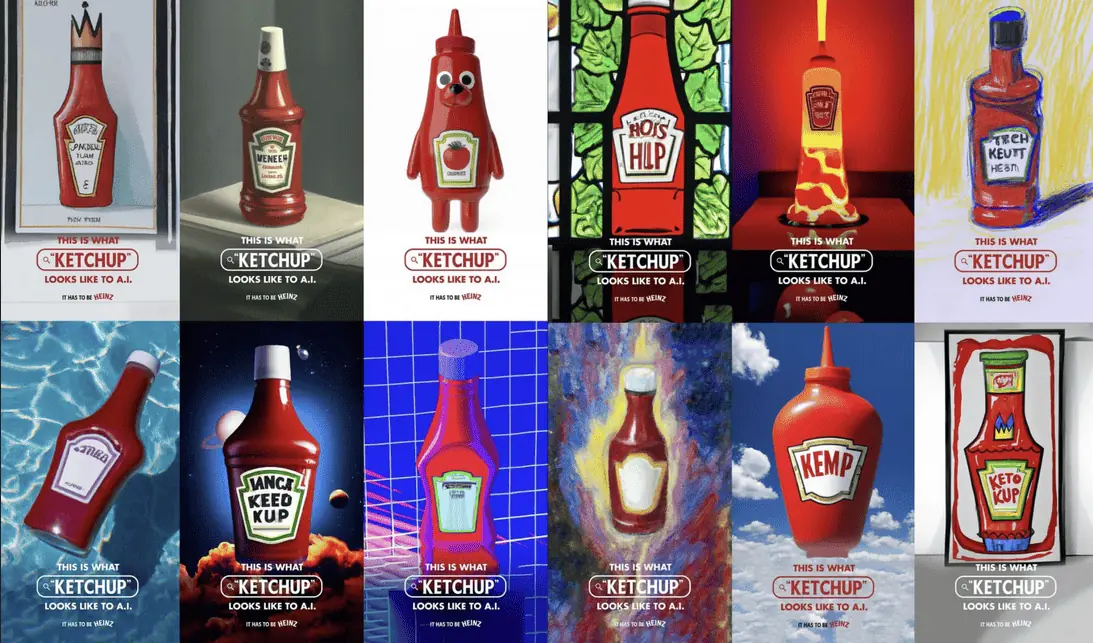
    Take a look at this campaign created by a creative agency, Rethink Ideas, in collaboration with Heinz:

    campaign created by Rethink Ideas, in collaboration with Heinz.

    Initially, Rethink Ideas simply played around with DALL-E 2 typing prompts related to ketchup. The team noticed that the generated images were basically iterations of the iconic Heinz ketchup bottle. That’s when the inspiration struck them in the form of this brilliant campaign!

    The agency asked people to share their AI prompts for ketchup-related images. They handpicked the best prompts and put them on display – on social media and even in old-school print ads. It’s safe to say the campaign was a hit and got many people talking.

    Video Ads Get Shorter and Shorter

    The average length of a video ad has been steadily decreasing in recent years. In 2016, the average length of a video ad was 24 seconds. By 2021, it had reduced to 15 seconds. And in 2023, it is expected to be even shorter, at 12 seconds.

    The truth is, people nowadays only have a little patience for long videos. More than 25% of them who are 17 or older will close a video within just 10 seconds. And over half of them say they’re only willing to stick around for about 20 seconds. 

    So, it’s essential for ads to be quick and precise without dragging out the story too much.        

    Audio Ads are On the Rise

    Audio ads are rising, with ad spending projected to reach $10 billion worldwide in 2023 alone. Thanks to popular streaming sites like Spotify and Apple Music, audio listening has become increasingly popular, opening a whole new way for advertisers to reach their consumers and engage with their audio content. According to a study, audio ads are 24% more memorable than traditional display ads. Plus, they are twice as likely to lift purchase intent.

    On the consumer side of things, people are spending more time listening to audio than ever before. In the United States, the average person listens to digital audio for 1 hour and 40 minutes daily. 

    Audio ads are a great way to reach these engaged consumers. They’re 36% more memorable than video ads and can be enjoyed alongside other media, like music or podcasts.

    Speaking of podcasts, they are a huge hit. 21.3% of people who use the internet to listen to podcasts every week for an average of 61 minutes per day. That’s almost a quarter of internet users!

    And for advertisers, this presents a goldmine of opportunities. They are looking at $3.46 billion in podcast ad revenue in the year 2023 alone.

    Authenticity In Social Media Ads

    People tend to pay three times more attention to a brand’s social media content than any other type of media content they create and post. It’s because social media feels personal – like the brands are talking directly to the users. 

    And because of that, people expect brands to be more genuine and authentic in what they share. A study from 2022 by Tint found that 62% of consumers are more likely to check out content, such as ads, posts, etc., that feature regular customers than pictures made by the brand itself. 

    Interestingly, no demographic other than Gen Z fully embraces this idea, with 82% stating they trust a company more if it uses images of actual people in its advertising efforts.

    Therefore, advertisers need to focus on making brands more human. 

    A great approach is to lean into user-generated content. Studies have found that about 72% of consumers trust reviews and testimonials from fellow customers way more than just hearing the brand talk about its own products.

    The best part is consumers are more than willing to collaborate with brands. Around 72% are with a brand reaching out to them to repurpose their content. 

    Another approach can be influencer marketing. In fact, 61% of consumers put their trust in influencers’ recommendations — more than the 38% who trust branded social media content. 

    Not to mention, influencer marketing is big business in itself. According to Statista, the entire industry is worth almost $21.1 billion in 2023, a 28.6% year-on-year increase from $16.4 billion in 2022. 

    In-Game Advertising Witnesses a Rise 

    In-game advertising is a type of advertising that is placed within video games. It can take many forms, such as static banners, full-screen interstitials, or even interactive elements that are integrated into the game itself.

    According to ay Market Research Future (MRFR) report, the in-game advertising market will reach USD 20.7 billion by 2032, growing at a 12.30% CAGR. This surge in growth is caused by the increasing popularity of mobile gaming and the growing adoption of in-game advertising by brands.

    Some well-known companies, like Red Bull and Intel, have been into gaming advertising for years. They frequently sponsor eSports gaming events, integrating their brand into the gaming experience.

    When it comes to the players themselves, it’s interesting to see how they react to these ads. About 39% of mobile gamers say they remember accessible game ads quite well. And surprisingly, around 51% of these gamers prefer watching ads to spending money on in-game purchases. 

    Millennials are the ones responding positively to these in-game ads. Among them, those aged 30 to 35 are at the top, with 53% recalling these ads. The 25 to 30-year-old group isn’t far behind either, with half of them remembering the ads they’ve seen.

    Shoppable Posts 

    According to the Global Web Index, out of every 100 people who use social media, about 54 of them use it to learn more about different brands. This growing trend led to the rise of social commerce, which allows businesses to sell products directly through social media platforms. 

    One of the most popular forms of social commerce is shoppable posts, which allow users to purchase products directly from a brand’s social media page. Platforms like Facebook, Instagram, Snapchat, and Pinterest have made social selling easier and more efficient. Not only can businesses show their posts to more people by turning them into ads, but they can also target those ads to the audience they want to reach.

    H&M Man Instagram Post

    Mobile Ad Spending Continues to Grow

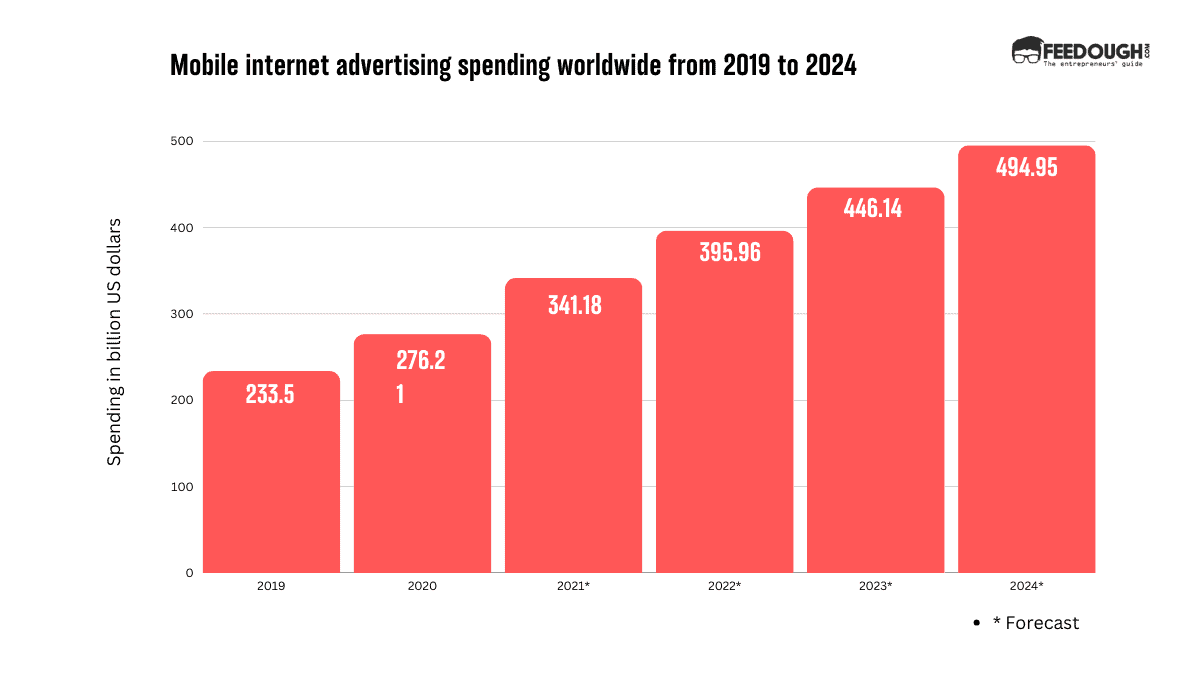
    Mobile ad spending is growing at a fast pace. In 2023, it is expected to reach $446.14 billion worldwide, a 12.7% increase from 2022. This growth is caused by the increasing popularity of mobile devices, alongside the growing sophistication of mobile advertising targeting and measurement capabilities.

    Mobile Internet Advertising Worldwide

    There are several factors driving the growth of mobile ad spending. For starters, more and more people are using their smartphones to access the internet, with a user spending an average of 4.8 hours a day on their device.

    Another reason is the increasing effectiveness of mobile advertising. Mobile ads can be targeted to specific demographics and interests, which makes them more likely to be viewed and clicked on by potential customers.

    Finally, the rise of new mobile ad formats, such as native ads and augmented reality ads, also contributes to the growth of mobile ad spending.

    Audio Optimisation for Ad Search

    Voice search has emerged as a prominent advertising avenue, with one billion monthly voice-initiated searches. Notably, 50% of adults use voice search in their daily lives. This surge can be linked to the widespread integration of smart speakers like Amazon Alexa and Google Home. It is estimated that by 2026, the U.S. alone will have over 150 million voice assistant users.

    Keeping this in mind, businesses can optimise their advertising strategies for voice search by ensuring that their ads run smoothly on mobile devices.

    It is also important to note that voice search queries are more like conversational, everyday language. Therefore, businesses should incorporate this natural language flow into their advertising content.

    Strategically including long-tail keywords into ad copy can also help to improve ad discovery. These extended phrases aptly mirror human speech patterns, making it more likely that users will find your ads when searching for information.

    AR-Powered Multimedia Advertising Campaigns

    Augmented reality (AR) is a tech that overlays a computer-generated image on a user’s real-world view. Over the years, the use of AR in display ads has become increasingly popular as it’s a new and exciting way to get people interested. Plus, it’s way more fun and immersive compared to regular ads.

    For instance, IKEA’s AR app, IKEA Place, allowed users to see how IKEA furniture would look in their own homes. Another great example is Coca-Cola’s “Share a Coke” AR campaign. Consumers could scan the bottles or cans with their smartphones to unlock personalised AR experiences, which included games, music, and other content.

    The AR Advertising market is expected to grow from US$4.3bn in 2023 to US$6.7bn in 2027, and a compound annual growth rate (CAGR) of 11.81%.

    Bottom Line?

    The advertising world in 2023 keeps changing, and the key takeaway is clear: advertisers must be open and adaptable to new and emerging advertising trends; authenticity and audience engagement remain more important than ever, and embracing innovation and staying informed about upcoming technologies is what will ensure strategies are working effectively.

  • 7 Essential Legal Documents For A Startup

    7 Essential Legal Documents For A Startup

    As an entrepreneur, I’m sure you know the intricacies of your business, but how well do you understand the importance of legal documents?

    What would you do in the following scenarios –

      • A customer claims that you misrepresented a product and is threatening to sue.

      • Your cofounder plans to leave the business and start a competition.

      • Your investors are questioning the legality of a certain action.

    These are all scenarios where having the right set of legal documents can help protect you and your business. While there is no one-size-fits-all set of legal documents, here’s an overview of 12 essential legal documents for any startup:

    Incorporation Documents

    Incorporation documents are the official documents used to form a corporate entity. These include articles of incorporation, bylaws, and other documents that outline your company’s operations.

    One of the biggest mistakes entrepreneurs make is not separating their startup from their personal assets. This mistake often leads to personal liability and financial distress.

    To prevent this, it is important to register your company as a legal entity, like a corporation or limited liability company (LLC) that has its own legal and financial standing.

    Incorporation documents (for a corporation), LLC operating agreements (for LLCs), and other formation documents are legal proof that your business is separate from you and your cofounders.

    This in itself has several benefits:

      • Limiting your personal liability, so you’re not held responsible for potential losses or damages caused by the company.

      • Giving you access to certain tax benefits and deductions.

    Shareholders’ Agreement or Founders’ Agreement

    If you’re not the only owner of the startup, it’s important to document how the company will be owned and operated. A shareholders’ agreement (when external investors are involved) or founders’ agreement (when founders own the business) helps protect your interests.

    These legal documents for startups clearly outline the following:

      • How and when will you be compensated.

      • Who has voting rights and decision-making powers.

      • How the company’s shares are distributed among owners.

      • What happens if an owner leaves or is bought out.

      • Dispute resolution methods for resolving disagreements between shareholders/founders.

    Having these agreements in place will help reduce the potential for conflict among owners and protect everyone’s interests in case of a disagreement.

    Imagine these scenarios –

    Your cofounder plans to leave the business and start a competition.

    With a founders’ agreement in place, you’ll have an explicit set of rules that describes how the departing founder will exit the company and prevent them from starting a competing business.

    Your investors are questioning the legality of a certain action.

    Having shareholders’ agreements in place can provide clarity on how decisions are made and who has the authority to make them. This can help ensure that all parties involved are aware of their respective rights and obligations when it comes to making key decisions regarding the company.

    Intellectual Property (IP) Contracts

    Your startup’s success depends partly on its ability to protect its intellectual property (IP). IP can include trademarks, patents, copyrights, and trade secrets.

    These can be your brand name, logo, tagline, website design, software code, and other assets. Having the right IP contracts in place is important to protect these assets from infringement or theft.

    Some of the IP contracts you may need to consider include:

      • Patents: A patent is a legal claim that gives you exclusive rights to your invention. If someone else uses your patented technology without your permission, they can be held liable for infringement. These include utility patents, design patents, and plant patents. You can register a patent by filing a patent application with the United States Patent and Trademark Office (USPTO). For other countries, you may need to file separate applications with their respective governments.

      • Trademarks: A trademark is a phrase, logo, or symbol that identifies your products or services. It helps prevent others from using the same name to market their products or services. These include brand names, slogans, and logos. To register a trademark, you must file an application with the USPTO. For India, you can file an application with the Controller General of Patents Designs and Trademarks.

      • Copyrights: A copyright is a legal claim that gives you exclusive rights to your original work, such as books, articles, music albums, films, and computer software. To register a copyright, you must file an application with the US Copyright Office in the United States. For other countries, you may need to file separate applications with their respective governments.

      • Trade secrets: Trade secrets can include business processes or methods, customer lists, recipes, formulas, algorithms, designs, and other confidential information. These are not registered with any governmental body but are kept secret to maintain a competitive advantage. To protect your trade secrets from theft or misuse, it is important to have an agreement in place that outlines how the information will be handled and who has access to it.

    Employment Agreements

    Employment agreements outline the terms and conditions of employment between an employer and an employee. These legal documents for startups specify both parties’ rights, duties, and obligations in a legally binding agreement.

    If you have employees, you need an employment agreement that includes provisions for:

      • Salaries and benefits.

      • Job duties, responsibilities, and expectations.

      • Working hours and vacation policies.

      • Confidentiality and noncompete clauses.

      • Termination protections for both parties.

    Having these documents in place will help ensure that your employees understand their job requirements, duties, and company policies and procedures.

    Moreover, it will also protect your business from potential legal issues if an employee chooses to leave the company or breach their contract.

    Non-Disclosure Agreements (NDAs)

    A non-disclosure agreement (NDA) is a legally binding contract between two parties that outlines what confidential information must remain private. It prohibits the sharing or use of this information for any purpose other than what it was intended for.

    You may need to enter into NDAs with vendors, partners, customers, or investors if you want to protect confidential information such as trade secrets, pricing strategies, customer lists, recipes, formulas, algorithms and other proprietary information.

    To create a binding NDA, you must include provisions for:

      • Definition of the confidential information that is being protected.
      • Who has access to the information and how it can be used.
      • What happens if either party breaches the agreement.
      • How long the agreement will remain in effect.

      Both parties must sign the document, and a lawyer should review it to ensure all the necessary provisions are in place.

      Vendor Contracts

      Vendor contracts are agreements between two parties – a vendor and a customer. The contract outlines what services or products the vendor will provide to the customer and any associated costs.

      Some of the provisions included in these legal documents for startups are:

        the services you are receiving from your vendor and the associated terms. Even if you can’t have the printed versions, you can use a scanning app to store digital copies of such contracts for easier access.

        Regulatory Compliance Documents

        Depending on the nature of your business, you may need to comply with certain regulatory requirements. They may include laws, regulations, and procedures related to financial reporting, data privacy, health and safety standards, cybersecurity protocols, and environmental protection.

        If you must comply with any of these regulations, you must have the appropriate documents. These documents can include compliance policies and procedures manuals that outline the standards you must adhere to.

        You may need a lawyer’s help to ensure these documents align with all relevant laws and regulations. They can also help you create an internal audit system to ensure your business complies with the latest regulations.

        Such regulatory compliance documents serve to protect your business and employees from scenarios like these:

        • Definition of the confidential information that is being protected.
        • Who has access to the information and how it can be used.
        • What happens if either party breaches the agreement.
        • How long the agreement will remain in effect.

        Business Plan

        Though not a legal document, a business plan is essential to any startup. It is a document that outlines the goals and objectives of your business, as well as the strategies and tactics you will use to achieve them.

        Having a detailed business plan in place helps ensure that all aspects of your business are considered when making decisions. It also serves as a roadmap for investors who may be interested in funding your startup.

        Your business plan usually includes:

          • An overview of your business and its mission statement.
          • Detailed financial projections.
          • A description of the products or services you offer.
          • Your competitive advantages in the market.
          • A marketing plan to promote your products and services.
          • Any legal considerations that need to be taken into account for your specific industry or jurisdiction.

          While no law requires you to have a business plan, it is often an integral part of any successful startup. Having one can help ensure that all aspects of your business are well-thought-out and organised.

          Creating a legal infrastructure for your business is essential for the success of your startup. Here are some tips to help you get started:

            • Have an attorney or law firm review all of your documents and contracts to ensure they are in compliance with applicable laws and regulations.
            • Make sure that all parties involved have a clear understanding of their roles and responsibilities.
            • Ensure you have a copy of all legal documents in case you need to refer back to them for any reason.
            • Make sure that all documents are reviewed and updated regularly. Regulations may change over time, so it’s important to be aware of any changes affecting your business.
            • Have a system to ensure that all documents are properly tracked and managed. This will help you stay organised and on top of any legal issues that may arise.

          • Who Owns X.com- X.com Founders, Current CEO, & History

            Who Owns X.com- X.com Founders, Current CEO, & History

            In the realm of social media, many platforms came and disappeared. But only a few platforms have left an indelible mark as profound as Twitter. Born out of a simple idea, Twitter quickly became a global hub for real-time communication, news sharing, and vibrant online communities in just a few words. 

            However, in the ever-evolving landscape of technology, Twitter’s journey took a fascinating twist in 2023. So now it is no longer just Twitter; it is now known as X.com and is undergoing a transformation.

            But who owns Twitter, now known as X.com? Who are the transformative hands behind Twitter, what’s the history of Twitter, how come it became X.com, and is there a history of X.com?

            Let’s unfold all these answers in this read.

            What Is X.com?

            X.com is a prominent and influential social media platform that has evolved into much more than just a means of sharing 280-character updates with the world. It was earlier known as Twitter until it announced its rebranding in 2023. It is globally used for real-time communication, news dissemination, and community engagement.

            At its core, X.com allows users to post short messages, known as “Tweets,” which can include text, images, videos, links, and more. These tweets are publicly visible, which enables users to share their thoughts, opinions, news, and updates with a wide audience.

            Besides, people have been using X.com, previously known as Twitter, for diverse usages, including:

            • News and Information
            • Social Interaction
            • Marketing and Brand Promotion
            • Activism and Advocacy
            • Entertainment
            • Research and Analysis

            Who Owns X.Com?

            On  October 27, 2022, business giant Elon Musk acquired Twitter for US$44 billion and, in 2023, changed its name to X. Thus, the owner of X today is Elon Musk.

            Moreover, to manage the work and take forward the growth of X and beyond Twitter’s vision, Musk appointed Linda Yaccarino, a former executive of NBCUniversal, as the CEO of X Corp. and X.com, effective June 5, 2023.

            Twitter Parent Company

            The parent company of Twitter, Today’s X, is X Holdings Corp. Since X Corp. was established in March 2023, it is the successor to Twitter, Inc., but Twitter is now a wholly owned subsidiary of X Holdings Corp. Musk owns the holding company X Holding Corp and has a long and complex history of coming into existence. 

            The company owns the social networking service Twitter, which is currently rebranding to X and has announced plans to use it as a base for other offerings. 

            History Of X.com 

            The parent company of Twitter, today’s X Holdings Corp., has a long and complicated history. It involves several mergers, acquisitions, and rebranding. 

            1999 – The inception of X.com

            X.com started as an online bank in 1999 when Elon Musk co-founded X.com with Harris Fricker, Christopher Payne, and Ed Ho. This online bank offered innovative features such as sending money using its infrared money transfer system or emails. 

            2000 – The merger of Confinity and X.com

            However, X.com faced fierce competition from Confinity, a software company that started in 1998 called PayPal. Thus, in March 2000, Musk decided to merge X.com with Confinity, hoping to create a dominant player in the online payment industry. 

            The merged company initially adopted X.com as its brand’s name, as Musk believed it had a broader long-term potential than Confinity or PayPal. 

            However, this name was unpopular among consumers and disliked by the users as they said it sounded more like an adult website. Thus, people preferred the simpler and more descriptive name of PayPal as they considered it a pal that helps you pay and get paid. 

            2000 – Musk’s departure from X.com and its renaming to PayPal

            Musk faced internal conflicts with the former Confinity executives and employees, who disagreed with his vision and strategy for the company. 

            And so, to push out Musk, the co-founders of PayPal, Peter Thiel, Levchin, and PayPal COO David O. Sacks, gathered to discuss how they could push out Musk, reported the 2015 Ashlee Vance biography of Elon Musk

            Vance further says, “They decided to sell the board on the idea of Thiel returning as CEO,”.

            So, they decided to wave off Musk behind his back to avoid confronting him. 

            It was the time when Musk planned his honeymoon trip to Sydney. At the airport, while the couple was about to board the flight, he received a notification that executives at X.com had submitted letters expressing a lack of confidence in Musk’s leadership to the board of directors. In response to this, the board reached a consensus that Musk’s absence of a well-defined business strategy and the ways he faces technological challenges, the company has to overcome this. And consequently, Musk has to depart from his role, and Peter Thiel will be the new CEO in 2000.

            Shortly after this, the company changed its name to PayPal Inc. and focused on developing its core product.

            2002 – eBay bought PayPal

            In February 2002, when PayPal went for its initial public offering (IPO), it raised $70.2 million and closed at $20.09 on Nasdaq.  

            This success of PayPal attracted the attention of eBay, the online auction giant using it as one of its payment options. Consecutively, eBay announced that it would buy PayPal for $1.5 billion in stock in July 2002. 

            The deal undoubtedly gave a significant advantage to eBay over its competitors in the e-commerce market, as it could offer its customers and sellers a seamless and secure payment service to its customers and sellers. But this also limited PayPal’s growth potential, as it became dependent on eBay’s platform and policies.

            2015 – The PayPal and eBay split.

            Since there was growing competition in the ecommerce market and PayPal also believed in innovation, their continued partnership would have hindered the growth of both parties. Thus, they decided to split and barred each of them from becoming direct competitors in their core businesses. 

            2017 – Musk Buys X.com Back

            Ever since Musk was out of that merged bank of X.com and Confinity, he had not given up on his original idea of creating an online bank that offered more than just payments and the name X.com. 

            Thus 2017, when he got a chance, he reacquired the domain name X.com from PayPal for an undisclosed amount. He said that he had a sentimental attachment to the name and hinted that he might use it for a new venture in the future. 

            2022 – Musk Bought Twitter

            In 2022, he revealed his plan to acquire Twitter, started its acquisition on April 14, 2022, and concluded it on October 27, 2022. He said that he wanted to rename it to X and transform it into an “everything app” that would offer various services and products such as messaging, social media, e-commerce, gaming, entertainment, news, education, health care, and finance, and make X similar to the WeChat used in China.

            He further said that he wanted to buy Twitter and make X because he wanted to make a platform for free expression and public conversation, where a wide range of beliefs can be debated in a healthy manner without resorting to violence.

            2023 – Twitter to X.com

            In March 2023, Musk announced that he was rebranding Twitter into X.com. As said earlier, he said he would make X.com an everything app soon. He said he also plans to launch his own cryptocurrency, X Coin, by the end of 2023. 

            Musk appointed Linda Yaccarino, a former executive of NBCUniversal, as the CEO of X Holdings Corp., the parent company of X.com (formerly Twitter). He also appointed Gwynne Shotwell, the president and COO of SpaceX, as the chairwoman of X Holdings Corp., the ultimate owner of X Corp.

            Twitter Founder (Today’s X.com)

            Twitter was co-founded by Jack Dorsey, Noah Glass, Biz Stone, and Evan Williams. These four individuals played pivotal roles in the development and launch of Twitter in March 2006. Jack Dorsey sent the very first tweet on the platform, and together, they created a social media platform that has since become a giant name in the industry.

            Jack Dorsey served as the CEO of Twitter until 2008 when he was replaced by Williams. He returned as the CEO in 2015 and led the company through several challenges and innovations. 

            However, in 2022, he announced that he had sold Twitter to Elon Musk for $44 billion. He also said that he would resign as the CEO of Twitter and focus on his other ventures, such as Square, a financial services company, and Bluesky, a decentralised social network project. 

            After purchasing Twitter, Musk rebranded Twitter into X.com, which Musk founded in 1999 as the name of the bank, but failed. 

            So today, Twitter, a company founded by Jack Dorsey, Noah Glass, Biz Stone, and Evan Williams, is rebranded to X.com, a company owned and founded by Musk. 

            Key Milestones In The History Of Twitter

            The journey of Twitter since its inception has been full of setting milestones in the social media industry. Here are a few key milestones in the history of Twitter:

            • In February 2006, Jack Dorsey, Noah Glass, Biz Stone, and Evan Williams started to work on Twitter.
            • In March 2006, Jack Dorsey tweeted, “just setting up my twttr.”
            • On July 15, 2006, Twitter was launched publicly as a service of Odeo, a podcasting company co-founded by Evan Williams, Biz Stone, and Noah Glass. 
            • In October 2006, Williams, Stone, and Dorsey bought out Odeo and started Obvious Corp. to develop Twitter further. 
            • In April 2007, Twitter spun off from Odeo, and it became an individual company, named Twitter Inc., with Jack Dorsey as the CEO of the company. 
            • In October 2007, Twitter raised its first round of funding, which was undisclosed but is rumoured to be between $1 million and $5 million
            • In March 2008, Twitter reached 1.3 million registered users. 
            • In October 2008, Evan Williams took the place of CEO, replacing Jack Dorsey, who was first appointed as the chairman of the company. 
            • In November 2008, Twitter rejected the $500 million acquisition offer.  
            • In January 2009, Twitter introduced the verified account concept into the verified profiles of celebrities, public figures, and famous personalities to increase the trust of its users. 
            • In March 2011, Twitter reached 200 million registered users, showing continued growth in its user base.
            • In June 2011, Dick Costolo replaced Evan Williams as the CEO of Twitter. .
            • In September 2011, Twitter introduced the hashtag (#) to categorise and search for tweets. The introduction of hashtags completely revolutionised content discovery.
            • In November 2013, Twitter made an IPO on the New York Stock Exchange and raised $1.82 billion, a significant milestone in its financial history.
            • In October 2015, marking his second stint as CEO, Jack Dorsey returned as the CEO of Twitter, replacing Dick Costolo.
            • In November 2017, Twitter expanded the character limit for tweets from 140 to 280, which enabled users to create more expressive tweets.
            • In January 2021,  after labelling President Donald Trump’s tweets as potentially misleading for the first time in May 2020, Twitter permanently suspended President Donald Trump’s account in 2021, for inciting violence after his supporters stormed the US Capitol, raising concerns about social media content moderation.
            • In June 2022, Twitter launched Twitter Blue, a subscription-based service that offers premium features such as undo tweets, bookmark folders, and reader mode. 
            • In October 2022,  Elon Musk acquired Twitter, and after that, in the same month, he tweeted, “an accelerant to creating X, the everything app.”
            • In April 2023, Elon Musk changed the name of Twitter to X.com. 

            Where Is X.Com, Former Twitter Headquartered?

            X.com, formerly known as Twitter, is headquartered in San Francisco, even after facing a lawsuit. 

            Musk installed a glaring signage of X on the top of the headquarters of Twitter in San Francisco after he announced the rebranding, which breached the city’s regulations of signage and lighting. 

            There are also a few more things that the lawsuit has prompted Musk about the breach. 

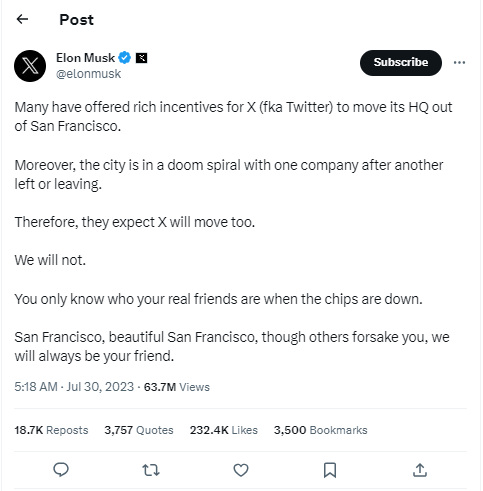
            To which Musk tweeted,  “Many have offered rich incentives for X (fka Twitter) to move its HQ out of San Francisco. Moreover, the city is in a doom spiral, with one company after another left or leaving. Therefore, they expect X will move too. We will not…San Francisco, beautiful San Francisco, though others forsake you, we will always be your friend.” 

            Elon Musk Tweer

            So, the headquarters are still in San Francisco, but since it is in controversy, the headquarters may shift. 

            Wrapping Up

            The transformation of X.com, formerly known as Twitter, is an ever-evolving journey of technological change and visionary leadership. It all began as a platform for sharing short thoughts in 2006, but under the ownership of Elon Musk since 2022, it has gotten a facelift and is still undergoing a remarkable makeover. 

            Today, it’s not just a social media giant; as the words of Elon Musk mark, it is slowly becoming a versatile hub. Today, it has already become a platform for communication, commerce, and more. As the evolution continues, it seems like X.com promises to reshape our digital world and will soon redefine how we connect and interact with information. 

          • Who Owns ChatGPT – ChatGPT Founders, Current CEO, & History

            Who Owns ChatGPT – ChatGPT Founders, Current CEO, & History

            In its very young existence, ChatGPT has already made a splash in the entire tech industry and has gathered the appreciation and attention of 100 million users worldwide. ChatGPT is a chatbot that talks almost like a human, understands humour, and gets the nuances of language – now that’s ChatGPT for you!

            Despite the competition from Google as Bard and from Microsoft as Bing, ChatGPT seems to be growing and has a flourishing future. But who owns ChatGPT? How is Elon Musk related to the chatbot? What have been the key milestones of the application since its birth, and what is its future outlook? We’ll discuss these and more topics related to ChatGPT in this article.

            What is ChatGPT?

            ChatGPT is a sibling of InstructAI, trained to respond to the prompts and answer in detail. ChatGPT was created in 2022 and was launched on November 30, 2022, by OpenAI. However, the company OpenAI was founded in 20215 by Sam Altman, Elon Musk, Ilya Sutskever, and others.

            Essentially, ChatGPT is a chatbot developed by OpenAI. It is trained on 300 billion words available online till 2021 and 175 billion parameters. It is built on OpenAI’s GPT-3.5 and GPT-4 families of large language models (LLMs). 

            ChatGPT can generate text, translate languages, write different creative content, including blogs, books, product descriptions, and songs, and answer your questions about any niche or industry informatively. This showcases the ideas of OpenAI’s creators, who wanted to make smart AI models that can talk and help people with many different things.

            Who Owns ChatGPT?

            OpenAI owns ChatGPT. OpenAI is a non-profit (now switched to for-profit) research company founded in 2015 by Elon Musk, Sam Altman, and a few other prominent names in the tech industry, including Peter Theil, Ilya Sutskever, Jessica Livingston, Reid Hoffman, Greg Brockman, Wojciech Zaremba, and John Schulman.

            However, the current CEO of OpenAI, the parent company of ChatGPT, is Sam Altman, known as the company’s major contributing partner. 

            ChatGPT Parent Company: OpenAI 

            OpenAI is the parent company of ChatGPT. It was founded as a non-profit research company based in San Francisco, California. The company switched from non-profit to for-profit in 2019 as it claimed that it wanted to secure its resources and funding needs to attract more funds and partnerships to get better help in the research and development of AI. This change allowed them to attract more investments, develop strategic partnerships, and ensure they had the financial means to advance AI.

            The OpenAI is a team of hundreds of researchers and engineers who aim to research and work on generative models to develop safe and beneficial artificial general intelligence that aligns with human values. And that is why they created ChatGPT, which can help people vocalise their thoughts in better words and ways. 

            ChatGPT Founders 

            There is no one founder behind ChatGPT. It is a product of the research and development company, OpenAI, where hundreds of researchers and engineers worked cohesively on this project. 

            However, the visionary of ChatGPT was Greg Brockman, who foresees a society in which intelligent computers and people might coexist in peace, to which Sam Altman also contributed and took the project further. 

            However, OpenAI, the company behind ChatGPT, was co-founded by Elon Musk and Sam Altman in 2015. 

            The team of researchers and engineers at OpenAI, who worked on and developed ChatGPT, was led by Ilya Sutskever and Dario Amodei. Ilya Sutskever is a renowned AI researcher and also the co-founder of OpenAI.

            Does Elon Musk Own ChatGPT?

            Even though Elon Musk was one of the co-founders of OpenAI, the parent company of ChatGPT, and also gave funding of $100 to the company, he exited the board of directors in 2018. Thus, we can say Elon Musk does not own ChatGPT or even has no more stakes in its parent company OpenAI nor is he a contributing partner anymore. 

            But, how come, when Elon Musk left OpenAI in 2018, he was said to be a contributing partner of ChatGPT?

            That is because his earlier contributions and support in monetary and guidance forms continued to indirectly influence and contribute to OpenAI’s projects, including ChatGPT. 

            Since his initial involvement helped shape the organisation’s direction and mission, which also left a lasting impact on OpenAI’s ongoing work and development in artificial intelligence, he was listed as one of the founders of ChatGPT. 

            Major Acquisitions And Partnerships Of ChatGPT

            Here’s to those who contributed to the creation of ChatGPT from both a financial and a resource point of view and companies that ChatGPT acquired and why.

            • Microsoft: In February 2023, deepening its partnership with ChatGPT, Microsoft announced a $10 billion investment in OpenAI, making it the company’s largest shareholder. This investment will help OpenAI to develop ChatGPT and other artificial general intelligence technologies. On the other hand, this investment would enable Microsoft to enhance its capabilities in supercomputing systems, develop new AI-powered experiences, and maintain its exclusive role as OpenAI’s cloud provider.
            • Andreessen Horowitz: It is a venture capital firm that has invested in 1388 tech companies, including Facebook, Twitter, and Airbnb. The firm has invested in OpenAI since its advent in 2015.
            • Peter Thiel: Peter Thiel is a German-American billionaire entrepreneur, political activist, and venture capitalist. He is a co-founder of PayPal,  Palantir Technologies, and Founders Fund and the first outside investor of Facebook. He is also a major investor in OpenAI and has been a vocal advocate for the development of artificial general intelligence.
            • Sam Altman: The CEO and co-founder of OpenAI, also a former president of Y Combinator, a startup accelerator, has invested in OpenAI monetarily and also played a pivotal role in leading the way of OpenAI towards its advancements in AI.
            • Khosla Ventures: It was the first venture capitalist to invest in OpenAI in 2019 when the company switched from being a non-profit to a for-profit organisation. 
            • Global Illumination: The acquisition of Global Illumination is known as OpenAI’s first acquisition. OpenAI said that acquiring Global Illumination would help it “build more creative and engaging AI experiences”. The company also said it would help it “expand its capabilities in the areas of natural language processing, computer vision, and machine learning.”

            These are just a few investors, and many more have extended their partnership and support for the development of the chatGPT and the company OpenAI. Since its beginning, the ChatGPT has set various milestones and is developing exceptionally well. 

            Key Milestones In ChatGPT History 

            There are just a few key milestones of the evolutionary journey of ChatGPT, as it is still a technology which is still under continuous development. 

            Here are a few key milestones in the history of ChatGPT: 

            • November 2022: ChatGPT is first announced.
            • December 2022: ChatGPT is released to the public as a free research preview.
            • February 2023: Microsoft announces a $1 billion investment in OpenAI, making it the company’s largest shareholder.
            • March 14, 2023: OpenAI releases GPT-4 in ChatGPT and Bing, which promises better reliability, creativity, and problem-solving skills.
            • April 23, 2023: OpenAI releases ChatGPT plugins, GPT-3.5 with browsing, and GPT-4 with browsing in ALPHA.
            • May 15, 2023: OpenAI launches the ChatGPT iOS app, allowing users to access GPT-3.5 for free.
            • June 2023: ChatGPT is used to generate a realistic dialogue between two AI chatbots that is indistinguishable from human conversation.
            • September 2023: ChatGPT is used to create a new type of AI-generated music that is more expressive and emotional than previous AI music.
            • October 2023: ChatGPT is used to develop a new AI-powered writing assistant to help writers generate better content.

            As the company kept evolving, it spread its roots worldwide and now exists with various headquarters at diverse places in the world for smooth functioning. 

            Where Is ChatGPT Headquartered?

            ChatGPT is headquartered in San Francisco, California, United States. The company also has offices in Seattle, Washington, and Austin, Texas, with the mission to revolutionise how people interact with technology and make AI accessible to all.

            What is ChatGPT’s Mission Statement?

            The mission of ChatGPT is to ensure AI benefit the entire humanity. 

            Through advanced AI technology, Chat GPT intends to revolutionise communication so that individuals, businesses, and communities can exchange ideas efficiently and effectively, engage in meaningful conversations, and unlock the potential of human collaboration.

            This also means that the company is committed to developing ChatGPT in a way that is safe, ethical, and beneficial to society.

            Future Outlook Of ChatGPT

            ChatGPT’s growth in user numbers from 100 million to 200 million over the past six months, its paid version release, millions paying for the plugins, and much more suggest that ChatGPT has a brimming future and has sincere growth plans for the future.

            But before we discuss the future plans of ChatGPT, let’s see what are the challenges and opportunists that ChatGPT is facing and how they are addressing the same:

            • The Chatbot being biased: ChatGPT is trained on a massive dataset of text and code, which means that it is susceptible to the biases that exist in that data. The company is working to address this challenge by developing methods to identify and remove bias from ChatGPT’s training data.
            • The safety challenge: ChatGPT is a powerful tool that could be used for malicious purposes. But, as the company is well aware of what’s happening and going wrong, they say that safety is still on their priority list and that they are working to develop safeguards to prevent ChatGPT from being used for harmful activities.
            • The opportunity to improve communication: The OpenAI created ChatGPT just to enhance communication between people and machines. And for that reason, the company is constantly working to develop new ways to make ChatGPT more natural and human-like in its interactions and make it convenient for its entire user base to communicate better.
            • The opportunity to create new products and services: ChatGPT offers its API so that it can be used to develop new ChatGPT-like products and services that are not possible with traditional technologies. Thus, different companies are exploring ways to use ChatGPT to create new applications in education, healthcare, and other industries. For example, Myntra introduced ChatGPT in its apps to match customers with the right shopping requirements. Similarly, different companies are finding different ways to include ChatGPT into their system to offer a better user experience to their customers

            The key leaders of ChatGPT, including Sam Altman, the CEO of OpenAI, and Ilya Sutskever, the chief scientist of OpenAI, envision ChatGPT to be a force for good in the world, and they are developing the technology to bring this vision to life.

            Overall, the future of ChatGPT seems bright. The company has a strong team of engineers and scientists and the resources to develop ChatGPT into a powerful and beneficial technology. ChatGPT’s challenges are significant, but the company is committed to addressing them. With continued development, ChatGPT has the potential to revolutionise the way we interact with computers and the world around us.

          • Who Owns YouTube – YouTube Founders, Current CEO, & History

            Who Owns YouTube – YouTube Founders, Current CEO, & History

             YouTube is a  significant hub among online platforms, with an astonishing 2 billion active users worldwide. Every day, people watch billions of hours of videos on YouTube, making it a major part of our lives.

            YouTube is more than just entertainment. It is also a thriving ecosystem for creators, generating over $10 billion in advertising revenue each year. The platform is available in over 100 countries and 80 languages, which makes it a truly global phenomenon.

            But who owns YouTube, the giant platform? Who are YouTube’s founders, and what are some of the YouTube’s essential milestones? Let’s unfold these questions about a platform that redefined how we share and consume content in this digital age.  

            What is YouTube?

            YouTube is an online video-sharing platform where you can share, watch, and upload videos. It is a platform that offers various features, making it a popular platform for creators and users alike. Here, creators can upload their video content of any length and format. Based on every video upload, you can also add different annotations and captions and use its other features while uploading the videos to make them rank higher. On the other side, users can search and watch videos on any device, including smartphones, computers, tablets and more.

            The primary source of YouTube’s revenue generation is advertising, subscriptions, and commerce. Advertisers can place their ads on YouTube videos, and creators can earn money from them. However, if creators want, they can also charge for subscriptions to their channels and sell products through YouTube’s commerce platform.

            Since its launch, YouTube has greatly impacted how we consume and share information. It has also become a significant platform for creators to share their visual content and connect with audiences. It had such a major impact that in 2005, within just a few months of its launch, it started trafficking 30,000 views a day. This grabbed the attention of many tech giants to purchase and own the company within a few months only. 

            Who Owns YouTube?

            Today, YouTube is owned by Google. Google acquired YouTube in 2006 for $1.65 billion. YouTube is now one of Google’s most popular products, with over 2 billion active monthly users, almost a quarter of the world’s population. 

            Google is a subsidiary of Alphabet Inc., a holding company that also owns other popular brands such as Google Search, Gmail, and Android. 

            YouTube Parent Company

            The parent company of YouTube is Alphabet Inc. YouTube is part of Google, which is a subsidiary of Alphabet.

            Alphabet Inc. was formed in 2015 when Google reorganised its businesses. The reorganisation was designed to make it easier for Google to focus on its core businesses, such as search and advertising. Alphabet Inc. also allows Google to experiment with new industries, such as self-driving cars and artificial intelligence.

            YouTube Founder

            YouTube was founded by Chad Hurley, Steve Chen, and Jawed Karim in 2005. These were the three co-workers from PayPal. 

            The original idea was an online dating service named  “Tune In, Hook Up”, but it eventually failed. 

            However, after the infamous Justin Timberlake and Janet Jackson Super Bowl halftime show incident, the three creators were trying to find that video on the internet, but couldn’t find videos of it on the internet. That was when they realised there was no easy way to share videos online. To serve that need, the three founders changed their concept to a video-sharing platform, and YouTube was born in 2005.

            Key Milestones in The History Of YouTube

            Here are some key milestones in the history of YouTube:

            • February 2005: YouTube was founded by Steve Chen, Chad Hurley, and Jawed Karim as a dating app.
            • April 2005: The first video was uploaded to YouTube, titled “Me at the Zoo” by Jawed Karim, one of the co-founders.
            • May 2005: YouTube goes into beta testing.
            • September 2005: The first video that reached one million views during this beta testing was a Nike ad featuring Brazilian soccer star Ronaldinho.
            • November 2005: YouTube received its first round of funding from Sequoia Capital, worth $3.5 million.
            • December 15, 2005: YouTube was officially launched. When it was formally launched, it served more than two million video views daily.
            • October 2006: Google acquired YouTube for $1.65 billion in stock, making it one of the largest acquisitions in tech history.
            • August 2007: YouTube introduces in-video ads for creators to monetise their work.
            • November 2007: YouTube launched its first localised versions in nine countries: Brazil, France, Ireland, Italy, Japan, the Netherlands, Poland, Spain, and the UK.
            • March 2008: YouTube began offering HD videos in 720p resolution.
            • October 2008: YouTube introduces preroll ads.
            • October 2009: YouTube reached one billion views per day.
            • May 2010: YouTube announced that it had exceeded two billion views per day
            • November 2010: YouTube launched its first original content initiative, YouTube Original Channels, featuring professionally produced content from celebrities and media companies.
            • December 2010: YouTube began offering live streaming capabilities to select partners.
            • April 2011: YouTube reached three billion views per day and announced that it paid more than $30 billion to its creators, companies and media partners over the last three years.
            • December 2011: YouTube redesigned its homepage and introduced the concept of channels as the primary way to discover and watch videos.
            • May 2012: YouTube launched its first paid subscription service, YouTube Rentals, which offered access to premium movies and TV shows from major studios and networks.
            • November 2012: YouTube celebrated its one billionth video with a special video featuring Psy’s viral hit “Gangnam Style”, which became the first video to reach one billion views on the platform.
            • March 2014: YouTube launched its first kids app, YouTube Kids, which offered a curated and safe environment for children to watch videos.
            • October 2015: YouTube launched its first paid subscription service for video, YouTube Red, which offered ad-free access to all videos, offline playback, background play, and exclusive original content for a monthly fee.
            • October 2016: YouTube launched its first virtual reality app, YouTube VR, offering immersive experiences for viewers using VR headsets such as Google Cardboard and Daydream.
            • October 2017: YouTube rebranded its paid subscription service for video from YouTube Red to YouTube Premium, which offered the same benefits as before, plus access to YouTube Music and YouTube Originals.
            • October 2019: YouTube rebranded its paid subscription service for music from YouTube Music Key Beta to YouTube Music Premium, which offered the same benefits as before, plus access to more features and content.
            • February 2020: YouTube reached four billion hours of watch time daily and announced that it had over six billion monthly active users.
            • April 2020: YouTube launched its first live-streaming service for education, Learn@Home with YouTube, offering free online lessons and resources from various educational partners during the COVID-19 pandemic.
            • June 2021: YouTube added support for videos in 3D format, which offered a more immersive and realistic experience for viewers using 3D glasses or devices.
            • April 2022: YouTube launched its first live streaming service for sports, called YouTube Sports Live, which offered access to live and on-demand sports from over 100 leagues and networks, including NBA, NFL, MLB, NHL, FIFA, and more.
            • February 2023: YouTube reached seven billion hours of watch time daily and announced that it had over nine billion monthly active users.

            These are just a few of the key milestones in the history of YouTube. The platform has continued to grow and evolve over the years, and it has become one of the most popular websites in the world, which surely has many more milestones in between.

            Where Is YouTube Headquartered?

            The headquarters of YouTube is in San Bruno, California, the United States. The company’s office is located at 901 Cherry Ave, San Bruno, CA 94066.

            The YouTube headquarters is a large campus with several buildings. The main building is called the “YouTube Space”, where most of the company’s employees work. The YouTube Space has several features, including a video studio, a screening room, and a game room.

            YouTube also has several other offices worldwide, including offices in London, Tokyo, and New York City.

            Wrapping Up

            YouTube, the world’s leading and largest video-sharing platform, has come a long way since its birth in 2005. Acquired by Google in 2006, it has grown over its journey into a global phenomenon. Today, it has billions of users and significantly impacts content creation, consumption, and monetisation. From its humble beginnings as a dating app concept to its current status as part of Alphabet Inc., YouTube’s journey has been marked by various vital milestones and innovations, from which we could make the most remarkable ones. 

            Headquartered in San Bruno, California, and having offices in different countries worldwide, it seems like YouTube has a promising future ahead as it adapts to the evolving needs of its vast and diverse user base.

          • Who Owns Google – Google Founders, Current CEO, & History

            Who Owns Google – Google Founders, Current CEO, & History

            Google has 92.24% of the world’s market share. Maybe that is why we say “Google it” to someone whenever they have a query and we don’t have an answer. 

            It is like, in the vast world of the internet, the name that stands out is Google. 

            Because it is not just a search engine; it is a huge tech company that plays a big role in our online lives. Since its launch, it has not just changed how we find information and use the internet. It has created the way we search.

            At its heart, Google’s search engine, which uses clever computer tricks, has become a tool we all use daily and is a huge part of our lives. We use Google as a search engine, maps, email, videos, and many other things. 

            But when did Google start? Who owns Google today, and what milestones has Google set so far? Let’s explore Google’s beginnings, what its founders wanted to do, important moments in its history, and the new things it’s trying, all of which change and redefine how we use the internet.

            What Is Google?

            Google is a well-known multinational company focusing on internet-related services and products, including AI, search engine technology, online ads, computer software, cloud computing, quantum computing, e-commerce, and consumer electronics. 

            However, at its core, Google is primarily known for its search engine, used by billions of people worldwide to access information on the internet. Google employs complex algorithms to deliver relevant search results quickly and accurately, making it an integral part of our daily lives. So much so that people use the terms ‘Google it’ or Google as a verb, which signifies searching for something. 

            Thus, we can say since Google was founded in 1998, it has become one of the world’s most influential and widely recognised companies. 

            However, Google is far more than just a search engine. With time, it kept expanding its offerings to include a wide range of products and services serving user’s evolving needs with time, including but not limited to:

            • Google Maps
            • Gmail
            • YouTube
            • Google Drive
            • Android
            • Google Chrome
            • Google Workspace (which includes Google Docs, Sheets, Slides, and more.)
            • Google Cloud
            • Google Assistant

            Who Owns Google?

            Google has undergone structural changes since its inception; thus, its partnership has changed over time. So, today, Google is owned by Alphabet Inc., a conglomerate, the holding company of Google and its other diverse portfolio of businesses and brands, established in 2015.

            Google Parent Company: Alphabet Inc. 

            In 2015, Google went through a major restructuring, as Google desired to make its core work clearer and more accountable so that it could focus on Internet services and other companies under which it could operate smoothly. 

            This move was announced by Larry Page and Sergey Brin, the co-founders of Google, to make its core work clearer and more accountable and better organise and manage the various businesses and projects that had evolved under the Google umbrella. 

            Under Alphabet Inc., Google became one of several subsidiaries and continued to operate as the primary driver of revenue and innovation within the alliance. 

            Google Founder 

            The founders of Google are the two Ph.D. students from Stanford University in California, namely Larry Page and Sergey Brin. This duo met in 1995 while working on a research project on the World Wide Web (WWW). Within a year after they met, in 1996, they began working on a new search engine called BackRub, which they later renamed to Google.

            Google was officially launched on 4 September 1998 from their friend’s garage in Menlo Park, California, United States. The company quickly grew and expanded, and by 2004, after beating Yahoo! Google already became the most popular search engine in the world, with users searching on Google 200 million times a day.

            Larry Page and Sergey Brin own about 14% of Google’s publicly listed shares and 56% of the company’s super-voting stock.

            Key Milestones In The History Of Google 

            Google’s journey to being a billion-dollar company from being a research project of two PhD scholars has long marked several significant milestones.

            Even though I can not mark each milestone of Google here, I’ll add some of the critical moments in the history of Google:

            • Google.com Domain (1997):
              While it was still a research project of Larry Page and Sergey Brin at Stanford, they registered the domain name google.com in September 1997.
            • The Birth of Google (1998):
              Larry Page and Sergey Brin officially founded Google Inc. in September 1998 in a garage in Menlo Park, California.
            • First Funding (1998):
              Google secured its first major investment from Andy Bechtolsheim, co-founder of Sun Microsystems, of $100,000 in August 1998. 
            • Incorporation (1998):
              Google officially incorporated as a company on September 4, 1998, with initial funding from investors including Bechtolsheim.
            • Eric Schmidt as CEO (2001):
              Eric Schmidt joined Google as CEO to provide experience and leadership to manage a growing tech company. 
            • AdWords in 2000: 
              AdWords was the advertising program that allowed businesses to bid for keywords and display targeted ads to the users within the search result screen.
            •  AdSense in 2003
              AdSense enabled website owners to display Google ads on their sites and earn revenue from clicks.
            • Google IPO (2004):
              With its initial public offering (IPO), Google went public in August 2004. It raised $1.67 billion from IPO and became a publicly traded company under the ticker symbol “GOOG.”
            • Acquisition of YouTube (2006):
              Google acquired YouTube, the world’s largest video-sharing platform of that time, for $1.65 billion in stock. This move solidified Google’s presence in the online video space and boosted its revenue generation.
            • Launch of Android (2008):
              Google introduced the Android operating system for smartphones, which has become the world’s most widely used mobile operating system ever since.
            • Introduction of Chrome Browser (2008):
              Google brought a new web browser, Google Chrome, which quickly gained popularity for its speed and simplicity.
            • Google’s Self-Driving Car Project (2010):
              The launch of a self-driving car project in 2010, which it later named Waymo LLC, marked Google’s entry into autonomous vehicle technology.
            • Alphabet Inc. Restructuring (2015):
              Google restructured itself to streamline the work and businesses operating under the umbrella of Google. Here, the co-founders of Google introduced Alphabet Inc. in 2015, and Google itself became one of its subsidiaries.
            • Quantum Supremacy (2019):
              Google claimed to have achieved “quantum supremacy” in October 2019, demonstrating the potential of quantum computing to solve complex problems at previously impossible speeds.
            • Launch of Stadia (2019): 
              Users got a cloud gaming service from Google called Stadia that allows users to play video games on various devices without needing hardware. Stadia offers a library of games that can be streamed over the internet at up to 4K resolution and 60 frames per second.
            • Acquisition of Fitbit (2019): 
              Fitbit was acquired by Google, a leading wearable fitness device maker, for $2.1 billion in 2019. This acquisition enhanced Google’s presence in the health and wellness market and gave it access to Fitbit’s user data and technology.
            • Launch of Google Workspace (2020): 
              At the time of Covid19, when the entire world was working from home, Google rebranded its suite of productivity and collaboration tools, formerly known as G Suite, to Google Workspace in 2020. 
            • Launch of Google Cloud Healthcare API (2021): 
              With the Google Cloud Healthcare API, healthcare organisations can securely store and access health data in the cloud without silos, manage existing and new patient data, privacy, and more.
            • Launch of Privacy Sandbox (2022): 
              The Privacy Sandbox was first announced in January 2020 and has been developing since then. In 2022, Google began testing some of the proposals in the Privacy Sandbox in Chrome. A Google initiative called the Privacy Sandbox aims to enhance online user privacy by developing new privacy-focused web technologies and standards for digital advertising that reduce the need for third-party cookies.
            • Launch of Google Bard (2023):
              Google Bard is a recent experiment that Google launched in early 2023 after ChatGPT came into existence as an AI chatbot that can access the internet to leverage Google search for its responses. Google Bard is a potential milestone for Google’s innovation and vision, but it is still in its early stages and not widely available to the public. 

            Wrapping Up

            As a project that started in a garage and now shapes the digital age, Google’s journey has been nothing short of impressive. Founded by Larry Page and Sergey Brin, Google has evolved into a multifaceted conglomerate under Alphabet Inc. 

            With its spirit to never stop, Google has created several breakthroughs like quantum supremacy, AdWords, Android, self-driving cars, ethical AI, and much more, and has continued redefining our world. The way Google navigates challenges and innovations, it always remains at the forefront of technological advancement, which impacts how we work, connect, and explore the ever-expanding digital landscape.

          • How To Get A Startup Business Loan With No Money

            How To Get A Startup Business Loan With No Money

            Starting a startup is pricey. You end up paying not just for the initial costs but also for operational expenses, IP protection, marketing expenses, and more. And these expenses can cost thousands of dollars, if not more.

            So, how do entrepreneurs manage to pull off such a large financial commitment?

            Usually, you have two options –

            • Get angel investors and venture capitalists to invest in your project, or
            • Get a business loan.

            Honestly speaking, no investor or bank is willing to invest in the very initial stages of your business. But still, many entrepreneurs succeed in getting a startup business loan without money.

            Here’s a guide elaborating on how you can get a startup business loan for your startup.

            How To Get A Startup Business Loan With No Money

            Spoiler alert – If you’re a new business or a startup with no or very little cash flow, you’re not likely to qualify for a business loan or a startup loan from a traditional brick-and-mortar bank or SBA.

            But there’s a turnaround. Look at the assets you own (that you can put up as collateral) and your business’s other qualifications. You can still get a business loan even without money.

            Here are some options:

            Business Credit Cards

            Unlike startup loans, getting a business credit card is easy. You don’t usually need any real-estate collateral or a huge bank balance. All you need is to have good credit and/or a steady monthly income, and you will be eligible for more than one type of card.

            The best part?

            Business credit cards are unsecured – meaning you won’t have to put any of your personal possessions on the line. And even if you don’t qualify for a traditional business credit card, alternative options like prepaid and secured credit cards exist.

            But ensure that you use them responsibly, as high-interest rates are not the only problem with Credit Cards – they may also damage your personal credit score if you fail to pay them on time.

            Equipment Loans

            Equipment loans refer to taking a loan out to purchase new equipment for your business. In this case, the equipment you buy becomes collateral and can act as an alternative to cash.

            Some lenders won’t even require you to put anything else down as collateral, so it’s worth checking around and seeing if any lender will offer you such terms – which could save you thousands of dollars in the long run, if not more.

            The good part?

            Some lenders can even offer to fund 100% of the equipment you’re buying – meaning you won’t have to put any money down, and they’ll even cover the shipping cost.

            The most important thing here is to compare terms from multiple lenders and get the best one for you – look at factors such as loan amount, interest rate, payment schedule, down payments required, etc., before you make a decision.

            Microloans

            Microloans are small loans of up to $50,000 given by lenders specifically to help small business owners get started and grow.

            These loans are usually unsecured and require no collateral – meaning you won’t have to put anything on the line to get approved for them. This is because the lenders of such loans are usually nonprofits and mission-based organisations like non-governmental organisations (NGOs), churches, and small business development centres.

            You can get a microloan even if you have no money to put down, and the best part is that these loans come with much lower interest rates than traditional bank loans – so it’s definitely worth considering this option before going to any other source for financing.

            Payday Loans

            If you started your business while still employed, you could consider taking out a payday loan.

            Payday loans are very short-term loans and have a higher interest rate than traditional bank loans – but they can be extremely helpful in getting your business started if you don’t have any money to put down.

            The best part? Payday lenders usually require minimal paperwork and don’t require any collateral – so it’s relatively easier to get approved for a payday loan than any other type of loan.

            Just ensure that you pay them off on time, as they will start charging late fees and can eventually raise your interest rate if you fail to keep up with the payments.

            Invoice Financing

            Invoice financing (also known as accounts receivable financing) allows you to take out a loan against the invoices you have sent to clients – but haven’t collected yet.

            In this case, the unpaid invoices act as collateral and can be used to get approved for the loan – meaning you won’t have to put down any money or provide any other type of collateral.

            This type of business loan can be completed within a few days and with minimal paperwork, making it perfect for entrepreneurs who need cash fast but don’t have the funds to put down as collateral.

            Merchant Cash Advances

            Merchant cash advances are basically an advance from a lender against your future credit card sales.

            This type of loan is perfect for businesses with a steady stream of credit card transactions as you can use this money to get your business up and running without having to put down any money or collateral.

            Moreover, they are structured to allow you to pay back the advance at your own pace – making them extremely flexible and ideal for businesses with inconsistent cash flows.

            However, one of the downsides to this type of loan is that it comes with a much higher interest rate than traditional loans – so make sure you compare different lenders and get the best terms before going for a merchant cash advance.

            Venture Debt

            If your startup is disruptive enough, you can reach out to venture capital firms instead of banks and ask for venture debt.

            Venture debt is basically a loan taken from venture capital firms that is similar to traditional bank loans, minus the need to put down any money or collateral as security.

            While many argue that venture capital firms don’t invest in very early stage startups, there are some firms that can provide venture debt to such businesses.

            The best part? The interest rates on venture debt are usually lower than those of traditional bank loans – making them a great alternative for entrepreneurs who aren’t able to get approved for regular business loans.

            Crowdfunding

            While not the usual type of loan, crowdfunding has become an increasingly popular option for entrepreneurs in recent years.

            Crowdfunding allows you to get money from a large number of people who might support your project and want to see it come to life – without having to put down any money or collateral as security.

            There are several different types of crowdfunding platforms that you can choose from. Some are:

            • Reward-based crowdfunding platforms like Kickstarter, where you can offer t-shirts, digital downloads or other rewards in exchange for donations.
            • Equity crowdfunding platforms like AngelList, where people can invest in your startup and get equity in return.
            • Debt crowdfunding platforms like LendingClub, where people can give you money and expect a return on their investment.

            In India, several crowdfunding platforms, like Cred and BharatPe, catering to users with high credit scores and good credit history, have come up in recent years, making it easier than ever for aspiring entrepreneurs to get funding without having to put down any money.

            Tips To Getting A Startup Business Loan

            If there aren’t sufficient funds to put down as a down payment or no collateral to provide, getting approved for a business loan can be difficult – but it’s not impossible.

            Here are some tips to keep in mind if you’re looking to get a startup business loan with no money:

            Evaluate What You Can Put As Collateral

            Take a look around your business and see if there is anything you can put up as collateral. This could be anything from equipment to real estate or even a vehicle – so it’s worth evaluating to see if you can use any of these assets as collateral.

            This will tell the lender that you are invested in the business and will be more likely to pay back the loan.

            Find A Co-Signer or Guarantor

            If you don’t have any collateral, it’s worth finding someone who can co-sign or guarantee your loan – which means they would take responsibility for making payments should you fail to pay.

            This could be a family member, friend, or colleague who believes in your business and would be willing to help you get started.

            Understand Your Credit Score

            If you don’t have any money or collateral to put down, lenders will look at your credit score to determine if you’re eligible for the loan. Thus, it’s important to understand your credit score and how to improve it before approaching a lender.

            Research Lender Requirements

            Different lenders usually have different requirements for startup business loans, so it’s important to do your research and find out which ones are offering the best terms.

            For example, lenders usually look for three aspects while evaluating loan applications:

            • Time in business: How long has the company been in operation?
            • Credit history: What is the credit score of the business and/or its owners?
            • Debt-to-income ratio: What is the debt to income ratio for the business and/or its owners?
            • Annual revenue: What is the company’s annual revenue?

            While there are some banks and financial institutions that disregard the revenue altogether.

            By researching different lenders’ requirements, you’ll be better equipped to get the loan that best fits your business needs.

            Research Different Loan Options

            It’s important to research different types of loans and find out which one will be the most suitable for your business. While traditional bank loans may seem like the only option, there are many alternatives, such as merchant cash advances, payday loans and invoice financing, that you can explore.

            So, ensure you compare different loan options and find out which one will be the most suitable for your business needs.

            Apply For Several Loans

            The best way to increase your chances of getting approved for a startup business loan is by applying at several places – so apply at as many banks or non-traditional lenders as possible.

            This will increase the chances that at least one of them will approve your application, and you’ll get the loan you need to start your business.

            Know The Loan Amount You Can Afford

            Whether a bank or a non-traditional lender approves your loan application, it’s essential to know the amount you can comfortably afford to pay back.

            You don’t want to take out a loan that is too big and become overwhelmed with debt later on – so make sure you only borrow an amount that is within your means.

            Should You Get A Startup Business Loan With No Money?

            Money is the seed you put into a business to make it grow. But loans are not always the best option – especially when you don’t have any money to put down as a down payment.

            Before taking out a loan, think about alternative options like:

            • Getting a partner on board: Look for a partner who can provide capital and expertise to get your business off the ground.
            • Equity financing: Where investors provide funds in exchange for a portion of your company’s equity.
            • Crowdfunding: where you raise money from a large number of individuals who support your project.
            • Startup grants: Business grants are like free money that don’t need to be paid back. Specific organisations and government initiatives offer grants to help entrepreneurs in specific industries or solve a particular issue.

            If you can’t find any other options and need to take out a loan, it’s important to make sure you understand the terms and conditions before signing on the dotted line. That way, you can ensure that you get an effective loan with a repayment plan that you’re comfortable with.

            Startup Business Loans FAQs

            Several questions come up when it comes to startup business loans – here are some of the most commonly asked ones:

            What Is The Best Loan For A Startup Business?

            The best loan for a startup business depends on many factors, such as the amount needed, the type of lender you’re applying to and whether or not you have collateral. It’s important to research different loan options and find the one that’s most suitable for your business needs.

            What Are The Requirements For A Startup Business Loan?

            Requirements for a startup business loan vary from lender to lender but usually include time in business, credit history of the company and/or its owners, debt-to-income ratio of the company and/or its owners, and the company’s annual revenue.

            Can You Get a Startup Business Loan With No Collateral?

            Yes, getting a startup business loan is possible even if you don’t have collateral to offer. Such loans are often referred to as unsecured business loans, meaning that any asset does not back them. The risk for lenders is higher in this case, so these loans often have higher interest rates and stricter eligibility criteria, including a high credit score and a strong business plan.
            Various types of unsecured business loans are available, such as term loans, lines of credit, and invoice financing. Online lenders and microlenders often provide these types of loans. However, it’s crucial to read the terms and conditions carefully and understand the costs associated with these loans before applying.

            Can You Get a Startup Business Loan With No Credit?

            Getting a startup business loan with no credit can be challenging, but it’s not impossible. Lenders typically rely on credit history to determine your creditworthiness and loan repayment ability. However, if you have no credit, there are several alternative options you can explore:
            Get a business loan on the name of your partner or friend with a good credit score
            Leverage your personal assets such as real estate, stocks, bonds and other securities
            Apply for an unsecured loan from online lenders who don’t rely on credit checks. But know that such loans will likely come with higher interest rates.
            Look for grants that are designed specifically to help entrepreneurs start their businesses.

          • ChatGPT vs Google Bard: Which Is Better?

            ChatGPT vs Google Bard: Which Is Better?

            ChatGPT came into the industry, and within two months, it attracted 100 million users to generate AI content. As soon as it was launched, people started using the Chatbot for business, personal and educational purposes. As ChatGPT was taking the spotlight, there was an 11% decline in Google’s share as of 28th Feb, wiping out around $140 billion in market value. To which Google came up with Bard as an answer, similar to ChatGPT but with the internet.

            Even though Bard and ChatGPT may have similar functionality and perform similar tasks, there are differences in both AI tools. 

            ChatGPT vs Bard – The Difference

            Even though these AI tools may have similarities and do the same tasks, they have some major differences. The biggest difference between ChatGPT and Bard is their language model and their training data.

            ChatGPT uses a generative pre-trained GPT 3.5 turbo model in its free version and GPT4 in Plus. however, Bard uses Language Model for Dialogue Applications (LaMBDA) and Pathways Language Model 2 (PaLM 2).

            ChatGPT was trained on a dataset of text and code that includes books, articles, documents, and all the content scraped from the internet. While Bard is trained on these datasets as well, it was also trained on a dataset that includes conversations and dialogues from the web.

            This difference in training data and language models is reflected in how these two models generate text. ChatGPT tends to generate more factual and informative text, while Bard tends to generate more conversational and creative text and is good for research.

            Features
            ChatGPT
            Bard
            Training data
            Text and codes available on the internet
            Text and codes + Conversations and dialogues
            Architecture
            GPT 3.5 turbo and GPT-4
             Language Model for Dialogue Applications (LaMBDA) and Pathways Language Model 2 (PaLM 2)
            Interaction style         
            ChatBot
            ChatBot
            Availability
            Publicly available
            Private beta version (You need to apply to access the Beta and be in the queue to get access)
            Subscription Plans (Price)
            There is a free version available for all. Charges $20 per month for the Plus subscription
            Free to use
            Best For
            Writing factual content, informative texts, and coding.
            To research with real-time internet browsing and creative writing.
            Limitations
            Can be repetitive and robotic
            It can be repetitive and robotic
            Plugins
            Available only in Plus subscription
            No plugins available  
            Communities
            Yes
            No
            Accuracy
            Still under development and not so good with writing texts.
            Answers accurate answers based on real-time information from Google Search
            Parent Company
            OpenAI
            Google
            Word Limit Of Reading Words
            ChatGPT free answers questions with the information till 2021, so it’s not so accurate.
            ChatGPT Plus accurately answers questions as they are periodically updated
            Somewhere between 1500 – 2000 words

            ChatGPT vs Bard Language Model

            ChatGPT and Bard Language Model represent two distinct AI tools, each rooted in diverse chat models. As ChatGPT uses the Generative Pre-trained Transformer 3.5 turbo model in free and GPT4 in plus, Bard uses Language Model for Dialogue Applications (LaMBDA), paving the way for unique conversational experiences and applications.

            ChatGPT Language Model

            The language model of ChatGPT is based on GPT models (generative pre-trained transformer model), a type of deep learning model designed for natural language processing tasks. The ChatGPT is based on GPT-3.5 turbo architecture which is an upgrade of the legacy model, which was GPT3, and allows the usage of GPT-4 usage in its plus subscription. These models are finetuned and trained on a text and code dataset specifically for conversational applications.

            These chatbots are continuously trained on feedback from human users to improve their ability to generate relevant and engaging text. Besides, ChatGPT is a Transformer-based architecture, which means that it uses self-attention to learn long-range dependencies between words.

            Google Bard Language Model

            Google Bard is based on several language models, including Pathways Language Model 2 (PaLM 2), Language Model for Dialogue Applications (LaMDA), and Transformer.

            The Transformer is a neural network architecture that is used for natural language processing tasks. It is particularly good at understanding and responding to long-range dependencies in text.

            LaMDA is a family of conversational language models developed by Google. LaMDA is designed to be more capable of understanding and responding to natural language than previous language models.

            PaLM is a large language model developed by Google AI. PaLM is trained on a massive dataset of text and code and can perform a wide range of tasks, including question-answering, summarisation, and translation.

            Besides, as Google Bard has access to the internet as compared to the ChatGPT (which gets updated periodically), Bard gets improvements and data every second information is posted online.

            Coding on Google Bard vs ChatGPT Coding

            ChatGPT free and Plus and Google Bard are powerful language models designed to understand and generate human-like text based on the provided input. These chatbots offer an accessible and convenient way for developers to get coding assistance without any cost or at fractions of money.

            By simply typing out your coding queries, you can receive code suggestions, find relevant code examples, get a structure of complex codings, obtain explanations of various programming concepts, and do more.

            Let’s look at how ChatGT free version, ChatGPT Plus, and Google Bard write codes and whether they are useful. I gave similar prompts to each of these tools, and here are their responses and if they actually work or not.

            Prompt I gave to these AI tools

            Generate a Chrome Extension where it can highlight the word ‘team’ in Docs and highlight it in red.

            Codes Generated By ChatGPT

            ChatGPT generated codes in five steps. Which was quite appealing to see.

            Codes Generated By ChatGPT

            Did it work?

            It did work pretty well.

            Codes Generated By Google Bard

            Codes Generated By Google Bard

            Did it work?

            Since Bard only wrote the code of the .crx file and nothing else, it was incomplete and didn’t work.

            ChatGPT vs Bard In Writing Blog Outlines 

            To test the capabilities of two powerful AI chat models, ChatGPT and Google Bard, I provided them with similar prompts to observe the outcomes they generate.

            We evaluate these outlines, witnessing how these language models each tackled the task with their unique approaches and compared them on the bases of:

            • The structure of the blog
            • Outline flow to check if they have a logical structure
            • The overall quality of the talking points they added to each subheading

            Here’s the prompt we gave to both chatbots to produce the outline:

            I gave a common prompt to both of these AI tools, to which they generated the outlines for the blog.

            The prompt I gave is:
            Generate a blog outline for – How To Start A Startup?

            you can use H1 to H4 tags

            Blog Outline ChatGPT Created

            Blog Outline ChatGPT Created
            Blog Outline ChatGPT Created

            Blog Outline Google Bard Created:

            Blog Outline Google Bard Created
            Blog Outline Google Bard Created

            ChatGPT Is The Winner 🏆

            Even though both of these outlines are good and can be used to write a blog on the given topic. However, if I were to choose one outline and use it as the chatbot created, I would choose the outline ChatGPT created. The reason is that ChatGPT’s outline seems more elaborative, has a better flow, and covers more relevant subheadings and material within them.

            ChatGPT vs Google Bard On Blog Writing

            After I made Bard and ChatGPT create blog outlines, giving the same prompts, I gave the next prompt to them, which said, “Cool, now can you write a blog using the same outline?”

            With this prompt, they both created a blog of around 600 words each, but both seemed quite generic.

            So I tried different prompts and asked them to write the blog section by section.

            I gave them one subheading at a time to write, and here’s what they created:

            ChatGPT Writing Blog Sections

            ChatGPT Writing Blog Sections

            Google Bard Writing The Blog Sections

            Google Bard Writing The Blog Sections

            Google Bard Takes The Trophy 🏆

            Even though ChatGPT had enough to write for this one section and is very elaborate, I like the response Google Bard created. It seems crips, meaty and actionable to me. With a few alterations, I can use the response Bard created for me.

            ChatGPT vs Google Bard In Writing Emails

            In the email communication realm, efficiency and clarity are paramount. So, to assess the email writing skills of ChatGPT and Google Bard, I conducted an experiment where I provided them with identical prompts to draft emails. Here are the results they produced:

            Email ChatGPT wrote

            Email ChatGPT wrote

            The Email Bard Created

            The Email Bard Created

            ChatGPT Made A Win In Email Writing 🏆

            In my perspective, Google Bard created an email which I think looks like a newbie’s first draft of an email. Not very appealing to read, and it also added a section of free gifts at the end, which I did not even mention in the prompt, making it relevant to what I was looking for.

            In contrast, ChatGPT created an email, which, if I copy and paste and send it as it is, it would still fetch me a good open rate of email and readers on the blog section.

            ChatGPT vs Google Bard: Internet Browsing

            ChatGPT and Google Bard are the two large language models (LLMs) that are intended to assist in writing and research.

            ChatGPT free and Plus are LLMs that are developed by OpenAI. In these, both ChatGPT Plus and Free are good for writing, as they can generate creative text formats, like poems, code, scripts, product descriptions, musical pieces, emails, letters, blogs, and more.

            However, ChatGPT free does not have access to real-time internet data and is trained on the data till 2021, so it can be outdated. But ChatGPT Plus has the option for internet browsing, but that, too, does not provide results with real-time browsing. So, I would say it is best for writing and not a tool to rely on for research.

            ChatGPT vs Bard: Data Source

            ChatGPT and Bard are both large language models (LLMs) that are trained on a massive dataset of text and code. However, there are some differences in the data sources that they are trained on.

            ChatGPT is trained on a dataset that includes text from the entire internet, including online books and code repositories. This data on the internet gets updated every second on a regular basis, but for ChatGPT free and even the Plus version, it is a limited scope, as ChatGPT gets updated only periodically. For example, it does not include the latest research papers or news articles.

            Bard is also trained on a dataset that includes text from the internet, books, code repositories, and also real-time search results, unlike ChatGPT. This means that Bard has access to the latest information, which can be helpful for answering questions about current events or providing up-to-date information.

            Another thing is, ChatGPT is trained using a technique called supervised learning, which means that it is trained on a dataset of text and code pairs. While Bard is trained on a combination of supervised and reinforcement learning techniques, which means it is trained by interacting with the real world and on data sets both.

            This means that ChatGPT is good at generating text that is similar to the text that it was trained on. While Bard is good at generating text that is relevant to the current context.

            ChatGPT vs Google Bard Pricing

            There is a clear pricing structure for ChatGPT and Google Bard. Here’s the clear pricing:

            • There is a free version of ChatGPT that is powered by a GPT-3.5 turbo model
            •  ChatGPT gives you unlimited questions, faster response times, and access to new features at $20 per month.
            • Google Bard is free at the moment. But, as Google Bard is still under development, its pricing could change in the future.

            Ultimately, the best choice for you will depend on your needs (research/writing) and your budget.

            ChatGPT vs Bard’s Scope Of Work

            As ChatGPT’s free version came into the market, it had a scope of work which allowed the users to converge with the AI on any topic, get answers to queries, write blogs, essays, songs, codings, and more.

            With the recent advancement when ChatGPT introduced the Plus subscription, it allows users to access plugins, code interpreters, and internet browning, which extends the scope of work of ChatGPT. Moreover, the communities that ChatGPT has, where everyone can contribute their plugins, learn and teach prompt engineering, and do more, further extend the scope of ChatGPT.

            In contrast, Bard’s scope allows you to research as it can access real-time internet, write content, get information even using images, get updates or recent happenings, code, and do more.

            So, both of these AI tools have a wide scope of work. But as Bard has access to the internet, can provide information on recent happenings, and also helps in writing and coding, and is still under development, it seems like Bard has a wider scope of work.

            Wrapping Up

            The battle between ChatGPT and Bard showcases the rapid advancements in AI technology and the potential they hold for various applications. Both tools have their unique strengths and differences which cater to the different needs of users.

            As per ChatGPT’s training data and language model, it seems like it is best suited to generating factual and informative content, coding, and writing lengthy sections. With the recent introduction of the Plus subscription, it also expands its capabilities by allowing access to plugins and internet browsing.

            On the other hand, Google Bard brings a fresh approach by leveraging its training on conversations and dialogues from the web. Its training data and language model makes it more adept at generating conversational and creative text. Moreover, with real-time internet access, Bard also provides up-to-date information, which helps you effectively research and stay current with the latest trends.

            The competition between these two AI giants has brought a diverse and accessible landscape for users seeking AI-generated content and assistance. While ChatGPT succeeded at certain aspects, Google Bard also excels in doing other tasks.

            Ultimately, the choice between ChatGPT and Bard will depend on your needs, budget considerations, and the specific tasks at hand.

            FAQ

            What is the difference between GPT-4 and ChatGPT?

            The major difference between ChatGPT and  ChatGPT4 is their models. ChatGPT free version is based on the GPT3.5 turbo model, and ChatGPT4 is based on the GPT4 model. What adds to the difference is the additional features ChatGPT4 has, which are plugins, internet browsing, code interpreter, and more accuracy.

            Which is better, ChatGPT or Bard?

            Between ChatGPT and Bard, you can decide which is better on the basis of your needs. If you want to focus on research, need details of recent happenings, or get help in creative writing, you can head to Bard. however, if you want assistance in writing text, summarising articles or blogs, getting help with social media content, or more, you can choose ChatGPT.

            What are the pros and cons of ChatGPT 3.5?

            Pros:
            Factual and informative text
            Widely available
            Free to use
            Cons:
            Can be repetitive
            Not as good at generating conversational and creative text
            Information limited to 2021

            What are the pros and cons of Bard?

            Pros:
            Can create conversational and creative text
            Good for research 
            Responds to image searches 

            Cons:
            Not yet widely available
            Pricing is not yet known
            Can be biased

            How to use ChatGPT?

             To get started with ChatGPT, create an account with OpenAI, verify your number, and you can simply get started. To start chatting with the bot, you need to type your message or query in the chat box, and you can receive responses from the bot.

            How to use ChatGPT Plus?

            To use ChatGPT Plus, you need to have an account on ChatGPT, and from there, you can go to the ‘Upgrade to Plus’ option given above the profile name or switch the toggle ‘GPT-4’ to upgrade to Plus. As soon as you fill in your details and pay, you can get started with ChatGPT Plus.

          • This Startup Eliminates High Ad Costs for Entrepreneurs – AdTrade Startup Review

            This Startup Eliminates High Ad Costs for Entrepreneurs – AdTrade Startup Review

            In today’s competitive business landscape, startups and solopreneurs often struggle with limited marketing budgets and the high cost of advertising. But fear not! There is a solution on the horizon. 

            Meet AdTrade, a revolutionary marketplace that aims to eliminate exorbitant ad costs by providing an all-in-one platform where business owners can buy, sell, or trade ad space with others. With direct communication between advertisers and publishers, AdTrade cuts out the middleman, offering a transparent marketplace like no other. 

            As the brainchild of Bill Hinostroza, a seasoned entrepreneur who understands the struggles of marketing without breaking the bank, AdTrade is here to create a win-win situation for startups seeking more exposure. 

            So, if you’re tired of costly ad campaigns, keep an eye out for AdTrade’s snowball effect, as it connects entrepreneurs and solopreneurs in a mutually beneficial ecosystem. Stay tuned for more updates as AdTrade embarks on its journey to revolutionise the advertising industry. 

            What Is AdTrade? 

            AdTrade is an innovative platform catering to the ad space buying, selling, and trading needs of entrepreneurs, solopreneurs, and startups. The motivation is to alleviate the financial burden of costly advertising, a chronic issue that repeatedly disrupts the growth momentum of most startups. 

            Let’s say you’re an entrepreneur who wants to expand your product’s visibility but is dissuaded by the overpriced rates of ad space. AdTrade is your solution. It encourages cost-effective advertising via its user-friendly platform that enables direct transactions of ad space amongst fellow business owners. 

            This exchange format not only fosters mutual growth but also induces trade flexibility. Additionally, AdTrade’s unique selling point is transparency, a trait that fortifies trust within its users and eliminates the vexations that accompany dealing with intermediaries. 

            Hence, AdTrade doesn’t merely offer a marketplace but a community where your business can thrive without suppressing your budget. 

            AdTrade Founders

            Leading the helm at AdTrade is Bill Hinostroza, its CEO. With a self-taught background in web development, Bill has started several startups over the past eight years, harnessing his rich and varied experiences to realise his vision for AdTrade. 

            Having confronted his own share of fiscal constraints while trying to gain brand exposure, he identified a need for a transparent, cost-effective advertising network. This motivated him to create AdTrade, a platform designed by an entrepreneur for entrepreneurs, which allows for the trading, selling, and buying of ad space. 

            Fuelled by the disappointments of his past endeavours, Bill carved a new path to alleviate the marketing strains regularly faced by startups. His strong belief in the collective power of a like-minded community underpins the core ethos of AdTrade. 

            Interview with Bill Hinostroza, CEO of AdTrade

            Bill Hinostroza, the CEO of AdTrade, sat down to discuss how his startup aims to eliminate high advertising costs for entrepreneurs and startups. Here are the key insights from the interview:

            Q: Can you briefly introduce yourself and your role at AdTrade?

            A: I am Bill Hinostroza, the CEO of AdTrade. My role is to lead the team and oversee the overall strategy and direction of the company.

            Q: What inspired you to venture into the advertising industry with AdTrade?

            A: As an entrepreneur myself, I have faced the challenges of marketing and sales for my startups. It was always difficult to get exposure without burning a considerable amount of money. So, the idea of creating a platform where startups can buy, sell, or trade ad space with others came to me as a win-win solution.

            Q: Could you provide some details about the early days of AdTrade?

            A: Like any startup, our initial challenge is onboarding users and ensuring an active retention rate. We aim to have a snowball effect where more users join the platform, creating a network effect. Currently, we are reaching out to startups and solopreneurs through cold emails to generate interest.

            Q: How does AdTrade differentiate itself from competitors in the market?

            A: Our unique selling point is transparency. Advertisers and publishers have direct communication with each other on our platform. By cutting out the middleman, we create a marketplace exclusively for advertising professionals, offering a level of transparency that is unmatched.

            Q: Has AdTrade received any external funding? What is the startup’s valuation today?

            A: No, we have not received external funding yet, so we do not have a valuation at the moment.

            Q: What are AdTrade’s plans for the future?

            A: Currently, our primary focus is onboarding new users, so development is on hold. However, in the future, we aim to continuously enhance the platform and expand our user base.

            Q: What advice do you have for aspiring entrepreneurs looking to start their own business?

            A: My advice would be to follow Nike’s slogan: “Just do it.” Take the leap and try to build something that people want. Start by creating an MVP or a waitlist to gauge demand. Additionally, it is important to surround yourself with a community of like-minded individuals who share your passion.

            Q: Is there anything else you would like to share about your startup journey?

            A: As a self-taught web developer with over 8+ years of experience, I have learned the importance of having a supportive community. If you don’t have people physically around you, I recommend joining online platforms such as indiehackers and r/startups on Reddit. These communities are tailored for startups and solopreneurs, and they can provide invaluable support and guidance.

            Although AdTrade is still in its early stages, it aims to transform the advertising industry by providing a transparent marketplace where entrepreneurs and startups can affordably buy, sell, or trade ad space. With its unique approach and focus on solving the high ad costs issue, AdTrade has the potential to become a game-changer in the advertising landscape.

            Feedough’s Take on AdTrade

            AdTrade’s disruption of the ad market equation by introducing a direct peer-to-peer ad space marketplace is commendable. Its positioning is perfect for startups and solopreneurs, working instinctively against traditional high-cost advertising hurdles. Yet, it must fortify its retention strategy to sustain momentum. Remember, effectiveness lies in the volume and diversity of participants. 

            The absence of intermediaries is a breath of fresh air, but one can’t overemphasise the importance of a consumer-centric design for this model to succeed. AdTrade holds immense potential to craft an ad-industry metamorphosis if it remains adaptive, innovative and user-oriented. Monitor this space for an exciting future!

            Get Your Startup Reviewed By Feedough!

            Get discovered by over 500,000 monthly visitors. Explain your offering to thousands of potential investors, customers, and top blogs.

            Startup reviews are custom-written posts by our experienced team, who’ll work closely with your team to create the best pitch possible. The review article will be posted and shared with thousands of our subscribers over emails, social media posts, and push notifications.

            Use this form to get in touch.