While hiring promising employees is a struggle in itself, retaining them in the long run is an even greater challenge. Employee retention is what sets apart a successful business from an unsuccessful one. Not only does it save costs on constant training and recruitment, but it also boosts employee morale and productivity.
Moreover, consider this scenario- you have a team of highly skilled and experienced employees who have been with your company for a while. Suddenly, one by one, they start leaving for better opportunities elsewhere. You are left with new hires who require extensive training and take time to adapt to their roles. This affects your company’s overall productivity and puts a strain on the remaining employees who have to shoulder the extra workload. It’s a lose-lose situation that every company wants to avoid.
To prevent such situations, it is crucial for you to have a solid employee retention strategy in place. But this isn’t the only reason why employee retention is essential. Let’s dive deeper into the topic and understand the importance of employee retention strategies.
The Importance of Retaining Employees
Having old, experienced employees in your team is not only beneficial for the company but also for its customers. Here are some compelling reasons why employee retention should be a top priority for every organisation:
Cost-effective: According to some reports, the average cost to replace an employee ranges from one to two times the employee’s annual salary. This cost includes hiring, onboarding, training, ramp time to peak productivity, the loss of engagement from others due to high turnover, higher business error rates, and general culture impacts. Moreover, when it comes to hourly employees, it can be as high as $1500 and can be as high as 213% of an employee’s salary if it’s for a C-suite employee.
Maintaining company culture: Employees who have been with the company for a longer period tend to be more invested in its culture. They are familiar with the company’s values, goals, and practices, making them valuable assets when it comes to maintaining and promoting a positive workplace culture.
Boosts profitability and productivity: A study by Gallup highlights that companies that manage to hire candidates from the top 20% of their existing talent pool experience 21% higher profitability and a 17% increase in productivity. This is because when employees stay with the company longer, they become more efficient in their roles and bring a wealth of experience and knowledge to their work.
Positive company reputation: With the rise of social media and online employer review platforms, a company’s reputation is easily accessible to potential employees. High employee turnover can lead to negative reviews and feedback, decreasing the quality of applicants. On the other hand, a low turnover rate reflects positively on the company’s culture and work environment, attracting top talent.
Why Do Employees Leave?
Just knowing about the importance of employee retention is not enough; companies need to understand why workers leave. Here are some of the most common reasons for employees seeking new job opportunities:
Low Pay:63% of workers who quit their jobs in 2021 cited insufficient compensation as a major reason for their decision. Employees need to feel that their efforts and contributions are being fairly compensated, and if they feel underpaid, they will be more likely to look for higher-paying opportunities.
Lack of Opportunities for Advancement: This factor is another major reason why employees choose to leave their jobs, with 63% of workers citing it as a cause for quitting. When employees perceive that there is no room for growth or advancement within a company, they are more likely to seek opportunities elsewhere.
Feeling Disrespected or Unappreciated: Employees want to feel valued and respected in their workplace. When they feel that their contributions are not appreciated or that they are disrespected by management or colleagues, it can lead to feelings of dissatisfaction and ultimately result in them leaving the company. In fact, 57% of workers who quit their jobs in 2021 cited this as a contributing factor.
Toxic Company Culture: A negative or toxic company culture can also significantly contribute to employee turnover. According to Forbes, 62% of workers consider leaving their jobs due to a poor workplace culture. A toxic environment can include factors such as lack of communication, micromanagement, lack of trust and support, and high levels of stress.
Poor Management: A significant determining factor in employee retention is the quality of management. Research indicates that 56% of employees have contemplated leaving their jobs due to poor management. Mismanagement can manifest in various ways, such as a lack of clear communication, inadequate feedback, favouritism, or micromanagement. When employees feel their leaders are not competent or do not treat them fairly, they may feel demotivated and consider seeking employment elsewhere where they can work under better management.
Lack of Healthy Work-Life Boundaries: Achieving a healthy work-life balance is crucial for maintaining employee satisfaction and retention. Around 49% of workers consider leaving their jobs due to a lack of work-life balance.
Once you have identified the potential reasons that may drive employees to leave, you can take proactive measures to improve your employee retention rate. Here are ten proven employee retention strategies to help you retain top talent and build a loyal workforce.
10 Proven Employee Retention Strategies
Here’s a list of employee retention strategies that can help you reduce turnover and retain your top-performing employees:
Ensure Competitive Compensation and Benefits
One of the most crucial factors that determine employee retention is compensation and benefits. It’s a big reason why more than half of employees leave their jobs.
Fair pay not only shows appreciation for employees’ hard work but also ensures that their basic needs are met. Besides, offering additional benefits like health insurance, retirement plans, and bonuses can make your employees feel valued and motivated to stay with your company.
The importance of competitive compensation and benefits in retaining employees can’t be overstated. You –
Save on the cost of hiring and training new employees
Increase motivation and morale amongst your workforce
Attract top talent in a competitive job market
Build a positive employer image
Regularly review your pay scales and employee benefits packages to ensure you offer competitive compensation and benefits. Focus on your industry standards and consider the cost of living in your employees’ location.
You can even survey your employees to understand their expectations and make necessary adjustments.
Provide Opportunities for Growth and Development
Employees want to feel like they are constantly learning and growing in their careers. According to Gallup, 87% of millennials consider professional development opportunities essential when considering a job.
Moreover, offering opportunities for growth and development can keep employees engaged, motivated, and loyal to your company. They see a future with your organisation and are more likely to stay for the long haul.
You can provide such opportunities through regular training, mentorship, or tuition reimbursement programs. For example, you could offer your employees access to online courses, conferences, or workshops relevant to their roles and interests. You can even create a career development plan for each employee and work with them to reach their goals.
This not only shows your employees that you are invested in their growth and success, but it also improves their skills and knowledge, which can contribute to the overall success of your business. Plus, with a strong focus on employee development, you can nurture future leaders within your organisation and reduce the need for external hiring.
Foster Strong Relationships and Communication
While feeling disrespected or unrecognised for their contributions are leading reasons why employees leave, lack of connection with coworkers is also a significant factor. Employees who feel a sense of belonging and camaraderie with their colleagues are more likely to stay loyal to their company.
And it’s not something that’s not in your hands. As a manager or business owner, you can create an environment that fosters strong relationships between team members by encouraging collaboration, creating opportunities for social interactions outside the workplace, and promoting open communication.
Here are a few strategies you can implement to build a sense of community within your team:
Host regular team-building activities and events, such as happy hours or group outings.
Encourage cross-functional collaborations and projects to help employees get to know each other better.
Create an open-door policy where employees feel comfortable sharing their thoughts and concerns with you.
Implement employee recognition programs to acknowledge your team members’ hard work and contributions.
Set up regular check-ins or one-on-one meetings to foster a deeper understanding between employees and their managers.
Open communication is especially important in maintaining employee retention. Employees who feel that their voices are heard and valued are more likely to stay at a company.
Additionally, promoting an open-door policy can also help identify potential problems or concerns that may lead to employee turnover. Addressing these issues early on can prevent employees from becoming dissatisfied and leaving the company.
Offer Career Development Opportunities
Employees don’t just want a job – they want a career. Providing opportunities for growth and development is crucial in retaining your top talent. This can include offering training, mentorship programs, or even tuition reimbursement for employees looking to further their education.
Not only does this show that you value your employees’ professional growth, but it also helps them feel invested in the company’s success.
According to a study by Udemy in 2016, as cited in the Harvard Business Review, professional development opportunities are a key component in fostering engagement and retention amongst employees. The study emphasises three vital strategies to enhance retention through professional development:
comprehending the career aspirations and goals of employees,
facilitating consistent career-focused conversations, and
pinpointing individual strengths and areas that need improvement.
This not only highlights the importance of acknowledging employee growth but also underlines the significance of their contribution to the success of the company.
Moreover, a survey of more than 2,000 employees by UMass Global reveals that organisations offering professional development opportunities have 15% more engaged employees. Additionally, these organisations have a higher employee retention rate compared to those that do not offer such opportunities.
Recruit The Right Employees
Recruiting the right employees is probably one of the most crucial employee retention strategies. And this is totally in your hands. It is your job to ensure that the new hires are a good fit for the company culture and have the right skills for their roles. If not, these employees will likely feel disconnected and unfulfilled, leading them to leave the company.
Employees who feel their skills are underutilised in their current roles are more likely to quit. Similarly, employees who do not fit into the company culture may feel isolated and out of place, leading to a lack of job satisfaction. T
Take this example: if you hired someone for a customer service role and later found out that they lack basic communication skills, it is highly likely that this employee would not be satisfied in their job. Similarly, if the company culture promotes collaboration and teamwork, but a new hire prefers working independently, this employee is more likely to leave.
Therefore, it is crucial to invest time and resources in recruiting the right employees for your company. This not only increases employee retention but also ensures that your team is productive and motivated.
Focus On Work From Anywhere
Post pandemic, remote work has become the norm for many companies. And this flexible work arrangement has proved to be a great employee retention strategy. Employees now know that they can work from anywhere and still be productive. This flexibility not only adds convenience to their lives but also shows that the company trusts them to get the job done, regardless of their location.
Moreover, offering remote work options increases employee satisfaction by eliminating long commutes and providing a better work-life balance. And with so many companies now offering remote work opportunities, employees are more likely to stay with a company that offers this benefit.
Consider this, you live in Chandigarh, India and have been working for a company based in Mumbai. While you love your job, living in a crowded city and pricey real estate is taking a toll on your mental and financial well-being. Then one day you get a call from a friend who tells you about an exciting job opportunity in a competitor company that offers remote work. What would you do? Most likely, consider it as a chance to improve your quality of life while still keeping your job.
Ensure They Maintain A Work-Life Balance
Know that there’s far more to life than work. While it’s essential to focus on employee productivity, it’s equally vital to ensure that they maintain a healthy work-life balance. Long working hours and constant pressure can lead to burnout, affecting employee retention rates.
Employees hate when their work-life balance is compromised. Companies are often reluctant to hire more staff due to budget constraints, but this can harm employee mental health in the long run. In fact, 77% of full-time American workers have experienced job burnout and 66% believe they lack work-life balance. This results in a really high employee attrition rate.
A few strategies you can implement to ensure work-life balance for your employees are:
Offer flexible scheduling: Allowing employees to have control over their work hours can make a significant difference in their work-life balance. It enables them to schedule appointments, attend family events, and take care of personal responsibilities while still fulfilling work obligations.
Encourage downtime: While it’s essential to meet deadlines and achieve targets, it’s equally important to give employees time to recharge. Encourage them to disconnect from work after office hours and take breaks throughout the day.
Set realistic expectations: Unrealistic goals and excessive workload can lead to stress and burnout. Make sure you set achievable targets for your employees and provide the necessary resources and support for them to accomplish their tasks.
Offer remote or telecommuting options: With the rise of technology, remote work is becoming more popular and can be an effective way to promote work-life balance. Allowing employees to work from home or other locations can save them commute time and give them more flexibility.
Implement wellness programs: Physical and mental health are crucial components of a healthy work-life balance. Consider offering gym memberships, mental health support services, or organising wellness activities to promote employee well-being.
Focus On Your Workplace Culture
Your company’s culture plays a significant role in employee retention. Let’s say you work at a company where long working hours and constant pressure to perform are the norm. Moreover, when employees take time off, they are made to feel guilty or get behind on their work. In that case, it’s no surprise that the employee retention rate may be low.
It’s essential to foster a positive workplace culture where employees feel valued and supported. Here are some ways you can do that:
Encourage open communication: Create an environment where employees feel comfortable expressing their opinions and concerns. Regular team meetings and one-on-one catch-ups can help foster open communication.
Promote teamwork and collaboration: Encourage employees to work together on projects and recognise their contributions as a team effort. This not only promotes a sense of belonging but also boosts morale.
Recognise and reward employees: Employees who feel appreciated are more likely to be engaged and motivated. Consider implementing a recognition and rewards program to acknowledge the hard work and achievements of your employees.
Invest in employee development: Providing opportunities for learning and growth can show employees that you are invested in their personal and professional development. This can boost their job satisfaction and loyalty to the company.
Offer Incentives
Who doesn’t love a good incentive? But what if you worked for a company that never offered bonuses or rewards? You may feel undervalued and start looking for other opportunities. Offering incentives is a great way to show employees that their hard work and dedication are recognised and appreciated.
Here are some examples of incentives you can offer:
Performance-based bonuses: Consider offering bonuses based on individual or team performance to incentivise productivity and goal achievement. This not only motivates employees but also aligns their interests with the company’s objectives.
Time off: Giving employees additional time off for a job well done can be a great way to show appreciation and promote work-life balance.
Professional development opportunities: Invest in your employees’ growth by providing them with opportunities to attend workshops, conferences, or training sessions. This shows that you value their professional development and can help retain top talent.
Ensure No Burnout
Employee burnout refers to physical, emotional, and mental exhaustion caused by prolonged and excessive stress. It can lead to decreased productivity and job dissatisfaction and ultimately impact employee retention.
According to Gallup, employees who experience burnout are 2.6 times more likely to search for a new job, indicating a direct link between burnout and retention.
As an employer, it’s essential to recognise the signs of burnout and take proactive measures to prevent it. Here are some ways you can ensure no burnout in your workplace:
Encourage breaks: Taking short breaks throughout the workday can help employees recharge and avoid feeling overwhelmed.
Promote work-life balance: Be mindful of employees’ workload and encourage them to leave work at work. Encourage them to disconnect from work during their time off.
Recognise and address stressors: It’s crucial to identify and address sources of stress in the workplace, whether it be heavy workloads, unrealistic deadlines, or toxic working relationships.
Allow flexible schedules: Allowing employees flexibility with their schedules can help alleviate burnout by giving them more control.
Bottom-Line?
Your employees are the backbone of your company, and retaining them is crucial for long-term success. By implementing these strategies, you can create a positive work environment, show your employees that you value them, and ultimately improve your employee retention rate.
Remember to assess and adjust your efforts as needed continuously. Employee retention is an ongoing process that requires attention and effort from all levels of the organisation. With a strong focus on employee well-being and engagement, you can create a workplace culture that promotes loyalty, productivity, and overall success.
The events industry has long grappled with the challenge of bridging the gap between in-person engagement and online convenience. Event organisers have been seeking a comprehensive and customisable virtual event solution that can replicate the immersive experience of physical events. But until now, they have often been left with subpar alternatives that fail to meet their expectations.
Introducing BeHuman.Online, a game-changing startup that is redefining virtual events. With their efficient and intuitive virtual event hosting platform, BeHuman.Online seamlessly integrates tailored experiences and provides a solution that event organisers have been longing for.
What Is BeHuman.Online?
BeHuman.Online is an efficient and intuitive virtual event hosting platform that redefines the virtual events experience. It caters to forward-thinking event organisers who are seeking a comprehensive and customisable virtual event solution. The problem it solves is bridging the gap between in-person engagement and online convenience.
What sets BeHuman.Online apart is its seamless integration with Amazon Web Services (AWS), allowing event hosts to use their AWS API keys to access industry-low-cost video for attendees. This not only saves money but also provides clarity on where the video calls are going, as they are kept within the host’s AWS account. No other virtual event platform offers this AWS integration for low-cost video calls.
BeHuman.Online was inspired by the team’s experience in creating virtual events since 2008. They wanted to make it easy for others to create beautiful and scalable virtual events. During the early days, the founders faced challenges in designing the offering but overcame them through product idea creation.
BeHuman.Online Founders:
Matthew Pullerits is the CEO and Co-founder of BeHuman.Online, a startup that aims to redefine virtual events with its efficient and intuitive virtual event hosting platform. With a background in creating virtual events since 2008, Matthew and his experienced team have been building virtual events for individual clients and wanted to provide an easy-to-use solution for others.
Currently, BeHuman.Online has not received external funding but has been able to enhance its offering based on valuable feedback from initial customers. Matthew and his team have added features such as custom domain support, white-label options, and Zapier integrations to meet the requirements of their growing user base.
As for Matthew’s advice to aspiring entrepreneurs, he encourages them to take that first step and enjoy the ride.
Interview with Matthew Pullerits, CEO & Co-founder of BeHuman.Online
I recently had the opportunity to interview Matthew Pullerits, the CEO & Co-founder of BeHuman.Online, to gain insights into their journey and how they are revolutionising the virtual events landscape. Here’s what he had to say:
Q: What inspired you to venture into this particular industry?
A: We have been creating virtual events since 2008, building a strong foundation of experience in the field. As an experienced team, we wanted to provide others with the ability to easily create beautiful and scalable virtual events.
Q: Can you share some details about the early days of BeHuman.Online?
A: In the early days, we focused on product idea creation, which presented its own set of challenges. Designing the offering to meet the needs of event organisers required careful thought and iteration.
Q: How does BeHuman.Online differentiate itself from competitors in the virtual events space?
A: One of our standout features is our AWS integration for low-cost video calls. No other virtual event platform offers this integration. Hosts are able to access the direct source cost from Amazon without any markups, providing cost-effective video calls.
Q: Has BeHuman.Online received any external funding?
A: No, we have not received any external funding. We have relied on our initial customers’ feedback to enhance our offering and grow our user base organically.
Q: What are your plans for the future of BeHuman.Online?
A: We plan to continue expanding our offering based on the valuable feedback we have received from our customers. We have already added features such as custom domain support, white-label options, and Zapier integrations, and we will continue to innovate and meet the evolving needs of event organisers.
Q: What advice do you have for aspiring entrepreneurs looking to start their own business?
A: My advice would be to just start and enjoy the ride. Building a startup can be challenging, but it is a rewarding journey filled with learning and growth.
Q: Is there anything else you would like to share with Feedough readers about your startup journey?
A: As a personal touch, I would like to mention that I am a new dad, juggling the responsibilities of parenthood with running a startup. It’s an exciting and fulfilling time in my life.
These insights from Matthew Pullerits provide a glimpse into BeHuman.Online’s unique approach to virtual events and their commitment to meeting the needs of event organisers. As the virtual events market continues to grow exponentially, BeHuman.Online is primed to make a significant impact in redefining the future of virtual events.
Feedough’s Take on BeHuman.Online
BeHuman.Online has identified a gap in the market and is offering a solution that caters to both the convenience of virtual events and the engagement of in-person events. Their innovative approach with AWS integration for low-cost video calls sets them apart from competitors and positions them for success in the growing virtual events industry. With continuous updates and enhancements based on customer feedback, BeHuman.Online is poised to become a leading player in the virtual events space. We look forward to seeing their future growth and impact on the industry.
Get Your Startup Reviewed By Feedough!
Get discovered by over 500,000 monthly visitors. Explain your offering to over thousands of potential investors, customers, and top blogs.
Startup reviews are custom written posts by our experienced team who’ll work closely with your team to create the best pitch possible. The review article will be posted and shared with thousands of our subscribers over emails, social media posts, and push notifications.
Imagine a world where aspiring entrepreneurs and innovators struggle to articulate their ideas and secure investments. A world filled with poorly structured pitch decks and missed opportunities for closing deals.
This is the reality that PitchBob.io aims to change.
Founded by Dima Maslennikov, a seasoned entrepreneur, PitchBob.io is a groundbreaking startup that has revolutionised the way entrepreneurs create and deliver business presentations. With a focus on solving the problems of idea formulation, pitch deck creation, and feedback processes, PitchBob.io empowers early-stage tech entrepreneurs, corporate innovators, and investors alike.
What Is PitchBob.io?
PitchBob.io is an AI-powered pitch deck generator that caters to a diverse audience. Whether you’re an early-stage tech entrepreneur, a corporate entrepreneur or intrapreneur, or even an enterprise looking for investment opportunities, PitchBob.io is here to solve your primary problem – structuring ideas for pitch decks.
PitchBob.io leverages AI to provide a solution for both B2C and B2B challenges. For B2C users, it offers knowledge and assistance in startup idea formulation, ensuring a solid foundation for your pitch. On the other hand, for B2B users, PitchBob.io addresses difficulties in idea formulation, provides constructive feedback, and streamlines the evaluation and support processes.
What sets PitchBob.io apart from competitors?
Firstly, it prioritises essence and content, focusing on delivering meaningful substance rather than just aesthetics.
Secondly, it offers multi-platform communication channels like Messenger, WhatsApp, Telegram, and more, ensuring seamless interactions for both B2C and B2B users.
Lastly, its AI and low-code platform makes it faster, cheaper, and more efficient than its competitors.
PitchBob.io Founders
Dima Maslennikov, the CEO of PitchBob.io, is a seasoned entrepreneur with a track record of successful exits. His journey in the startup ecosystem began over a decade ago, where he witnessed firsthand the challenges entrepreneurs faced in articulating their ideas and securing investments. Inspired to make a difference, Dima decided to simplify the startup presentation process.
In 2016, during a workshop on Lean Startup and Customer Development methodologies, Dima had a pivotal realisation. He noticed the struggle many participants experienced in effectively formulating and structuring their ideas. This observation sparked the idea of creating a pitch deck template that would serve as a guiding framework for entrepreneurs.
Fast forward to 2023, PitchBob.io experienced a significant breakthrough with the rise of generative AI and the advent of chatGPT. These advancements revolutionised the product’s capabilities, enabling a global reach and expanding its impact exponentially.
Dima’s vision for PitchBob.io is to help millions of entrepreneurs and corporate innovation leaders annually, empowering them to formulate their business ideas and create compelling startup pitch decks. By simplifying the startup presentation process, Dima aims to shape the future of entrepreneurship and innovation.
Interview with Dima Maslennikov, the CEO of PitchBob.io
Here’s how Dima’s entrepreneurial journey led him to create this groundbreaking startup that is revolutionising the way entrepreneurs create and deliver business presentations.
Q: Can you introduce yourself and tell us about PitchBob.io?
A: I am Dima Maslennikov, the CEO of PitchBob.io. PitchBob.io is an AI-powered pitch deck generator that caters to a diverse audience, including early-stage tech entrepreneurs, corporate entrepreneurs, intrapreneurs, and investors. Our primary focus is solving the problem of structuring ideas for pitch decks.
Q: What are the specific problems that PitchBob.io addresses?
A: PitchBob.io solves various problems for both B2C and B2B users. For B2C users, we provide knowledge and assistance in startup idea formulation, ensuring a solid foundation for their pitch. For B2B users, we address difficulties in idea formulation, provide constructive feedback, and streamline the evaluation and support processes.
Q: How does PitchBob.io differentiate itself from its competitors?
A: There are several key factors that set PitchBob.io apart. Firstly, we prioritise substance and content, delivering meaningful substance rather than solely focusing on aesthetics. Secondly, we offer multi-platform communication channels, such as Messenger, WhatsApp, Telegram, and more, ensuring seamless interactions for both B2C and B2B users. Lastly, our AI and low-code platform make us faster, cheaper, and more efficient compared to our competitors.
Q: Can you share some insights into the early days of PitchBob.io?
A: In 2023, PitchBob.io experienced a significant breakthrough with the rise of generative AI and chat GPT. These advancements revolutionised the capabilities of our product, enabling us to have a global reach and expanding our impact exponentially.
Q: What inspired you to venture into this particular industry?
A: PitchBob.io was born out of my personal journey as an entrepreneur. Over a decade ago, I witnessed the struggles entrepreneurs faced in articulating their ideas and securing investments. Determined to make a difference, I decided to simplify the startup presentation process. The idea for PitchBob.io sparked during a workshop I conducted on Lean Startup and Customer Development methodologies in 2016. I saw firsthand the challenges participants faced in formulating and structuring their ideas effectively, which inspired me to create a pitch deck template that would serve as a guiding framework for entrepreneurs.
Q: What are the future plans for PitchBob.io?
A: Our ultimate goal is to help millions of entrepreneurs and corporate innovation leaders annually by assisting them in formulating their business ideas and creating compelling startup pitch decks. We envision PitchBob.io as a platform that empowers and shapes the future of entrepreneurship and innovation.
Q: Do you have any advice for aspiring entrepreneurs?
A: My advice for aspiring entrepreneurs is to join the PitchBob.io community and unleash the full potential of their startup presentation. Together, let’s shape the future of entrepreneurship and innovation.
Feedough’s Take on PitchBob.io
PitchBob seems like an innovative platform that addresses a common pain point for entrepreneurs and corporate innovators alike. With its AI-powered pitch deck generator, it simplifies the process of structuring ideas and creating compelling presentations. Its multi-platform communication channels and low-code platform make it stand out from competitors, making it faster, cheaper, and more efficient. We are excited to see how PitchBob.io continues to shape the future of entrepreneurship and innovation.
Get Your Startup Reviewed By Feedough!
Get discovered by over 500,000 monthly visitors. Explain your offering to over thousands of potential investors, customers, and top blogs.
Startup reviews are custom written posts by our experienced team who’ll work closely with your team to create the best pitch possible. The review article will be posted and shared with thousands of our subscribers over emails, social media posts, and push notifications.
Running a small business isn’t easy. You have to wear a lot of hats and take on a wide variety of responsibilities. Be it managing finances, keeping track of inventory, or dealing with employees – it can all be overwhelming sometimes.
But one area where small business owners truly struggle is marketing.
Marketing is crucial for small businesses specifically as they not only have to compete with other small businesses but also with larger companies that have bigger budgets. As a small business owner, you may not have the resources or budget to invest in traditional marketing methods like TV commercials or billboards. But that doesn’t mean you can’t effectively market your business and reach potential customers.
With that in mind, we have compiled a list of 30 marketing ideas for small businesses. These marketing ideas are affordable, easy to implement, and can help you attract new customers and retain existing ones.
Get Search Engine Exposure Using Google My Business
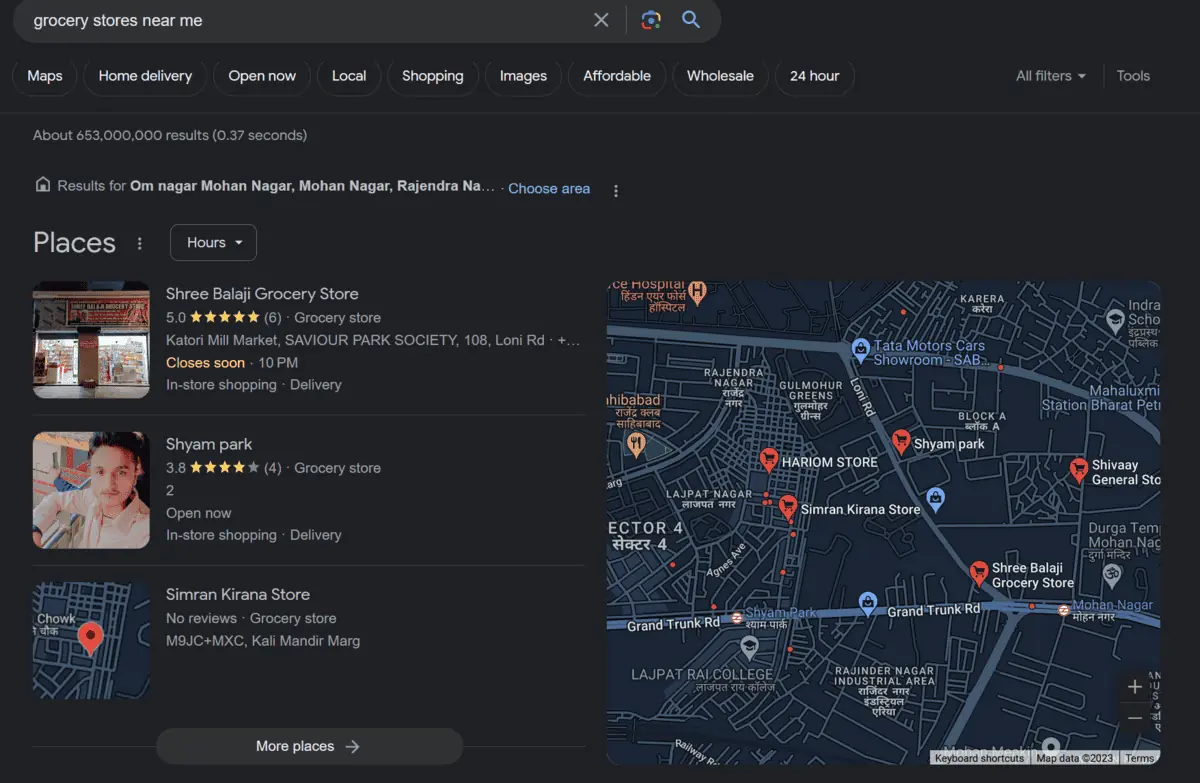
tl;dr: Build a Google My Business page to improve your search engine visibility. For example, if someone searches for a “local coffee shop,” your Google My Business page will show up with your website, address, and hours of operation.
Here’s an example where I searched for a grocery store near me.
Similarly, you can make sure your business shows up when people search for products or services you offer. Simply create a Google My Business page and fill out all the necessary information. The information ranges from your business name, address, phone number, and hours to photos, reviews, and even posts.
And if you’re not that tech-savvy, you can even outsource this task on outsourcing websites like Fiverr, Upwork, etc., where people will build and optimise your Google My Business page for around $5.
Run Giveaways and Contests
Giveaways refer to offering free products or services to your audience. Contests, on the other hand, involve asking your audience to participate in a certain task or challenge and rewarding the winner with a prize.
Both these marketing ideas can help you attract new customers and increase brand awareness.
For example, you can run online giveaways on social media platforms, where participants have to like, share, and tag their friends in the comments section to enter.
Or you can host a contest where people have to create content related to your brand and use a specific hashtag.
Whatever the case, these strategies only work when the prize is valuable and relevant to your audience. Instead of giving away a generic gift card, offer your product or service as the prize. This way, you can attract potential customers who are genuinely interested in what you have to offer.
Collaborate with Local Businesses
Collaborating with other local businesses can be a win-win situation for both parties. You can cross-promote each other’s products or services to reach a larger audience and attract new customers.
For example, if you own a bakery, team up with a nearby coffee shop to offer a discount on coffee for customers who buy your pastries. Or if you run a clothing store, collaborate with a shoe store to create combo deals and promote them on social media.
This is called cross-promotion, and even big companies use this tactic. For example, McDonald’s and Coca-Cola often collaborate on marketing campaigns.
So, don’t hesitate to reach out to other small businesses in your area and explore potential collaborative opportunities.
Here are some ideas for your type of small business:
If you’re a restaurant, collaborate with a local brewery and offer discounted beer with your meals. They get to promote their beer, and you get to attract more customers.
If you’re a pet store, collaborate with a dog grooming salon and offer a discount on grooming services for customers who buy your products. They can also display your products in their store, giving them more variety and potential sales while promoting your business.
If you’re a gym or fitness studio, collaborate with a nutritionist to offer discounts on meal plans for your members. This adds more value to your services and creates a well-rounded health and wellness experience for your customers.
The possibilities are endless. All you have to do is think of businesses that complement yours and reach out to them with a collaboration idea.
Host Events or Workshops
Events and workshops are a great way to attract new customers and engage with your existing ones. You can either host them in-person or virtually, depending on the nature of your business and current circumstances.
If you’re a bookstore, you can host book signings, author talks, or even book clubs. If you’re a boutique, you can have a fashion show event to showcase your latest collection.
But ensure that just hosting isn’t enough, you’d need to market your event or workshop to reach potential attendees. You can create a Facebook event, send out email invites or post about it on your social media platforms.
These events not only attract new customers but also give you an opportunity to interact with them and build a relationship, increasing the chances of them becoming repeat customers in the future.
Showcase Your Expertise Through Content Marketing
Content marketing is a powerful tool for small businesses to showcase their expertise and knowledge in their niche. You can create blog posts, videos, or even podcasts related to your products or services.
For example, if you own a bakery, you can create a blog post on “5 Tips for Baking the Perfect Cake” or make a video tutorial on how to decorate cupcakes. This not only establishes you as an expert in your field but also drives traffic to your website and social media platforms.
And remember, content doesn’t always have to be promotional. In fact, educational or instructional content tends to perform better as it provides value to the audience rather than just trying to sell them something.
While this feels like a lot of work, you can start small by creating one piece of content per week and gradually increase it as you get comfortable. You can even hire part time interns or virtual assistants to help with content creation and management.
Leverage Social Media
Social media is a cost-effective way for small businesses to reach potential customers and engage with their current ones. The key is to find the right platform for your business and create engaging content that resonates with your audience.
For example, if you own a beauty salon, Instagram would be a great platform to showcase your work and attract potential clients. For an interior design business, Pinterest would be ideal to showcase your portfolio and attract new clients. And LinkedIn would be a great platform for B2B businesses to network and connect with potential clients or partners.
But just building a profile on these platforms isn’t enough. You need to actively engage with your audience by:
Content creation: Posting regularly about what the people want to see. Explore different formats like images, videos, reels etc.; capitalise on what is trending; develop content that is shareable and gets you more reach.
Engagement: Responding to comments, messages, reviews, and mentions. This shows that you care about your audience and build a relationship with them.
Collaboration: Collaborating with other businesses or influencers in your niche can help expand your reach and attract new followers/customers.
Social media platforms also offer paid advertising options that can help you reach a larger and more specific audience. You can run targeted ads based on location, interests, and demographics to attract new customers.
But ensure that you have a well-defined strategy in place and track your results to make the most out of your social media efforts.
Manage Local Listings and Reviews
In today’s digital age, most people rely on online reviews and local listings to find businesses. For example, a person may search for restaurants to visit on Zomato (India), Yelp (USA), or TripAdvisor (Global).
As a small business, it is crucial to manage your online presence and ensure that you have accurate information listed on these platforms. This includes your name, address, phone number, website link, hours of operation, and photos.
Encourage satisfied customers to leave reviews on these platforms, as positive reviews can attract more customers. But don’t ignore negative reviews, either. Respond to them professionally and try to address their concerns. This shows that you value customer feedback and are willing to improve.
For starters, these are a few platforms (industry-oriented) you can list your business on:
TripAdvisor (travel and hospitality industry)
Zomato/ Yelp (food and beverage industry)
Houzz (home improvement industry)
WeddingWire/The Knot (wedding industry)
HealthGrades (healthcare industry)
Trivago (travel and hospitality industry)
(home improvement industry)
Vitals (healthcare industry)
Keep track of your online presence and reviews to ensure that you are putting your best foot forward in the digital world.
Use Sales and Discounts Strategically
Everyone loves a good deal, and sales and discounts are a great way to attract new customers. But as a small business, it’s essential to use them strategically.
For example, you as a small business owner have two major customer-oriented goals –
Bring new customers
Make old customers return
Discounts and deals can help with both these goals. You can offer a first-time discount to attract new customers and build trust. Or you can offer loyalty discounts or referral discounts to encourage repeat business and word-of-mouth marketing.
But make sure that your discounts are not too steep, as it could eat into your profits. Such offers should be limited to certain periods or conditions to create a sense of urgency and encourage customers to take action.
Build A Loyalty Program
It costs five times more to acquire a new customer than to retain an existing one. This is why building a loyalty program for your small business can be a smart move.
A loyalty program refers to rewarding customers for their continued business with discounts, freebies, or exclusive offers. This not only incentivises repeat business but also creates a sense of exclusivity and appreciation towards your brand.
You can offer loyalty programs through physical punch cards, mobile apps, or even email campaigns.
But ensure that the rewards hold some utility for your customers and the program is simple to understand and use. A complicated loyalty program may discourage customers from participating.
Here are two examples – one of a good loyalty program and the other of a confusing one:
Good loyalty program: A coffee shop offers a free drink after every 10 purchases.
Confusing loyalty program: A boutique clothing store offers a 5% discount on the first Monday of every month for customers who have spent over $500 in the past year.
Keep your loyalty program simple and easy to understand, and your customers will appreciate it.
Build A Community
Communities are the new evangelists that you earn with your good work. A community is a group of people with shared interests and values who come together to support each other.
They can include your customers, employees, partners, and even other businesses in your niche. Building a community around your brand can help you attract new customers through word-of-mouth marketing and create a loyal customer base.
You can build a community by:
Hosting events or workshops related to your business
Creating online groups where people can share their experiences and connect with other like-minded individuals
Collaborating with other businesses or influencers to reach a wider audience and engage with their communities
Suppose you own a gym. You can create an online group for your members to share their fitness journeys, recipes, and motivational tips. This community doesn’t necessarily be offline or limited to your own gym members. You can host it on channels like WhatsApp and even include influencers in the fitness industry to engage with your community.
Apply For Business Awards
A regular customer might not want to try out a new small business. But if that business has won the best-of-the-best award in their industry, it could catch their attention.
Applying for business awards can give your small business the recognition and credibility it deserves. It not only helps with brand awareness but also establishes trust among potential customers.
Keep an eye out for relevant industry awards and apply for them. Oftentimes, such awards require you to pay a nominal entry fee, but the potential benefits can be worth it. Even if you don’t win, being nominated alone can boost your business’s credibility and visibility.
Engage In Influencer Marketing
Influencer marketing refers to collaborating with individuals who have a significant following on social media or the internet. These influencers can help you reach your target audience through their platforms and increase brand awareness.
Lifestyle influencers or niche-specific bloggers have a loyal following and can, therefore, strongly impact their audience’s purchasing decisions.
Collaborating with influencers for sponsored posts or product reviews
Hosting a giveaway or contest on the influencer’s platform
Offering discounts or free products to the influencer’s followers
But make sure you choose an influencer who aligns with your brand values and target audience. This way, their followers are more likely to be interested in your business and potential customers.
Host Themed Events
Keeping your target audience engaged and interested is the best way to create brand loyalty for a small business. Hosting themed events is a fun and effective way to engage with your audience.
These events can be related to your business or industry, but they don’t have to be. For example, if you own a bakery, you can host a cupcake decorating contest for kids during Halloween. This will attract families and give them an opportunity to experience your products and services in a unique way.
Similarly, if you have a clothing boutique, you can host a fashion show or pop-up shop featuring local designers and influencers. This will not only attract potential customers but also create a sense of community within your niche.
Use SMS/WhatsApp Marketing
Your target audience is always on their phones, so why not reach out to them through SMS or WhatsApp? This marketing idea is especially effective for small businesses with a local customer base.
You can send personalised messages or offers to your customers, keeping them updated about new products, events, or promotions. Whatsapp and SMS see far more open and engagement rates than emails or social media posts, making them a valuable marketing tool for small businesses.
However, ensure you have your customer’s permission before sending them any messages. Also ensure you don’t spam their inbox with too many messages, as this can lead to them blocking you and can eventually harm your brand image.
Capitalise On Geo-Targeted Ads
Geo-targeted ads refer to advertisements only shown to people in a specific geographical location. This can be an effective marketing idea for small businesses, as it helps you reach potential customers who are physically close to your business.
Platforms like Google Ads and Facebook Ads allow you to set up geo-targeted campaigns, where you can choose the radius or pin-drop location for your ads. This works particularly well for businesses that rely on foot traffic, such as restaurants, salons, or retail stores.
You can also use geo-targeting to advertise special offers or promotions to people within a certain location. This can entice them to visit your business and make a purchase.
Introduce Interactive Packaging
Interactive packaging is a creative marketing technique that encourages customers to engage with your product uniquely. By transforming the packaging into something interactive, you not only make unboxing fun but also create a memorable experience for your customers, thereby enhancing brand recall.
The best part? The customer may become your evangelist on social media, sharing the interactive packaging with their followers and potentially attracting new customers for you.
This could be as simple as creating a package that can be reused in an interesting way, or it could involve integrating QR codes or augmented reality features that lead to interactive digital content. For instance, a QR code on a food package could take the customer to a webpage with recipe ideas for that product.
Remember, the goal is to add value to the customer experience and encourage them to interact with your brand beyond just the product itself.
Reward Customers For Reviews And Testimonials
In today’s digital age, reviews and testimonials can be a powerful marketing tool. They provide social proof, boost credibility, and help potential customers make informed decisions. Moreover, positive reviews can significantly improve your business’s online visibility and ranking on search engines, helping on online reputation management.
Therefore, why not incentivise your customers to leave reviews and testimonials about your product or service? You can offer discounts, freebies, or loyalty points to customers who give valuable feedback. This not only encourages them to interact with your brand but also helps you gain valuable insights into their experience.
You can then use these reviews and testimonials in your marketing materials, website, or social media.
However, it’s important to note that while you encourage positive reviews, you should also be open to constructive criticism. Addressing negative feedback with professionalism and promptness can turn a dissatisfied customer into a loyal one and show onlookers that you value customer satisfaction.
Start A Subscription Product/Service
Subscription-based models are gaining popularity, and for a good reason. They offer convenience to customers and provide businesses with consistent revenue streams. For example, a male customer may want to receive razors monthly, or a coffee-lover may want to try new blends weekly. This is where subscription models come in.
As a small business owner, you can introduce a subscription service for your product. If you sell skincare products, consider offering customers a monthly box with deluxe samples of new products or exclusive discounts on full-size items. Or if you offer services such as coaching or consulting, you can offer a monthly subscription for access to exclusive resources and webinars.
Not only does this generate recurring revenue for your business, but it also creates a sense of exclusivity and loyalty among subscribers, eventually leading to an endowment effect. And as your subscriber base grows, you can even expand your offerings and introduce more tiers of subscription plans.
Try Guerrilla Marketing
Guerrilla marketing or undercover marketing refers to unconventional, low-cost marketing tactics that aim to create a buzz and attract attention. These strategies often involve using public spaces or events to creatively promote your brand.
For example, you can use chalk art on sidewalks, place stickers or posters in strategic locations, or even organise flash mobs to surprise and engage potential customers. This type of marketing is particularly effective for small businesses with limited budgets, as it relies on creativity and innovation rather than a large advertising budget.
Coca-Cola’s “Happiness Machine” campaign, where they placed a vending machine in a college campus and surprised students with free bottles of Coke.
IKEA’s “Pee Ad,” where they placed an ad in women’s magazines that doubled as a pregnancy test. The ad would reveal a discount on a crib if the reader was pregnant.
Using geofencing technology, Burger King’s “Whopper Detour” campaign offered customers one cent Whoppers if they were within 600 feet of a McDonald’s.
Teach Something New
As a small business owner, you have unique knowledge and expertise in your field. Why not share this knowledge with your customers and potential customers? Not only does it establish you as an authority in your industry, but it also allows you to form personal connections with your audience.
You can host workshops or webinars on relevant topics, create informative blog posts or videos, or even offer free consultations. This not only adds value to your customers but also helps you build a rapport with them.
For example, if you own a bakery, you could offer a cookie decorating workshop for kids or a bread-making class for adults. Or if you’re a social media marketing agency, you could host a webinar on the latest trends and strategies in the industry.
Sharing your knowledge not only helps customers learn something new but also exposes them to your business, potentially leading to conversions. Additionally, this type of marketing can also be cost-effective as it relies on your expertise and time rather than expensive resources.
TikTok isn’t just a social media platform for entertainment; it’s an ecosystem catering to –
Careers,
Creativity,
and Commerce.
And if you’re a creator, trust me, you can make good money on TikTok.
It’s the perfect place to monetise your creativity by selling products, promoting brands, and creating content for other companies.
But there’s a lot more to it.
Here’s a guide focusing on the different ways you can make money on TikTok by being just a creator.
But for beginners who’ve just heard of the platform and want to know more, here are the basics.
What Is TikTok And Why Is It So Popular?
TikTok is a social media platform where users can create and share short videos of themselves lip-syncing, dancing, performing skits or other creative activities.
The app was launched in 2017 by the Chinese company ByteDance and has become one of the most popular social media platforms worldwide, with millions of users worldwide.
What makes TikTok unique is its algorithm, which curates content tailored to each user’s personal interests and preferences. This makes it easy for users to discover content they are likely to enjoy.
The platform also allows users to connect with each other through hashtags, making it easier for them to find and follow creators whose content they like.
This has resulted in a highly engaged audience who are eager to consume more content from their favourite creators.
How To Make Money On TikTok?
With over 1.677 billion users worldwide, creators are now easily earning a full-time living off of TikTok and its various monetisation opportunities. But to clear the misconceptions first, here are some FAQs
How many followers does one need to make money on TikTok?
There isn’t one set number of followers as it varies depending on the type of monetisation you choose to pursue. However, having a large following can make it easier for brands and companies to reach out to you with potential opportunities.
How much do TikTokkers make?
The amount of money you can make on TikTok is varied and depends on several factors, such as your reach, the type of monetisation opportunities you pursue and how much effort you put into creating content. Generally speaking, the more views on your videos, the more money you can make from official sources (up to 4 cents for 1000 views). The game changes when you start thinking about other monetisation strategies like selling products directly, affiliate marketing and brand partnerships.
Official Ways To Make Money On TikTok
Unlike Instagram, creators on TikTok have a variety of monetisation opportunities, including both official and non-official (but legit) ones. Here are some of the most popular ways to make money on TikTok:
TikTok Creator Next
TikTok Creator Next is a company’s official program to help creators monetise their content. It includes a suite of tools and features that allow you to convert your creativity and passion into a full-fledged career.
To join Creator Next, you need to be :
18 years or older,
Have at least 1,000 video views in the last 30 days
Have at least three posts in the last 30 days
Have an account that is in good standing with Community Guidelines
Be based in countries the program is available in (US, UK, Germany, France, Italy, Spain, Canada and Australia)
The Creator Next program is the host of the following monetisation features –
TikTok Creator Fund: The TikTok Creator Fund is an official TikTok monetisation program (like Snapchat Spotlight) that rewards creators for creating high-quality content. Once in the program, creators can earn money from their videos based on the number of views and engagement they receive.
TikTok Creator Marketplace: The TikTok Creator Marketplace is a way for creators to collaborate with brands and businesses looking to work with influencers.
LIVE Gifts: Creators can earn money through virtual gifts (diamonds) they receive during live streams.
Video Gifts: Creators can also earn money through video gifts (diamonds), which are virtual gifts viewers can send to creators in the comments section of their videos.
TikTok’s Creator Fund
TikTok’s Creator Fund is a program where eligible creators can receive payment for their content. The fund was created to support the platform’s most popular creators, who are allotted a specific budget based on their reach and engagement.
Joining the Creator Fund is really easy. All you have to be is over 18 years old, have at least 10k followers and have a minimum of 100k authentic views in the last 30 days. After you’ve met these requirements, you can apply to join the fund directly through your account settings.
Currently, this fund is available only in 6 countries (U.S., UK, Germany, Italy, France, and Spain), but the company is working to expand this to more countries in the near future.
How Much Does TikTok Pay To Its Creators?
TikTok usually pays 2 to 4 cents for every 1000 views a creator receives. It roughly translates to $20-$40 for 100k views and $200 to $400 for every 1M views. The exact number also depends on the content type and engagement rate.
You can withdraw money from your creator fund as soon as you reach $10 in 30 days.
TikTok Shopping
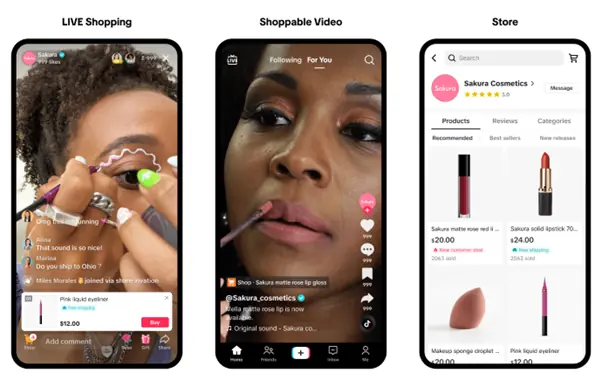
TikTok Shopping allows brands and creators to create a pathway for their audiences to shop right from within the platform. The feature provides an opportunity for businesses and influencers alike, allowing them to easily add product links in their videos and an entire catalogue of products for their audiences to buy.
The best part about this shop is that the user isn’t redirected to any external website. Instead, the product will pop up in the form of a link within the video itself. Also, you get a dedicated dashboard (seller centre) to manage your store. So, if you have products to sell, all you have to do is add the product card to your video and link it to the corresponding page on your store.
Moreover, given that the average engagement rate on TikTok could be as high as 10%, your product stands a good chance of getting noticed.
TikTok Creator Marketplace
TikTok also has a Creator Marketplace, an official platform for creators to team up with brands and businesses to monetise their content.
It’s similar to any influencer marketing agency, except that it is a platform specifically designed for the TikTok creator community. This makes it easier for brands to find and work with creators quickly and efficiently.
The marketplace offers many different branded content opportunities right on TikTok’s dashboard.
To join the Creator Marketplace, you must first meet some basic requirements of the Creator Next.
Other Ways To Make Money On TikTok
Besides the official monetisation options, there are also several other ways to make money on TikTok that are unofficial but legitimate.
Brand Partnerships
Being famous on TikTok opens you up to opportunities from brands who are keen to work with creators.
Such partnerships are win-win for both parties, as the brand gets exposure to a new audience, and the creator makes money. They may include sponsored posts, where you promote the brand’s products or services through your content, or they may involve you collaborating with the brand to create content.
Popular creators have managed to make up to $150K for such partnerships with their large followings.
Depending on your reach and engagement rate, you can negotiate payments from brands ranging from $500 to tens of thousands of dollars. But before you approach a brand, ensure:
You have a well-defined niche and audience
Your content is of high quality
You are targeting the right brands that fit your personality and interests
Also, ensure your reach is lucrative enough for brands to partner with you.
How To Get Brands To Partner On TikTok?
There are four ways
Reach out to brands yourself: While it’s a lengthy and not-so-guaranteed process, you can always reach out to brands and propose your services. Let’s say you have 60,000 followers and are quite popular in the makeup niche. Find brands starting up their own makeup lines and see if they’re looking for influencers, then approach them with your offer.
Get curated by talent agencies: Several dedicated talent agencies like The Influencer Marketing Factory connect influencers to brands. You can sign up with a talent agency and have them curate opportunities for you. They take a cut from your payment, but it’s worth it if they get you great deals.
Use TikTok’s platform: The app has its Creator Marketplace, allowing brands to connect with popular creators on the app and work together for sponsored posts. The bonus is that you get to join the Marketplace Academy for Creators, where you’ll get access to exclusive tutorials, workshops and other resources from established creators.
Join Influencer Marketing Platforms: There are many platforms, such as Creator.co, and Upfluence, which let brands find influencers in their niche by browsing through profiles and portfolios. You can sign up to these platforms and get hired directly.
Start Affiliate Marketing
Affiliate marketing refers to a process where influencers promote products or services from other businesses and get a commission for each sale they make. For example, creating content in the technology niche and reviewing products. You can become an Amazon affiliate and start recommending products to your followers.
To get started, you must join an affiliate network, choose the product or service you want to promote, and then share it with your audience on TikTok.
You will be given a unique link with a tracking code that helps track the sales generated through your content. Every time someone buys something using your link, you get a commission.
Promote Songs
Not just brands but also labels and musicians are eager to collaborate with popular TikTok creators to promote their songs. If you have a good following and can create engaging content, why not get paid for sharing songs?
This works the same way as brand partnerships, where you get paid to promote a piece of content. All you have to do is come up with creative ways to use the song in your videos and make sure it’s catchy enough that your followers start using it as well.
Such collaborations can be quite lucrative and may fetch you a good amount. All you need to do is join TikTok music promotion sites like SoundCamps or join a talent agency that also deals in music promotion.
While you usually find sponsored post opportunities on Creator Marketplace, there are also direct sponsorship opportunities if you have a big enough following. Brands may reach out to you directly, or you can approach them yourself.
Sell Your Digital Products
Are you good at something? Or do you have a niche skill that you can teach others? Then, selling digital products like courses, ebooks, templates, and more can be a great way to make money on TikTok.
You can create content around the niche you’re teaching (such as makeup tutorials, cooking recipes, and photography tips), and then link to your digital products in the description.
Your followers may purchase them, giving you an additional stream of income other than brand partnerships and sponsored posts.
For example, HappyDownloads is an Etsy store focusing on digital templates. The brand also has a TikTok account with around 1M followers. They create content around different designs and templates they have created and link to their store in the description for people to purchase them.
Can You Make A Career Out Of TikTok?
Short answer: Yes, definitely.
Long answer: TikTok is an ecosystem of engaged audiences and talented creators. When a platform becomes an ecosystem, it becomes easier for creators to make money and turn their creativity into a full career.
You can generate income from affiliate marketing, sponsored posts, and digital products and explore other avenues such as getting hired as a brand ambassador or working with talent agencies.
You may even be able to get donations from your followers once you have an engaged audience.
At the end of the day, it all comes down to creating engaging content that resonates with your audience and finding brand partnerships that fit well with your niche and personality.
In its very young existence, ChatGPT has already made a splash in the entire tech industry and has gathered the appreciation and attention of 100 million
In the late 90s, when watching movies through DVD cassettes had supremacy throughout, Reed Hastings, who faced a late fee of $40 for submitting back a DVD, got clicked with a revolutionary idea with his partner, Marc Randolph. The idea: What if you could have them delivered right to the customer‘s mailbox instead of clumsily heading to a video store to rent movies on heavy VHS tapes or DVDs? And that was the time when Netflix was born. It was not born as a streaming platform that we have today, but it started a DVD-to-mail service. Fast forward to the present, and Netflix has become nothing short of an entertainment revolution. It’s not merely a streaming service today. It is a global entertainment powerhouse that has forever altered according to how we users consume television and movies. So, who owns Netflix, the media giant? What milestones has it set throughout the history of Netflix? Who are the founders of Netflix? Let’s delve into the tale of Netflix’s ownership, its journey, and its founders who started it all.
What Is Netflix?
Netflix is a global entertainment powerhouse that offers a subscription-based streaming service allowing members to watch TV shows, movies, anime, documentaries, and more over the internet. It is an OTT that has completely revolutionised how people consume television and movies. Here’s what it offers that has revolutionised the entrainment industry entirely:
Original Content: Netflix is known for its original content, so much so that in 2023, Netflix’s library today has 55% of original content. This original content library includes popular TV shows such as “Stranger Things”, “The Crown”, and “House of Cards”. The company has also produced several critically praised and loved films, such as “The Irishman” and “Roma” under the original content section.
Global Reach: As of the second quarter of 2023, Netflix has over 238 million paid subscribers worldwide in 190 countries. As compared to the previous quarter, this is an increase of 5.89 million subscribers. The company has been continuously expanding its reach rapidly in recent years, and it is now available in almost every corner of the globe. By doing so, the company is tapping into a diverse audience and catering to various languages and cultures.
Personalisation: The personalisation algorithm of Netflix has constantly updated, and today, it is known as one of the most sophisticated in the world. That is why Netflix is renowned for its personalisation algorithm, which analyses user viewing habits and suggests content tailored to individual preferences. This personalisation plays a key role in retaining subscribers and keeping them engaged with the platform.
Gaming: Netflix launched its gaming service in November 2021, which has a mix of licenced and original games for you to play on the platform. The service is also available in over 190 countries and offers a variety of mobile games that you can play if you are a subscriber. The games are available to download and play on Android and iOS devices.
These strengths have helped Netflix to become a global entertainment powerhouse. Even though the company faces increasing competition from other streaming services, it remains the industry leader because of its adequate leadership and powerful strategies.
Who Owns Netflix?
Netflix is a publicly traded company, so there is no one owner of Netflix. Instead, their shareholders and investors own the company based on the stakes they have in the company.
Here are the top ten shareholders of Netflix:
Shareholder
Stake
Shares Owned
Vanguard Group Inc.
7.9%
35,112,844
BlackRock Inc.
6.58%
29,250,564
Capital Research Global Investors
5.84%
25,947,098
Baillie Gifford & Co.
5.21%
23,140,000
State Street Corporation
4.81%
21,357,784
FMR LLC
4.24%
18,830,000
Bank of America Corporation
3.75%
16,651,000
Morgan Stanley
3.45%
15,321,000
T. Rowe Price Associates, Inc.
3.34%
14,823,000
Geode Capital Management LLC
2.99%
13,274,000
Based on our research, these investors are all institutional investors, meaning they invest money on behalf of other people, such as pension funds and mutual funds.
However, Reed Hastings, the co-founder and former CEO of Netflix, and Marc Randolph, the co-founder of Netflix, are no longer among the top 10 shareholders of Netflix.
Netflix Founders
There are two founders of Netflix, Reed Hastings and Marc Randolph.
Reed Hastings
Hastings is a billionaire American entrepreneur and businessman. He has been the co-founder, chairman, and co-CEO of Netflix, currently an Executive Chairman of Netflix. He also co-founded the educational technology company Knewton and sits on the board of many non-profit organisations.
Marc Randolph
Randolph is an American tech entrepreneur, speaker, and advisor. He is the co-founder of Netflix and is the first CEO of Netflix. He is also the co-founder of the online education company Udacity.
When Randolph was working as a marketing manager for Pure Atria, a software company that Hastings had co-founded, Hastings and Randolph met in 1997.
After one day, when Hastings had to pay a late fee for returning a DVD to Blockbuster, they came up with the idea for Netflix. They believed there was a better way to rent movies and launched Netflix in 1998.
They started Netflix as a DVD-by-mail rental service, but with evolving needs and attention to the change in nature of people on how they want their entertainment, it pivoted to streaming in 2007. The company has since become one of the most successful streaming services in the world.
Key Milestones In The History Of Netflix
Since its inception, Netflix has always served the entertainment industry to the best of its capacity, catering to the right needs.
From DVD-by-mail to OTT streaming of original and licensed content and gaming, StreamingFlix has always been the leader. But in this journey from DVD-by-mail to the best OTT platform known worldwide, the company has set several milestones in between. However, out of which, some of the key milestones in the history of Netflix are as follows:
August 1997: Reed Hastings and Marc Randolph co-founded Netflix in Scotts Valley, California, on 29 August 1997, with the idea to rent DVDs online and deliver them through the mail.
April 1998: Netflix was launched on 14 April with 925 titles for people to rent on a traditional pay-per-rental model.
September 1999: Netflix introduced its monthly subscription model, which allowed customers to rent unlimited DVDs for a flat monthly fee.
2000: Reed Hastings approached John Antioco, the Blockbuster chief, to purchase Netflix for $50 million. However, Blockbuster declined the offer.
2000: Netflix introduced its personalised recommendation system, which uses algorithms to suggest titles based on customers’ ratings.
2002: On 29th May, Netflix went public on the NASDAQ stock exchange and raised $82.5 million in its initial public offering (IPO).
2003: Netflix reached one million subscribers in the United States.
2006: Netflix offers a $1,000,000 prize to the first developer of a video recommendations algorithm that beats Cinematch’s rating prediction accuracy by more than 10%.
2007: Netflix delivered its one billionth video over the mail, shifting from its core business towards streaming content. It was in January 2007 when Netflix launched its streaming service, which allowed customers to watch movies and TV shows instantly on their computers and other devices.
2010: Netflix expanded its streaming service to Canada, its first international market.
2011: Netflix launched its streaming service in Latin America and the Caribbean.
2012: Netflix debuts its first original series, Lilyhammer, starring Steven Van Zandt as a former mobster who moves to Norway under witness protection.
2013 – 2014: Netflix released House of Cards, its first major original series, which became a critical and commercial success. In 2014, it released more original series, including Orange Is the New Black, BoJack Horseman, and Marco Polo. Netflix expanded its streaming service to the United Kingdom, Ireland, Scandinavia, the Netherlands, Germany, France, Austria, Switzerland, Belgium, and Luxembourg. It also releases more original series.
2015: Netflix launches its streaming service in Australia, New Zealand, Japan, Spain, Italy, Portugal, and India. It also releases more original series like Daredevil, Jessica Jones, Narcos, and Master of None.
2016: After focusing on the expansion strategy worldwide for a few years, Netflix became available in almost every country except China, Syria, North Korea, and Crimea.
2017: Netflix reaches 100 million subscribers worldwide. It continued to release more original series, such as 13 Reasons Why, The Defenders, Mindhunter, and The Punisher.
2018: Netflix invested $8 billion in original content production. It also created Netflix Animation, an American animation studio and a subsidiary of Netflix, as its first production studio.
2019: Netflix wins its first Academy Award for Best Documentary Feature for Icarus. It also releases more original series, such as Sex Education, Russian Doll, The Umbrella Academy, and When They See Us.
2020: Netflix reached 200 million subscribers worldwide during the COVID-19 pandemic, especially when the lockdown made people stay home. It also releases more original series, such as The Witcher, The Queen’s Gambit, The Crown Season 4, and Bridgerton.
2021: Netflix dominated the Golden Globe Awards with ten wins out of 42 nominations. It also releases more original series, such as Lupin, The Serpent, Shadow and Bone, and Sweet Tooth
Wrapping Up
Netflix was born to revolutionise our DVD rental system almost two decades ago. Since then, through its constant facelifts based on people’s evolving demands, it has become a global entertainment power plant.
With a library now dominated by original content and also filled with rich licenced content, it reached over 238 million subscribers in nearly every corner of the world. From tailoring recommendations through a sophisticated algorithm and even venturing into gaming, this OTT platform has a flourishing future.
Its journey, from mailing DVDs to making its remarkable place in every corner of the world, it all showcases its resilience and adaptability in an ever-evolving entertainment landscape. As competition seems to intensify, Netflix’s legacy as a pioneer and industry leader also appears to remain unshaken and quite promising to shape the future of how we consume content for years to come.
Just the mention of a research paper sends shivers down the spine of whoever has to write it, be it a student or a professional.
All of us know it is a task known for its hard work, intense and extensive research, and a lot of challenges.
But there is a hidden truth! If you know how to approach it correctly, writing a research paper and, dare we say, enjoyable can get less intimidating.
So, here’s a guide to crafting a compelling research paper, elaborating on how to write a research paper for academic or professional purposes. We have separated each part for you and clarified how you must initiate your research, construct an outline, pen down the information, proofread it, and submit it.
But before we dive into the nitty-gritty details, let’s start by demystifying what a research paper truly is and what are the different types of research papers.
What Is A Research Paper?
A research paper involves studying, surveying, researching, and analysing a field of knowledge to find the best possible information about that topic or field.
However, as known widely, these research papers are not just limited to academics. Instead, they are a common and important medium of scholarly communication used by professionals, academics, and researchers across various fields and industries.
As these papers involve a systematic investigation, data collection, analysis, and interpretation of findings, these papers are well-structured, organised, and are supported by relevant evidence from credible sources. This makes it a suitable and helpful write-up for academic researchers, professionals, NGOs, market research firms, policymakers and government agencies, as it helps explain things elaboratively.
The research papers written by the students are typically a part of their educational experience. In contrast, the research papers written by professionals help them advance their knowledge, address a real problem, and contribute to their fields respectively.
These different types of research papers coming from different fields are often published in a journal, presented at a conference, and shared with the public to encourage learning, innovation, and evidence-based decision-making.
Types Of Research Papers
Argumentative Research Papers: In this type of paper, you take a position on a controversial issue and argue in support of that position. More importantly, you have to provide strong evidence to support your argument and consider and respond to opposing viewpoints with strong points.
Analytical Research Papers: The main purpose of an analytical paper is to examine a particular issue or topic in-depth and break down any complex topic into smaller components. After doing this, you examine the different points of view and perspectives on the same topic from all angles and conclude the paper with your own solution or interpretation.
Descriptive Research Papers: The descriptive research paper aims to provide a detailed description or account of a subject, event, phenomenon, or process. These papers do not delve into any arguments or take ideas but emphasise neutral observations, facts, and descriptions.
Experimental Research Papers: These papers significantly describe or share the report about a real experiment, and they share real knowledge rather than theoretical knowledge about a topic. They include detailed descriptions of the research methods, data collection, and statistical analysis and conclude with the findings.
Review Papers: The review papers do not conduct their own research. They actually analyse, review, synthesise information and discuss relevant studies, trends, and gaps in the field from the research already done on a topic, phenomenon, or circumstance.
Case Study Papers: The case studies examine a particular case in depth. The case study can be about a person, a group, or an event. Here, you include a detailed account of the case and must also analyse the factors that contributed to the case.
How Long Should A Research Paper Be?
When you find yourself searching for “How to write my research paper, and how long should a research paper be, here’s some advice for you: page numbers or word counts do not define the ideal length of the research paper. Instead, the research depth determines the presentation’s clarity and the analysis’s completeness.
In essence, you must prioritise substance over length to ensure that every section and argument makes sense and is written meaningfully to keep the overall quality and coherence intact. Additionally, you should not hit around the bush just to increase the number of worlds.
However, the theoretical answer to how long a research paper is:
At the undergraduate level, you can make your research paper around 8 to 20 pages, which often corresponds to a word count of 2,000 to 5,000 words.
Master’s level papers often tend to be more comprehensive and span 20 to 40 pages, with a word count typically around 5,000 to 10,000 words.
Doctoral-level research papers, such as dissertations, are much longer and often exceed 100 pages or surpass 20,000 words, indicating that experts prepare these papers.
How To Write A Research Paper?
In the entire journey of writing the research paper, you must diligently do everything, starting from the right research to effective writing to produce the best results. But writing the research paper doesn’t mean directly getting started with the paper and pen.
There are key stages that help you compose the best research paper, from the pre-writing phase to proofreading and submitting it. So, let’s delve into the essential steps to craft a compelling research paper.
Pre-Writing Phase
To craft an excellent research paper, begin with careful preparation while you are in the pre-writing phase. This crucial pre-writing preparation will help you set a strong foundation for a well-structured and informative research paper. Here are the key steps you need to undertake in the pre-writing phase:
Select A Topic
While you are selecting a topic, a few things matter. Because the topic is something you will juggle with, you need to choose it wisely. There are the things to consider:
Choose Wisely: Select a topic that genuinely interests you. Your interest and enthusiasm for that particular subject will fuel you to dig deeper into the research and writing process.
Choose A Topic With Specificity: Choose a topic that is neither too broad nor too narrow. Your exploration will be more effective if you have a well-defined research question.
See If The Topic Has The Relevance: Considering the relevance of your topic is a must. You need to do this to see if the topic is essential in your field of study and if it contributes to existing knowledge or addresses a current issue.
Check Availability Of Resources: Before you commence, check if there are credible sources and research material related to your topic. If there are limited resources, the success of a research paper can be affected.
Conduct Research
The research of your topic has to be thorough, analysed through different angles, and not restricted to a particular side. In fact, I would say you must spend more time on research than on writing. Because “The time spent sharpening one’s axe is more valuable than the time spent cutting down a tree.” So, emphasise the importance of preparation and planning before undertaking a task rather than rushing into it without proper readiness.
You can utilise library resources, academic databases, and reputable online sources to gather relevant information. Academic journals, books, and scholarly websites are great places to kick-start your research.
Throughout your research, take notes, keep a record of the sources and page numbers for citations, and organise your notes logically for easy reference.
Create A Research Question Or Thesis Statement
So, before you come up with even a first draft, you need to write down your thesis statement or the research question.
The research question is a clear and concise research question that your paper will address. A research question defines the scope and purpose of your study.
The Thesis statement presents the central argument or hypothesis of your paper. It should be specific but arguable at the same time.
The thesis statement or the research question will be the base of your research paper, so ensure they align with your chosen topic and the goals of your paper.
However, when you start to delve into your research, you should keep the space open for refinement in your question or statement in case you think it can improve.
Writing Phase Of Research Paper
Organise Your Thoughts & Create An Outline
Before you delve into the writing part of the content, it is essential to organise your thoughts and craft a structure, i.e., an outline for your research paper. The created outline will provide a structure and direction to your paper, ensuring you follow a logical flow of ideas. Here’s how to go about it:
Divide your paper into different sections and add subheads. Each section must include the introduction, literature review, methodology, results, discussion, and conclusion.
Within each section, create a hierarchical outline with the talking points. This will help you trace the main points and subpoints you intend to cover.
Also, as you create the section, ensure to create a silo in the sections and arrange each section in an orderly way to present your idea.
Write An Introduction That Hits The Right Cord
The introduction is the opportunity to engage the readers and set the premise for them, which helps them decide whether they want to invest their time in reading the complete research paper.
Thus, to set up the tone, the introduction should address the “what,”“why,” and “how” of your research:
What does the paper include? Here, you must provide a brief overview of what readers can expect from your paper. You can mention the main sections and the key points you will discuss.
Why Is It Worth Reading? Explain to the readers about the significance of your research. You can add what problem it addresses and why this problem is necessary or relevant. In this section, you can add the FOMO through your questions to convince the reader that your paper adds value to the field.
How You’ll Build Your Argument? You can give a little glimpse into the approach you have followed in your research paper. You can create a section mentioning your methodology or research methods. This will also increase your authority and authenticity in front of the raiders.
Get Started With Your First Draft
Once you have your outline ready and a good understanding of what your paper has to include, you can start writing your first draft. At this moment, you do not need to write everything with perfection. All you need to do is just get things on paper.
Even if you do not feel like starting with the first section, it is the first draft, so you can always start with any section you think you are prepared to complete first. The primary goal is to capture your ideas, evidence, and insights in your outline.
Moreover, in the first draft, you can add all the relevant information you think you have related to the topic. While later refining your draft, you’ll have an opportunity to fine-tune and filter what information feels right to include and what doesn’t.
Address A Strong Counterargument To Strengthen Your Assertion
To strengthen your assertion, you must address a strong counterargument in your research paper.
You can begin by identifying and adding the most substantial counterargument to your thesis or main point. You must understand the opposing viewpoint thoroughly and include its essential claims and evidence. Then, after acknowledging the counterargument, provide a thoughtful and well-reasoned denial of that argument. Explain why the counterargument may be valid in some contexts but ultimately falls short in the context of your research, and thus, you deny it.
To support your denial argument, shelf some credible reasoning evidence and show how your position is more valid, well-supported, or aligned with the overall goal of your research.
This will demonstrate that you have considered different perspectives and are addressing the issues comprehensively.
Summarise Your Research Paper Strategically
This summary of your research paper is the conclusion. Here, you can:
Restate the main points of your research paper. This reminds readers of the primary focus of your paper.
Summarise the most significant findings and results from your research. You can be crisp with your statement, but add enough detail to convey the importance of these findings in the summary.
Address the question or thesis statement again at this moment. Revisiting your thesis statement or addressing the question again shows how nuanced your understanding of the subject is.
Lastly, conclude your summary with a powerful closing statement that reinforces the significance of your research. Focus on the most critical points to leave a lasting impression and give readers a memorable takeaway.
Revise, Edit, & Proofread Your Paper
After completing the first draft, the writing or the work doesn’t end here. The next crucial step is to revise thoroughly, do the heavy editing, and proofread the entire paper. This stage makes your paper polished and ready for submission. Here’s what all you need to do:
Ensure The Paragraphs Are Well-Structured and Have a Transition
If you are making a research paper for your organisation as a professional or a student, it is either way necessary to check each and every paragraph and sentence. You need to do this to check if each section provides coherent supporting details. This creates a flow in your argument and helps readers follow that.
Besides, when there is a flow inside a paragraph, you must also ensure the transition between the paragraphs stays intact. Using transitional words and smooth transitions helps the readers to navigate your idea more easily.
Cut Out The Fillers & Refrain From Beating Around The Bush Statements
Every reader likes the concise reading. So, when revising and refining your research paper, examine your paper for unnecessary phrases, words, or sentences that do not contribute to your argument or seem to be a filler. Be concise and direct in your writing.
However, if you have paragraphs written, do not lose them entirely. You can save them in other documents. You never know when you’ll need that paragraph for another assignment.
Be clear with your arguments. Ensure that your statements are clear and to the point. You must also avoid vague or overly complex language or sentences that confuse the readers.
Proofread To Catch Errors In Spelling, Grammar, and Formatting
After you have completed all the sections of your research paper and added the information required, it’s time to re-read and proofread your paper.
You need to carefully proofread each and every sentence of your paper to catch spelling and grammar errors. Pay attention to common mistakes such as typos, subject-verb agreement, hyphens, and other punctuation.
You can always use Grammarly to proofread your paper and check for plagiarism.
Another important thing you need to take care of is checking that your paper adheres to the required formatting style, for example, APA, MLA, or Chicago.
Also, verify that your citations, references, and page formatting are consistent and accurate.
Wrong or inconsistent formatting always has a negative impact, even if you wrote a research paper with high-quality research.
Feedback & Submission
Seeking feedback and a second opinion is always a good idea before submission. So, Consider seeking feedback from peers, colleagues, mentors, or just any of them. Getting a fresh perspective or improvement remarks can help you identify areas for improvement and clarity.
However, if you do not have peers to get feedback or do not want to share it before submitting it, read it aloud and listen to yourself consciously. Reading your paper aloud will help you identify awkward phrasing, missing words, or grammatical errors that you might have skipped during silent proofreading.
Take time to meticulously proofread and polish your research paper and produce a professional-grade final product.
Once you have carefully reviewed and refined your research paper, it’s time to prepare it for submission. Do not just mail your research paper to the concerned person or guide, but ensure that you follow the submission guidelines provided by your institution or publisher.
Bottom-Line?
The art of writing a research paper is more like embarking on a journey of intellectual exploration. It is not just about meeting the word count, formatting the guideline, or answering the generic questions. Instead, it is about diving deep into the subject, evaluating the topic, writing things from different perspectives, and sharing your insights. It is also about how well and in what quality capacity you contribute to the world of knowledge.
So, as you work on your research paper, remember that you are not solely writing down the words but doing the work that goes beyond the words and pages. Your dedication and hard work should advance knowledge and share ideas in the right way that genuinely helps you mark your presence in the world of learning and discovery.
ChatGPT isn’t the only tool out there for conversational AI anymore. It has solid competition from several LLM tools like Bard, HuggingChat, etc., but Claude is the most recent one to enter the arena. Developed by researchers at Anthropic, Claude AI is a ChatGPT alternative that can generate text conversation responses based on natural language input.
But how does Claude work? Or, better, how to use Claude AI to get the most out of it? In this guide, let’s break down everything you should know about Claude AI and Claude 2.
What Is Claude AI?
Claude is an AI chatbot designed and launched by Anthropic, a company that aims to create safe and beneficial artificial intelligence. This chatbot is really good at understanding and processing text. It can understand, process, and respond to natural language inputs with high reliability, making it a potent tool for various applications.
It works just like ChatGPT – in a conversational mode, Claude analyses user input and produces a contextually relevant response. It’s designed to be flexible enough to generate text responses with human-like intuition, leading to more engaging conversations and interactions.
Released in March 2023, this ChatGPT alternative is aimed to provide “helpful, harmless and honest” answers to queries, separating it from its competitors like Google Bard and ChatGPT.
How Does Claude Work?
Unlike other ChatGPT alternatives like Chatsonic, Jasper Chat, etc., that rely on the ChatGPT technology itself, Claude uses a unique combination of proprietary natural language processing (NLP) and deep learning-based algorithms to generate its conversational responses.
To understand how Claude works, you need to understand these three technical terms –
LLM – Claude is a language-agnostic LLM tool. It can understand natural language inputs and generate responses in multiple languages, including English, French, German, and Spanish. For example, asking Claude a question in English will generate an appropriate response in English.
NLP – Natural language processing (or NLP) is what allows Claude to recognise patterns and identify the intent behind user input. Through this technology, it can understand user queries with greater accuracy and provide more meaningful conversational responses.
Deep Learning – The deep learning algorithms used by Claude are trained to recognise the context, sentiment, and emotion of a conversation. By understanding this context, it can generate natural-sounding responses that make for more engaging conversations and interactions with users.
Claude has received extensive training on vast amounts of real-time data available on the internet (till December 2022), allowing it to learn the patterns and nuances of human language. When a user interacts with Claude AI, the system processes the input and generates relevant responses based on the learned patterns.
Claude strictly follows a set of principles termed ‘Constitutional AI (CAI)’ that dictates its behaviour, making it a safe, helpful, and reliable AI chatbot. The AI keeps on improving its response quality and overall functioning with the help of user feedback and repetitive refinements.
Features Of Claude AI
Claude AI boasts several features that make it a powerful AI chatbot. Some of its key features are listed below:
Large language model: Claude 2 is a large language model, which means it has been trained on a massive dataset of text and code. This gives it the ability to generate text, translate languages, write different kinds of creative content, and answer your questions in an informative way.
Extensive context window: Claude’s context window ranges to 100,000 tokens which is roughly 75,000 words. It means a person can feed entire books and lengthy documents into Claude within seconds and then ask the AI complex questions about them.
Contextual responses: Claude 2 can understand the context of your conversation and respond accordingly. This means that it can keep track of what you have said previously and use that information to generate more relevant and helpful responses.
Longer responses: Claude 2 can generate longer responses than previous language models. This makes it more capable of handling complex tasks like writing essays or summarising large documents.
Ability to read multiple files: Claude 2 can read multiple files at once. This makes it possible to compare and contrast information from different sources, or to generate a summary of a large document.
Improved coding skills: Claude 2 can generate code in a variety of programming languages, including Python, JavaScript, and SQL
Multilingual capabilities: Claude 2 can converse in almost all languages on earth. It even has the capability to use a language to generate a new one.
Focus on safety and ethics: Claude 2 has been designed with a focus on safety and ethics using the Constitutional AI. This means that it is less likely to generate harmful or offensive content.
Available via API: Claude 2 is available via API, which means that it can be integrated into other applications. This makes it a powerful tool for developers and businesses.
How To Use Claude 2
Getting started with Claude is as easy as it gets. Just follow these few simple steps below:
Sign up and create an account to get access. Claude is currently in open beta mode, so access might be limited for some users.
Browse through the products and services Claude offers and see what aligns with your needs and interests. Start a chat with Claude to get answers to your questions or create something with the helpful AI chatbot.
Claude also offers API access to a limited number of users. You can check the eligibility criteria and apply for the API.
Using Claude
Claude works just like ChatGPT but with the added benefit of understanding more context and having up-to-date knowledge.
To use Claude, all you need is to understand the art of prompting. It’s as simple as talking to another human. But this artificial human is –
Extremely intelligent and knows a lot more than you think. So you need to mention exactly what you are asking. You can’t just go and ask, “Tell me about rocket science”, as it’ll reply with answers that might be directed to a more educated person.
Needs context to understand the situation and conversation. In simple terms, when you ask a question, make sure to provide some background information about the situation. It’ll help Claude understand your query better and give more accurate answers.
Though not connected to the internet directly, Claude is updated till December 2022 with the latest information and knowledge.
But the best part about Claude is that it can understand external files like PDFs and other text documents, extract knowledge from them, and provide answers based on that.
For example, you can upload a PDF containing information about marketing strategies and then ask Claude to summarise the document. It’ll give you an output that will be useful for your work.
Moreover, Claude can also generate code on demand. Whether you need a Python script or HTML coding, just ensure that your prompt contains the language you want and Claude will generate the code for your project.
How To Access Claude 2?
As amazing of a tool as Claude is, it is not available for use in many countries. However, if you reside in a country where Claude is not available and wish to access it, there is a workaround.
You can download and use a Windows VPN app or a Mac app which allows you to connect to servers of different countries. This will make it appear as though you are accessing Claude from one of its supported regions, and you can easily benefit from its capabilities. With the help of a good VPN and Mac app, you don’t have to miss out on anything!
You can also add your details to the country waitlist of Claude so you get informed immediately once it is officially available in your country.
Claude Vs ChatGPT
Both ChatGPT and Claude are impressive AI chatbots that offer their users a wide range of features and abilities. Let’s look at the differences that set these two chatbots apart to understand which one is better.
Feature
Claude
ChatGPT
Accessibility
Claude is not accessible to everyone at the moment.
ChatGPT is accessible to everyone.
Token limit
Claude accepts longer prompts at a time with up to 75,000 words which are equal to 100k tokens.
ChatGPT cannot handle longer prompts and has a token limit between 4k to 8k.
Safety measures
Claude is designed to be a harmless and safe AI chatbot. It has a set of principles that ensures the content generated is safe and reliable.
As compared to Claude, ChatGPT does not have much stricter safety measures and it is easier to bypass the safety rules with ChatGPT.
Access to information
Claude has been trained on a massive set of real-time data thus, it can provide the latest information available.
ChatGPT does not have any information after September 2021 which serves as its huge limitation.
Better coding
Claude offers an overall better coding experience than ChatGPT as it can handle long prompts and refinements.
ChatGPT is comparatively one step behind Claude when it comes to coding and programming.
Pricing
Claude is free, however, you can purchase more tokens once you run out of your existing tokens.
ChatGPT has both free and paid plans. For $20/month users can get access to ChatGPT Plus.
It’s been nineteen months since ChatGPT was first introduced to the world, and it has already become a part of our collective consciousness. When you hear someone mention AI these days, we bet the first thing that pops into your head is surely ChatGPT.
However, we have some really interesting news for you; ChatGPT is not the only AI chatbot on the market ahead in the popularity contest.
In recent months, several other AI chatbots have emerged that offer similar or even better features. For example, Microsoft Bing Chat, powered by OpenAI’s GPT-4 model, is a lot more powerful and factual than the free tier ChatGPT used by millions worldwide. Google Bard AI is another worthy alternative powered by Google’s in-house PaLM 2 large language model.
In this article, we will explore twelve such chatbots leading the AI race, giving ChatGPT a run for its money. We will go through each alternative one by one, understand its key functionalities and examine how they fare against ChatGPT.
While OpenAI’s marvel may hold its place as an AI giant, these emerging online ChatGPT alternatives surely possess the potential to revolutionise the way we interact with AI altogether.
The Rundown
For Writing
Jasper Chat: Powered by OpenAI’s GPT-3.5 turbo language model, Jasper Chat is a conversational AI chatbot that helps you generate outputs that are consistent with your brand voice.
Chat by Copy.ai: A chat-based interface specifically designed for marketers and salespeople, Chat by Copy.ai helps you create personalised sales emails, engaging social media posts, SEO-friendly blog posts (long-form), content repurposing, and pay-per-click (PPC) ads.
Chatsonic: An advanced AI chatbot that helps you write highly relevant, factually accurate content with its real-time search capabilities.
Best Overall AI Chatbots
Claude 2: A powerful AI chatbot that summarises text, helps you write various kinds of creative content and answers your questions in an informative way.
Google Bard: An experimental conversational AI service that works similarly to ChatGPT, but with the added ability to collect data by real-time search.
PoE: An AI-powered bot aggregator platform that lets users ask questions and get answers from a range of AI chatbots.
HuggingChat: A ChatGPT open-source alternative that can be used both as a generative AI to perform tasks and as a framework for developers to create their own chatbots.
For Research:
Bing AI: An AI chatbot that understands the meaning of user queries and learns from user behaviour to provide more relevant and personalised results.
Perplexity AI: An AI search engine that performs real-time web searches to fetch up-to-date information from the internet with sources instantly.
For Coding:
GitHub Copilot: An AI-powered coding assistant that can help you write code faster and more accurately.
Amazon CodeWhisperors: A general-purpose, AI code generator that offers you personalised coding suggestions in real time.
BlackBox AI: A super-fast AI code generator that can extract code from images, videos, or other PDFs.
For Translation:
DeepL Translate: An AI-powered translator known for its accuracy and fluency, supporting over 30+ languages.
For Entertainment:
Character.ai: An AI-powered chatbot that can create custom characters for games, stories, and other projects.
Why You Might Want to Use a ChatGPT Alternative?
Despite its early success, ChatGPT still has its shortcomings that might not appeal to everyone:
Undoubtedly, ChatGPT is a powerful AI chatbot and can be of incredible use. However, it can sometimes be inaccurate or imprecise with the information it provides. This is because the free version, which uses GPT-3.5, is trained on a dataset cut off in September 2020. The paid version, ChatGPT +, which uses GPT-4 and offers web browsing, is more accurate and precise but costs $20 per month. One could easily find many other tools that could do the same job as ChatGPT, either for free or at a much lower price.
As a ChatGPT user, you must have come across the “ChatGPT is at capacity right now” message at some point. Due to heavy peak-hour traffic, it’s nearly impossible to access ChatGPT. When this happens, you’re left waiting until ChatGPT is available to be used again.
At times, ChatGPT can be slow and unresponsive in generating its responses. Other AI chatbots, such as Google Bard and Bing AI, are much faster and more reliable.
ChatGPT is not always creative. It tends to stick to a particular style and uses phrases and cliches repeatedly.
Unlike ChatGPT, some AI chatbots allow you to choose specific parameters to control how it generates text, such as length, tonality, and complexity.
So, that’s when other alternatives to ChatGPT enter the picture and offer something different. Let’s go ahead and dive deeper into it!
ChatGPT Alternative for Writing
Jasper Chat
Jasper Chat isn’t just any AI chatbot, it’s a notable ChatGPT alternative which is powered by OpenAI’s GPT-3.5 turbo language model. With Jasper Chat, users get human-like text responses that are contextually relevant to the conversation that’s taking place. Simply put, talking to Jasper Chat feels like you’re talking to an actual person.
Using Jasper Chat is pretty easy, almost like how you use ChatGPT. You type in a prompt, and based on it, the AI provides you with the desired output.
Here’s where things get interesting! Jasper Chat features “message context buttons”, at the left bottom of the generated output. And you can use these buttons to perform several actions:
You can use the “eye” button to hide a message from Jasper’s memory to ensure it’s not used as a reference for future chat responses.
You can upvote or downvote any messages from Jasper to flag a good or bad output – this helps Jasper to learn and be more accurate with its responses over time.
If you’re unsatisfied with the generated response, click the “Try again” button for new output.
You can use the “Copy message” button to copy the output to your clipboard directly.
You can click on the “Add to knowledge base” button to add the generated output as an asset to your knowledge base and use it for future reference.
You can click on the “open in document” button to create a new document directly.
In addition to these cool features, Jasper Chat also lets you adjust specific parameters of your prompt. For instance, if you want your outputs to be consistent with your brand voice, you can apply one of your voices to the chat. Moreover, you can also add knowledge base assets so the AI only refers to a specific knowledge base to generate your output.
If you’re unhappy with your prompt and feel it’s pretty generic, you can also improve its quality by using Jasper Chat’s “enhance prompt” feature. You can also use the “Speed” and “Quality” features to speed things up and improve the reasoning in the generated prompts.
Jasper Chat Pricing
Jasper Chat is included in all plans, starting at just $39/mo.
Chat by Copy.ai
Chat by Copy.ai is an innovative ChatGPT alternative. The chat-based interface lets you ask questions, give feedback, and access real-time data. This AI chatbot is specifically designed for salespeople and marketing teams.
One of the key features of Chat by Copy.ai is its ability to scrape and summarise data from any public URL. This means you can use Chat by Copy.ai to learn more about your target audience, better prepare for product demos with new leads, or have the information you need to create highly personalised sales copy to enhance your outreach efforts.
Chat by Copy.ai also allows you to generate content infused with your brand’s authentic voice. And if you find the provided typed-in prompt unsatisfactory, you can choose to “Improve” it before sending it to the AI for a better response.
With Copy.ai’s AI-powered chatbot, you can:
Create personalised emails based on your prospect’s LinkedIn profile, that too, at scale.
Create a detailed content and brief outline using real-time SERP data.
Research, create, edit, and optimise content all in one place using the in-built doc editor.
Access pre-built prompts for personalised sales emails, engaging social media posts, SEO-friendly blog posts (long-form), content repurposing, and pay-per-click (PPC) ads.
Pull data from YouTube videos and break it down into accurate bullet points.
Chat by Copy.ai Pricing
Chat by Copy.ai is included in all the plans, which are:
Free plan: 2,000 words per month, 1 user seat, 29+ languages.
Pro plan: $36/month, unlimited words, 5 user seats, 29+ languages.
Chatsonic is Writesonic’s own version of ChatGPT, but with better features and capabilities. This advanced AI-powered conversational chatbot is built upon the latest GPT-4 model and uses NLP (Natural Learning Processing) and ML (Machine Learning) technology to automate your writing process.
With Chatsonic, you can:
Easily conduct real-time research and generate factual, highly-relevant and accurate information on a given topic. Chatsonic utilises Google Knowledge Graph to provide you with the latest news, trends and insights.
Give voice commands to Chatsonic, just like Siri and Alexa. Instead of putting thoughts to paper, you can simply voice the instructions, and Chatsonic will do the job for you.
Make Chatsonic can remember the context of your previous conversations just like you would with a person. Simply enable the “Memory Mode”, and Chatsonic will start storing a transcript of the conversation. You can also manually add text to the transcript by clicking on the “Add to Memory” button.
Generate location-specific content. For instance, you need to write a blog on “Best places to eat in New York”, Chatsonic will provide you with relevant blogs, restaurant recommendations, and more.
Talk to 16+ personas! With Chatsonic’s persona mode, you can better understand your target audience’s needs and expectations, develop new ideas for content, and improve the quality of your writing.
Access Chatsonic’s Chrome extension. This means you can use Chatsonic’s generative AI capabilities anywhere on the web. Be it posting a tweet, replying to an email, or summarising a piece of information, you can do anything.
Access Chatsonic’s vast prompt library. The free marketplace even has prompts for ChatGPT!
Chatsonic Pricing
Free plan: Unlimited chat sessions, 100 messages per session, 100 prompts per month.
Starter plan: $12/month, 200 messages per session, 200 prompts per month.
Pro plan: $24/month, 500 messages per session, 500 prompts per month.
Enterprise plan: Custom pricing, unlimited messages per session, unlimited prompts per month.
Best Overall ChatGPT Alternatives
Claude 2
Claude 2 is a large language model (LLM) chatbot developed by Anthropic AI. As the successor of the original Claude model, Claude 2 offers quite a few remarkable features, including:
It is capable of processing 100K tokens in each prompt, which means it can easily work over 100+ pages of technical documentation or even a book.
It can write longer responses, which means you can easily make it write stories, memos, letters, blogs, and more.
It can understand and respond to complex questions, even if they are open-ended, challenging, or strange.
It can produce different creative text formats, such as poems, scripts, songs, emails, letters, etc.
It can translate many languages.
It can write, debug and explain code in different programming languages.
One of the exciting things about using Claude 2 is that it can process information from files directly. You can upload a PDF file, Word document, or any other file type that contains text, and Claude 2 will process it and generate insights. This means it can easily summarise information from complex long-form content.
Claude 2 can be accessed via API or tried on the new public-facing beta website, claude.ai. However, the website can only be accessed by U.S. and U.K. citizens.
Claude 2 Pricing
API Access: The Claude 2 API costs $0.0465 per thousand words. This means that if you generate 10,000 words, you will be charged $4.65.
Prompt Tokens: Prompt tokens are used to initiate and guide conversations with Claude 2. They are available for purchase at a rate of $11.2 per million tokens. If you purchase 1 million prompt tokens, you will be charged $112.
Google Bard
Bard AI, is an experimental AI service powered by Google’s very own and most advanced large language model (LLM) PaLM 2. At the time of its launch, the AI chat service was powered by LaMDA.
Bard AI is currently available in 40+ languages and over 230 countries and territories. Like most AI chatbots, Bard AI can write code, answer maths questions, summarise information and assist you in writing content.
When you type in a prompt and press send, the AI almost instantly produces an output. And here’s the best part: the AI makes 3 drafts of the same output, each slightly different, so you could have choices.
With Bard AI, you can also use images in your prompts, thanks to the multimodal functionality from PaLM 2. It can be as easy as scanning an image using Google Lens and having the AI write a caption about it. What’s more, you can also have Bard AI respond to your prompts with videos and images.
A recent update from Google I/O revealed that Bard would also integrate Adobe Firefly, Adobe’s family of creative, generative AI models, in the months to come. Bard will also integrate the capabilities of Google apps and services you already use — Docs, Drive, Gmail, Maps and others.
Google Bard Pricing
Google Bard is free to use for everyone. Anyone with a Google account can easily access it.
PoE
PoE AI, which stands for “Platform for Exploration” is Quora’s AI-powered bot aggregator. It lets you ask questions and get answers from a range of AI chatbots that are built on LLMs (large language models), including those from ChatGPT developer OpenAI, and other companies like Anthropic, Meta and Google.
Here’s a list of supported chatbots:
OpenAI: Assistant (formerly known as Sage) – powered by gpt-3.5-turbo, GPT-4 (with limits for normal users), and ChatGPT – powered by gpt-3.5-turbo
Anthropic: Claude-2-100k (with limits for normal users), Claude-instant, and Claude-instant-100k (not available for normal users).
Google: Google PaLM
Meta: Llama – 2- 70b
PoE AI also lets you create your own chatbots using personalised prompts coupled with existing models as a knowledge base. And the best part of it all? No coding is needed.
PoE Pricing
PoE AI is free to use but has its limitations. It offers one free message to GPT-4 and three free messages to Claude per day. If you exceed these limits, you can continue using the app, but you may experience slower messaging speeds, less bot availability, and lower-quality responses.
To send more messages, you can subscribe to Poe’s Pro service for $19.99 per month. This will give you 600 GPT-4 messages and 1,000 Claude+ messages monthly.
HuggingChat
HuggingChat is an open-source chatbot developed by Hugging Face, a company that specialises in natural language processing (NLP) and machine learning (ML). It is a free and easy-to-use tool that can generate text, translate languages, write different kinds of creative content, and answer questions in an informative way.
HuggingChat is trained on the OpenAssistant Conversations Dataset (OASST1), which is a large dataset of human-to-human conversations. This dataset allows HuggingChat to generate text that feels more natural and engaging as compared to other chatbots.
HuggingChat is still under development, but it already has several features, including:
HuggingChat lets you save previous conversations so that you can return to them later.
Users can thumbs up or down the generated responses, helping the LLM learn which responses are useful and which aren’t.
HuggingChat makes it easy to share conversations with others which can be highly useful, especially for collaborating on tasks or for getting feedback on a conversation.
HuggingChat can summarise and provide key points of a webpage from the URL provided by the user.
It can connect a user’s own vector store with documents and provide answers.
With HuggingChat, you edit past prompts, similar to ChatGPT.
It also offers a “continue feature,” so that if the AI is cut off in the middle of a response, it can pick up right where it left off.
HuggingChat Pricing
HuggingChat is completely free to use. Signing up, using the tool, or accessing any of its features won’t cost you anything.
ChatGPT Alternative for Research
Bing AI
Bing AI is a conversational AI chatbot feature integrated into Microsoft Bing’s search engine. Bing AI is powered by OpenAI’s LLM (large language model) called GPT-4, which allows the AI to understand natural language queries and provide comprehensive, informative answers accordingly.s. In the landscape of AI options, Bing AI emerges as a compelling ChatGPT alternative, redefining how users interact with search functionality.
Not only does Bing AI perform real-time searches to provide you with relevant links to websites, but it goes above and beyond, presenting you with neatly summarised information. You’ll even get footnotes with links to the original sources to ensure you have all the credible and factually correct information at your fingertips.
What’s even more impressive is that Bing AI gets to know you over time. It learns from your search history and interests to provide you with highly personalised responses. This means you’ll get the most helpful and relevant answers for your research.
However, Bing AI isn’t just limited to being a research encyclopaedia. You can also use Bing AI as a creative tool to write stories, poems, essays, scripts, song lyrics and more.
Bing AI also has its very own “Image Creator” that can help you design a logo, drawing, artwork, or other image based on text. The best part? Bing Chat’s Image Creator supports over 100+ languages.
You can access Bing AI through the Edge browser, Bing mobile app, Google Chrome, and Safari (for selected users).
Bing AI Pricing
At present, Bing AI is free to use. No subscription fees or additional costs are associated with using the AI chatbot. However, there’s a limit to the number of queries you can ask per day. If the limit is exceeded, you may be asked to wait for a certain period of time before you can ask another query.
Perplexity AI
Perplexity AI is an AI-powered search engine combining large language models (GPT-3.5 and GPT-4) and real-time web searches to provide comprehensive and informative answers.
Unlike a typical search engine, Perplexity has a chatbot-like interface. This means you can ask questions in natural language, and the AI will provide you with answers. In fact, it’ll also cite the sources it used to provide you with that particular response.
While still in the development stage, here’s what Perplexity AI has to offer:
Since Perplexity poses itself as an answer and search engine, its main feature is to provide straightforward answers. And it does that for free! You don’t even have to sign up or make an account to use it.
You can easily edit or rewrite your queries in case you feel unsatisfied with the response.
Perplexity also links to new topics that are related to your search query.
While Perplexity AI digs deep and scours the entire Internet for answers, you can also streamline its focus to various domains such as Wikipedia, Reddit, YouTube, news articles, etc.
You can save and share search sessions as permalinks, monitor stats like views and likes, and easily manage threads by deleting them. This feature is available to account holders only.
You can browse threads shared by others and ask follow-up questions or explore related questions to avoid dead-ends in their searches.
Account holders can edit the sources used for their searches, ensuring threads are truthful and well-rounded. They can add relevant sources for different perspectives and remove incorrect or opinionated information lacking citations.
Powered by GPT-4, Copilot is another great feature Perplexity AI offers. It essentially is an AI companion for search experiences. It engages users in an intelligent search process, asking clarifying questions to provide answers based on specified parameters. Copilot is free but limited to 5 uses every 4 hours.
You also get access to a Chrome extension that lets you use Perplexity AI conveniently while browsing the internet, providing instant access to AI assistance for any search queries you encounter.
You can also install Perplexity AI’s ios app.
Perplexity AI Pricing
Perplexity AI offers two pricing plans: Free and Pro.
The Free plan is completely free to use and includes the following features:
Unlimited queries
Access to the Copilot AI search assistant
The ability to cite sources in your responses
The ability to save your responses
The Pro plan costs $20 per month and comes with the following additional features:
Nearly unlimited Copilot usage
Access to GPT-4
Dedicated support
The ability to export your responses
You can also sign up for a free trial of the Pro plan to see if it’s the right choice for you.
ChatGPT Alternative for Coding
GitHub Copilot
GitHub Copilot is a cloud-based AI tool developed by GitHub and OpenAI to assist users of Visual Studio Code, Visual Studio, Neovim, and JetBrains integrated development environments (IDEs) by autocompleting code. It is powered by the OpenAI Codex, which is an LLM trained on a massive dataset of text and code. As a ChatGPT alternative, GitHub Copilot offers an innovative approach to enhancing the coding experience.
Copilot can suggest code for a variety of programming tasks, including:
Completing functions
Generating unit tests
Writing documentation
Formatting code
Debugging code
Copilot is still under development, but it has already been proven to be a great asset to developers. In a study conducted by GitHub, Copilot was found to help developers code up to 55% faster.
Some of the features of GitHub Copilot include:
Real-time code completion: Copilot suggests code in real-time as you type. You can stay in your workflow without pausing, looking up documentation, or writing boilerplate code.
Context-aware suggestions: Copilot’s suggestions are context-aware, which means they are based on the code you are currently working on. So, you’re more likely to get suggestions that are relevant to your task.
Configurable: Copilot can be configured to your preferences. For example, you can choose the programming languages that you want Copilot to suggest code for, and you can also choose the level of detail that you want Copilot’s suggestions to be.
Github Copilot AI Pricing
GitHub Copilot has two pricing plans: Individuals and Business.
Individuals plan cost$10 per month or $100 per year. It includes access to Copilot for personal development and a 30-day free trial.
Business plancosts $19 per user per month. It Includes access to Copilot for your team, organisation-wide policy management, industry-leading privacy, corporate proxy support and Copilot Chat beta.
GitHub’s Copilot is also available for free to verified students and maintainers of popular open-source projects.
Amazon Code Whisperers
Amazon CodeWhisperer stands out as a multi-purpose, AI-driven code generator, offering real-time code recommendations that can serve as a ChatGPT alternative.
CodeWhisperer automatically provides suggestions based on your existing code and comments as you start to write your code. These personalised recommendations can vary in scope and size, ranging from a single-line comment to fully formed functions.
CodeWhisperer offers a variety of features, including:
Supports multiple programming languages: It is available for various programming languages, including Java, Python, JavaScript, TypeScript, C#, Go, Rust, PHP, Ruby, Kotlin, C, C++, Shell scripting, SQL, and Scala.
Supports multiple IDEs: CodeWhisperer is available for a variety of popular IDEs, including JetBrains IDEs (IntelliJ IDEA, PyCharm, WebStorm, and Rider), Visual Studio (VS) Code, AWS Cloud9, AWS Lambda console, JupyterLab and Amazon SageMaker Studio.
Built-in security scans: CodeWhisperer can help you identify and fix security vulnerabilities in your code. It can also help you comply with security best practices.
Reference tracking: CodeWhisperer can help you track your code’s references, allowing you to see where your code is being used in other parts of your project. This can help you to identify and fix errors in your code.
Overall, Amazon CodeWhisperer is a powerful tool that can help you write code faster and more securely.
Amazon Code Whisperers Pricing
Amazon CodeWhisperer has two pricing tiers: Individual and Professional.
The Individual Tier is free to use. It includes unlimited code suggestions, reference tracking, and 50 security scans (per user, per month).
Professional Tier costs $19 per user per month. It includes all features of the Individual Tier, unlimited security scans, organisation-wide policy management, and enterprise support.
You can even sign up for a free trial of the Professional Trial to check if it’s the right choice for you.
Black Box AI
BlackBox AI is an AI-powered code generator designed to help developers write codes faster. It offers a variety of features, including:
Code completion: BlackBox AI can autocomplete code in over 20+ programming languages, including Python, JavaScript, TypeScript, Go, Ruby, and many more. No more writing long lines of code which means Developers can save tons of time and effort.
Code debugging: BlackBox AI can help developers debug their code by finding errors and suggesting solutions.
Code extraction: BlackBox AI can help developers extract and copy code from various formats, whether it’s code snippets from websites, documentation, images or even videos.
Code search: BlackBox AI can search for code on the internet to provide developers with specific code snippets or examples.
Code sharing: With Blackbox AI, developers can easily collaborate on code or share it with others.
Code documentation: BlackBox AI can generate code documentation, which can be particularly helpful for developers who want to share their code with others or document it for their own reference.
Simple and straightforward UI: Featuring a simple and easy-to-use interface, Blackbox AI makes it easy for developers to navigate the tool.
Compatible with any web browser or IDE: BlackBox AI is compatible with any web browser or IDE. Regardless of their preferred development environment, developers can use the tool on any device.
Black Box AI Pricing
Black Box AI has three pricing plans: Good Developer, Awesome Developer, and Enterprise.
The good Developer plan is $0.58 per week. It Includes 1000 code searches per month, 200+ programming languages, and 1000 code autocompletes per month.
The Awesome Developer plan is $0.96 per week. It includes unlimited code searches per month, 200+ programming languages, and unlimited code autocompletes per month.
The enterprise plan comes with custom pricing. It includes all the Awesome Developer plan features, a dedicated account manager and white labelling.
ChatGPT Alternative for Translation
DeepL
DeepL Translate is a neural machine translation (NMT) service that was launched in 2017. It is based on a neural network that has been trained on a massive dataset of text and code.
DeepL often outperforms Google Translate in accuracy and supports a wide range of languages, from English and French to Chinese and Korean.
DeepL isn’t just limited to short snippets of text. It can translate entire documents, whether they’re Word files, PowerPoint presentations, or whatever else you throw its way.
One of the great things about using DeepL is the customisation options it offers. You can tweak the translation tone to fit your style and add your own special terminology.
Whether you need high-quality translations for personal stuff, business tasks, or even localisation of websites and software, DeepL is surely worth your consideration worth your consideration as a ChatGPT alternative.
DeepL AI Pricing
DeepL AI has three pricing plans: Starter, Advanced, and Ultimate.
The Starter plan is $8.74 per user per month (billed annually). It includes unlimited text translation, three non-editable file translations per month, upload files up to 5 MB in size and 1 glossary with up to 10 entries.
The Advanced plan is $28.74 per user per month (billed annually). It includes all features of the Starter plan, 100 editable file translations per user/month, upload files up to 20 MB, and unlimited glossaries.
The Ultimate plan is $57.49 per user per month (billed annually). It includes all features of the Advanced plan, unlimited file translations, upload files up to 50 MB in size and priority support.
ChatGPT Alternative for Entertainment
Character.ai
Character.ai is a neural language model chatbot service that can generate human-like text responses and participate in contextual conversation. With Character.ai, you can actually design your own “characters” and give them unique personalities with specific parameters. Once you’ve developed your character, you can share it with the community, and others can chat with your creation as well through this engaging ChatGPT alternative.
The characters can be based on anything you like, be it a fictional character, a celebrity or someone/something that didn’t exist before. Some people even create characters with specific goals in mind, like helping with creative writing or being part of a text-based adventure game.
What’s even more fun is that you’re not limited to just chatting with one character at a time. You can have group chats with multiple characters, and they’ll all interact with each other and with you. It’s like being in a whole new world of interactive storytelling and conversation.
Character.ai Pricing
Character.AI is a free-to-use tool, but it also offers a paid subscription called c.ai+. c.ai+ costs $9.99 per month or $120 per year.
FAQ
What is ChatGPT?
Developed by OpenAI, ChatGPT is a large language model chatbot that engages in human-like dialogue based on a given prompt. It is trained on a massive dataset of text and code and can generate text, translate languages, write different kinds of creative content, and answer your questions in an informative way.
What are the different ways you can use ChatGPT?
ChatGPT can be used for a variety of tasks, including: Generating text, such as articles, blog posts, or creative writing. Translating languages. Answering questions. Summarising text. Classifying content. Writing different kinds of creative content, such as poems, code, scripts, musical pieces, emails, letters, etc.
Is ChatGPT free to use?
Yes, a free version of ChatGPT is available to anyone. However, a paid version called ChatGPT Plus offers additional features, such as access to GPT-4 language model, new features and improvements, web browsing, plugins, higher usage limits, quick response time, faster processing speed and the ability to use ChatGPT during peak hours.
Where does ChatGPT get its data?
ChatGPT is trained on a massive dataset of text and code, which is compiled based on a variety of sources, including: Publicly available websites: ChatGPT crawls the web and gathers text from publicly available websites. This includes text from news articles, blog posts, social media posts, and other sources. Books: ChatGPT is trained on a corpus of books, including fiction and nonfiction. This allows ChatGPT to learn about a wide range of topics and to generate text that is more complex and nuanced than text that is only trained on web data. Code repositories: ChatGPT is also trained on code repositories, which include code from GitHub, Bitbucket, and other code hosting platforms. This allows ChatGPT to learn about programming languages and generate more technical and accurate text. In addition to these sources, ChatGPT is also trained on a dataset of human conversations. This dataset is used to help ChatGPT learn how to generate more natural and engaging text. The data that ChatGPT is trained on is constantly being updated, which means that the model is always learning new things. As a result, ChatGPT is able to generate more accurate and relevant text over time.
How many questions can I ask ChatGPT?
There is no limit on the number of questions you can ask ChatGPT in an hour. However, if you ask too many questions consistently, you may receive the “Too many requests in 1 hour” error. This rate-limiting measure is put in place to prevent abuse of the service.
No doubt, simplified is a tool that simplifies all the tasks of a marketer and makes it easier to manage everything smoothly.
But, if you are a social media whiz, a word wizard, a design guru, or a video editing pro looking for Simplified alternatives for each category, allowing you to work like a pro we have got you covered.
No more searching high and low for that one-size-fits-all solution, we have curated four categories and added simplifed alternatives to each category after considerably using the tools and knowing them altogether.
So, ditch the complexity and embrace simplicity with different tools for different usabilities. We’ve done the hard work of finding the cream of the crop, so you can get the tool that works best for you.
Graphic Design
Features
Simplified
Canva
Vista Create
Visme
Storage
1 GB in free, 100GB in a small team, 200GB in Business, an 500 GB Storage in Growth Plan
5 GB for the free plan and 1 TB for the pro and enterprise plan
Create and manage multiple team spaces for different projects or clients.
100MB in free, 250 MB in the starter, 3GB in pro, and 10-25 GB per user in the team’s plan.
Teamspaces
Manage multiple clients, projects and departments with Teamspaces
Create as many groups as you want to in the Teams plan.
No team spaces in the free plan and unlimited in the pro plan
Team spaces
Bulk Design Create
Fast content creation with Bulk imports
Upload the CSV or add data manually to create bulk designs.
No
No
Premium Stock Photos, Gifs, Music, Videos
Millions of photos, Gifs, Music, Videos, and premium stock photos
1+M for free and 4+M in pro and teams plan
1M+ photos, videos, and vectors
1M built-in free stock photos and videos
Drag and drop design editor
Yes
Yes
Yes
Yes
Templates
100K Design Templates
8K+ templates for free and 60K+ templates in paid plans
100K+ design templates in the free plan and 70M in the pro plan
1000s professional templates
Tolls for quick photo editing
10+ AI Tools for quick photo editing
Magic Editor
No separate editor. Each template allows for quick editing
No separate editor. Each template allows for quick editing
Collaborate with Guests
Invite anyone to view, comment, or edit your designs without creating an account.
Real-time collaboration: limited in free and advanced collaboration features in paid plans.
Collaborate with friends and colleagues using the Teams option.
Collaborate with other Visme users on your projects by letting them access, comment, or co-edit them (even live!)
Brand kits
Create multiple brand kits.
Create 100 brand kits in pro and 300 brand kits in the teams plan.
A Brand Kit with colours, logos, and fonts in the free plan and unlimited brand kits with advanced options in the pro plan
You can easily create your brand kit on Visme
Save And Publish Content
Yes
Save the template design and directly post on social media platforms.
Yes
Yes, you can save and publish your content on Visme.
AI Image Generator
Yes
Text to image generator
No
Yes
Canva Vs Simplified
Canva
Canva is a versatile and user-friendly graphic designing tool serving as one of the top Simplified alternatives. Whether you are a beginner or even a professional. It can help you easily create any visual content, including presentations, social media graphics, flyers, posters, and more.
Using Canva, you can have access to a range of customisable templates, stock images, icons, and graphic designing tools with its drag-and-drop interface, making it easier for you to create professional-looking designs without any prior design experience.
As a team, you can easily collaborate on Canva as it allows collaboration on projects and sharing designs. Additionally, this popular graphic designing tool offers a premium subscription that gives you access to even more features, including additional templates, graphics, and the ability to upload custom fonts and brand colours. You can integrate it seamlessly with various platforms and tools you regularly use, like Google Drive, Dropbox, Mailchimp, and WordPress. Overall, Canva is an easily navigable and adaptable platform that enables users to produce top-notch graphic designs.
Features
Simplified
Canva
Storage
1 GB in free, 100GB in a small team, 200GB in Business, an 500 GB Storage in Growth Plan
5 GB for the free plan and 1 TB for the pro and enterprise plan
Teamspaces
Manage multiple clients, projects and departments with Teamspaces
Create as many groups as you want to in the Teams plan.
Bulk Design Create
Fast content creation with Bulk imports
Upload the CSV or add data manually to create bulk designs.
Premium Stock Photos, Gifs, Music, Videos
Millions of photos, Gifs, Music, Videos, and premium stock photos
1+M for free and 4+M in pro and teams plan
Drag and drop design editor
Yes
Yes
Templates
100K Design Templates
8K+ templates for free and 60K+ templates in paid plans
Tolls for quick photo editing
10+ AI Tools for quick photo editing
Magic Editor
Collaborate with Guests
Invite anyone to view, comment, or edit your designs without creating an account
Real-time collaboration: limited in free and advanced collaboration features in paid plans
Brand kits
Create multiple brand kits
Create 100 brand kits in pro and 300 brand kits in the teams plan
Save And Publish Content
Yes
Save the template design and directly post on social media platforms.
AI Image Generator
Yes
Text to image generator
Pricing
Free plan
Small team plan for $24/month
Business plan for $40/month
Growth plan for $100/month
Canva Free Plan
Canva Pro for $12.99/month (or $119.99/year)
Canva for Team for $14.99/month
Is Canva better than Simplified?
Canva and Simplified are both great tools to create visual content, but they have different strengths. Canva is more established and offers a wider range of design features and customisation options, making it a better choice for users who want more creative control. On the other hand, Simplified is a comprehensive tool that focuses on AI-powered content creation and automation, making it a better choice for marketers who want to save time and effort on content creation as well as social media content scheduling and monitoring.
However, Simplified has some advantages over Canva, such as:
More features and content for free, such as AI copywriting, unlimited personalised brand kits, and integrations with Shopify, Storyblocks, and Unsplash.
Faster and smoother performance that can handle any design challenge.
More advanced collaboration system that allows users to share their workspace with anyone and communicate with them while designing.
A premium community where users can get feedback and support from other designers.
Content creation and complete social media management.
Therefore, simplified is a better choice than Canva for graphic design and other marketing purposes, as it offers more value for money, features, better performance, and better collaboration.
VistaCreate Vs Simplified
Vistaprint’s Vistacreate is a versatile graphic design platform that offers a wide array of design tools, making it a viable option among Simplified alternatives. It hosts a wide range of templates, images, and fonts that you can easily customise to suit your preferences.
With its affordable pricing plans that include unlimited designs, edit options, and storage, it makes the work easier for marketers. The platform also allows for collaboration, so teams can easily collaborate on projects and share designs. moreover, it offers various print marketing materials such as business cards, brochures, and banners, making it an all-in-one solution for graphic design and printing needs. Overall, Vistacreate is a versatile and reliable tool for creating professional-looking graphics.
Features
Simplified
Vista Create
Storage
1 GB in free, 100GB in a small team, 200GB in Business, an 500 GB Storage in Growth Plan
10 GB storage in free and unlimited in the pro plan
Teamspaces
Manage multiple clients, projects and departments with Teamspaces
No team spaces in the free plan and unlimited in the pro plan
Bulk Design Create
Fast content creation with Bulk imports
No
Premium Stock Photos, Gifs, Music, Videos
Millions of photos, Gifs, Music, Videos, and premium stock photos
1M+ photos, videos, and vectors
Drag and drop design editor
Yes
Yes
Templates
100K Design Templates
100K+ design templates in the free plan and 70M in the pro plan
Tolls for quick photo editing
10+ AI Tools for quick photo editing
No separate editor. Each template allows for quick editing
Collaborate with Guests
Invite anyone to view, comment, or edit your designs without creating an account
Collaborate with friends and colleagues using the Teams option
Brand kits
Create multiple brand kits
A Brand Kit with colours, logos, and fonts in the free plan and unlimited brand kits with advanced options in the pro plan
Save And Publish Content
Yes
Yes
AI Image Generator
Yes
No
Pricing
Free plan
Small team plan for $24/month
Business plan for $40/month
Growth plan for $100/month
Starter Plan for free
Pro Plan for $10/mo
Is VistaCreate better than Simplified?
VistaCreate offers a wide range of templates and editing tools, as well as affordable pricing plans for graphic design and printing needs. However, apart from streamlining the graphic designing work, Simplified offers additional features such as unlimited personalised brand kits, AI copywriting, social media content planning and scheduling, and advanced collaboration tools. Ultimately, the choice between VistaCreate and Simplified depends on the specific needs and preferences of the user.
Visme
Visme is a user-friendly visual content creation tool for businesses and professionals seeking Simplified Alternatives to transform data into visually appealing graphics. It enables you to easily design engaging presentations, infographics, reports, and more all in one place. With its thousands of intuitive interfaces and customisable templates, Visme empowers you to create professional-looking visuals even when you have no design experience. As it caters to the graphic requirements of marketers, educators, or business professionals, it provides a comprehensive set of tools and features to create impactful visual content that captures your audience’s attention.
Features
Simplified
Visme
Storage
1 GB in free, 100GB in a small team, 200GB in Business, an 500 GB Storage in Growth Plan
100MB in free, 250 MB in the starter, 3GB in pro, and 10-25 GB per user in the team’s plan.
Teamspaces
Manage multiple clients, projects and departments with Teamspaces
Create and manage multiple teamspaces for different projects or clients
Bulk Design Create
Fast content creation with Bulk imports
No
Premium Stock Photos, Gifs, Music, Videos
Millions of photos, Gifs, Music, Videos, and premium stock photos
1M built-in free stock photos and videos
Drag and drop design editor
Yes
Yes
Templates
100K Design Templates
1000s professional templates
Tolls for quick photo editing
10+ AI Tools for quick photo editing
No separate editor. Each template allows for quick editing
Collaborate with Guests
Invite anyone to view, comment, or edit your designs without creating an account
Collaborate with other Visme users on your projects by letting them access, comment, or co-edit them (even live!)
Brand kits
Create multiple brand kits
You can easily create your brand kit on Visme
Save And Publish Content
Yes
Yes, you can save and publish your content on Visme
AI Image Generator
Yes
Yes
Pricing
Free plan
Small team plan for $24/month
Business plan for $40/month
Growth plan for $100/month
Basic Plan for free
Starter Plan for $12.25/mo, billed yearly
Pro Plan for $24.75/mo, billed yearly
Visme for Teams are custom plans for teams of different sizes
Is Visme better than Simplified?
Visme and Simplified are both great tools for creating visual content, but they still have their own strengths. Simplified offers more features than Visme, such as video editing, content planner + scheduling posts, real-time collaboration, and AI writing for copy and long-form content. Simplified has more integrations with platforms like Google Drive, Shopify, Chrome Extension, and Storyblocks. So, if you want just a graphic designing tool, you can go for Visme, but if you want a comprehensive marketing tool, you can go for Simplified.
Video Editor & Animation
Features
Simplified
Wave.Video
Invideo
Adobe Express
Customisable video templates
Thousands of free customisable video templates for all formats and social channels
1000+ free video templates and millions in paid plans
6k Video Templates
Thousands of royalty-free Video Template
Stock videos
Millions of free stock videos
Stock library of 2M assets
3M+ Standard Media Library in free plans and
Standard plans + 1M+ Premium Media in paid plans + 10 iStock media/mo in the business plan and 120 iStock media/mo in the unlimited plan.
Over 270 million videos, images, music tracks, and motion graphics.
Editors
Each template allows for video editing
Yes, separate editor to edit and enhance video qualities
A complete suite of video editing
Video Editor comes with an advanced video editing toolkit
Text to speech
Automated text-to-speech, voice-over and free audio library
Quickly create branded content with brand kits and branded video templates
Yes, using the branding option for each of your brands
Yes, you can set-up the brand Presets
Yes, you can create an manage multiple band kits and assets
Watermark-free videos
Yes
No watermark-free videos in free plans. You can have watermark-free videos in all the paid plans.
No watermark on video
Using the paid versions, you can create videos without watermarking
One-click video resizing
Bulk schedule videos on social media with unlimited artboards and One-click resizing
You can resize videos in the editor or while publishing easily.
Yes, you can resize your videos with its powerful video resizer too
Yes, you can resize videos in seconds
Scheduler
Create and schedule Reels, Shorts, TikToks, and more directly from the video editor.
You can schedule only live streams and not posts for your social media.
No, you can not schedule posts on Invideo
Create, plan, preview your content, and schedule posts across multiple social media channels.
Animate videos and elements
Yes
Yes
Yes
Yes, with advanced custom features
Wave.Video
Wave.Video is a versatile tool that streamlines the process of creating, customising and distributing videos online or hosting live video sessions with advanced features. You can easily resize videos for many popular social media platforms, using its interactive elements and analytics to ensure videos are optimised for maximum engagement and impact.
Its intuitive interface and various thousands of templates, vast stock library, and other advanced features allow you to effortlessly edit videos, add text, apply filters, and incorporate audio to create professional-looking content. Thus, Wave.Video serves as a reliable alternative to Simplified, empowering businesses, marketers, and content creators to effectively communicate their messages through visually compelling videos.
Features
Simplified
Wave.Video
Customisable video templates
Thousands of free customisable video templates for all formats and social channels
1000+ free video templates and millions in paid plans
Stock videos
Millions of free stock videos
Stock library of 200M assets
Editors
Each template allows for video editing
Yes, separate editor to edit and enhance video qualities
Text to speech
Automated text-to-speech, voice-over and free audio library
Yes, in Creator and Business plans only
Automated Video captions
Yes
Yes, in Creator and Business plans only
Brand kits and branded video templates
Quickly create branded content with brand kits and branded video templates
Yes, using the branding option for each of your brands
Watermark-free videos
Yes
No watermark-free videos in free plans. You can have watermark-free videos in all the paid plans.
One-click video resizing
Bulk schedule videos on social media with unlimited artboards and One-click resizing
You can resize videos in the editor or while publishing easily.
Scheduler
Create and schedule Reels, Shorts, TikToks, and more directly from the video editor.
You can schedule only live streams and not posts for your social media.
Animate videos and elements
Yes
Yes
Pricing
Free plan
Small team plan for $24/month
Business plan for $40/month
Growth plan for $100/month
Free plan
Streamer Plan for $16 /mo
Creator Plan for $24/mo
Business Plan for $48/mo
Is Wave.Video better than Simplified?
Wave.Video is an online video editing tool, and Simplified is a complete social media marketing toolkit for marketers, which also comes with video editing tools. Wave.Video has a live streaming studio, a thumbnail maker, and more video hosting options, while Simplified has an AI writer, a stock library of million assets, and even a scheduler, while both have customisable video templates to make videos as well. Thus, the best video editor is the one that caters to your needs, preferences, and budget. You can compare the features and pricing of both platforms on their websites or use their free versions to get more insights.
InVideo
With a range of advanced features and an intuitive interface, Invideo is a video editor that serves as a compelling Simplified alternative that helps you create professional-quality videos of various types for several purposes and platforms.
Using InVideo’s rich template library, you can create videos, including social media ads, educational, promo, entertainment, and more.
One of the most appealing features of Invideo is that you can use InVideo’s AI-based text-to-video tool to convert your writeups, blogs, articles or scripts into videos in minutes.
Features
Simplified
Invideo
Customisable video templates
Thousands of free customisable video templates for all formats and social channels
6k Video Templates
Stock videos
Millions of free stock videos
3M+ Standard Media Library in free plans and
Standard plans + 1M+ Premium Media in paid plans + 10 iStock media/mo in the business plan and 120 iStock media/mo in the unlimited plan.
Editors
Each template allows for video editing
A complete suite of video editing
Text to speech
Automated text-to-speech, voice-over and free audio library
Automated text speech
Automated Video captions
Yes
No
Brand kits and branded video templates
Quickly create branded content with brand kits and branded video templates
Yes, you can set-up the brand Presets
Watermark-free videos
Yes
No watermark on video
One-click video resizing
Bulk schedule videos on social media with unlimited artboards and One-click resizing
Yes, you can resize your videos with its powerful video resizer tool.
Scheduler
Create and schedule Reels, Shorts, TikToks, and more directly from the video editor.
No, you can not schedule posts on Invideo
Animate videos and elements
Yes
Yes
Pricing
Free plan
Small team plan for $24/month
Business plan for $40/month
Growth plan for $100/month
Free plan
Busines plan for small businesses for $15/mo
Unlimited Plan for agencies and larger teams for $30/mo
Lifetime Business Plan for $399/billed once.
Is InVideo better than Simplified?
InVideo and Simplified are both competent online video editors that allow you to edit and create videos. However, they offer different features and pricing plans for content creators and marketers. They both work great for video editing and greetings, but where, InVideo has a text-to-video tool, a thumbnail maker, and a live streaming studio, Simplified in addition to video editing and creation, it has an AI writer and a social media planner and management suit. So, if you want just the video editing tool without social media management, InVideo can be your choice, or you can go for Simplified if you want complete social management, video editing toolkit, AI writer, and graphic designing tools.
Adobe Express
If you are looking for alternatives to Simplified for creating and scheduling posts on popular social media platforms, Adobe Express is an excellent option. It is a professional video maker and editor that helps you edit and publish videos on any digital destination.
The platform hosts expertly curated video themes that you can use to tell your own or your brand’s story and make it impactful for the audience. These themes feature a range of fonts, transitions, and colour schemes that you can add to suit your video style and mood. Moreover, you can add elements like text, music, effects, characters, backgrounds, and more to make the video assets even more appealing.
Adobe Express is easy to use and allows you to download your videos and schedule posts to share across any channel or device.
Features
Simplified
Adobe Express
Customisable video templates
Thousands of free customisable video templates for all formats and social channels
Thousands of royalty-free Video Template
Stock videos
Millions of free stock videos
Over 270 million videos, images, music tracks, and motion graphics.
Editors
Each template allows for video editing
Video Editor comes with an advanced video editing toolkit
Text to speech
Automated text-to-speech, voice-over and free audio library
Generate text-to-speech using various advanced custom options
Automated Video captions
Yes
Yes
Brand kits and branded video templates
Quickly create branded content with brand kits and branded video templates
Yes, you can create an manage multiple band kits and assets
Watermark-free videos
Yes
Using the paid versions, you can create videos without watermarking
One-click video resizing
Bulk schedule videos on social media with unlimited artboards and One-click resizing
Yes, you can resize videos in seconds
Scheduler
Create and schedule Reels, Shorts, TikToks, and more directly from the video editor.
Create, plan, preview your content, and schedule posts across multiple social media channels.
Animate videos and elements
Yes
Yes, with advanced custom features
Pricing
Free plan
Small team plan for $24/month
Business plan for $40/month
Growth plan for $100/month
Free Plan
Premium Plan for $9.99/mo
Is Adobe Express better than Simplified?
Adobe Express and Simplified are tools that you can use for graphic designing, video editing and scheduling social posts. But, Adobe Express has more fonts, icons, stickers, templates, and a more reasonable plan. While Simplified, in addition to all the graphic designing, scheduler, and video editor, has a complete AI writing toolset that makes it stand apart and help you create better content. However, the best platform for you will surely depend on your needs, preferences, and budget.
Social Media Planning & Publishing
Features
Simplified
RAADAR
SocialBee
Ocoya
Later
Social Channels
3 in free, 7 in a small team, 15 in business, and 30 in the growth plan
3 in Basic, 6 in premium, and 12 in professional plan
5 in Bootstrap plan 10 in Accelerate plan 25 in the pro plan 50 in Pro50 plan 100 in Pro 100 150 in the Pro 150 plan
5 profiles in Bronze plan
20 in Silver plan
50 in Gold plan
150 in Diamond plan
1 Social Set in Starter plan
3 social sets in Growth plan
6 social sets in Advanced plan
Each social set includes 1 profile each of 6 social media platforms.
Posts Scheduled at a time
10 in free, 500 in a small team, 1500 in business, and 25000 in a growth plan
90 posts in basic and Unlimited posts in the premium or professional plans
1k in Bootstrap and 5k in Accelerate, pro, pro50, pro100, and pro150 plan
Schedule thousands of posts for a year ahead
30 per social profile in starter plan
150 per social profile in Growth plan
Unlimited in Advanced plan
URL shortener
Yes
Yes
No
No in bronze, 100 links in silver 1000 in Gold, and Unlimited in Diamond plan
No
Collaboration
Yes
Team collaboration for premium and professional plan users, team assignment in all plans
Yes
Yes
Collab tools for creators in starters plan and for creators and brands in Growth and Advanced plans
Bulk Import & Schedule Posts
Yes, in all plans, expect free
Yes, only in the Professional plan
Yes, you can edit posts in bulk
Yes,you can import pictures from CSV files
Yes
Asset library and stock libraries
Asset and stock libraries integrated into the post editor
Yes, available in all plans
No, you can make the AI generate images from text or import from Canva or Giphy
No access to any library in Bronze plan.
Access Images, videos & GIFS in the Silver plan
Access the entire library in Gold and Diamond plans
No
Brand kits
Create multiple brand kits
No option to create a brand kit in the tool, but you can use Canva and Vistacreate to create posts through brand kits
No, you can use Canva to generate personalised pictures. Or use AI to generate pictures while adding the colour prompts
No in Bronze,
5 in Silver,
20 in Gold, and
Unlimited in Diamond plan
No.
Carousel posts
Schedule Carousel posts and monitor comments
schedule and publish carousel posts
schedule and publish carousel posts
schedule and publish carousel posts
Yes
Measure results
Customizable Analytics metrics available
Analytics are available for premium and professional plans
Yes
No analytics available in Bronze plan
Basic analytics in Silver ad Gold
Advanced analytics in Diamond
Limited analytics in starter’s plan
Full analytics in Growth and Advanced plans
Unified Inbox & Social Monitoring
Yes, Access and answer messages, mentions and comments only in the Growth Plan
Yes, in premium and professional plans
Yes, included in all plans
No
Yes
AI-powered captions and hashtags
Yes
Yes
Yes
Generate different captions and copies for different channels using different templates
Generate hashtags in all plans except Bronze
Yes
RADAAR
RADAAR is indeed a powerful and affordable social media management and collaboration platform, serving as a commendable alternative to Simplified. It comes with a social inbox, scheduler, and social monitoring all at one dashboard, making social media management easier. Besides, you can handle multiple brands under this one tool, keeping everything streamlined.
RADAAR holds a variety of features, including tools to publish, engage, listen, and analyse efforts. Thus, the tool assists social media managers at every stage, from scheduling to publishing posts on various platforms and profiles. It not only helps to analyze efforts but also streamlines social media management, which leads to improved results.
Features
Simplified
RAADAR
Social Channels
3 in free, 7 in a small team, 15 in business, and 30 in the growth plan
3 in Basic, 6 in premium, and 12 in professional plan
Posts Scheduled at a time
10 in free, 500 in a small team, 1500 in business, and 25000 in a growth plan
90 posts in basic and Unlimited posts in the premium or professional plans
URL shortener
Yes
Yes
Collaboration
Yes
Team collaboration for premium and professional plan users, team assignment in all plans
Bulk Import & Schedule Posts
Yes, in all plans, expect free
Yes, only in the Professional plan
Asset library and stock libraries
Asset and stock libraries integrated into the post editor
Yes, available in all plans
Brand kits
Create multiple brand kits
No option to create a brand kit in the tool, but you can use Canva and Vistacreate to create posts through brand kits
Carousel posts
Schedule Carousel posts and monitor comments
schedule and publish carousel posts
Measure results
Customizable Analytics metrics available
Analytics are available for premium and professional plans
Unified Inbox & Social Monitoring
Yes, Access and answer messages, mentions and comments only in the Growth Plan
Yes, in premium and professional plans
AI-powered captions and hashtags
Yes
Yes
Pricing
Free plan Small team plan for $24/month Business plan for $40/month Growth plan for $100/month
Free Plan Basic for $ 9.99/mo Premium for 19.99/mo Professional for $59.99/mo
Is RADAAR better than Simplified?
You can work with both the tools, RADAAR and Simplified, for social media management to create, publish and analyse your content across multiple platforms. However, both of these tools have some of their own strengths and weaknesses based on their features, pricing and supported platforms.
In terms of managing social media platforms, RADAAR holds more features in its minimum-paying plans than Simplified, such as social media inbox, social media monitoring, webhooks, WordPress integration, and SMS marketing. Moreover, RADAAR also supports more social media platforms than Simplified, including Vimeo, Mastodon, Telegram, and more.
While they have differences in features, they have different pricing too. SImplified’s plans start at $24/mo, while RADAAR’s basic plan is $9.99/mo.
But, at the same time, Simplified also has some features that RADAAR don’t, such as AI copywriting, content library, design tools and video editing.
So, depending on your needs, preferences, and budget, you may find the right tool for yourself.
SocialBee
SocialBee is a platform that can cater to your needs if you are a freelancer, small business, entrepreneur, or even a big company.
It is a one-stop-shop platform that allows you to create, schedule, publish, and even analyse your social media content from one place. You can schedule any type of post, including images, videos, carousels, and stories, on all major social media platforms and Google My Business.
Giving a detailed prompt, you can make the AI generate engaging posts, summarise content, and write high-converting social posts based on your product descriptions.
Meanwhile, you can also use SocialBee to recycle your evergreen content, track your performance, and collaborate with your team. It is an affordable and easy-to-use solution for any size of business looking for Simplified alternative tools.
Features
Simplified
SocialBee
Social Channels
3 in free, 7 in a small team, 15 in business, and 30 in the growth plan
5 in Bootstrap plan 10 in Accelerate plan 25 in the pro plan 50 in Pro50 plan 100 in Pro 100 150 in the Pro 150 plan
Posts Scheduled at a time
10 in free, 500 in a small team, 1500 in business, and 25000 in a growth plan
1k in Bootstrap and 5k in Accelerate, pro, pro50, pro100, and pro150 plan
URL shortener
Yes
No
Collaboration
Yes
Yes
Bulk Import & Schedule Posts
Yes, in all plans, expect free
Yes, you can edit posts in bulk
Asset library and stock libraries
Asset and stock libraries integrated into the post editor
No, you can make the AI generate images from text or import from Canva or Giphy
Brand kits
Create multiple brand kits
No, you can use Canva to generate personalised pictures. Or use AI to generate pictures while adding the colour prompts
Carousel posts
Schedule Carousel posts and monitor comments
schedule and publish carousel posts
Measure results
Customizable Analytics metrics available
Yes
Unified Inbox & Social Monitoring
Yes, Access and answer messages, mentions and comments only in the Growth Plan
Yes, included in all plans
AI-powered captions and hashtags
Yes
Yes
Pricing
Free plan
Small team plan for $24/month
Business plan for $40/month
Growth plan for $100/month
STANDARD PLANS Bootstrap for $29/mo
Accelerate for $49/mo
Pro for $99/mo
AGENCY PLANS Pro50 for $ 179/mo
Pro100 for $ 329/mo
Pro150 for $ 449/mo
Is SocialBee better than Simplified?
SocialBee is a complete social media management suite, whereas Simplified is a bit more than that. However, you can use both tools for social media management tools that allow you to create, publish and analyse your content across multiple platforms. But, they have some differences in terms of features, pricing and supported platforms.
Simplified hosts a bit more features than SocialBee, such as AI copywriting, content library, design tools and video editing. Plus, Simplified also offers a free forever plan that allows you to connect 3 social media channels and create 10 posts per month, which SocialBee don’t.
But, on the other hand, you can have a unified inbox in all pans of SocialBee which Simplified offers only in Growth plans. Plus, SocialBee is on the pricy side with fewer features than simplified. So, both of these tools offer a considerable amount of features. It depends on your needs and budget to choose the right platform.
Ocoya
Ocoya is a complete social media management toolkit and a viable Simplified alternative. It is precisely a social media automation platform that helps creates social media copy, captions, and descriptions for you. You can also generate hashtags for different platforms, and make the AI write blogs in 26 different languages.
Not just this, with its drag-and-drop, you can easily generate appealing visuals for your social media profiles.
Moreover, you can also integrate Ocoya with your e-commerce platforms and announce your new products automatically, which gives a boost to your sales.
The platform also allows you to run ads on different social media platforms from Ocoya. It also provides analytics to track performance and collaboration features to work with the team or clients. There is even more that this platform provides, including a link shortener and background remover.
Features
Simplified
Ocoya
Social Channels
3 in free, 7 in a small team, 15 in business, and 30 in the growth plan
5 profiles in Bronze plan
20 in Silver plan
50 in Gold plan
150 in Diamond plan
Posts Scheduled at a time
10 in free, 500 in a small team, 1500 in business, and 25000 in a growth plan
Schedule thousands of posts for a year ahead
URL shortener
Yes
No in bronze, 100 links in silver 1000 in Gold, and Unlimited in Diamond plan
Collaboration
Yes
Yes
Bulk Import & Schedule Posts
Yes, in all plans, expect free
Yes,you can import pictures from CSV files
Asset library and stock libraries
Asset and stock libraries integrated into the post editor
No access to any library in Bronze plan.
Access Images, videos & GIFS in the Silver plan
Access the entire library in Gold and Diamond plans
Brand kits
Create multiple brand kits
No in Bronze,
5 in Silver,
20 in Gold, and
Unlimited in the Diamond plan
Carousel posts
Schedule Carousel posts and monitor comments
schedule and publish carousel posts
Measure results
Customizable Analytics metrics available
Yes
Unified Inbox & Social Monitoring
Yes, Access and answer messages, mentions and comments only in the Growth Plan
No
AI-powered captions and hashtags
Yes
Generate different captions and copies for different channels using different templates
Generate hashtags in all plans except Bronze
Pricing
Free plan
Small team plan for $24/month
Business plan for $40/month
Growth plan for $100/month
Bronze for $15/mo
Silver for $39/mo
Gold for $39/mo
Diamond for $159/mo
Is Ocoya better than Simplified?
Ocoya and Simplified are tools that perform mostly at par but have some differences. Simplified has a unified inbox in its Growth plan, while Ocoya does not have it. While you can use Ocoya for writing purposes as well, that is only limited to social media content and short blogs. While there is a complete suite of AI writing in Simplified. Plus, Ocoya offers features a few advanced features, only its highest paying plans, while Simplified’s small team plan and business plan have them. Thus, you can try both tools for free and see which one you like better.
Later
Later a noteworthy alternative to Simplified, specifically caters to influencers and content creators aiming to optimise and enhance their social media presence.
Later has a clean interface and balanced aesthetics and functionality that allows you to plan, schedule, and analyse your posts effortlessly.
It is mostly designed with Instagram in mind, where it offers extensive features such as hashtag research, analytics, and a visual planner for crafting a visually appealing feed. But, it also supports platforms like Facebook, TikTok, LinkedIn, and Pinterest, which ensures a seamless multi-channel experience.
Moreover, it offers automated caption generation, a first-comment feature, hashtag groups, and Link in Bio functionality.
Features
Simplified
Later
Social Channels
3 in free, 7 in a small team, 15 in business, and 30 in the growth plan
1 Social Set in the Starter plan
3 social sets in the Growth plan
6 social sets in the Advanced plan
Each social set includes 1 profile each of 6 social media platforms.
Posts Scheduled at a time
10 in free, 500 in a small team, 1500 in business, and 25000 in a growth plan
30 per social profile in starter plan
150 per social profile in the Growth plan
Unlimited in the Advanced plan
URL shortener
Yes
No
Collaboration
Yes
Collab tools for creators in starters plan and for creators and brands in Growth and Advanced plans
Bulk Import & Schedule Posts
Yes, in all plans, expect free
Yes
Asset library and stock libraries
Asset and stock libraries integrated into the post editor
No
Brand kits
Create multiple brand kits
No
Carousel posts
Schedule Carousel posts and monitor comments
Yes
Measure results
Customizable Analytics metrics available
Limited analytics in starter’s plan
Full analytics in Growth and Advanced plans
Unified Inbox & Social Monitoring
Yes, Access and answer messages, mentions and comments only in the Growth Plan
Yes
AI-powered captions and hashtags
Yes
Yes
Pricing
Free plan
Small team plan for $24/month
Business plan for $40/month
Growth plan for $100/month
Free Forever Plan
Starter plan for $18/month
Growth Plan for $40/month
Advanced plan for $80/month
Is Later better than Simplified?
Though Later and Simplified are both great for social media management, they are different when it comes to offering features.
Simplified stands out with its features, including a no-code graphic design that lets you create stunning visuals in minutes. You can also use Simplified’s free forever plan with 3 social channels and 10 posts per month, while Later’s free plan only includes 1 social channel and 30 posts per month. On the other hand, Later allows you to schedule more posts per profile than Simplified. Besides, when with Simplified, you can not just work on scheduling social media posts, you can make the AI write all the marketing content, schedule posts, and work on graphics and video creation and editing.
You can compare their features, analyse user reviews, or try their free versions to see which works better.
AI Content Writing
Features
Simplified
Copy.ai
Jasper
Anyword
AI Words Per month
Forever Free Plan: 3k words/mo
Small Team Plan: 25k words/mo
Business Plan: 50k words/mo
Growth Plan: 250k words/month
2000 words in free plan
Unlimited words in pro and enterprise plans
Generate unlimited words in all plans
20,000 word credits per month in starters’ plan
30,000 word credits per month in Data-driven plan
Long-form content
Blog Wizard, article writer, and 20+ templates help in long-form content writing
25+ templates to support long-form content
15+ templates that help in long-form content generation
Blog Wizard, General writing, Article/blog section and other frameworks can help you generate long-form content
Languages
30+ languages
29 languages
29 languages
25+ languages
Tones
10 tones
9 tones and allows to enter custom tones as well
Allows you to enter your preferred tone
You can add the tone while giving the Prompt
Templates
90+ templates
90+ templates
50+ templates
90+ templates
Social Media Content Templates
Yes, it has templates to create social media content for popular platforms and scheduler to schedule posts and analyse content
Freestyle template and ready to use templates for popular social media platforms
Create content .for all different social media platforms with 20+ templates
20+ templates dedicated to social media
Technology
It uses GPT 3
GPT Technology 3
GPT technology 3.5
GPT3, T5 and CTRL, technology
Chrome Extension
Yes
Yes
Yes
No extension
Copy.ai
Copy.ai blogging toolkit offers a variety of templates and formats for various article formats, making it a versatile alternative to Simplified. You can write listicles, how-tos, and marketing-oriented framework-driven long-form and short content in minutes. It uses NPL and advanced algorithms to generate customised articles based on your given keywords, tonality, and goals.
It has 90+ professional templates and supports 25+ languages to help you generate content.
Besides, it also offers AI Workflow Automation, meta description writing, paragraph generation, rewriting, customisable templates to streamline the writing process and much more.
Features
Simplified
Copy.ai
AI Words Per month
Forever Free Plan: 3k words/mo
Small Team Plan: 25k words/mo
Business Plan: 50k words/mo
Growth Plan: 250k words/month
2000 words in free plan
Unlimited words in pro and enterprise plans
Long-form content
Blog Wizard, article writer, and 20+ templates help in long-form content writing
25+ templates to support long-form content
Languages
30+ languages
29 languages
Tones
10 tones
9 tones and allows to enter custom tones as well
Templates
90+ templates
90+ templates
Social Media Content Templates
Yes, it has templates to create social media content for popular platforms and scheduler to schedule posts and analyse content
Freestyle template and ready to use templates for popular social media platforms
Technology
It uses GPT 3
GPT Technology 3
Chrome Extension
Yes
Yes
Pricing
Free plan
Small team plan for $24/month
Business plan for $40/month
Growth plan for $100/month
Free plan: Offers many features for personal use.
Pro plan: Includes all free features plus extras, costs $49/month and $36/mo when billed yearly with 5 user seats.
Enterprise Plan: Custom pricing for teams with over 20 seats.
Is Copy.ai better than Simplified?
Copy.ai is known for being the AI writing assistant, while for SImplified, it is one of its features other than providing designing and social media management assistance.
When it comes to the language of content, both of these tools use NLP to develop natural-sounding language content, but copy.ai is known for it but Simplified as fair results too.
Copy.ai provides a 7-day free trial and has a wide range of templates, while Simplified offers a free forever plan. Both of these give access to N number of writing assistance features. However, Simplified is great for team collaboration and integrations with various platforms. Both tools have decent responsive customer support. Choose the tool that aligns best with your needs, preferences, and budget.
Jasper
If you’re searching for alternatives to Simplified, Jasper is a noteworthy platform worth considering. A generative AI platform for business, Jasper can help you create amazing written and visual content faster wherever you work online.
Using a range of Jasper’s professionally trained templates, you can write copy for your ads, blog, website, and social media and create unique images and art using AI. Besides, today, it is knowns in the industry to create the best long-form content on any topic.
Moreover, Jasper also has a simple yet powerful REST API that lets you access its features from any device or application.
You can also leverage its integrations with Copyscape, Grammarly, and Surfer SEO to improve the article’s quality, rank higher, and boost engagement.
Features
Simplified
Jasper
AI Words Per month
Forever Free Plan: 3k words/mo
Small Team Plan: 25k words/mo
Business Plan: 50k words/mo
Growth Plan: 250k words/month
Generate unlimited words in all plans
Long-form content
Blog Wizard, article writer, and 20+ templates help in long-form content writing
15+ templates that help in long-form content generation and
Languages
30+ languages
29 languages
Tones
10 tones
Allows you to enter your preferred tone
Templates
90+ templates
50+ templates
Social Media Content Templates
Yes, it has templates to create social media content for popular platforms and scheduler to schedule posts and analyse content
Create content .for all different social media platforms with 20+ templates
Technology
It uses GPT 3
GPT Technology 3.5
Chrome Extension
Yes
Yes
Pricing
Free plan
Small team plan for $24/month
Business plan for $40/month
Growth plan for $100/month
Creator plan for $49/mo ($39/mo when billed yearly)
Teams plan for $129/mo ($99/mo when billed yearly)
Custom Plan & Price for growing teams and businesses
Is Jasper better than Simplified?
Jasper is a complete AI writing suite, while Simplified is a complete marketing toolkit that helps marketers in graphic designing, video editing, writing, and social media management.
These tools use GPT-3 and 3.5 technology to generate content for various purposes. However, Jasper is well-known in the industry for its long-form content creation and the natural language content it produces.
Besides, though the UI of both the tools are clear, Jasper is easier to set up and use than Simplified. But, Jasper helps you only with content creation, while Simplified simplifies all the marketing tasks in one place. Simplified offers more features than Jasper, manage teams, comment, organise folders, AI art generator, videos, unlimited brand kits, one-click animations and video editing, design templates, social media scheduler and over 90+ AI templates.
Simplified also has a free forever plan, while Jasper charges $49 per month for the starter plan.
So, if you want only a content writing tool that helps in all to write all forms of content, you can go for Jasper, or if you want a complete marketing toolkit, Simplified is a tool to go with.
Anyword
Anyword is an AI copywriting tool, considered as one of the top Simplified alternatives, that helps marketers, content writers, and businesses create content and copy for various purposes.
It uses GPT-3 technology and predictive analytics to generate high-quality and high-converting content for ads, emails, blogs, landing pages and more.
It will help you streamline the blogging workflow, from the initial brainstorming stage all the way to the final draft after the edits.
It also allows you to have predictive analytics to tell you what works before you go live. Using which, you can improve your copies to enhance the effectiveness of the copy to boost the performance across channels.
Features
Simplified
Anyword
AI Words Per month
Forever Free Plan: 3k words/mo
Small Team Plan: 25k words/mo
Business Plan: 50k words/mo
Growth Plan: 250k words/month
20,000 word credits per month in starters’ plan
30,000 word credits per month in Data-driven plan
Long-form content
Blog Wizard, article writer, and 20+ templates help in long-form content writing
Blog Wizard, General writing, Article/blog section and other frameworks can help you generate long-form content
Languages
30+ languages
25+ languages
Tones
10 tones
You can add the tone while giving the Prompt
Templates
90+ templates
90+ templates
Social Media Content Templates
Yes, it has templates to create social media content for popular platforms and scheduler to schedule posts and analyse content
20+ templates dedicated to social media
Technology
It uses GPT 3
GPT3, T5 and CTRL, technology
Chrome Extension
Yes
No extension
Pricing
Free plan
Small team plan for $24/month
Business plan for $40/month
Growth plan for $100/month
Free Trial: 7 days
Starter Plan: $29 if billed monthly and $24 if billed annually with 20k words per month
Data-Driven Plan: $99 if billed monthly and $88 if billed annually with 30k words per month
Is Anyword better than Simplified?
We can use both the tools, Simplified and Anyword, for copywriting and content writing,but they have differences in features, usability, support, and pricing.
Anyword is easier to use, while Simplified is easier to set up and administer when compared. Simplified hosts more features, including team collaboration, video editing, graphic designing, and social media management. While Anyword offers AI art generation and SurferSEO integration.
Simplified has a free plan, while Anyword starts at $24 per month when billed annually. Simplified also offers a 60-day money-back guarantee, which Anyword does not. Thus, to determine the better option, consider your specific requirements and try both tools for free.
Hey, I'm Aashish
Each week I share research backed AI oriented content in my newsletter.
There are AI ideas, AI trends, tutorials, and guides.
24k entrepreneurs read it. I'd love you to join.